

Android 15에는 개발자를 위한 훌륭한 기능과 API가 도입되었습니다. 다음 섹션에서는 관련 API를 시작하는 데 도움이 되도록 이러한 기능을 요약합니다.
추가된 API, 수정된 API, 삭제된 API에 관한 자세한 목록은 API 차이점 보고서를 참고하세요. 추가된 API에 관한 자세한 내용은 Android API 참조를 참고하세요. Android 15의 경우 API 수준 35에 추가된 API를 찾아보세요. 플랫폼 변경이 앱에 영향을 줄 수 있는 분야에 관해 알아보려면 Android 15를 타겟팅하는 앱 및 모든 앱의 Android 15 동작 변경사항을 확인해야 합니다.
카메라 및 미디어
Android 15에는 카메라 및 미디어 환경을 개선하고 크리에이터가 Android에서 자신의 비전을 실현할 수 있도록 지원하는 도구와 하드웨어에 액세스할 수 있는 다양한 기능이 포함되어 있습니다.
Android 미디어 및 카메라의 최신 기능과 개발자 솔루션에 관한 자세한 내용은 Google I/O의 최신 Android 미디어 및 카메라 환경 빌드 강연을 참고하세요.
어두운 조명 모드
Android 15에서는 Camera 2와 야간 모드 카메라 확장 프로그램에서 모두 사용할 수 있는 자동 노출 모드인 어두운 조명 모드를 도입합니다. 어두운 조명 모드는 저조도 환경에서 미리보기 스트림의 노출을 조정합니다. 야간 모드는 연속 촬영한 사진을 결합하여 하나의 향상된 이미지를 만들기 때문에 야간 모드 카메라 확장 프로그램이 정지 이미지를 만드는 방식과는 다릅니다. 야간 모드는 정지 이미지를 만드는 데 매우 효과적이지만 연속 프레임 스트림을 만들 수는 없습니다. 하지만 저조도 부스트는 가능합니다. 따라서 저조도 부스트를 사용하면 다음과 같은 카메라 기능을 사용할 수 있습니다.
- 사용자가 저조도 사진을 더 잘 찍을 수 있도록 향상된 이미지 미리보기를 제공합니다.
- 저조도에서 QR 코드 스캔
어두운 조명 모드를 사용 설정하면 조명이 어두울 때 자동으로 켜지고 밝을 때는 꺼집니다.
앱은 저조도 환경에서 미리보기 스트림을 녹화하여 밝기가 향상된 동영상을 저장할 수 있습니다.
자세한 내용은 저조도 부스트를 참고하세요.
인앱 카메라 컨트롤
Android 15에서는 지원되는 기기에서 카메라 하드웨어와 알고리즘을 더 세부적으로 제어할 수 있는 확장 프로그램을 추가합니다.
HDR 헤드룸 제어
Android 15 chooses HDR headroom that is appropriate for the underlying device
capabilities and bit-depth of the panel. For pages that have lots of SDR
content, such as a messaging app displaying a single HDR thumbnail, this
behavior can end up adversely influencing the perceived brightness of the SDR
content. Android 15 lets you control the HDR headroom with
setDesiredHdrHeadroom to strike a balance between SDR
and HDR content.

라우드니스 제어

Android 15에서는 CTA-2075 음량 표준을 오디오 음량 불일치를 피하고 사용자가 콘텐츠 전환 시 볼륨 조정 이 시스템은 AAC 오디오 콘텐츠에서 사용할 수 있는 소리 크기 메타데이터와 함께 출력 장치(헤드폰 및 스피커)의 알려진 특성을 활용하여 오디오 소리 크기와 다이내믹 레인지 압축 수준을 지능적으로 조정합니다.
이 기능을 사용 설정하려면 AAC 콘텐츠에서 음량 메타데이터를 사용할 수 있는지 확인하고 앱에서 플랫폼 기능을 사용 설정해야 합니다. 이렇게 하려면 연결된 AudioTrack의 오디오 세션 ID를 사용하여 create 팩토리 메서드를 호출하여 LoudnessCodecController 객체를 인스턴스화합니다. 그러면 오디오 업데이트가 자동으로 적용됩니다. OnLoudnessCodecUpdateListener를 전달하여 볼륨 매개변수가 MediaCodec에 적용되기 전에 수정하거나 필터링할 수 있습니다.
// Media contains metadata of type MPEG_4 OR MPEG_D
val mediaCodec = …
val audioTrack = AudioTrack.Builder()
                                .setSessionId(sessionId)
                                .build()
...
// Create new loudness controller that applies the parameters to the MediaCodec
try {
   val lcController = LoudnessCodecController.create(mSessionId)
   // Starts applying audio updates for each added MediaCodec
}
AndroidX media3 ExoPlayer도
원활한 앱 통합을 위한 LoudnessCodecController API
가상 MIDI 2.0 기기
Android 13에서는 범용 MIDI 패킷 (UMP)을 사용하여 통신하는 USB를 사용하는 MIDI 2.0 기기에 연결하는 지원을 추가했습니다. Android 15에서는 UMP 지원을 가상 MIDI 앱으로 확장하여 작곡 앱이 USB MIDI 2.0 기기에서와 마찬가지로 가상 MIDI 2.0 기기로 신디사이저 앱을 제어할 수 있도록 합니다.
더 효율적인 AV1 소프트웨어 디코딩

VideoLAN의 인기 AV1 소프트웨어 디코더인 dav1d는 하드웨어에서 AV1 디코딩을 지원하지 않는 Android 기기에서 사용할 수 있습니다. dav1d는 기존 AV1 소프트웨어 디코더보다 최대 3배 더 우수한 성능을 제공하므로 일부 하위 및 중급 기기를 포함한 더 많은 사용자에게 HD AV1 재생을 제공할 수 있습니다.
앱은 dav1d를 "c2.android.av1-dav1d.decoder" 이름으로 호출하여 dav1d 사용을 선택해야 합니다. dav1d는 후속 업데이트에서 기본 AV1 소프트웨어 디코더가 됩니다. 이 지원은 표준화되어 Google Play 시스템 업데이트를 수신하는 Android 11 기기로 백포팅됩니다.
개발자 생산성 및 도구
생산성 향상을 위한 대부분의 작업은 Android 스튜디오, Jetpack Compose, Android Jetpack 라이브러리와 같은 도구를 중심으로 이루어지지만, Google은 항상 플랫폼에서 비전을 더 쉽게 실현할 수 있는 방법을 모색합니다.
OpenJDK 17 업데이트
Android 15 continues the work of refreshing Android's core libraries to align with the features in the latest OpenJDK LTS releases.
The following key features and improvements are included:
- Quality-of-life improvements around NIO buffers
- Streams
- Additional
mathandstrictmathmethods utilpackage updates including sequencedcollection,map, andsetByteBuffersupport inDeflater- Security updates such as
X500PrivateCredentialand security key updates
These APIs are updated on over a billion devices running Android 12 (API level 31) and higher through Google Play System updates, so you can target the latest programming features.
PDF 개선사항
Android 15에서는 PdfRenderer API가 크게 개선되었습니다. 앱에는 렌더링과 같은 고급 기능을
비밀번호로 보호된 파일, 주석, 양식 수정,
검색, 선택(사본 포함) 선형화된 PDF
로컬 PDF 보기의 속도를 높이고 리소스 사용을 줄이기 위해 최적화가 지원됩니다.
Jetpack PDF 라이브러리는 이러한 API를 사용하여 PDF 추가를 간소화합니다.
앱에 추가할 수 있습니다.

PdfRenderer를 Google을 사용하여 업데이트할 수 있는 모듈로 이동했습니다.
플랫폼 출시와는 별개인 Play 시스템 업데이트(Google에서는
Android 11 (API 수준 30)으로 다시 돌아가
API 노출 영역 Android 15 이전 버전
PdfRendererPreV
자동 언어 전환 개선사항
Android 14에서는 언어 간에 자동으로 전환되는 오디오의 기기 내 다중 언어 인식을 추가했지만, 이로 인해 단어가 누락될 수 있습니다. 특히 두 발화 간에 언어가 전환되는 시점에 휴식 시간이 거의 없을 때 그렇습니다. Android 15에서는 앱이 이 전환을 사용 사례에 맞게 조정하는 데 도움이 되는 추가 제어 기능을 제공합니다.
EXTRA_LANGUAGE_SWITCH_INITIAL_ACTIVE_DURATION_TIME_MILLIS는 자동 전환을 오디오 세션 시작으로 제한하고 EXTRA_LANGUAGE_SWITCH_MATCH_SWITCHES는 지정된 전환 횟수 후에 언어 전환을 비활성화합니다. 이러한 옵션은 세션 중에 자동 감지되어야 하는 단일 언어가 사용될 것으로 예상되는 경우에 특히 유용합니다.
개선된 OpenType 가변 글꼴 API
Android 15 improves the usability of the OpenType variable font. You can create
a FontFamily instance from a variable font without specifying weight axes
with the buildVariableFamily API. The text renderer overrides the value
of wght axis to match the displaying text.
Using the API simplifies the code for creating a Typeface considerably:
Kotlin
val newTypeface = Typeface.CustomFallbackBuilder(
            FontFamily.Builder(
                Font.Builder(assets, "RobotoFlex.ttf").build())
                    .buildVariableFamily())
    .build()
Java
Typeface newTypeface = Typeface.CustomFallbackBuilder(
            new FontFamily.Builder(
                new Font.Builder(assets, "RobotoFlex.ttf").build())
                    .buildVariableFamily())
    .build();
Previously, to create the same Typeface, you would need much more code:
Kotlin
val oldTypeface = Typeface.CustomFallbackBuilder(
            FontFamily.Builder(
                Font.Builder(assets, "RobotoFlex.ttf")
                    .setFontVariationSettings("'wght' 400")
                    .setWeight(400)
                    .build())
                .addFont(
                    Font.Builder(assets, "RobotoFlex.ttf")
                        .setFontVariationSettings("'wght' 100")
                        .setWeight(100)
                        .build()
                )
                .addFont(
                    Font.Builder(assets, "RobotoFlex.ttf")
                        .setFontVariationSettings("'wght' 200")
                        .setWeight(200)
                        .build()
                )
                .addFont(
                    Font.Builder(assets, "RobotoFlex.ttf")
                        .setFontVariationSettings("'wght' 300")
                        .setWeight(300)
                        .build()
                )
                .addFont(
                    Font.Builder(assets, "RobotoFlex.ttf")
                        .setFontVariationSettings("'wght' 500")
                        .setWeight(500)
                        .build()
                )
                .addFont(
                    Font.Builder(assets, "RobotoFlex.ttf")
                        .setFontVariationSettings("'wght' 600")
                        .setWeight(600)
                        .build()
                )
                .addFont(
                    Font.Builder(assets, "RobotoFlex.ttf")
                        .setFontVariationSettings("'wght' 700")
                        .setWeight(700)
                        .build()
                )
                .addFont(
                    Font.Builder(assets, "RobotoFlex.ttf")
                        .setFontVariationSettings("'wght' 800")
                        .setWeight(800)
                        .build()
                )
                .addFont(
                    Font.Builder(assets, "RobotoFlex.ttf")
                        .setFontVariationSettings("'wght' 900")
                        .setWeight(900)
                        .build()
                ).build()
        ).build()
Java
Typeface oldTypeface = new Typeface.CustomFallbackBuilder(
    new FontFamily.Builder(
        new Font.Builder(assets, "RobotoFlex.ttf")
            .setFontVariationSettings("'wght' 400")
            .setWeight(400)
            .build()
    )
    .addFont(
        new Font.Builder(assets, "RobotoFlex.ttf")
            .setFontVariationSettings("'wght' 100")
            .setWeight(100)
            .build()
    )
    .addFont(
        new Font.Builder(assets, "RobotoFlex.ttf")
            .setFontVariationSettings("'wght' 200")
            .setWeight(200)
            .build()
    )
    .addFont(
        new Font.Builder(assets, "RobotoFlex.ttf")
            .setFontVariationSettings("'wght' 300")
            .setWeight(300)
            .build()
    )
    .addFont(
        new Font.Builder(assets, "RobotoFlex.ttf")
            .setFontVariationSettings("'wght' 500")
            .setWeight(500)
            .build()
    )
    .addFont(
        new Font.Builder(assets, "RobotoFlex.ttf")
            .setFontVariationSettings("'wght' 600")
            .setWeight(600)
            .build()
    )
    .addFont(
        new Font.Builder(assets, "RobotoFlex.ttf")
            .setFontVariationSettings("'wght' 700")
            .setWeight(700)
            .build()
    )
    .addFont(
        new Font.Builder(assets, "RobotoFlex.ttf")
            .setFontVariationSettings("'wght' 800")
            .setWeight(800)
            .build()
    )
    .addFont(
        new Font.Builder(assets, "RobotoFlex.ttf")
            .setFontVariationSettings("'wght' 900")
            .setWeight(900)
            .build()
    )
    .build()
).build();
Here's an example of how a Typeface created with both the old and new APIs
renders:
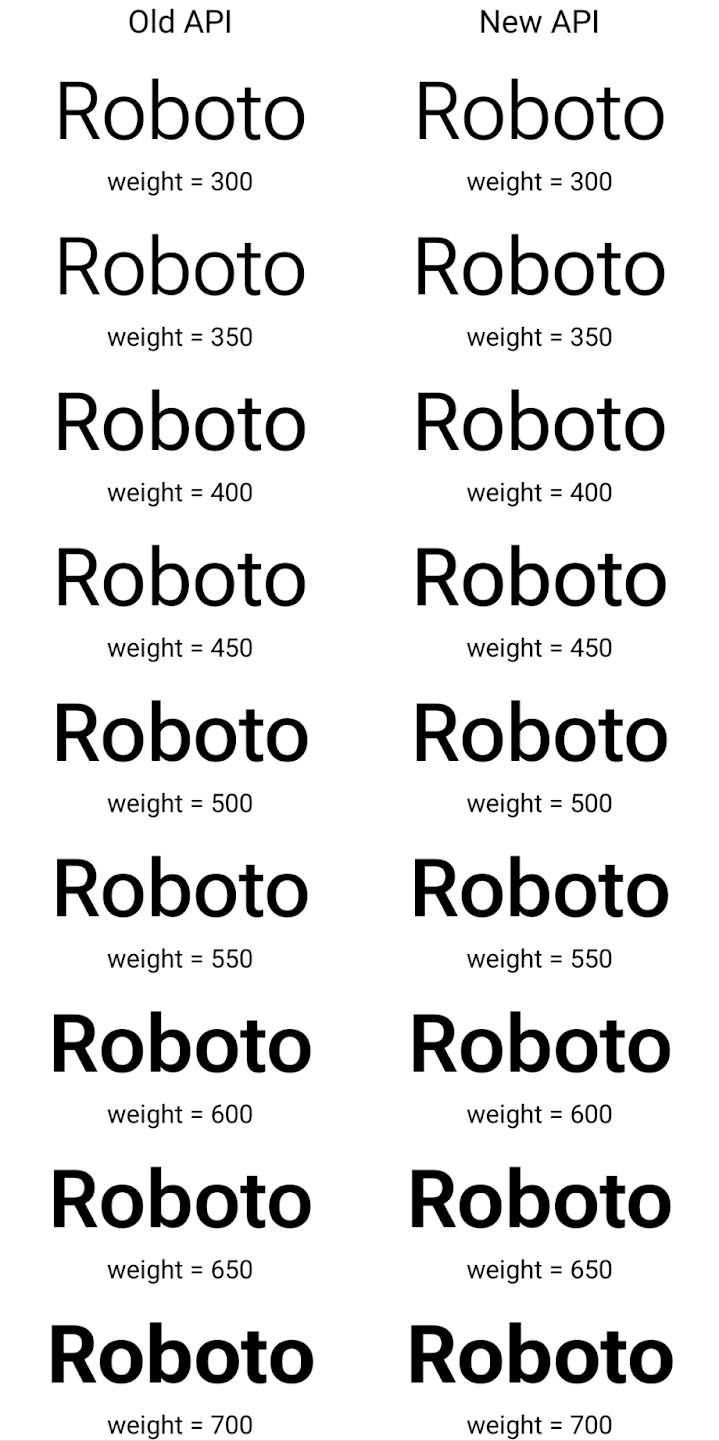
In this example, the Typeface created with the old API doesn't have the
capability to create accurate font weights for the 350, 450, 550 and 650
Font instances, so the renderer falls back to the closest weight. So in
this case, 300 is rendered instead of 350, 400 is rendered instead of 450, and
so on. By contrast, the Typeface created with the new APIs dynamically creates
a Font instance for a given weight, so accurate weights are rendered for 350,
450, 550, and 650 as well.
세분화된 줄바꿈 제어
Android 15부터 TextView 및 기본 줄 바꿈은 가독성을 개선하기 위해 텍스트의 지정된 부분을 동일한 줄에 유지할 수 있습니다. 문자열 리소스 또는 createNoBreakSpan에서 <nobreak> 태그를 사용하여 이 줄바꿈 맞춤설정을 활용할 수 있습니다. 마찬가지로 <nohyphen> 태그 또는 createNoHyphenationSpan를 사용하여 단어를 구두점을 사용하지 않고 유지할 수 있습니다.
예를 들어 다음 문자열 리소스에는 줄바꿈이 포함되어 있지 않으며 'Pixel 8 Pro'라는 텍스트로 렌더링되며 원치 않는 위치에서 줄바꿈이 발생합니다.
<resources>
    <string name="pixel8pro">The power and brains behind Pixel 8 Pro.</string>
</resources>
반대로 이 문자열 리소스에는 'Pixel 8 Pro'라는 문구를 래핑하고 줄바꿈을 방지하는 <nobreak> 태그가 포함되어 있습니다.
<resources>
    <string name="pixel8pro">The power and brains behind <nobreak>Pixel 8 Pro.</nobreak></string>
</resources>
이러한 문자열이 렌더링되는 방식의 차이는 다음 이미지에 나와 있습니다.

<nobreak> 태그를 사용하여 'Pixel 8 Pro'라는 문구가 줄바꿈되지 않은 텍스트 줄의 레이아웃
<nobreak> 태그를 사용하여 래핑된 동일한 텍스트 줄의 레이아웃앱 보관처리
Android 및 Google Play는 작년에 앱 보관 지원을 발표하여 사용자가 Google Play에서 Android App Bundle을 사용하여 게시된 기기에서 자주 사용하지 않는 앱을 부분적으로 삭제하여 공간을 확보할 수 있도록 했습니다. Android 15에는 앱 보관처리를 위한 OS 수준 지원이 포함되어 있습니다. 모든 앱 스토어에서 이를 더 쉽게 구현할 수 있습니다.
REQUEST_DELETE_PACKAGES 권한이 있는 앱은 PackageInstaller requestArchive 메서드를 호출하여 설치된 앱 패키지 보관처리를 요청할 수 있습니다. 이 경우 APK와 캐시된 파일이 삭제되지만 사용자 데이터는 유지됩니다. 보관처리된 앱은 LauncherApps API를 통해 표시 가능한 앱으로 반환됩니다. 사용자에게는 이러한 앱이 보관처리되었음을 강조하는 UI 처리가 표시됩니다. 사용자가 보관처리된 앱을 탭하면 해당 설치 프로그램은
보관 취소 요청을 받게 되며, 복원 프로세스는
ACTION_PACKAGE_ADDED 브로드캐스트에서 모니터링됩니다.
개발자 옵션을 사용하여 기기에서 16KB 모드 사용 설정

16KB 페이지 크기로 부팅 개발자 옵션을 전환하여 16KB 모드로 기기를 부팅합니다.
Android 15의 QPR 버전에서는 특정 기기에서 사용할 수 있는 개발자 옵션을 사용하여 기기를 16KB 모드로 부팅하고 기기 내 테스트를 실행할 수 있습니다. 개발자 옵션을 사용하기 전에 설정 > 시스템 > 소프트웨어 업데이트로 이동하여 사용 가능한 업데이트를 적용합니다.
이 개발자 옵션은 다음 기기에서 사용할 수 있습니다.
Pixel 8 및 8 Pro (Android 15 QPR1 이상)
Pixel 8a (Android 15 QPR1 이상)
Pixel 9, 9 Pro, 9 Pro XL (Android 15 QPR2 이상)
Pixel 9a (Android 16 이상)
그래픽
Android 15에는 ANGLE 및 Canvas 그래픽 시스템 추가 등 최신 그래픽 개선사항이 적용됩니다.
Android의 GPU 액세스 현대화

Android 하드웨어는 핵심 OS가 단일 CPU에서 실행되고 GPU에 고정 기능 파이프라인을 기반으로 하는 API를 사용하여 액세스하던 초기부터 상당히 발전했습니다. Vulkan® 그래픽 API는 Android 7.0 (API 수준 24)부터 NDK에서 최신 GPU 하드웨어를 더 잘 반영하고, 여러 CPU 코어를 지원하도록 더 효과적으로 확장하며, CPU 드라이버 오버헤드를 줄여 앱 성능을 개선하는 하위 수준 추상화를 통해 사용할 수 있습니다. Vulkan은 모든 최신 게임 엔진에서 지원됩니다.
Vulkan은 Android에서 GPU에 사용하는 기본 인터페이스입니다. 따라서 Android 15에는 Vulkan 위에 OpenGL® ES를 실행하기 위한 선택적 레이어로 ANGLE가 포함되어 있습니다. ANGLE로 전환하면 Android OpenGL 구현이 표준화되어 호환성이 개선되고 경우에 따라 성능이 개선됩니다. Android 15에서 설정 -> 시스템 -> 개발자 옵션 -> 실험용: ANGLE 사용 설정에서 개발자 옵션을 사용 설정하여 ANGLE로 OpenGL ES 앱 안정성과 성능을 테스트할 수 있습니다.
Vulkan 기반 Android ANGLE 로드맵

GPU 스택을 간소화하기 위한 일환으로 앞으로 더 많은 새 기기에서 ANGLE을 GL 시스템 드라이버로 제공할 예정이며, 향후 OpenGL/ES는 ANGLE을 통해서만 제공될 것으로 예상됩니다. 하지만 모든 기기에서 OpenGL ES를 계속 지원할 계획입니다.
권장되는 다음 단계
개발자 옵션을 사용하여 OpenGL ES용 ANGLE 드라이버를 선택하고 앱을 테스트합니다. 새 프로젝트의 경우 C/C++에 Vulkan을 사용하는 것이 좋습니다.
캔버스 개선사항
Android 15 continues our modernization of Android's Canvas graphics system with additional capabilities:
Matrix44provides a 4x4 matrix for transforming coordinates that should be used when you want to manipulate the canvas in 3D.clipShaderintersects the current clip with the specified shader, whileclipOutShadersets the clip to the difference of the current clip and the shader, each treating the shader as an alpha mask. This supports the drawing of complex shapes efficiently.
성능 및 배터리
Android는 앱의 성능과 품질을 개선하는 데 계속 집중하고 있습니다. Android 15에서는 앱에서 작업을 더 효율적으로 실행하고, 앱 성능을 최적화하고, 앱에 관한 유용한 정보를 수집하는 데 도움이 되는 API를 도입합니다.
배터리 효율적인 권장사항, 네트워크 및 전력 사용량 디버깅, Android 15 및 최신 버전의 Android에서 백그라운드 작업의 배터리 효율성을 개선하는 방법에 관한 자세한 내용은 Google I/O의 Android에서 백그라운드 작업의 배터리 효율성 개선 강연을 참고하세요.
ApplicationStartInfo API
이전 버전의 Android에서는 앱 시작이 다소 미스터리였습니다. 앱 내에서 콜드, 웜, 핫 상태 중에서 시작되었는지 확인하기 어려웠습니다. 프로세스 포크, onCreate 호출, 첫 번째 프레임 그리기 등 다양한 시작 단계에서 앱이 소비한 시간을 알기도 어려웠습니다. Application 클래스가 인스턴스화될 때 앱이 broadcast, 콘텐츠 제공자, 작업, 백업, 부팅 완료, 알람 또는 Activity에서 시작되었는지 알 수 있는 방법이 없었습니다.
Android 15의 ApplicationStartInfo API는 이 모든 기능을 제공합니다. 한곳에서 타이밍 데이터를 수집하는 데 도움이 되도록 흐름에 자체 타임스탬프를 추가할 수도 있습니다. 측정항목을 수집하는 것 외에도 ApplicationStartInfo를 사용하여 앱 시작을 직접 최적화할 수 있습니다. 예를 들어 브로드캐스트로 인해 앱이 시작될 때 Application 클래스 내에서 UI 관련 라이브러리를 인스턴스화하는 데 드는 비용을 없앨 수 있습니다.
자세한 앱 크기 정보
Since Android 8.0 (API level 26), Android has included the
StorageStats.getAppBytes API that summarizes the installed
size of an app as a single number of bytes, which is a sum of the APK size, the
size of files extracted from the APK, and files that were generated on the
device such as ahead-of-time (AOT) compiled code. This number is not very
insightful in terms of how your app is using storage.
Android 15 adds the
StorageStats.getAppBytesByDataType([type]) API, which lets
you get insight into how your app is using up all that space, including APK file
splits, AOT and speedup related code, dex metadata, libraries, and guided
profiles.
앱 관리 프로파일링
Android 15에는 힙 덤프, 힙 프로필, 스택 샘플링과 같은 프로파일링 정보를 앱 내에서 수집할 수 있는 ProfilingManager 클래스가 포함되어 있습니다. 앱의 파일 디렉터리에 전송되는 출력 파일을 식별하는 제공된 태그와 함께 앱에 콜백을 제공합니다. API는 성능 영향을 최소화하기 위해 비율 제한을 사용합니다.
앱에서 프로파일링 요청 구성을 간소화하려면 Core 1.15.0-rc01 이상에서 사용할 수 있는 상응하는 Profiling AndroidX API를 사용하는 것이 좋습니다.
SQLite 데이터베이스 개선사항
Android 15 introduces SQLite APIs that expose advanced features from the underlying SQLite engine that target specific performance issues that can manifest in apps. These APIs are included with the update of SQLite to version 3.44.3.
Developers should consult best practices for SQLite performance to get the most out of their SQLite database, especially when working with large databases or when running latency-sensitive queries.
- Read-only deferred transactions: when issuing transactions that are
read-only (don't include write statements), use
beginTransactionReadOnly()andbeginTransactionWithListenerReadOnly(SQLiteTransactionListener)to issue read-onlyDEFERREDtransactions. Such transactions can run concurrently with each other, and if the database is in WAL mode, they can run concurrently withIMMEDIATEorEXCLUSIVEtransactions. - Row counts and IDs: APIs were added to retrieve the count of changed
rows or the last inserted row ID without issuing an additional query.
getLastChangedRowCount()returns the number of rows that were inserted, updated, or deleted by the most recent SQL statement within the current transaction, whilegetTotalChangedRowCount()returns the count on the current connection.getLastInsertRowId()returns therowidof the last row to be inserted on the current connection. - Raw statements: issue a raw SQlite statement, bypassing convenience wrappers and any additional processing overhead that they may incur.
Android Dynamic Performance Framework 업데이트
Android 15에서는 게임 및 성능 집약적인 앱이 Android 기기의 전원 시스템 및 열 관련 시스템과 더 직접적으로 상호작용할 수 있는 API 집합인 Android 동적 성능 프레임워크 (ADPF)에 대한 투자를 계속하고 있습니다. 지원되는 기기에서 Android 15는 다음과 같은 ADPF 기능을 추가합니다.
- 힌트 세션의 전원 효율 모드는 연결된 스레드가 성능보다 절전 모드를 우선해야 함을 나타냅니다. 장기 실행 백그라운드 워크로드에 적합합니다.
- GPU 및 CPU 작업 기간을 모두 힌트 세션에서 보고할 수 있으므로 시스템은 워크로드 수요를 가장 잘 충족하도록 CPU 및 GPU 주파수를 함께 조정할 수 있습니다.
- 헤드룸 예측을 기반으로 가능한 열 제한 상태를 해석하는 열 헤드룸 기준점
앱과 게임에서 ADPF를 사용하는 방법을 자세히 알아보려면 문서를 참고하세요.
개인 정보 보호
Android 15에는 앱 개발자가 사용자 개인 정보를 보호하는 데 도움이 되는 다양한 기능이 포함되어 있습니다.
화면 녹화 감지
Android 15 adds support for apps to detect that they are being recorded. A callback is invoked whenever the app transitions between being visible or invisible within a screen recording. An app is considered visible if activities owned by the registering process's UID are being recorded. This way, if your app is performing a sensitive operation, you can inform the user that they're being recorded.
val mCallback = Consumer<Int> { state ->
  if (state == SCREEN_RECORDING_STATE_VISIBLE) {
    // We're being recorded
  } else {
    // We're not being recorded
  }
}

override fun onStart() {
   super.onStart()
   val initialState =
      windowManager.addScreenRecordingCallback(mainExecutor, mCallback)
   mCallback.accept(initialState)
}

override fun onStop() {
    super.onStop()
    windowManager.removeScreenRecordingCallback(mCallback)
}
확장된 IntentFilter 기능
Android 15는 UriRelativeFilterGroup를 통해 더 정확한 Intent 해상도를 지원합니다. 여기에는 URL 쿼리 매개변수, URL 프래그먼트, 차단 또는 제외 규칙 등 각각 충족해야 하는 Intent 매칭 규칙 집합을 형성하는 UriRelativeFilter 객체의 집합이 포함됩니다.
이러한 규칙은 android:allow 태그를 선택적으로 포함할 수 있는 <uri-relative-filter-group> 태그를 사용하여 AndroidManifest XML 파일에서 정의할 수 있습니다. 이러한 태그에는 기존 데이터 태그 속성과 android:query 및 android:fragment 속성을 사용하는 <data> 태그가 포함될 수 있습니다.
다음은 AndroidManifest 문법의 예입니다.
<intent-filter android:autoVerify="true">
  <action android:name="android.intent.action.VIEW" />
  <category android:name="android.intent.category.BROWSABLE" />
  <category android:name="android.intent.category.DEFAULT" />
  <data android:scheme="http" />
  <data android:scheme="https" />
  <data android:host="astore.com" />
  <uri-relative-filter-group>
    <data android:pathPrefix="/auth" />
    <data android:query="region=na" />
  </uri-relative-filter-group>
  <uri-relative-filter-group android:allow="false">
    <data android:pathPrefix="/auth" />
    <data android:query="mobileoptout=true" />
  </uri-relative-filter-group>
  <uri-relative-filter-group android:allow="false">
    <data android:pathPrefix="/auth" />
    <data android:fragmentPrefix="faq" />
  </uri-relative-filter-group>
</intent-filter>
비공개 스페이스
Private space lets users create a separate space on their device where they can keep sensitive apps away from prying eyes, under an additional layer of authentication. The private space uses a separate user profile. The user can choose to use the device lock or a separate lock factor for the private space.
Apps in the private space show up in a separate container in the launcher, and are hidden from the recents view, notifications, settings, and from other apps when the private space is locked. User-generated and downloaded content (such as media or files) and accounts are separated between the private space and the main space. The system sharesheet and the photo picker can be used to give apps access to content across spaces when the private space is unlocked.
Users can't move existing apps and their data into the private space. Instead, users select an install option in the private space to install an app using whichever app store they prefer. Apps in the private space are installed as separate copies from any apps in the main space (new copies of the same app).
When a user locks the private space, the profile is stopped. While the profile is stopped, apps in the private space are no longer active and can't perform foreground or background activities, including showing notifications.
We recommend that you test your app with private space to make sure your app works as expected, especially if your app falls into one of the following categories:
- Apps with logic for work profiles that assumes that any installed copies of their app that aren't in the main profile are in the work profile.
- Medical apps
- Launcher apps
- App store apps
선택한 사진 액세스에 대한 가장 최근 사용자 선택 쿼리
Apps can now highlight only the most-recently-selected photos and videos when
partial access to media permissions is granted. This feature can improve
the user experience for apps that frequently request access to photos and
videos. To use this feature in your app, enable the
QUERY_ARG_LATEST_SELECTION_ONLY argument when querying MediaStore
through ContentResolver.
Kotlin
val externalContentUri = MediaStore.Files.getContentUri("external")

val mediaColumns = arrayOf(
   FileColumns._ID,
   FileColumns.DISPLAY_NAME,
   FileColumns.MIME_TYPE,
)

val queryArgs = bundleOf(
   // Return only items from the last selection (selected photos access)
   QUERY_ARG_LATEST_SELECTION_ONLY to true,
   // Sort returned items chronologically based on when they were added to the device's storage
   QUERY_ARG_SQL_SORT_ORDER to "${FileColumns.DATE_ADDED} DESC",
   QUERY_ARG_SQL_SELECTION to "${FileColumns.MEDIA_TYPE} = ? OR ${FileColumns.MEDIA_TYPE} = ?",
   QUERY_ARG_SQL_SELECTION_ARGS to arrayOf(
       FileColumns.MEDIA_TYPE_IMAGE.toString(),
       FileColumns.MEDIA_TYPE_VIDEO.toString()
   )
)
Java
Uri externalContentUri = MediaStore.Files.getContentUri("external");

String[] mediaColumns = {
    FileColumns._ID,
    FileColumns.DISPLAY_NAME,
    FileColumns.MIME_TYPE
};

Bundle queryArgs = new Bundle();
queryArgs.putBoolean(MediaStore.QUERY_ARG_LATEST_SELECTION_ONLY, true);
queryArgs.putString(MediaStore.QUERY_ARG_SQL_SORT_ORDER, FileColumns.DATE_ADDED + " DESC");
queryArgs.putString(MediaStore.QUERY_ARG_SQL_SELECTION, FileColumns.MEDIA_TYPE + " = ? OR " + FileColumns.MEDIA_TYPE + " = ?");
queryArgs.putStringArray(MediaStore.QUERY_ARG_SQL_SELECTION_ARGS, new String[] {
    String.valueOf(FileColumns.MEDIA_TYPE_IMAGE),
    String.valueOf(FileColumns.MEDIA_TYPE_VIDEO)
});
Android의 개인 정보 보호 샌드박스
Android 15에는 최신 버전의 Android의 개인 정보 보호 샌드박스를 통합한 최신 Android 광고 서비스 확장 프로그램이 포함되어 있습니다. 이번 추가는 사용자 개인 정보 보호를 개선하고 모바일 앱에 효과적인 개인 맞춤 광고 경험을 제공하는 기술을 개발하기 위한 Google의 노력의 일환입니다. 개인 정보 보호 샌드박스 페이지에서 Android의 개인 정보 보호 샌드박스 개발자 프리뷰 및 베타 프로그램에 관한 자세한 내용을 확인하고 시작해 보세요.
헬스 커넥트
Android 15는 앱에서 수집한 건강/피트니스 데이터를 관리하고 공유하는 안전하고 중앙 집중식 플랫폼인 Android용 헬스 커넥트를 중심으로 최신 확장 프로그램을 통합합니다. 이번 업데이트에서는 피트니스, 영양, 피부 온도, 훈련 계획 등에서 추가 데이터 유형을 지원합니다.
피부 온도 측정으로 보다 정확하게 저장하고 공유할 수 있음 웨어러블 또는 기타 추적 장치의 온도 데이터.
트레이닝 계획은 사용자가 피트니스 목표를 달성할 수 있도록 도와주는 구조화된 운동 계획입니다. 트레이닝 계획 지원에는 다양한 완료 및 실적 목표가 포함됩니다.
- 칼로리 소모량과 같은 달성 목표 distance, duration 반복, 단계입니다.
- 다음과 같은 실적 목표 최대한 많이 반복하기 (AMRAP), 케이던스, 심박수, 파워, 운동 인지 속도 및 속도.
Android에서 헬스 커넥트의 최신 업데이트에 관해 자세히 알아보려면 Android로 적응형 환경 구축 Health 강연을 확인해 보세요.
앱 화면 공유
Android 15에서는 앱 화면 공유를 지원하므로 사용자가 전체 기기 화면이 아닌 앱 창만 공유하거나 녹화할 수 있습니다. Android 14 QPR2에서 처음 사용 설정된 이 기능에는 앱에서 앱 화면 공유 환경을 맞춤설정할 수 있는 MediaProjection 콜백이 포함되어 있습니다. Android 14 (API 수준 34) 이상을 타겟팅하는 앱의 경우 각 MediaProjection 캡처 세션에 사용자 동의가 필요합니다.
사용자 환경 및 시스템 UI
Android 15에서는 앱 개발자와 사용자가 필요에 맞게 기기를 구성할 수 있는 더 많은 제어 기능과 유연성을 제공합니다.
Android 15의 최신 개선사항을 사용하여 앱의 사용자 환경을 개선하는 방법을 자세히 알아보려면 Google I/O의 Android 앱의 사용자 환경 개선 강연을 참고하세요.
생성된 미리보기 API를 사용한 풍부한 위젯 미리보기
Before Android 15, the only way to provide widget picker previews was to specify a static image or layout resource. These previews often differ significantly from the look of the actual widget when it is placed on the home screen. Also, static resources can't be created with Jetpack Glance, so a Glance developer had to screenshot their widget or create an XML layout to have a widget preview.
Android 15 adds support for generated previews. This means that app widget
providers can generate RemoteViews to use as the picker preview, instead
of a static resource.

Push API
Apps can provide generated previews through a push API. Apps can provide
previews at any point in their lifecycle, and don't receive an explicit request
from the host to provide previews. Previews are persisted in AppWidgetService,
and hosts can request them on-demand. The following example loads an XML widget
layout resource and sets it as the preview:
AppWidgetManager.getInstance(appContext).setWidgetPreview(
   ComponentName(
       appContext,
       SociaLiteAppWidgetReceiver::class.java
   ),
   AppWidgetProviderInfo.WIDGET_CATEGORY_HOME_SCREEN,
   RemoteViews("com.example", R.layout.widget_preview)
)
The expected flow is:
- At any time, the widget provider calls
setWidgetPreview. The provided previews are persisted inAppWidgetServicewith other provider info. setWidgetPreviewnotifies hosts of an updated preview through theAppWidgetHost.onProvidersChangedcallback. In response, the widget host reloads all of its provider information.- When displaying a widget preview, the host checks
AppWidgetProviderInfo.generatedPreviewCategories, and if the chosen category is available, callsAppWidgetManager.getWidgetPreviewto return the saved preview for this provider.
When to call setWidgetPreview
Because there is no callback to provide previews, apps can choose to send previews at any point when they are running. How often to update the preview depends on the widget's use case.
The following list describes the two main categories of preview use cases:
- Providers that show real data in their widget previews, such as personalized or recent information. These providers can set the preview once the user has signed in or has done initial configuration in their app. After this, they can set up a periodic task to update the previews at their chosen cadence. Examples of this type of widget could be a photo, calendar, weather or news widget.
- Providers that show static information in previews or quick-action widgets that don't display any data. These providers can set previews once, when the app first launches. Examples of this type of widget include a drive quick actions widget or chrome shortcuts widget.
Some providers might show static previews on the hub mode picker, but real information on the homescreen picker. These providers should follow the guidance for both of these use cases to set previews.
PIP 모드
Android 15 introduces changes in Picture-in-Picture (PiP) ensuring an even smoother transition when entering into PiP mode. This will be beneficial for apps having UI elements overlaid on top of their main UI, which goes into PiP.
Developers use the onPictureInPictureModeChanged callback to define logic
that toggles the visibility of the overlaid UI elements. This callback is
triggered when the PiP enter or exit animation is completed. Beginning in
Android 15, the PictureInPictureUiState class includes another state.
With this UI state, apps targeting Android 15 (API level 35) will observe the
Activity#onPictureInPictureUiStateChanged callback being invoked with
isTransitioningToPip() as soon as the PiP animation starts. There are
many UI elements that are not relevant for the app when it is in PiP mode, for
example views or layout that include information such as suggestions, upcoming
video, ratings, and titles. When the app goes to PiP mode, use the
onPictureInPictureUiStateChanged callback to hide these UI elements. When the
app goes to full screen mode from the PiP window, use
onPictureInPictureModeChanged callback to unhide these elements, as shown in
the following examples:
override fun onPictureInPictureUiStateChanged(pipState: PictureInPictureUiState) {
        if (pipState.isTransitioningToPip()) {
          // Hide UI elements
        }
    }
override fun onPictureInPictureModeChanged(isInPictureInPictureMode: Boolean) {
        if (isInPictureInPictureMode) {
          // Unhide UI elements
        }
    }
This quick visibility toggle of irrelevant UI elements (for a PiP window) helps ensure a smoother and flicker-free PiP enter animation.
방해 금지 모드 규칙 개선
AutomaticZenRule lets apps customize Attention
Management (Do Not Disturb) rules and decide when to activate or deactivate
them. Android 15 greatly enhances these rules with the goal of improving the
user experience. The following enhancements are included:
- Adding types to
AutomaticZenRule, allowing the system to apply special treatment to some rules. - Adding an icon to
AutomaticZenRule, helping to make the modes be more recognizable. - Adding a
triggerDescriptionstring toAutomaticZenRulethat describes the conditions on which the rule should become active for the user. - Added
ZenDeviceEffectstoAutomaticZenRule, allowing rules to trigger things like grayscale display, night mode, or dimming the wallpaper.
알림 채널의 VibrationEffect 설정
Android 15 supports setting rich vibrations for incoming notifications by
channel using NotificationChannel.setVibrationEffect, so
your users can distinguish between different types of notifications without
having to look at their device.
미디어 프로젝션 상태 표시줄 칩 및 자동 중지
Media projection can expose private user information. A new, prominent status bar chip makes users aware of any ongoing screen projection. Users can tap the chip to stop screen casting, sharing, or recording. Also, for a more intuitive user experience, any in‑progress screen projection now automatically stops when the device screen is locked.

대형 화면 및 폼 팩터
Android 15에서는 대형 화면, 플립형, 폴더블을 비롯한 Android의 폼 팩터를 최대한 활용할 수 있도록 앱을 지원합니다.
향상된 대형 화면 멀티태스킹
Android 15는 사용자가 대형 화면 기기에서 멀티태스킹하는 더 나은 방법을 제공합니다. 대상 예를 들어 사용자는 자주 사용하는 화면 분할 앱 조합을 저장하여 빠르게 화면의 태스크 바에 액세스하고 고정하여 앱 간에 빠르게 전환할 수 있습니다. 다시 말해 하는 것이 그 어느 때보다 중요하다고 생각합니다.
Google I/O의 적응형 Android 빌드 빌드 앱 및 Material 3으로 UI 빌드 적응형 라이브러리 이 문서에는 대규모 캠페인을 위한 디자인 화면을 선택합니다.
커버 화면 지원
앱은 Android 15에서 사용하는 속성을 선언하여 지원되는 폴더블 기기의 작은 커버 화면에 Application 또는 Activity가 표시되도록 허용할 수 있습니다. 이러한 화면은 너무 작아서 Android 앱이 실행될 수 있는 호환 타겟으로 간주되지는 않지만 앱에서 이를 지원하도록 선택하면 더 많은 위치에서 앱을 사용할 수 있습니다.
연결
Android 15는 앱이 통신 및 무선 기술의 최신 발전에 액세스할 수 있도록 플랫폼을 업데이트합니다.
위성 지원
Android 15 continues to extend platform support for satellite connectivity and includes some UI elements to ensure a consistent user experience across the satellite connectivity landscape.
Apps can use ServiceState.isUsingNonTerrestrialNetwork() to
detect when a device is connected to a satellite, giving them more awareness of
why full network services might be unavailable. Additionally, Android 15
provides support for SMS and MMS apps as well as preloaded RCS apps to use
satellite connectivity for sending and receiving messages.

더 원활한 NFC 환경
Android 15 is working to make the tap to pay experience more seamless and
reliable while continuing to support Android's robust NFC app ecosystem. On
supported devices, apps can request the NfcAdapter to enter
observe mode, where the device listens but doesn't respond to NFC
readers, sending the app's NFC service PollingFrame
objects to process. The PollingFrame objects can be used to auth
ahead of the first communication to the NFC reader, allowing for a one tap
transaction in many cases.
In addition, apps can register a filter on supported devices so they can be notified of polling loop activity, which allows for smooth operation with multiple NFC-aware applications.
월렛 역할
Android 15에서는 사용자의 기본 월렛 앱과 더 긴밀하게 통합할 수 있는 월렛 역할을 도입합니다. 이 역할은 NFC 기본 미접촉 결제 설정을 대체합니다. 사용자는 설정 > 앱 > 기본 앱으로 이동하여 월렛 역할 소유자를 관리할 수 있습니다.
지갑 역할은 결제 카테고리에 등록된 AID의 NFC 탭을 라우팅할 때 사용됩니다. 동일한 AID에 등록된 다른 앱이 포그라운드에서 실행 중이 아닌 한 탭은 항상 월렛 역할 소유자에게 전달됩니다.
이 역할은 활성화 시 월렛 빠른 액세스 타일이 표시될 위치를 결정하는 데도 사용됩니다. 역할이 '없음'으로 설정된 경우 빠른 액세스 타일을 사용할 수 없으며 결제 카테고리 NFC 탭이 포그라운드 앱에만 전송됩니다.
보안
Android 15를 사용하면 앱의 보안을 강화하고 앱의 데이터를 보호하며 사용자에게 데이터에 대한 투명성과 제어 기능을 더 많이 제공할 수 있습니다. Google I/O의 Android에서 사용자 보안 보호 강연에서 사용자 보호 조치를 개선하고 새로운 위협으로부터 앱을 보호하기 위해 Google이 어떤 노력을 기울이고 있는지 자세히 알아보세요.
자동 완성과 인증 관리자 통합
Android 15부터 개발자는 사용자 이름 또는 비밀번호 필드와 같은 특정 뷰를 인증 관리자 요청에 연결하여 로그인 프로세스 중에 맞춤설정된 사용자 환경을 더 쉽게 제공할 수 있습니다. 사용자가 이러한 뷰 중 하나에 포커스를 맞추면 해당 요청이 인증 관리자로 전송됩니다. 결과 사용자 인증 정보는 여러 제공업체에서 집계되어 인라인 추천 또는 드롭다운 추천과 같은 자동 완성 대체 UI에 표시됩니다. Jetpack androidx.credentials 라이브러리는 개발자가 사용하는 것이 좋으며 곧 Android 15 이상에서 이 기능을 더욱 개선하는 데 사용할 수 있게 됩니다.
원탭 가입 및 로그인을 생체 인식 메시지와 통합
인증 관리자는 생체 인식 메시지를 사용자 인증 정보 생성에 통합 및 로그인 프로세스로 이루어져 있으므로 제공업체가 생체 인식 프롬프트 따라서 사용자 인증 정보 제공업체는 생성 및 가져오기 흐름의 결과를 제공하며, 생체 인식 흐름 결과로 보강됩니다. 이 간소화된 프로세스로 더 효율적이고 간소화된 사용자 인증 정보를 만들 수 있습니다. 생성 및 검색 프로세스가 포함됩니다.
엔드 투 엔드 암호화를 위한 키 관리
Android 15에서는 암호화 공개 키 저장을 위한 OS 수준 API를 제공하여 Android 앱에서 엔드 투 엔드 암호화 (E2EE)를 지원하는 E2eeContactKeysManager를 도입합니다.
E2eeContactKeysManager는 플랫폼 연락처 앱과 통합되어 사용자에게 연락처의 공개 키를 중앙 집중식으로 관리하고 확인할 수 있는 방법을 제공하도록 설계되었습니다.
콘텐츠 URI에 대한 권한 확인
Android 15 introduces a set of APIs that perform permission checks on content URIs:
Context.checkContentUriPermissionFull: This performs a full permission check on content URIs.Activitymanifest attributerequireContentUriPermissionFromCaller: This enforces specified permissions on the provided content URIs at activity launch.ComponentCallerclass forActivitycallers: This represents the app that launched the activity.
접근성
Android 15에는 사용자의 접근성을 개선하는 기능이 추가되었습니다.
점자 개선
Android 15에서는 TalkBack이 USB와 보안 블루투스 모두를 통해 HID 표준을 사용하는 점자 디스플레이를 지원할 수 있도록 했습니다.
이 표준은 마우스와 키보드에서 사용하는 표준과 마찬가지로 시간이 지남에 따라 Android가 더 다양한 점자 디스플레이를 지원하는 데 도움이 됩니다.
다국어 지원
Android 15에서는 기기가 여러 언어로 사용될 때 사용자 환경을 보완하는 기능이 추가되었습니다.
CJK 가변 글꼴
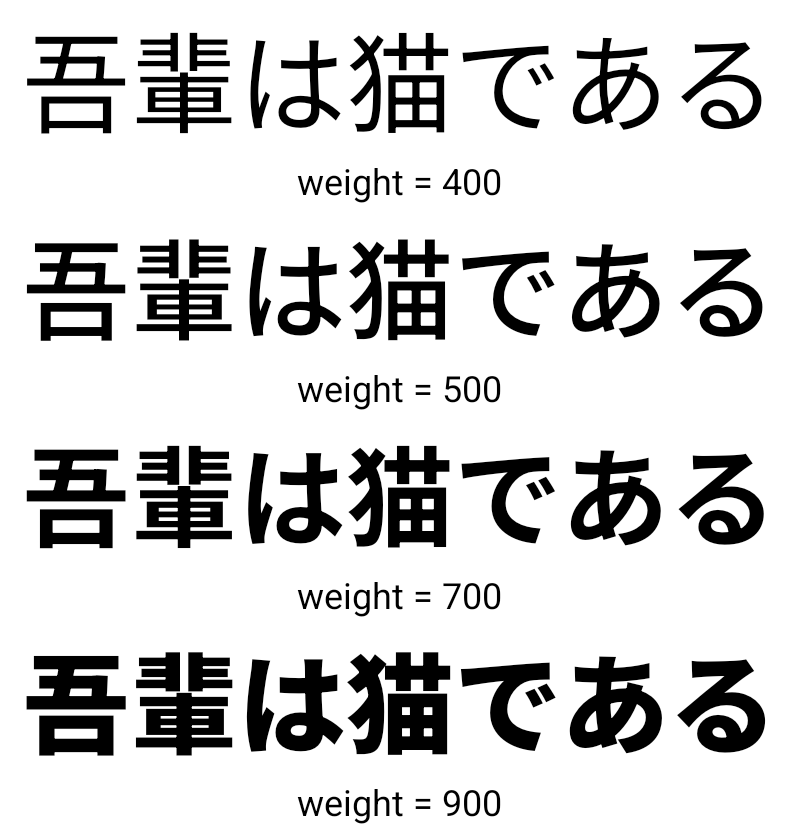
Android 15부터 중국어, 일본어, 한국어 (CJK) 언어의 글꼴 파일인 NotoSansCJK가 이제 가변 글꼴이 되었습니다. 가변 글꼴을 사용하면 CJK 언어로 창의적인 서체를 만들 수 있습니다. 디자이너는 더 다양한 스타일을 살펴보고 이전에는 어렵거나 불가능했던 시각적으로 눈에 띄는 레이아웃을 만들 수 있습니다.
문자 간 정렬
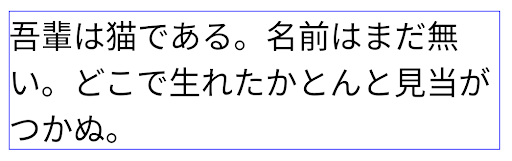
Starting with Android 15, text can be justified utilizing letter spacing by
using JUSTIFICATION_MODE_INTER_CHARACTER. Inter-word justification was
first introduced in Android 8.0 (API level 26), and inter-character
justification provides similar capabilities for languages that use the
whitespace character for segmentation, such as Chinese, Japanese, and others.
JUSTIFICATION_MODE_NONE.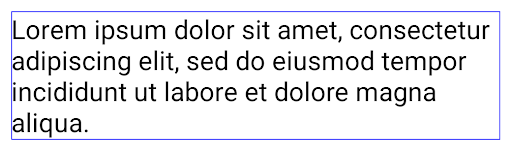
JUSTIFICATION_MODE_NONE.
JUSTIFICATION_MODE_INTER_WORD.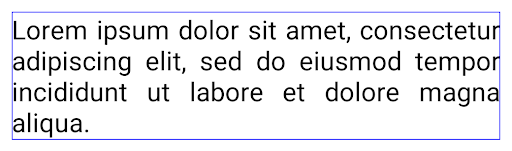
JUSTIFICATION_MODE_INTER_WORD.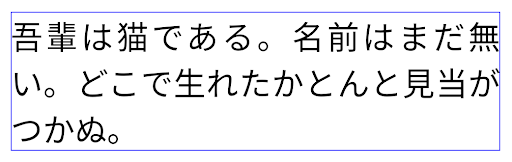
JUSTIFICATION_MODE_INTER_CHARACTER.
JUSTIFICATION_MODE_INTER_CHARACTER.자동 줄바꿈 구성
Android started supporting phrase-based line breaks for Japanese and Korean in
Android 13 (API level 33). However, while phrase-based line breaks improve the
readability of short lines of text, they don't work well for long lines of text.
In Android 15, apps can apply phrase-based line breaks only for short lines
of text, using the LINE_BREAK_WORD_STYLE_AUTO
option. This option selects the best word style option for the text.
For short lines of text, phrase-based line breaks are used, functioning the same
as LINE_BREAK_WORD_STYLE_PHRASE, as shown in the
following image:
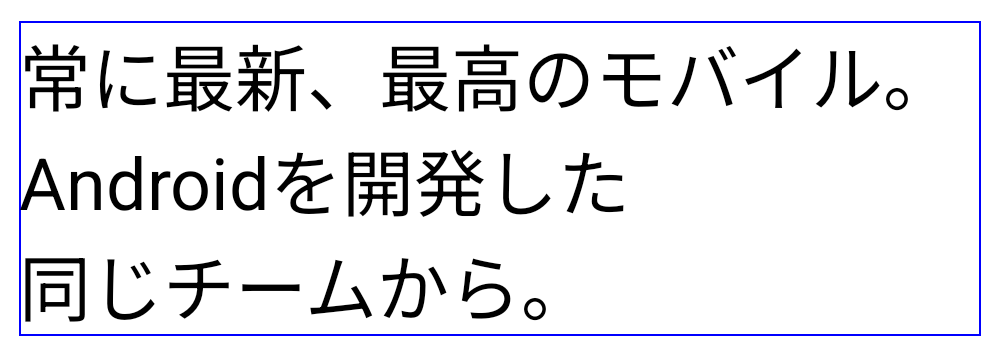
LINE_BREAK_WORD_STYLE_AUTO
applies phrase-based line breaks to improve the readability of the text.
This is the same as applying
LINE_BREAK_WORD_STYLE_PHRASE.For longer lines of text, LINE_BREAK_WORD_STYLE_AUTO uses a no
line-break word style, functioning the same as
LINE_BREAK_WORD_STYLE_NONE, as shown in the
following image:

LINE_BREAK_WORD_STYLE_AUTO
applies no line-break word style to improve the readability of the text.
This is the same as applying
LINE_BREAK_WORD_STYLE_NONE.추가 일본어 변체 가나 글꼴
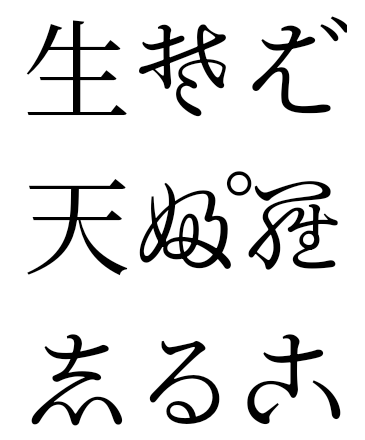
In Android 15, a font file for old Japanese Hiragana (known as Hentaigana) is bundled by default. The unique shapes of Hentaigana characters can add a distinctive flair to artwork or design while also helping to preserve accurate transmission and understanding of ancient Japanese documents.
VideoLAN 원뿔 저작권 (c) 1996-2010 VideoLAN. 이 로고 또는 수정된 버전은 누구나 VideoLAN 프로젝트 또는 VideoLAN팀에서 개발한 제품을 언급하기 위해 사용하거나 수정할 수 있지만, 프로젝트의 추천을 나타내지는 않습니다.
Vulkan 및 Vulkan 로고는 Khronos Group Inc.의 등록 상표입니다.
OpenGL은 등록된 상표이며 OpenGL ES 로고는 Khronos의 허가를 받아 Hewlett Packard Enterprise의 상표입니다.