

Platforma Android 15 zawiera zmiany w działaniu, które mogą mieć wpływ na Twoją aplikację. Poniższe zmiany w działaniu dotyczą wszystkich aplikacji działających na Androidzie 15 niezależnie od targetSdkVersion. Przetestuj aplikację, a następnie w razie potrzeby zmodyfikuj ją, aby w odpowiednich przypadkach obsługiwała te funkcje.
Zapoznaj się też z listą zmian w działaniu, które wpływają tylko na aplikacje kierowane na Androida 15.
Główna funkcja
Android 15 modyfikuje lub rozszerza różne podstawowe funkcje systemu Android.
Zmiany stanu pakietu na zatrzymany
Celem stanu pakietu FLAG_STOPPED (który użytkownicy mogą aktywować w wersjach AOSP przez długie naciśnięcie ikony aplikacji i wybranie „Wymuś zatrzymanie”) było zawsze utrzymywanie aplikacji w tym stanie, dopóki użytkownik nie usunie aplikacji z tego stanu, uruchamiając ją bezpośrednio lub pośrednio z aplikacją (za pomocą panelu udostępniania lub widżetu, wybierając aplikację jako tapetę na żywo itp.). W Androidzie 15 zaktualizowaliśmy działanie systemu, aby było zgodne z zamierzonym działaniem. Aplikacje powinny być usuwane z tylko w wyniku bezpośredniego lub pośredniego działania użytkownika.
Aby zapewnić pożądane działanie, oprócz obecnych ograniczeń system anuluje też wszystkie oczekujące intencje, gdy aplikacja przechodzi w stan zatrzymania na urządzeniu z Androidem 15. Gdy działania użytkownika wyprowadzą aplikację ze stanu zatrzymania, zostanie wysłana do niej transmisja ACTION_BOOT_COMPLETED, co umożliwi ponowne zarejestrowanie oczekujących intencji.
Aby sprawdzić, czy aplikacja została zatrzymana, możesz wywołać nową metodę ApplicationStartInfo.wasForceStopped().
Obsługa stron o rozmiarze 16 KB
W przeszłości Android obsługiwał tylko strony pamięci o rozmiarze 4 KB, co optymalizowało wydajność pamięci systemowej pod kątem średniej ilości pamięci całkowitej, jaką zwykle miały urządzenia z Androidem. Od Androida 15 AOSP obsługuje urządzenia skonfigurowane do używania rozmiaru strony 16 KB (urządzenia 16 KB). Jeśli Twoja aplikacja używa bibliotek NDK bezpośrednio lub pośrednio za pomocą pakietu SDK, musisz ją przebudować, aby działała na urządzeniach o rozmiarze strony 16 KB.
Producenci urządzeń nadal tworzą urządzenia z większą ilością pamięci fizycznej (RAM). Wiele z nich będzie korzystać ze stron o rozmiarze 16 KB (a w przyszłości większych), aby zoptymalizować wydajność urządzenia. Dodanie obsługi urządzeń ze stronami o rozmiarze 16 KB umożliwia uruchamianie aplikacji na tych urządzeniach i korzystanie z powiązanych z tym ulepszeń wydajności. Bez ponownej kompilacji aplikacje nie będą działać na urządzeniach 16 KB w przyszłych wersjach Androida.
Aby pomóc Ci dodać obsługę w aplikacji, przygotowaliśmy wskazówki dotyczące sprawdzania, czy zmiana ma wpływ na Twoją aplikację, ponownego jej kompilowania (w odpowiednich przypadkach) oraz testowania aplikacji w środowisku 16 KB przy użyciu emulatorów (w tym obrazów systemu Android 15 dla emulatora Androida).
Korzyści i wzrost wydajności
Urządzenia skonfigurowane z użyciem stron o rozmiarze 16 KB zużywają średnio nieco więcej pamięci, ale zyskują też różne ulepszenia wydajności zarówno systemu, jak i aplikacji:
- Krótszy czas uruchamiania aplikacji, gdy system jest pod presją pamięci: średnio o 3,16% krótszy, a w przypadku niektórych testowanych aplikacji o znacznie więcej (do 30%).
- Zmniejszone zużycie energii podczas uruchamiania aplikacji: średnio o 4,56%
- Szybsze uruchamianie aparatu: średnio o 4,48% szybsze uruchomienia z pamięci i o 6,60% szybsze uruchomienia „na zimno”
- Skrócony czas uruchamiania systemu: skrócenie o 8% (około 950 milisekund)
Te ulepszenia bazują na naszych wstępnych testach. Wyniki na rzeczywistych urządzeniach mogą się różnić. W miarę kontynuowania testów będziemy przeprowadzać dodatkową analizę potencjalnych zysków w przypadku aplikacji.
Sprawdź, czy zmiana wpłynie na Twoją aplikację
Jeśli Twoja aplikacja używa kodu natywnego, zrekompiluj ją, aby obsługiwała urządzenia 16-kilobajtowe. Jeśli nie masz pewności, czy Twoja aplikacja używa kodu natywnego, możesz za pomocą narzędzia APK Analyzer sprawdzić, czy zawiera ona kod natywny, a następnie sprawdzić wyrównanie segmentów ELF w przypadku znalezionych bibliotek współdzielonych. Android Studio udostępnia też funkcje, które pomagają automatycznie wykrywać problemy z wyrównaniem.
Jeśli Twoja aplikacja używa tylko kodu napisanego w języku programowania Java lub Kotlin, w tym wszystkich bibliotek i pakietów SDK, to już obsługuje urządzenia 16-bitowe. Zalecamy jednak przetestowanie aplikacji w środowisku 16 KB, aby sprawdzić, czy nie występują nieoczekiwane regresje w jej działaniu.
Zmiany wymagane w przypadku niektórych aplikacji, aby obsługiwały przestrzeń prywatną
Przestrzeń prywatna to nowa funkcja w Androidzie 15, która umożliwia użytkownikom tworzenie osobnej przestrzeni na urządzeniu, w której mogą ukryć aplikacje poufne przed ciekawskimi spojrzeniami, korzystając z dodatkowego poziomu uwierzytelniania. Aplikacje w przestrzeni prywatnej mają ograniczoną widoczność, dlatego niektóre z nich muszą wykonać dodatkowe czynności, aby móc wyświetlać aplikacje w przestrzeni prywatnej użytkownika i z nimi wchodzić w interakcje.
Wszystkie aplikacje
Aplikacje w przestrzeni prywatnej są przechowywane w oddzielnym profilu użytkownika, podobnie jak profil służbowy, dlatego nie powinny zakładać, że wszystkie zainstalowane kopie aplikacji, które nie znajdują się na głównym profilu, są na profilu służbowym. Jeśli Twoja aplikacja ma logikę związaną z aplikacjami na profilu służbowym, która zakłada, że ta logika jest prawidłowa, musisz ją dostosować.
Medycyna
Gdy użytkownik zablokuje przestrzeń prywatną, wszystkie aplikacje w niej są wstrzymywane i nie mogą wykonywać działań na pierwszym planie ani w tle, w tym wyświetlać powiadomień. Może to mieć poważny wpływ na korzystanie z aplikacji medycznych zainstalowanych w przestrzeni prywatnej.
Podczas konfigurowania przestrzeni prywatnej użytkownicy otrzymują ostrzeżenie, że przestrzeń prywatna nie jest odpowiednia dla aplikacji, które muszą wykonywać krytyczne czynności na pierwszym planie lub w tle, np. wyświetlać powiadomienia z aplikacji medycznych. Aplikacje nie mogą jednak określić, czy są używane w przestrzeni prywatnej, więc nie mogą wyświetlać użytkownikowi ostrzeżenia w takim przypadku.
Jeśli opracowujesz aplikację medyczną, sprawdź, jak ta funkcja może wpływać na Twoją aplikację, i podejmij odpowiednie działania, np. poinformuj użytkowników, aby nie instalowali aplikacji w przestrzeni prywatnej. Dzięki temu unikniesz zakłócenia jej kluczowych funkcji.
Aplikacje menu
Jeśli opracowujesz aplikację uruchamiającą, musisz wykonać te czynności, zanim aplikacje w prywatnej przestrzeni będą widoczne:
- Aplikacja musi być przypisana jako domyślna aplikacja uruchamiania na urządzeniu, czyli mieć rolę
ROLE_HOME. - Aplikacja musi zadeklarować normalne uprawnienia
ACCESS_HIDDEN_PROFILESw pliku manifestu aplikacji.
Aplikacje uruchamiające, które deklarują uprawnienie ACCESS_HIDDEN_PROFILES, muszą obsługiwać te przypadki użycia przestrzeni prywatnej:
- Aplikacja musi mieć oddzielny kontener programu uruchamiającego dla aplikacji zainstalowanych w przestrzeni prywatnej. Aby określić, jaki typ profilu użytkownika jest obsługiwany, użyj metody
getLauncherUserInfo(). - Użytkownik musi mieć możliwość ukrywania i wyświetlania kontenera przestrzeni prywatnej.
- Użytkownik musi mieć możliwość zablokowania i odblokowania kontenera przestrzeni prywatnej. Użyj metody
requestQuietModeEnabled(), aby zablokować (przekazująctrue) lub odblokować (przekazującfalse) przestrzeń prywatną. Gdy przestrzeń prywatna jest zablokowana, żadne aplikacje w kontenerze przestrzeni prywatnej nie powinny być widoczne ani możliwe do znalezienia za pomocą mechanizmów takich jak wyszukiwarka. Aplikacja powinna zarejestrować odbiornik dla transmisji
ACTION_PROFILE_AVAILABLEiACTION_PROFILE_UNAVAILABLEoraz aktualizować interfejs użytkownika w aplikacji, gdy stan zablokowania lub odblokowania kontenera obszaru prywatnego ulegnie zmianie. Oba te transmisje zawierająEXTRA_USER, którego aplikacja może używać do odwoływania się do użytkownika profilu prywatnego.Aby sprawdzić, czy profil przestrzeni prywatnej jest zablokowany, możesz też użyć metody
isQuietModeEnabled().
Aplikacje ze sklepów z aplikacjami
Przestrzeń prywatna zawiera przycisk „Zainstaluj aplikacje”, który uruchamia domyślny zamiar zainstalowania aplikacji w przestrzeni prywatnej użytkownika. Aby aplikacja mogła otrzymać tę niejawną intencję, w pliku manifestu aplikacji musisz zadeklarować uprawnienie <intent-filter> z wartością <category>CATEGORY_APP_MARKET.
Czcionka emotikonów oparta na PNG została usunięta
Plik czcionki emoji (NotoColorEmojiLegacy.ttf) w starym formacie PNG został usunięty, pozostawiając tylko plik wektorowy. Począwszy od Androida 13 (poziom interfejsu API 33) plik czcionki emotikonów używany przez systemowy moduł renderowania emotikonów zmienił się z pliku PNG na plik wektorowy. System zachował starszy plik czcionki w Androidzie 13 i 14 ze względu na zgodność, aby aplikacje z własnymi mechanizmami renderowania czcionek mogły nadal używać starszego pliku czcionki, dopóki nie zostaną zaktualizowane.
Aby sprawdzić, czy Twoja aplikacja jest dotknięta, wyszukaj w jej kodzie odwołania do pliku NotoColorEmojiLegacy.ttf.
Aplikację możesz dostosować na kilka sposobów:
- Do renderowania tekstu używaj interfejsów platformy. Możesz renderować tekst do bitmapy
Canvasi w razie potrzeby używać go do uzyskiwania obrazu nieprzetworzonego. - Dodaj do aplikacji obsługę czcionek COLRv1. Biblioteka open source FreeType obsługuje COLRv1 w wersji 2.13.0 i wyższych.
- W ostatecznym wypadku możesz dołączyć do pliku APK stary plik czcionki emotikonów (
NotoColorEmoji.ttf), ale w tym przypadku w aplikacji zabraknie najnowszych emotikonów. Więcej informacji znajdziesz na stronie projektu Noto Emoji na GitHub.
Zwiększenie minimalnej docelowej wersji pakietu SDK z 23 do 24
Android 15 opiera się na
zmian wprowadzonych w Androidzie 14 i rozszerzając te
i zwiększaj bezpieczeństwo. Na Androidzie 15 aplikacje z
Nie można zainstalować wersji targetSdkVersion o wartości niższej niż 24.
Wymaganie, aby aplikacje spełniały wymagania dotyczące nowoczesnych poziomów interfejsu API, pomaga zapewnić bezpieczeństwo i prywatność.
Złośliwe oprogramowanie często trafia do interfejsów API na niższych poziomach, aby ominąć bezpieczeństwo i prywatność
zabezpieczeń wprowadzonych w wyższych wersjach Androida. Przykład:
niektóre złośliwe aplikacje używają tych zabezpieczeń: targetSdkVersion z 22,
model uprawnień czasu działania wprowadzony w 2015 r. przez Androida 6.0 Marshmallow (API)
poziom 23). Ta zmiana w Androidzie 15 utrudnia złośliwemu unikaniu zabezpieczeń
i lepszą ochronę prywatności. Próba zainstalowania aplikacji kierowanej na niższy interfejs API
spowoduje błąd instalacji i pojawi się komunikat podobny do tego:
widoczne w dzienniku Logcat:
INSTALL_FAILED_DEPRECATED_SDK_VERSION: App package must target at least SDK version 24, but found 7
na urządzeniach z Androidem 15 i z Androidem w wersji starszej niż targetSdkVersion.
pozostaną zainstalowane niż 24.
Jeśli chcesz przetestować aplikację kierowaną na starszy poziom interfejsu API, użyj tego ADB polecenie:
adb install --bypass-low-target-sdk-block FILENAME.apk
Prywatność i bezpieczeństwo
Android 15 wprowadza solidne środki zapobiegające oszustwom z użyciem jednorazowego hasła (OTP) oraz chroniące poufne treści użytkownika. Skupiono się na wzmocnieniu ochrony usługi Notification Listener i funkcji udostępniania ekranu. Najważniejsze ulepszenia obejmują ukrywanie kodów OTP w powiadomieniach dostępnych dla niezaufanych aplikacji, ukrywanie powiadomień podczas udostępniania ekranu oraz zabezpieczanie działań w aplikacji, gdy są publikowane kody OTP. Te zmiany mają na celu ochronę poufnych treści użytkownika przed nieupoważnionymi osobami.
Deweloperzy muszą pamiętać o tych kwestiach, aby zapewnić zgodność swoich aplikacji ze zmianami w Androidzie 15:
Usuwanie hasła jednorazowego
Android zablokuje niesprawdzone aplikacje, które implementują NotificationListenerService, przed odczytem nieocenzurowanych treści z powiadomień, w których wykryto kod OTP. Zaufane aplikacje, takie jak powiązania z menedżerem urządzeń towarzyszących, są zwolnione z tych ograniczeń.
Ochrona udostępniania ekranu
- Treść powiadomienia jest ukryta podczas sesji udostępniania ekranu, aby chronić prywatność użytkownika. Jeśli aplikacja implementuje
setPublicVersion(), Android wyświetla publiczną wersję powiadomienia, która zastępuje powiadomienie w niebezpiecznych kontekstach. W przeciwnym razie treść powiadomienia jest zaciemniona bez żadnego dodatkowego kontekstu. - Treści poufne, takie jak hasło, są ukryte przed widzami zdalnymi, aby zapobiec ujawnieniu poufnych informacji użytkownika.
- Aktywności z aplikacji, które wysyłają powiadomienia podczas udostępniania ekranu, gdy wykryto kod OTP, będą ukryte. Treści aplikacji są niewidoczne dla widza zdalnego podczas uruchamiania.
- Oprócz automatycznego rozpoznawania poufnych pól przez Androida deweloperzy mogą ręcznie oznaczać części aplikacji jako poufne, używając
setContentSensitivity. Te elementy są ukryte przed widzami podczas udostępniania ekranu. - Deweloperzy mogą włączyć opcję Wyłącz zabezpieczenia przed udostępnianiem ekranu w sekcji Opcje dla deweloperów, aby wyłączyć zabezpieczenia przed udostępnianiem ekranu na potrzeby demonstracji lub testów. Domyślny systemowy rejestrator ekranu nie jest objęty tymi zmianami, ponieważ nagrania pozostają na urządzeniu.
Aparat i multimedia
Android 15 wprowadza te zmiany w działaniu aparatu i multimediów we wszystkich aplikacjach.
Bezpośrednie i przenoszone odtwarzanie dźwięku unieważnia wcześniej otwarte bezpośrednie lub przenoszone ścieżki audio po osiągnięciu limitów zasobów.
Przed Androidem 15, jeśli aplikacja poprosiła o bezpośrednie odtwarzanie lub odciążenie audio, gdy inna aplikacja odtwarzała dźwięk i zostały osiągnięte limity zasobów, nie można było otworzyć nowego AudioTrack.
Od Androida 15, gdy aplikacja prosi o odtwarzanie bezpośrednie lub z wykorzystaniem offloadu i osiąga limity zasobów, system unieważnia wszystkie aktualnie otwarte obiekty AudioTrack, które uniemożliwiają spełnienie żądania dotyczącego nowego utworu.
(Płyty audio z trekiem bezpośrednim i z trekiem z płyty są zwykle otwierane w celu odtwarzania skompresowanych formatów audio. Typowe przypadki odtwarzania dźwięku bezpośredniego obejmują przesyłanie strumieniowe zakodowanego dźwięku przez HDMI do telewizora. Płyty z przesłanymi ścieżkami są zwykle używane do odtwarzania skompresowanego dźwięku na urządzeniu mobilnym z akceleracją DSP sprzętową.
Wrażenia użytkowników i interfejs systemu
Android 15 zawiera kilka zmian, które mają na celu zapewnienie bardziej spójnego i intuicyjnego interfejsu.
Animacje przewidywanego przejścia wstecz włączone w przypadku aplikacji, które wyraziły na to zgodę
Od Androida 15 opcja dla programistów dotycząca animacji przewidywanego przejścia wstecz została usunięta. Systemowe animacje takie jak animacja powrotu do ekranu głównego, animacja przełączania zadań i animacja przełączania aktywności są teraz wyświetlane w aplikacjach, które włączyły przewidujący gest wsteczny w całości lub na poziomie aktywności. Jeśli Twoja aplikacja jest dotknięta, wykonaj te czynności:
- Upewnij się, że aplikacja została prawidłowo przeniesiona, aby można było używać przewidującego gestu wstecz.
- Upewnij się, że przejścia między fragmentami działają z przewidywaną nawigacją wstecz.
- Zrezygnuj z animacji i przejść w ramach, a zamiast nich używaj animatora i przejść androidx.
- Przejdź z poziomów podrzędnych, których
FragmentManagernie zna. Używaj zamiast nich stosów powrotnych zarządzanych przezFragmentManagerlub komponent Nawigacja.
Widżety są wyłączone, gdy użytkownik wymusi zatrzymanie aplikacji
Jeśli użytkownik wymusi zatrzymanie aplikacji na urządzeniu z Androidem 15, system tymczasowo wyłączy wszystkie widżety tej aplikacji. Widgety są wyszarzone i użytkownik nie może z nimi wchodzić w interakcję. Dzieje się tak, ponieważ od Androida 15 system anuluje wszystkie oczekujące intencje aplikacji, gdy zostanie ona zatrzymana.
System ponownie włączy te widżety, gdy użytkownik uruchomi aplikację.
Więcej informacji znajdziesz w artykule Zmiany stanu zatrzymania pakietu.
Element paska stanu rejestrowania multimediów informuje użytkowników o udostępnianiu, przesyłaniu i nagrywaniu ekranu
Wykorzystanie funkcji udostępniania ekranu ujawnia prywatne dane użytkowników, takie jak informacje finansowe, ponieważ użytkownicy nie zdają sobie sprawy, że ich ekran jest udostępniany.
W przypadku aplikacji działających na urządzeniach z Androidem 15 QPR1 lub nowszym na pasku stanu wyświetla się duży i wyróżniony element, który informuje użytkowników o trwającej projekcji ekranu. Użytkownicy mogą kliknąć element, aby zatrzymać udostępnianie, przesyłanie lub nagrywanie ekranu. Projekcja ekranu jest też automatycznie zatrzymywana, gdy ekran urządzenia jest zablokowany.
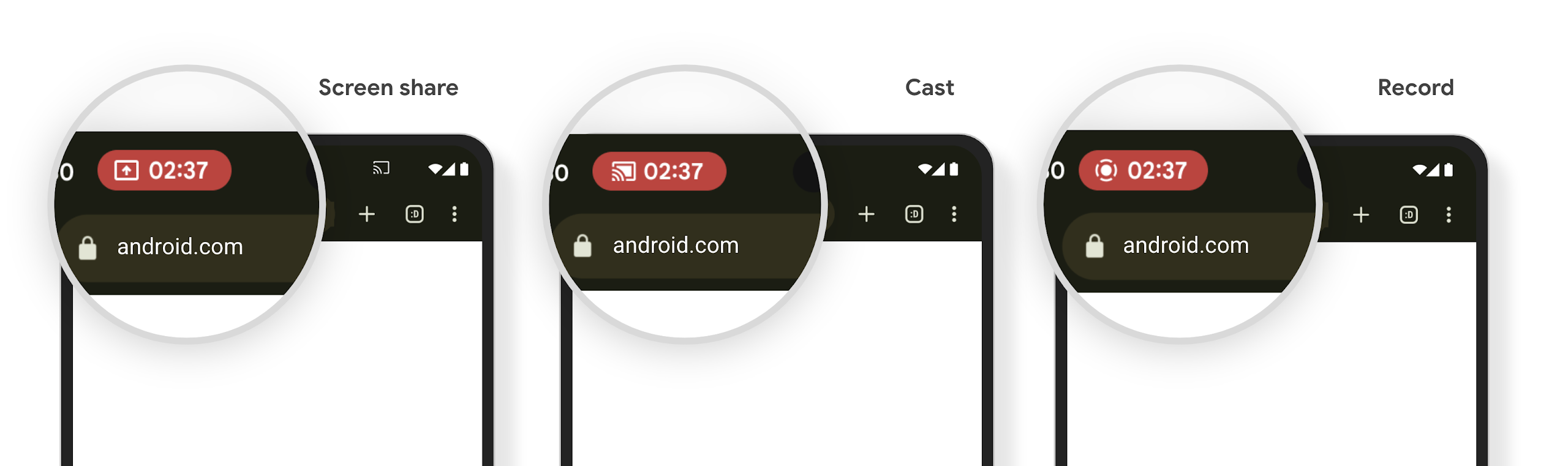
Sprawdź, czy Twoja aplikacja jest objęta ograniczeniami
Domyślnie aplikacja zawiera element na pasku stanu i automatycznie zawiesza projekcję ekranu po włączeniu ekranu blokady.
Więcej informacji o testowaniu aplikacji w takich przypadkach użycia znajdziesz w artykule Pasek stanu, element sterujący i automatyczne zatrzymywanie.
Ograniczenia dostępu do sieci w tle
W Androidzie 15 aplikacje, które inicjują żądanie sieciowe poza prawidłowym cyklem życia procesu, są traktowane jako wyjątki. Zazwyczaj jest to UnknownHostException lub inny element związany z gniazdem IOException. Żądania sieciowe, które występują poza prawidłowym cyklem życia, są zwykle spowodowane tym, że aplikacje nieświadomie kontynuują żądanie sieciowe nawet wtedy, gdy aplikacja nie jest już aktywna.
Aby uniknąć tego wyjątku, zadbaj o to, aby żądania sieci były świadome cyklu życia i były anulowane po zakończeniu prawidłowego cyklu procesu, używając komponentów świadomych cyklu życia. Jeśli ważne jest, aby żądanie sieciowe zostało wysłane nawet wtedy, gdy użytkownik opuści aplikację, rozważ zaplanowanie żądania sieciowego za pomocą WorkManagera lub kontynuowanie widocznego dla użytkownika zadania za pomocą usługi na pierwszym planie.
Elementy wycofane
Z każdą kolejną wersją niektóre interfejsy API Androida mogą stać się przestarzałe lub wymagać refaktoryzacji, aby zapewnić deweloperom większy komfort pracy lub obsługiwać nowe funkcje platformy. W takich przypadkach oficjalnie wycofujemy przestarzałe interfejsy API i kierujemy deweloperów do alternatyw, których mogą używać w zamian.
Wycofanie oznacza, że zakończyliśmy oficjalne wsparcie dla danych interfejsów API, ale nadal będą one dostępne dla deweloperów. Więcej informacji o ważnych funkcjach, które zostały wycofane w tej wersji Androida, znajdziesz na stronie poświęconej wycofywaniu funkcji.