

كما هو الحال في الإصدارات السابقة، يتضمّن Android 15 تغييرات في السلوك قد تؤثر في تطبيقك. تنطبق تغييرات السلوك التالية حصريًا على التطبيقات التي تستهدف الإصدار 15 من نظام التشغيل Android أو الإصدارات الأحدث. إذا كان تطبيقك يستهدف الإصدار 15 من نظام التشغيل Android أو الإصدارات الأحدث، عليك تعديل تطبيقك ليتوافق مع هذه السلوكيات بشكل سليم، حيثما ينطبق ذلك.
احرص أيضًا على مراجعة قائمة التغييرات في السلوك التي تؤثر في جميع التطبيقات
التي تعمل على Android 15 بغض النظر عن targetSdkVersion لتطبيقك.
الوظيفة الأساسية
يعدّل نظام التشغيل Android 15 العديد من الإمكانات الأساسية لنظام Android أو يوسّع نطاقها.
التغييرات على الخدمات التي تعمل في المقدّمة
نحن بصدد إجراء التغييرات التالية على الخدمات التي تعمل في المقدّمة في Android 15.
- سلوك مهلة الخدمة التي تعمل في المقدّمة لمزامنة البيانات
- نوع الخدمة الجديدة التي تعمل في المقدّمة لمعالجة الوسائط
- القيود المفروضة على
BOOT_COMPLETEDمستقبلات البث التي تبدأ الخدمات التي تعمل في المقدّمة - قيود على بدء الخدمات التي تعمل في المقدّمة عندما يكون لدى التطبيق إذن
SYSTEM_ALERT_WINDOW
سلوك مهلة الخدمة التي تعمل في المقدّمة لمزامنة البيانات
يقدّم Android 15 سلوكًا جديدًا للمهلة في dataSync للتطبيقات التي تستهدف Android 15 (المستوى 35 من واجهة برمجة التطبيقات) أو الإصدارات الأحدث. ينطبق هذا السلوك أيضًا على
نوع "mediaProcessing" الجديد للخدمة التي تعمل في المقدّمة.
يسمح النظام بتشغيل خدمات dataSync للتطبيق لمدة 6 ساعات إجمالاً
خلال 24 ساعة، وبعدها يستدعي النظام طريقة
Service.onTimeout(int, int) الخاصة بالخدمة
قيد التشغيل (المتوفرة في Android
15). في هذه المرحلة، تتوفّر للخدمة بضع ثوانٍ للاتصال بالرقم
Service.stopSelf(). عند استدعاء Service.onTimeout()، لن تعود
الخدمة خدمة تعمل في المقدّمة. إذا لم تُشغِّل الخدمة Service.stopSelf()، يُرسِل النظام استثناءً داخليًا. يتم تسجيل
الاستثناء في Logcat مع الرسالة التالية:
Fatal Exception: android.app.RemoteServiceException: "A foreground service of
type dataSync did not stop within its timeout: [component name]"
لتجنُّب المشاكل المتعلّقة بهذا التغيير في السلوك، يمكنك اتّخاذ إجراء أو أكثر من الإجراءات التالية:
- يجب أن تنفِّذ خدمتك طريقة
Service.onTimeout(int, int)الجديدة. عندما يتلقّى تطبيقك المكالمة المُعاد توجيهها، احرص على الاتصال بالرقمstopSelf()في غضون بضع ثوانٍ. (إذا لم توقف التطبيق على الفور، سيُنشئ النظام حالة تعطُّل.) - تأكَّد من أنّ خدمات
dataSyncفي تطبيقك لا تعمل لأكثر من إجمالي 6 ساعات في أي فترة 24 ساعة (ما لم يتفاعل المستخدم مع التطبيق، يؤدي ذلك إلى إعادة ضبط الموقّت). - لا تبدأ
dataSyncالخدمات التي تعمل في المقدّمة إلا نتيجةً لتفاعل مباشر من العميل، لأنّ تطبيقك يكون في المقدّمة عند بدء الخدمة، ويكون لدى خدمتك ست ساعات كاملة بعد انتقال التطبيق إلى الخلفية. - بدلاً من استخدام خدمة
dataSyncتعمل في المقدّمة، استخدِم واجهة برمجة تطبيقات بديلة.
إذا استمر تشغيل خدمات dataSync التي تعمل في المقدّمة في تطبيقك لمدة 6 ساعات في آخر
24 ساعة، لا يمكنك بدء خدمة أخرى تعمل في المقدّمة dataSync ما لم ينقل المستخدم
تطبيقك إلى المقدّمة (ما يؤدي إلى إعادة ضبط الموقّت). إذا حاولت
بدء dataSync خدمة أخرى تعمل في المقدّمة، يُرسِل النظام
ForegroundServiceStartNotAllowedException
رسالة خطأ مثل "انتهت المهلة الزمنية للخدمة التي تعمل في المقدّمة
من النوع dataSync".
الاختبار
لاختبار سلوك تطبيقك، يمكنك تفعيل مهلات مزامنة البيانات حتى إذا كان تطبيقك
لا يستهدف الإصدار 15 من نظام التشغيل Android (ما دام التطبيق يعمل على جهاز
Android 15). لتفعيل المهلات، شغِّل الأمر adb التالي:
adb shell am compat enable FGS_INTRODUCE_TIME_LIMITS your-package-name
يمكنك أيضًا تعديل فترة المهلة لتسهيل اختبار سلوك
تطبيقك عند بلوغ الحدّ الأقصى. لضبط فترة مهلة جديدة، شغِّل adb الأمر التالي:
adb shell device_config put activity_manager data_sync_fgs_timeout_duration duration-in-milliseconds
نوع الخدمة الجديدة التي تعمل في المقدّمة لمعالجة الوسائط
يقدّم Android 15 نوعًا جديدًا من الخدمات التي تعمل في المقدّمة، وهو mediaProcessing. هذا نوع الخدمة مناسب لعمليات مثل تحويل ترميز ملفات الوسائط. على سبيل المثال، قد ينزِّل تطبيق وسائط ملفًا صوتيًا ويحتاج إلى تحويله إلى
تنسيق مختلف قبل تشغيله. يمكنك استخدام mediaProcessing
خدمة تعمل في المقدّمة للتأكّد من استمرار الإحالة الناجحة حتى عندما يكون التطبيق في
الخلفية.
يسمح النظام بتشغيل خدمات mediaProcessing للتطبيق لمدة إجمالية تبلغ 6
ساعات خلال فترة 24 ساعة، وبعد ذلك يستدعي النظام أسلوب
Service.onTimeout(int, int) للخدمة التي تعمل (تم تقديمه في Android
15). في هذه المرحلة، تتوفّر للخدمة بضع ثوانٍ للاتصال بالرقم
Service.stopSelf(). إذا لم تُشغِّل الخدمة Service.stopSelf()، يُرسِل النظام استثناءً داخليًا. يتم تسجيل
الاستثناء في Logcat مع الرسالة التالية:
Fatal Exception: android.app.RemoteServiceException: "A foreground service of
type mediaProcessing did not stop within its timeout: [component name]"
لتجنُّب حدوث الاستثناء، يمكنك تنفيذ أحد الإجراءات التالية:
- اطلب من مقدّم الخدمة تنفيذ طريقة
Service.onTimeout(int, int)الجديدة. عندما يتلقّى تطبيقك معاودة الاتصال، احرص على الاتصال بـstopSelf()في غضون بضع ثوانٍ. (إذا لم توقف التطبيق على الفور، سيُنشئ النظام حالة تعطُّل.) - تأكَّد من أنّ خدمات
mediaProcessingفي تطبيقك لا تعمل لأكثر من إجمالي 6 ساعات في أي فترة 24 ساعة (ما لم يتفاعل المستخدم مع التطبيق، يؤدي ذلك إلى إعادة ضبط الموقّت). - لا تبدأ
mediaProcessingالخدمات التي تعمل في المقدّمة إلا نتيجةً لتفاعل مباشر من العميل، لأنّ تطبيقك يكون في المقدّمة عند بدء الخدمة، ويكون لدى خدمتك ست ساعات كاملة بعد انتقال التطبيق إلى الخلفية. - بدلاً من استخدام خدمة
mediaProcessingتعمل في المقدّمة، استخدِم واجهة برمجة تطبيقات بديلة، مثل WorkManager.
إذا استمر تشغيل خدمات mediaProcessing التي تعمل في المقدّمة في تطبيقك لمدة 6 ساعات في
آخر 24 ساعة، لا يمكنك بدء خدمة أخرى تعمل في المقدّمة mediaProcessing ما لم
ينقل المستخدم تطبيقك إلى المقدّمة (ما يؤدي إلى إعادة ضبط الموقّت). إذا حاولت بدء خدمة "mediaProcessing" أخرى تعمل في المقدّمة، سيعرض النظام
ForegroundServiceStartNotAllowedException
رسالة خطأ مثل "تم استنفاد المهلة الزمنية لنوع الخدمة التي تعمل في المقدّمة
mediaProcessing".
لمزيد من المعلومات عن نوع الخدمة mediaProcessing، يُرجى الاطّلاع على المقالة التغييرات التي طرأت على
أنواع الخدمات التي تعمل في المقدّمة لنظام التشغيل Android 15: معالجة الوسائط.
الاختبار
لاختبار سلوك تطبيقك، يمكنك تفعيل مهلات معالجة الوسائط حتى إذا كان
تطبيقك لا يستهدف الإصدار 15 من نظام التشغيل Android (ما دام التطبيق يعمل على
جهاز يعمل بالإصدار 15 من نظام التشغيل Android). لتفعيل مهلات الانتظار، شغِّل الأمر adb التالي:
adb shell am compat enable FGS_INTRODUCE_TIME_LIMITS your-package-name
يمكنك أيضًا تعديل فترة المهلة لتسهيل اختبار سلوك
تطبيقك عند بلوغ الحدّ الأقصى. لضبط فترة مهلة جديدة، شغِّل adb الأمر التالي:
adb shell device_config put activity_manager media_processing_fgs_timeout_duration duration-in-milliseconds
القيود المفروضة على تطبيقات BOOT_COMPLETED التي تستخدم مستقبلات البث لتشغيل الخدمات التي تعمل في المقدّمة
There are new restrictions on BOOT_COMPLETED broadcast receivers launching
foreground services. BOOT_COMPLETED receivers are not allowed to launch the
following types of foreground services:
dataSynccameramediaPlaybackphoneCallmediaProjectionmicrophone(this restriction has been in place formicrophonesince Android 14)
If a BOOT_COMPLETED receiver tries to launch any of those types of foreground
services, the system throws ForegroundServiceStartNotAllowedException.
Testing
To test your app's behavior, you can enable these new restrictions even if your
app is not targeting Android 15 (as long as the app is running on an Android 15
device). Run the following adb command:
adb shell am compat enable FGS_BOOT_COMPLETED_RESTRICTIONS your-package-name
To send a BOOT_COMPLETED broadcast without restarting the device,
run the following adb command:
adb shell am broadcast -a android.intent.action.BOOT_COMPLETED your-package-name
القيود المفروضة على بدء الخدمات التي تعمل في المقدّمة عندما يكون لدى التطبيق إذن SYSTEM_ALERT_WINDOW
Previously, if an app held the SYSTEM_ALERT_WINDOW permission, it could launch
a foreground service even if the app was currently in the background (as
discussed in exemptions from background start restrictions).
If an app targets Android 15, this exemption is now narrower. The app now needs
to have the SYSTEM_ALERT_WINDOW permission and also have a visible overlay
window. That is, the app needs to first launch a
TYPE_APPLICATION_OVERLAY window and the window
needs to be visible before you start a foreground service.
If your app attempts to start a foreground service from the background without
meeting these new requirements (and it does not have some other exemption), the
system throws ForegroundServiceStartNotAllowedException.
If your app declares the SYSTEM_ALERT_WINDOW permission
and launches foreground services from the background, it may be affected by this
change. If your app gets a ForegroundServiceStartNotAllowedException, check
your app's order of operations and make sure your app already has an active
overlay window before it attempts to start a foreground service from the
background. You can check if your overlay window is currently visible
by calling View.getWindowVisibility(), or you
can override View.onWindowVisibilityChanged()
to get notified whenever the visibility changes.
Testing
To test your app's behavior, you can enable these new restrictions even if your
app is not targeting Android 15 (as long as the app is running on an Android 15
device). To enable these new restrictions on starting foreground services
from the background, run the following adb command:
adb shell am compat enable FGS_SAW_RESTRICTIONS your-package-name
تغييرات على الأوقات التي يمكن فيها للتطبيقات تعديل الحالة العامة لوضع "عدم الإزعاج"
Apps that target Android 15 (API level 35) and higher can no longer change the
global state or policy of Do Not Disturb (DND) on a device (either by modifying
user settings, or turning off DND mode). Instead, apps must contribute an
AutomaticZenRule, which the system combines into a global policy with the
existing most-restrictive-policy-wins scheme. Calls to existing APIs that
previously affected global state (setInterruptionFilter,
setNotificationPolicy) result in the creation or update of an implicit
AutomaticZenRule, which is toggled on and off depending on the call-cycle of
those API calls.
Note that this change only affects observable behavior if the app is calling
setInterruptionFilter(INTERRUPTION_FILTER_ALL) and expects that call to
deactivate an AutomaticZenRule that was previously activated by their owners.
التغييرات في واجهة برمجة التطبيقات OpenJDK
Android 15 continues the work of refreshing Android's core libraries to align with the features in the latest OpenJDK LTS releases.
Some of these changes can affect app compatibility for apps targeting Android 15 (API level 35):
Changes to string formatting APIs: Validation of argument index, flags, width, and precision are now more strict when using the following
String.format()andFormatter.format()APIs:String.format(String, Object[])String.format(Locale, String, Object[])Formatter.format(String, Object[])Formatter.format(Locale, String, Object[])
For example, the following exception is thrown when an argument index of 0 is used (
%0in the format string):IllegalFormatArgumentIndexException: Illegal format argument index = 0In this case, the issue can be fixed by using an argument index of 1 (
%1in the format string).Changes to component type of
Arrays.asList(...).toArray(): When usingArrays.asList(...).toArray(), the component type of the resulting array is now anObject—not the type of the underlying array's elements. So the following code throws aClassCastException:String[] elements = (String[]) Arrays.asList("one", "two").toArray();For this case, to preserve
Stringas the component type in the resulting array, you could useCollection.toArray(Object[])instead:String[] elements = Arrays.asList("two", "one").toArray(new String[0]);Changes to language code handling: When using the
LocaleAPI, language codes for Hebrew, Yiddish, and Indonesian are no longer converted to their obsolete forms (Hebrew:iw, Yiddish:ji, and Indonesian:in). When specifying the language code for one of these locales, use the codes from ISO 639-1 instead (Hebrew:he, Yiddish:yi, and Indonesian:id).Changes to random int sequences: Following the changes made in https://bugs.openjdk.org/browse/JDK-8301574, the following
Random.ints()methods now return a different sequence of numbers than theRandom.nextInt()methods do:Generally, this change shouldn't result in app-breaking behavior, but your code shouldn't expect the sequence generated from
Random.ints()methods to matchRandom.nextInt().
The new SequencedCollection API can affect your app's compatibility
after you update compileSdk in your app's build configuration to use
Android 15 (API level 35):
Collision with
MutableList.removeFirst()andMutableList.removeLast()extension functions inkotlin-stdlibThe
Listtype in Java is mapped to theMutableListtype in Kotlin. Because theList.removeFirst()andList.removeLast()APIs have been introduced in Android 15 (API level 35), the Kotlin compiler resolves function calls, for examplelist.removeFirst(), statically to the newListAPIs instead of to the extension functions inkotlin-stdlib.If an app is re-compiled with
compileSdkset to35andminSdkset to34or lower, and then the app is run on Android 14 and lower, a runtime error is thrown:java.lang.NoSuchMethodError: No virtual method removeFirst()Ljava/lang/Object; in class Ljava/util/ArrayList;The existing
NewApilint option in Android Gradle Plugin can catch these new API usages../gradlew lintMainActivity.kt:41: Error: Call requires API level 35 (current min is 34): java.util.List#removeFirst [NewApi] list.removeFirst()To fix the runtime exception and lint errors, the
removeFirst()andremoveLast()function calls can be replaced withremoveAt(0)andremoveAt(list.lastIndex)respectively in Kotlin. If you're using Android Studio Ladybug | 2024.1.3 or higher, it also provides a quick fix option for these errors.Consider removing
@SuppressLint("NewApi")andlintOptions { disable 'NewApi' }if the lint option has been disabled.Collision with other methods in Java
New methods have been added into the existing types, for example,
ListandDeque. These new methods might not be compatible with the methods with the same name and argument types in other interfaces and classes. In the case of a method signature collision with incompatibility, thejavaccompiler outputs a build-time error. For example:Example error 1:
javac MyList.javaMyList.java:135: error: removeLast() in MyList cannot implement removeLast() in List public void removeLast() { ^ return type void is not compatible with Object where E is a type-variable: E extends Object declared in interface ListExample error 2:
javac MyList.javaMyList.java:7: error: types Deque<Object> and List<Object> are incompatible; public class MyList implements List<Object>, Deque<Object> { both define reversed(), but with unrelated return types 1 errorExample error 3:
javac MyList.javaMyList.java:43: error: types List<E#1> and MyInterface<E#2> are incompatible; public static class MyList implements List<Object>, MyInterface<Object> { class MyList inherits unrelated defaults for getFirst() from types List and MyInterface where E#1,E#2 are type-variables: E#1 extends Object declared in interface List E#2 extends Object declared in interface MyInterface 1 errorTo fix these build errors, the class implementing these interfaces should override the method with a compatible return type. For example:
@Override
public Object getFirst() {
    return List.super.getFirst();
}
الأمان
يتضمّن نظام التشغيل Android 15 تغييرات تعزّز أمان النظام للمساعدة في حماية التطبيقات والمستخدمين من التطبيقات الضارة.
إصدارات TLS المحظورة
يفرض نظام التشغيل Android 15 قيودًا على استخدام الإصدارَين 1.0 و1.1 من بروتوكول أمان طبقة النقل. تم إيقاف هذه الإصدارات نهائيًا في Android، ولكن تم الآن حظر استخدامها في التطبيقات التي تستهدف الإصدار Android 15.
عمليات تشغيل الأنشطة الآمنة في الخلفية
Android 15 protects users from malicious apps and gives them more control over their devices by adding changes that prevent malicious background apps from bringing other apps to the foreground, elevating their privileges, and abusing user interaction. Background activity launches have been restricted since Android 10 (API level 29).
Other changes
- Change
PendingIntentcreators to block background activity launches by default. This helps prevent apps from accidentally creating aPendingIntentthat could be abused by malicious actors. - Don't bring an app to the foreground unless the
PendingIntentsender allows it. This change aims to prevent malicious apps from abusing the ability to start activities in the background. By default, apps are not allowed to bring the task stack to the foreground unless the creator allows background activity launch privileges or the sender has background activity launch privileges. - Control how the top activity of a task stack can finish its task. If the top activity finishes a task, Android will go back to whichever task was last active. Moreover, if a non-top activity finishes its task, Android will go back to the home screen; it won't block the finish of this non-top activity.
- Prevent launching arbitrary activities from other apps into your own task. This change prevents malicious apps from phishing users by creating activities that appear to be from other apps.
- Block non-visible windows from being considered for background activity launches. This helps prevent malicious apps from abusing background activity launches to display unwanted or malicious content to users.
نوايا أكثر أمانًا
Android 15 introduces StrictMode for
intents.
In order to see detailed logs about Intent usage violations, use following
method:
Kotlin
fun onCreate() {
    StrictMode.setVmPolicy(VmPolicy.Builder()
        .detectUnsafeIntentLaunch()
        .build()
    )
}
Java
public void onCreate() {
    StrictMode.setVmPolicy(new VmPolicy.Builder()
            .detectUnsafeIntentLaunch()
            .build());
}
تجربة المستخدم وواجهة مستخدم النظام
يتضمّن Android 15 بعض التغييرات التي تهدف إلى توفير تجربة مستخدم أكثر اتساقًا وسهولة.
تغييرات في المساحة الداخلية للنافذة
There are two changes related to window insets in Android 15: edge-to-edge is enforced by default, and there are also configuration changes, such as the default configuration of system bars.
Edge-to-edge enforcement
تكون ميزة "العرض حتى حافة الشاشة" مفعّلة تلقائيًا في التطبيقات على الأجهزة التي تعمل بنظام التشغيل Android 15 إذا كان التطبيق يستهدف الإصدار 15 من نظام التشغيل Android (المستوى 35 لواجهة برمجة التطبيقات).

هذا تغيير غير متوافق قد يؤثر سلبًا في واجهة مستخدم تطبيقك. تؤثّر التغييرات في أقسام واجهة المستخدم التالية:
- شريط التنقّل باستخدام مقبض الإيماءات
- تكون شفافة تلقائيًا.
- تم إيقاف الإزاحة السفلية كي يتم عرض المحتوى خلف شريط التنقّل في النظام ما لم يتم تطبيق هوامش داخلية.
- تم إيقاف
setNavigationBarColorوR.attr#navigationBarColorنهائيًا، ولا يؤثران في التنقّل بالإيماءات. - لن يكون
setNavigationBarContrastEnforcedوR.attr#navigationBarContrastEnforcedأي تأثير على التنقّل بالإيماءات.
- التنقّل باستخدام ثلاثة أزرار
- يتم ضبط مستوى الشفافية على% 80 تلقائيًا، وقد يتطابق اللون مع لون خلفية النافذة.
- تم إيقاف الإزاحة السفلية كي يتم عرض المحتوى خلف شريط التنقّل في النظام ما لم يتم تطبيق الحواف الداخلية.
- يتم ضبط
setNavigationBarColorوR.attr#navigationBarColorتلقائيًا ليتطابقا مع خلفية النافذة. يجب أن تكون خلفية النافذة قابلة للرسم بلون حتى يتم تطبيق هذا الإعداد التلقائي. تم إيقاف هذه الواجهة نهائيًا، ولكنها لا تزال تؤثر في التنقّل باستخدام ثلاثة أزرار. - تكون قيمة
setNavigationBarContrastEnforcedوR.attr#navigationBarContrastEnforcedصحيحة تلقائيًا، ما يؤدي إلى إضافة خلفية غير شفافة بنسبة% 80 في وضع "التنقّل باستخدام ثلاثة أزرار".
- شريط الحالة
- تكون شفافة تلقائيًا.
- يتم إيقاف الإزاحة العلوية، وبالتالي يتم عرض المحتوى خلف شريط الحالة ما لم يتم تطبيق هوامش داخلية.
- تم إيقاف
setStatusBarColorوR.attr#statusBarColorنهائيًا، ولن يكون لهما أي تأثير في الإصدار Android 15. - تم إيقاف
setStatusBarContrastEnforcedوR.attr#statusBarContrastEnforcedنهائيًا، ولكن سيظل لهما تأثير على Android 15.
- صورة مقطوعة للشاشة
- يجب أن تكون قيمة
layoutInDisplayCutoutModeللنوافذ غير العائمة هيLAYOUT_IN_DISPLAY_CUTOUT_MODE_ALWAYS. يتم تفسيرSHORT_EDGESوNEVERوDEFAULTعلى أنّهاALWAYSكي لا يظهر للمستخدمين شريط أسود بسبب صورة مقطوعة للشاشة، بل يظهر المحتوى من الحافة إلى الحافة.
- يجب أن تكون قيمة
يوضّح المثال التالي تطبيقًا قبل وبعد استهداف Android 15 (مستوى واجهة برمجة التطبيقات 35)، وقبل وبعد تطبيق المساحات الداخلية. هذا المثال ليس شاملاً، وقد يظهر بشكل مختلف على Android Auto.


ما يجب التحقّق منه إذا كان تطبيقك معروضًا من الحافة إلى الحافة
إذا كان تطبيقك يعرض المحتوى من الحافة إلى الحافة ويطبّق هوامش داخلية، لن تتأثر في معظم الحالات، باستثناء السيناريوهات التالية. ومع ذلك، حتى إذا كنت تعتقد أنّك لن تتأثر بهذا التغيير، ننصحك باختبار تطبيقك.
- لديك نافذة غير عائمة، مثل
ActivityتستخدمSHORT_EDGESأوNEVERأوDEFAULTبدلاً منLAYOUT_IN_DISPLAY_CUTOUT_MODE_ALWAYS. إذا كان تطبيقك يتعطّل عند تشغيله، قد يكون ذلك بسبب شاشة البداية. يمكنك إما ترقية تبعية شاشة البداية الأساسية إلى الإصدار 1.2.0-alpha01 أو إصدار أحدث، أو ضبطwindow.attributes.layoutInDisplayCutoutMode = WindowManager.LayoutInDisplayCutoutMode.always. - قد تكون هناك شاشات ذات عدد زيارات أقل مع واجهة مستخدم محجوبة. تأكَّد من أنّ الشاشات الأقل زيارة لا تتضمّن واجهة مستخدم محجوبة. تشمل الشاشات التي تسجّل عددًا أقل من الزيارات ما يلي:
- شاشات الإعداد أو تسجيل الدخول
- صفحات الإعدادات
الإجراءات التي يجب اتّخاذها إذا لم يكن تطبيقك معروضًا من الحافة إلى الحافة
إذا لم يكن تطبيقك معروضًا من الحافة إلى الحافة، من المرجّح أن تتأثّر بذلك. بالإضافة إلى سيناريوهات التطبيقات التي تعرض المحتوى من الحافة إلى الحافة، يجب مراعاة ما يلي:
- إذا كان تطبيقك يستخدم "مكوّنات Material 3" (
androidx.compose.material3) في Compose، مثلTopAppBarوBottomAppBarوNavigationBar، من المحتمل ألا تتأثر هذه المكوّنات لأنّها تتعامل تلقائيًا مع الهوامش الداخلية. - إذا كان تطبيقك يستخدم مكوّنات Material 2 (
androidx.compose.material) في Compose، لن تتعامل هذه المكوّنات تلقائيًا مع الحواف الداخلية. ومع ذلك، يمكنك الوصول إلى الحواف الداخلية وتطبيقها يدويًا. في androidx.compose.material الإصدار 1.6.0 والإصدارات الأحدث، استخدِم المَعلمةwindowInsetsلتطبيق الهوامش الداخلية يدويًا علىBottomAppBarوTopAppBarوBottomNavigationوNavigationRail. وبالمثل، استخدِم المَعلمةcontentWindowInsetsمعScaffold. - إذا كان تطبيقك يستخدم طرق العرض ومكوّنات Material
(
com.google.android.material)، فإنّ معظم مكوّنات Material المستندة إلى طرق العرض، مثلBottomNavigationViewأوBottomAppBarأوNavigationRailViewأوNavigationView، تتعامل مع الحواف الداخلية ولا تتطلّب أي عمل إضافي. ومع ذلك، عليك إضافةandroid:fitsSystemWindows="true"إذا كنت تستخدمAppBarLayout. - بالنسبة إلى العناصر القابلة للإنشاء المخصّصة، طبِّق عمليات الإزاحة يدويًا كمسافة بادئة. إذا كان المحتوى الخاص بك ضمن
Scaffold، يمكنك استخدام الحواف الداخلية باستخدام قيم المساحة المتروكةScaffold. بخلاف ذلك، طبِّق الحشو باستخدام أحدWindowInsets. - إذا كان تطبيقك يستخدم طرق العرض و
BottomSheetأوSideSheetأو حاويات مخصّصة، طبِّق مساحة متروكة باستخدامViewCompat.setOnApplyWindowInsetsListener. بالنسبة إلىRecyclerView، طبِّق المساحة المتروكة باستخدام أداة معالجة الأحداث هذه، وأضِف أيضًاclipToPadding="false".
ما يجب التحقّق منه إذا كان تطبيقك يجب أن يوفّر حماية مخصّصة تعمل في الخلفية
إذا كان تطبيقك يوفّر حماية مخصّصة في الخلفية للتنقُّل باستخدام ثلاثة أزرار أو شريط الحالة، يجب أن يضع تطبيقك عنصرًا قابلاً للإنشاء أو عرضًا خلف شريط النظام باستخدام WindowInsets.Type#tappableElement() للحصول على ارتفاع شريط التنقّل الذي يتضمّن 3 أزرار أو WindowInsets.Type#statusBars.
مراجع إضافية حول ميزة "من الحافة إلى الحافة"
راجِع الدليلَين طرق العرض من الحافة إلى الحافة وCompose من الحافة إلى الحافة للاطّلاع على اعتبارات إضافية بشأن تطبيق الحواف الداخلية.
واجهات برمجة التطبيقات المتوقّفة نهائيًا
تم إيقاف واجهات برمجة التطبيقات التالية نهائيًا ولكن لم يتم إيقافها:
R.attr#enforceStatusBarContrastR.attr#navigationBarColor(للتنقّل باستخدام ثلاثة أزرار، مع 80% قيمة ألفا)Window#isStatusBarContrastEnforcedWindow#setNavigationBarColor(للتنقّل باستخدام ثلاثة أزرار، مع قيمة ألفا بنسبة% 80)Window#setStatusBarContrastEnforced
تم إيقاف واجهات برمجة التطبيقات التالية:
R.attr#navigationBarColor(للتنقّل بالإيماءات)R.attr#navigationBarDividerColorR.attr#statusBarColorWindow#setDecorFitsSystemWindowsWindow#getNavigationBarColorWindow#getNavigationBarDividerColorWindow#getStatusBarColorWindow#setNavigationBarColor(للتنقّل بالإيماءات)Window#setNavigationBarDividerColorWindow#setStatusBarColor
Stable configuration
إذا كان تطبيقك يستهدف Android 15 (المستوى 35 لواجهة برمجة التطبيقات) أو الإصدارات الأحدث، لن يستبعد Configuration بعد الآن أشرطة النظام. إذا كنت تستخدم حجم الشاشة في فئة Configuration لاحتساب التنسيق، عليك استبداله ببدائل أفضل، مثل ViewGroup أو WindowInsets أو WindowMetricsCalculator مناسبة، حسب حاجتك.
تتوفّر فئة Configuration منذ المستوى 1 لواجهة برمجة التطبيقات. ويتم الحصول عليها عادةً من Activity.onConfigurationChanged. وتقدّم معلومات مثل كثافة النافذة واتجاهها وأحجامها. من الخصائص المهمة لأحجام النوافذ التي يتم عرضها من Configuration أنّها كانت تستبعد في السابق أشرطة النظام.
يُستخدَم حجم الإعدادات عادةً لاختيار الموارد، مثل /res/layout-h500dp، ولا تزال هذه حالة استخدام صالحة. ومع ذلك، لم ننصح أبدًا باستخدامه لاحتساب التنسيق. إذا كنت تستخدمه، عليك التوقّف عن ذلك الآن. عليك استبدال استخدام Configuration بشيء أكثر ملاءمةً حسب حالة الاستخدام.
إذا كنت تستخدمه لاحتساب التنسيق، استخدِم ViewGroup مناسبًا، مثل CoordinatorLayout أو ConstraintLayout. إذا كنت تستخدمه لتحديد ارتفاع شريط التنقّل في النظام، استخدِم WindowInsets. إذا أردت معرفة الحجم الحالي لنافذة تطبيقك، استخدِم computeCurrentWindowMetrics.
توضّح القائمة التالية الحقول المتأثّرة بهذا التغيير:
- لم يعُد حجمَا
Configuration.screenWidthDpوscreenHeightDpيستبعدان أشرطة النظام. Configuration.smallestScreenWidthDpيتأثّر بشكل غير مباشر بالتغييرات التي تطرأ علىscreenWidthDpوscreenHeightDp.Configuration.orientationيتأثّر بشكل غير مباشر بالتغييرات التي تطرأ علىscreenWidthDpوscreenHeightDpعلى الأجهزة القريبة من المربّع.Display.getSize(Point)يتأثّر بشكل غير مباشر بالتغييرات فيConfiguration. تم إيقاف هذه الطريقة نهائيًا بدءًا من المستوى 30 لواجهة برمجة التطبيقات.- تعمل
Display.getMetrics()بهذه الطريقة منذ المستوى 33 لواجهة برمجة التطبيقات.
تكون القيمة التلقائية لسمة elegantTextHeight هي true
For apps targeting Android 15 (API level 35), the
elegantTextHeight TextView attribute
becomes true by default, replacing the compact font used by default with some
scripts that have large vertical metrics with one that is much more readable.
The compact font was introduced to prevent breaking layouts; Android 13 (API
level 33) prevents many of these breakages by allowing the text layout to
stretch the vertical height utilizing the fallbackLineSpacing
attribute.
In Android 15, the compact font still remains in the system, so your app can set
elegantTextHeight to false to get the same behavior as before, but it is
unlikely to be supported in upcoming releases. So, if your app supports the
following scripts: Arabic, Lao, Myanmar, Tamil, Gujarati, Kannada, Malayalam,
Odia, Telugu or Thai, test your app by setting elegantTextHeight to true.

elegantTextHeight behavior for apps targeting Android 14 (API level 34) and lower.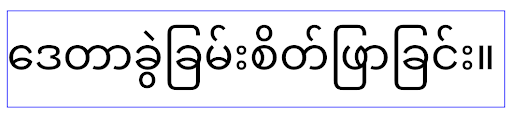
elegantTextHeight behavior for apps targeting Android 15.تغيير عرض TextView لأشكال الحروف المعقّدة
In previous versions of Android, some cursive fonts or languages that have
complex shaping might draw the letters in the previous or next character's area.
In some cases, such letters were clipped at the beginning or ending position.
Starting in Android 15, a TextView allocates width for drawing enough space
for such letters and allows apps to request extra paddings to the left to
prevent clipping.
Because this change affects how a TextView decides the width, TextView
allocates more width by default if the app targets Android 15 (API level 35) or
higher. You can enable or disable this behavior by calling the
setUseBoundsForWidth API on TextView.
Because adding left padding might cause a misalignment for existing layouts, the
padding is not added by default even for apps that target Android 15 or higher.
However, you can add extra padding to preventing clipping by calling
setShiftDrawingOffsetForStartOverhang.
The following examples show how these changes can improve text layout for some fonts and languages.
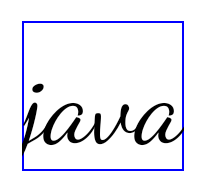
<TextView
    android:fontFamily="cursive"
    android:text="java" />
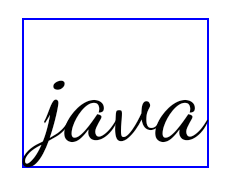
<TextView
    android:fontFamily="cursive"
    android:text="java"
    android:useBoundsForWidth="true"
    android:shiftDrawingOffsetForStartOverhang="true" />

<TextView
    android:text="คอมพิวเตอร์" />

<TextView
    android:text="คอมพิวเตอร์"
    android:useBoundsForWidth="true"
    android:shiftDrawingOffsetForStartOverhang="true" />
ارتفاع السطر التلقائي المتوافق مع اللغة المحلية في EditText
في الإصدارات السابقة من Android، كان تنسيق النص يمدّد ارتفاع
النص ليتناسب مع ارتفاع سطر الخط الذي يتطابق مع اللغة الحالية. على سبيل المثال، إذا كان المحتوى باللغة اليابانية، يصبح ارتفاع النص أكبر قليلاً لأنّ ارتفاع السطر للخط الياباني
أكبر قليلاً من ارتفاع السطر للخط اللاتيني. ومع ذلك، على الرغم من هذه الاختلافات في ارتفاعات السطور، تم ضبط حجم العنصر
EditText بشكلٍ موحّد، بغض النظر عن
اللغة المستخدَمة، كما هو موضّح في الصورة التالية:

EditText عنصرًا يمكن أن يحتوي
على نص باللغة الإنجليزية (en) واليابانية (ja) والبورمية (my). يكون
ارتفاع الرمز EditText متطابقًا، على الرغم من أنّ هذه اللغات
لها ارتفاعات سطور مختلفة عن بعضها.بالنسبة إلى التطبيقات التي تستهدف الإصدار 15 من Android (المستوى 35 لواجهة برمجة التطبيقات)، تم الآن تخصيص الحد الأدنى لارتفاع السطر
لـ EditText لمطابقة الخط المرجعي للّغة المحدّدة، كما هو موضح
في الصورة التالية:

EditText عنصرًا يمكن أن يحتوي
على نص باللغة الإنجليزية (en) واليابانية (ja) والبورمية (my). يتضمّن الآن
ارتفاع الرمز EditText مساحة لاستيعاب
ارتفاع السطر التلقائي لخطوط هذه اللغات.يمكن لتطبيقك استعادة السلوك السابق إذا لزم الأمر من خلال تحديد سمة
useLocalePreferredLineHeightForMinimum
على false، ويمكن لتطبيقك ضبط الحد الأدنى المخصّص للمقاييس العمودية باستخدام واجهة برمجة التطبيقات
setMinimumFontMetrics في Kotlin وJava.
الكاميرا والوسائط
يُجري الإصدار 15 من نظام التشغيل Android التغييرات التالية على سلوك الكاميرا والوسائط في التطبيقات التي تستهدف الإصدار 15 من نظام التشغيل Android أو الإصدارات الأحدث.
القيود المفروضة على طلب أولويّة الصوت
Apps that target Android 15 (API level 35) must be the top app or running a
foreground service in order to request audio focus. If an app
attempts to request focus when it does not meet one of these requirements, the
call returns AUDIOFOCUS_REQUEST_FAILED.
You can learn more about audio focus at Manage audio focus.
تعديل القيود المفروضة على حِزم تطوير البرامج (SDK) غير التابعة لجهات خارجية
يتضمّن Android 15 قوائم معدَّلة لواجهات برمجة التطبيقات غير المتوفّرة في حزمة SDK والمقيّدة، استنادًا إلى التعاون مع مطوّري Android وأحدث الاختبارات الداخلية. نحرص قدر الإمكان على توفير بدائل عامة قبل تقييد واجهات برمجة التطبيقات غير المتوفّرة في حزمة SDK.
إذا كان تطبيقك لا يستهدف Android 15، قد لا تؤثّر بعض هذه التغييرات فيك على الفور. ومع ذلك، على الرغم من إمكانية وصول تطبيقك إلى بعض واجهات برمجة التطبيقات غير المتوفّرة في حزمة SDK استنادًا إلى مستوى واجهة برمجة التطبيقات المستهدَف في تطبيقك، فإنّ استخدام أي طريقة أو حقل غير متوفّر في حزمة SDK يحمل دائمًا خطرًا كبيرًا بتعطُّل تطبيقك.
إذا لم تكن متأكدًا مما إذا كان تطبيقك يستخدم واجهات برمجة تطبيقات غير متوفّرة في حزمة SDK، يمكنك اختباره لمعرفة ذلك. إذا كان تطبيقك يعتمد على واجهات برمجة تطبيقات غير متوفّرة في حزمة SDK، عليك البدء في التخطيط لنقل البيانات إلى بدائل حزمة SDK. ومع ذلك، ندرك أنّ بعض التطبيقات لديها حالات استخدام صالحة لاستخدام واجهات برمجة تطبيقات غير متوفّرة في حزمة SDK. إذا لم تتمكّن من العثور على بديل لاستخدام واجهة برمجة تطبيقات غير متوفّرة في حزمة SDK لميزة في تطبيقك، عليك طلب واجهة برمجة تطبيقات عامة جديدة.
To learn more about the changes in this release of Android, see Updates to non-SDK interface restrictions in Android 15. To learn more about non-SDK interfaces generally, see Restrictions on non-SDK interfaces.