

Как и в предыдущих версиях, Android 15 включает изменения в поведении, которые могут повлиять на ваше приложение. Следующие изменения в поведении применяются исключительно к приложениям, ориентированным на Android 15 или выше. Если ваше приложение ориентировано на Android 15 или выше, вам следует внести в него изменения для корректной поддержки этих изменений, где это применимо.
Обязательно ознакомьтесь также со списком изменений в поведении, которые затрагивают все приложения, работающие на Android 15, независимо от targetSdkVersion вашего приложения.
Основная функциональность
Android 15 изменяет или расширяет различные основные возможности системы Android.
Изменения в работе служб переднего плана
We are making the following changes to foreground services with Android 15.
- Data sync foreground service timeout behavior
- New media processing foreground service type
- Restrictions on
BOOT_COMPLETEDbroadcast receivers launching foreground services - Restrictions on starting foreground services while an app holds the
SYSTEM_ALERT_WINDOWpermission
Data sync foreground service timeout behavior
Android 15 introduces a new timeout behavior to dataSync for apps targeting
Android 15 (API level 35) or higher. This behavior also applies to the new
mediaProcessing foreground service type.
The system permits an app's dataSync services to run for a total of 6 hours
in a 24-hour period, after which the system calls the running service's
Service.onTimeout(int, int) method (introduced in Android
15). At this time, the service has a few seconds to call
Service.stopSelf(). When Service.onTimeout() is called, the
service is no longer considered a foreground service. If the service does not
call Service.stopSelf(), the system throws an internal exception. The
exception is logged in Logcat with the following message:
Fatal Exception: android.app.RemoteServiceException: "A foreground service of
type dataSync did not stop within its timeout: [component name]"
To avoid problems with this behavior change, you can do one or more of the following:
- Have your service implement the new
Service.onTimeout(int, int)method. When your app receives the callback, make sure to callstopSelf()within a few seconds. (If you don't stop the app right away, the system generates a failure.) - Make sure your app's
dataSyncservices don't run for more than a total of 6 hours in any 24-hour period (unless the user interacts with the app, resetting the timer). - Only start
dataSyncforeground services as a result of direct user interaction; since your app is in the foreground when the service starts, your service has the full six hours after the app goes to the background. - Instead of using a
dataSyncforeground service, use an alternative API.
If your app's dataSync foreground services have run for 6 hours in the last
24, you cannot start another dataSync foreground service unless the user
has brought your app to the foreground (which resets the timer). If you try to
start another dataSync foreground service, the system throws
ForegroundServiceStartNotAllowedException
with an error message like "Time limit already exhausted for foreground service
type dataSync".
Testing
To test your app's behavior, you can enable data sync timeouts even if your app
is not targeting Android 15 (as long as the app is running on an Android 15
device). To enable timeouts, run the following adb command:
adb shell am compat enable FGS_INTRODUCE_TIME_LIMITS your-package-name
You can also adjust the timeout period, to make it easier to test how your
app behaves when the limit is reached. To set a new timeout period, run the
following adb command:
adb shell device_config put activity_manager data_sync_fgs_timeout_duration duration-in-milliseconds
New media processing foreground service type
В Android 15 представлен новый тип службы переднего плана — mediaProcessing . Этот тип службы подходит для таких операций, как перекодирование медиафайлов. Например, мультимедийное приложение может загрузить аудиофайл, и ему необходимо преобразовать его в другой формат перед воспроизведением. Вы можете использовать службу переднего плана mediaProcessing чтобы гарантировать, что преобразование продолжается, даже когда приложение находится в фоновом режиме.
Система разрешает службам mediaProcessing приложения работать в общей сложности 6 часов в течение 24-часового периода, после чего система вызывает метод Service.onTimeout(int, int) работающей службы (представленный в Android 15). В это время у службы есть несколько секунд для вызова Service.stopSelf() . Если служба не вызывает Service.stopSelf() , система выдает внутреннее исключение. Исключение регистрируется в Logcat со следующим сообщением:
Fatal Exception: android.app.RemoteServiceException: "A foreground service of
type mediaProcessing did not stop within its timeout: [component name]"
Чтобы избежать исключения, вы можете сделать одно из следующих действий:
- Пусть ваш сервис реализует новый метод
Service.onTimeout(int, int). Когда ваше приложение получит обратный вызов, обязательно вызовитеstopSelf()в течение нескольких секунд. (Если вы не остановите приложение сразу, система выдаст ошибку.) - Убедитесь, что службы
mediaProcessingвашего приложения не работают более 6 часов в течение любого 24-часового периода (если только пользователь не взаимодействует с приложением, сбрасывая таймер). - Запускайте службы переднего плана
mediaProcessingтолько в результате прямого взаимодействия с пользователем; поскольку ваше приложение находится на переднем плане при запуске службы, у вашей службы есть полные шесть часов после того, как приложение перейдет в фоновый режим. - Вместо использования службы переднего плана
mediaProcessingиспользуйте альтернативный API , например WorkManager.
Если службы переднего плана mediaProcessing вашего приложения работали в течение 6 часов за последние 24, вы не сможете запустить другую службу переднего плана mediaProcessing , пока пользователь не переведет ваше приложение на передний план (что сбрасывает таймер). Если вы попытаетесь запустить другую службу переднего плана mediaProcessing , система выдаст ForegroundServiceStartNotAllowedException с сообщением об ошибке, например «Ограничение времени уже исчерпано для типа службы переднего плана mediaProcessing».
Дополнительные сведения о типе службы mediaProcessing см. в разделе Изменения в типах служб переднего плана для Android 15: обработка мультимедиа .
Тестирование
Чтобы проверить поведение вашего приложения, вы можете включить тайм-ауты обработки мультимедиа, даже если ваше приложение не предназначено для Android 15 (при условии, что приложение работает на устройстве Android 15). Чтобы включить таймауты, выполните следующую команду adb :
adb shell am compat enable FGS_INTRODUCE_TIME_LIMITS your-package-name
Вы также можете настроить период ожидания, чтобы было проще протестировать поведение вашего приложения при достижении предела. Чтобы установить новый период ожидания, выполните следующую команду adb :
adb shell device_config put activity_manager media_processing_fgs_timeout_duration duration-in-milliseconds
Restrictions on BOOT_COMPLETED broadcast receivers launching foreground services
Существуют новые ограничения на широковещательные приемники BOOT_COMPLETED , запускающие службы приоритета. Получателям BOOT_COMPLETED не разрешено запускать следующие типы служб приоритета:
-
dataSync -
camera -
mediaPlayback -
phoneCall -
mediaProjection -
microphone(это ограничение действует дляmicrophoneначиная с Android 14)
Если получатель BOOT_COMPLETED пытается запустить любой из этих типов служб переднего плана, система выдает исключение ForegroundServiceStartNotAllowedException .
Тестирование
Чтобы проверить поведение вашего приложения, вы можете включить эти новые ограничения, даже если ваше приложение не предназначено для Android 15 (при условии, что приложение работает на устройстве Android 15). Запустите следующую команду adb :
adb shell am compat enable FGS_BOOT_COMPLETED_RESTRICTIONS your-package-name
Чтобы отправить широковещательную рассылку BOOT_COMPLETED без перезагрузки устройства, выполните следующую команду adb :
adb shell am broadcast -a android.intent.action.BOOT_COMPLETED your-package-name
Restrictions on starting foreground services while an app holds the SYSTEM_ALERT_WINDOW permission
Previously, if an app held the SYSTEM_ALERT_WINDOW permission, it could launch
a foreground service even if the app was currently in the background (as
discussed in exemptions from background start restrictions).
If an app targets Android 15, this exemption is now narrower. The app now needs
to have the SYSTEM_ALERT_WINDOW permission and also have a visible overlay
window. That is, the app needs to first launch a
TYPE_APPLICATION_OVERLAY window and the window
needs to be visible before you start a foreground service.
If your app attempts to start a foreground service from the background without
meeting these new requirements (and it does not have some other exemption), the
system throws ForegroundServiceStartNotAllowedException.
If your app declares the SYSTEM_ALERT_WINDOW permission
and launches foreground services from the background, it may be affected by this
change. If your app gets a ForegroundServiceStartNotAllowedException, check
your app's order of operations and make sure your app already has an active
overlay window before it attempts to start a foreground service from the
background. You can check if your overlay window is currently visible
by calling View.getWindowVisibility(), or you
can override View.onWindowVisibilityChanged()
to get notified whenever the visibility changes.
Testing
To test your app's behavior, you can enable these new restrictions even if your
app is not targeting Android 15 (as long as the app is running on an Android 15
device). To enable these new restrictions on starting foreground services
from the background, run the following adb command:
adb shell am compat enable FGS_SAW_RESTRICTIONS your-package-name
Изменения в условиях, когда приложения могут изменять глобальное состояние режима «Не беспокоить».
Apps that target Android 15 (API level 35) and higher can no longer change the
global state or policy of Do Not Disturb (DND) on a device (either by modifying
user settings, or turning off DND mode). Instead, apps must contribute an
AutomaticZenRule, which the system combines into a global policy with the
existing most-restrictive-policy-wins scheme. Calls to existing APIs that
previously affected global state (setInterruptionFilter,
setNotificationPolicy) result in the creation or update of an implicit
AutomaticZenRule, which is toggled on and off depending on the call-cycle of
those API calls.
Note that this change only affects observable behavior if the app is calling
setInterruptionFilter(INTERRUPTION_FILTER_ALL) and expects that call to
deactivate an AutomaticZenRule that was previously activated by their owners.
Изменения в API OpenJDK
В Android 15 продолжается работа по обновлению основных библиотек Android в соответствии с функциями последних версий OpenJDK LTS.
Некоторые из этих изменений могут повлиять на совместимость приложений, ориентированных на Android 15 (уровень API 35):
Изменения в API форматирования строк : проверка индекса аргумента, флагов, ширины и точности теперь более строгая при использовании следующих API
String.format()иFormatter.format():-
String.format(String, Object[]) -
String.format(Locale, String, Object[]) -
Formatter.format(String, Object[]) -
Formatter.format(Locale, String, Object[])
Например, при использовании аргумента с индексом 0 (
%0в строке формата) выбрасывается следующее исключение:IllegalFormatArgumentIndexException: Illegal format argument index = 0В этом случае проблему можно решить, используя индекс аргумента, равный 1 (
%1в строке формата).-
Изменения в типе компонента метода
Arrays.asList(...).toArray(): При использованииArrays.asList(...).toArray()тип компонента результирующего массива теперь равенObject, а не типу элементов базового массива. Поэтому следующий код вызывает исключениеClassCastException:String[] elements = (String[]) Arrays.asList("one", "two").toArray();В этом случае, чтобы сохранить тип компонента
Stringв результирующем массиве, можно использоватьCollection.toArray(Object[]):String[] elements = Arrays.asList("two", "one").toArray(new String[0]);Изменения в обработке языковых кодов : При использовании API
Localeязыковые коды для иврита, идиша и индонезийского языка больше не преобразуются в их устаревшие формы (иврит:iw, идиш:jiи индонезийский:in). При указании языкового кода для одной из этих локалей используйте вместо него коды из ISO 639-1 (иврит:he, идиш:yiи индонезийский:id).Изменения в последовательностях случайных целых чисел : В соответствии с изменениями, внесенными в https://bugs.openjdk.org/browse/JDK-8301574 , следующие методы
Random.ints()теперь возвращают другую последовательность чисел, чем методыRandom.nextInt():В целом, это изменение не должно приводить к некорректной работе приложения, но ваш код не должен ожидать, что последовательность, сгенерированная методами
Random.ints()будет совпадать с последовательностью, сгенерированной методомRandom.nextInt().
Новый API SequencedCollection может повлиять на совместимость вашего приложения после обновления compileSdk в конфигурации сборки приложения для использования Android 15 (уровень API 35) :
Конфликт с функциями расширения
MutableList.removeFirst()иMutableList.removeLast()вkotlin-stdlibВ Java тип
Listсопоставляется с типомMutableListв Kotlin. Поскольку APIList.removeFirst()иList.removeLast()были введены в Android 15 (уровень API 35), компилятор Kotlin статически разрешает вызовы функций, напримерlist.removeFirst(), в новые APIList, а не в функции расширения изkotlin-stdlib.Если приложение перекомпилируется с
compileSdkустановленным на35, и параметромminSdkустановленным на34или ниже, а затем запускается на Android 14 и ниже, возникает ошибка выполнения:java.lang.NoSuchMethodError: No virtual method removeFirst()Ljava/lang/Object; in class Ljava/util/ArrayList;Существующая опция проверки синтаксиса
NewApiв плагине Android Gradle может выявлять эти новые случаи использования API../gradlew lintMainActivity.kt:41: Error: Call requires API level 35 (current min is 34): java.util.List#removeFirst [NewApi] list.removeFirst()Для исправления исключений времени выполнения и ошибок линтера вызовы функций
removeFirst()иremoveLast()можно заменить наremoveAt(0)иremoveAt(list.lastIndex)соответственно в Kotlin. Если вы используете Android Studio Ladybug | 2024.1.3 или выше, также доступен быстрый способ исправления этих ошибок.Если параметр проверки синтаксиса отключен, рекомендуется удалить
@SuppressLint("NewApi")иlintOptions { disable 'NewApi' }.Конфликт с другими методами в Java
В существующие типы были добавлены новые методы, например,
ListиDeque. Эти новые методы могут быть несовместимы с методами с тем же именем и типами аргументов в других интерфейсах и классах. В случае конфликта сигнатур методов с несовместимостью компиляторjavacвыдаст ошибку во время сборки. Например:Пример ошибки 1:
javac MyList.javaMyList.java:135: error: removeLast() in MyList cannot implement removeLast() in List public void removeLast() { ^ return type void is not compatible with Object where E is a type-variable: E extends Object declared in interface ListПример ошибки 2:
javac MyList.javaMyList.java:7: error: types Deque<Object> and List<Object> are incompatible; public class MyList implements List<Object>, Deque<Object> { both define reversed(), but with unrelated return types 1 errorПример ошибки 3:
javac MyList.javaMyList.java:43: error: types List<E#1> and MyInterface<E#2> are incompatible; public static class MyList implements List<Object>, MyInterface<Object> { class MyList inherits unrelated defaults for getFirst() from types List and MyInterface where E#1,E#2 are type-variables: E#1 extends Object declared in interface List E#2 extends Object declared in interface MyInterface 1 errorДля исправления этих ошибок сборки класс, реализующий эти интерфейсы, должен переопределить метод с совместимым типом возвращаемого значения. Например:
@Override
public Object getFirst() {
    return List.super.getFirst();
}
Безопасность
В Android 15 внесены изменения, повышающие безопасность системы и помогающие защитить приложения и пользователей от вредоносных программ.
Ограниченные версии TLS
Android 15 restricts the usage of TLS versions 1.0 and 1.1. These versions had previously been deprecated in Android, but are now disallowed for apps targeting Android 15.
Запуск защищенной фоновой активности
Android 15 protects users from malicious apps and gives them more control over their devices by adding changes that prevent malicious background apps from bringing other apps to the foreground, elevating their privileges, and abusing user interaction. Background activity launches have been restricted since Android 10 (API level 29).
Other changes
- Change
PendingIntentcreators to block background activity launches by default. This helps prevent apps from accidentally creating aPendingIntentthat could be abused by malicious actors. - Don't bring an app to the foreground unless the
PendingIntentsender allows it. This change aims to prevent malicious apps from abusing the ability to start activities in the background. By default, apps are not allowed to bring the task stack to the foreground unless the creator allows background activity launch privileges or the sender has background activity launch privileges. - Control how the top activity of a task stack can finish its task. If the top activity finishes a task, Android will go back to whichever task was last active. Moreover, if a non-top activity finishes its task, Android will go back to the home screen; it won't block the finish of this non-top activity.
- Prevent launching arbitrary activities from other apps into your own task. This change prevents malicious apps from phishing users by creating activities that appear to be from other apps.
- Block non-visible windows from being considered for background activity launches. This helps prevent malicious apps from abusing background activity launches to display unwanted or malicious content to users.
Более безопасные намерения
Android 15 introduces StrictMode for
intents.
In order to see detailed logs about Intent usage violations, use following
method:
Kotlin
fun onCreate() {
    StrictMode.setVmPolicy(VmPolicy.Builder()
        .detectUnsafeIntentLaunch()
        .build()
    )
}
Java
public void onCreate() {
    StrictMode.setVmPolicy(new VmPolicy.Builder()
            .detectUnsafeIntentLaunch()
            .build());
}
Пользовательский опыт и пользовательский интерфейс системы
В Android 15 внесены некоторые изменения, призванные обеспечить более согласованный и интуитивно понятный пользовательский интерфейс.
Изменения отступа окна
Есть два изменения, связанных с вставками окон в Android 15: по умолчанию применяется сквозное изображение, а также есть изменения конфигурации, такие как конфигурация системных панелей по умолчанию.
Комплексное обеспечение соблюдения требований
Приложения по умолчанию отображаются без рамок на устройствах под управлением Android 15, если приложение ориентировано на Android 15 (уровень API 35).
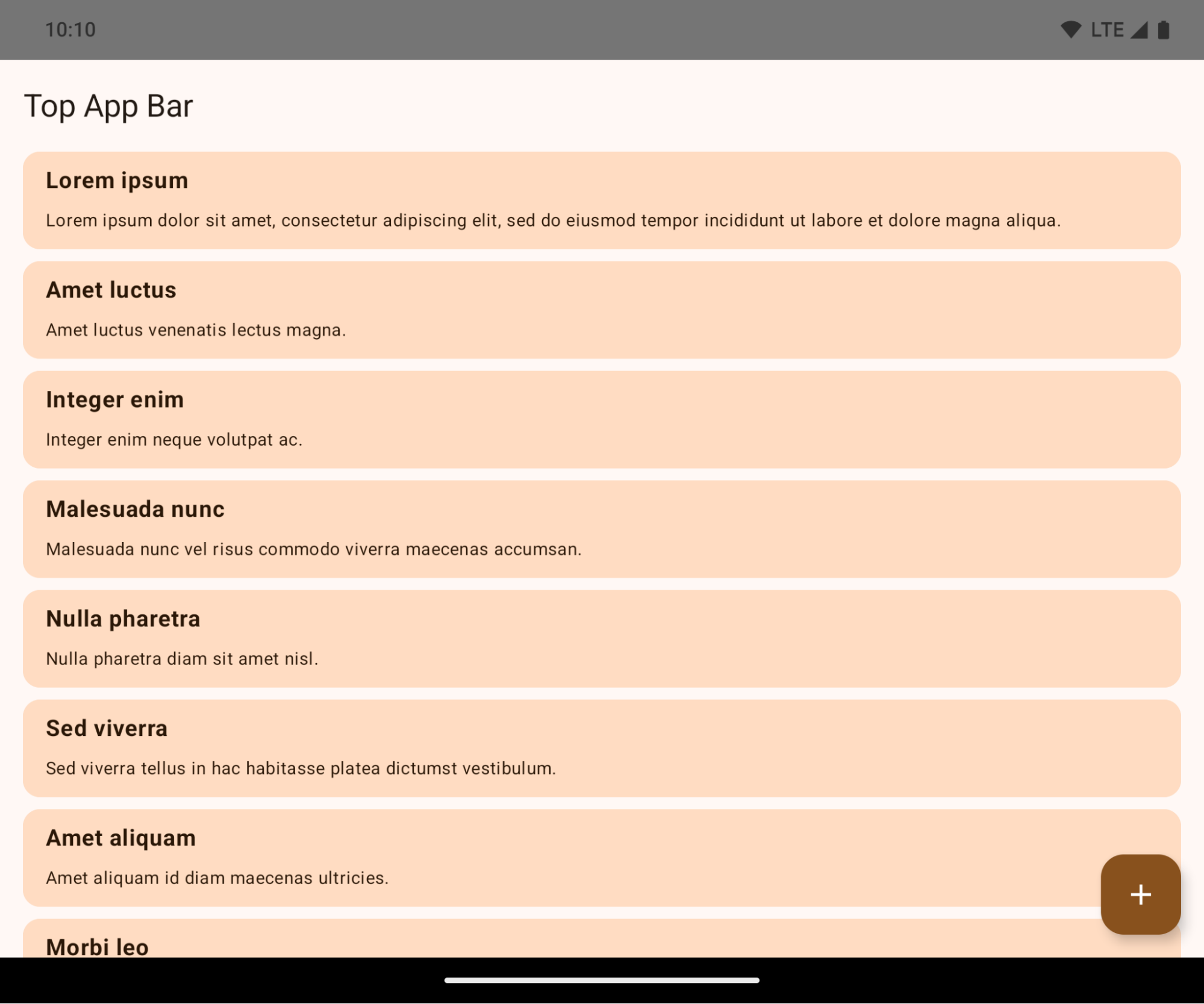
Это критическое изменение, которое может негативно повлиять на пользовательский интерфейс вашего приложения. Изменения затрагивают следующие области пользовательского интерфейса:
- Панель навигации с помощью жестов
- По умолчанию прозрачный.
- Функция смещения вниз отключена, поэтому контент отображается за панелью навигации системы, если не применены отступы.
-
setNavigationBarColorиR.attr#navigationBarColorустарели и не влияют на навигацию жестами. -
setNavigationBarContrastEnforcedиR.attr#navigationBarContrastEnforcedпо-прежнему не влияют на навигацию жестами.
- 3-кнопочная навигация
- По умолчанию непрозрачность установлена на 80%, при этом цвет может соответствовать фону окна.
- Отключено смещение снизу, поэтому контент отображается за панелью навигации системы, если не применены отступы.
-
setNavigationBarColorиR.attr#navigationBarColorпо умолчанию устанавливают цвет в соответствии с фоном окна. Для применения этого значения по умолчанию фон окна должен быть задан цветом из графического объекта. Этот API устарел, но продолжает влиять на навигацию с тремя кнопками. -
setNavigationBarContrastEnforcedиR.attr#navigationBarContrastEnforcedпо умолчанию установлено значение true, что добавляет 80% непрозрачный фон к навигации из 3 кнопок.
- Строка состояния
- По умолчанию прозрачный.
- Верхнее смещение отключено, поэтому контент отображается за строкой состояния, если не применены отступы.
-
setStatusBarColorиR.attr#statusBarColorустарели и не оказывают никакого влияния на Android 15. -
setStatusBarContrastEnforcedиR.attr#statusBarContrastEnforcedустарели, но по-прежнему эффективны на Android 15.
- Вырез для дисплея
- Для неплавающих окон
layoutInDisplayCutoutModeдолжен быть установленLAYOUT_IN_DISPLAY_CUTOUT_MODE_ALWAYS.SHORT_EDGES,NEVERиDEFAULTинтерпретируются какALWAYS, чтобы пользователи не видели черную полосу, вызванную вырезом в экране, и чтобы окно отображалось от края до края.
- Для неплавающих окон
В следующем примере показано приложение до и после перехода на Android 15 (уровень API 35), а также до и после применения отступов. Этот пример не является исчерпывающим, в Android Auto это может выглядеть иначе.
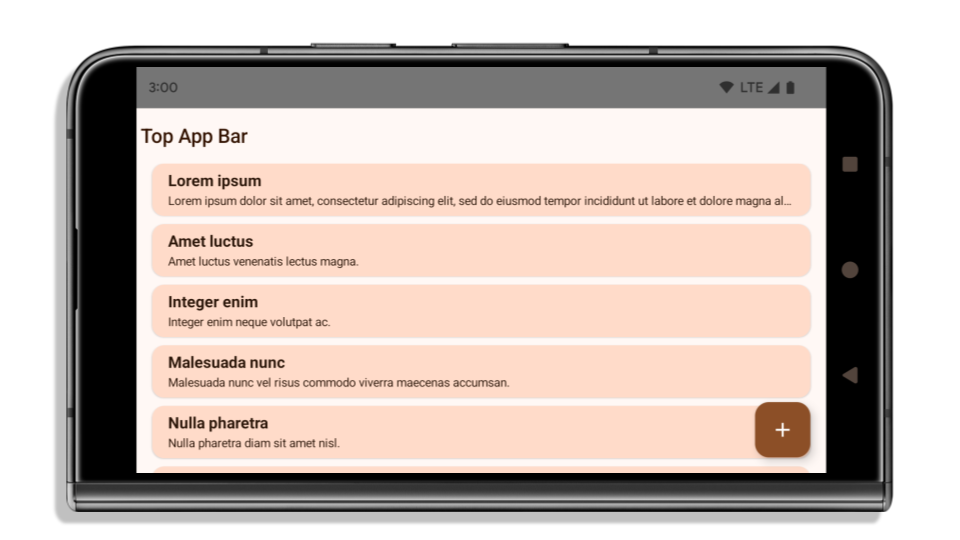
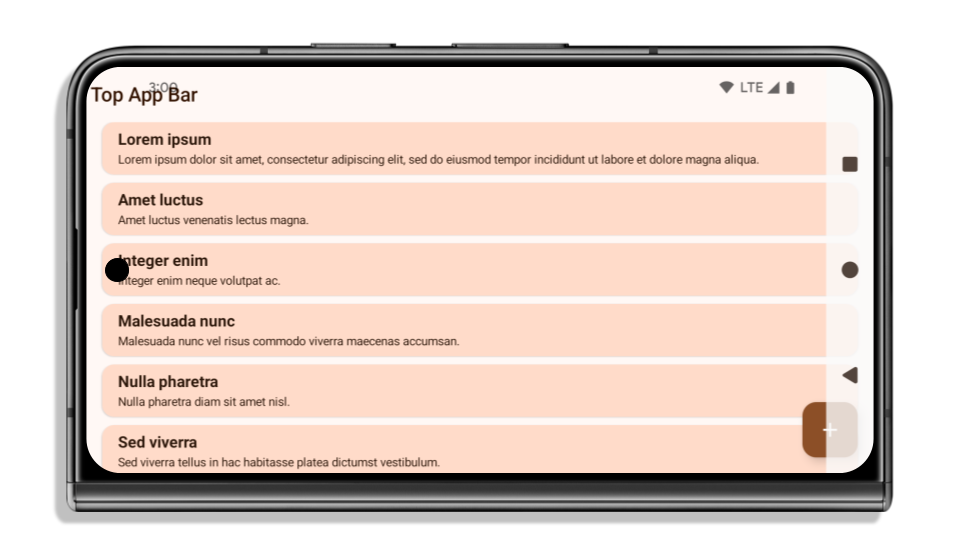
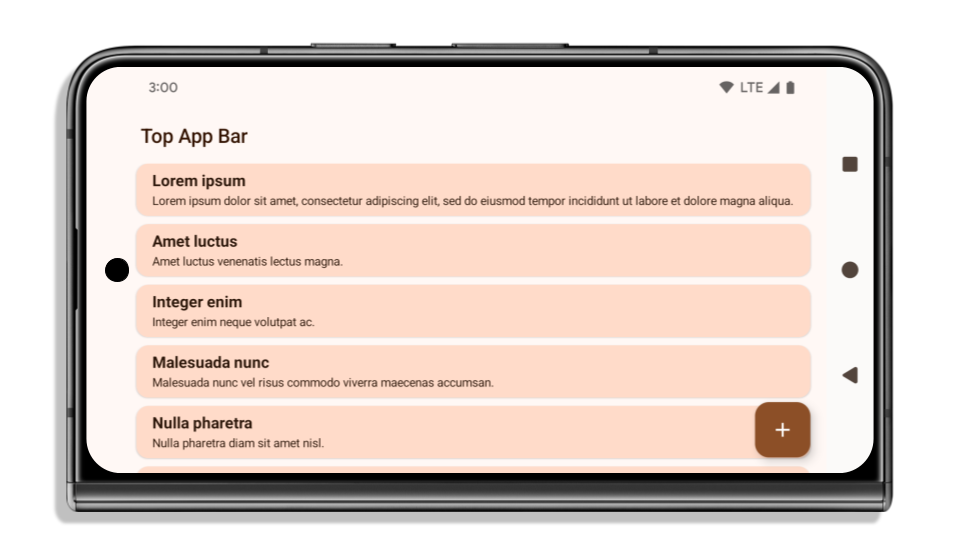
Что проверить, если ваше приложение уже полностью занимает всю ширину экрана?
Если ваше приложение уже имеет полноэкранный режим и применяет отступы, то в большинстве случаев это вас не затронет, за исключением следующих сценариев. Однако, даже если вы считаете, что это вас не коснется, мы рекомендуем протестировать ваше приложение.
- У вас неплавающее окно, например,
Activity, которое используетSHORT_EDGES,NEVERилиDEFAULTвместоLAYOUT_IN_DISPLAY_CUTOUT_MODE_ALWAYS. Если ваше приложение вылетает при запуске, это может быть связано с вашим заставочным экраном. Вы можете либо обновить основную зависимость заставочного экрана до 1.2.0-alpha01 или более поздней, либо установитьwindow.attributes.layoutInDisplayCutoutMode = WindowManager.LayoutInDisplayCutoutMode.always. - Возможно, существуют экраны с низкой посещаемостью, на которых частично перекрыт пользовательский интерфейс. Убедитесь, что на этих менее посещаемых экранах нет перекрытого пользовательского интерфейса. К экранам с низкой посещаемостью относятся:
- Экраны регистрации или входа в систему
- Страницы настроек
Что проверить, если ваше приложение еще не оптимизировано для отображения всего экрана?
Если ваше приложение ещё не является полностью открытым (bread to edge), то, скорее всего, оно вас затронет. Помимо сценариев для приложений, которые уже являются полностью открытыми (bread to edge), следует учитывать следующее:
- Если ваше приложение использует компоненты Material 3 (
androidx.compose.material3) в Compose, такие какTopAppBar,BottomAppBarиNavigationBar, то эти компоненты, скорее всего, не будут затронуты, поскольку они автоматически обрабатывают отступы. - Если ваше приложение использует компоненты Material 2 (
androidx.compose.material) в Compose, эти компоненты не обрабатывают отступы автоматически. Однако вы можете получить доступ к отступам и применить их вручную. В androidx.compose.material версии 1.6.0 и выше используйте параметрwindowInsets, чтобы вручную применить отступы дляBottomAppBar,TopAppBar,BottomNavigationиNavigationRail. Аналогично используйте параметрcontentWindowInsetsдляScaffold. - Если ваше приложение использует представления и компоненты Material (
com.google.android.material), большинство компонентов Material на основе представлений, таких какBottomNavigationView,BottomAppBar,NavigationRailViewилиNavigationView, обрабатывают отступы и не требуют дополнительной работы. Однако вам необходимо добавитьandroid:fitsSystemWindows="true"если вы используетеAppBarLayout. - Для пользовательских элементов, создаваемых с помощью компоновки, задайте отступы вручную. Если ваш контент находится внутри
Scaffold, вы можете использовать значения отступовScaffold. В противном случае задайте отступы с помощью одного изWindowInsets. - Если ваше приложение использует представления и
BottomSheet,SideSheetили пользовательские контейнеры, примените отступы с помощьюViewCompat.setOnApplyWindowInsetsListener. ДляRecyclerViewпримените отступы с помощью этого слушателя, а также добавьтеclipToPadding="false".
Что проверить, если вашему приложению необходима настраиваемая защита от фоновых процессов?
Если вашему приложению необходимо обеспечить настраиваемую защиту фона для трехкнопочной навигации или строки состояния, то следует разместить компонент или представление за системной панелью, используя WindowInsets.Type#tappableElement() для получения высоты трехкнопочной панели навигации или WindowInsets.Type#statusBars .
Дополнительные ресурсы, охватывающие все аспекты.
Дополнительные сведения о применении отступов см. в руководствах « Вид от края до края» и «Композиция от края до края» .
Устаревшие API
Следующие API-интерфейсы устарели, но не отключены:
-
R.attr#enforceStatusBarContrast -
R.attr#navigationBarColor(для навигации с 3 кнопками, с 80% прозрачностью) -
Window#isStatusBarContrastEnforced -
Window#setNavigationBarColor(для навигации с 3 кнопками, с 80% прозрачностью) -
Window#setStatusBarContrastEnforced
Следующие API-интерфейсы устарели и отключены:
-
R.attr#navigationBarColor(для навигации жестами) -
R.attr#navigationBarDividerColor -
R.attr#statusBarColor -
Window#setDecorFitsSystemWindows -
Window#getNavigationBarColor -
Window#getNavigationBarDividerColor -
Window#getStatusBarColor -
Window#setNavigationBarColor(для навигации жестами) -
Window#setNavigationBarDividerColor -
Window#setStatusBarColor
Стабильная конфигурация
If your app targets Android 15 (API level 35) or higher, Configuration no
longer excludes the system bars. If you use the screen size in the
Configuration class for layout calculation, you should replace it with better
alternatives like an appropriate ViewGroup, WindowInsets, or
WindowMetricsCalculator depending on your need.
Configuration has been available since API 1. It is typically obtained from
Activity.onConfigurationChanged. It provides information like window density,
orientation, and sizes. One important characteristic about the window sizes
returned from Configuration is that it previously excluded the system bars.
The configuration size is typically used for resource selection, such as
/res/layout-h500dp, and this is still a valid use case. However, using it for
layout calculation has always been discouraged. If you do so, you should move
away from it now. You should replace the use of Configuration with something
more suitable depending on your use case.
If you use it to calculate the layout, use an appropriate ViewGroup, such as
CoordinatorLayout or ConstraintLayout. If you use it to determine the height
of the system navbar, use WindowInsets. If you want to know the current size
of your app window, use computeCurrentWindowMetrics.
The following list describes the fields affected by this change:
Configuration.screenWidthDpandscreenHeightDpsizes no longer exclude the system bars.Configuration.smallestScreenWidthDpis indirectly affected by changes toscreenWidthDpandscreenHeightDp.Configuration.orientationis indirectly affected by changes toscreenWidthDpandscreenHeightDpon close-to-square devices.Display.getSize(Point)is indirectly affected by the changes inConfiguration. This was deprecated beginning in API level 30.Display.getMetrics()has already worked like this since API level 33.
Атрибут elegantTextHeight по умолчанию имеет значение true.
Для приложений, ориентированных на Android 15 (уровень API 35), атрибут elegantTextHeight TextView становится true по умолчанию, заменяя компактный шрифт, используемый по умолчанию, некоторыми скриптами с большими вертикальными метриками на гораздо более читаемый. Компактный шрифт был введен, чтобы предотвратить нарушение макета; Android 13 (уровень API 33) предотвращает многие из этих проблем, позволяя текстовому макету растягивать вертикальную высоту с помощью атрибута fallbackLineSpacing .
В Android 15 компактный шрифт по-прежнему остается в системе, поэтому ваше приложение может установить для elegantTextHeight значение false чтобы получить то же поведение, что и раньше, но вряд ли он будет поддерживаться в следующих выпусках. Итак, если ваше приложение поддерживает следующие сценарии: арабский, лаосский, мьянманский, тамильский, гуджаратский, каннада, малаялам, одиа, телугу или тайский, протестируйте свое приложение, установив для elegantTextHeight значение true .

elegantTextHeight для приложений, ориентированных на Android 14 (уровень API 34) и ниже. 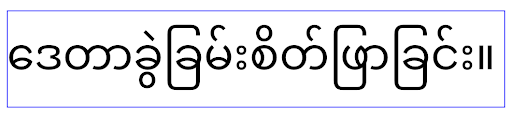
elegantTextHeight для приложений, ориентированных на Android 15.Изменение ширины TextView для сложных форм букв
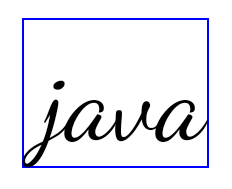
In previous versions of Android, some cursive fonts or languages that have
complex shaping might draw the letters in the previous or next character's area.
In some cases, such letters were clipped at the beginning or ending position.
Starting in Android 15, a TextView allocates width for drawing enough space
for such letters and allows apps to request extra paddings to the left to
prevent clipping.
Because this change affects how a TextView decides the width, TextView
allocates more width by default if the app targets Android 15 (API level 35) or
higher. You can enable or disable this behavior by calling the
setUseBoundsForWidth API on TextView.
Because adding left padding might cause a misalignment for existing layouts, the
padding is not added by default even for apps that target Android 15 or higher.
However, you can add extra padding to preventing clipping by calling
setShiftDrawingOffsetForStartOverhang.
The following examples show how these changes can improve text layout for some fonts and languages.

<TextView
    android:fontFamily="cursive"
    android:text="java" />
<TextView
    android:fontFamily="cursive"
    android:text="java"
    android:useBoundsForWidth="true"
    android:shiftDrawingOffsetForStartOverhang="true" />
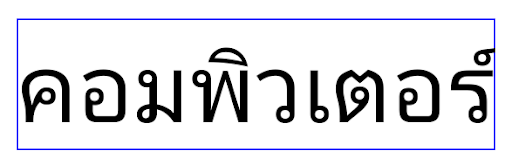
<TextView
    android:text="คอมพิวเตอร์" />
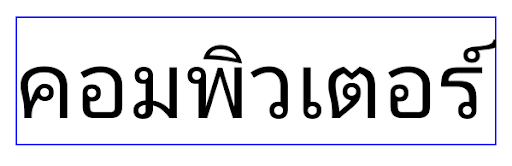
<TextView
    android:text="คอมพิวเตอร์"
    android:useBoundsForWidth="true"
    android:shiftDrawingOffsetForStartOverhang="true" />
Высота строки по умолчанию для EditText с учетом локали
В предыдущих версиях Android текстовый макет растягивал высоту текста так, чтобы она соответствовала высоте строки шрифта, соответствующего текущему языковому стандарту. Например, если контент был на японском языке, поскольку высота строки японского шрифта немного больше, чем у латинского шрифта, высота текста стала немного больше. Однако, несмотря на эти различия в высоте строк, размер элемента EditText был одинаковым, независимо от используемой локали, как показано на следующем изображении:

EditText , которые могут содержать текст на английском (en), японском (ja) и бирманском (my). Высота EditText одинакова, хотя эти языки имеют разную высоту строк. Для приложений, ориентированных на Android 15 (уровень API 35), минимальная высота строки теперь зарезервирована для EditText , чтобы соответствовать эталонному шрифту для указанного языкового стандарта, как показано на следующем изображении:

EditText , которые могут содержать текст на английском (en), японском (ja) и бирманском (my). Высота EditText теперь включает пространство для размещения высоты строки по умолчанию для шрифтов этих языков. При необходимости ваше приложение может восстановить предыдущее поведение, указав для атрибута useLocalePreferredLineHeightForMinimum значение false , а ваше приложение может установить собственные минимальные вертикальные метрики с помощью API setMinimumFontMetrics в Kotlin и Java.
Камера и медиа
В Android 15 внесены следующие изменения в работу камеры и мультимедиа для приложений, ориентированных на Android 15 и выше.
Ограничения на запрос фокусировки звука
Apps that target Android 15 (API level 35) must be the top app or running a
foreground service in order to request audio focus. If an app
attempts to request focus when it does not meet one of these requirements, the
call returns AUDIOFOCUS_REQUEST_FAILED.
You can learn more about audio focus at Manage audio focus.
Обновлены ограничения, не относящиеся к SDK.
Android 15 includes updated lists of restricted non-SDK interfaces based on collaboration with Android developers and the latest internal testing. Whenever possible, we make sure that public alternatives are available before we restrict non-SDK interfaces.
If your app does not target Android 15, some of these changes might not immediately affect you. However, while it's possible for your app to access some non-SDK interfaces depending on your app's target API level, using any non-SDK method or field always carries a high risk of breaking your app.
If you are unsure if your app uses non-SDK interfaces, you can test your app to find out. If your app relies on non-SDK interfaces, you should begin planning a migration to SDK alternatives. Nevertheless, we understand that some apps have valid use cases for using non-SDK interfaces. If you can't find an alternative to using a non-SDK interface for a feature in your app, you should request a new public API.
Дополнительные сведения об изменениях в этой версии Android см. в разделе Обновления ограничений интерфейса, не связанных с SDK, в Android 15 . Дополнительные сведения об интерфейсах, отличных от SDK, см. в разделе Ограничения на интерфейсы, не относящиеся к SDK .