

مانند نسخههای قبلی، اندروید ۱۵ شامل تغییرات رفتاری است که ممکن است بر برنامه شما تأثیر بگذارد. تغییرات رفتاری زیر منحصراً برای برنامههایی اعمال میشود که اندروید ۱۵ یا بالاتر را هدف قرار میدهند. اگر برنامه شما اندروید ۱۵ یا بالاتر را هدف قرار میدهد، باید برنامه خود را اصلاح کنید تا در صورت لزوم، از این رفتارها به درستی پشتیبانی کند.
حتماً فهرست تغییرات رفتاری که صرف نظر از targetSdkVersion برنامه شما، بر همه برنامههای در حال اجرا در اندروید ۱۵ تأثیر میگذارند را نیز بررسی کنید.
قابلیتهای اصلی
اندروید ۱۵ قابلیتهای اصلی مختلف سیستم اندروید را تغییر داده یا گسترش میدهد.
تغییرات در سرویسهای پیشزمینه
ما در حال انجام تغییرات زیر در سرویس های پیش زمینه با اندروید 15 هستیم.
- رفتار درنگ سرویس پیش زمینه همگام سازی داده ها
- نوع سرویس پیش زمینه پردازش رسانه جدید
- محدودیت در گیرنده های پخش
BOOT_COMPLETEDکه خدمات پیش زمینه را راه اندازی می کنند - محدودیتهایی برای شروع سرویسهای پیشزمینه در زمانی که برنامه دارای مجوز
SYSTEM_ALERT_WINDOWاست
رفتار درنگ سرویس پیش زمینه همگام سازی داده ها
Android 15 introduces a new timeout behavior to dataSync for apps targeting
Android 15 (API level 35) or higher. This behavior also applies to the new
mediaProcessing foreground service type.
The system permits an app's dataSync services to run for a total of 6 hours
in a 24-hour period, after which the system calls the running service's
Service.onTimeout(int, int) method (introduced in Android
15). At this time, the service has a few seconds to call
Service.stopSelf(). When Service.onTimeout() is called, the
service is no longer considered a foreground service. If the service does not
call Service.stopSelf(), the system throws an internal exception. The
exception is logged in Logcat with the following message:
Fatal Exception: android.app.RemoteServiceException: "A foreground service of
type dataSync did not stop within its timeout: [component name]"
To avoid problems with this behavior change, you can do one or more of the following:
- Have your service implement the new
Service.onTimeout(int, int)method. When your app receives the callback, make sure to callstopSelf()within a few seconds. (If you don't stop the app right away, the system generates a failure.) - Make sure your app's
dataSyncservices don't run for more than a total of 6 hours in any 24-hour period (unless the user interacts with the app, resetting the timer). - Only start
dataSyncforeground services as a result of direct user interaction; since your app is in the foreground when the service starts, your service has the full six hours after the app goes to the background. - Instead of using a
dataSyncforeground service, use an alternative API.
If your app's dataSync foreground services have run for 6 hours in the last
24, you cannot start another dataSync foreground service unless the user
has brought your app to the foreground (which resets the timer). If you try to
start another dataSync foreground service, the system throws
ForegroundServiceStartNotAllowedException
with an error message like "Time limit already exhausted for foreground service
type dataSync".
Testing
To test your app's behavior, you can enable data sync timeouts even if your app
is not targeting Android 15 (as long as the app is running on an Android 15
device). To enable timeouts, run the following adb command:
adb shell am compat enable FGS_INTRODUCE_TIME_LIMITS your-package-name
You can also adjust the timeout period, to make it easier to test how your
app behaves when the limit is reached. To set a new timeout period, run the
following adb command:
adb shell device_config put activity_manager data_sync_fgs_timeout_duration duration-in-milliseconds
نوع سرویس پیش زمینه پردازش رسانه جدید
Android 15 introduces a new foreground service type, mediaProcessing. This
service type is appropriate for operations like transcoding media files. For
example, a media app might download an audio file and need to convert it to a
different format before playing it. You can use a mediaProcessing foreground
service to make sure the conversion continues even while the app is in the
background.
The system permits an app's mediaProcessing services to run for a total of 6
hours in a 24-hour period, after which the system calls the running service's
Service.onTimeout(int, int) method (introduced in Android
15). At this time, the service has a few seconds to call
Service.stopSelf(). If the service does not
call Service.stopSelf(), the system throws an internal exception. The
exception is logged in Logcat with the following message:
Fatal Exception: android.app.RemoteServiceException: "A foreground service of
type mediaProcessing did not stop within its timeout: [component name]"
To avoid having the exception, you can do one of the following:
- Have your service implement the new
Service.onTimeout(int, int)method. When your app receives the callback, make sure to callstopSelf()within a few seconds. (If you don't stop the app right away, the system generates a failure.) - Make sure your app's
mediaProcessingservices don't run for more than a total of 6 hours in any 24-hour period (unless the user interacts with the app, resetting the timer). - Only start
mediaProcessingforeground services as a result of direct user interaction; since your app is in the foreground when the service starts, your service has the full six hours after the app goes to the background. - Instead of using a
mediaProcessingforeground service, use an alternative API, like WorkManager.
If your app's mediaProcessing foreground services have run for 6 hours in the
last 24, you cannot start another mediaProcessing foreground service unless
the user has brought your app to the foreground (which resets the timer). If you
try to start another mediaProcessing foreground service, the system throws
ForegroundServiceStartNotAllowedException
with an error message like "Time limit already exhausted for foreground service
type mediaProcessing".
For more information about the mediaProcessing service type, see Changes to
foreground service types for Android 15: Media processing.
Testing
To test your app's behavior, you can enable media processing timeouts even if
your app is not targeting Android 15 (as long as the app is running on an
Android 15 device). To enable timeouts, run the following adb command:
adb shell am compat enable FGS_INTRODUCE_TIME_LIMITS your-package-name
You can also adjust the timeout period, to make it easier to test how your
app behaves when the limit is reached. To set a new timeout period, run the
following adb command:
adb shell device_config put activity_manager media_processing_fgs_timeout_duration duration-in-milliseconds
محدودیت در گیرنده های پخش BOOT_COMPLETED که خدمات پیش زمینه را راه اندازی می کنند
There are new restrictions on BOOT_COMPLETED broadcast receivers launching
foreground services. BOOT_COMPLETED receivers are not allowed to launch the
following types of foreground services:
dataSynccameramediaPlaybackphoneCallmediaProjectionmicrophone(this restriction has been in place formicrophonesince Android 14)
If a BOOT_COMPLETED receiver tries to launch any of those types of foreground
services, the system throws ForegroundServiceStartNotAllowedException.
Testing
To test your app's behavior, you can enable these new restrictions even if your
app is not targeting Android 15 (as long as the app is running on an Android 15
device). Run the following adb command:
adb shell am compat enable FGS_BOOT_COMPLETED_RESTRICTIONS your-package-name
To send a BOOT_COMPLETED broadcast without restarting the device,
run the following adb command:
adb shell am broadcast -a android.intent.action.BOOT_COMPLETED your-package-name
محدودیتهایی برای شروع سرویسهای پیشزمینه در زمانی که برنامه دارای مجوز SYSTEM_ALERT_WINDOW است
قبلاً، اگر برنامهای مجوز SYSTEM_ALERT_WINDOW را داشت، میتوانست یک سرویس پیشزمینه راهاندازی کند، حتی اگر برنامه در حال حاضر در پسزمینه باشد (همانطور که در معافیتها از محدودیتهای شروع پسزمینه بحث شد).
اگر برنامه ای اندروید 15 را هدف قرار دهد، این معافیت اکنون محدودتر شده است. اکنون برنامه باید مجوز SYSTEM_ALERT_WINDOW را داشته باشد و همچنین یک پنجره همپوشانی قابل مشاهده داشته باشد. یعنی برنامه باید ابتدا یک پنجره TYPE_APPLICATION_OVERLAY راه اندازی کند و قبل از شروع سرویس پیش زمینه باید پنجره قابل مشاهده باشد.
اگر برنامه شما سعی کند یک سرویس پیشزمینه را از پسزمینه راهاندازی کند، بدون اینکه این الزامات جدید را برآورده کند (و معافیت دیگری ندارد)، سیستم ForegroundServiceStartNotAllowedException را پرتاب میکند.
اگر برنامه شما مجوز SYSTEM_ALERT_WINDOW را اعلام کند و خدمات پیشزمینه را از پسزمینه راهاندازی کند، ممکن است تحت تأثیر این تغییر قرار گیرد. اگر برنامه شما یک ForegroundServiceStartNotAllowedException دریافت می کند، ترتیب عملکرد برنامه خود را بررسی کنید و مطمئن شوید که برنامه شما قبلاً یک پنجره همپوشانی فعال دارد قبل از اینکه بخواهد یک سرویس پیش زمینه را از پس زمینه راه اندازی کند. میتوانید با فراخوانی View.getWindowVisibility() بررسی کنید که آیا پنجره همپوشانی شما قابل مشاهده است یا خیر، یا میتوانید View.onWindowVisibilityChanged() را لغو کنید تا هر زمان که قابلیت مشاهده تغییر کرد مطلع شوید.
تست کردن
برای آزمایش رفتار برنامهتان، میتوانید این محدودیتهای جدید را فعال کنید، حتی اگر برنامه شما اندروید 15 را هدف قرار ندهد (تا زمانی که برنامه روی دستگاه Android 15 اجرا شود). برای فعال کردن این محدودیتهای جدید برای شروع خدمات پیشزمینه از پسزمینه، دستور adb زیر را اجرا کنید:
adb shell am compat enable FGS_SAW_RESTRICTIONS your-package-name
تغییراتی در زمانهایی که برنامهها میتوانند وضعیت کلی حالت «مزاحم نشوید» را تغییر دهند
برنامههایی که Android 15 (سطح API 35) و بالاتر را هدف قرار میدهند، دیگر نمیتوانند وضعیت کلی یا خطمشی «مزاحم نشوید» (DND) را در دستگاه تغییر دهند (چه با تغییر تنظیمات کاربر یا خاموش کردن حالت DND). در عوض، برنامهها باید یک AutomaticZenRule ارائه دهند، که سیستم آن را در یک خطمشی جهانی با طرح موجود بیشترین محدودیتکننده-سیاست-برنده ترکیب میکند. تماسهای APIهای موجود که قبلاً بر وضعیت جهانی تأثیر میگذاشتند ( setInterruptionFilter ، setNotificationPolicy ) منجر به ایجاد یا بهروزرسانی یک AutomaticZenRule ضمنی میشود که بسته به چرخه تماس آن فراخوانهای API، روشن و خاموش میشود.
توجه داشته باشید که این تغییر تنها در صورتی بر رفتار قابل مشاهده تأثیر میگذارد که برنامه setInterruptionFilter(INTERRUPTION_FILTER_ALL) را فراخوانی کند و انتظار دارد که این تماس AutomaticZenRule را که قبلاً توسط صاحبان آن فعال شده است غیرفعال کند.
تغییرات API در OpenJDK
Android 15 continues the work of refreshing Android's core libraries to align with the features in the latest OpenJDK LTS releases.
Some of these changes can affect app compatibility for apps targeting Android 15 (API level 35):
Changes to string formatting APIs: Validation of argument index, flags, width, and precision are now more strict when using the following
String.format()andFormatter.format()APIs:String.format(String, Object[])String.format(Locale, String, Object[])Formatter.format(String, Object[])Formatter.format(Locale, String, Object[])
For example, the following exception is thrown when an argument index of 0 is used (
%0in the format string):IllegalFormatArgumentIndexException: Illegal format argument index = 0In this case, the issue can be fixed by using an argument index of 1 (
%1in the format string).Changes to component type of
Arrays.asList(...).toArray(): When usingArrays.asList(...).toArray(), the component type of the resulting array is now anObject—not the type of the underlying array's elements. So the following code throws aClassCastException:String[] elements = (String[]) Arrays.asList("one", "two").toArray();For this case, to preserve
Stringas the component type in the resulting array, you could useCollection.toArray(Object[])instead:String[] elements = Arrays.asList("two", "one").toArray(new String[0]);Changes to language code handling: When using the
LocaleAPI, language codes for Hebrew, Yiddish, and Indonesian are no longer converted to their obsolete forms (Hebrew:iw, Yiddish:ji, and Indonesian:in). When specifying the language code for one of these locales, use the codes from ISO 639-1 instead (Hebrew:he, Yiddish:yi, and Indonesian:id).Changes to random int sequences: Following the changes made in https://bugs.openjdk.org/browse/JDK-8301574, the following
Random.ints()methods now return a different sequence of numbers than theRandom.nextInt()methods do:Generally, this change shouldn't result in app-breaking behavior, but your code shouldn't expect the sequence generated from
Random.ints()methods to matchRandom.nextInt().
The new SequencedCollection API can affect your app's compatibility
after you update compileSdk in your app's build configuration to use
Android 15 (API level 35):
Collision with
MutableList.removeFirst()andMutableList.removeLast()extension functions inkotlin-stdlibThe
Listtype in Java is mapped to theMutableListtype in Kotlin. Because theList.removeFirst()andList.removeLast()APIs have been introduced in Android 15 (API level 35), the Kotlin compiler resolves function calls, for examplelist.removeFirst(), statically to the newListAPIs instead of to the extension functions inkotlin-stdlib.If an app is re-compiled with
compileSdkset to35andminSdkset to34or lower, and then the app is run on Android 14 and lower, a runtime error is thrown:java.lang.NoSuchMethodError: No virtual method removeFirst()Ljava/lang/Object; in class Ljava/util/ArrayList;The existing
NewApilint option in Android Gradle Plugin can catch these new API usages../gradlew lintMainActivity.kt:41: Error: Call requires API level 35 (current min is 34): java.util.List#removeFirst [NewApi] list.removeFirst()To fix the runtime exception and lint errors, the
removeFirst()andremoveLast()function calls can be replaced withremoveAt(0)andremoveAt(list.lastIndex)respectively in Kotlin. If you're using Android Studio Ladybug | 2024.1.3 or higher, it also provides a quick fix option for these errors.Consider removing
@SuppressLint("NewApi")andlintOptions { disable 'NewApi' }if the lint option has been disabled.Collision with other methods in Java
New methods have been added into the existing types, for example,
ListandDeque. These new methods might not be compatible with the methods with the same name and argument types in other interfaces and classes. In the case of a method signature collision with incompatibility, thejavaccompiler outputs a build-time error. For example:Example error 1:
javac MyList.javaMyList.java:135: error: removeLast() in MyList cannot implement removeLast() in List public void removeLast() { ^ return type void is not compatible with Object where E is a type-variable: E extends Object declared in interface ListExample error 2:
javac MyList.javaMyList.java:7: error: types Deque<Object> and List<Object> are incompatible; public class MyList implements List<Object>, Deque<Object> { both define reversed(), but with unrelated return types 1 errorExample error 3:
javac MyList.javaMyList.java:43: error: types List<E#1> and MyInterface<E#2> are incompatible; public static class MyList implements List<Object>, MyInterface<Object> { class MyList inherits unrelated defaults for getFirst() from types List and MyInterface where E#1,E#2 are type-variables: E#1 extends Object declared in interface List E#2 extends Object declared in interface MyInterface 1 errorTo fix these build errors, the class implementing these interfaces should override the method with a compatible return type. For example:
@Override
public Object getFirst() {
    return List.super.getFirst();
}
امنیت
اندروید ۱۵ شامل تغییراتی است که امنیت سیستم را ارتقا میدهد تا به محافظت از برنامهها و کاربران در برابر برنامههای مخرب کمک کند.
نسخههای محدود TLS
اندروید 15 استفاده از TLS نسخه 1.0 و 1.1 را محدود می کند. این نسخهها قبلاً در اندروید منسوخ شده بودند، اما اکنون برای برنامههایی که اندروید 15 را هدف قرار میدهند غیرمجاز هستند.
فعالیت پسزمینه امن راهاندازی میشود
Android 15 protects users from malicious apps and gives them more control over their devices by adding changes that prevent malicious background apps from bringing other apps to the foreground, elevating their privileges, and abusing user interaction. Background activity launches have been restricted since Android 10 (API level 29).
Other changes
- Change
PendingIntentcreators to block background activity launches by default. This helps prevent apps from accidentally creating aPendingIntentthat could be abused by malicious actors. - Don't bring an app to the foreground unless the
PendingIntentsender allows it. This change aims to prevent malicious apps from abusing the ability to start activities in the background. By default, apps are not allowed to bring the task stack to the foreground unless the creator allows background activity launch privileges or the sender has background activity launch privileges. - Control how the top activity of a task stack can finish its task. If the top activity finishes a task, Android will go back to whichever task was last active. Moreover, if a non-top activity finishes its task, Android will go back to the home screen; it won't block the finish of this non-top activity.
- Prevent launching arbitrary activities from other apps into your own task. This change prevents malicious apps from phishing users by creating activities that appear to be from other apps.
- Block non-visible windows from being considered for background activity launches. This helps prevent malicious apps from abusing background activity launches to display unwanted or malicious content to users.
مقاصد امنتر
اندروید ۱۵ StrictMode برای intentها معرفی میکند.
برای مشاهده گزارشهای دقیق در مورد تخلفات استفاده Intent ، از روش زیر استفاده کنید:
کاتلین
fun onCreate() {
    StrictMode.setVmPolicy(VmPolicy.Builder()
        .detectUnsafeIntentLaunch()
        .build()
    )
}
جاوا
public void onCreate() {
    StrictMode.setVmPolicy(new VmPolicy.Builder()
            .detectUnsafeIntentLaunch()
            .build());
}
تجربه کاربری و رابط کاربری سیستم
اندروید ۱۵ شامل تغییراتی است که برای ایجاد یک تجربه کاربری سازگارتر و شهودیتر در نظر گرفته شدهاند.
تغییرات درج پنجره
در اندروید 15 دو تغییر مربوط به ورودیهای پنجره وجود دارد: لبه به لبه بهطور پیشفرض اعمال میشود و همچنین تغییراتی در پیکربندی وجود دارد، مانند پیکربندی پیشفرض نوارهای سیستم.
اجرای لبه به لبه
اگر برنامهها برای اندروید ۱۵ (سطح API 35) طراحی شده باشند، بهطور پیشفرض در دستگاههایی که اندروید ۱۵ را اجرا میکنند، لبه به لبه هستند.
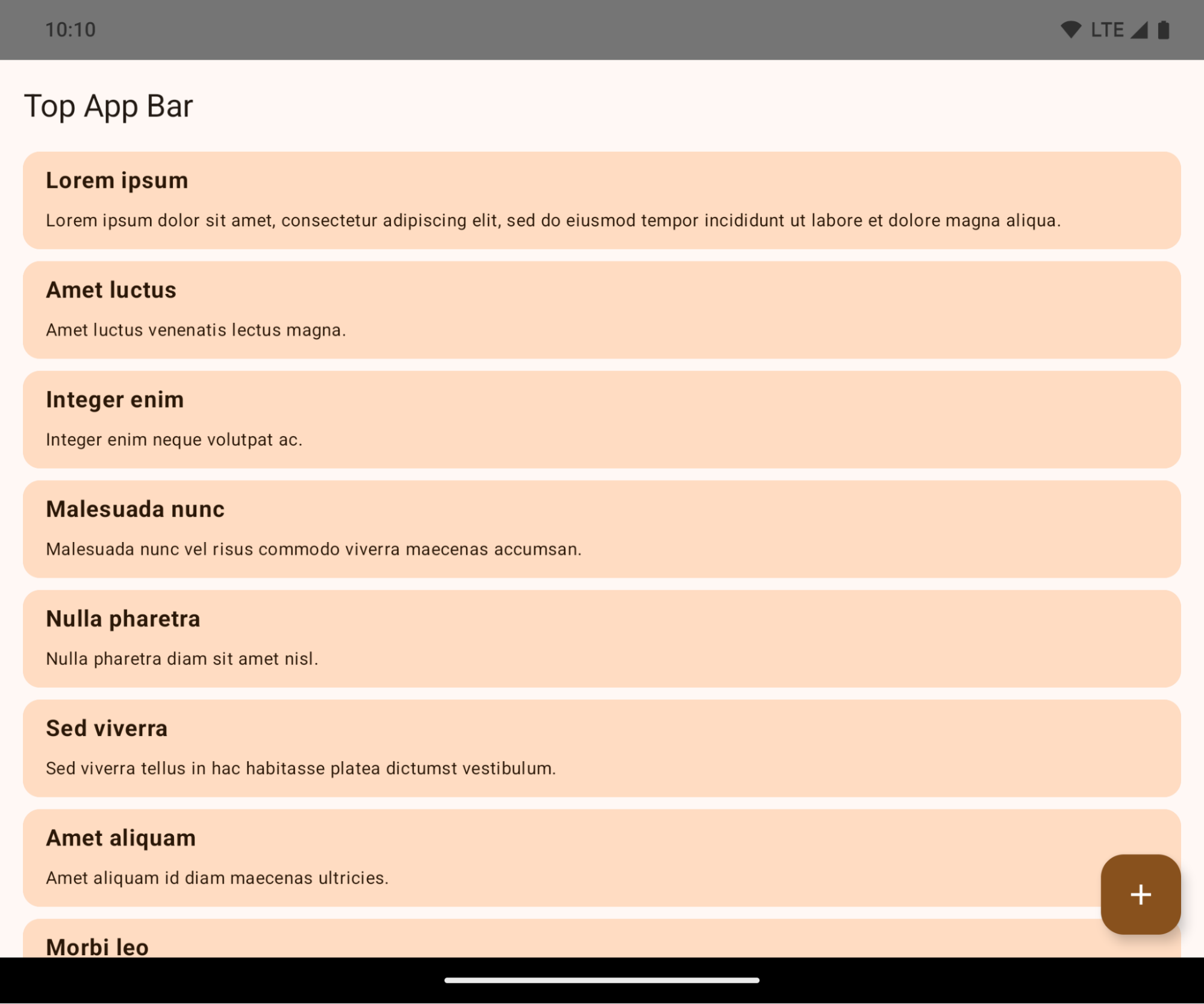
این یک تغییر اساسی است که ممکن است تأثیر منفی بر رابط کاربری برنامه شما بگذارد. این تغییرات بر روی بخشهای زیر از رابط کاربری تأثیر میگذارند:
- نوار ناوبری با استفاده از ژستهای حرکتی
- به طور پیشفرض شفاف.
- فاصلهی پایین غیرفعال است، بنابراین محتوا پشت نوار ناوبری سیستم ترسیم میشود، مگر اینکه از insets استفاده شود.
-
setNavigationBarColorوR.attr#navigationBarColorمنسوخ شدهاند و بر ناوبری ژستها تأثیری ندارند. -
setNavigationBarContrastEnforcedوR.attr#navigationBarContrastEnforcedهمچنان هیچ تاثیری بر ناوبری ژستها ندارند.
- ناوبری ۳ دکمهای
- میزان شفافیت (Opacity) به طور پیشفرض روی ۸۰٪ تنظیم شده است، و احتمالاً رنگ آن با پسزمینه پنجره مطابقت دارد.
- افست پایین غیرفعال است، بنابراین محتوا پشت نوار ناوبری سیستم ترسیم میشود، مگر اینکه از insets استفاده شود.
-
setNavigationBarColorوR.attr#navigationBarColorبه طور پیشفرض طوری تنظیم شدهاند که با پسزمینه پنجره مطابقت داشته باشند. برای اینکه این پیشفرض اعمال شود، پسزمینه پنجره باید رنگی قابل ترسیم داشته باشد. این API منسوخ شده است اما همچنان بر ناوبری سه دکمهای تأثیر میگذارد. -
setNavigationBarContrastEnforcedوR.attr#navigationBarContrastEnforcedبه طور پیشفرض روی true تنظیم شدهاند که یک پسزمینه مات ۸۰٪ به ناوبری ۳ دکمهای اضافه میکند.
- نوار وضعیت
- به طور پیشفرض شفاف.
- فاصلهی بالایی غیرفعال است، بنابراین محتوا پشت نوار وضعیت رسم میشود، مگر اینکه از inset استفاده شود.
-
setStatusBarColorوR.attr#statusBarColorمنسوخ شدهاند و هیچ تاثیری روی اندروید ۱۵ ندارند. -
setStatusBarContrastEnforcedوR.attr#statusBarContrastEnforcedمنسوخ شدهاند اما هنوز هم روی اندروید ۱۵ تأثیر دارند.
- برش نمایشگر
-
layoutInDisplayCutoutModeپنجرههای غیر شناور بایدLAYOUT_IN_DISPLAY_CUTOUT_MODE_ALWAYSباشد.SHORT_EDGES،NEVERوDEFAULTبه عنوانALWAYSتفسیر میشوند تا کاربران نوار سیاه ناشی از بریدگی صفحه نمایش را نبینند و صفحه نمایش لبه به لبه به نظر برسد.
-
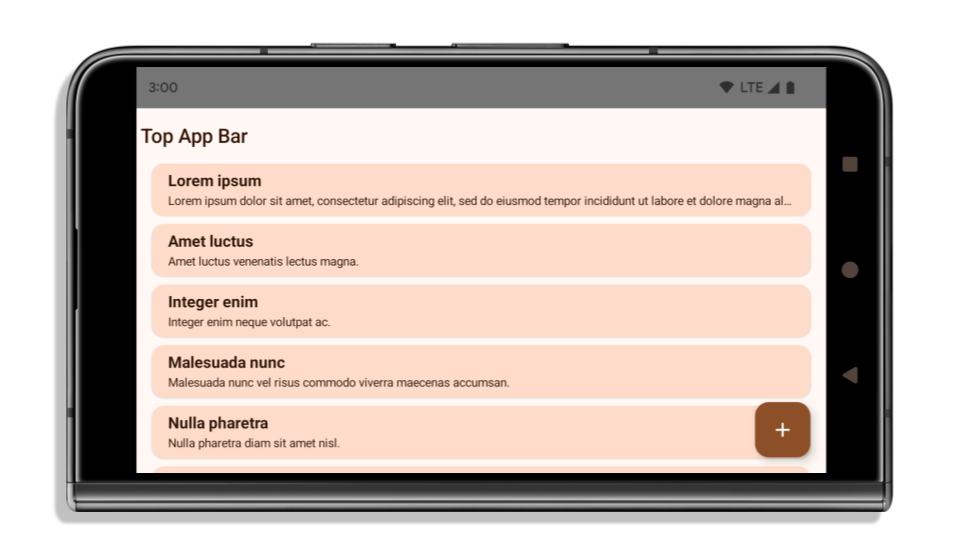
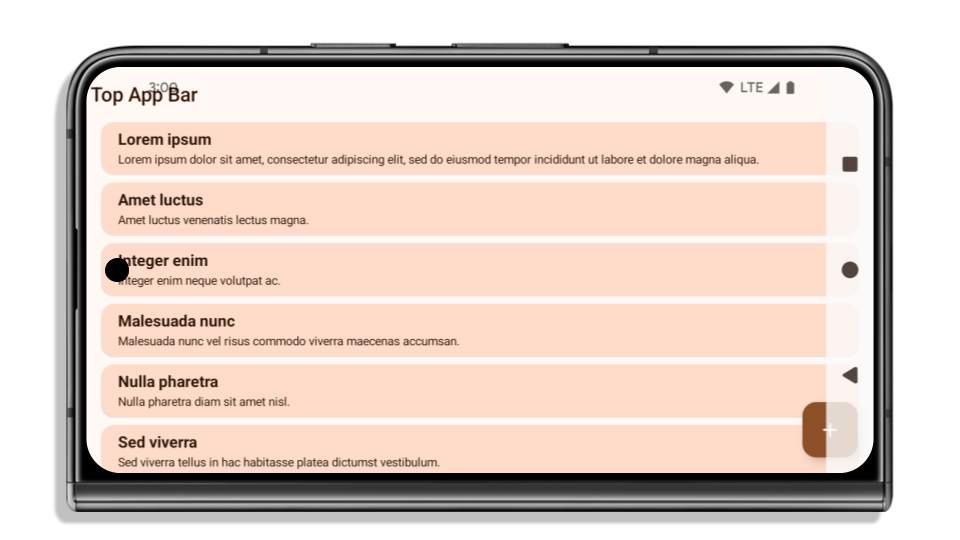
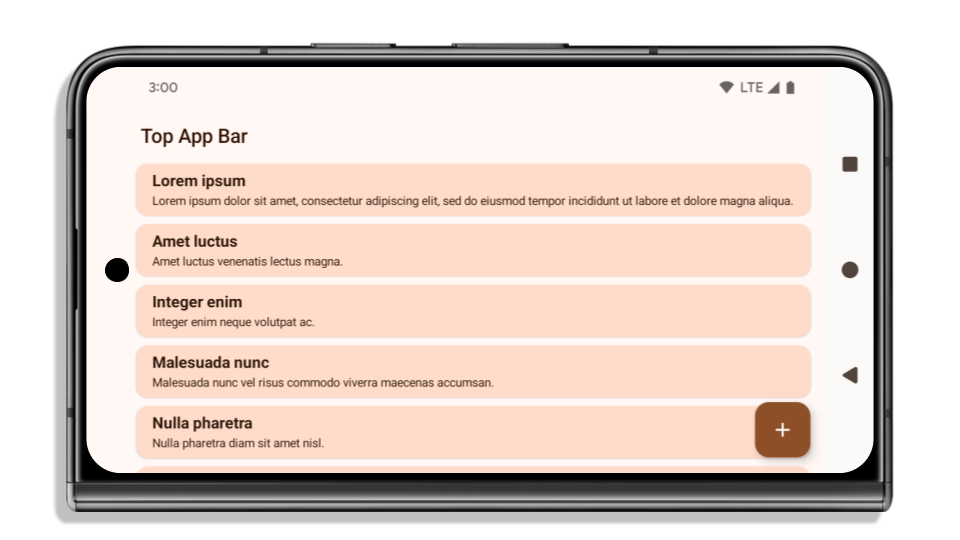
مثال زیر یک برنامه را قبل و بعد از هدف قرار دادن اندروید ۱۵ (سطح API ۳۵) و قبل و بعد از اعمال insets نشان میدهد. این مثال جامع نیست، ممکن است در Android Auto متفاوت به نظر برسد.
اگر برنامه شما از قبل edge-to-edge است، چه مواردی را باید بررسی کنید؟
اگر برنامه شما از قبل لبه به لبه است و از insets استفاده میکند، به جز در سناریوهای زیر، اکثراً تحت تأثیر قرار نگرفتهاید. با این حال، حتی اگر فکر میکنید تحت تأثیر قرار نگرفتهاید، توصیه میکنیم برنامه خود را آزمایش کنید.
- شما یک پنجره غیرشناور دارید، مانند یک
Activityکه ازSHORT_EDGES،NEVERیاDEFAULTبه جایLAYOUT_IN_DISPLAY_CUTOUT_MODE_ALWAYSاستفاده میکند. اگر برنامه شما هنگام اجرا از کار میافتد، ممکن است به دلیل صفحه شروع (splashscreen) شما باشد. میتوانید وابستگی اصلی صفحه شروع را به 1.2.0-alpha01 یا بالاتر ارتقا دهید یاwindow.attributes.layoutInDisplayCutoutMode = WindowManager.LayoutInDisplayCutoutMode.alwaysقرار دهید. - ممکن است صفحات کمبازدیدتری با رابط کاربری مسدود شده وجود داشته باشند. بررسی کنید که این صفحات کمبازدید رابط کاربری مسدود شده نداشته باشند. صفحات کمبازدید شامل موارد زیر هستند:
- صفحات ورود یا ورود به سیستم
- صفحات تنظیمات
اگر برنامه شما از قبل edge-to-edge نیست، چه مواردی را باید بررسی کنید؟
اگر برنامه شما از قبل edge-to-edge نیست، به احتمال زیاد تحت تأثیر قرار گرفتهاید. علاوه بر سناریوهایی برای برنامههایی که از قبل edge-to-edge هستند، باید موارد زیر را در نظر بگیرید:
- اگر برنامه شما از کامپوننتهای Material 3 (
androidx.compose.material3) در compose استفاده میکند، مانندTopAppBar،BottomAppBarوNavigationBar، این کامپوننتها احتمالاً تحت تأثیر قرار نمیگیرند زیرا به طور خودکار insetها را مدیریت میکنند. - اگر برنامه شما از کامپوننتهای Material 2 (
androidx.compose.material) در Compose استفاده میکند، این کامپوننتها به طور خودکار insetها را مدیریت نمیکنند. با این حال، میتوانید به insetها دسترسی داشته باشید و آنها را به صورت دستی اعمال کنید. در androidx.compose.material 1.6.0 و بالاتر، از پارامترwindowInsetsبرای اعمال insetها به صورت دستی برایBottomAppBar،TopAppBar،BottomNavigationوNavigationRailاستفاده کنید. به همین ترتیب، از پارامترcontentWindowInsetsبرایScaffoldاستفاده کنید. - اگر برنامه شما از نماها و کامپوننتهای متریال (
com.google.android.material) استفاده میکند، اکثر کامپوننتهای متریال مبتنی بر نماها مانندBottomNavigationView،BottomAppBar،NavigationRailViewیاNavigationView، درجها را مدیریت میکنند و نیازی به کار اضافی ندارند. با این حال، اگر ازAppBarLayoutاستفاده میکنید، بایدandroid:fitsSystemWindows="true"را اضافه کنید. - برای کامپوننتهای سفارشی، insetها را به صورت دستی به عنوان padding اعمال کنید. اگر محتوای شما درون یک
Scaffoldاست، میتوانید insetها را با استفاده از مقادیر paddingScaffoldاستفاده کنید. در غیر این صورت، padding را با استفاده از یکی ازWindowInsetsاعمال کنید. - اگر برنامه شما از viewها و
BottomSheet،SideSheetیا containerهای سفارشی استفاده میکند، با استفاده ازViewCompat.setOnApplyWindowInsetsListener، فاصلهگذاری (padding) را اعمال کنید. برایRecyclerView، با استفاده از این listener، فاصلهگذاری را اعمال کنید و همچنینclipToPadding="false"را اضافه کنید.
اگر برنامه شما نیاز به ارائه محافظت از پسزمینه سفارشی دارد، چه مواردی را بررسی کنید؟
اگر برنامه شما باید محافظت از پسزمینه سفارشی را برای ناوبری سه دکمهای یا نوار وضعیت ارائه دهد، برنامه شما باید با استفاده از WindowInsets.Type#tappableElement() یک عنصر ترکیبی یا یک view را در پشت نوار سیستم قرار دهد تا ارتفاع نوار ناوبری سه دکمهای یا WindowInsets.Type#statusBars دریافت کند.
منابع اضافی و بهروز
برای ملاحظات بیشتر در مورد اعمال درج، به راهنماهای « نمای لبه به لبه» و «نوشتن لبه به لبه» مراجعه کنید.
API های منسوخ شده
API های زیر منسوخ شده اند اما غیرفعال نشده اند:
-
R.attr#enforceStatusBarContrast -
R.attr#navigationBarColor(برای ناوبری ۳ دکمهای، با آلفای ۸۰٪) -
Window#isStatusBarContrastEnforced -
Window#setNavigationBarColor(برای ناوبری ۳ دکمهای، با آلفای ۸۰٪) -
Window#setStatusBarContrastEnforced
API های زیر منسوخ و غیرفعال شده اند:
-
R.attr#navigationBarColor(برای ناوبری با اشاره) -
R.attr#navigationBarDividerColor -
R.attr#statusBarColor -
Window#setDecorFitsSystemWindows -
Window#getNavigationBarColor -
Window#getNavigationBarDividerColor -
Window#getStatusBarColor -
Window#setNavigationBarColor(برای پیمایش با اشاره) -
Window#setNavigationBarDividerColor -
Window#setStatusBarColor
پیکربندی پایدار
اگر برنامه شما اندروید ۱۵ (سطح API 35) یا بالاتر را هدف قرار میدهد، Configuration دیگر نوارهای سیستم را حذف نمیکند. اگر از اندازه صفحه نمایش در کلاس Configuration برای محاسبه طرحبندی استفاده میکنید، باید آن را با گزینههای بهتری مانند ViewGroup ، WindowInsets یا WindowMetricsCalculator مناسب، بسته به نیاز خود، جایگزین کنید.
Configuration از API 1 در دسترس بوده است. معمولاً از Activity.onConfigurationChanged به دست میآید. این فایل اطلاعاتی مانند تراکم پنجره، جهتگیری و اندازهها را ارائه میدهد. یکی از ویژگیهای مهم در مورد اندازههای پنجره که از Configuration برگردانده میشود این است که قبلاً نوارهای سیستم را حذف میکرد.
اندازه پیکربندی معمولاً برای انتخاب منابع استفاده میشود، مانند /res/layout-h500dp ، و این هنوز یک مورد استفاده معتبر است. با این حال، استفاده از آن برای محاسبه طرحبندی همیشه توصیه نشده است. اگر این کار را میکنید، باید همین حالا از آن صرف نظر کنید. شما باید بسته به مورد استفاده خود، استفاده از Configuration را با چیزی مناسبتر جایگزین کنید.
اگر از آن برای محاسبهی طرحبندی استفاده میکنید، از یک ViewGroup مناسب مانند CoordinatorLayout یا ConstraintLayout استفاده کنید. اگر از آن برای تعیین ارتفاع نوار ناوبری سیستم استفاده میکنید، WindowInsets استفاده کنید. اگر میخواهید اندازهی فعلی پنجرهی برنامهی خود را بدانید، از computeCurrentWindowMetrics استفاده کنید.
لیست زیر فیلدهایی را که تحت تأثیر این تغییر قرار میگیرند، شرح میدهد:
- اندازههای
Configuration.screenWidthDpوscreenHeightDpدیگر نوارهای سیستم را شامل نمیشوند. -
Configuration.smallestScreenWidthDpبه طور غیرمستقیم تحت تأثیر تغییراتscreenWidthDpوscreenHeightDpقرار میگیرد. -
Configuration.orientationبه طور غیرمستقیم تحت تأثیر تغییراتscreenWidthDpوscreenHeightDpدر دستگاههای نزدیک به مربع قرار میگیرد. -
Display.getSize(Point)به طور غیرمستقیم تحت تأثیر تغییرات درConfigurationقرار میگیرد. این تابع از سطح API 30 منسوخ شده است. -
Display.getMetrics()از API سطح ۳۳ به این صورت کار میکرده است.
مقدار پیشفرض ویژگی elegantTextHeight برابر با true است.
For apps targeting Android 15 (API level 35), the
elegantTextHeight TextView attribute
becomes true by default, replacing the compact font used by default with some
scripts that have large vertical metrics with one that is much more readable.
The compact font was introduced to prevent breaking layouts; Android 13 (API
level 33) prevents many of these breakages by allowing the text layout to
stretch the vertical height utilizing the fallbackLineSpacing
attribute.
In Android 15, the compact font still remains in the system, so your app can set
elegantTextHeight to false to get the same behavior as before, but it is
unlikely to be supported in upcoming releases. So, if your app supports the
following scripts: Arabic, Lao, Myanmar, Tamil, Gujarati, Kannada, Malayalam,
Odia, Telugu or Thai, test your app by setting elegantTextHeight to true.

elegantTextHeight behavior for apps targeting Android 14 (API level 34) and lower.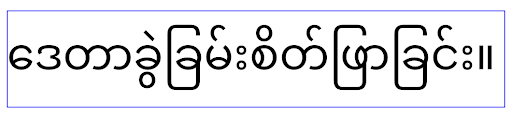
elegantTextHeight behavior for apps targeting Android 15.تغییر عرض TextView برای شکلهای پیچیده حروف
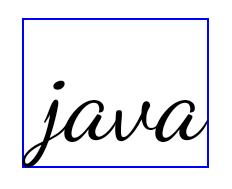
In previous versions of Android, some cursive fonts or languages that have
complex shaping might draw the letters in the previous or next character's area.
In some cases, such letters were clipped at the beginning or ending position.
Starting in Android 15, a TextView allocates width for drawing enough space
for such letters and allows apps to request extra paddings to the left to
prevent clipping.
Because this change affects how a TextView decides the width, TextView
allocates more width by default if the app targets Android 15 (API level 35) or
higher. You can enable or disable this behavior by calling the
setUseBoundsForWidth API on TextView.
Because adding left padding might cause a misalignment for existing layouts, the
padding is not added by default even for apps that target Android 15 or higher.
However, you can add extra padding to preventing clipping by calling
setShiftDrawingOffsetForStartOverhang.
The following examples show how these changes can improve text layout for some fonts and languages.

<TextView
    android:fontFamily="cursive"
    android:text="java" />
<TextView
    android:fontFamily="cursive"
    android:text="java"
    android:useBoundsForWidth="true"
    android:shiftDrawingOffsetForStartOverhang="true" />
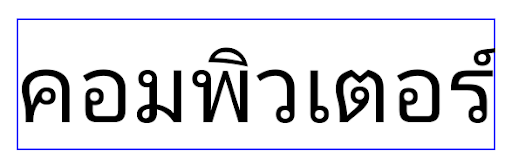
<TextView
    android:text="คอมพิวเตอร์" />
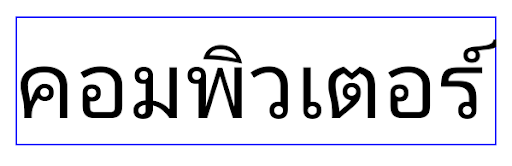
<TextView
    android:text="คอมพิวเตอร์"
    android:useBoundsForWidth="true"
    android:shiftDrawingOffsetForStartOverhang="true" />
ارتفاع خط پیشفرضِ آگاه از زبان برای EditText
در نسخههای قبلی اندروید، طرحبندی متن، ارتفاع متن را به اندازه ارتفاع خط فونتی که با منطقه فعلی مطابقت دارد، افزایش میداد. به عنوان مثال، اگر محتوا به زبان ژاپنی بود، چون ارتفاع خط فونت ژاپنی کمی بزرگتر از فونت لاتین است، ارتفاع متن کمی بزرگتر می شد. با این حال، علیرغم این تفاوتها در ارتفاع خط، عنصر EditText بدون توجه به منطقه مورد استفاده، همانطور که در تصویر زیر نشان داده شده است، اندازه یکسانی داشت:

EditText که می تواند حاوی متنی از انگلیسی (en)، ژاپنی (ja) و برمه ای (my) باشد. ارتفاع EditText یکسان است، حتی اگر این زبان ها دارای ارتفاع خطوط متفاوت از یکدیگر باشند. برای برنامههایی که Android 15 (سطح API 35) را هدف قرار میدهند، اکنون یک حداقل ارتفاع خط برای EditText محفوظ است تا با فونت مرجع برای Locale مشخصشده مطابقت داشته باشد، همانطور که در تصویر زیر نشان داده شده است:

EditText که می تواند حاوی متنی از انگلیسی (en)، ژاپنی (ja) و برمه ای (my) باشد. ارتفاع EditText اکنون شامل فضایی برای قرار دادن ارتفاع خط پیشفرض برای فونتهای این زبانها میشود. در صورت نیاز، برنامه شما میتواند رفتار قبلی را با تعیین ویژگی useLocalePreferredLineHeightForMinimum به false بازیابی کند، و برنامه شما میتواند حداقل معیارهای عمودی سفارشی را با استفاده از setMinimumFontMetrics API در Kotlin و Java تنظیم کند.
دوربین و رسانه
اندروید ۱۵ تغییرات زیر را در رفتار دوربین و رسانه برای برنامههایی که اندروید ۱۵ یا بالاتر را هدف قرار میدهند، ایجاد میکند.
محدودیتهای درخواست فوکوس صوتی
برنامههایی که Android 15 (سطح API 35) را هدف قرار میدهند باید برنامه برتر باشند یا یک سرویس پیشزمینه را اجرا کنند تا فوکوس صوتی را درخواست کنند . اگر برنامهای بخواهد فوکوس را درخواست کند در حالی که یکی از این شرایط را برآورده نمیکند، تماس AUDIOFOCUS_REQUEST_FAILED را برمیگرداند.
میتوانید در مدیریت فوکوس صوتی درباره فوکوس صوتی اطلاعات بیشتری کسب کنید.
محدودیتهای غیر SDK بهروزرسانی شدند
Android 15 includes updated lists of restricted non-SDK interfaces based on collaboration with Android developers and the latest internal testing. Whenever possible, we make sure that public alternatives are available before we restrict non-SDK interfaces.
If your app does not target Android 15, some of these changes might not immediately affect you. However, while it's possible for your app to access some non-SDK interfaces depending on your app's target API level, using any non-SDK method or field always carries a high risk of breaking your app.
If you are unsure if your app uses non-SDK interfaces, you can test your app to find out. If your app relies on non-SDK interfaces, you should begin planning a migration to SDK alternatives. Nevertheless, we understand that some apps have valid use cases for using non-SDK interfaces. If you can't find an alternative to using a non-SDK interface for a feature in your app, you should request a new public API.
برای اطلاعات بیشتر در مورد تغییرات این نسخه از اندروید، بهروزرسانیهای محدودیتهای رابط غیر SDK در Android 15 را ببینید. برای کسب اطلاعات بیشتر در مورد رابط های غیر SDK به طور کلی، به محدودیت ها در رابط های غیر SDK مراجعه کنید.