

Android 15 представляет множество замечательных функций и API для разработчиков. В следующих разделах приведено краткое описание этих функций, которое поможет вам начать работу с соответствующими API.
Подробный список добавленных, измененных и удаленных API см. в отчете об изменениях API . Подробную информацию о добавленных API см. в справочнике API Android — для Android 15 ищите API, добавленные в API уровня 35. Чтобы узнать о том, как изменения платформы могут повлиять на ваши приложения, обязательно ознакомьтесь с изменениями в поведении Android 15 для приложений, ориентированных на Android 15 , и для всех приложений .
Камера и медиа
Android 15 включает в себя множество функций, улучшающих работу с камерой и мультимедиа, а также предоставляющих доступ к инструментам и оборудованию, которые помогут создателям воплотить свои идеи в жизнь на Android.
Более подробную информацию о новейших функциях и решениях для разработчиков, связанных с медиаконтентом и камерой Android, можно найти в докладе «Создание современных возможностей для работы с медиаконтентом и камерой Android» на конференции Google I/O.
Усиление низкой освещенности
В Android 15 представлен Low Light Boost — режим автоматической экспозиции, доступный как для Камеры 2 , так и для расширения камеры для ночного режима . Low Light Boost регулирует экспозицию потока предварительного просмотра в условиях низкой освещенности. Это отличается от того, как расширение камеры для ночного режима создает неподвижные изображения, поскольку ночной режим объединяет серию фотографий для создания единого улучшенного изображения. Хотя ночной режим очень хорошо работает для создания неподвижного изображения, он не может создавать непрерывный поток кадров, а режим Low Light Boost может. Таким образом, Low Light Boost обеспечивает такие возможности камеры, как:
- Предоставление улучшенного предварительного просмотра изображения, чтобы пользователи могли лучше кадрировать свои снимки при слабом освещении.
- Сканирование QR-кодов при слабом освещении
Если вы включите усиление при слабом освещении, оно автоматически включается при низком уровне освещенности и выключается, когда света становится больше.
Приложения могут записывать поток предварительного просмотра в условиях низкой освещенности, чтобы сохранить более яркое видео.
Для получения дополнительной информации см. «Усиление при слабом освещении» .
Встроенные элементы управления камерой в приложении.
В Android 15 добавлено расширение для большего контроля над оборудованием камеры и ее алгоритмами на поддерживаемых устройствах:
- Расширенные настройки мощности вспышки позволяют точно контролировать интенсивность вспышки как в режиме
SINGLE, так и в режимеTORCHпри съемке изображений.
контроль запаса мощности HDR
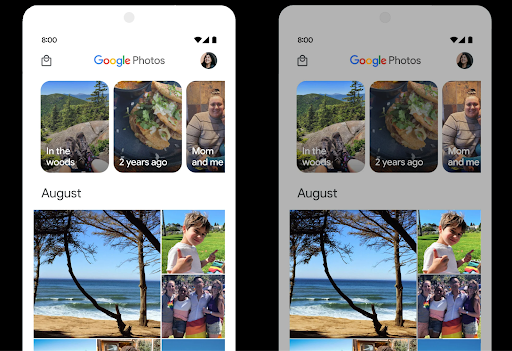
Android 15 выбирает запас HDR, соответствующий возможностям основного устройства и разрядности панели. Для страниц с большим количеством контента SDR, таких как приложение для обмена сообщениями, отображающее одну миниатюру HDR, такое поведение может в конечном итоге отрицательно повлиять на воспринимаемую яркость контента SDR. Android 15 позволяет управлять запасом HDR с помощью setDesiredHdrHeadroom чтобы обеспечить баланс между SDR и HDR-контентом.
Регулировка громкости

В Android 15 реализована поддержка стандарта громкости CTA-2075, который поможет вам избежать несоответствия громкости звука и гарантировать, что пользователям не придется постоянно регулировать громкость при переключении между контентом. Система использует известные характеристики устройств вывода (наушников и динамика), а также метаданные громкости, доступные в аудиоконтенте AAC, для интеллектуальной регулировки громкости звука и уровней сжатия динамического диапазона.
Чтобы включить эту функцию, вам необходимо убедиться, что метаданные громкости доступны в вашем контенте AAC, и включить функцию платформы в вашем приложении. Для этого вы создаете экземпляр объекта LoudnessCodecController , вызывая его фабричный метод create с идентификатором аудиосеанса из связанного AudioTrack ; это автоматически начнет применять аудиообновления. Вы можете передать OnLoudnessCodecUpdateListener для изменения или фильтрации параметров громкости перед их применением в MediaCodec .
// Media contains metadata of type MPEG_4 OR MPEG_D
val mediaCodec = …
val audioTrack = AudioTrack.Builder()
                                .setSessionId(sessionId)
                                .build()
...
// Create new loudness controller that applies the parameters to the MediaCodec
try {
   val lcController = LoudnessCodecController.create(mSessionId)
   // Starts applying audio updates for each added MediaCodec
}
AndroidX media3 ExoPlayer также будет обновлен для использования API-интерфейсов LoudnessCodecController для плавной интеграции приложений.
Виртуальные MIDI 2.0 устройства
В Android 13 добавлена поддержка подключения к устройствам MIDI 2.0 с помощью USB , которые обмениваются данными с помощью универсальных пакетов MIDI (UMP). Android 15 расширяет поддержку UMP на виртуальные MIDI-приложения , позволяя приложениям композиции управлять приложениями синтезатора как виртуальным устройством MIDI 2.0 так же, как если бы они работали с устройством USB MIDI 2.0.
Более эффективное программное декодирование AV1

dav1d , популярный программный декодер AV1 от VideoLAN, доступен для устройств Android, которые не поддерживают декодирование AV1 аппаратно. dav1d почти в 3 раза более производительен, чем устаревший программный декодер AV1, что позволяет воспроизводить HD AV1 большему количеству пользователей, включая некоторые устройства низкого и среднего уровня.
Ваше приложение должно согласиться на использование dav1d, вызвав его по имени "c2.android.av1-dav1d.decoder" . В последующем обновлении dav1d станет программным декодером AV1 по умолчанию. Эта поддержка стандартизирована и перенесена на устройства Android 11, которые получают обновления системы Google Play.
Инструменты и средства повышения производительности разработчиков
Хотя большая часть нашей работы по повышению вашей производительности сосредоточена на таких инструментах, как Android Studio , Jetpack Compose и библиотеки Android Jetpack , мы всегда ищем способы в рамках платформы, которые помогут вам легче воплотить ваши идеи в жизнь.
Обновления OpenJDK 17
В Android 15 продолжается работа по обновлению основных библиотек Android, чтобы они соответствовали функциям последних выпусков OpenJDK LTS.
Включены следующие ключевые функции и улучшения:
- Улучшение качества жизни буферов NIO
- Потоки
- Дополнительные
mathиstrictmathметоды - обновления пакета
util, включая упорядоченнуюcollection,mapиset - Поддержка
ByteBufferвDeflater - Обновления безопасности, такие как
X500PrivateCredentialи обновления ключей безопасности.
Эти API обновляются на более чем миллиарде устройств под управлением Android 12 (уровень API 31) и более поздних версий посредством обновлений системы Google Play , поэтому вы можете использовать новейшие функции программирования.
Улучшения в работе с PDF-файлами
Android 15 включает существенные улучшения API-интерфейсов PdfRenderer . Приложения могут включать расширенные функции, такие как отображение файлов, защищенных паролем , аннотаций, редактирования форм , поиска и выбора с копированием. Поддерживается оптимизация линеаризованных PDF-файлов для ускорения локального просмотра PDF-файлов и сокращения использования ресурсов. Библиотека Jetpack PDF использует эти API для упрощения добавления возможностей просмотра PDF-файлов в ваше приложение.
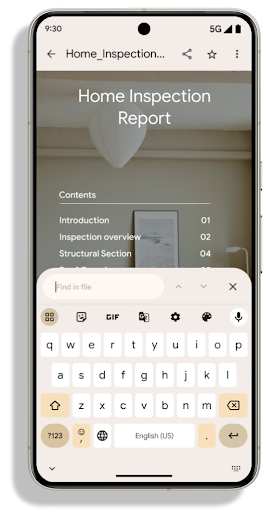
PdfRenderer был перенесен в модуль, который можно обновлять с помощью обновлений системы Google Play независимо от версии платформы, и мы поддерживаем эти изменения обратно в Android 11 (уровень API 30), создавая совместимую версию до Android 15. Поверхность API, называемая PdfRendererPreV .
Android 15 включает существенные улучшения API-интерфейсов PdfRenderer . Приложения могут включать расширенные функции, такие как отображение файлов, защищенных паролем , аннотаций, редактирования форм , поиска и выбора с копированием. Поддерживается оптимизация линеаризованных PDF-файлов для ускорения локального просмотра PDF-файлов и сокращения использования ресурсов. Библиотека Jetpack PDF использует эти API для упрощения добавления возможностей просмотра PDF-файлов в ваше приложение.
PdfRenderer был перенесен в модуль, который можно обновлять с помощью обновлений системы Google Play независимо от версии платформы, и мы поддерживаем эти изменения обратно в Android 11 (уровень API 30), создавая совместимую версию до Android 15. Поверхность API, называемая PdfRendererPreV .
Android 15 включает существенные улучшения API-интерфейсов PdfRenderer . Приложения могут включать расширенные функции, такие как отображение файлов, защищенных паролем , аннотаций, редактирования форм , поиска и выбора с копированием. Поддерживается оптимизация линеаризованных PDF-файлов для ускорения локального просмотра PDF-файлов и сокращения использования ресурсов. Библиотека Jetpack PDF использует эти API для упрощения добавления возможностей просмотра PDF-файлов в ваше приложение.
PdfRenderer был перенесен в модуль, который можно обновлять с помощью обновлений системы Google Play независимо от версии платформы, и мы поддерживаем эти изменения обратно в Android 11 (уровень API 30), создавая совместимую версию до Android 15. Поверхность API, называемая PdfRendererPreV .
Улучшения автоматического переключения языка
В Android 14 добавлено распознавание нескольких языков в аудио на устройстве с автоматическим переключением между языками, но это может привести к пропаданию слов, особенно когда языки переключаются с меньшей паузой между двумя произнесениями. В Android 15 добавлены дополнительные элементы управления, которые помогают приложениям настроить это переключение в соответствии со своими сценариями использования. EXTRA_LANGUAGE_SWITCH_INITIAL_ACTIVE_DURATION_TIME_MILLIS ограничивает автоматическое переключение началом аудиосеанса, а EXTRA_LANGUAGE_SWITCH_MATCH_SWITCHES деактивирует переключение языка после определенного количества переключений. Эти параметры особенно полезны, если вы ожидаете, что во время сеанса будет говориться на одном языке, который должен определяться автоматически.
Улучшен API вариативных шрифтов OpenType.
В Android 15 улучшено удобство использования переменного шрифта OpenType. Вы можете создать экземпляр FontFamily из переменного шрифта без указания осей веса с помощью API buildVariableFamily . Средство визуализации текста переопределяет значение оси wght , чтобы оно соответствовало отображаемому тексту.
Использование API значительно упрощает код для создания Typeface :
Котлин
val newTypeface = Typeface.CustomFallbackBuilder(
            FontFamily.Builder(
                Font.Builder(assets, "RobotoFlex.ttf").build())
                    .buildVariableFamily())
    .build()
Ява
Typeface newTypeface = Typeface.CustomFallbackBuilder(
            new FontFamily.Builder(
                new Font.Builder(assets, "RobotoFlex.ttf").build())
                    .buildVariableFamily())
    .build();
Раньше для создания того же Typeface требовалось гораздо больше кода:
Котлин
val oldTypeface = Typeface.CustomFallbackBuilder(
            FontFamily.Builder(
                Font.Builder(assets, "RobotoFlex.ttf")
                    .setFontVariationSettings("'wght' 400")
                    .setWeight(400)
                    .build())
                .addFont(
                    Font.Builder(assets, "RobotoFlex.ttf")
                        .setFontVariationSettings("'wght' 100")
                        .setWeight(100)
                        .build()
                )
                .addFont(
                    Font.Builder(assets, "RobotoFlex.ttf")
                        .setFontVariationSettings("'wght' 200")
                        .setWeight(200)
                        .build()
                )
                .addFont(
                    Font.Builder(assets, "RobotoFlex.ttf")
                        .setFontVariationSettings("'wght' 300")
                        .setWeight(300)
                        .build()
                )
                .addFont(
                    Font.Builder(assets, "RobotoFlex.ttf")
                        .setFontVariationSettings("'wght' 500")
                        .setWeight(500)
                        .build()
                )
                .addFont(
                    Font.Builder(assets, "RobotoFlex.ttf")
                        .setFontVariationSettings("'wght' 600")
                        .setWeight(600)
                        .build()
                )
                .addFont(
                    Font.Builder(assets, "RobotoFlex.ttf")
                        .setFontVariationSettings("'wght' 700")
                        .setWeight(700)
                        .build()
                )
                .addFont(
                    Font.Builder(assets, "RobotoFlex.ttf")
                        .setFontVariationSettings("'wght' 800")
                        .setWeight(800)
                        .build()
                )
                .addFont(
                    Font.Builder(assets, "RobotoFlex.ttf")
                        .setFontVariationSettings("'wght' 900")
                        .setWeight(900)
                        .build()
                ).build()
        ).build()
Ява
Typeface oldTypeface = new Typeface.CustomFallbackBuilder(
    new FontFamily.Builder(
        new Font.Builder(assets, "RobotoFlex.ttf")
            .setFontVariationSettings("'wght' 400")
            .setWeight(400)
            .build()
    )
    .addFont(
        new Font.Builder(assets, "RobotoFlex.ttf")
            .setFontVariationSettings("'wght' 100")
            .setWeight(100)
            .build()
    )
    .addFont(
        new Font.Builder(assets, "RobotoFlex.ttf")
            .setFontVariationSettings("'wght' 200")
            .setWeight(200)
            .build()
    )
    .addFont(
        new Font.Builder(assets, "RobotoFlex.ttf")
            .setFontVariationSettings("'wght' 300")
            .setWeight(300)
            .build()
    )
    .addFont(
        new Font.Builder(assets, "RobotoFlex.ttf")
            .setFontVariationSettings("'wght' 500")
            .setWeight(500)
            .build()
    )
    .addFont(
        new Font.Builder(assets, "RobotoFlex.ttf")
            .setFontVariationSettings("'wght' 600")
            .setWeight(600)
            .build()
    )
    .addFont(
        new Font.Builder(assets, "RobotoFlex.ttf")
            .setFontVariationSettings("'wght' 700")
            .setWeight(700)
            .build()
    )
    .addFont(
        new Font.Builder(assets, "RobotoFlex.ttf")
            .setFontVariationSettings("'wght' 800")
            .setWeight(800)
            .build()
    )
    .addFont(
        new Font.Builder(assets, "RobotoFlex.ttf")
            .setFontVariationSettings("'wght' 900")
            .setWeight(900)
            .build()
    )
    .build()
).build();
Вот пример того, как отображается Typeface созданный с использованием старого и нового API:
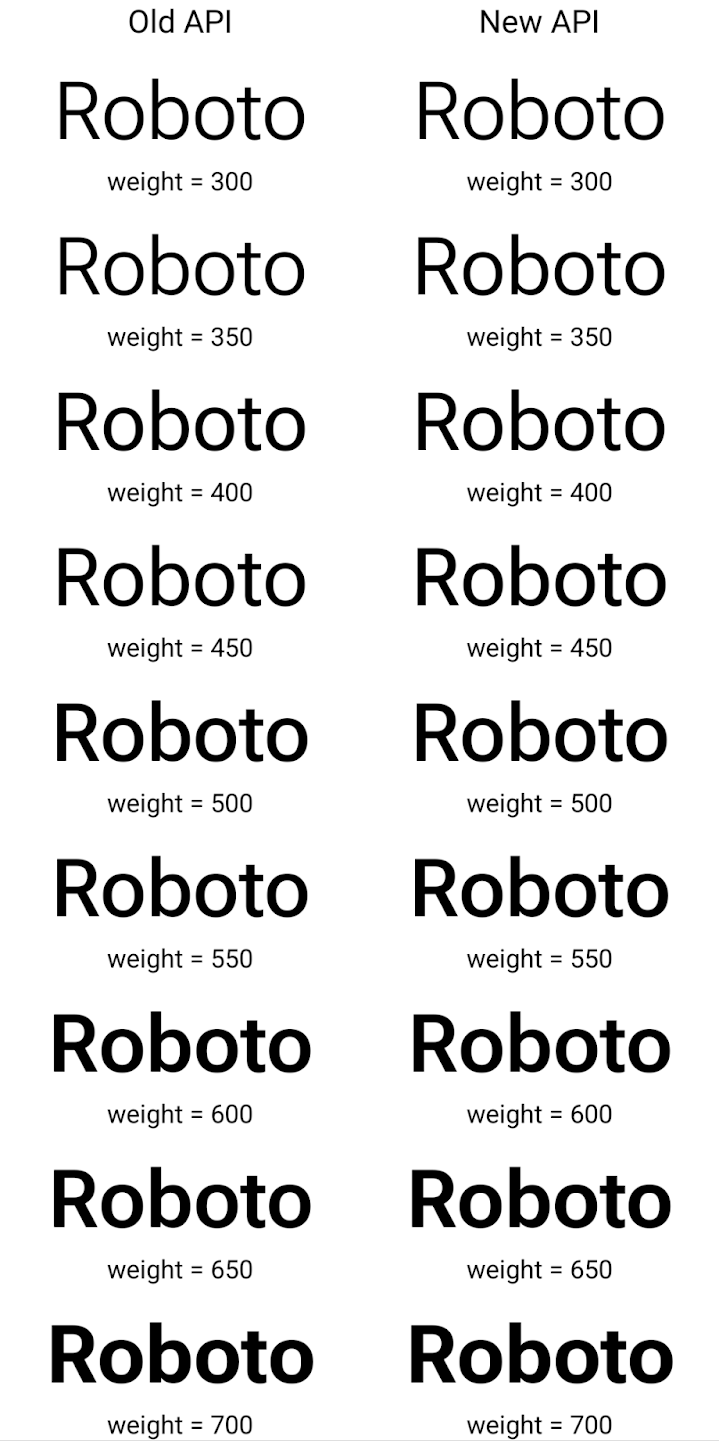
В этом примере Typeface , созданный с помощью старого API, не имеет возможности создавать точные веса шрифтов для экземпляров Font 350, 450, 550 и 650, поэтому средство визуализации возвращается к ближайшему весу. Таким образом, в этом случае вместо 350 отображается 300, вместо 450 отображается 400 и так далее. Напротив, Typeface , созданный с помощью новых API, динамически создает экземпляр Font для заданного веса, поэтому точные веса отображаются также для 350, 450, 550 и 650.
Гранулярные элементы управления разрывом строки
Начиная с Android 15, TextView и базовый разрыв строки могут сохранять заданную часть текста в одной строке для улучшения читаемости. Вы можете воспользоваться преимуществами этой настройки разрыва строки, используя тег <nobreak> в строковых ресурсах или createNoBreakSpan . Аналогичным образом вы можете предотвратить расстановку переносов в словах, используя тег <nohyphen> или createNoHyphenationSpan .
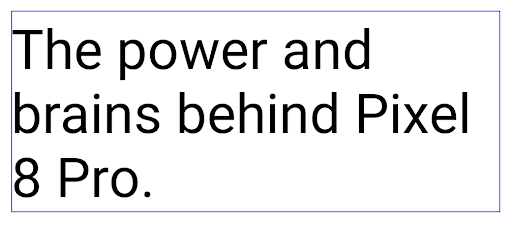
Например, следующий строковый ресурс не содержит разрыва строки и отображается с текстом «Pixel 8 Pro». поломка в нежелательном месте:
<resources>
    <string name="pixel8pro">The power and brains behind Pixel 8 Pro.</string>
</resources>
Напротив, этот строковый ресурс включает тег <nobreak> , который окружает фразу «Pixel 8 Pro». и предотвращает разрывы строк:
<resources>
    <string name="pixel8pro">The power and brains behind <nobreak>Pixel 8 Pro.</nobreak></string>
</resources>
Разница в том, как отображаются эти строки, показана на следующих изображениях:
<nobreak> . 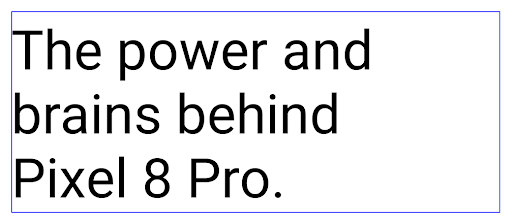
<nobreak> .архивирование приложений
В прошлом году Android и Google Play объявили о поддержке архивирования приложений , что позволяет пользователям освободить место за счет частичного удаления с устройства нечасто используемых приложений, опубликованных с помощью Android App Bundle в Google Play. Android 15 включает поддержку архивирования и разархивирования приложений на уровне ОС, что упрощает реализацию этой функции для всех магазинов приложений.
Приложения с разрешением REQUEST_DELETE_PACKAGES могут вызывать метод requestArchive PackageInstaller , чтобы запросить архивирование установленного пакета приложения, при этом APK и все кэшированные файлы удаляются, но пользовательские данные сохраняются. Архивированные приложения возвращаются как отображаемые приложения через API LauncherApps ; пользователи увидят сообщение пользовательского интерфейса, указывающее на то, что эти приложения заархивированы. Если пользователь нажмет на заархивированное приложение, ответственный установщик получит запрос на его разархивирование , а процесс восстановления можно будет отслеживать с помощью широковещательной рассылки ACTION_PACKAGE_ADDED .
Включите режим 16 КБ на устройстве с помощью параметров разработчика.
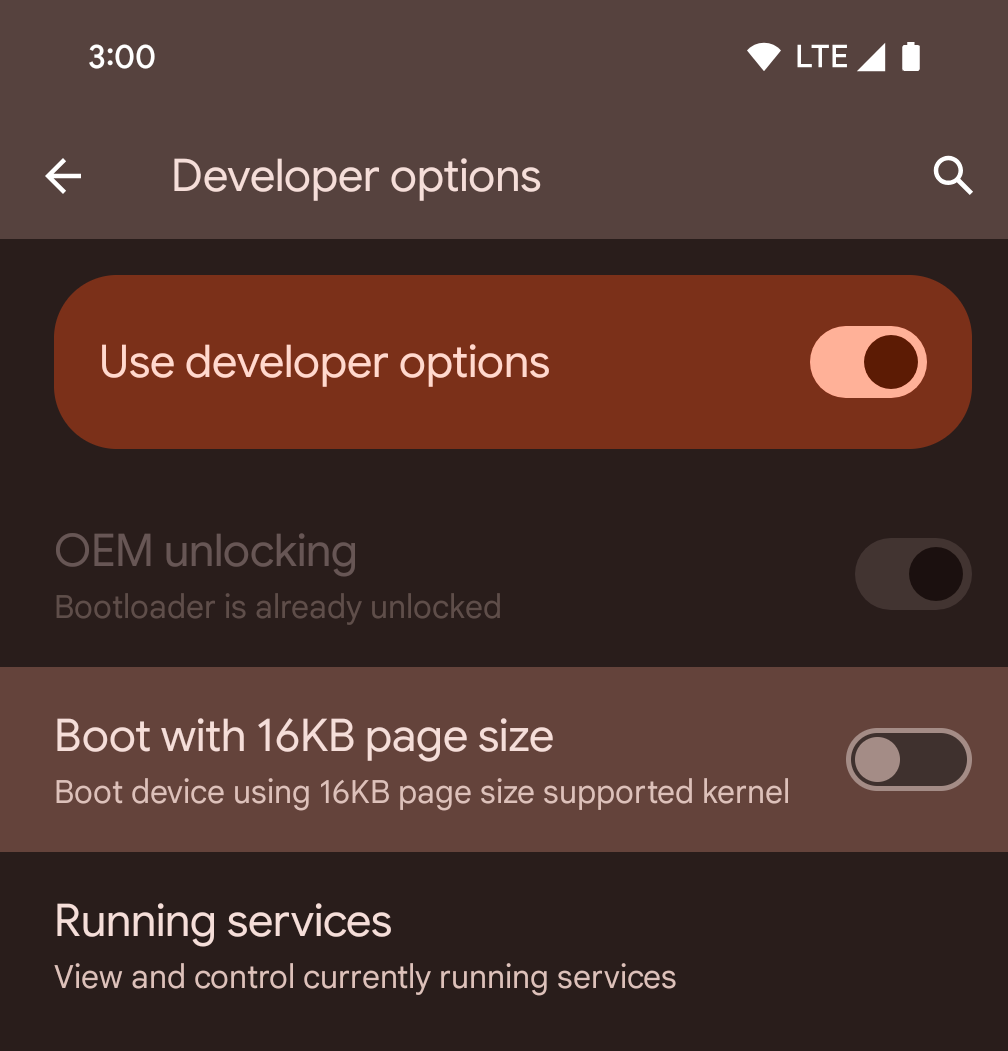
Включите параметр разработчика «Загрузка с размером страницы 16 КБ» , чтобы загрузить устройство в режиме 16 КБ.
В версиях Android 15 QPR можно использовать режим разработчика , доступный на некоторых устройствах, чтобы загрузить устройство в режиме 16 КБ и выполнить тестирование на устройстве. Перед использованием режима разработчика перейдите в Настройки > Система > Обновления ПО и примените все доступные обновления.
Данная опция для разработчиков доступна на следующих устройствах:
Pixel 8 и 8 Pro (с Android 15 QPR1 или выше)
Pixel 8a (с Android 15 QPR1 или выше)
Pixel 9, 9 Pro и 9 Pro XL (с Android 15 QPR2 или выше)
Pixel 9a (с Android 16 или выше)
Графика
Android 15 привносит новейшие графические улучшения, включая технологию ANGLE и дополнения к графической системе Canvas.
Модернизация доступа к графическому процессору в Android

Аппаратное обеспечение Android значительно изменилось с первых дней, когда основная ОС работала на одном процессоре, а доступ к графическим процессорам осуществлялся с использованием API-интерфейсов, основанных на конвейерах с фиксированными функциями. Графический API Vulkan® доступен в NDK начиная с Android 7.0 (уровень API 24) с абстракцией более низкого уровня, которая лучше отражает современное аппаратное обеспечение графического процессора, лучше масштабируется для поддержки нескольких ядер ЦП и обеспечивает снижение нагрузки на драйвер ЦП, что приводит к улучшению производительность приложения. Vulkan поддерживается всеми современными игровыми движками.
Vulkan — предпочтительный интерфейс Android для графического процессора. Поэтому Android 15 включает ANGLE в качестве дополнительного уровня для запуска OpenGL® ES поверх Vulkan. Переход на ANGLE позволит стандартизировать реализацию Android OpenGL для улучшения совместимости и, в некоторых случаях, повышения производительности. Вы можете проверить стабильность и производительность вашего приложения OpenGL ES с помощью ANGLE, включив опцию разработчика в «Настройки» -> «Система» -> «Параметры разработчика» -> «Экспериментально: включить ANGLE на Android 15».
Android ANGLE на дорожной карте Vulkan
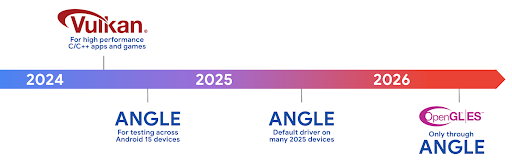
В рамках оптимизации нашего стека графических процессоров в дальнейшем мы будем поставлять ANGLE в качестве системного драйвера GL на большее количество новых устройств, при этом в будущем ожидается, что OpenGL/ES будет доступен только через ANGLE. При этом мы планируем продолжить поддержку OpenGL ES на всех устройствах .
Рекомендуемые следующие шаги
Используйте параметры разработчика, чтобы выбрать драйвер ANGLE для OpenGL ES и протестировать свое приложение. Для новых проектов мы настоятельно рекомендуем использовать Vulkan для C/C++.
Улучшения для Canvas
Android 15 продолжает модернизацию графической системы Android Canvas с дополнительными возможностями:
-
Matrix44предоставляет матрицу 4x4 для преобразования координат, которую следует использовать, когда вы хотите манипулировать холстом в 3D. -
clipShaderпересекает текущий клип с указанным шейдером, аclipOutShaderустанавливает для клипа разницу между текущим клипом и шейдером, каждый из которых рассматривает шейдер как альфа-маску. Это позволяет эффективно рисовать сложные формы.
Производительность и батарея
Android продолжает уделять основное внимание улучшению производительности и качества ваших приложений. Android 15 представляет API, которые помогают сделать выполнение задач в вашем приложении более эффективным, оптимизировать производительность приложения и собирать информацию о ваших приложениях.
Рекомендации по энергоэффективности, отладка использования сети и энергии, а также подробная информация о том, как мы повышаем эффективность использования батареи в фоновом режиме в Android 15 и последних версиях Android, представлены в докладе « Повышение эффективности использования батареи в фоновом режиме на Android» на конференции Google I/O.
API ApplicationStartInfo
В предыдущих версиях Android запуск приложений был чем-то вроде загадки. В вашем приложении было сложно определить, началось ли оно с холодного, теплого или горячего состояния. Также было сложно узнать, сколько времени ваше приложение тратило на различных этапах запуска: разветвление процесса, вызов onCreate , рисование первого кадра и многое другое. Когда был создан экземпляр вашего класса Application , у вас не было возможности узнать, запускается ли приложение с широковещательной рассылки, поставщика контента, задания, резервной копии, завершения загрузки, сигнала тревоги или Activity .
API ApplicationStartInfo в Android 15 предоставляет все это и многое другое. Вы даже можете добавить в поток свои собственные временные метки, чтобы собирать данные о времени в одном месте. Помимо сбора метрик, вы можете использовать ApplicationStartInfo , чтобы напрямую оптимизировать запуск приложения; например, вы можете исключить дорогостоящее создание экземпляров библиотек, связанных с пользовательским интерфейсом, в классе Application , когда ваше приложение запускается из-за широковещательной рассылки.
Подробная информация о размере приложения
Начиная с Android 8.0 (уровень API 26), Android включает API StorageStats.getAppBytes , который суммирует установленный размер приложения как одно число байтов, которое представляет собой сумму размера APK, размера файлов, извлеченных из APK, и файлы, созданные на устройстве, такие как предварительно скомпилированный код (AOT). Это число не очень информативно с точки зрения того, как ваше приложение использует хранилище.
В Android 15 добавлен API StorageStats.getAppBytesByDataType([type]) , который позволяет вам получить представление о том, как ваше приложение использует все это пространство, включая разделение файлов APK, код, связанный с AOT и ускорением, метаданные dex, библиотеки и управляемые профили.
Профилирование, управляемое приложением
Android 15 включает класс ProfilingManager , который позволяет собирать информацию о профилировании внутри вашего приложения, например дампы кучи, профили кучи, выборку стека и многое другое. Он обеспечивает обратный вызов вашего приложения с предоставленным тегом для идентификации выходного файла, который доставляется в каталог файлов вашего приложения. API ограничивает скорость, чтобы минимизировать влияние на производительность.
Чтобы упростить создание запросов профилирования в вашем приложении, мы рекомендуем использовать соответствующий API Profiling AndroidX, доступный в версии Core 1.15.0-rc01 или выше.
Улучшения базы данных SQLite
В Android 15 представлены API-интерфейсы SQLite, которые предоставляют расширенные функции базового механизма SQLite, направленные на решение конкретных проблем с производительностью, которые могут проявляться в приложениях. Эти API включены в обновление SQLite до версии 3.44.3 .
Разработчикам следует ознакомиться с передовыми практиками производительности SQLite , чтобы максимально эффективно использовать свою базу данных SQLite, особенно при работе с большими базами данных или при выполнении запросов, чувствительных к задержке.
- Отложенные транзакции только для чтения : при выпуске транзакций, предназначенных только для чтения (не включая операторы записи), используйте
beginTransactionReadOnly()иbeginTransactionWithListenerReadOnly(SQLiteTransactionListener)для выполненияDEFERREDтранзакций только для чтения. Такие транзакции могут выполняться одновременно друг с другом, а если база данных находится в режиме WAL, они могут выполняться одновременно сIMMEDIATEилиEXCLUSIVEтранзакциями. - Количество и идентификаторы строк : были добавлены API для получения количества измененных строк или идентификатора последней вставленной строки без выполнения дополнительного запроса.
getLastChangedRowCount()возвращает количество строк, которые были вставлены, обновлены или удалены последним оператором SQL в текущей транзакции, аgetTotalChangedRowCount()возвращает количество в текущем соединении.getLastInsertRowId()возвращаетrowidпоследней строки, которая будет вставлена в текущее соединение. - Необработанные операторы : выдайте необработанный оператор SQlite, минуя удобные оболочки и любые дополнительные накладные расходы на обработку, которые они могут понести.
Обновления Android Dynamic Performance Framework
В Android 15 мы продолжаем наши инвестиции в Android Dynamic Performance Framework (ADPF) — набор API-интерфейсов, которые позволяют играм и приложениям, требующим высокой производительности, более непосредственно взаимодействовать с энерго- и тепловыми системами устройств Android. На поддерживаемых устройствах в Android 15 добавлены возможности ADPF:
- Режим энергоэффективности для сеансов подсказок, указывающий, что связанные с ними потоки должны отдавать предпочтение энергосбережению, а не производительности, что отлично подходит для длительных фоновых рабочих нагрузок.
- О продолжительности работы графического процессора и центрального процессора можно сообщать в сеансах подсказок, что позволяет системе одновременно регулировать частоты процессора и графического процессора для наилучшего удовлетворения требований рабочей нагрузки.
- Пороговые значения температурного запаса для интерпретации возможного состояния теплового регулирования на основе прогнозирования запаса.
Чтобы узнать больше о том, как использовать ADPF в ваших приложениях и играх, перейдите к документации .
,В Android 15 мы продолжаем наши инвестиции в Android Dynamic Performance Framework (ADPF) — набор API-интерфейсов, которые позволяют играм и приложениям, требующим высокой производительности, более непосредственно взаимодействовать с энерго- и тепловыми системами устройств Android. На поддерживаемых устройствах в Android 15 добавлены возможности ADPF:
- Режим энергоэффективности для сеансов подсказок, указывающий, что связанные с ними потоки должны отдавать предпочтение энергосбережению, а не производительности, что отлично подходит для длительных фоновых рабочих нагрузок.
- О продолжительности работы графического процессора и центрального процессора можно сообщать в сеансах подсказок, что позволяет системе одновременно регулировать частоты процессора и графического процессора для наилучшего удовлетворения требований рабочей нагрузки.
- Пороговые значения температурного запаса для интерпретации возможного состояния теплового регулирования на основе прогнозирования запаса.
Чтобы узнать больше о том, как использовать ADPF в ваших приложениях и играх, перейдите к документации .
,В Android 15 мы продолжаем наши инвестиции в Android Dynamic Performance Framework (ADPF) — набор API-интерфейсов, которые позволяют играм и приложениям, требующим высокой производительности, более непосредственно взаимодействовать с энерго- и тепловыми системами устройств Android. На поддерживаемых устройствах в Android 15 добавлены возможности ADPF:
- Режим энергоэффективности для сеансов подсказок, указывающий, что связанные с ними потоки должны отдавать предпочтение энергосбережению, а не производительности, что отлично подходит для длительных фоновых рабочих нагрузок.
- О продолжительности работы графического процессора и центрального процессора можно сообщать в сеансах подсказок, что позволяет системе одновременно регулировать частоты процессора и графического процессора для наилучшего удовлетворения требований рабочей нагрузки.
- Пороговые значения температурного запаса для интерпретации возможного состояния теплового регулирования на основе прогнозирования запаса.
Чтобы узнать больше о том, как использовать ADPF в ваших приложениях и играх, перейдите к документации .
Конфиденциальность
Android 15 включает в себя множество функций, которые помогают разработчикам приложений защищать конфиденциальность пользователей.
Обнаружение записи экрана
В Android 15 добавлена поддержка приложений, позволяющих обнаружить, что они записываются. Обратный вызов вызывается всякий раз, когда приложение становится видимым или невидимым во время записи экрана. Приложение считается видимым, если записываются действия, принадлежащие UID процесса регистрации. Таким образом, если ваше приложение выполняет конфиденциальную операцию, вы можете сообщить пользователю, что его действия записываются.
val mCallback = Consumer<Int> { state ->
  if (state == SCREEN_RECORDING_STATE_VISIBLE) {
    // We're being recorded
  } else {
    // We're not being recorded
  }
}

override fun onStart() {
   super.onStart()
   val initialState =
      windowManager.addScreenRecordingCallback(mainExecutor, mCallback)
   mCallback.accept(initialState)
}

override fun onStop() {
    super.onStop()
    windowManager.removeScreenRecordingCallback(mCallback)
}
Расширенные возможности IntentFilter
В Android 15 реализована поддержка более точного разрешения Intent с помощью UriRelativeFilterGroup , который содержит набор объектов UriRelativeFilter , формирующих набор правил сопоставления Intent , каждое из которых должно выполняться, включая параметры URL-запроса, фрагменты URL-адресов и правила блокировки или исключения.
Эти правила можно определить в XML-файле AndroidManifest с помощью тега <uri-relative-filter-group> , который при необходимости может включать тег android:allow . Эти теги могут содержать теги <data> , которые используют существующие атрибуты тегов данных, а также атрибуты android:query и android:fragment .
Вот пример синтаксиса AndroidManifest :
<intent-filter android:autoVerify="true">
  <action android:name="android.intent.action.VIEW" />
  <category android:name="android.intent.category.BROWSABLE" />
  <category android:name="android.intent.category.DEFAULT" />
  <data android:scheme="http" />
  <data android:scheme="https" />
  <data android:host="astore.com" />
  <uri-relative-filter-group>
    <data android:pathPrefix="/auth" />
    <data android:query="region=na" />
  </uri-relative-filter-group>
  <uri-relative-filter-group android:allow="false">
    <data android:pathPrefix="/auth" />
    <data android:query="mobileoptout=true" />
  </uri-relative-filter-group>
  <uri-relative-filter-group android:allow="false">
    <data android:pathPrefix="/auth" />
    <data android:fragmentPrefix="faq" />
  </uri-relative-filter-group>
</intent-filter>
Личное пространство
Личное пространство позволяет пользователям создать на своем устройстве отдельное пространство, где они смогут хранить конфиденциальные приложения вдали от посторонних глаз, используя дополнительный уровень аутентификации. В личном пространстве используется отдельный профиль пользователя. Пользователь может выбрать использование блокировки устройства или отдельный фактор блокировки для личного пространства.
Приложения в личном пространстве отображаются в отдельном контейнере на панели запуска и скрыты от просмотра последних, уведомлений, настроек и других приложений, когда личное пространство заблокировано. Созданный и загруженный пользователем контент (например, медиафайлы или файлы) и учетные записи разделены между частным пространством и основным пространством. Системный общий лист и средство выбора фотографий можно использовать для предоставления приложениям доступа к контенту в разных пространствах, когда личное пространство разблокировано.
Пользователи не могут перемещать существующие приложения и их данные в личное пространство. Вместо этого пользователи выбирают вариант установки в личном пространстве, чтобы установить приложение, используя любой магазин приложений, который они предпочитают. Приложения в личном пространстве устанавливаются как отдельные копии любых приложений в основном пространстве (новые копии одного и того же приложения).
Когда пользователь блокирует личное пространство, профиль останавливается. Пока профиль остановлен, приложения в личном пространстве больше не активны и не могут выполнять приоритетные или фоновые действия, включая показ уведомлений.
Мы рекомендуем вам протестировать свое приложение в личном пространстве, чтобы убедиться, что оно работает должным образом, особенно если ваше приложение попадает в одну из следующих категорий:
- Приложения с логикой рабочих профилей , которая предполагает, что все установленные копии их приложений, которых нет в основном профиле, находятся в рабочем профиле.
- Медицинские приложения
- Приложения для запуска
- Приложения из магазина приложений
Запрос последнего выбранного пользователем элемента для доступа к выбранным фотографиям.
Приложения теперь могут выделять только те фотографии и видео, которые были выбраны последними, если предоставлен частичный доступ к медиа-разрешениям. Эта функция может улучшить взаимодействие с пользователем в приложениях, которые часто запрашивают доступ к фотографиям и видео. Чтобы использовать эту функцию в своем приложении, включите аргумент QUERY_ARG_LATEST_SELECTION_ONLY при запросе MediaStore через ContentResolver .
Котлин
val externalContentUri = MediaStore.Files.getContentUri("external")

val mediaColumns = arrayOf(
   FileColumns._ID,
   FileColumns.DISPLAY_NAME,
   FileColumns.MIME_TYPE,
)

val queryArgs = bundleOf(
   // Return only items from the last selection (selected photos access)
   QUERY_ARG_LATEST_SELECTION_ONLY to true,
   // Sort returned items chronologically based on when they were added to the device's storage
   QUERY_ARG_SQL_SORT_ORDER to "${FileColumns.DATE_ADDED} DESC",
   QUERY_ARG_SQL_SELECTION to "${FileColumns.MEDIA_TYPE} = ? OR ${FileColumns.MEDIA_TYPE} = ?",
   QUERY_ARG_SQL_SELECTION_ARGS to arrayOf(
       FileColumns.MEDIA_TYPE_IMAGE.toString(),
       FileColumns.MEDIA_TYPE_VIDEO.toString()
   )
)
Ява
Uri externalContentUri = MediaStore.Files.getContentUri("external");

String[] mediaColumns = {
    FileColumns._ID,
    FileColumns.DISPLAY_NAME,
    FileColumns.MIME_TYPE
};

Bundle queryArgs = new Bundle();
queryArgs.putBoolean(MediaStore.QUERY_ARG_LATEST_SELECTION_ONLY, true);
queryArgs.putString(MediaStore.QUERY_ARG_SQL_SORT_ORDER, FileColumns.DATE_ADDED + " DESC");
queryArgs.putString(MediaStore.QUERY_ARG_SQL_SELECTION, FileColumns.MEDIA_TYPE + " = ? OR " + FileColumns.MEDIA_TYPE + " = ?");
queryArgs.putStringArray(MediaStore.QUERY_ARG_SQL_SELECTION_ARGS, new String[] {
    String.valueOf(FileColumns.MEDIA_TYPE_IMAGE),
    String.valueOf(FileColumns.MEDIA_TYPE_VIDEO)
});
«Песочница конфиденциальности» на Android
Android 15 включает новейшие расширения Android Ad Services, включая последнюю версию Privacy Sandbox для Android . Это дополнение является частью нашей работы по разработке технологий, которые улучшают конфиденциальность пользователей и обеспечивают эффективную персонализированную рекламу для мобильных приложений. На нашей странице «Песочница конфиденциальности» вы найдете дополнительную информацию о предварительной версии и бета-версиях Privacy Sandbox для разработчиков Android, которые помогут вам начать работу.
Health Connect
Android 15 объединяет новейшие расширения Health Connect от Android — безопасной и централизованной платформы для управления и обмена данными о здоровье и фитнесе, собранными приложениями. В этом обновлении добавлена поддержка дополнительных типов данных о фитнесе , питании , температуре кожи, планах тренировок и многом другом.
Отслеживание температуры кожи позволяет пользователям хранить и передавать более точные данные о температуре с носимого или другого устройства отслеживания.
Планы тренировок — это структурированные планы тренировок, которые помогают пользователю достичь своих целей в фитнесе. Поддержка планов обучения включает в себя различные цели завершения и производительности:
- Цели достижения, касающиеся сожженных калорий , расстояния , продолжительности , повторений и шагов .
- Цели производительности включают максимально возможное количество повторений (AMRAP) , частоту шагов , частоту сердечных сокращений , мощность , воспринимаемую скорость нагрузки и скорость .
Узнайте больше о последних обновлениях Health Connect в Android в докладе «Создание адаптируемого опыта с помощью Android Health» от Google I/O.
,Android 15 объединяет новейшие расширения Health Connect от Android — безопасной и централизованной платформы для управления и обмена данными о здоровье и фитнесе, собранными приложениями. В этом обновлении добавлена поддержка дополнительных типов данных о фитнесе , питании , температуре кожи, планах тренировок и многом другом.
Отслеживание температуры кожи позволяет пользователям хранить и передавать более точные данные о температуре с носимого или другого устройства слежения.
Планы тренировок — это структурированные планы тренировок, которые помогают пользователю достичь своих целей в фитнесе. Поддержка планов обучения включает в себя различные цели завершения и производительности:
- Цели достижения, касающиеся сожженных калорий , расстояния , продолжительности , повторений и шагов .
- Цели производительности включают максимально возможное количество повторений (AMRAP) , частоту шагов , частоту сердечных сокращений , мощность , воспринимаемую скорость нагрузки и скорость .
Узнайте больше о последних обновлениях Health Connect в Android в докладе «Создание адаптируемого опыта с помощью Android Health» от Google I/O.
Совместное использование экрана приложения
Android 15 поддерживает совместное использование экрана приложения, поэтому пользователи могут делиться или записывать только окно приложения, а не весь экран устройства. Эта функция, впервые включенная в Android 14 QPR2, включает обратные вызовы MediaProjection , которые позволяют вашему приложению настраивать процесс совместного использования экрана приложения. Обратите внимание, что для приложений, предназначенных для Android 14 (уровень API 34) или выше, требуется согласие пользователя для каждого сеанса захвата MediaProjection .
Пользовательский опыт и пользовательский интерфейс системы
Android 15 предоставляет разработчикам приложений и пользователям больше контроля и гибкости в настройке своих устройств в соответствии с их потребностями.
Чтобы узнать больше о том, как использовать последние улучшения в Android 15 для улучшения пользовательского опыта вашего приложения, посмотрите доклад « Улучшение пользовательского опыта вашего Android-приложения» с конференции Google I/O.
Более информативный предварительный просмотр виджетов с помощью API генерированных предварительных просмотров.
До Android 15 единственным способом обеспечить предварительный просмотр средства выбора виджетов было указание статического изображения или ресурса макета . Эти предварительные просмотры часто существенно отличаются от внешнего вида фактического виджета, когда он размещен на главном экране. Кроме того, статические ресурсы невозможно создавать с помощью Jetpack Glance, поэтому разработчику Glance приходилось делать снимок экрана своего виджета или создавать макет XML, чтобы иметь предварительный просмотр виджета.
В Android 15 добавлена поддержка созданных предварительных просмотров. Это означает, что поставщики виджетов приложений могут создавать RemoteViews для использования в качестве предварительного просмотра средства выбора вместо статического ресурса.
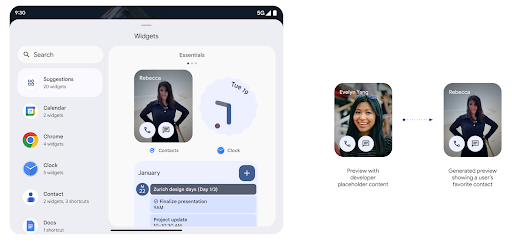
Нажмите API
Приложения могут предоставлять сгенерированные предварительные просмотры через push API. Приложения могут предоставлять предварительные просмотры в любой момент своего жизненного цикла и не получают явного запроса от хоста на предоставление предварительных просмотров. Предварительные просмотры сохраняются в AppWidgetService , и хосты могут запрашивать их по требованию. В следующем примере загружается ресурс макета виджета XML и устанавливается его в качестве предварительного просмотра:
AppWidgetManager.getInstance(appContext).setWidgetPreview(
   ComponentName(
       appContext,
       SociaLiteAppWidgetReceiver::class.java
   ),
   AppWidgetProviderInfo.WIDGET_CATEGORY_HOME_SCREEN,
   RemoteViews("com.example", R.layout.widget_preview)
)
Ожидаемый поток:
- В любой момент поставщик виджетов вызывает
setWidgetPreview. Предоставленные предварительные просмотры сохраняются вAppWidgetServiceвместе с другой информацией поставщика. -
setWidgetPreviewуведомляет узлы об обновленной предварительной версии через обратный вызовAppWidgetHost.onProvidersChanged. В ответ хост виджета перезагружает всю информацию о своем провайдере. - При отображении предварительного просмотра виджета хост проверяет
AppWidgetProviderInfo.generatedPreviewCategoriesи, если выбранная категория доступна, вызываетAppWidgetManager.getWidgetPreview, чтобы вернуть сохраненный предварительный просмотр для этого провайдера.
Когда вызывать setWidgetPreview
Поскольку обратный вызов для предоставления предварительного просмотра отсутствует, приложения могут отправлять предварительные просмотры в любой момент их работы. Частота обновления предварительного просмотра зависит от варианта использования виджета.
В следующем списке описаны две основные категории вариантов использования предварительной версии:
- Поставщики, которые показывают реальные данные в предварительных просмотрах виджетов, например персонализированную или недавнюю информацию. Эти поставщики могут установить предварительный просмотр после того, как пользователь вошел в систему или выполнил первоначальную настройку в своем приложении. После этого они могут настроить периодическую задачу для обновления предварительных просмотров с выбранной частотой. Примерами виджетов этого типа могут быть виджет фотографий, календаря, погоды или новостей.
- Поставщики, которые отображают статическую информацию в предварительном просмотре, или виджеты быстрого действия, которые не отображают никаких данных. Эти поставщики могут установить предварительный просмотр один раз при первом запуске приложения. Примеры виджетов этого типа включают виджет быстрых действий на диске или виджет ярлыков Chrome.
Некоторые провайдеры могут отображать статические предварительные просмотры в средстве выбора режима концентратора, а реальную информацию — в средстве выбора главного экрана. Эти поставщики должны следовать рекомендациям для обоих этих вариантов использования, чтобы установить предварительный просмотр.
Картинка в картинке
В Android 15 представлены изменения в режиме «картинка в картинке» (PiP), обеспечивающие еще более плавный переход при входе в режим «картинка в картинке». Это будет полезно для приложений, в которых элементы пользовательского интерфейса накладываются поверх основного пользовательского интерфейса, который входит в PiP.
Разработчики используют обратный вызов onPictureInPictureModeChanged для определения логики, которая переключает видимость наложенных элементов пользовательского интерфейса. Этот обратный вызов запускается, когда завершается анимация входа или выхода PiP. Начиная с Android 15, класс PictureInPictureUiState включает еще одно состояние.
В этом состоянии пользовательского интерфейса приложения, предназначенные для Android 15 (уровень API 35), будут наблюдать за вызовом обратного вызова Activity#onPictureInPictureUiStateChanged с помощью isTransitioningToPip() как только начнется анимация PiP. Существует множество элементов пользовательского интерфейса, которые не имеют отношения к приложению, когда оно находится в режиме «картинка в картинке», например представления или макет, включающие такую информацию, как предложения, предстоящие видео, рейтинги и заголовки. Когда приложение переходит в режим PiP, используйте обратный вызов onPictureInPictureUiStateChanged , чтобы скрыть эти элементы пользовательского интерфейса. Когда приложение переходит в полноэкранный режим из окна PiP, используйте обратный вызов onPictureInPictureModeChanged чтобы отобразить эти элементы, как показано в следующих примерах:
override fun onPictureInPictureUiStateChanged(pipState: PictureInPictureUiState) {
        if (pipState.isTransitioningToPip()) {
          // Hide UI elements
        }
    }
override fun onPictureInPictureModeChanged(isInPictureInPictureMode: Boolean) {
        if (isInPictureInPictureMode) {
          // Unhide UI elements
        }
    }
Это быстрое переключение видимости ненужных элементов пользовательского интерфейса (для окна PiP) помогает обеспечить более плавную анимацию входа в PiP без мерцания.
Улучшены правила режима «Не беспокоить».
AutomaticZenRule позволяет приложениям настраивать правила управления вниманием (не беспокоить) и решать, когда их активировать или деактивировать. В Android 15 эти правила значительно усовершенствованы с целью улучшения пользовательского опыта. Включены следующие улучшения:
- Добавление типов в
AutomaticZenRule, позволяющее системе применять специальную обработку к некоторым правилам. - Добавление значка в
AutomaticZenRule, помогающее сделать режимы более узнаваемыми. - Добавление в
AutomaticZenRuleстрокиtriggerDescription, описывающей условия, при которых правило должно стать активным для пользователя. - В
AutomaticZenRuleдобавленZenDeviceEffects, позволяющий правилам запускать такие функции, как отображение оттенков серого, ночной режим или затемнение обоев.
Настройте эффект вибрации для каналов уведомлений.
Android 15 поддерживает настройку насыщенной вибрации для входящих уведомлений по каналам с помощью NotificationChannel.setVibrationEffect , поэтому ваши пользователи могут различать разные типы уведомлений, не глядя на свое устройство.
Индикатор состояния проекции и автоматическая остановка
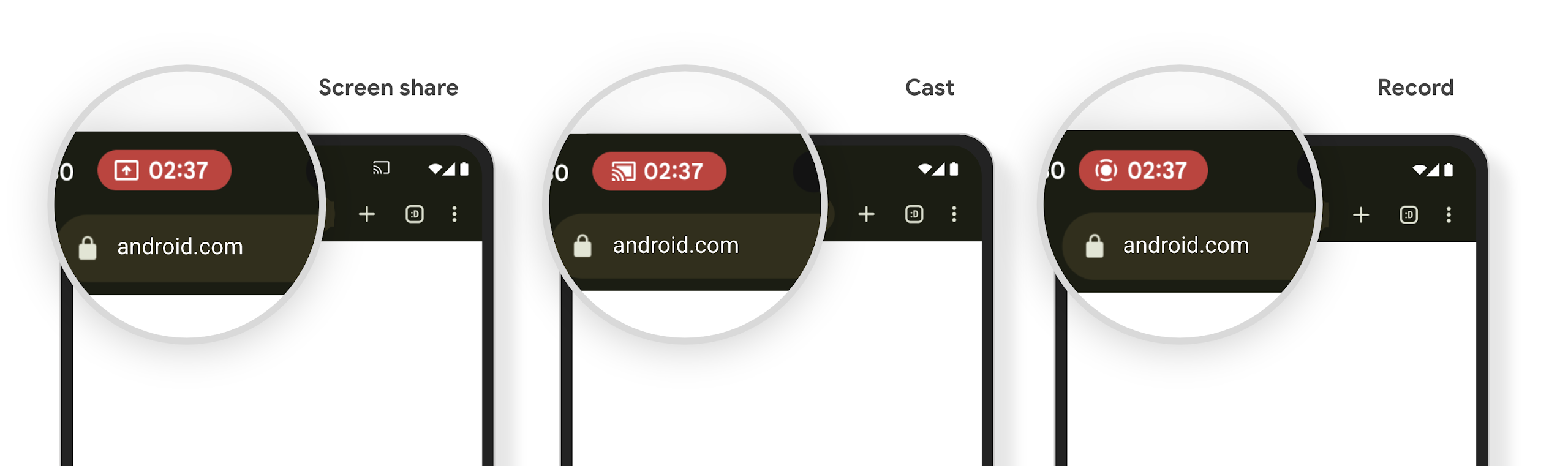
Медиа-проекция может раскрыть личную информацию пользователя. Новый, заметный чип строки состояния информирует пользователей о любой текущей проекции экрана. Пользователи могут коснуться чипа, чтобы остановить трансляцию экрана, совместное использование или запись. Кроме того, для более интуитивно понятного взаимодействия с пользователем любое текущее проецирование экрана теперь автоматически останавливается при блокировке экрана устройства.
Большие экраны и форм-факторы
Android 15 обеспечивает вашим приложениям поддержку, позволяющую максимально эффективно использовать форм-факторы Android, включая большие экраны, устройства с откидной и складной клавиатурой.
Улучшена многозадачность на большом экране.
Android 15 дает пользователям больше возможностей для многозадачности на устройствах с большим экраном. Например, пользователи могут сохранить свои любимые комбинации приложений с разделенным экраном для быстрого доступа и закрепить панель задач на экране для быстрого переключения между приложениями. Это означает, что обеспечение адаптивности вашего приложения важнее, чем когда-либо.
Google I/O проводит сеансы по созданию адаптивных приложений для Android и созданию пользовательского интерфейса с помощью адаптивной библиотеки Material 3, которые могут вам помочь, а в нашей документации есть дополнительные сведения, которые помогут вам проектировать для больших экранов .
Поддержка внешнего экрана
Ваше приложение может объявить свойство , которое Android 15 использует, чтобы позволить вашему Application или Activity отображаться на небольших верхних экранах поддерживаемых переворачивающихся устройств. Эти экраны слишком малы, чтобы их можно было рассматривать как совместимые цели для запуска приложений Android, но ваше приложение может согласиться на их поддержку, что сделает ваше приложение доступным в большем количестве мест.
Подключение
Обновление Android 15 предоставляет вашему приложению доступ к новейшим достижениям в области коммуникационных и беспроводных технологий.
Спутниковая поддержка
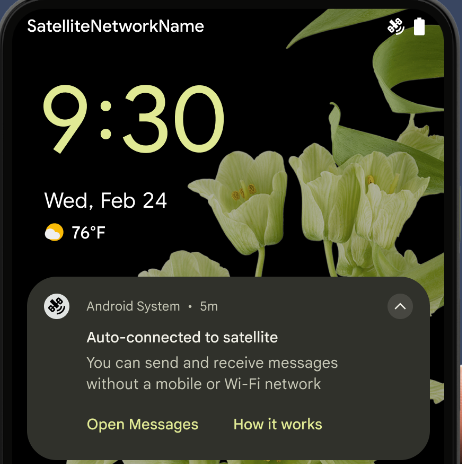
Android 15 продолжает расширять поддержку платформы для спутниковой связи и включает в себя некоторые элементы пользовательского интерфейса, обеспечивающие единообразный пользовательский опыт в сфере спутниковой связи.
Приложения могут использовать ServiceState.isUsingNonTerrestrialNetwork() для определения того, когда устройство подключено к спутнику, что дает им больше информации о том, почему все сетевые службы могут быть недоступны. Кроме того, Android 15 обеспечивает поддержку приложений SMS и MMS, а также предустановленных приложений RCS для использования спутниковой связи для отправки и получения сообщений.
Более плавная работа NFC
Android 15 работает над тем, чтобы сделать процесс оплаты одним касанием более простым и надежным, продолжая при этом поддерживать надежную экосистему приложений Android NFC. На поддерживаемых устройствах приложения могут запрашивать NfcAdapter для перехода в режим наблюдения , в котором устройство прослушивает, но не отвечает устройствам чтения NFC, отправляя на обработку объекты PollingFrame службы NFC приложения. Объекты PollingFrame можно использовать для аутентификации перед первой связью со считывателем NFC, что во многих случаях позволяет выполнить транзакцию одним касанием.
Кроме того, приложения могут зарегистрировать фильтр на поддерживаемых устройствах, чтобы они могли получать уведомления об активности цикла опроса, что обеспечивает бесперебойную работу с несколькими приложениями, поддерживающими NFC.
Роль кошелька
В Android 15 представлена роль кошелька, которая обеспечивает более тесную интеграцию с предпочтительным приложением-кошельком пользователя. Эта роль заменяет настройку бесконтактной оплаты NFC по умолчанию. Пользователи могут управлять владельцем роли Кошелька, перейдя в «Настройки» > «Приложения» > «Приложения по умолчанию» .
Роль «Кошелек» используется при маршрутизации касаний NFC для AID, зарегистрированных в категории платежей. Нажатия всегда передаются владельцу роли «Кошелек», если только на переднем плане не работает другое приложение, зарегистрированное для того же AID.
Эта роль также используется для определения того, куда должна перемещаться плитка быстрого доступа к кошельку при активации. Если для роли установлено значение «Нет», плитка быстрого доступа недоступна, а касания NFC категории оплаты доставляются только в приложение на переднем плане.
Безопасность
Android 15 помогает повысить безопасность вашего приложения, защитить его данные и предоставить пользователям больше прозрачности и контроля над своими данными. Подробнее о том, что мы делаем для улучшения защиты пользователей и защиты вашего приложения от новых угроз, смотрите в докладе « Защита безопасности пользователей на Android» на конференции Google I/O.
Интеграция менеджера учетных данных с функцией автозаполнения.
Начиная с Android 15, разработчики могут связывать определенные представления, такие как поля имени пользователя или пароля, с запросами диспетчера учетных данных , что упрощает предоставление индивидуального пользовательского опыта во время процесса входа. Когда пользователь фокусируется на одном из этих представлений, соответствующий запрос отправляется в Credential Manager. Полученные учетные данные объединяются между поставщиками и отображаются в резервных пользовательских интерфейсах автозаполнения, таких как встроенные или раскрывающиеся предложения. Библиотека Jetpack androidx.credentials является предпочтительной конечной точкой для разработчиков и скоро будет доступна для дальнейшего улучшения этой функции в Android 15 и более поздних версиях.
Интегрируйте регистрацию и вход в систему одним касанием с использованием биометрических данных.
Credential Manager интегрирует биометрические запросы в процессы создания учетных данных и входа в систему , устраняя необходимость для поставщиков управлять биометрическими запросами. В результате поставщикам учетных данных необходимо сосредоточиться только на результатах потоков создания и получения, дополненных результатами биометрического потока. Этот упрощенный процесс обеспечивает более эффективный и оптимизированный процесс создания и поиска учетных данных.
Управление ключами для сквозного шифрования
Мы представляем E2eeContactKeysManager в Android 15, который упрощает сквозное шифрование (E2EE) в ваших приложениях Android, предоставляя API на уровне ОС для хранения криптографических открытых ключей.
E2eeContactKeysManager предназначен для интеграции с приложением контактов платформы, чтобы предоставить пользователям централизованный способ управления и проверки открытых ключей своих контактов.
Проверка прав доступа к URI контента
В Android 15 представлен набор API, которые выполняют проверку разрешений для URI контента:
-
Context.checkContentUriPermissionFull: выполняет полную проверку разрешений для URI контента. - Атрибут манифеста
ActivityrequireContentUriPermissionFromCaller: обеспечивает соблюдение указанных разрешений для предоставленных URI контента при запуске действия. - Класс
ComponentCallerдля вызывающихActivity: представляет приложение, запустившее действие.
Доступность
В Android 15 добавлены функции, улучшающие доступность для пользователей.
Улучшенный шрифт Брайля
В Android 15 мы позволили TalkBack поддерживать дисплеи Брайля, использующие стандарт HID, как через USB, так и через защищенный Bluetooth.
Этот стандарт, очень похожий на тот, который используется в мышах и клавиатурах, со временем поможет Android поддерживать более широкий спектр дисплеев Брайля.
Интернационализация
Android 15 добавляет функции и возможности, которые улучшают пользовательский опыт при использовании устройства на разных языках.
CJK переменный шрифт
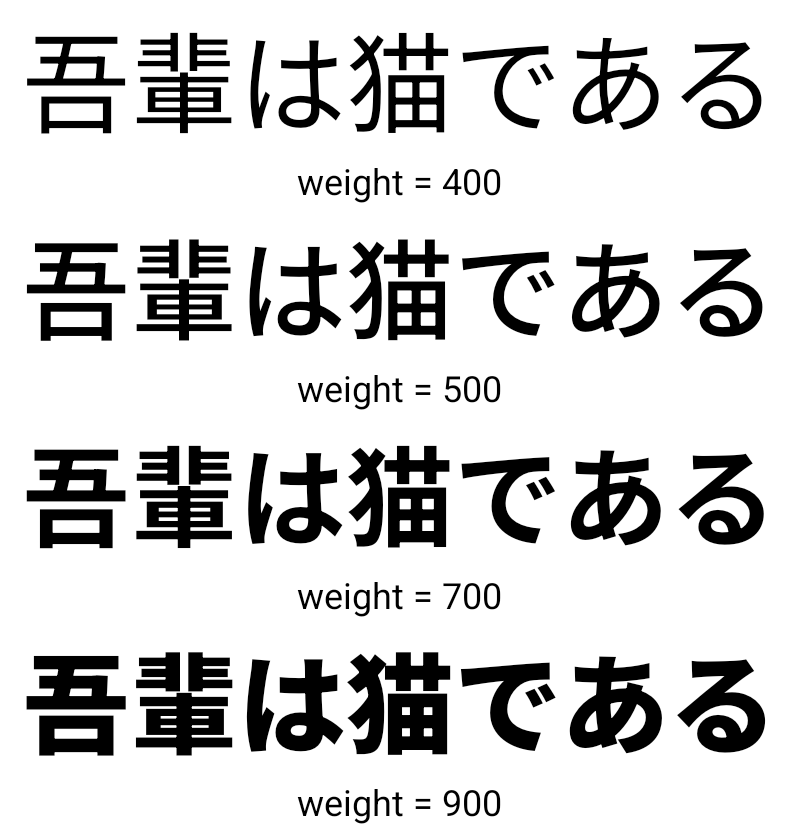
Начиная с Android 15, файл шрифта для китайского, японского и корейского (CJK) языков NotoSansCJK теперь является переменным шрифтом. Вариативные шрифты открывают возможности для творческой типографики на языках CJK. Дизайнеры могут исследовать более широкий спектр стилей и создавать визуально яркие макеты, которые раньше было трудно или невозможно реализовать.
Обоснование между персонажами
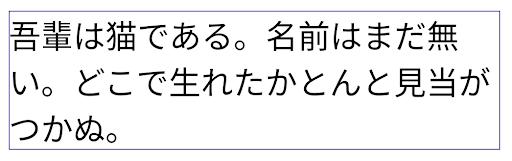
Начиная с Android 15, текст можно выравнивать с использованием межбуквенного интервала с помощью JUSTIFICATION_MODE_INTER_CHARACTER . Выравнивание между словами было впервые представлено в Android 8.0 (уровень API 26), а выравнивание между символами предоставляет аналогичные возможности для языков, которые используют символ пробела для сегментации, таких как китайский, японский и другие.
JUSTIFICATION_MODE_NONE . 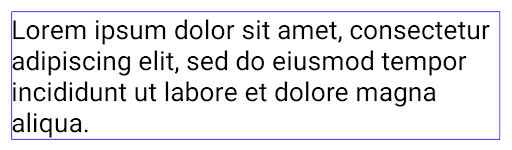
JUSTIFICATION_MODE_NONE . 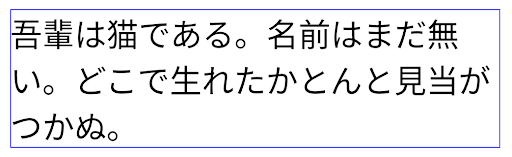
JUSTIFICATION_MODE_INTER_WORD . 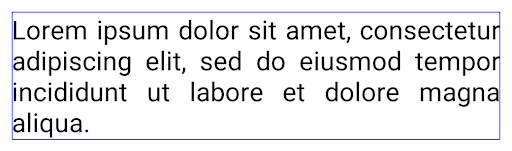
JUSTIFICATION_MODE_INTER_WORD . 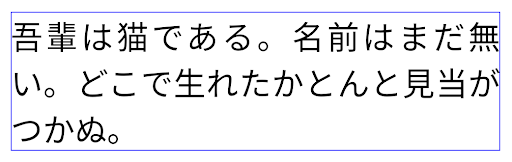
JUSTIFICATION_MODE_INTER_CHARACTER . 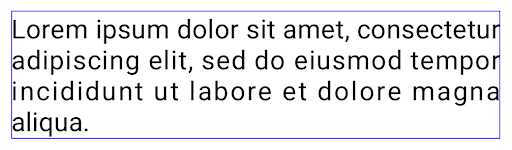
JUSTIFICATION_MODE_INTER_CHARACTER .Автоматическая настройка переноса строки
Android начал поддерживать разрывы строк на основе фраз для японского и корейского языков в Android 13 (уровень API 33). Однако хотя разрывы строк на основе фраз улучшают читаемость коротких строк текста, они плохо работают с длинными строками текста. В Android 15 приложения могут применять разрывы строк на основе фраз только для коротких строк текста, используя параметр LINE_BREAK_WORD_STYLE_AUTO . Эта опция выбирает лучший вариант стиля слова для текста.
Для коротких строк текста используются разрывы строк на основе фраз, которые работают так же, как LINE_BREAK_WORD_STYLE_PHRASE , как показано на следующем рисунке:
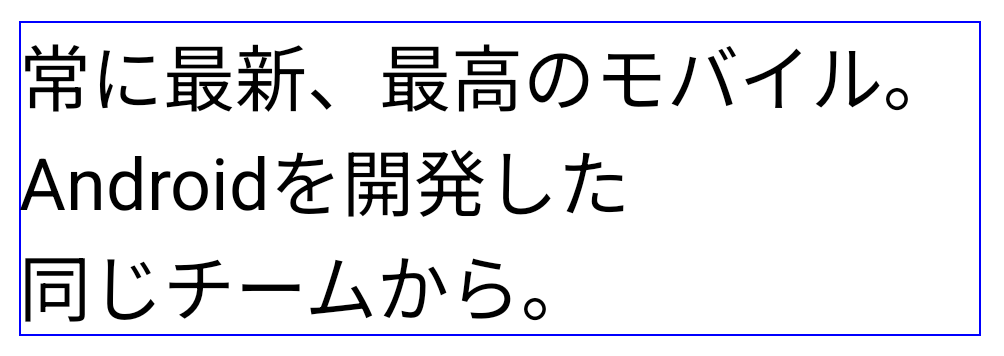
LINE_BREAK_WORD_STYLE_AUTO применяет разрывы строк на основе фраз, чтобы улучшить читаемость текста. Это то же самое, что применить LINE_BREAK_WORD_STYLE_PHRASE . Для более длинных строк текста LINE_BREAK_WORD_STYLE_AUTO использует стиль слов без разрывов строк, который работает так же, как LINE_BREAK_WORD_STYLE_NONE , как показано на следующем рисунке:
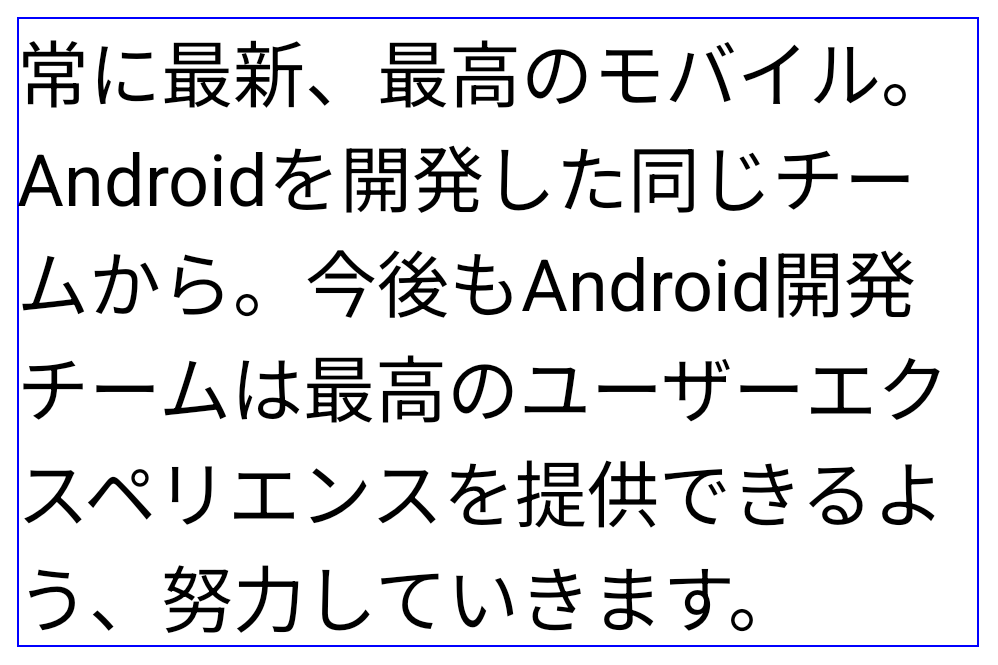
LINE_BREAK_WORD_STYLE_AUTO не применяет стиль слов с разрывом строки, чтобы улучшить читаемость текста. Это то же самое, что применить LINE_BREAK_WORD_STYLE_NONE .Дополнительный японский шрифт хентайгана
В Android 15 по умолчанию включен файл шрифта для старой японской хираганы (известной как хентайгана). Уникальные формы символов хентайганы могут придать особый шарм произведениям искусства или дизайну, а также помогают сохранить точную передачу и понимание древних японских документов.
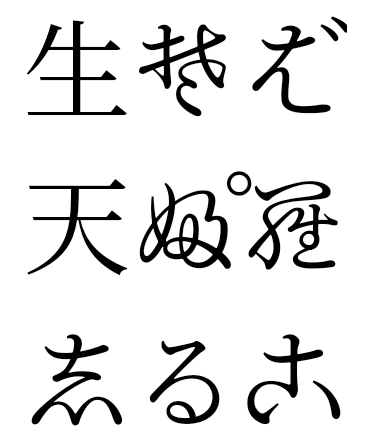
Конус VideoLAN Copyright (c) 1996-2010 VideoLAN. Этот логотип или его измененная версия может использоваться или изменяться кем-либо для ссылки на проект VideoLAN или любой продукт, разработанный командой VideoLAN, но не означает одобрения проекта.
Vulkan и логотип Vulkan являются зарегистрированными торговыми марками Khronos Group Inc.
OpenGL является зарегистрированной торговой маркой, а логотип OpenGL ES является торговой маркой Hewlett Packard Enterprise, используемой с разрешения Khronos.