

Android 15 では、デベロッパー向けに優れた機能と API が導入されました。以下のセクションでは、これらの機能の概要を説明し、関連する API を使い始めるうえで役立つ情報を提供します。
追加、変更、削除された API の詳細な一覧については、API 差分レポートをご覧ください。追加された API について詳しくは、Android API リファレンスをご覧ください。Android 15 の場合は、API レベル 35 で追加された API をご確認ください。プラットフォームの変更がアプリに影響する領域については、Android 15 の動作変更(Android 15 をターゲットとするアプリの場合とすべてのアプリの場合)をご確認ください。
カメラとメディア
Android 15 には、カメラとメディアのユーザー エクスペリエンスを向上させるさまざまな機能が含まれています。また、クリエイターが Android で思い描いたビジョンを実現するためのツールやハードウェアにアクセスできるようになります。
Android のメディアとカメラの最新機能とデベロッパー ソリューションについて詳しくは、Google I/O のトーク Building modern Android media and camera experiences をご覧ください。
Low Light Boost
Android 15 では、Camera 2 と夜間モードのカメラ拡張機能の両方で使用できる自動露出モードである Low Light Boost が導入されています。Low Light Boost は、暗い場所でプレビュー ストリームの露出を調整します。これは、夜間モードのカメラ拡張機能が静止画像を作成する方法とは異なります。夜間モードでは、連続撮影した写真を組み合わせて、1 枚の補正済み画像を作成します。夜間モードは静止画像の作成に非常に適していますが、連続したフレーム ストリームを作成することはできません。一方、低照度ブーストは連続したフレーム ストリームを作成できます。そのため、ローライト ブーストにより、次のようなカメラ機能が有効になります。
- 画像プレビューが強化され、暗い場所でも写真の構図を決めやすくなりました
- 暗い場所での QR コードのスキャン
Low Light Boost を有効にすると、明るさが低いときに自動的にオンになり、明るくなるとオフになります。
プレビュー ストリームをオフにして動画を録画することで、暗い場所でも明るい動画を保存できます。
詳しくは、Low Light Boost をご覧ください。
アプリ内カメラ コントロール
Android 15 adds an extension for more control over the camera hardware and its algorithms on supported devices:
- Advanced flash strength adjustments enabling precise control of flash
intensity in both
SINGLEandTORCHmodes while capturing images.
HDR ヘッドルーム コントロール
Android 15 は、基盤となるデバイスの機能とパネルのビット深度に適した HDR ヘッドルームを指定します。1 つの HDR サムネイルを表示するメッセージ アプリなど、SDR コンテンツが多いページでは、この動作により、SDR コンテンツの明るさが認識されなくなる可能性があります。Android 15 では、setDesiredHdrHeadroom を使用して HDR ヘッドルームを制御し、SDR コンテンツと HDR コンテンツのバランスをとることができます。

音量調節

Android 15 では、音量の不一致を回避し、コンテンツを切り替える際にユーザーが音量を絶えず調整する必要がないように、CTA-2075 音量標準のサポートが導入されました。このシステムは、出力デバイス(ヘッドフォンとスピーカー)の既知の特性と、AAC オーディオ コンテンツで利用可能なラウドネス メタデータを利用して、音声のラウドネスとダイナミック レンジ圧縮レベルをインテリジェントに調整します。
この機能を有効にするには、
AAC コンテンツを編集して、アプリでプラットフォーム機能を有効にします。そのために、
LoudnessCodecController オブジェクトをインスタンス化する
音声とともに create ファクトリ メソッドを呼び出す
関連付けられている AudioTrack のセッション ID。
自動的にオーディオ アップデートの適用が開始されます。OnLoudnessCodecUpdateListener を渡して、ラウドネス パラメータを変更またはフィルタリングしてから、MediaCodec に適用できます。
// Media contains metadata of type MPEG_4 OR MPEG_D
val mediaCodec = …
val audioTrack = AudioTrack.Builder()
                                .setSessionId(sessionId)
                                .build()
...
// Create new loudness controller that applies the parameters to the MediaCodec
try {
   val lcController = LoudnessCodecController.create(mSessionId)
   // Starts applying audio updates for each added MediaCodec
}
また、AndroidX media3 ExoPlayer もアップデートされ、
シームレスなアプリ統合のための LoudnessCodecController API。
仮想 MIDI 2.0 デバイス
Android 13 added support for connecting to MIDI 2.0 devices using USB, which communicate using Universal MIDI Packets (UMP). Android 15 extends UMP support to virtual MIDI apps, enabling composition apps to control synthesizer apps as a virtual MIDI 2.0 device just like they would with an USB MIDI 2.0 device.
AV1 ソフトウェア デコードの効率が向上

dav1d は、VideoLAN の人気の高い AV1 ソフトウェア デコーダで、ハードウェアで AV1 デコードをサポートしていない Android デバイスで利用できます。dav1d は従来の AV1 ソフトウェア デコーダよりも最大 3 倍のパフォーマンスを発揮し、一部のローエンド デバイスやミッドレンジ デバイスを含む、より多くのユーザーが HD AV1 を再生できるようになります。
アプリは、dav1d の名前 "c2.android.av1-dav1d.decoder" で呼び出して、dav1d の使用をオプトインする必要があります。dav1d は、今後のアップデートでデフォルトの AV1 ソフトウェア デコーダになります。このサポートは標準化され、Google Play システム アップデートを受信する Android 11 デバイスにバックポートされています。
デベロッパーの生産性とツール
生産性を向上させるための取り組みのほとんどは、Android Studio、Jetpack Compose、Android Jetpack ライブラリなどのツールを中心に行われていますが、プラットフォームでビジョンをより簡単に実現できるようにするための方法も常に探しています。
OpenJDK 17 の更新
Android 15 では、最新の OpenJDK LTS リリースの機能に合わせて Android のコアライブラリを更新する取り組みが引き続き行われています。
主な機能と改善点は次のとおりです。
- NIO バッファに関する利便性の向上
- ストリーム
- 追加の
mathメソッドとstrictmathメソッド utilパッケージの更新(順序付きのcollection、map、setなど)DeflaterでのByteBufferのサポートX500PrivateCredentialやセキュリティ キーの更新などのセキュリティ アップデート
これらの API は、Android 12(API レベル 31)以降を搭載し、Google Play システム アップデートを受け取っている 10 億台を超えるデバイスで更新されるため、最新のプログラミング機能をターゲットにできます。
PDF の改善
Android 15 includes substantial improvements to the PdfRenderer
APIs. Apps can incorporate advanced features such as rendering
password-protected files, annotations, form editing,
searching, and selection with copy. Linearized PDF
optimizations are supported to speed local PDF viewing and reduce resource use.
The Jetpack PDF library uses these APIs to simplify adding PDF
viewing capabilities to your app.

The PdfRenderer has been moved to a module that can be updated using Google
Play system updates independent of the platform release, and we're supporting
these changes back to Android 11 (API level 30) by creating a compatible
pre-Android 15 version of the API surface, called
PdfRendererPreV.
言語の自動切り替えの改善
Android 14 added on-device, multi-language recognition in audio with automatic
switching between languages, but this can cause words to get dropped,
especially when languages switch with less of a pause between the two
utterances. Android 15 adds additional controls to help apps tune this switching
to their use case.
EXTRA_LANGUAGE_SWITCH_INITIAL_ACTIVE_DURATION_TIME_MILLIS
confines the automatic switching to the beginning of the audio session, while
EXTRA_LANGUAGE_SWITCH_MATCH_SWITCHES deactivates the
language switching after a defined number of switches. These options are
particularly useful if you expect that there will be a single language spoken
during the session that should be autodetected.
OpenType 可変フォント API の改善
Android 15 では、OpenType 可変フォントのユーザビリティが改善されています。新しい
重み軸を指定しない可変フォントからの FontFamily インスタンス
buildVariableFamily API の場合。テキスト レンダラが値をオーバーライドする
の wght 軸を、表示テキストに合わせて調整します。
API を使用すると、Typeface の作成コードが大幅に簡素化されます。
Kotlin
val newTypeface = Typeface.CustomFallbackBuilder(
            FontFamily.Builder(
                Font.Builder(assets, "RobotoFlex.ttf").build())
                    .buildVariableFamily())
    .build()
Java
Typeface newTypeface = Typeface.CustomFallbackBuilder(
            new FontFamily.Builder(
                new Font.Builder(assets, "RobotoFlex.ttf").build())
                    .buildVariableFamily())
    .build();
以前は、同じ Typeface を作成するには、より多くのコードが必要でした。
Kotlin
val oldTypeface = Typeface.CustomFallbackBuilder(
            FontFamily.Builder(
                Font.Builder(assets, "RobotoFlex.ttf")
                    .setFontVariationSettings("'wght' 400")
                    .setWeight(400)
                    .build())
                .addFont(
                    Font.Builder(assets, "RobotoFlex.ttf")
                        .setFontVariationSettings("'wght' 100")
                        .setWeight(100)
                        .build()
                )
                .addFont(
                    Font.Builder(assets, "RobotoFlex.ttf")
                        .setFontVariationSettings("'wght' 200")
                        .setWeight(200)
                        .build()
                )
                .addFont(
                    Font.Builder(assets, "RobotoFlex.ttf")
                        .setFontVariationSettings("'wght' 300")
                        .setWeight(300)
                        .build()
                )
                .addFont(
                    Font.Builder(assets, "RobotoFlex.ttf")
                        .setFontVariationSettings("'wght' 500")
                        .setWeight(500)
                        .build()
                )
                .addFont(
                    Font.Builder(assets, "RobotoFlex.ttf")
                        .setFontVariationSettings("'wght' 600")
                        .setWeight(600)
                        .build()
                )
                .addFont(
                    Font.Builder(assets, "RobotoFlex.ttf")
                        .setFontVariationSettings("'wght' 700")
                        .setWeight(700)
                        .build()
                )
                .addFont(
                    Font.Builder(assets, "RobotoFlex.ttf")
                        .setFontVariationSettings("'wght' 800")
                        .setWeight(800)
                        .build()
                )
                .addFont(
                    Font.Builder(assets, "RobotoFlex.ttf")
                        .setFontVariationSettings("'wght' 900")
                        .setWeight(900)
                        .build()
                ).build()
        ).build()
Java
Typeface oldTypeface = new Typeface.CustomFallbackBuilder(
    new FontFamily.Builder(
        new Font.Builder(assets, "RobotoFlex.ttf")
            .setFontVariationSettings("'wght' 400")
            .setWeight(400)
            .build()
    )
    .addFont(
        new Font.Builder(assets, "RobotoFlex.ttf")
            .setFontVariationSettings("'wght' 100")
            .setWeight(100)
            .build()
    )
    .addFont(
        new Font.Builder(assets, "RobotoFlex.ttf")
            .setFontVariationSettings("'wght' 200")
            .setWeight(200)
            .build()
    )
    .addFont(
        new Font.Builder(assets, "RobotoFlex.ttf")
            .setFontVariationSettings("'wght' 300")
            .setWeight(300)
            .build()
    )
    .addFont(
        new Font.Builder(assets, "RobotoFlex.ttf")
            .setFontVariationSettings("'wght' 500")
            .setWeight(500)
            .build()
    )
    .addFont(
        new Font.Builder(assets, "RobotoFlex.ttf")
            .setFontVariationSettings("'wght' 600")
            .setWeight(600)
            .build()
    )
    .addFont(
        new Font.Builder(assets, "RobotoFlex.ttf")
            .setFontVariationSettings("'wght' 700")
            .setWeight(700)
            .build()
    )
    .addFont(
        new Font.Builder(assets, "RobotoFlex.ttf")
            .setFontVariationSettings("'wght' 800")
            .setWeight(800)
            .build()
    )
    .addFont(
        new Font.Builder(assets, "RobotoFlex.ttf")
            .setFontVariationSettings("'wght' 900")
            .setWeight(900)
            .build()
    )
    .build()
).build();
新旧両方の API を使用して Typeface を作成する方法の例を次に示します。
レンダリング:

この例では、古い API で作成された Typeface に
350、450、550、650 のフォント ウェイトを正確に作成
Font インスタンスなので、レンダラは最も近い重みにフォールバックします。たとえば
この場合、350 ではなく 300 がレンダリングされ、450 ではなく 400 がレンダリングされます。
できます。一方、新しい API で作成された Typeface は、
指定された重みに対する Font インスタンス。350 度は正確な重みがレンダリングされます。
450、550、650 も選択できます
きめ細かい改行制御
Android 15 以降では、TextView と基盤となる行ブレーカーは、テキストの特定の部分を同じ行に保持して読みやすさを向上させることができます。この改行のカスタマイズを利用するには、文字列リソースまたは createNoBreakSpan で <nobreak> タグを使用します。同様に、<nohyphen> タグまたは createNoHyphenationSpan を使用して、単語をハイフネーションから除外することもできます。
たとえば、次の文字列リソースには改行が含まれていないため、「Google Pixel 8 Pro」というテキストが望ましくない場所で改行されてレンダリングされます。
<resources>
    <string name="pixel8pro">The power and brains behind Pixel 8 Pro.</string>
</resources>
一方、この文字列リソースには <nobreak> タグが含まれています。このタグは「Google Pixel 8 Pro」というフレーズを折り返し、改行を防ぎます。
<resources>
    <string name="pixel8pro">The power and brains behind <nobreak>Pixel 8 Pro.</nobreak></string>
</resources>
次の図に、これらの文字列のレンダリング方法の違いを示します。
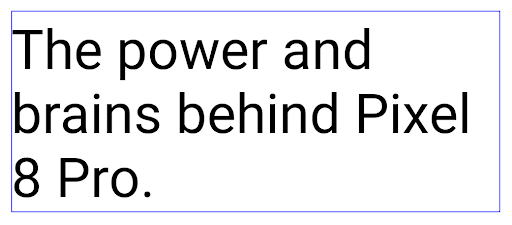
<nobreak> タグを使用して折り返されていないテキスト行のレイアウト。
<nobreak> タグを使用して折り返されている、同じ行のテキストのレイアウト。アプリのアーカイブ
Android と Google Play は最後に、アプリのアーカイブのサポートを発表しました。 年間で、ユーザーは部分的削除によって空き容量を増やすことができます。 Android アプリを使用して公開された、デバイスの使用頻度の低いアプリ Google Play でセット購入。Android 15 はアプリのアーカイブを OS レベルでサポート アーカイブ解除が可能になり、すべてのアプリストアで容易に実装できるようになります。
REQUEST_DELETE_PACKAGES 権限を持つアプリは、
PackageInstaller requestArchive メソッドを使用して、メッセージの
インストール済みのアプリ パッケージ。APK とキャッシュされたファイルは削除されるが、
保護します。アーカイブされたアプリは、
LauncherApps APIそうしたケースがあることを強調する UI が
アプリがアーカイブされます。ユーザーがアーカイブされたアプリをタップすると、担当インストーラにアーカイブを解除するようリクエストが送信されます。復元プロセスは ACTION_PACKAGE_ADDED ブロードキャストによってモニタリングできます。
開発者向けオプションを使用してデバイスで 16 KB モードを有効にする

[16 KB ページサイズで起動する] デベロッパー オプションを切り替えて、デバイスを 16 KB モードで起動します。
Android 15 の QPR バージョンでは、特定のデバイスで利用可能なデベロッパー オプションを使用して、デバイスを 16 KB モードで起動し、オンデバイス テストを実行できます。開発者向けオプションを使用する前に、[設定] > [システム] > [ソフトウェア アップデート] に移動して、利用可能なアップデートを適用します。
この開発者向けオプションは、次のデバイスで利用できます。
Google Pixel 8、Google Pixel 8 Pro(Android 15 QPR1 以降)
Google Pixel 8a(Android 15 QPR1 以降)
Google Pixel 9、9 Pro、9 Pro XL(Android 15 QPR2 以降搭載)
Google Pixel 9a(Android 16 以降搭載)
グラフィック
Android 15 では、ANGLE や Canvas グラフィック システムの追加など、最新のグラフィックの改善が導入されています。
Android の GPU アクセスの近代化

Android ハードウェアは、コア OS が単一の CPU で実行され、GPU に固定関数パイプラインに基づく API を使用してアクセスされていた初期の頃からかなり進化しています。Vulkan® グラフィック API は、Android 7.0(API レベル 24)以降、NDK で利用可能になりました。最新の GPU ハードウェアをより適切に反映する低レベルの抽象化により、複数の CPU コアをサポートするようにスケーリングが改善され、CPU ドライバのオーバーヘッドが削減され、アプリのパフォーマンスが向上します。Vulkan は、すべての最新のゲームエンジンでサポートされています。
Vulkan は、Android の GPU への優先インターフェースです。そのため、Android 15 には、Vulkan 上で OpenGL® ES を実行するためのオプション レイヤとして ANGLE が含まれています。ANGLE に移行することで、Android OpenGL の実装が標準化され、互換性が向上し、場合によってはパフォーマンスも向上します。Android 15 で [設定] -> [システム] -> [開発者向けオプション] -> [試験運用版: ANGLE を有効にする] で開発者向けオプションを有効にすると、ANGLE で OpenGL ES アプリの安定性とパフォーマンスをテストできます。
Android ANGLE on Vulkan のロードマップ

GPU スタックの効率化の一環として、今後はさらに多くの新しいデバイスで GL システム ドライバとして ANGLE を搭載する予定です。今後、OpenGL/ES は ANGLE でのみ利用可能になる見込みです。ただし、すべてのデバイスで OpenGL ES のサポートを継続する予定です。
推奨される次のステップ
デベロッパー オプションを使用して OpenGL ES の ANGLE ドライバを選択し、アプリをテストします。新しいプロジェクトでは、C/C++ に Vulkan を使用することを強くおすすめします。
キャンバスの改善
Android 15 では、Android の Canvas グラフィック システムのモダナイゼーションを継続し、次の機能を追加しました。
Matrix44は、3D でキャンバスを操作するときに使用する座標変換用の 4x4 行列を提供します。clipShaderは現在のクリップと指定されたシェーダーを交差させ、clipOutShaderは現在のクリップとシェーダーの差分にクリップを設定します。どちらもシェーダーをアルファマスクとして扱います。これにより、複雑な形状を効率的に描画できます。
パフォーマンスとバッテリー
Android は、アプリのパフォーマンスと品質の向上を支援することに引き続き注力しています。Android 15 では、アプリ内のタスクの実行を効率化し、アプリのパフォーマンスを最適化し、アプリに関する分析情報を収集するのに役立つ API が導入されています。
バッテリー効率に関するベスト プラクティス、ネットワークと電力使用量のデバッグ、Android 15 と最近のバージョンの Android でバックグラウンド作業のバッテリー効率を改善する方法について詳しくは、Google I/O の Android でのバックグラウンド作業のバッテリー効率の改善をご覧ください。
ApplicationStartInfo API
以前のバージョンの Android では、アプリの起動は少し謎めいたものでした。アプリ内で、アプリがコールド スタート、ウォーム スタート、ホットスタートのいずれから開始されたかを判断することは困難でした。また、プロセスのフォーク、onCreate の呼び出し、最初のフレームの描画など、さまざまな起動フェーズでアプリが費やした時間を把握することも困難でした。Application クラスがインスタンス化されたときに、アプリがブロードキャスト、コンテンツ プロバイダ、ジョブ、バックアップ、起動完了、アラーム、Activity のいずれから開始されたかを把握する方法はありませんでした。
Android 15 の ApplicationStartInfo API には、これらに加えて多くの機能が用意されています。独自のタイムスタンプをフローに加えて、タイミング データを 1 か所で収集することもできます。指標の収集に加えて、ApplicationStartInfo を使用してアプリの起動を直接最適化することもできます。たとえば、ブロードキャストによりアプリの起動時に Application クラス内の UI 関連ライブラリをインスタンス化する必要がなくなります。
アプリサイズの詳細情報
Since Android 8.0 (API level 26), Android has included the
StorageStats.getAppBytes API that summarizes the installed
size of an app as a single number of bytes, which is a sum of the APK size, the
size of files extracted from the APK, and files that were generated on the
device such as ahead-of-time (AOT) compiled code. This number is not very
insightful in terms of how your app is using storage.
Android 15 adds the
StorageStats.getAppBytesByDataType([type]) API, which lets
you get insight into how your app is using up all that space, including APK file
splits, AOT and speedup related code, dex metadata, libraries, and guided
profiles.
アプリ管理のプロファイリング
Android 15 includes the ProfilingManager class,
which lets you collect profiling information from within your app such as heap
dumps, heap profiles, stack sampling, and more. It provides a callback to your
app with a supplied tag to identify the output file, which is delivered to your
app's files directory. The API does rate limiting to minimize the performance
impact.
To simplify constructing profiling requests in your app, we recommend using the
corresponding Profiling AndroidX API, available
in Core 1.15.0-rc01 or higher.
SQLite データベースの改善
Android 15 introduces SQLite APIs that expose advanced features from the underlying SQLite engine that target specific performance issues that can manifest in apps. These APIs are included with the update of SQLite to version 3.44.3.
Developers should consult best practices for SQLite performance to get the most out of their SQLite database, especially when working with large databases or when running latency-sensitive queries.
- Read-only deferred transactions: when issuing transactions that are
read-only (don't include write statements), use
beginTransactionReadOnly()andbeginTransactionWithListenerReadOnly(SQLiteTransactionListener)to issue read-onlyDEFERREDtransactions. Such transactions can run concurrently with each other, and if the database is in WAL mode, they can run concurrently withIMMEDIATEorEXCLUSIVEtransactions. - Row counts and IDs: APIs were added to retrieve the count of changed
rows or the last inserted row ID without issuing an additional query.
getLastChangedRowCount()returns the number of rows that were inserted, updated, or deleted by the most recent SQL statement within the current transaction, whilegetTotalChangedRowCount()returns the count on the current connection.getLastInsertRowId()returns therowidof the last row to be inserted on the current connection. - Raw statements: issue a raw SQlite statement, bypassing convenience wrappers and any additional processing overhead that they may incur.
Android Dynamic Performance Framework の更新
Android 15 では、Android Dynamic Performance Framework(ADPF)への投資が継続されています。ADPF は、ゲームやパフォーマンスを必要とするアプリが Android デバイスの電力システムや温度システムをより直接的に操作できるようにする API のセットです。サポートされているデバイスでは、Android 15 に ADPF 機能が追加されます。
- ヒント セッションの省電力モード。関連するスレッドでパフォーマンスよりも省電力を優先すべきことを示します。長時間実行されるバックグラウンド ワークロードに適しています。
- GPU と CPU の作業時間はヒント セッションで報告できるため、システムはワークロードの需要に最適に合わせて CPU と GPU の周波数を調整できます。
- サーマル ヘッドルームしきい値: ヘッドルーム予測に基づいて、サーマル スロットリングが発生する可能性のあるステータスを解釈します。
アプリやゲームで ADPF を使用する方法について詳しくは、ドキュメントをご覧ください。
プライバシー
Android 15 には、アプリ デベロッパーがユーザーのプライバシーを保護するのに役立つさまざまな機能が含まれています。
スクリーン レコーダーの検出
Android 15 adds support for apps to detect that they are being recorded. A callback is invoked whenever the app transitions between being visible or invisible within a screen recording. An app is considered visible if activities owned by the registering process's UID are being recorded. This way, if your app is performing a sensitive operation, you can inform the user that they're being recorded.
val mCallback = Consumer<Int> { state ->
  if (state == SCREEN_RECORDING_STATE_VISIBLE) {
    // We're being recorded
  } else {
    // We're not being recorded
  }
}

override fun onStart() {
   super.onStart()
   val initialState =
      windowManager.addScreenRecordingCallback(mainExecutor, mCallback)
   mCallback.accept(initialState)
}

override fun onStop() {
    super.onStop()
    windowManager.removeScreenRecordingCallback(mCallback)
}
IntentFilter の機能拡張
Android 15 では、UriRelativeFilterGroup を通じて、より正確な Intent 解決のサポートが組み込まれています。これには、それぞれ満たす必要がある一連の Intent マッチング ルール(URL クエリ パラメータ、URL フラグメント、ブロックルールや除外ルールなど)を形成する UriRelativeFilter オブジェクトのセットが含まれています。
これらのルールは、AndroidManifest XML ファイルで <uri-relative-filter-group> タグを使用して定義できます。必要に応じて、android:allow タグを含めることができます。これらのタグには、既存のデータタグ属性や android:query 属性、android:fragment 属性を使用する <data> タグを含めることができます。
AndroidManifest 構文の例を次に示します。
<intent-filter android:autoVerify="true">
  <action android:name="android.intent.action.VIEW" />
  <category android:name="android.intent.category.BROWSABLE" />
  <category android:name="android.intent.category.DEFAULT" />
  <data android:scheme="http" />
  <data android:scheme="https" />
  <data android:host="astore.com" />
  <uri-relative-filter-group>
    <data android:pathPrefix="/auth" />
    <data android:query="region=na" />
  </uri-relative-filter-group>
  <uri-relative-filter-group android:allow="false">
    <data android:pathPrefix="/auth" />
    <data android:query="mobileoptout=true" />
  </uri-relative-filter-group>
  <uri-relative-filter-group android:allow="false">
    <data android:pathPrefix="/auth" />
    <data android:fragmentPrefix="faq" />
  </uri-relative-filter-group>
</intent-filter>
プライベート スペース
プライベート スペースを利用すると、追加の認証が必要な独立した空間をデバイス上に作成し、そこにプライベートなアプリを配置することでセキュリティを確保することができます。プライベート スペースでは、独立したユーザー プロファイルを使用します。プライベート スペースにデバイスロックを使うか別のロックを使うかは、ユーザーが選択できます。
プライベート スペース内のアプリはランチャーの別のコンテナに表示され、プライベート スペースがロックされているときは、[最近] ビュー、通知、設定、および他のアプリで非表示になります。ユーザーが生成したりダウンロードしたりしたコンテンツ(メディアやファイルなど)やアカウントは、プライベート スペースとメインスペースで分離されます。プライベート スペースのロックが解除されている場合、システムの Sharesheet と写真選択ツールを使用すると、アプリは全スペースのコンテンツにアクセスできます。
ユーザーは、既存のアプリとそのデータをプライベート スペースに移動することはできません。代わりに、ユーザーはプライベート スペースでインストール オプションを選択し、任意のアプリストアを使用してアプリをインストールします。プライベート スペースのアプリは、メインスペースのアプリとは別のコピーとしてインストールされます(同じアプリの新しいコピー)。
ユーザーがプライベート スペースをロックすると、プロファイルは停止します。プロファイルが停止している間、プライベート スペース内のアプリはアクティブではなく、通知の表示など、フォアグラウンド アクティビティやバックグラウンド アクティビティを実行できません。
アプリが次のいずれかのカテゴリに該当する場合は特に、アプリが想定どおりに動作することを確認するために、プライベート スペースでアプリをテストすることをおすすめします。
- 仕事用プロファイル用のロジックを含むアプリ: メイン プロファイルにないアプリのインストール済みコピーが仕事用プロファイルにあることを前提としています。
- 医療アプリ
- ランチャー アプリ
- アプリストアのアプリ
選択した写真へのアクセスに関するユーザーの最新の選択をクエリする
アプリでは、最近選択した写真や動画のみが、
メディア権限への部分的なアクセスが付与されている。この機能を使用すると、
アプリが頻繁に写真へのアクセスをリクエストする場合、
できます。アプリでこの機能を使用するには、ContentResolver を介して MediaStore をクエリするときに QUERY_ARG_LATEST_SELECTION_ONLY 引数を有効にします。
Kotlin
val externalContentUri = MediaStore.Files.getContentUri("external")

val mediaColumns = arrayOf(
   FileColumns._ID,
   FileColumns.DISPLAY_NAME,
   FileColumns.MIME_TYPE,
)

val queryArgs = bundleOf(
   // Return only items from the last selection (selected photos access)
   QUERY_ARG_LATEST_SELECTION_ONLY to true,
   // Sort returned items chronologically based on when they were added to the device's storage
   QUERY_ARG_SQL_SORT_ORDER to "${FileColumns.DATE_ADDED} DESC",
   QUERY_ARG_SQL_SELECTION to "${FileColumns.MEDIA_TYPE} = ? OR ${FileColumns.MEDIA_TYPE} = ?",
   QUERY_ARG_SQL_SELECTION_ARGS to arrayOf(
       FileColumns.MEDIA_TYPE_IMAGE.toString(),
       FileColumns.MEDIA_TYPE_VIDEO.toString()
   )
)
Java
Uri externalContentUri = MediaStore.Files.getContentUri("external");

String[] mediaColumns = {
    FileColumns._ID,
    FileColumns.DISPLAY_NAME,
    FileColumns.MIME_TYPE
};

Bundle queryArgs = new Bundle();
queryArgs.putBoolean(MediaStore.QUERY_ARG_LATEST_SELECTION_ONLY, true);
queryArgs.putString(MediaStore.QUERY_ARG_SQL_SORT_ORDER, FileColumns.DATE_ADDED + " DESC");
queryArgs.putString(MediaStore.QUERY_ARG_SQL_SELECTION, FileColumns.MEDIA_TYPE + " = ? OR " + FileColumns.MEDIA_TYPE + " = ?");
queryArgs.putStringArray(MediaStore.QUERY_ARG_SQL_SELECTION_ARGS, new String[] {
    String.valueOf(FileColumns.MEDIA_TYPE_IMAGE),
    String.valueOf(FileColumns.MEDIA_TYPE_VIDEO)
});
Android 版プライバシー サンドボックス
Android 15 includes the latest Android Ad Services extensions, incorporating the latest version of the Privacy Sandbox on Android. This addition is part of our work to develop technologies that improve user privacy and enable effective, personalized advertising experiences for mobile apps. Our privacy sandbox page has more information about the Privacy Sandbox on Android developer preview and beta programs to help you get started.
ヘルスコネクト
Android 15 integrates the latest extensions around Health Connect by Android, a secure and centralized platform to manage and share app-collected health and fitness data. This update adds support for additional data types across fitness, nutrition, skin temperature, training plans, and more.
Skin temperature tracking allows users to store and share more accurate temperature data from a wearable or other tracking device.
Training plans are structured workout plans to help a user achieve their fitness goals. Training plans support includes a variety of completion and performance goals:
- Completion goals around calories burned, distance, duration, repetition, and steps.
- Performance goals around as many repetitions as possible (AMRAP), cadence, heart rate, power, perceived rate of exertion, and speed.
Learn more about the latest updates to Health Connect in Android in the Building adaptable experiences with Android Health talk from Google I/O.
アプリの画面共有
Android 15 supports app screen sharing so users can share or record just an
app window rather than the entire device screen. This feature, first enabled in
Android 14 QPR2, includes
MediaProjection callbacks that allow your app
to customize the app screen sharing experience. Note that for apps targeting
Android 14 (API level 34) or higher,
user consent is required for each
MediaProjection capture session.
ユーザー エクスペリエンスとシステム UI
Android 15 では、アプリ デベロッパーとユーザーがニーズに合わせてデバイスを構成するための制御と柔軟性が向上しています。
Android 15 の最新の改善点を使用してアプリのユーザー エクスペリエンスを向上させる方法について詳しくは、Google I/O の Android アプリのユーザー エクスペリエンスを高めるをご覧ください。
Generated Previews API によるリッチなウィジェット プレビュー
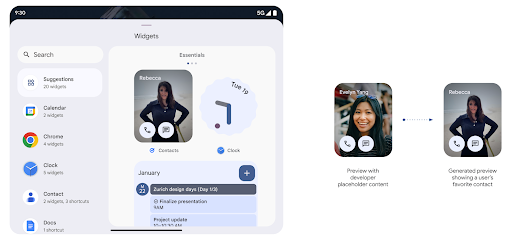
Before Android 15, the only way to provide widget picker previews was to specify a static image or layout resource. These previews often differ significantly from the look of the actual widget when it is placed on the home screen. Also, static resources can't be created with Jetpack Glance, so a Glance developer had to screenshot their widget or create an XML layout to have a widget preview.
Android 15 adds support for generated previews. This means that app widget
providers can generate RemoteViews to use as the picker preview, instead
of a static resource.
Push API
Apps can provide generated previews through a push API. Apps can provide
previews at any point in their lifecycle, and don't receive an explicit request
from the host to provide previews. Previews are persisted in AppWidgetService,
and hosts can request them on-demand. The following example loads an XML widget
layout resource and sets it as the preview:
AppWidgetManager.getInstance(appContext).setWidgetPreview(
   ComponentName(
       appContext,
       SociaLiteAppWidgetReceiver::class.java
   ),
   AppWidgetProviderInfo.WIDGET_CATEGORY_HOME_SCREEN,
   RemoteViews("com.example", R.layout.widget_preview)
)
The expected flow is:
- At any time, the widget provider calls
setWidgetPreview. The provided previews are persisted inAppWidgetServicewith other provider info. setWidgetPreviewnotifies hosts of an updated preview through theAppWidgetHost.onProvidersChangedcallback. In response, the widget host reloads all of its provider information.- When displaying a widget preview, the host checks
AppWidgetProviderInfo.generatedPreviewCategories, and if the chosen category is available, callsAppWidgetManager.getWidgetPreviewto return the saved preview for this provider.
When to call setWidgetPreview
Because there is no callback to provide previews, apps can choose to send previews at any point when they are running. How often to update the preview depends on the widget's use case.
The following list describes the two main categories of preview use cases:
- Providers that show real data in their widget previews, such as personalized or recent information. These providers can set the preview once the user has signed in or has done initial configuration in their app. After this, they can set up a periodic task to update the previews at their chosen cadence. Examples of this type of widget could be a photo, calendar, weather or news widget.
- Providers that show static information in previews or quick-action widgets that don't display any data. These providers can set previews once, when the app first launches. Examples of this type of widget include a drive quick actions widget or chrome shortcuts widget.
Some providers might show static previews on the hub mode picker, but real information on the homescreen picker. These providers should follow the guidance for both of these use cases to set previews.
ピクチャー イン ピクチャー
Android 15 introduces changes in Picture-in-Picture (PiP) ensuring an even smoother transition when entering into PiP mode. This will be beneficial for apps having UI elements overlaid on top of their main UI, which goes into PiP.
Developers use the onPictureInPictureModeChanged callback to define logic
that toggles the visibility of the overlaid UI elements. This callback is
triggered when the PiP enter or exit animation is completed. Beginning in
Android 15, the PictureInPictureUiState class includes another state.
With this UI state, apps targeting Android 15 (API level 35) will observe the
Activity#onPictureInPictureUiStateChanged callback being invoked with
isTransitioningToPip() as soon as the PiP animation starts. There are
many UI elements that are not relevant for the app when it is in PiP mode, for
example views or layout that include information such as suggestions, upcoming
video, ratings, and titles. When the app goes to PiP mode, use the
onPictureInPictureUiStateChanged callback to hide these UI elements. When the
app goes to full screen mode from the PiP window, use
onPictureInPictureModeChanged callback to unhide these elements, as shown in
the following examples:
override fun onPictureInPictureUiStateChanged(pipState: PictureInPictureUiState) {
        if (pipState.isTransitioningToPip()) {
          // Hide UI elements
        }
    }
override fun onPictureInPictureModeChanged(isInPictureInPictureMode: Boolean) {
        if (isInPictureInPictureMode) {
          // Unhide UI elements
        }
    }
This quick visibility toggle of irrelevant UI elements (for a PiP window) helps ensure a smoother and flicker-free PiP enter animation.
サイレント モード ルールの改善
AutomaticZenRule lets apps customize Attention
Management (Do Not Disturb) rules and decide when to activate or deactivate
them. Android 15 greatly enhances these rules with the goal of improving the
user experience. The following enhancements are included:
- Adding types to
AutomaticZenRule, allowing the system to apply special treatment to some rules. - Adding an icon to
AutomaticZenRule, helping to make the modes be more recognizable. - Adding a
triggerDescriptionstring toAutomaticZenRulethat describes the conditions on which the rule should become active for the user. - Added
ZenDeviceEffectstoAutomaticZenRule, allowing rules to trigger things like grayscale display, night mode, or dimming the wallpaper.
通知チャンネルの VibrationEffect を設定する
Android 15 supports setting rich vibrations for incoming notifications by
channel using NotificationChannel.setVibrationEffect, so
your users can distinguish between different types of notifications without
having to look at their device.
メディア プロジェクションのステータスバー チップと自動停止
Media projection can expose private user information. A new, prominent status bar chip makes users aware of any ongoing screen projection. Users can tap the chip to stop screen casting, sharing, or recording. Also, for a more intuitive user experience, any in‑progress screen projection now automatically stops when the device screen is locked.

大画面とフォーム ファクタ
Android 15 では、大画面、フリップ式、折りたたみ式など、Android のフォーム ファクタを最大限に活用するためのサポートがアプリに提供されます。
大画面でのマルチタスクを改善
Android 15 gives users better ways to multitask on large screen devices. For example, users can save their favorite split-screen app combinations for quick access and pin the taskbar on screen to quickly switch between apps. This means that making sure your app is adaptive is more important than ever.
Google I/O has sessions on Building adaptive Android apps and Building UI with the Material 3 adaptive library that can help, and our documentation has more to help you Design for large screens.
カバー画面のサポート
アプリは、Android 15 で使用されるプロパティを宣言して、対応するフリップ可能なデバイスの小さなカバー画面に Application または Activity を表示できます。これらの画面は小さすぎて、Android アプリの実行対象として互換性のあるターゲットと見なすことはできませんが、アプリでこれらの画面のサポートを有効にすることで、アプリをより多くのデバイスで利用できるようになります。
接続
Android 15 では、プラットフォームが更新され、アプリから通信技術とワイヤレス技術の最新の進歩にアクセスできるようになります。
衛星サポート
Android 15 では、衛星通信のプラットフォーム サポートをさらに拡張し、衛星通信の全域で一貫したユーザー エクスペリエンスを実現するための UI 要素を追加しています。
アプリは ServiceState.isUsingNonTerrestrialNetwork() を使用して次のことを行えます。
デバイスが衛星に接続されていることを検出し、
フル ネットワーク サービスが利用できない理由。さらに Android 15 では
SMS および MMS アプリや、プリロードされた RCS アプリに対応しています。
衛星回線で送受信されています

NFC のエクスペリエンスがよりスムーズに
Android 15 では、Android の堅牢な NFC アプリ エコシステムを引き続きサポートしながら、タッチ決済のエクスペリエンスをよりシームレスで信頼性の高いものにする取り組みを進めています。サポートされているデバイスでは、アプリは NfcAdapter に観察モードに入るようリクエストできます。このモードでは、デバイスはリッスンしますが NFC リーダーには応答せず、アプリの NFC サービス PollingFrame
オブジェクトを送信して処理します。PollingFrame オブジェクトを使用すると、NFC リーダーへの最初の通信の前に認証を行うことができ、多くの場合、ワンタップ取引が可能になります。
さらに、アプリはサポートされているデバイスにフィルタを登録して、ポーリング ループ アクティビティを通知できます。これにより、複数の NFC 対応アプリケーションでスムーズに動作できます。
ウォレットの役割
Android 15 では、ユーザーが優先するウォレット アプリとの統合を強化できるウォレット ロールが導入されています。このロールは、NFC のデフォルトの非接触型決済設定に代わるものです。ウォレットのロールホルダーを管理するには、[設定] > [アプリ] > [デフォルト アプリ] に移動します。
ウォレットのロールを使用するのは、支払いカテゴリに登録されている AID の NFC タップを転送する場合です。タップは、同じ AID に登録されている別のアプリがフォアグラウンドで実行されていない限り、常にウォレットのロール所有者に送信されます。
このロールは、ウォレットのクイック アクセス タイルが有効になったときに配置する場所を決定するためにも使用されます。ロールが [なし] に設定されている場合、クイック アクセス タイルを使用できず、支払いカテゴリの NFC タップはフォアグラウンド アプリにのみ配信されます。
セキュリティ
Android 15 では、アプリのセキュリティを強化し、アプリのデータを保護し、ユーザーがデータをより透明性をもって管理できるようになります。ユーザーの安全保護対策を強化し、アプリを新たな脅威から保護するために Google が行っている取り組みについて詳しくは、Google I/O のAndroid でのユーザーのセキュリティ保護に関するトークをご覧ください。
認証情報マネージャーを自動入力と統合する
Android 15 以降では、デベロッパーはユーザー名やパスワード フィールドなどの特定のビューを認証情報マネージャー リクエストにリンクできるため、ログイン プロセス中にカスタマイズされたユーザー エクスペリエンスを簡単に提供できます。ユーザーがこれらのビューのいずれかにフォーカスすると、対応するリクエストが認証情報マネージャーに送信されます。生成された認証情報はプロバイダ間で集約され、インライン候補やプルダウン候補などの自動入力のフォールバック UI に表示されます。Jetpack androidx.credentials ライブラリは、デベロッパーが使用するエンドポイントとして推奨されます。このライブラリはまもなく Android 15 以降で利用可能になり、この機能をさらに強化できるようになります。
シングルタップ登録とログインを生体認証プロンプトと統合する
Credential Manager integrates biometric prompts into the credential creation and sign-in processes, eliminating the need for providers to manage biometric prompts. As a result, credential providers only need to focus on the results of the create and get flows, augmented with the biometric flow result. This simplified process creates a more efficient and streamlined credential creation and retrieval process.
エンドツーエンドの暗号化の鍵管理
Android 15 では E2eeContactKeysManager が導入されます。これは、暗号公開鍵の保存用の OS レベルの API を提供することで、Android アプリでのエンドツーエンドの暗号化(E2EE)を容易にします。
E2eeContactKeysManager は、プラットフォームの連絡先アプリと統合するように設計されており、ユーザーが連絡先の公開鍵を一元的に管理および検証できるようにします。
コンテンツ URI の権限チェック
Android 15 introduces a set of APIs that perform permission checks on content URIs:
Context.checkContentUriPermissionFull: This performs a full permission check on content URIs.Activitymanifest attributerequireContentUriPermissionFromCaller: This enforces specified permissions on the provided content URIs at activity launch.ComponentCallerclass forActivitycallers: This represents the app that launched the activity.
ユーザー補助
Android 15 では、ユーザー補助機能を改善する機能が追加されています。
Better Braille
In Android 15, we've made it possible for TalkBack to support Braille displays that are using the HID standard over both USB and secure Bluetooth.
This standard, much like the one used by mice and keyboards, will help Android support a wider range of Braille displays over time.
国際化
Android 15 では、デバイスが異なる言語で使用される場合のユーザー エクスペリエンスを補完する機能が追加されています。
CJK 可変フォント
Android 15 以降、中国語、日本語、韓国語(CJK)言語のフォント ファイル NotoSansCJK が可変フォントになりました。可変フォントにより、CJK 言語でのクリエイティブなタイポグラフィの可能性が広がります。デザイナーは、より幅広いスタイルを試し、これまで実現が難しかった、または不可能だった視覚的に魅力的なレイアウトを作成できます。

文字間隔の調整
Android 15 以降では、文字間隔を使用してテキストを両端揃えできます。
JUSTIFICATION_MODE_INTER_CHARACTER を使用します。変更前の単語間の両端揃え:
Android 8.0(API レベル 26)で初めて導入されました。
同様の機能は、
空白文字(中国語、日本語など)

JUSTIFICATION_MODE_NONE を使用した日本語テキストのレイアウト。
JUSTIFICATION_MODE_NONE を使用した英語テキストのレイアウト。
JUSTIFICATION_MODE_INTER_WORD を使用した日本語テキストのレイアウト。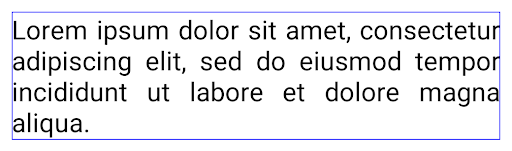
JUSTIFICATION_MODE_INTER_WORD を使用した英語テキストのレイアウト。
JUSTIFICATION_MODE_INTER_CHARACTER を使用した日本語テキストのレイアウト。
JUSTIFICATION_MODE_INTER_CHARACTER を使用した英語テキストのレイアウト。自動改行の設定
Android started supporting phrase-based line breaks for Japanese and Korean in
Android 13 (API level 33). However, while phrase-based line breaks improve the
readability of short lines of text, they don't work well for long lines of text.
In Android 15, apps can apply phrase-based line breaks only for short lines
of text, using the LINE_BREAK_WORD_STYLE_AUTO
option. This option selects the best word style option for the text.
For short lines of text, phrase-based line breaks are used, functioning the same
as LINE_BREAK_WORD_STYLE_PHRASE, as shown in the
following image:

LINE_BREAK_WORD_STYLE_AUTO
applies phrase-based line breaks to improve the readability of the text.
This is the same as applying
LINE_BREAK_WORD_STYLE_PHRASE.For longer lines of text, LINE_BREAK_WORD_STYLE_AUTO uses a no
line-break word style, functioning the same as
LINE_BREAK_WORD_STYLE_NONE, as shown in the
following image:

LINE_BREAK_WORD_STYLE_AUTO
applies no line-break word style to improve the readability of the text.
This is the same as applying
LINE_BREAK_WORD_STYLE_NONE.追加の日本語変体仮名フォント
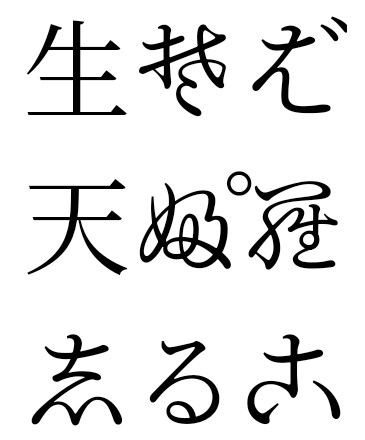
In Android 15, a font file for old Japanese Hiragana (known as Hentaigana) is bundled by default. The unique shapes of Hentaigana characters can add a distinctive flair to artwork or design while also helping to preserve accurate transmission and understanding of ancient Japanese documents.
VideoLAN cone Copyright (c) 1996-2010 VideoLAN. このロゴまたはその変更版は、VideoLAN プロジェクトまたは VideoLAN チームによって開発された製品を参照するために、誰でも使用または変更できますが、プロジェクトによる推奨を示すものではありません。
Vulkan および Vulkan のロゴは、Khronos Group Inc.の登録商標です。
OpenGL は登録商標であり、OpenGL ES ロゴは Khronos の許可を得て使用している Hewlett Packard Enterprise の商標です。