

Android 15, geliştiriciler için harika özellikler ve API'ler sunuyor. Aşağıdaki bölümlerde, ilgili API'leri kullanmaya başlamanıza yardımcı olmak için bu özellikler özetlenmiştir.
Eklenen, değiştirilen ve kaldırılan API'lerin ayrıntılı listesi için API farklılıkları raporunu inceleyin. Eklenen API'lerle ilgili ayrıntılar için Android API referansını ziyaret edin. Android 15 için API düzeyi 35'te eklenen API'leri bulun. Platform değişikliklerinin uygulamalarınızı etkileyebileceği alanlar hakkında bilgi edinmek için Android 15'i hedefleyen uygulamalarda ve tüm uygulamalarda Android 15 davranış değişikliklerini inceleyin.
Kamera ve medya içerikleri
Android 15, kamera ve medya deneyimini iyileştiren, içerik üreticilerin vizyonlarını Android'de hayata geçirmelerini destekleyen araçlara ve donanımlara erişmenizi sağlayan çeşitli özellikler içerir.
Android'deki medya ve kamera için en yeni özellikler ve geliştirici çözümleri hakkında daha fazla bilgi edinmek istiyorsanız Google I/O'daki Modern Android medya ve kamera deneyimleri oluşturma başlıklı konuşmayı izleyin.
Düşük ışık güçlendirmesi
Android 15, hem Camera 2 hem de gece modu kamera uzantısında kullanılabilen bir otomatik pozlama modu olan düşük ışık güçlendirmesi özelliğini kullanıma sunar. Düşük Işık Güçlendirmesi, düşük ışık koşullarında önizleme akışının pozlamasını ayarlar. Gece modu, tek bir gelişmiş resim oluşturmak için seri çekim fotoğrafları birleştirdiğinden bu, gece modu kamera uzantısının hareketsiz resim oluşturma yönteminden farklıdır. Gece modu, hareketsiz resim oluşturmak için çok iyi çalışır ancak sürekli kare akışı oluşturamaz. Düşük Işık Geliştirme özelliği ise bunu yapabilir. Bu nedenle, Düşük Işıkta Geliştirme özelliği aşağıdaki gibi kamera özelliklerini etkinleştirir:
- Kullanıcıların düşük ışıkta çektiği fotoğrafları daha iyi kadraja alabilmesi için gelişmiş resim önizlemesi sunma
- Düşük ışıkta QR kodu tarama
Düşük ışık güçlendirmesini etkinleştirirseniz bu özellik, ışık seviyesi düşük olduğunda otomatik olarak açılır ve ışık seviyesi arttığında kapanır.
Uygulamalar, düşük ışık koşullarında önizleme akışını kaydederek videoları aydınlatabilir.
Daha fazla bilgi için Düşük Işıkta Güçlendirme başlıklı makaleyi inceleyin.
Uygulama içi kamera kontrolleri
Android 15, desteklenen cihazlarda kamera donanımı ve algoritmaları üzerinde daha fazla kontrol için bir uzantı ekler:
- Görüntü çekerken hem
SINGLEhem deTORCHmodlarında flaşın yoğunluğunu hassas bir şekilde kontrol etmenizi sağlayan gelişmiş flaş gücü ayarları.
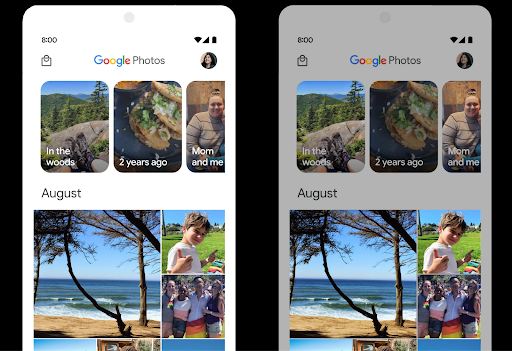
HDR ek alan kontrolü
Android 15, temel cihazın özelliklerine ve panelin bit derinliğine uygun HDR yedek bandını seçer. Tek bir HDR küçük resmi gösteren bir mesajlaşma uygulaması gibi çok fazla SDR içeriği bulunan sayfalarda bu davranış, SDR içeriğinin algılanan parlaklığını olumsuz yönde etkileyebilir. Android 15, SDR ve HDR içerik arasında denge kurmak için setDesiredHdrHeadroom ile HDR marjını kontrol etmenize olanak tanır.
Ses yüksekliği kontrolü

Android 15, ses yüksekliği tutarsızlıklarını önlemenize ve kullanıcıların içerikler arasında geçiş yaparken sürekli olarak ses düzeyini ayarlamak zorunda kalmamasını sağlamanıza yardımcı olmak için CTA-2075 ses yüksekliği standardını destekler. Sistem, sesin ses düzeyini ve dinamik aralık sıkıştırma seviyelerini akıllıca ayarlamak için çıkış cihazlarının (kulaklık ve hoparlör) bilinen özelliklerinden ve AAC ses içeriğindeki ses düzeyi meta verilerinden yararlanır.
Bu özelliği etkinleştirmek için ses yüksekliği meta verilerinin şurada bulunduğundan emin olmanız gerekir:
AAC içeriğinizi ve uygulamanızda platform özelliğini etkinleştirin. Bunun için
LoudnessCodecController nesnesini şu şekilde örneklendir:
cihazın sesiyle birlikte create fabrika yöntemini çağırıyor.
ilişkili AudioTrack oturum kimliği; bu
otomatik olarak ses güncellemelerini uygulamaya başlar. MediaCodec'e uygulanmadan önce ses seviyesi parametrelerini değiştirmek veya filtrelemek için bir OnLoudnessCodecUpdateListener iletebilirsiniz.
// Media contains metadata of type MPEG_4 OR MPEG_D
val mediaCodec = …
val audioTrack = AudioTrack.Builder()
                                .setSessionId(sessionId)
                                .build()
...
// Create new loudness controller that applies the parameters to the MediaCodec
try {
   val lcController = LoudnessCodecController.create(mSessionId)
   // Starts applying audio updates for each added MediaCodec
}
AndroidX media3 ExoPlayer da sorunsuz bir uygulama entegrasyonu için LoudnessCodecController API'lerini kullanacak şekilde güncellenecek.
Sanal MIDI 2.0 cihazları
Android 13'e, Universal MIDI Paketleri (UMP) kullanarak iletişim kuran USB üzerinden MIDI 2.0 cihazlarına bağlanma desteği eklendi. Android 15, UMP desteğini sanal MIDI uygulamalarına genişleterek beste uygulamalarının sentezleyici uygulamalarını USB MIDI 2.0 cihazı gibi sanal MIDI 2.0 cihazı olarak kontrol etmesine olanak tanır.
Daha verimli AV1 yazılım kod çözme

VideoLAN'ın popüler AV1 yazılım kod çözücüsü dav1d, donanımda AV1 kod çözmeyi desteklemeyen Android cihazlarda kullanılabilir. Eski AV1 yazılım kod çözücüsüne kıyasla 3 kata kadar daha yüksek performans gösteren dav1d, bazı düşük ve orta sınıf cihazlar da dahil olmak üzere daha fazla kullanıcının HD AV1 oynatmasını sağlar.
Uygulamanızın, dav1d'yi adıyla çağırarak "c2.android.av1-dav1d.decoder" kullanmayı etkinleştirmesi gerekir. dav1d, sonraki bir güncellemede varsayılan AV1 yazılım kod çözücüsü olacak. Bu destek standartlaştırılır ve Google Play sistem güncellemeleri alan Android 11 cihazlara geri bağlanır.
Geliştirici üretkenliği ve araçları
Üretkenliğinizi artırmaya yönelik çalışmalarımızın çoğu Android Studio, Jetpack Compose ve Android Jetpack kitaplıkları gibi araçlara odaklanırken platformda vizyonunuzu daha kolay gerçekleştirmenize yardımcı olacak yollar aramaya devam ediyoruz.
OpenJDK 17 güncellemeleri
Android 15, Android'in temel kitaplıklarını en son OpenJDK LTS sürümlerindeki özelliklerle uyumlu hale getirmek için yenileme çalışmalarına devam ediyor.
Aşağıdaki temel özellikler ve iyileştirmeler bu sürüme dahil edilmiştir:
- NIO arabellekleriyle ilgili yaşam kalitesi iyileştirmeleri
- Yayınlar
- Ek
mathvestrictmathyöntemleri - Sıralı
collection,mapvesetiçerenutilpaket güncellemeleri Deflater'teByteBufferdesteğiX500PrivateCredentialve güvenlik anahtarı güncellemeleri gibi güvenlik güncellemeleri
Bu API'ler, Google Play sistem güncellemeleri aracılığıyla Android 12 (API düzeyi 31) ve sonraki sürümleri çalıştıran bir milyardan fazla cihazda güncellenir. Böylece en son programlama özelliklerini hedefleyebilirsiniz.
PDF iyileştirmeleri
Android 15, PdfRenderer ile ilgili önemli iyileştirmeler içerir.
API'ler. Uygulamalar, şifre korumalı dosyaların oluşturulması, ek açıklama, form düzenleme, arama ve kopyalama ile seçme gibi gelişmiş özellikler içerebilir. Yerel PDF görüntülemeyi hızlandırmak ve kaynak kullanımını azaltmak için doğrusallaştırılmış PDF optimizasyonları desteklenir.
Jetpack PDF kitaplığı, uygulamanıza PDF görüntüleme özelliklerini eklemeyi kolaylaştırmak için bu API'leri kullanır.
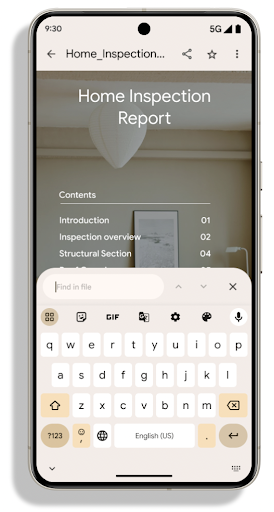
PdfRenderer, Google kullanılarak güncellenebilecek bir modüle taşındı
Platform sürümünden bağımsız olarak Play sistem güncellemelerini destekleriz.
bu değişiklikleri Android 11'e (API düzeyi 30) geri
API yüzeyinin Android 15 öncesi sürümü
PdfRendererPreV
Otomatik dil geçişiyle ilgili iyileştirmeler
Android 14, diller arasında otomatik geçişle birlikte cihaz üzerinde sesli olarak çok dilli tanıma özelliğini ekledi. Ancak bu özellik, özellikle iki ifade arasında daha az duraksama olduğunda kelimelerin atlanmasına neden olabilir. Android 15, uygulamaların bu geçişi kullanım alanlarına göre ayarlamalarına yardımcı olmak için ek kontroller ekler.
EXTRA_LANGUAGE_SWITCH_INITIAL_ACTIVE_DURATION_TIME_MILLIS, otomatik geçişi ses oturumunun başına sınırlar. EXTRA_LANGUAGE_SWITCH_MATCH_SWITCHES ise belirli sayıda geçişten sonra dil geçişini devre dışı bırakır. Bu seçenekler, oturum sırasında otomatik olarak algılanması gereken tek bir dilin konuşulacağını düşünüyorsanız özellikle kullanışlıdır.
Geliştirilmiş OpenType Variable Font API
Android 15, OpenType değişken yazı tipinin kullanılabilirliğini artırır. buildVariableFamily API'si ile ağırlık eksenlerini belirtmeden değişken bir yazı tipinden FontFamily örneği oluşturabilirsiniz. Metin oluşturma aracı, görüntülenen metinle eşleşecek şekilde wght ekseninin değerini geçersiz kılar.
API'nin kullanılması, Typeface oluşturma kodunu önemli ölçüde basitleştirir:
Kotlin
val newTypeface = Typeface.CustomFallbackBuilder(
            FontFamily.Builder(
                Font.Builder(assets, "RobotoFlex.ttf").build())
                    .buildVariableFamily())
    .build()
Java
Typeface newTypeface = Typeface.CustomFallbackBuilder(
            new FontFamily.Builder(
                new Font.Builder(assets, "RobotoFlex.ttf").build())
                    .buildVariableFamily())
    .build();
Önceden, aynı Typeface öğesini oluşturmak için çok daha fazla koda ihtiyacınız vardı:
Kotlin
val oldTypeface = Typeface.CustomFallbackBuilder(
            FontFamily.Builder(
                Font.Builder(assets, "RobotoFlex.ttf")
                    .setFontVariationSettings("'wght' 400")
                    .setWeight(400)
                    .build())
                .addFont(
                    Font.Builder(assets, "RobotoFlex.ttf")
                        .setFontVariationSettings("'wght' 100")
                        .setWeight(100)
                        .build()
                )
                .addFont(
                    Font.Builder(assets, "RobotoFlex.ttf")
                        .setFontVariationSettings("'wght' 200")
                        .setWeight(200)
                        .build()
                )
                .addFont(
                    Font.Builder(assets, "RobotoFlex.ttf")
                        .setFontVariationSettings("'wght' 300")
                        .setWeight(300)
                        .build()
                )
                .addFont(
                    Font.Builder(assets, "RobotoFlex.ttf")
                        .setFontVariationSettings("'wght' 500")
                        .setWeight(500)
                        .build()
                )
                .addFont(
                    Font.Builder(assets, "RobotoFlex.ttf")
                        .setFontVariationSettings("'wght' 600")
                        .setWeight(600)
                        .build()
                )
                .addFont(
                    Font.Builder(assets, "RobotoFlex.ttf")
                        .setFontVariationSettings("'wght' 700")
                        .setWeight(700)
                        .build()
                )
                .addFont(
                    Font.Builder(assets, "RobotoFlex.ttf")
                        .setFontVariationSettings("'wght' 800")
                        .setWeight(800)
                        .build()
                )
                .addFont(
                    Font.Builder(assets, "RobotoFlex.ttf")
                        .setFontVariationSettings("'wght' 900")
                        .setWeight(900)
                        .build()
                ).build()
        ).build()
Java
Typeface oldTypeface = new Typeface.CustomFallbackBuilder(
    new FontFamily.Builder(
        new Font.Builder(assets, "RobotoFlex.ttf")
            .setFontVariationSettings("'wght' 400")
            .setWeight(400)
            .build()
    )
    .addFont(
        new Font.Builder(assets, "RobotoFlex.ttf")
            .setFontVariationSettings("'wght' 100")
            .setWeight(100)
            .build()
    )
    .addFont(
        new Font.Builder(assets, "RobotoFlex.ttf")
            .setFontVariationSettings("'wght' 200")
            .setWeight(200)
            .build()
    )
    .addFont(
        new Font.Builder(assets, "RobotoFlex.ttf")
            .setFontVariationSettings("'wght' 300")
            .setWeight(300)
            .build()
    )
    .addFont(
        new Font.Builder(assets, "RobotoFlex.ttf")
            .setFontVariationSettings("'wght' 500")
            .setWeight(500)
            .build()
    )
    .addFont(
        new Font.Builder(assets, "RobotoFlex.ttf")
            .setFontVariationSettings("'wght' 600")
            .setWeight(600)
            .build()
    )
    .addFont(
        new Font.Builder(assets, "RobotoFlex.ttf")
            .setFontVariationSettings("'wght' 700")
            .setWeight(700)
            .build()
    )
    .addFont(
        new Font.Builder(assets, "RobotoFlex.ttf")
            .setFontVariationSettings("'wght' 800")
            .setWeight(800)
            .build()
    )
    .addFont(
        new Font.Builder(assets, "RobotoFlex.ttf")
            .setFontVariationSettings("'wght' 900")
            .setWeight(900)
            .build()
    )
    .build()
).build();
Aşağıda, bir Typeface hesabının hem eski hem de yeni API'lerle nasıl oluşturulduğuna dair bir örnek verilmiştir
oluşturur:
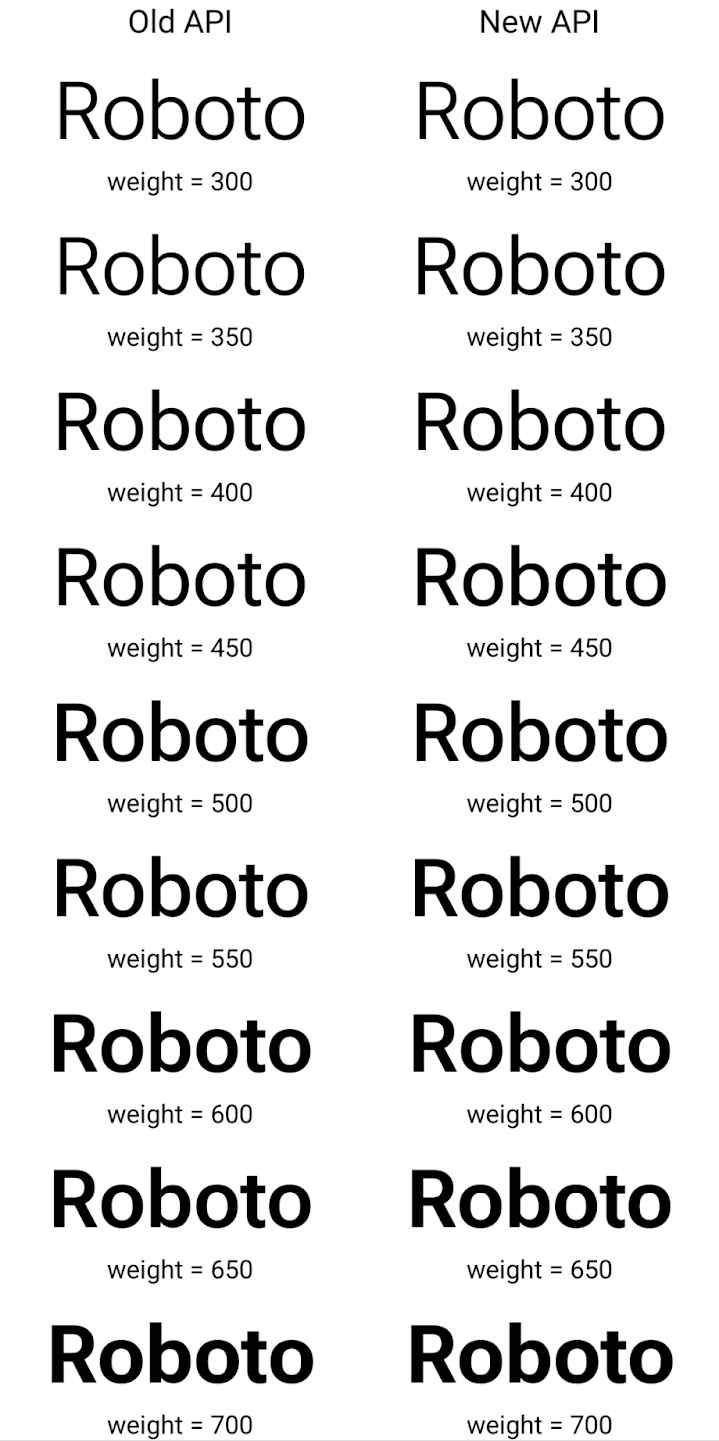
Bu örnekte, eski API ile oluşturulan Typeface öğesinde
350, 450, 550 ve 650 için doğru yazı tipi ağırlıkları oluşturma olanağı
Font örneklerinden oluşur, böylece oluşturucu en yakın ağırlığa geri döner. Bu durumda, 350 yerine 300, 450 yerine 400 vb. oluşturulur. Buna karşılık, yeni API'lerle oluşturulan Typeface, belirli bir ağırlık için dinamik olarak bir Font örneği oluşturur. Böylece 350, 450, 550 ve 650 için de doğru ağırlıklar oluşturulur.
Ayrıntılı satır sonu kontrolleri
Android 15'ten itibaren, TextView ve temel satır ayırıcı, okunabilirliği artırmak için metnin belirli bir bölümünü aynı satırda koruyabilir. Dize kaynaklarında <nobreak> etiketini veya createNoBreakSpan kullanarak bu satır sonu özelleştirmesinden yararlanabilirsiniz. Benzer şekilde, <nohyphen> etiketini veya createNoHyphenationSpan kullanarak kelimeleri kısaltmalardan koruyabilirsiniz.
Örneğin, aşağıdaki dize kaynağı satır sonu içermez ve "Pixel 8 Pro" metninin istenmeyen bir yerde kesildiği şekilde oluşturulur:
<resources>
    <string name="pixel8pro">The power and brains behind Pixel 8 Pro.</string>
</resources>
Buna karşılık bu dize kaynağı, "Pixel 8 Pro" ifadesini sarmalayan ve satır aralarını önleyen <nobreak> etiketini içerir:
<resources>
    <string name="pixel8pro">The power and brains behind <nobreak>Pixel 8 Pro.</nobreak></string>
</resources>
Bu dizelerin oluşturulma biçimleri arasındaki fark aşağıdaki resimlerde gösterilmektedir:
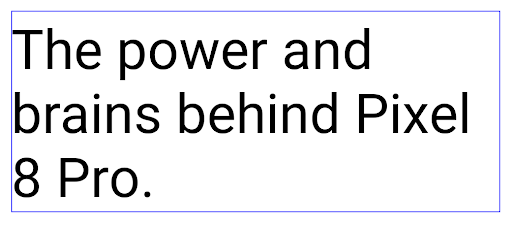
<nobreak> etiketi kullanılarak sarmalandığı bir metin satırı için düzen.
<nobreak> etiketi kullanılarak sarıldığı aynı metin satırının düzeni.Uygulama arşivleme
Android ve Google Play son olarak uygulama arşivleme desteğini duyurdu yıl, kullanıcıların belirli bir süre içinde Cihazda Android Uygulaması kullanılarak yayınlanan, sık kullanılmayan uygulamalar Google Play'deki paket. Android 15, uygulama arşivleme ve arşivden çıkarma için OS düzeyinde destek içerir. Bu sayede tüm uygulama mağazalarının bu özelliği uygulamasını kolaylaştırır.
REQUEST_DELETE_PACKAGES iznine sahip uygulamalar, yüklü bir uygulama paketinin arşivlenmesini istemek için PackageInstaller requestArchive yöntemini çağırabilir. Bu yöntem, APK'yı ve önbelleğe alınmış dosyaları kaldırır ancak kullanıcı verilerini korur. Arşivlenen uygulamalar, LauncherApps API'leri aracılığıyla görüntülenebilir uygulamalar olarak döndürülür. Kullanıcılar, bu uygulamaların arşivlendiğini vurgulayan bir kullanıcı arayüzü işlemi görür. Kullanıcı arşivlenmiş bir uygulamaya dokunursa sorumlu yükleyici
arşivden çıkarma isteği alır ve geri yükleme işlemi
ACTION_PACKAGE_ADDED yayını tarafından izlenmektedir.
Geliştirici seçeneklerini kullanarak bir cihazda 16 KB modunu etkinleştirme
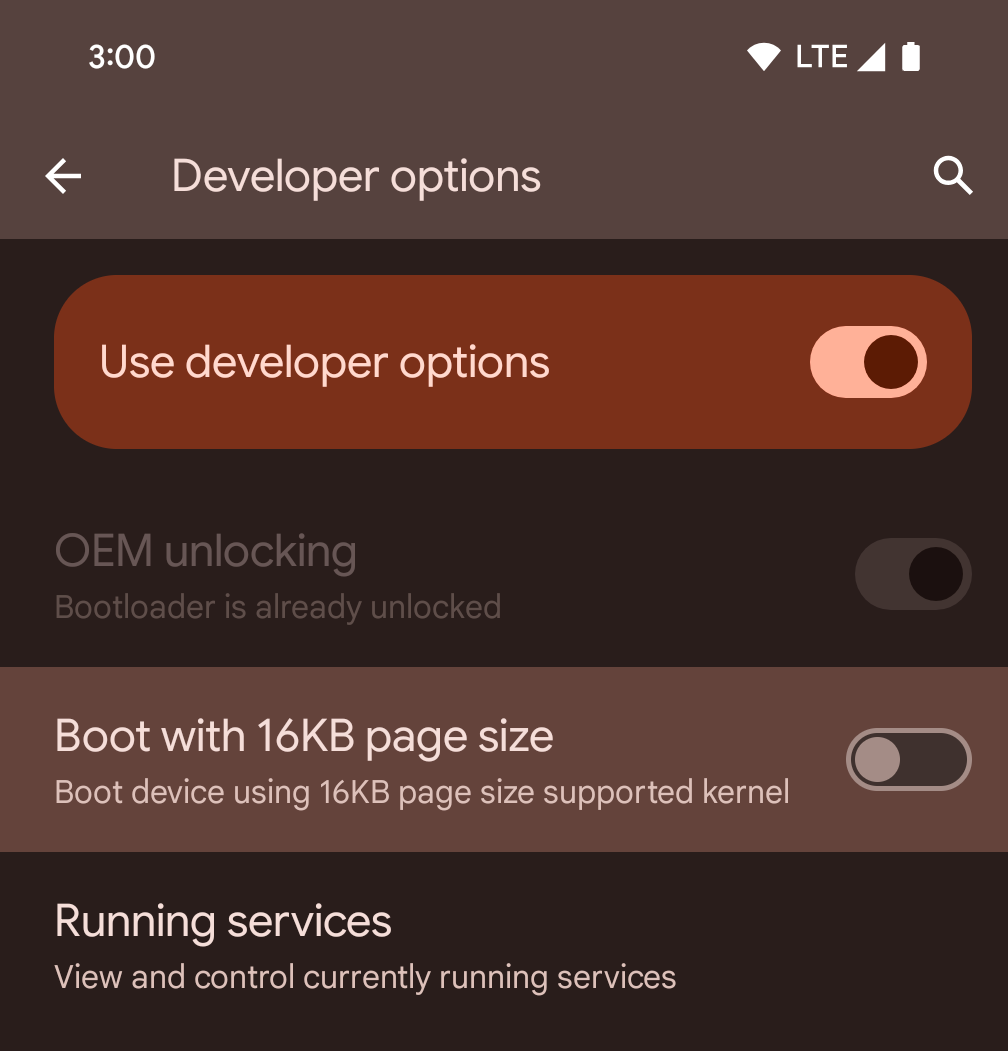
Cihazı 16 KB modunda başlatmak için 16 KB sayfa boyutuyla başlat geliştirici seçeneğini etkinleştirin.
Android 15'in QPR sürümlerinde, cihazı 16 KB modunda başlatmak ve cihaz üzerinde test yapmak için belirli cihazlarda bulunan geliştirici seçeneğini kullanabilirsiniz. Geliştirici seçeneğini kullanmadan önce Ayarlar > Sistem > Yazılım güncellemeleri'ne gidip varsa güncellemeleri uygulayın.
Bu geliştirici seçeneği aşağıdaki cihazlarda kullanılabilir:
Pixel 8 ve 8 Pro (Android 15 QPR1 veya sonraki sürümlerle)
Pixel 8a (Android 15 QPR1 veya sonraki sürümler)
Pixel 9, 9 Pro ve 9 Pro XL (Android 15 QPR2 veya sonraki bir sürüm yüklü)
Pixel 9a (Android 16 veya sonraki sürümler)
Grafik
Android 15, ANGLE ve Canvas grafik sistemine eklemeler de dahil olmak üzere en yeni grafik iyileştirmelerini sunar.
Android'in GPU erişimini modernleştirme

Android donanımı, çekirdek işletim sisteminin tek bir CPU'da çalıştığı ve GPU'lara sabit işlevli ardışık düzenlere dayalı API'ler kullanılarak erişildiği ilk günlerden bu yana oldukça gelişti. Vulkan® grafik API'si, Android 7.0 (API seviyesi 24) sürümünden beri NDK'da mevcuttur. Modern GPU donanımlarını daha iyi yansıtan, birden fazla CPU çekirdeğini desteklemek için daha iyi ölçeklendirilen ve CPU sürücüsünün ek yükünü azaltan bu API, uygulama performansını iyileştirir. Vulkan, tüm modern oyun motorları tarafından desteklenir.
Vulkan, Android'in GPU için tercih ettiği arayüzdür. Bu nedenle Android 15, Vulkan'ın üzerinde OpenGL® ES çalıştırmak için isteğe bağlı bir katman olarak ANGLE'ı içerir. ANGLE'a geçiş, Android OpenGL uygulamasını standartlaştırarak daha iyi uyumluluk ve bazı durumlarda daha iyi performans sağlar. Android 15'te Ayarlar -> Sistem -> Geliştirici Seçenekleri -> Deneysel: ANGLE'ı etkinleştir geliştirici seçeneğini etkinleştirerek OpenGL ES uygulamanızın kararlılığını ve performansını ANGLE ile test edebilirsiniz.
Vulkan'da Android ANGLE yol haritası
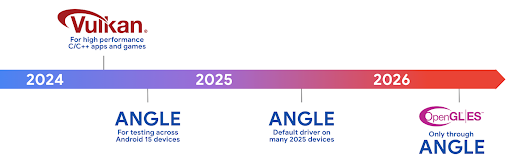
GPU yığınımızı basitleştirme kapsamında, bundan sonra daha fazla yeni cihazda GL sistem sürücüsü olarak ANGLE'ı kullanıma sunacağız. OpenGL/ES'in gelecekte yalnızca ANGLE üzerinden kullanılmasını bekliyoruz. Bununla birlikte, tüm cihazlarda OpenGL ES desteğini sürdürmeyi planlıyoruz.
Sıradaki önerilen adımlar
OpenGL ES için ANGLE sürücüsünü seçmek ve uygulamanızı test etmek üzere geliştirici seçeneklerini kullanın. Yeni projelerde C/C++ için Vulkan'ı kullanmanızı önemle tavsiye ederiz.
Tuval'de iyileştirmeler
Android 15, Android'in Canvas grafik sistemini modernleştirme çalışmalarımıza ek özellikler ekliyor:
Matrix44, tuvali 3D olarak değiştirmek istediğinizde kullanılması gereken koordinatları dönüştürmek için 4x4 matris sağlar.clipShader, mevcut klibi belirtilen gölgelendiriciyle kesiştirirkenclipOutShader, klibi mevcut klip ile gölgelendiricinin farkına ayarlar. Her ikisi de gölgelendiriciyi bir alfa maskesi olarak işler. Bu, karmaşık şekillerin verimli bir şekilde çizilmesini destekler.
Performans ve pil
Android, uygulamalarınızın performansını ve kalitesini artırmanıza yardımcı olmaya odaklanmaya devam ediyor. Android 15, uygulamanızdaki görevlerin daha verimli bir şekilde yürütülmesine, uygulama performansının optimize edilmesine ve uygulamalarınız hakkında analizler toplanmasına yardımcı olan API'ler sunar.
Pil verimliliğiyle ilgili en iyi uygulamalar, ağ ve güç kullanımında hata ayıklama ve Android 15 ile Android'in son sürümlerinde arka plan çalışmalarının pil verimliliğini nasıl artırdığımız hakkında ayrıntılı bilgi için Google I/O'daki Android'de arka plan çalışmalarının pil verimliliğini artırma başlıklı konuşmayı izleyin.
ApplicationStartInfo API
Android'in önceki sürümlerinde uygulama başlatma biraz gizemli bir konuydu. Uygulamanızın sıfırdan, hazır durumda veya çalışır durumda başlatılıp başlatılmadığını belirlemek zordu. Ayrıca, uygulamanızın çeşitli başlatma aşamalarında (ör. işlemin ayrılması, onCreate çağrılması, ilk karenin çizilmesi) ne kadar süre harcadığını bilmek de zordu. Application sınıfınız oluşturulduğunda, uygulamanın bir yayından, içerik sağlayıcıdan, işten, yedekten, önyüklemenin tamamlanmasından, alarmdan veya Activity'ten başlatılıp başlatılmadığını bilemezdiniz.
Android 15'teki ApplicationStartInfo API'si tüm bunları ve daha fazlasını sunar. Zamanlama verilerini tek bir yerde toplamayı kolaylaştırmak için akışa kendi zaman damgalarınızı eklemeyi bile seçebilirsiniz. Metrikleri toplamanın yanı sıra, uygulamanızın başlatılmasını doğrudan optimize etmek için ApplicationStartInfo'ü kullanabilirsiniz. Örneğin, uygulamanız bir yayın nedeniyle başlatılırken Application sınıfınızda kullanıcı arayüzüyle ilgili kitaplıkların maliyetli şekilde oluşturulmasını ortadan kaldırabilirsiniz.
Ayrıntılı uygulama boyutu bilgileri
Android 8.0 (API seviyesi 26) sürümünden itibaren Android, bir uygulamanın yüklü boyutunu tek bir bayt sayısı olarak özetleyen StorageStats.getAppBytes API'yi içermektedir. Bu sayı, APK boyutunun, APK'dan ayıklanan dosyaların boyutunun ve cihazda oluşturulan dosyaların (ör. önceden derlenmiş kod) toplamıdır. Bu sayı, uygulamanızın depolama alanını nasıl kullandığı konusunda çok yararlı değildir.
Android 15'te, APK dosya bölme işlemleri, AOT ve hızlandırmayla ilgili kod, dex meta verileri, kitaplıklar ve rehberli profiller dahil olmak üzere uygulamanızın tüm bu alanı nasıl kullandığı hakkında bilgi edinmenizi sağlayan StorageStats.getAppBytesByDataType([type]) API eklendi.
Uygulama tarafından yönetilen profilleme
Android 15, uygulamanızdan yığın dökümleri, yığın profilleri, yığın örnekleme ve daha fazlası gibi profil oluşturma bilgilerini toplamanıza olanak tanıyan ProfilingManager sınıfını içerir. Uygulamanızın dosya dizinine yayınlanan çıkış dosyasını tanımlamak için sağlanan bir etiketle uygulamanıza geri çağırma sağlar. API, performans üzerindeki etkiyi en aza indirmek için hız sınırlaması yapar.
Uygulamanızda profil oluşturma istekleri oluşturmayı basitleştirmek için Core 1.15.0-rc01 veya sonraki sürümlerde bulunan ilgili Profiling AndroidX API'sini kullanmanızı öneririz.
SQLite veritabanı iyileştirmeleri
Android 15, temel SQLite motorundaki gelişmiş özellikleri sunan ve uygulamalarda ortaya çıkabilecek belirli performans sorunlarını hedefleyen SQLite API'lerini kullanıma sunar. Bu API'ler, SQLite'ın sürüm güncellemesine dahil edilir 3.44.3 belgesini inceleyin.
Geliştiriciler, özellikle büyük veritabanlarıyla çalışırken veya gecikmeye duyarlı sorgular çalıştırırken SQLite veritabanlarından en iyi şekilde yararlanmak için SQLite performansıyla ilgili en iyi uygulamalara göz atmalıdır.
- Salt okunur ertelenen işlemler: Salt okunur (yazma ifadeleri içermeyen) işlemler gönderirken salt okunur
DEFERREDişlemleri göndermek içinbeginTransactionReadOnly()vebeginTransactionWithListenerReadOnly(SQLiteTransactionListener)kullanın. Bu tür işlemler, olarak ayarlayabilir ve veritabanı WAL modundaysa birbirlerineIMMEDIATEveyaEXCLUSIVEişlemiyle eş zamanlı olarak çalışır. - Satır sayıları ve kimlikler: Değiştirilen öğelerin sayısını almak için API'ler eklenmiştir
satır kimliğini veya son eklenen satır kimliğini girin.
getLastChangedRowCount(), geçerli işlemdeki en son SQL ifadesi tarafından eklenen, güncellenen veya silinen satır sayısını döndürür.getTotalChangedRowCount()ise geçerli bağlantıdaki sayıyı döndürür.getLastInsertRowId(), son satırınrowiddeğerini döndürür yeni bir bağlantı eklemeniz gerekir. - Ham ifadeler: Kolaylık sağlayan sarmalayıcıları ve bunların neden olabileceği ek işlem maliyetlerini atlayarak ham SQlite ifadesi gönderin.
Android Dynamic Performance Framework güncellemeleri
Android 15, oyunların ve performans açısından yoğun uygulamaların Android cihazların güç ve termal sistemleriyle daha doğrudan etkileşim kurmasına olanak tanıyan bir API grubu olan Android Dinamik Performans Çerçevesi'ne (ADPF) yaptığımız yatırımı sürdürüyor. Android 15, desteklenen cihazlarda ADPF özelliklerini ekler:
- İpucu oturumları için güç verimliliği modu. Bu mod, ilişkili ileti dizilerinin performans yerine güç tasarrufunu tercih etmesi gerektiğini belirtir. Uzun süreli arka plan iş yükleri için idealdir.
- İpucu oturumlarında hem GPU hem de CPU çalışma süreleri raporlanabilir. Bu sayede sistem, iş yükü taleplerini en iyi şekilde karşılamak için CPU ve GPU frekanslarını birlikte ayarlayabilir.
- Boşluk tahminine dayalı olası termal azaltma durumunu yorumlamak için termal boşluk eşikleri.
ADPF'yi uygulama ve oyunlarınızda nasıl kullanacağınız hakkında daha fazla bilgi edinmek için dokümanlara göz atın.
Gizlilik
Android 15, uygulama geliştiricilerin kullanıcı gizliliğini korumasına yardımcı olan çeşitli özellikler içerir.
Ekran kaydı algılama
Android 15, bunları algılamak için uygulamalar için destek sunmaya başladı. kaydedilmektedir. Uygulama geçişinde her zaman geri çağırma çağrılır arasında bir ekran kaydında görünür veya görünmez olma arasındaki farka bağlıdır. Kayıt işleminin UID'sine ait etkinlikler kaydediliyorsa uygulama görünür olarak kabul edilir. Bu sayede, uygulamanız hassas bir işlem gerçekleştiriyorsa kullanıcıyı kaydedildiğini bildirebilirsiniz.
val mCallback = Consumer<Int> { state ->
  if (state == SCREEN_RECORDING_STATE_VISIBLE) {
    // We're being recorded
  } else {
    // We're not being recorded
  }
}

override fun onStart() {
   super.onStart()
   val initialState =
      windowManager.addScreenRecordingCallback(mainExecutor, mCallback)
   mCallback.accept(initialState)
}

override fun onStop() {
    super.onStop()
    windowManager.removeScreenRecordingCallback(mCallback)
}
Genişletilmiş IntentFilter özellikleri
Android 15, URL sorgu parametreleri, URL parçaları ve engelleme veya hariç tutma kuralları dahil olmak üzere her biri karşılanması gereken bir Intent eşleme kuralı grubu oluşturan bir UriRelativeFilter nesnesi grubu içeren UriRelativeFilterGroup aracılığıyla daha hassas Intent çözümü destekler.
Bu kurallar, AndroidManifest XML dosyasında <uri-relative-filter-group> etiketiyle tanımlanabilir. Bu etiket isteğe bağlı olarak android:allow etiketi içerebilir. Bu etiketler, mevcut veri etiketi özelliklerinin yanı sıra android:query ve android:fragment özelliklerini kullanan <data> etiketleri içerebilir.
AndroidManifest söz dizimi örneğini aşağıda bulabilirsiniz:
<intent-filter android:autoVerify="true">
  <action android:name="android.intent.action.VIEW" />
  <category android:name="android.intent.category.BROWSABLE" />
  <category android:name="android.intent.category.DEFAULT" />
  <data android:scheme="http" />
  <data android:scheme="https" />
  <data android:host="astore.com" />
  <uri-relative-filter-group>
    <data android:pathPrefix="/auth" />
    <data android:query="region=na" />
  </uri-relative-filter-group>
  <uri-relative-filter-group android:allow="false">
    <data android:pathPrefix="/auth" />
    <data android:query="mobileoptout=true" />
  </uri-relative-filter-group>
  <uri-relative-filter-group android:allow="false">
    <data android:pathPrefix="/auth" />
    <data android:fragmentPrefix="faq" />
  </uri-relative-filter-group>
</intent-filter>
Özel alan
Özel alan, kullanıcıların cihazda ayrı bir alan oluşturmalarını sağlayarak hassas uygulamaları, ek bir kimlik doğrulama katmanıyla meraklı gözlerden korur. Özel alan ayrı bir kullanıcı profili kullanır. Kullanıcı, özel alan için cihaz kilidi veya ayrı bir kilit faktörü kullanmayı seçebilir.
Özel alandaki uygulamalar, Launcher'daki ayrı bir kapsayıcıda gösterilir ve özel alan kilitlendiğinde son kullanılanlar görünümü, bildirimler, ayarlar ve diğer uygulamalardan gizlenir. Kullanıcı tarafından oluşturulup indirilen içerikler (ör. medya veya dosyalar) ve hesaplar, özel alan ile ana alan arasında ayrılır. Özel alanın kilidi açıldığında, sistem paylaşım sayfası ve fotoğraf seçici, uygulamalara alanlar arasındaki içeriklere erişim izni vermek için kullanılabilir.
Kullanıcılar mevcut uygulamaları ve verilerini özel alana taşıyamaz. Bunun yerine, kullanıcılar tercih ettikleri uygulama mağazasını kullanarak uygulama yüklemek için özel alanda bir yükleme seçeneği belirler. Özel alandaki uygulamalar, ana alandaki uygulamalardan ayrı kopyalar olarak yüklenir (aynı uygulamanın yeni kopyaları).
Kullanıcı özel alanı kilitlediğinde profil durdurulur. Profil durdurulduğunda özel alandaki uygulamalar artık etkin olmaz ve bildirim gösterme dahil olmak üzere ön plan veya arka plan etkinlikleri gerçekleştiremez.
Uygulamanızın beklendiği gibi çalıştığından emin olmak için uygulamanızı özel alanla test etmenizi öneririz. Özellikle uygulamanız aşağıdaki kategorilerden birine giriyorsa:
- Uygulamalarının ana profilde olmayan yüklü kopyalarının iş profilinde olduğunu varsaymaya çalışan iş profilleri için mantığı olan uygulamalar.
- Tıbbi uygulamalar
- Başlatıcı uygulamaları
- Uygulama mağazası uygulamaları
Seçilen Fotoğraflara Erişim için en son kullanıcı seçimini sorgulama
Artık medya izinlerine kısmi erişim verildiğinde uygulamalar yalnızca en son seçilen fotoğraf ve videoları vurgulayabilir. Bu özellik, sık sık fotoğraflara ve videolara erişim isteyen uygulamalar için kullanıcı deneyimini iyileştirebilir. Bu özelliği uygulamanızda kullanmak için ContentResolver üzerinden MediaStore sorgularken QUERY_ARG_LATEST_SELECTION_ONLY bağımsız değişkenini etkinleştirin.
Kotlin
val externalContentUri = MediaStore.Files.getContentUri("external")

val mediaColumns = arrayOf(
   FileColumns._ID,
   FileColumns.DISPLAY_NAME,
   FileColumns.MIME_TYPE,
)

val queryArgs = bundleOf(
   // Return only items from the last selection (selected photos access)
   QUERY_ARG_LATEST_SELECTION_ONLY to true,
   // Sort returned items chronologically based on when they were added to the device's storage
   QUERY_ARG_SQL_SORT_ORDER to "${FileColumns.DATE_ADDED} DESC",
   QUERY_ARG_SQL_SELECTION to "${FileColumns.MEDIA_TYPE} = ? OR ${FileColumns.MEDIA_TYPE} = ?",
   QUERY_ARG_SQL_SELECTION_ARGS to arrayOf(
       FileColumns.MEDIA_TYPE_IMAGE.toString(),
       FileColumns.MEDIA_TYPE_VIDEO.toString()
   )
)
Java
Uri externalContentUri = MediaStore.Files.getContentUri("external");

String[] mediaColumns = {
    FileColumns._ID,
    FileColumns.DISPLAY_NAME,
    FileColumns.MIME_TYPE
};

Bundle queryArgs = new Bundle();
queryArgs.putBoolean(MediaStore.QUERY_ARG_LATEST_SELECTION_ONLY, true);
queryArgs.putString(MediaStore.QUERY_ARG_SQL_SORT_ORDER, FileColumns.DATE_ADDED + " DESC");
queryArgs.putString(MediaStore.QUERY_ARG_SQL_SELECTION, FileColumns.MEDIA_TYPE + " = ? OR " + FileColumns.MEDIA_TYPE + " = ?");
queryArgs.putStringArray(MediaStore.QUERY_ARG_SQL_SELECTION_ARGS, new String[] {
    String.valueOf(FileColumns.MEDIA_TYPE_IMAGE),
    String.valueOf(FileColumns.MEDIA_TYPE_VIDEO)
});
Android'de Özel Korumalı Alan
Android 15, Android'deki Özel Korumalı Alan'ın en son sürümünü içeren en yeni Android reklam hizmetleri uzantılarını içerir. Bu ekleme, kullanıcı gizliliğini iyileştiren ve mobil uygulamalar için etkili, kişiselleştirilmiş reklam deneyimleri sağlayan teknolojiler geliştirme çalışmalarımızın bir parçasıdır. Başlamanıza yardımcı olmak için Android geliştirici önizlemesi ve beta programlarındaki Özel Korumalı Alan hakkında daha fazla bilgiyi Özel Korumalı Alan sayfamızda bulabilirsiniz.
Health Connect
Android 15, uygulamalar tarafından toplanan sağlık ve fitness verilerini yönetmek ve paylaşmak için güvenli ve merkezi bir platform olan Android'den Health Connect ile ilgili en son uzantıları entegre eder. Bu güncellemeyle fitness, beslenme, deri sıcaklığı, antrenman planları ve daha birçok alanda ek veri türleri için destek eklendi.
Cilt sıcaklığı takibi, kullanıcıların giyilebilir cihazlardan veya diğer izleme cihazlarından daha doğru sıcaklık verileri depolayıp paylaşmasına olanak tanır.
Antrenman planları, kullanıcıların fitness hedeflerine ulaşmasına yardımcı olmak için hazırlanmış yapılandırılmış antrenman planlarıdır hedefler. Eğitim planları desteği, tamamlama ve performans açısından farklılık gösterir hedefler:
- Harcanan kalori, mesafe, süre, tekrar ve adım sayısıyla ilgili tamamlama hedefleri
- Mümkün olduğunca çok tekrar (AMRAP), ritim, kalp atış hızı, güç, algılanan efor oranı ve hız ile ilgili performans hedefleri.
Android'deki Health Connect ile ilgili son güncellemeler hakkında daha fazla bilgiyi şurada bulabilirsiniz: Android'de uyarlanabilir deneyimler geliştirme Google I/O'da sağlık konuşması.
Uygulama ekran paylaşımı
Android 15, uygulama ekranı paylaşımını destekler. Böylece kullanıcılar cihaz ekranının tamamını değil, yalnızca bir uygulama penceresini paylaşabilir veya kaydedebilir. İlk olarak Android 14 QPR2'de etkinleştirilen bu özellik, uygulamanızın uygulama ekranı paylaşımı deneyimini özelleştirmesine olanak tanıyan MediaProjection geri çağırma işlevlerini içerir. Android 14 (API düzeyi 34) veya sonraki sürümleri hedefleyen uygulamalarda her MediaProjection yakalama oturumu için kullanıcı izninin gerekli olduğunu unutmayın.
Kullanıcı deneyimi ve sistem arayüzü
Android 15, uygulama geliştiricilere ve kullanıcılara cihazlarını ihtiyaçlarına göre yapılandırma konusunda daha fazla kontrol ve esneklik sunar.
Android 15'teki en son iyileştirmeleri kullanarak uygulamanızın kullanıcı deneyimini nasıl iyileştireceğiniz hakkında daha fazla bilgi edinmek için Google I/O'daki Android uygulamanızın kullanıcı deneyimini iyileştirme başlıklı konuşmayı izleyin.
Generated Previews API ile daha zengin widget önizlemeleri
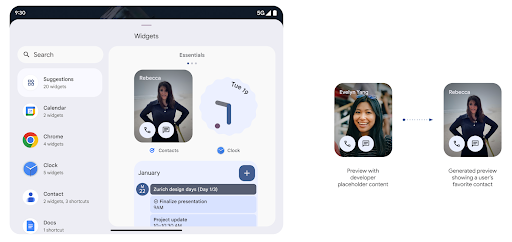
Android 15'ten önce widget seçici önizlemeleri sağlamanın tek yolu statik bir resim veya düzen kaynağı belirtmekti. Bu önizlemeler, ana ekrana yerleştirildiğinde asıl widget'ın görünümünden genellikle önemli ölçüde farklıdır. Ayrıca statik kaynaklar Jetpack Glance ile oluşturulamaz. Bu nedenle, bir XML dosyasına sahip olması için geliştiricinin widget'ın ekran görüntüsünü widget önizlemesi.
Android 15'te oluşturulan önizlemeler için destek eklendi. Bu, uygulama widget'ının
sağlayıcılar, bunun yerine seçici önizlemesi olarak kullanmak üzere RemoteViews oluşturabilir
örneğidir.
Push API'sı
Uygulamalar, oluşturulan önizlemeleri bir push API'si aracılığıyla sağlayabilir. Uygulamalar, yaşam döngülerinin herhangi bir noktasında önizleme sağlayabilir ve canlı yayın sahibinden önizleme sağlamaları için açık bir istek almazlar. Önizlemeler AppWidgetService'te saklanır ve ev sahipleri bunları istedikleri zaman isteyebilir. Aşağıdaki örnek, bir XML widget'ı yükler
düzen kaynağını belirler ve bunu önizleme olarak ayarlar:
AppWidgetManager.getInstance(appContext).setWidgetPreview(
   ComponentName(
       appContext,
       SociaLiteAppWidgetReceiver::class.java
   ),
   AppWidgetProviderInfo.WIDGET_CATEGORY_HOME_SCREEN,
   RemoteViews("com.example", R.layout.widget_preview)
)
Beklenen akış şu şekildedir:
- Widget sağlayıcı dilediğinde
setWidgetPreviewçağrısı yapar. Sağlanan Önizlemeler,AppWidgetServiceuygulamasında diğer sağlayıcı bilgileriyle birlikte kalıcıdır. setWidgetPreview,AppWidgetHost.onProvidersChangedgeri çağırma işlevi aracılığıyla ev sahiplerini güncellenmiş önizlemeden haberdar eder. Buna karşılık, widget ana makine tüm sağlayıcı bilgilerini yeniden yükler.- Barındırıcı, widget önizlemesini görüntülerken
AppWidgetProviderInfo.generatedPreviewCategoriesdeğerini kontrol eder ve seçilen kategori mevcutsa bu sağlayıcının kayıtlı önizlemesini döndürmek içinAppWidgetManager.getWidgetPreviewişlevini çağırır.
setWidgetPreview'ü ne zaman aramalısınız?
Önizleme sağlamak için geri çağırma olmadığından uygulamalar, çalıştıkları herhangi bir noktada önizleme göndermeyi seçebilir. Önizlemenin ne sıklıkta güncelleneceği widget'ın kullanım alanına bağlıdır.
Aşağıdaki listede, önizleme kullanım alanlarının iki ana kategorisi açıklanmaktadır:
- Widget önizlemelerinde gerçek veriler gösteren sağlayıcılar (ör. kişiselleştirilmiş reklamlar) en son bilgilere ulaşabilirsiniz. Bu sağlayıcılar, kullanıcı aşağıdaki işlemleri yaptıktan sonra önizlemeyi ayarlayabilir: oturum açmış veya uygulamasında ilk yapılandırmayı gerçekleştirmiş olduğundan emin olun. Bundan sonra, önizlemeleri seçtikleri sıklıkta güncellemek için periyodik bir görev oluşturabilir. Bu tür widget'lara örnek olarak fotoğraf, takvim, hava durumu veya haber widget'ları verilebilir.
- Önizlemelerde veya hızlı işlem widget'larında statik bilgiler gösteren sağlayıcılar reklam grupları oluşturabilirsiniz. Bu sağlayıcılar, uygulama ilk kez açıldığında önizlemeleri bir kez ayarlayabilir. Bu tür widget'lara örnek olarak Drive hızlı işlemler widget'ı veya Chrome kısayolları widget'ı verilebilir.
Bazı sağlayıcılar, hub modu seçicisinde statik önizlemeler gösterebilir ancak gerçek bilgileri kontrol edin. Bu sağlayıcılar, önizlemeleri ayarlamak için bu kullanım alanlarının her ikisi için de yönergeleri izlemelidir.
Pencere İçinde Pencere
Android 15, PIP moduna geçerken daha da sorunsuz bir geçiş sağlayan Pencere İçinde Pencere (PIP) özelliğinde değişiklikler sunar. Bu işlem, ana kullanıcı arayüzünün üzerine yerleştirilmiş kullanıcı arayüzü öğeleri içeren uygulamalar.
Geliştiriciler, üste binen kullanıcı arayüzü öğelerinin görünürlüğünü değiştiren mantığı tanımlamak için onPictureInPictureModeChanged geri çağırma işlevini kullanır. Bu geri arama
PiP giriş veya çıkış animasyonu tamamlandığında tetiklenir. Şu tarihte başlıyor:
Android 15, PictureInPictureUiState sınıfı başka bir eyalet içerir.
Bu kullanıcı arayüzü durumunda, Android 15'i (API düzeyi 35) hedefleyen uygulamalar
Activity#onPictureInPictureUiStateChanged geri çağırma özelliği şununla çağrılıyor:
PiP animasyonu başlar başlamaz isTransitioningToPip(). Her biri 100'den az gösterim alan
PiP modundayken uygulamayla alakalı olmayan birçok kullanıcı arayüzü öğesi
öneriler, yaklaşan görüntüleme sayısı gibi bilgiler içeren örnek görünümler veya
videolar, derecelendirmeler ve başlıklar. Uygulama PiP moduna geçtiğinde
Bu kullanıcı arayüzü öğelerini gizlemek için onPictureInPictureUiStateChanged geri çağırma işlemini gerçekleştirin.
PiP penceresinden tam ekran moduna geçerse
Bu öğeleri göstermek için onPictureInPictureModeChanged geri çağırması (aşağıda gösterildiği gibi)
aşağıdaki örnekler:
override fun onPictureInPictureUiStateChanged(pipState: PictureInPictureUiState) {
        if (pipState.isTransitioningToPip()) {
          // Hide UI elements
        }
    }
override fun onPictureInPictureModeChanged(isInPictureInPictureMode: Boolean) {
        if (isInPictureInPictureMode) {
          // Unhide UI elements
        }
    }
Alakasız kullanıcı arayüzü öğelerinin bu hızlı görünürlük açma/kapatma düğmesi (PIP penceresi için) daha akıcı ve titreyen bir PiP giriş animasyonu olduğundan emin olun.
İyileştirilmiş Rahatsız Etmeyin kuralları
AutomaticZenRule, uygulamaların Dikkat'i özelleştirmesine olanak tanır
Yönetim (Rahatsız Etmeyin) kuralları ve ne zaman etkinleştirileceğine veya devre dışı bırakılacağına karar verme
oluşturabilirsiniz. Android 15,
en iyi uygulamaları paylaşacağız. Aşağıdaki iyileştirmeler dahildir:
AutomaticZenRuleöğesine türler ekleniyor ve sistemin özel uygulama yapmasına olanak tanıyor bazı kurallara uyması gerekir.AutomaticZenRuleuygulamasına simge eklenerek modların daha kullanışlı hale getirilmesine yardımcı olun fark edebilirsiniz.AutomaticZenRuleöğesine aşağıdakileri açıklayan birtriggerDescriptiondizesi ekleniyor kuralın kullanıcı için etkin olması gereken koşullar.- Eklenme zamanı
ZenDeviceEffectsAutomaticZenRuledeğerine ayarlayarak kuralların gri tonlama gibi öğeleri tetiklemesine izin verir gece moduna girebilir veya duvar kağıdını karartabilirsiniz.
Bildirim kanalları için VibrationEffect ayarlama
Android 15, gelen bildirimler için zengin titreşimlerin ayarlanmasını
NotificationChannel.setVibrationEffect kullanıyor. Bu nedenle,
Kullanıcılarınız farklı bildirim türlerini birbirinden
cihazlarına bakması gerekmez.
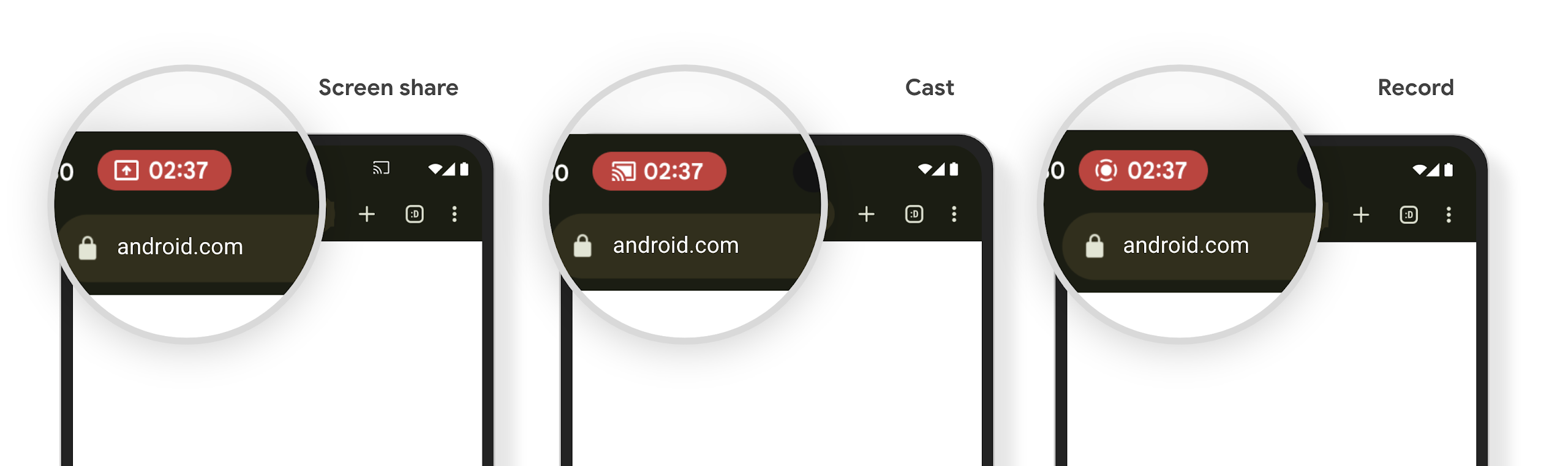
Medya projeksiyonu durum çubuğu çipi ve otomatik durdurma
Medya yansıtma, kullanıcıların gizli bilgilerini açığa çıkarabilir. Yeni ve belirgin bir durum çubuğu çipi, devam eden ekran projeksiyonlarından kullanıcıları haberdar eder. Kullanıcılar ekran aktarmayı, paylaşımı veya kaydı durdurmak için çipe dokunabilir. Ayrıca, daha sezgisel bir kullanıcı deneyimi için devam eden ekran projeksiyonları artık cihaz ekranı kilitlendiğinde otomatik olarak durdurulur.
Büyük ekranlar ve form faktörleri
Android 15, uygulamalarınızın büyük ekranlar, çevrilebilir ve katlanabilir cihazlar gibi Android'in form faktörlerinden en iyi şekilde yararlanmasını sağlar.
Büyük ekranda çoklu görev deneyimi artık daha iyi
Android 15, kullanıcıların büyük ekranlı cihazlarda çoklu görev gerçekleştirmeleri için daha iyi yöntemler sunar. Örneğin, Örneğin, kullanıcılar en sevdikleri bölünmüş ekran uygulama kombinasyonlarını hızlı bir şekilde görev çubuğuna dokunup sabitleyerek uygulamalar arasında kolayca geçiş yapabilirsiniz. Bunun anlamı şudur: uygulamanızın uyarlanabilir olmasını sağlamanın hiç olmadığı kadar önemli olduğunu unutmayın.
Google I/O, Uyarlanabilir Android'i Geliştirme uygulamalar ve Material 3 ile Kullanıcı Arayüzü Oluşturma uyarlanabilir kitaplık yardımcı olabilir ve dokümanlarımızda büyük müşteri memnuniyeti için ekranları için de geçerlidir.
Kapak ekranı desteği
Uygulamanız, Application veya Activity'inizin desteklenen katlanabilir cihazların küçük kapak ekranlarında gösterilmesine izin vermek için Android 15'in kullandığı bir mülkü tanımlayabilir. Bu ekranlar, Android uygulamalarının çalışabileceği uyumlu hedefler olarak kabul edilemeyecek kadar küçüktür ancak uygulamanız bunları desteklemeyi etkinleştirerek daha fazla yerde kullanılabilir hale gelebilir.
Bağlantı
Android 15, platformu güncelleyerek uygulamanızın iletişim ve kablosuz teknolojilerdeki en son gelişmelere erişmesini sağlar.
Uydu desteği
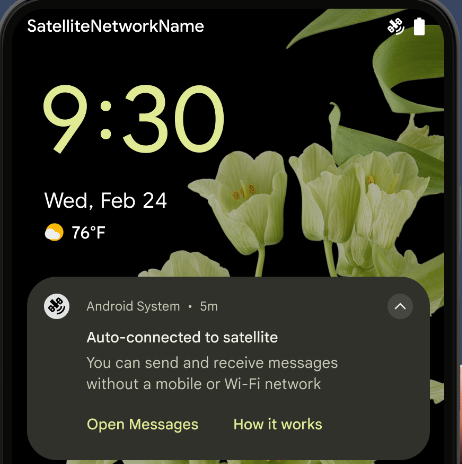
Android 15, uydu bağlantısı için platform desteğini genişletmeye ve Kullanıcı deneyiminin tutarlı bir uydu bağlantısı durumu.
Uygulamalar, bir cihazın uyduya ne zaman bağlandığını algılamak için ServiceState.isUsingNonTerrestrialNetwork() kullanabilir. Bu sayede, tam ağ hizmetlerinin neden kullanılamayabileceği konusunda daha fazla bilgi sahibi olabilirler. Ayrıca Android 15, mesaj göndermek ve almak için uydu bağlantısını kullanmak üzere SMS ve MMS uygulamalarının yanı sıra önceden yüklenmiş RCS uygulamaları için destek sunar.
Daha sorunsuz NFC deneyimleri
Android 15, Android'in güçlü NFC uygulama ekosistemini desteklemeye devam ederken temassız ödeme deneyimini daha akıcı ve güvenilir hale getirmek için çalışıyor. Desteklenen cihazlarda uygulamalar, NfcAdapter'den gözlem moduna girmesini isteyebilir. Bu modda cihaz, NFC okuyucuları dinler ancak yanıt vermez. Uygulamanın NFC hizmeti, işleme alınacak PollingFrame
nesneleri gönderir. PollingFrame nesneleri, NFC okuyucuyla ilk iletişimden önce kimlik doğrulama yapmak için kullanılabilir. Bu sayede, birçok durumda tek dokunuşla işlem yapılabilir.
Ayrıca uygulamalar, desteklenen cihazlarda bir filtre kaydedebilir. Böylece, anket döngüsü etkinliği hakkında bildirim alabilir ve NFC'den haberdar olan birden fazla uygulamayla sorunsuz şekilde çalışabilir.
Cüzdan rolü
Android 15, kullanıcının tercih ettiği cüzdan uygulamasıyla daha sıkı entegrasyon sağlayan bir Cüzdan rolü sunar. Bu rol, NFC'nin varsayılan temassız ödeme ayarının yerini alır. Kullanıcılar, Ayarlar > Uygulamalar > Varsayılan Uygulamalar'a giderek Cüzdan rolü sahibini yönetebilir.
Cüzdan rolü, ödeme kategorisine kayıtlı AID'ler için NFC dokunma işlemlerini yönlendirirken kullanılır. Aynı AID için kayıtlı başka bir uygulama ön planda çalışmıyorsa dokunma işlemleri her zaman Cüzdan rol sahibine gider.
Bu rol, Cüzdan Hızlı Erişim kartının etkinleştirildiğinde nereye yerleştirileceğini belirlemek için de kullanılır. Rol "Yok" olarak ayarlandığında Hızlı Erişim kutusu kullanılamaz ve ödeme kategorisi NFC dokunuşları yalnızca ön plan uygulamasına gönderilir.
Güvenlik
Android 15, uygulamanızın güvenliğini artırmanıza, uygulamanızın verilerini korumanıza ve kullanıcılara verileri üzerinde daha fazla şeffaflık ve kontrol imkanı sunmanıza yardımcı olur. Kullanıcı koruma önlemlerini iyileştirmek ve uygulamanızı yeni tehditlere karşı korumak için neler yaptığımız hakkında daha fazla bilgi edinmek isterseniz Google I/O'daki Android'de kullanıcı güvenliğini sağlama konuşmasına göz atın.
Kimlik Bilgisi Yöneticisi'ni otomatik doldurma ile entegre etme
Android 15'ten itibaren geliştiriciler kullanıcı adı veya şifre alanları gibi belirli görünümleri Kimlik Bilgisi Yöneticisi istekleriyle bağlayabilir. Bu sayede, oturum açma işlemi sırasında özelleştirilmiş bir kullanıcı deneyimi sunmak daha kolay hale gelir. Kullanıcı bu görünümlerden birine odaklandığında Kimlik Bilgisi Yöneticisi'ne ilgili bir istek gönderilir. Elde edilen kimlik bilgileri sağlayıcılar arasında toplanır ve satır içi öneriler veya açılır liste önerileri gibi otomatik doldurma yedek kullanıcı arayüzlerinde gösterilir. Jetpack androidx.credentials kitaplığı, geliştiricilerin tercih ettiği uç noktadır ve yakında Android 15 ve sonraki sürümlerde bu özelliği daha da geliştirmek için kullanıma sunulacaktır.
Tek dokunuşla kaydolma ve oturum açma özelliğini biyometrik istemlerle entegre etme
Kimlik Bilgisi Yöneticisi, biyometrik istemleri kimlik bilgisi oluşturmaya entegre eder ve oturum açma işlemlerini gerçekleştirdiğinden sağlayıcıların yönetim ihtiyacını biyometrik istemleri kullanabilir. Sonuç olarak, kimlik bilgisi sağlayıcıların yalnızca kimlik bilgisi oluşturma ve alma akışlarının sonuçlarına odaklanmaları ve bu sonuçları biyometrik akış sonucuyla tamamlamaları gerekir. Bu basitleştirilmiş süreç, daha verimli ve basit bir kimlik bilgisi oluşturma ve alma süreci oluşturur.
Uçtan uca şifreleme için anahtar yönetimi
Android 15'te, kriptografik açık anahtarların depolanması için işletim sistemi düzeyinde bir API sağlayarak Android uygulamalarınızda uçtan uca şifrelemeyi (E2EE) kolaylaştıran E2eeContactKeysManager'i kullanıma sunuyoruz.
E2eeContactKeysManager, kullanıcılara kişilerinin herkese açık anahtarlarını merkezi bir şekilde yönetme ve doğrulama olanağı sunmak için platformdaki kişiler uygulamasıyla entegre olacak şekilde tasarlanmıştır.
İçerik URI'lerinde izin kontrolleri
Android 15, içerik URI'lerinde izin kontrolleri gerçekleştiren bir dizi API'yi kullanıma sunar:
Context.checkContentUriPermissionFull: Bu seçenek, içerik URI'lerinde tam izin kontrolü gerçekleştirir.Activitymanifest özelliğirequireContentUriPermissionFromCaller: Bu özellik, etkinlik başlatıldığında sağlanan içerik URI'lerinde belirtilen izinleri zorunlu kılar.Activityçağırıcıları içinComponentCallersınıfı: Bu, etkinliği başlatan uygulamayı temsil eder.
Erişilebilirlik
Android 15, kullanıcılar için erişilebilirliği artıran özellikler ekler.
Daha iyi Braille
Android 15'te TalkBack'in hem USB hem de güvenli Bluetooth üzerinden HID standardını kullanan Braille ekranları desteklemesini sağladık.
Fareler ve klavyeler tarafından kullanılana benzer bu standart, Android'in zaman içinde daha geniş bir Braille ekran yelpazesini desteklemesine yardımcı olacaktır.
Uluslararası hale getirme
Android 15, bir cihaz farklı dillerde kullanıldığında kullanıcı deneyimini tamamlayan özellikler ve işlevler ekler.
CJK değişken yazı tipi
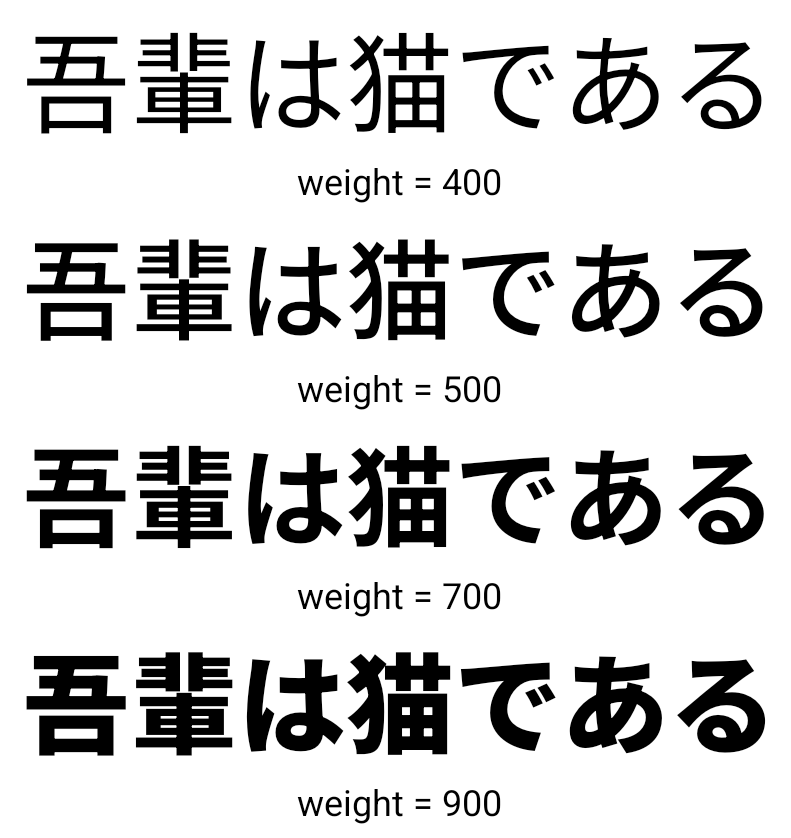
Android 15'ten itibaren Çince, Japonca ve Korece (CJK) diller için NotoSansCJK yazı tipi dosyası değişken yazı tipi olarak kullanılmaktadır. Değişken yazı tipleri, CJK dillerinde yaratıcı tipografi olanakları sunar. Tasarımcılar daha geniş bir stil yelpazesini keşfedebilir ve daha önce elde edilmesi zor veya imkansız olan görsel açıdan çarpıcı düzenler oluşturabilir.
Karakterler arası gerekçe
Android 15'ten itibaren metin, harf aralığı kullanılarak ikiye yaslanabilir ve
JUSTIFICATION_MODE_INTER_CHARACTER kullanılıyor. Kelimeler arası iki yana yaslama (önceki değeri)
İlk olarak Android 8.0'da (API düzeyi 26) kullanıma sunulduktan sonra
iki yana yaslama,
Segmentasyon için bir boşluk karakteri (ör. Çince, Japonca vb.).
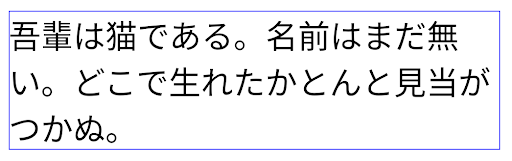
JUSTIFICATION_MODE_NONE kullanılarak Japonca metin düzeni.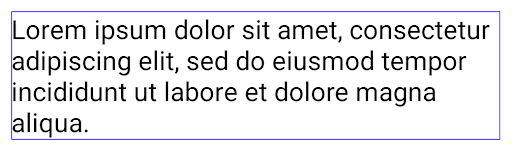
JUSTIFICATION_MODE_NONE kullanılarak İngilizce metin düzeni.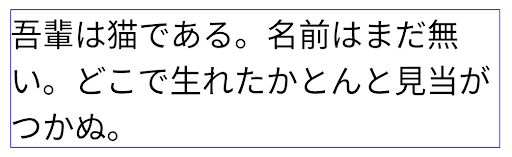
JUSTIFICATION_MODE_INTER_WORD kullanan Japonca metin için düzen.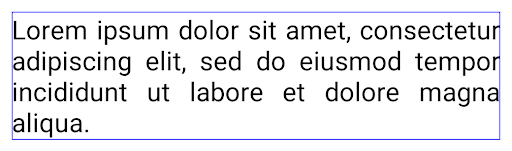
JUSTIFICATION_MODE_INTER_WORD kullanılarak İngilizce metin düzeni.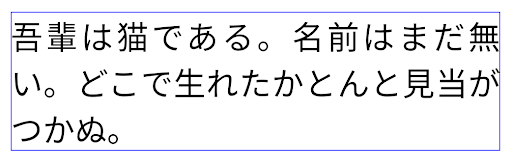
JUSTIFICATION_MODE_INTER_CHARACTER kullanılarak Japonca metin düzeni.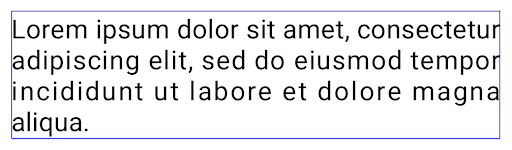
JUSTIFICATION_MODE_INTER_CHARACTER kullanılarak oluşturulan İngilizce metin için düzen.Otomatik satır sonu yapılandırması
Android, İngilizcede Japonca ve Korece için sıralı tabanlı satır sonlarını desteklemeye başladı.
Android 13 (API düzeyi 33). Ancak sıralı tabanlı satır sonları,
metinler okunaklı olduğundan, uzun metin satırlarında iyi performans göstermez.
Android 15'te uygulamalar, LINE_BREAK_WORD_STYLE_AUTO seçeneğini kullanarak ifade tabanlı satır aralarını yalnızca kısa metin satırları için uygulayabilir. Bu seçenek, metin için en iyi kelime stili seçeneğini belirler.
Kısa metin satırları için, aynı işlevi gören kelime öbeğine dayalı satır sonları kullanılır.
aşağıda gösterildiği gibi LINE_BREAK_WORD_STYLE_PHRASE olarak
şu resim:
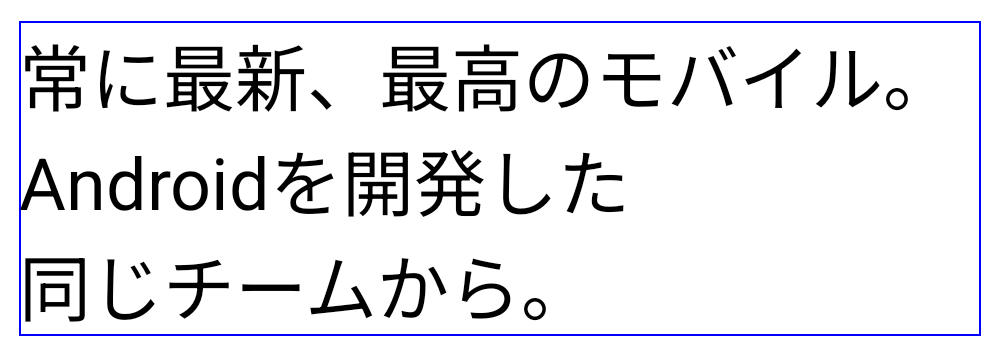
LINE_BREAK_WORD_STYLE_AUTO
Metnin okunabilirliğini artırmak için sıralı satır sonları uygular.
Bu,
LINE_BREAK_WORD_STYLE_PHRASE.Daha uzun metin satırları için LINE_BREAK_WORD_STYLE_AUTO, hayır kullanır
aynı şekilde çalışan satır sonu kelime stili
LINE_BREAK_WORD_STYLE_NONE,
şu resim:
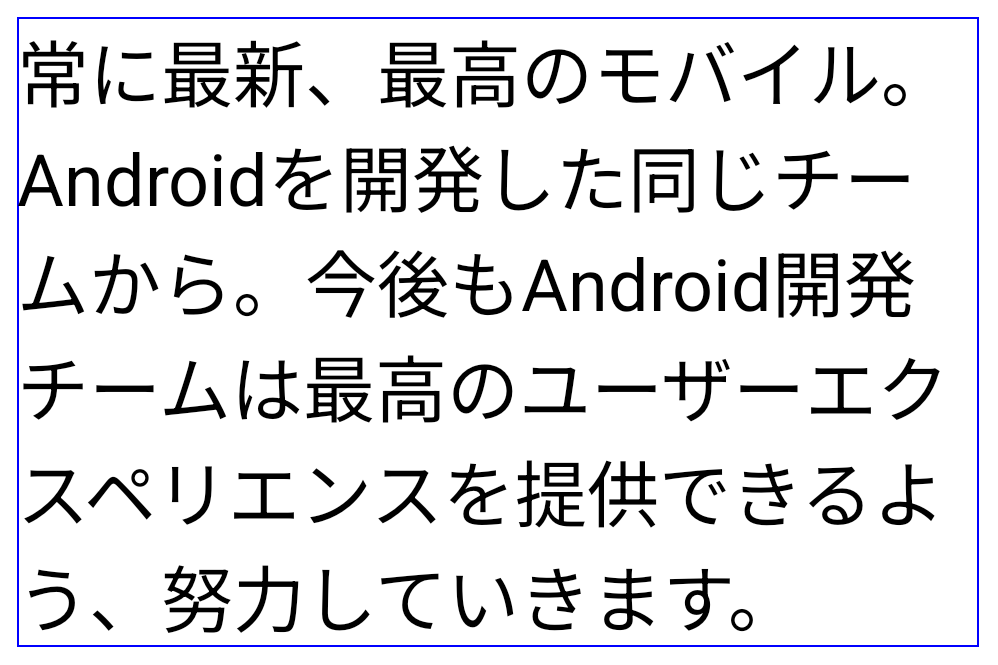
LINE_BREAK_WORD_STYLE_AUTO
Metnin okunabilirliğini artırmak için satır sonu kelime stili uygulamaz.
Bu,
LINE_BREAK_WORD_STYLE_NONE.Ek Japonca Hentaigana Yazı Tipi
Android 15'te eski Japonca Hiragana (Hentaigana olarak bilinir) yazı tipi dosyası varsayılan olarak paketlenmiştir. Hentaigana karakterlerinin benzersiz şekilleri sanat eseri veya tasarımda ayırt edici bir dokunuş katar ve aynı zamanda doğru hazineleri eski Japon belgelerinin iletimi ve anlaşılması.

VideoLAN cone Copyright (c) 1996-2010 VideoLAN. Bu logo veya değiştirilmiş bir sürümü, VideoLAN projesine ya da VideoLAN ekibi tarafından geliştirilen herhangi bir ürüne atıfta bulunmak için herkes tarafından kullanılabilir veya değiştirilebilir ancak proje tarafından onaylandığını göstermez.
Vulkan ve Vulkan logosu, Khronos Group Inc. şirketinin tescilli ticari markalarıdır.
OpenGL, tescilli bir ticari markadır ve OpenGL ES logosu, Khronos'un izniyle kullanılan Hewlett Packard Enterprise'ın ticari markasıdır.