

Android 15 bietet viele neue Funktionen und APIs für Entwickler. In den folgenden Abschnitten werden diese Funktionen zusammengefasst, um Ihnen den Einstieg in die zugehörigen APIs zu erleichtern.
Eine detaillierte Liste der hinzugefügten, geänderten und entfernten APIs finden Sie im API-Vergleichsbericht. Details zu den hinzugefügten APIs finden Sie in der Android-API-Referenz. Suchen Sie für Android 15 nach APIs, die in API-Level 35 hinzugefügt wurden. Informationen zu Bereichen, in denen sich Plattformänderungen auf Ihre Apps auswirken können, finden Sie unter Verhaltensänderungen in Android 15 für Apps, die auf Android 15 ausgerichtet sind und für alle Apps.
Kamera und Medien
Android 15 bietet eine Vielzahl von Funktionen, die die Kamera- und Mediennutzung verbessern und die dir Zugriff auf Tools und Hardware geben, mit denen Creator ihre Visionen auf Android verwirklichen können.
Weitere Informationen zu den neuesten Funktionen und Entwicklerlösungen für Android-Medien und -Kameras finden Sie im Google I/O-Vortrag Building modern Android media and camera experiences.
Low Light-Modus
Mit Android 15 wird Low Light Boost eingeführt, ein Modus für die automatische Belichtung, der sowohl für Camera 2 als auch für die Kameraerweiterung „Nachtmodus“ verfügbar ist. Der Modus für wenig Licht passt die Belichtung des Vorschaustreams bei schlechten Lichtverhältnissen an. Das unterscheidet sich von der Funktionsweise der Kameraerweiterung für den Nachtmodus, mit der Standbilder erstellt werden. Im Nachtmodus werden mehrere Fotos zu einem einzigen verbesserten Bild kombiniert. Der Nachtmodus eignet sich zwar sehr gut zum Erstellen eines Standbilds, kann aber keinen kontinuierlichen Frames-Stream erstellen. Das ist mit dem Low Light Boost jedoch möglich. So ermöglicht der Low Light Boost unter anderem folgende Kamerafunktionen:
- Verbesserte Bildvorschau, damit Nutzer ihre Fotos bei schlechten Lichtverhältnissen besser ausrichten können
- QR-Codes bei wenig Licht scannen
Wenn Sie die Funktion „Optimierung bei wenig Licht“ aktivieren, wird sie automatisch aktiviert, wenn die Lichtverhältnisse schlecht sind, und deaktiviert, wenn mehr Licht vorhanden ist.
Apps können sogar die Vorschau eines Streams bei schlechten Lichtverhältnissen aufnehmen und dann ein aufgehelltes Video speichern.
Weitere Informationen finden Sie unter Boost bei schlechten Lichtverhältnissen.
In-App-Kamerasteuerung
Android 15 bietet eine Erweiterung, mit der Sie die Kamerahardware und ihre Algorithmen auf unterstützten Geräten besser steuern können:
- Erweiterte Anpassungen der Blitzstärke, mit denen sich die Blitzintensität sowohl im Modus
SINGLEals auch im ModusTORCHbei der Aufnahme von Bildern präzise steuern lässt.
HDR-Headroom-Steuerung
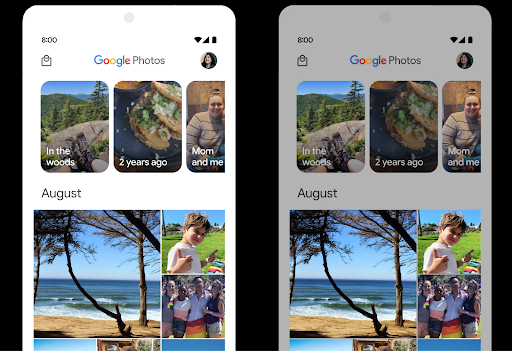
Android 15 wählt einen HDR-Headroom aus, der den zugrunde liegenden Gerätefunktionen und der Bittiefe des Panels entspricht. Bei Seiten mit vielen SDR-Inhalten, z. B. einer Messaging-App, in der ein einzelnes HDR-Vorschaubild angezeigt wird, kann dieses Verhalten die wahrgenommene Helligkeit der SDR-Inhalte beeinträchtigen. Mit Android 15 können Sie den HDR-Headroom mit setDesiredHdrHeadroom steuern, um ein Gleichgewicht zwischen SDR- und HDR-Inhalten zu finden.
Loudness-Regler

Android 15 introduces support for the CTA-2075 loudness standard to help you avoid audio loudness inconsistencies and ensure users don't have to constantly adjust volume when switching between content. The system leverages known characteristics of the output devices (headphones and speaker) along with loudness metadata available in AAC audio content to intelligently adjust the audio loudness and dynamic range compression levels.
To enable this feature, you need to ensure loudness metadata is available in
your AAC content and enable the platform feature in your app. For this, you
instantiate a LoudnessCodecController object by
calling its create factory method with the audio
session ID from the associated AudioTrack; this
automatically starts applying audio updates. You can pass an
OnLoudnessCodecUpdateListener to modify or filter
loudness parameters before they are applied on the
MediaCodec.
// Media contains metadata of type MPEG_4 OR MPEG_D
val mediaCodec = …
val audioTrack = AudioTrack.Builder()
                                .setSessionId(sessionId)
                                .build()
...
// Create new loudness controller that applies the parameters to the MediaCodec
try {
   val lcController = LoudnessCodecController.create(mSessionId)
   // Starts applying audio updates for each added MediaCodec
}
AndroidX media3 ExoPlayer will also be updated to use the
LoudnessCodecController APIs for a seamless app integration.
Virtuelle MIDI 2.0-Geräte
Android 13 added support for connecting to MIDI 2.0 devices using USB, which communicate using Universal MIDI Packets (UMP). Android 15 extends UMP support to virtual MIDI apps, enabling composition apps to control synthesizer apps as a virtual MIDI 2.0 device just like they would with an USB MIDI 2.0 device.
Effizientere AV1-Softwaredecodierung

dav1d, der beliebte AV1-Software-Decoder von VideoLAN, ist für Android-Geräte verfügbar, die die AV1-Dekodierung nicht in Hardware unterstützen. dav1d ist bis zu dreimal leistungsfähiger als der bisherige AV1-Software-Decoder und ermöglicht die HD-AV1-Wiedergabe für mehr Nutzer, einschließlich einiger Geräte der unteren und mittleren Preisklasse.
Deine App muss die Verwendung von dav1d aktivieren, indem sie es beim Namen aufruft"c2.android.av1-dav1d.decoder". In einem nachfolgenden Update wird dav1d zum Standard-AV1-Software-Decoder. Diese Unterstützung ist standardisiert und wird auf Android 11-Geräte übertragen, die Google Play-Systemupdates erhalten.
Produktivität und Tools für Entwickler
Die meisten unserer Bemühungen zur Steigerung Ihrer Produktivität konzentrieren sich auf Tools wie Android Studio, Jetpack Compose und die Android Jetpack-Bibliotheken. Wir suchen aber auch immer nach Möglichkeiten, Ihnen die Umsetzung Ihrer Visionen auf der Plattform zu erleichtern.
OpenJDK 17-Updates
In Android 15 werden die Kernbibliotheken von Android weiter aktualisiert, um sie an die Funktionen der neuesten OpenJDK-LTS-Releases anzupassen.
Die folgenden wichtigen Funktionen und Verbesserungen sind enthalten:
- Verbesserungen bei NIO-Buffers
- Streams
- Zusätzliche
math- undstrictmath-Methoden util-Paketupdates, einschließlich der sequenziertencollection,mapundsetByteBuffer-Unterstützung inDeflater- Sicherheitsupdates wie
X500PrivateCredentialund Sicherheitsschlüsselupdates
Diese APIs werden über Google Play-Systemupdates auf über einer Milliarde Geräten mit Android 12 (API-Level 31) und höher aktualisiert, damit Sie Ihre Apps auf die neuesten Programmierfunktionen ausrichten können.
Verbesserungen bei PDF-Dateien
Android 15 enthält erhebliche Verbesserungen an den PdfRenderer-APIs. Apps können erweiterte Funktionen wie Rendering enthalten
passwortgeschützte Dateien, Anmerkungen, Formularbearbeitung,
Suche und Auswahl mit Text Linearisiertes PDF
Optimierungen werden unterstützt, um die lokale PDF-Ansicht zu beschleunigen und den Ressourcenverbrauch zu reduzieren.
Mit der Jetpack-PDF-Bibliothek können Sie Ihrer App ganz einfach Funktionen zum Ansehen von PDFs hinzufügen.

Die PdfRenderer wurde in ein Modul verschoben, das unabhängig von der Plattformversion über Google Play-Systemupdates aktualisiert werden kann. Wir unterstützen diese Änderungen bis Android 11 (API-Level 30), indem wir eine kompatible Version der API-Oberfläche vor Android 15 namens PdfRendererPreV erstellen.
Verbesserungen beim automatischen Sprachenwechsel
Android 14 added on-device, multi-language recognition in audio with automatic
switching between languages, but this can cause words to get dropped,
especially when languages switch with less of a pause between the two
utterances. Android 15 adds additional controls to help apps tune this switching
to their use case.
EXTRA_LANGUAGE_SWITCH_INITIAL_ACTIVE_DURATION_TIME_MILLIS
confines the automatic switching to the beginning of the audio session, while
EXTRA_LANGUAGE_SWITCH_MATCH_SWITCHES deactivates the
language switching after a defined number of switches. These options are
particularly useful if you expect that there will be a single language spoken
during the session that should be autodetected.
Verbesserte OpenType Variable Font API
Android 15 improves the usability of the OpenType variable font. You can create
a FontFamily instance from a variable font without specifying weight axes
with the buildVariableFamily API. The text renderer overrides the value
of wght axis to match the displaying text.
Using the API simplifies the code for creating a Typeface considerably:
Kotlin
val newTypeface = Typeface.CustomFallbackBuilder(
            FontFamily.Builder(
                Font.Builder(assets, "RobotoFlex.ttf").build())
                    .buildVariableFamily())
    .build()
Java
Typeface newTypeface = Typeface.CustomFallbackBuilder(
            new FontFamily.Builder(
                new Font.Builder(assets, "RobotoFlex.ttf").build())
                    .buildVariableFamily())
    .build();
Previously, to create the same Typeface, you would need much more code:
Kotlin
val oldTypeface = Typeface.CustomFallbackBuilder(
            FontFamily.Builder(
                Font.Builder(assets, "RobotoFlex.ttf")
                    .setFontVariationSettings("'wght' 400")
                    .setWeight(400)
                    .build())
                .addFont(
                    Font.Builder(assets, "RobotoFlex.ttf")
                        .setFontVariationSettings("'wght' 100")
                        .setWeight(100)
                        .build()
                )
                .addFont(
                    Font.Builder(assets, "RobotoFlex.ttf")
                        .setFontVariationSettings("'wght' 200")
                        .setWeight(200)
                        .build()
                )
                .addFont(
                    Font.Builder(assets, "RobotoFlex.ttf")
                        .setFontVariationSettings("'wght' 300")
                        .setWeight(300)
                        .build()
                )
                .addFont(
                    Font.Builder(assets, "RobotoFlex.ttf")
                        .setFontVariationSettings("'wght' 500")
                        .setWeight(500)
                        .build()
                )
                .addFont(
                    Font.Builder(assets, "RobotoFlex.ttf")
                        .setFontVariationSettings("'wght' 600")
                        .setWeight(600)
                        .build()
                )
                .addFont(
                    Font.Builder(assets, "RobotoFlex.ttf")
                        .setFontVariationSettings("'wght' 700")
                        .setWeight(700)
                        .build()
                )
                .addFont(
                    Font.Builder(assets, "RobotoFlex.ttf")
                        .setFontVariationSettings("'wght' 800")
                        .setWeight(800)
                        .build()
                )
                .addFont(
                    Font.Builder(assets, "RobotoFlex.ttf")
                        .setFontVariationSettings("'wght' 900")
                        .setWeight(900)
                        .build()
                ).build()
        ).build()
Java
Typeface oldTypeface = new Typeface.CustomFallbackBuilder(
    new FontFamily.Builder(
        new Font.Builder(assets, "RobotoFlex.ttf")
            .setFontVariationSettings("'wght' 400")
            .setWeight(400)
            .build()
    )
    .addFont(
        new Font.Builder(assets, "RobotoFlex.ttf")
            .setFontVariationSettings("'wght' 100")
            .setWeight(100)
            .build()
    )
    .addFont(
        new Font.Builder(assets, "RobotoFlex.ttf")
            .setFontVariationSettings("'wght' 200")
            .setWeight(200)
            .build()
    )
    .addFont(
        new Font.Builder(assets, "RobotoFlex.ttf")
            .setFontVariationSettings("'wght' 300")
            .setWeight(300)
            .build()
    )
    .addFont(
        new Font.Builder(assets, "RobotoFlex.ttf")
            .setFontVariationSettings("'wght' 500")
            .setWeight(500)
            .build()
    )
    .addFont(
        new Font.Builder(assets, "RobotoFlex.ttf")
            .setFontVariationSettings("'wght' 600")
            .setWeight(600)
            .build()
    )
    .addFont(
        new Font.Builder(assets, "RobotoFlex.ttf")
            .setFontVariationSettings("'wght' 700")
            .setWeight(700)
            .build()
    )
    .addFont(
        new Font.Builder(assets, "RobotoFlex.ttf")
            .setFontVariationSettings("'wght' 800")
            .setWeight(800)
            .build()
    )
    .addFont(
        new Font.Builder(assets, "RobotoFlex.ttf")
            .setFontVariationSettings("'wght' 900")
            .setWeight(900)
            .build()
    )
    .build()
).build();
Here's an example of how a Typeface created with both the old and new APIs
renders:
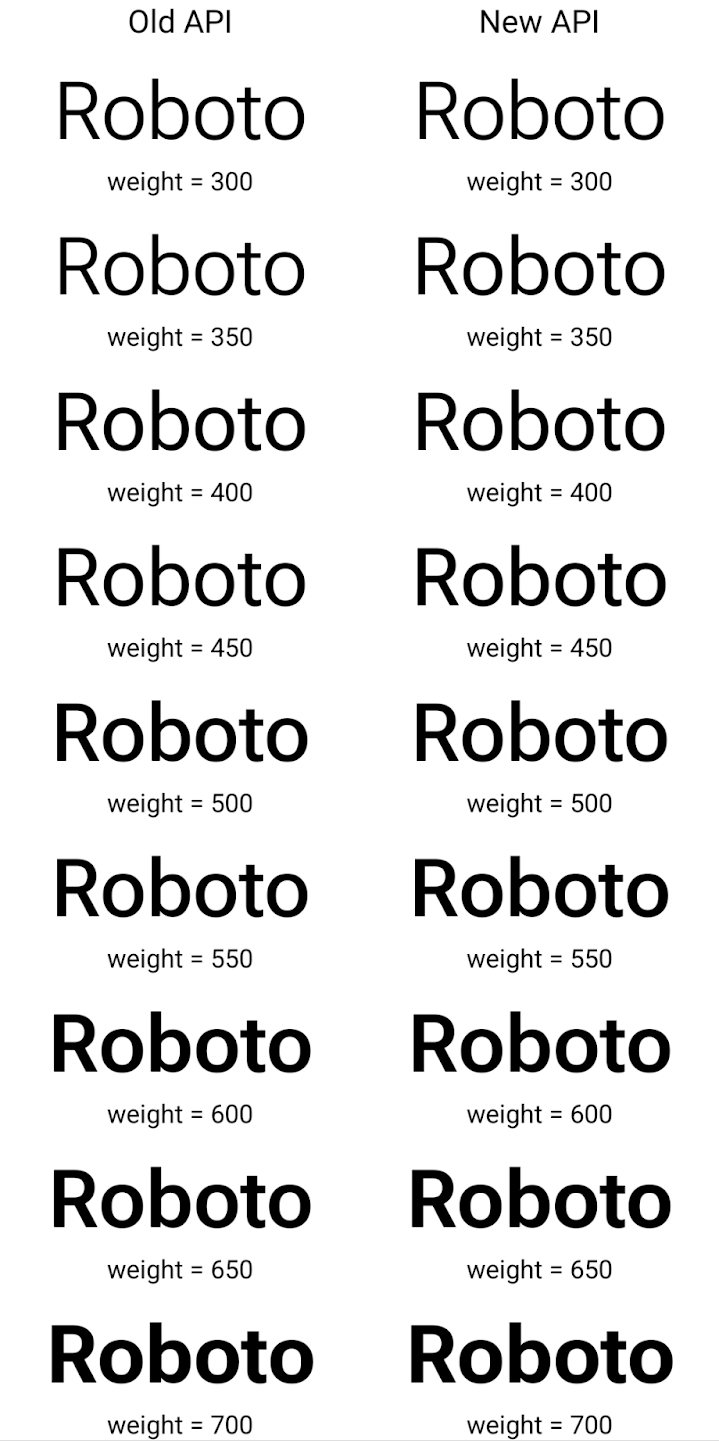
In this example, the Typeface created with the old API doesn't have the
capability to create accurate font weights for the 350, 450, 550 and 650
Font instances, so the renderer falls back to the closest weight. So in
this case, 300 is rendered instead of 350, 400 is rendered instead of 450, and
so on. By contrast, the Typeface created with the new APIs dynamically creates
a Font instance for a given weight, so accurate weights are rendered for 350,
450, 550, and 650 as well.
Detaillierte Steuerung von Zeilenumbrüchen
Ab Android 15 kann ein TextView und der zugrunde liegende Zeilenumbruch den angegebenen Textabschnitt in derselben Zeile beibehalten, um die Lesbarkeit zu verbessern. Sie können diese Anpassung der Zeilenumbrüche nutzen, indem Sie das <nobreak>-Tag in Stringressourcen oder createNoBreakSpan verwenden. Ebenso können Sie Wörter aus Bindestrichen beibehalten, indem Sie das <nohyphen>-Tag oder createNoHyphenationSpan verwenden.
Die folgende Stringressource enthält beispielsweise keinen Zeilenumbruch und wird so gerendert, dass der Text „Pixel 8 Pro.“ an einer unerwünschten Stelle unterbrochen wird:
<resources>
    <string name="pixel8pro">The power and brains behind Pixel 8 Pro.</string>
</resources>
Diese Stringressource enthält dagegen das Tag <nobreak>, das den Ausdruck „Pixel 8 Pro“ umbricht und Zeilenumbrüche verhindert:
<resources>
    <string name="pixel8pro">The power and brains behind <nobreak>Pixel 8 Pro.</nobreak></string>
</resources>
Die Unterschiede bei der Darstellung dieser Strings sind in den folgenden Bildern zu sehen:

<nobreak>-Tag umgebrochen wird.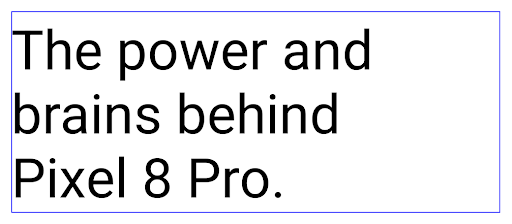
<nobreak>-Tag umgebrochen wird.App-Archivierung
Android und Google Play haben angekündigt, dass die App-Archivierung zuletzt unterstützt wird. Jahr, sodass Nutzer Speicherplatz freigeben können, indem sie selten verwendete Apps auf dem Gerät, die über die Android-App veröffentlicht wurden Set bei Google Play. Android 15 unterstützt das Archivieren und Entarchivieren von Apps auf Betriebssystemebene. Dadurch lässt sich die Funktion in allen App-Shops einfacher implementieren.
Apps mit der Berechtigung REQUEST_DELETE_PACKAGES können die
PackageInstaller requestArchive, um die Archivierung eines
installiertes App-Paket entfernt, wodurch das APK und alle im Cache gespeicherten Dateien entfernt werden,
Nutzerdaten. Archivierte Apps werden über die LauncherApps APIs als darstellbare Apps zurückgegeben. Nutzer sehen eine UI-Anzeige, die darauf hinweist, dass diese Apps archiviert sind. Wenn ein Nutzer auf eine archivierte App tippt,
erhält eine Anfrage zum Wieder aktivieren und der Wiederherstellungsprozess kann
die von der ACTION_PACKAGE_ADDED-Übertragung überwacht werden.
Enable 16 KB mode on a device using developer options

Toggle the Boot with 16KB page size developer option to boot a device in 16 KB mode.
In QPR versions of Android 15, you can use the developer option that's available on certain devices to boot the device in 16 KB mode and perform on-device testing. Before using the developer option, go to Settings > System > Software updates and apply any updates that are available.
This developer option is available on the following devices:
Pixel 8 and 8 Pro (with Android 15 QPR1 or higher)
Pixel 8a (with Android 15 QPR1 or higher)
Pixel 9, 9 Pro, and 9 Pro XL (with Android 15 QPR2 or higher)
Pixel 9a (with Android 16 or higher)
Grafik
Android 15 bietet die neuesten Grafikverbesserungen, darunter ANGLE und Ergänzungen des Canvas-Grafiksystems.
Modernisierung des GPU-Zugriffs unter Android

Android hardware has evolved quite a bit from the early days where the core OS would run on a single CPU and GPUs were accessed using APIs based on fixed-function pipelines. The Vulkan® graphics API has been available in the NDK since Android 7.0 (API level 24) with a lower-level abstraction that better reflects modern GPU hardware, scales better to support multiple CPU cores, and offers reduced CPU driver overhead — leading to improved app performance. Vulkan is supported by all modern game engines.
Vulkan is Android's preferred interface to the GPU. Therefore, Android 15 includes ANGLE as an optional layer for running OpenGL® ES on top of Vulkan. Moving to ANGLE will standardize the Android OpenGL implementation for improved compatibility, and, in some cases, improved performance. You can test out your OpenGL ES app stability and performance with ANGLE by enabling the developer option in Settings -> System -> Developer Options -> Experimental: Enable ANGLE on Android 15.
The Android ANGLE on Vulkan roadmap

As part of streamlining our GPU stack, going forward we will be shipping ANGLE as the GL system driver on more new devices, with the future expectation that OpenGL/ES will be only available through ANGLE. That being said, we plan to continue support for OpenGL ES on all devices.
Recommended next steps
Use the developer options to select the ANGLE driver for OpenGL ES and test your app. For new projects, we strongly encourage using Vulkan for C/C++.
Verbesserungen für Canvas
Android 15 continues our modernization of Android's Canvas graphics system with additional capabilities:
Matrix44provides a 4x4 matrix for transforming coordinates that should be used when you want to manipulate the canvas in 3D.clipShaderintersects the current clip with the specified shader, whileclipOutShadersets the clip to the difference of the current clip and the shader, each treating the shader as an alpha mask. This supports the drawing of complex shapes efficiently.
Leistung und Akku
Android konzentriert sich weiterhin darauf, Ihnen dabei zu helfen, die Leistung und Qualität Ihrer Apps zu verbessern. Mit Android 15 werden APIs eingeführt, die dazu beitragen, Aufgaben in Ihrer App effizienter auszuführen, die App-Leistung zu optimieren und Statistiken zu Ihren Apps zu erfassen.
Informationen zu Best Practices für einen effizienten Akkuverbrauch, zum Debuggen der Netzwerk- und Stromnutzung sowie Details dazu, wie wir die Akkueffizienz von Hintergrundaufgaben in Android 15 und den letzten Android-Versionen verbessern, finden Sie im Google I/O-Vortrag zur Verbesserung der Akkueffizienz von Hintergrundaufgaben in Android.
ApplicationStartInfo API
In früheren Android-Versionen war das Starten von Apps ein wenig mysteriös. Es war schwierig zu ermitteln, ob Ihre App im Kalt-, Warm- oder Heißstart gestartet wurde. Außerdem war es schwierig zu ermitteln, wie lange Ihre App in den verschiedenen Startphasen benötigt hat: zum Beispiel zum Verzweigen des Prozesses, zum Aufrufen von onCreate oder zum Zeichnen des ersten Frames. Bei der Instanziierung Ihrer Application-Klasse konnten Sie nicht wissen, ob die App über eine Übertragung, einen Inhaltsanbieter, einen Job, eine Sicherung, den vollständigen Start, einen Wecker oder eine Activity gestartet wurde.
Die ApplicationStartInfo API unter Android 15 bietet all das und noch mehr. Sie können dem Ablauf auch eigene Zeitstempel hinzufügen, um Zeitdaten an einem Ort zu erfassen. Neben der Erhebung von Messwerten können Sie ApplicationStartInfo auch verwenden, um den App-Start direkt zu optimieren. So können Sie beispielsweise die kostenintensive Instanziierung von UI-bezogenen Bibliotheken in Ihrem Application-Klassen beim Starten Ihrer App aufgrund einer Übertragung vermeiden.
Detaillierte Informationen zur App-Größe
Seit Android 8.0 (API-Ebene 26) ist die StorageStats.getAppBytes API in Android enthalten. Diese API gibt die installierte Größe einer App als einzelne Bytezahl an, die sich aus der APK-Größe, der Größe der aus dem APK extrahierten Dateien und der Größe der auf dem Gerät generierten Dateien wie AOT-kompiliertem Code zusammensetzt. Diese Zahl gibt nicht viel Aufschluss darüber, wie Ihre App den Speicherplatz nutzt.
Android 15 enthält die StorageStats.getAppBytesByDataType([type]) API, mit der Sie nachvollziehen können, wie viel Speicherplatz Ihre App belegt, einschließlich APK-Dateien, AOT- und Beschleunigungscode, Dex-Metadaten, Bibliotheken und Anleitungsprofilen.
Von der App verwaltetes Profiling
Android 15 includes the ProfilingManager class,
which lets you collect profiling information from within your app such as heap
dumps, heap profiles, stack sampling, and more. It provides a callback to your
app with a supplied tag to identify the output file, which is delivered to your
app's files directory. The API does rate limiting to minimize the performance
impact.
To simplify constructing profiling requests in your app, we recommend using the
corresponding Profiling AndroidX API, available
in Core 1.15.0-rc01 or higher.
Verbesserungen der SQLite-Datenbank
Android 15 introduces SQLite APIs that expose advanced features from the underlying SQLite engine that target specific performance issues that can manifest in apps. These APIs are included with the update of SQLite to version 3.44.3.
Developers should consult best practices for SQLite performance to get the most out of their SQLite database, especially when working with large databases or when running latency-sensitive queries.
- Read-only deferred transactions: when issuing transactions that are
read-only (don't include write statements), use
beginTransactionReadOnly()andbeginTransactionWithListenerReadOnly(SQLiteTransactionListener)to issue read-onlyDEFERREDtransactions. Such transactions can run concurrently with each other, and if the database is in WAL mode, they can run concurrently withIMMEDIATEorEXCLUSIVEtransactions. - Row counts and IDs: APIs were added to retrieve the count of changed
rows or the last inserted row ID without issuing an additional query.
getLastChangedRowCount()returns the number of rows that were inserted, updated, or deleted by the most recent SQL statement within the current transaction, whilegetTotalChangedRowCount()returns the count on the current connection.getLastInsertRowId()returns therowidof the last row to be inserted on the current connection. - Raw statements: issue a raw SQlite statement, bypassing convenience wrappers and any additional processing overhead that they may incur.
Updates für das Android Dynamic Performance Framework
Mit Android 15 setzen wir unsere Investitionen in das Android Dynamic Performance Framework (ADPF) fort. Das ADPF ist eine Reihe von APIs, mit denen Spiele und leistungsintensive Apps direkter mit den Energie- und Temperatursystemen von Android-Geräten interagieren können. Auf unterstützten Geräten bietet Android 15 ADPF-Funktionen:
- Ein Energiesparmodus für Sitzungen mit Hinweisen, um anzugeben, dass die zugehörigen Threads den Energiesparmodus der Leistung vorziehen sollen. Ideal für lang andauernde Hintergrundlasten.
- Die GPU- und CPU-Arbeitsdauern können in Hinweissitzungen erfasst werden, sodass das System die CPU- und GPU-Taktfrequenzen gemeinsam anpassen kann, um die Anforderungen der Arbeitslast bestmöglich zu erfüllen.
- Grenzwerte für den thermischen Spielraum, um den möglichen thermischen Drosselungsstatus anhand der Spielraumvorhersage zu interpretieren.
Weitere Informationen zur Verwendung von ADPF in Ihren Apps und Spielen finden Sie in der Dokumentation.
Datenschutz
Android 15 umfasst eine Vielzahl von Funktionen, die App-Entwicklern helfen, den Datenschutz der Nutzer zu schützen.
Erkennung von Bildschirmaufzeichnungen
Android 15 adds support for apps to detect that they are being recorded. A callback is invoked whenever the app transitions between being visible or invisible within a screen recording. An app is considered visible if activities owned by the registering process's UID are being recorded. This way, if your app is performing a sensitive operation, you can inform the user that they're being recorded.
val mCallback = Consumer<Int> { state ->
  if (state == SCREEN_RECORDING_STATE_VISIBLE) {
    // We're being recorded
  } else {
    // We're not being recorded
  }
}

override fun onStart() {
   super.onStart()
   val initialState =
      windowManager.addScreenRecordingCallback(mainExecutor, mCallback)
   mCallback.accept(initialState)
}

override fun onStop() {
    super.onStop()
    windowManager.removeScreenRecordingCallback(mCallback)
}
Erweiterte IntentFilter-Funktionen
Android 15 builds in support for more precise Intent resolution through
UriRelativeFilterGroup, which contains a set of
UriRelativeFilter objects that form a set of Intent
matching rules that must each be satisfied, including URL query parameters, URL
fragments, and blocking or exclusion rules.
These rules can be defined in the AndroidManifest XML file with the
<uri-relative-filter-group> tag, which can optionally include an
android:allow tag. These tags can contain <data> tags that use existing data
tag attributes as well as the android:query and android:fragment
attributes.
Here's an example of the AndroidManifest syntax:
<intent-filter android:autoVerify="true">
  <action android:name="android.intent.action.VIEW" />
  <category android:name="android.intent.category.BROWSABLE" />
  <category android:name="android.intent.category.DEFAULT" />
  <data android:scheme="http" />
  <data android:scheme="https" />
  <data android:host="astore.com" />
  <uri-relative-filter-group>
    <data android:pathPrefix="/auth" />
    <data android:query="region=na" />
  </uri-relative-filter-group>
  <uri-relative-filter-group android:allow="false">
    <data android:pathPrefix="/auth" />
    <data android:query="mobileoptout=true" />
  </uri-relative-filter-group>
  <uri-relative-filter-group android:allow="false">
    <data android:pathPrefix="/auth" />
    <data android:fragmentPrefix="faq" />
  </uri-relative-filter-group>
</intent-filter>
Vertrauliches Profil
Private space lets users create a separate space on their device where they can keep sensitive apps away from prying eyes, under an additional layer of authentication. The private space uses a separate user profile. The user can choose to use the device lock or a separate lock factor for the private space.
Apps in the private space show up in a separate container in the launcher, and are hidden from the recents view, notifications, settings, and from other apps when the private space is locked. User-generated and downloaded content (such as media or files) and accounts are separated between the private space and the main space. The system sharesheet and the photo picker can be used to give apps access to content across spaces when the private space is unlocked.
Users can't move existing apps and their data into the private space. Instead, users select an install option in the private space to install an app using whichever app store they prefer. Apps in the private space are installed as separate copies from any apps in the main space (new copies of the same app).
When a user locks the private space, the profile is stopped. While the profile is stopped, apps in the private space are no longer active and can't perform foreground or background activities, including showing notifications.
We recommend that you test your app with private space to make sure your app works as expected, especially if your app falls into one of the following categories:
- Apps with logic for work profiles that assumes that any installed copies of their app that aren't in the main profile are in the work profile.
- Medical apps
- Launcher apps
- App store apps
Abfrage der letzten Nutzerauswahl für den Zugriff auf ausgewählte Fotos
Apps können jetzt nur die zuletzt ausgewählten Fotos und Videos hervorheben,
Es wird teilweiser Zugriff auf Medienberechtigungen gewährt. Mit dieser Funktion können
für Apps, die häufig Zugriff auf Fotos und Videos anfordern,
Videos. Wenn Sie diese Funktion in Ihrer App verwenden möchten, aktivieren Sie das Argument QUERY_ARG_LATEST_SELECTION_ONLY, wenn Sie MediaStore über ContentResolver abfragen.
Kotlin
val externalContentUri = MediaStore.Files.getContentUri("external")

val mediaColumns = arrayOf(
   FileColumns._ID,
   FileColumns.DISPLAY_NAME,
   FileColumns.MIME_TYPE,
)

val queryArgs = bundleOf(
   // Return only items from the last selection (selected photos access)
   QUERY_ARG_LATEST_SELECTION_ONLY to true,
   // Sort returned items chronologically based on when they were added to the device's storage
   QUERY_ARG_SQL_SORT_ORDER to "${FileColumns.DATE_ADDED} DESC",
   QUERY_ARG_SQL_SELECTION to "${FileColumns.MEDIA_TYPE} = ? OR ${FileColumns.MEDIA_TYPE} = ?",
   QUERY_ARG_SQL_SELECTION_ARGS to arrayOf(
       FileColumns.MEDIA_TYPE_IMAGE.toString(),
       FileColumns.MEDIA_TYPE_VIDEO.toString()
   )
)
Java
Uri externalContentUri = MediaStore.Files.getContentUri("external");

String[] mediaColumns = {
    FileColumns._ID,
    FileColumns.DISPLAY_NAME,
    FileColumns.MIME_TYPE
};

Bundle queryArgs = new Bundle();
queryArgs.putBoolean(MediaStore.QUERY_ARG_LATEST_SELECTION_ONLY, true);
queryArgs.putString(MediaStore.QUERY_ARG_SQL_SORT_ORDER, FileColumns.DATE_ADDED + " DESC");
queryArgs.putString(MediaStore.QUERY_ARG_SQL_SELECTION, FileColumns.MEDIA_TYPE + " = ? OR " + FileColumns.MEDIA_TYPE + " = ?");
queryArgs.putStringArray(MediaStore.QUERY_ARG_SQL_SELECTION_ARGS, new String[] {
    String.valueOf(FileColumns.MEDIA_TYPE_IMAGE),
    String.valueOf(FileColumns.MEDIA_TYPE_VIDEO)
});
Privacy Sandbox für Android
Android 15 enthält die neuesten Erweiterungen für Android-Werbedienste, einschließlich der neuesten Version der Privacy Sandbox für Android. Diese Ergänzung ist Teil unserer Bemühungen, Technologien zu entwickeln, die den Datenschutz für Nutzer verbessern und effektive, personalisierte App-Werbung ermöglichen. Auf unserer Privacy Sandbox-Seite finden Sie weitere Informationen zu den Entwicklervorschau- und Betaprogrammen der Privacy Sandbox für Android.
Health Connect
Android 15 integrates the latest extensions around Health Connect by Android, a secure and centralized platform to manage and share app-collected health and fitness data. This update adds support for additional data types across fitness, nutrition, skin temperature, training plans, and more.
Skin temperature tracking allows users to store and share more accurate temperature data from a wearable or other tracking device.
Training plans are structured workout plans to help a user achieve their fitness goals. Training plans support includes a variety of completion and performance goals:
- Completion goals around calories burned, distance, duration, repetition, and steps.
- Performance goals around as many repetitions as possible (AMRAP), cadence, heart rate, power, perceived rate of exertion, and speed.
Learn more about the latest updates to Health Connect in Android in the Building adaptable experiences with Android Health talk from Google I/O.
App-Bildschirmfreigabe
Android 15 supports app screen sharing so users can share or record just an
app window rather than the entire device screen. This feature, first enabled in
Android 14 QPR2, includes
MediaProjection callbacks that allow your app
to customize the app screen sharing experience. Note that for apps targeting
Android 14 (API level 34) or higher,
user consent is required for each
MediaProjection capture session.
Nutzererfahrung und System-UI
Unter Android 15 haben App-Entwickler und Nutzer mehr Kontrolle und Flexibilität bei der Konfiguration ihres Geräts.
Weitere Informationen dazu, wie Sie die neuesten Verbesserungen in Android 15 nutzen können, um die Nutzerfreundlichkeit Ihrer App zu verbessern, finden Sie im Google I/O-Vortrag „Nutzerfreundlichkeit Ihrer Android-App verbessern“.
Umfangreichere Widget-Vorschauen mit der Generated Previews API
Before Android 15, the only way to provide widget picker previews was to specify a static image or layout resource. These previews often differ significantly from the look of the actual widget when it is placed on the home screen. Also, static resources can't be created with Jetpack Glance, so a Glance developer had to screenshot their widget or create an XML layout to have a widget preview.
Android 15 adds support for generated previews. This means that app widget
providers can generate RemoteViews to use as the picker preview, instead
of a static resource.

Push API
Apps can provide generated previews through a push API. Apps can provide
previews at any point in their lifecycle, and don't receive an explicit request
from the host to provide previews. Previews are persisted in AppWidgetService,
and hosts can request them on-demand. The following example loads an XML widget
layout resource and sets it as the preview:
AppWidgetManager.getInstance(appContext).setWidgetPreview(
   ComponentName(
       appContext,
       SociaLiteAppWidgetReceiver::class.java
   ),
   AppWidgetProviderInfo.WIDGET_CATEGORY_HOME_SCREEN,
   RemoteViews("com.example", R.layout.widget_preview)
)
The expected flow is:
- At any time, the widget provider calls
setWidgetPreview. The provided previews are persisted inAppWidgetServicewith other provider info. setWidgetPreviewnotifies hosts of an updated preview through theAppWidgetHost.onProvidersChangedcallback. In response, the widget host reloads all of its provider information.- When displaying a widget preview, the host checks
AppWidgetProviderInfo.generatedPreviewCategories, and if the chosen category is available, callsAppWidgetManager.getWidgetPreviewto return the saved preview for this provider.
When to call setWidgetPreview
Because there is no callback to provide previews, apps can choose to send previews at any point when they are running. How often to update the preview depends on the widget's use case.
The following list describes the two main categories of preview use cases:
- Providers that show real data in their widget previews, such as personalized or recent information. These providers can set the preview once the user has signed in or has done initial configuration in their app. After this, they can set up a periodic task to update the previews at their chosen cadence. Examples of this type of widget could be a photo, calendar, weather or news widget.
- Providers that show static information in previews or quick-action widgets that don't display any data. These providers can set previews once, when the app first launches. Examples of this type of widget include a drive quick actions widget or chrome shortcuts widget.
Some providers might show static previews on the hub mode picker, but real information on the homescreen picker. These providers should follow the guidance for both of these use cases to set previews.
Bild im Bild
Android 15 introduces changes in Picture-in-Picture (PiP) ensuring an even smoother transition when entering into PiP mode. This will be beneficial for apps having UI elements overlaid on top of their main UI, which goes into PiP.
Developers use the onPictureInPictureModeChanged callback to define logic
that toggles the visibility of the overlaid UI elements. This callback is
triggered when the PiP enter or exit animation is completed. Beginning in
Android 15, the PictureInPictureUiState class includes another state.
With this UI state, apps targeting Android 15 (API level 35) will observe the
Activity#onPictureInPictureUiStateChanged callback being invoked with
isTransitioningToPip() as soon as the PiP animation starts. There are
many UI elements that are not relevant for the app when it is in PiP mode, for
example views or layout that include information such as suggestions, upcoming
video, ratings, and titles. When the app goes to PiP mode, use the
onPictureInPictureUiStateChanged callback to hide these UI elements. When the
app goes to full screen mode from the PiP window, use
onPictureInPictureModeChanged callback to unhide these elements, as shown in
the following examples:
override fun onPictureInPictureUiStateChanged(pipState: PictureInPictureUiState) {
        if (pipState.isTransitioningToPip()) {
          // Hide UI elements
        }
    }
override fun onPictureInPictureModeChanged(isInPictureInPictureMode: Boolean) {
        if (isInPictureInPictureMode) {
          // Unhide UI elements
        }
    }
This quick visibility toggle of irrelevant UI elements (for a PiP window) helps ensure a smoother and flicker-free PiP enter animation.
Verbesserte „Bitte nicht stören“-Regeln
AutomaticZenRule lets apps customize Attention
Management (Do Not Disturb) rules and decide when to activate or deactivate
them. Android 15 greatly enhances these rules with the goal of improving the
user experience. The following enhancements are included:
- Adding types to
AutomaticZenRule, allowing the system to apply special treatment to some rules. - Adding an icon to
AutomaticZenRule, helping to make the modes be more recognizable. - Adding a
triggerDescriptionstring toAutomaticZenRulethat describes the conditions on which the rule should become active for the user. - Added
ZenDeviceEffectstoAutomaticZenRule, allowing rules to trigger things like grayscale display, night mode, or dimming the wallpaper.
VibrationEffect für Benachrichtigungskanäle festlegen
Android 15 supports setting rich vibrations for incoming notifications by
channel using NotificationChannel.setVibrationEffect, so
your users can distinguish between different types of notifications without
having to look at their device.
Chip für die Statusleiste für die Projektion von Medieninhalten und automatisches Beenden
Media projection can expose private user information. A new, prominent status bar chip makes users aware of any ongoing screen projection. Users can tap the chip to stop screen casting, sharing, or recording. Also, for a more intuitive user experience, any in‑progress screen projection now automatically stops when the device screen is locked.

Große Displays und Formfaktoren
Mit Android 15 können Ihre Apps die Formfaktoren von Android optimal nutzen, darunter große Displays, Flipables und Foldables.
Verbessertes Multitasking auf großen Displays
Android 15 gives users better ways to multitask on large screen devices. For example, users can save their favorite split-screen app combinations for quick access and pin the taskbar on screen to quickly switch between apps. This means that making sure your app is adaptive is more important than ever.
Google I/O has sessions on Building adaptive Android apps and Building UI with the Material 3 adaptive library that can help, and our documentation has more to help you Design for large screens.
Unterstützung für das Außendisplay
Ihre App kann eine Property deklarieren, die von Android 15 verwendet wird, damit Ihre Application oder Activity auf den kleinen Cover-Displays unterstützter Klappgeräte angezeigt werden kann. Diese Bildschirme sind zu klein, um als kompatible Ziele für Android-Apps zu gelten. Sie können jedoch die Unterstützung für diese Bildschirme aktivieren, damit Ihre App an mehr Orten verfügbar ist.
Konnektivität
Mit Android 15 wird die Plattform aktualisiert, damit Ihre App Zugriff auf die neuesten Fortschritte in der Kommunikations- und Funktechnologie hat.
Satellitenunterstützung
Android 15 erweitert die Plattformunterstützung für die Satellitenverbindung weiter und enthält einige UI-Elemente, die für eine einheitliche Nutzererfahrung bei der Satellitenverbindung sorgen.
Mit ServiceState.isUsingNonTerrestrialNetwork() können Apps erkennen, wenn ein Gerät mit einem Satelliten verbunden ist. So können sie besser nachvollziehen, warum vollständige Netzwerkdienste möglicherweise nicht verfügbar sind. Außerdem unterstützt Android 15 SMS- und MMS-Apps sowie vorinstallierte RCS-Apps, um die Satellitenverbindung zum Senden und Empfangen von Nachrichten zu nutzen.

Reibungslosere NFC-Funktionen
Mit Android 15 wird das Bezahlen per NFC noch einfacher und zuverlässiger. Gleichzeitig wird das robuste NFC-App-Ökosystem von Android weiter unterstützt. Auf unterstützten Geräten können Apps den NfcAdapter auffordern, den Beobachtungsmodus zu aktivieren. In diesem Modus überwacht das Gerät NFC-Lesegeräte, antwortet ihnen aber nicht. Der NFC-Dienst der App sendet dann PollingFrame-Objekte zur Verarbeitung. Die PollingFrame-Objekte können vor der ersten Kommunikation mit dem NFC-Lesegerät zur Authentifizierung verwendet werden, was in vielen Fällen eine Transaktion mit nur einem Tippen ermöglicht.
Außerdem können Apps auf unterstützten Geräten einen Filter registrieren, damit sie über die Aktivitäten der Polling-Schleife benachrichtigt werden. Dies ermöglicht einen reibungslosen Betrieb mit mehreren NFC-kompatiblen Apps.
Wallet-Rolle
Android 15 introduces a Wallet role that allows tighter integration with the user's preferred wallet app. This role replaces the NFC default contactless payment setting. Users can manage the Wallet role holder by navigating to Settings > Apps > Default Apps.
The Wallet role is used when routing NFC taps for AIDs registered in the payment category. Taps always go to the Wallet role holder unless another app that is registered for the same AID is running in the foreground.
This role is also used to determine where the Wallet Quick Access tile should go when activated. When the role is set to "None", the Quick Access tile isn't available and payment category NFC taps are only delivered to the foreground app.
Sicherheit
Mit Android 15 können Sie die Sicherheit Ihrer App verbessern, die Daten Ihrer App schützen und Nutzern mehr Transparenz und Kontrolle über ihre Daten bieten. Im Google I/O-Vortrag zum Schutz der Nutzersicherheit auf Android erfährst du mehr darüber, wie wir den Schutz von Nutzern verbessern und deine App vor neuen Bedrohungen schützen.
Credential Manager in Autofill einbinden
Starting with Android 15, developers can link specific views like username or password fields with Credential Manager requests, making it easier to provide a tailored user experience during the sign-in process. When the user focuses on one of these views, a corresponding request is sent to Credential Manager. The resulting credentials are aggregated across providers and displayed in autofill fallback UIs, such as inline suggestions or drop-down suggestions. The Jetpack androidx.credentials library is the preferred endpoint for developers to use and will soon be available to further enhance this feature in Android 15 and higher.
Registrierung und Anmeldung über One Tap mit biometrischen Aufforderungen einbinden
Der Anmeldedaten-Manager integriert biometrische Aufforderungen in die Erstellung von Anmeldedaten und Anmeldeprozessen, sodass Anbieter keine biometrische Aufforderungen. Anbieter von Anmeldedaten müssen sich daher nur auf die der Erstellungs- und Abrufvorgänge, ergänzt mit dem biometrischen Flussergebnis. Dieser vereinfachte Prozess ermöglicht eine effizientere und optimierte Erstellung und Abruf von Anmeldedaten.
Schlüsselverwaltung für die Ende-zu-Ende-Verschlüsselung
We are introducing the E2eeContactKeysManager in Android 15, which
facilitates end-to-end encryption (E2EE) in your Android apps by providing an
OS-level API for the storage of cryptographic public keys.
The E2eeContactKeysManager is designed to integrate with the platform
contacts app to give users a centralized way to manage and verify their
contacts' public keys.
Berechtigungsprüfungen für Inhalts-URIs
Android 15 introduces a set of APIs that perform permission checks on content URIs:
Context.checkContentUriPermissionFull: This performs a full permission check on content URIs.Activitymanifest attributerequireContentUriPermissionFromCaller: This enforces specified permissions on the provided content URIs at activity launch.ComponentCallerclass forActivitycallers: This represents the app that launched the activity.
Bedienungshilfen
Android 15 bietet neue Funktionen, die die Barrierefreiheit für Nutzer verbessern.
Better Braille
In Android 15 unterstützt TalkBack Braillezeilen, die den HID-Standard sowohl über USB als auch über sicheres Bluetooth verwenden.
Dieser Standard, der dem von Mäusen und Tastaturen ähnelt, wird dazu beitragen, dass Android im Laufe der Zeit eine größere Auswahl an Braillezeilen unterstützt.
Internationalisierung
Android 15 bietet Funktionen, die die Nutzerfreundlichkeit verbessern, wenn ein Gerät in verschiedenen Sprachen verwendet wird.
Variable CJK-Schriftart
Ab Android 15 ist die Schriftdatei für die chinesischen, japanischen und koreanischen Sprachen (CJK), NotoSansCJK, eine variable Schriftart. Variable Schriftarten eröffnen neue Möglichkeiten für kreative Typografie in CJK-Sprachen. Designer können eine größere Bandbreite an Stilen ausprobieren und visuell ansprechende Layouts erstellen, die zuvor schwierig oder unmöglich zu erreichen waren.

Zeichenabstand
Starting with Android 15, text can be justified utilizing letter spacing by
using JUSTIFICATION_MODE_INTER_CHARACTER. Inter-word justification was
first introduced in Android 8.0 (API level 26), and inter-character
justification provides similar capabilities for languages that use the
whitespace character for segmentation, such as Chinese, Japanese, and others.
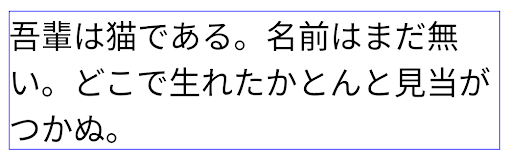
JUSTIFICATION_MODE_NONE.
JUSTIFICATION_MODE_NONE.
JUSTIFICATION_MODE_INTER_WORD.
JUSTIFICATION_MODE_INTER_WORD.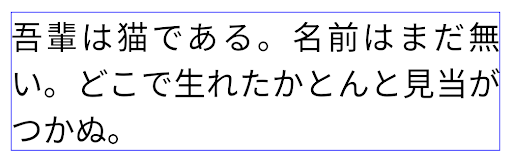
JUSTIFICATION_MODE_INTER_CHARACTER.
JUSTIFICATION_MODE_INTER_CHARACTER.Automatische Konfiguration von Zeilenumbrüchen
Android unterstützt jetzt wortbasierte Zeilenumbrüche für Japanisch und Koreanisch in
Android 13 (API-Level 33) Durch Zeilenumbrüche dagegen verbessern sich
von kurzen Textzeilen gut lesbar sind, eignen sie sich nicht gut für lange Textzeilen.
In Android 15 können Apps textbasierte Zeilenumbrüche nur auf kurze Zeilen anwenden
des Textes, unter Verwendung des LINE_BREAK_WORD_STYLE_AUTO
Option. Mit dieser Option wird die beste Wortstiloption für den Text ausgewählt.
Für kurze Textzeilen werden satzbasierte Zeilenumbrüche verwendet, die wie LINE_BREAK_WORD_STYLE_PHRASE funktionieren, wie im folgenden Bild dargestellt:
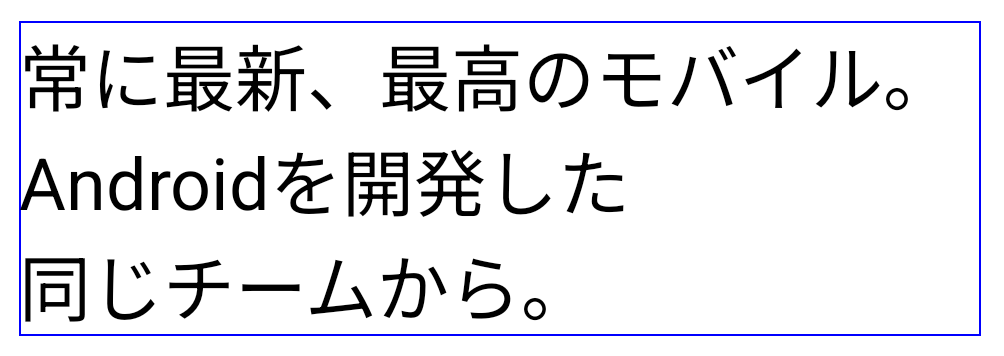
LINE_BREAK_WORD_STYLE_AUTO satzbasierte Zeilenumbrüche ein, um die Lesbarkeit des Textes zu verbessern.
Dies entspricht der Anwendung
LINE_BREAK_WORD_STYLE_PHRASEBei längeren Textzeilen verwendet LINE_BREAK_WORD_STYLE_AUTO das Zeichen „Nein“
Zeilenumbruch-Wortformat, das genauso funktioniert wie
LINE_BREAK_WORD_STYLE_NONE, wie in den
folgendes Bild:

LINE_BREAK_WORD_STYLE_AUTO
wendet keinen Zeilenumbruch an, um die Lesbarkeit des Textes zu verbessern.
Dies entspricht der Anwendung von LINE_BREAK_WORD_STYLE_NONE.Zusätzliche japanische Hentaigana-Schriftart
In Android 15, a font file for old Japanese Hiragana (known as Hentaigana) is bundled by default. The unique shapes of Hentaigana characters can add a distinctive flair to artwork or design while also helping to preserve accurate transmission and understanding of ancient Japanese documents.
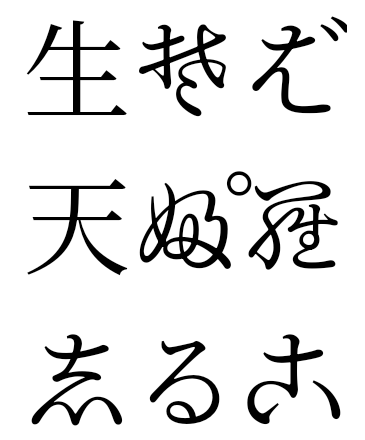
VideoLAN-Kegel – Copyright (c) 1996–2010 VideoLAN. Dieses Logo oder eine modifizierte Version kann von jeder Person verwendet oder geändert werden, um auf das VideoLAN-Projekt oder ein Produkt zu verweisen, das vom VideoLAN-Team entwickelt wurde. Es ist jedoch keine Empfehlung des Projekts.
Vulkan und das Vulkan-Logo sind eingetragene Marken der Khronos Group Inc.
OpenGL ist eine eingetragene Marke und das OpenGL ES-Logo ist eine Marke von Hewlett Packard Enterprise, die mit Genehmigung von Khronos verwendet wird.