

Как и в предыдущих выпусках, в Android 15 есть изменения в поведении, которые могут повлиять на ваше приложение. Следующие изменения в поведении применяются исключительно к приложениям, предназначенным для Android 15 или более поздней версии. Если ваше приложение предназначено для Android 15 или более поздней версии, вам следует изменить его, чтобы оно правильно поддерживало эти функции, где это применимо.
Также ознакомьтесь со списком изменений в поведении, которые затрагивают все приложения для Android 15, независимо от значения targetSdkVersion.
Основные функции
В Android 15 изменены или расширены различные основные возможности системы Android.
Изменения в отношении активных служб
We are making the following changes to foreground services with Android 15.
- Data sync foreground service timeout behavior
- New media processing foreground service type
- Restrictions on
BOOT_COMPLETEDbroadcast receivers launching foreground services - Restrictions on starting foreground services while an app holds the
SYSTEM_ALERT_WINDOWpermission
Data sync foreground service timeout behavior
В Android 15 представлен новый режим тайм-аута для dataSync для приложений, предназначенных для Android 15 (уровень API 35) или выше. Это поведение также применимо к новому типу службы переднего плана mediaProcessing .
Система разрешает службам dataSync приложения работать в общей сложности 6 часов в течение 24-часового периода, после чего система вызывает метод Service.onTimeout(int, int) работающей службы (представленный в Android 15). В это время у службы есть несколько секунд для вызова Service.stopSelf() . При вызове Service.onTimeout() служба больше не считается службой переднего плана. Если служба не вызывает Service.stopSelf() , система выдает внутреннее исключение. Исключение регистрируется в Logcat со следующим сообщением:
Fatal Exception: android.app.RemoteServiceException: "A foreground service of
type dataSync did not stop within its timeout: [component name]"
Чтобы избежать проблем с этим изменением поведения, вы можете выполнить одно или несколько из следующих действий:
- Пусть ваш сервис реализует новый метод
Service.onTimeout(int, int). Когда ваше приложение получит обратный вызов, обязательно вызовитеstopSelf()в течение нескольких секунд. (Если вы не остановите приложение сразу, система выдаст ошибку.) - Убедитесь, что службы
dataSyncвашего приложения не работают более 6 часов в течение 24-часового периода (если только пользователь не взаимодействует с приложением, сбрасывая таймер). - Запускайте службы
dataSyncпереднего плана только в результате прямого взаимодействия с пользователем; поскольку ваше приложение находится на переднем плане при запуске службы, у вашей службы есть полные шесть часов после того, как приложение перейдет в фоновый режим. - Вместо использования службы переднего плана
dataSyncиспользуйте альтернативный API .
Если службы приоритетного плана dataSync вашего приложения работали в течение 6 часов за последние 24 часа, вы не сможете запустить другую службу приоритетного плана dataSync , пока пользователь не переведет ваше приложение на передний план (что сбрасывает таймер). Если вы попытаетесь запустить другую службу переднего плана dataSync , система выдаст исключение ForegroundServiceStartNotAllowedException с сообщением об ошибке, например «Ограничение времени для типа службы переднего плана dataSync уже исчерпано».
Тестирование
Чтобы проверить поведение вашего приложения, вы можете включить таймауты синхронизации данных, даже если ваше приложение не предназначено для Android 15 (при условии, что приложение работает на устройстве Android 15). Чтобы включить таймауты, выполните следующую команду adb :
adb shell am compat enable FGS_INTRODUCE_TIME_LIMITS your-package-name
Вы также можете настроить период ожидания, чтобы было проще протестировать поведение вашего приложения при достижении предела. Чтобы установить новый период ожидания, выполните следующую команду adb :
adb shell device_config put activity_manager data_sync_fgs_timeout_duration duration-in-milliseconds
New media processing foreground service type
В Android 15 представлен новый тип службы переднего плана — mediaProcessing . Этот тип службы подходит для таких операций, как перекодирование медиафайлов. Например, мультимедийное приложение может загрузить аудиофайл, и ему необходимо преобразовать его в другой формат перед воспроизведением. Вы можете использовать службу переднего плана mediaProcessing чтобы гарантировать, что преобразование продолжается, даже когда приложение находится в фоновом режиме.
Система разрешает службам mediaProcessing приложения работать в общей сложности 6 часов в течение 24-часового периода, после чего система вызывает метод Service.onTimeout(int, int) работающей службы (представленный в Android 15). В это время у службы есть несколько секунд для вызова Service.stopSelf() . Если служба не вызывает Service.stopSelf() , система выдает внутреннее исключение. Исключение регистрируется в Logcat со следующим сообщением:
Fatal Exception: android.app.RemoteServiceException: "A foreground service of
type mediaProcessing did not stop within its timeout: [component name]"
Чтобы избежать исключения, вы можете сделать одно из следующих действий:
- Пусть ваш сервис реализует новый метод
Service.onTimeout(int, int). Когда ваше приложение получит обратный вызов, обязательно вызовитеstopSelf()в течение нескольких секунд. (Если вы не остановите приложение сразу, система выдаст ошибку.) - Убедитесь, что службы
mediaProcessingвашего приложения не работают более 6 часов в течение любого 24-часового периода (если только пользователь не взаимодействует с приложением, сбрасывая таймер). - Запускайте службы переднего плана
mediaProcessingтолько в результате прямого взаимодействия с пользователем; поскольку ваше приложение находится на переднем плане при запуске службы, у вашей службы есть полные шесть часов после того, как приложение перейдет в фоновый режим. - Вместо использования службы переднего плана
mediaProcessingиспользуйте альтернативный API , например WorkManager.
Если службы переднего плана mediaProcessing вашего приложения работали в течение 6 часов за последние 24, вы не сможете запустить другую службу переднего плана mediaProcessing , пока пользователь не переведет ваше приложение на передний план (что сбрасывает таймер). Если вы попытаетесь запустить другую службу переднего плана mediaProcessing , система выдаст ForegroundServiceStartNotAllowedException с сообщением об ошибке, например «Ограничение времени уже исчерпано для типа службы переднего плана mediaProcessing».
Дополнительные сведения о типе службы mediaProcessing см. в разделе Изменения в типах служб переднего плана для Android 15: обработка мультимедиа .
Тестирование
Чтобы проверить поведение вашего приложения, вы можете включить тайм-ауты обработки мультимедиа, даже если ваше приложение не предназначено для Android 15 (при условии, что приложение работает на устройстве Android 15). Чтобы включить таймауты, выполните следующую команду adb :
adb shell am compat enable FGS_INTRODUCE_TIME_LIMITS your-package-name
Вы также можете настроить период ожидания, чтобы было проще протестировать поведение вашего приложения при достижении предела. Чтобы установить новый период ожидания, выполните следующую команду adb :
adb shell device_config put activity_manager media_processing_fgs_timeout_duration duration-in-milliseconds
Restrictions on BOOT_COMPLETED broadcast receivers launching foreground services
There are new restrictions on BOOT_COMPLETED broadcast receivers launching
foreground services. BOOT_COMPLETED receivers are not allowed to launch the
following types of foreground services:
dataSynccameramediaPlaybackphoneCallmediaProjectionmicrophone(this restriction has been in place formicrophonesince Android 14)
If a BOOT_COMPLETED receiver tries to launch any of those types of foreground
services, the system throws ForegroundServiceStartNotAllowedException.
Testing
To test your app's behavior, you can enable these new restrictions even if your
app is not targeting Android 15 (as long as the app is running on an Android 15
device). Run the following adb command:
adb shell am compat enable FGS_BOOT_COMPLETED_RESTRICTIONS your-package-name
To send a BOOT_COMPLETED broadcast without restarting the device,
run the following adb command:
adb shell am broadcast -a android.intent.action.BOOT_COMPLETED your-package-name
Restrictions on starting foreground services while an app holds the SYSTEM_ALERT_WINDOW permission
Previously, if an app held the SYSTEM_ALERT_WINDOW permission, it could launch
a foreground service even if the app was currently in the background (as
discussed in exemptions from background start restrictions).
If an app targets Android 15, this exemption is now narrower. The app now needs
to have the SYSTEM_ALERT_WINDOW permission and also have a visible overlay
window. That is, the app needs to first launch a
TYPE_APPLICATION_OVERLAY window and the window
needs to be visible before you start a foreground service.
If your app attempts to start a foreground service from the background without
meeting these new requirements (and it does not have some other exemption), the
system throws ForegroundServiceStartNotAllowedException.
If your app declares the SYSTEM_ALERT_WINDOW permission
and launches foreground services from the background, it may be affected by this
change. If your app gets a ForegroundServiceStartNotAllowedException, check
your app's order of operations and make sure your app already has an active
overlay window before it attempts to start a foreground service from the
background. You can check if your overlay window is currently visible
by calling View.getWindowVisibility(), or you
can override View.onWindowVisibilityChanged()
to get notified whenever the visibility changes.
Testing
To test your app's behavior, you can enable these new restrictions even if your
app is not targeting Android 15 (as long as the app is running on an Android 15
device). To enable these new restrictions on starting foreground services
from the background, run the following adb command:
adb shell am compat enable FGS_SAW_RESTRICTIONS your-package-name
Изменения, касающиеся того, когда приложения могут менять глобальный статус режима "Не беспокоить"
Apps that target Android 15 (API level 35) and higher can no longer change the
global state or policy of Do Not Disturb (DND) on a device (either by modifying
user settings, or turning off DND mode). Instead, apps must contribute an
AutomaticZenRule, which the system combines into a global policy with the
existing most-restrictive-policy-wins scheme. Calls to existing APIs that
previously affected global state (setInterruptionFilter,
setNotificationPolicy) result in the creation or update of an implicit
AutomaticZenRule, which is toggled on and off depending on the call-cycle of
those API calls.
Note that this change only affects observable behavior if the app is calling
setInterruptionFilter(INTERRUPTION_FILTER_ALL) and expects that call to
deactivate an AutomaticZenRule that was previously activated by their owners.
Изменения в OpenJDK API
Android 15 continues the work of refreshing Android's core libraries to align with the features in the latest OpenJDK LTS releases.
Some of these changes can affect app compatibility for apps targeting Android 15 (API level 35):
Changes to string formatting APIs: Validation of argument index, flags, width, and precision are now more strict when using the following
String.format()andFormatter.format()APIs:String.format(String, Object[])String.format(Locale, String, Object[])Formatter.format(String, Object[])Formatter.format(Locale, String, Object[])
For example, the following exception is thrown when an argument index of 0 is used (
%0in the format string):IllegalFormatArgumentIndexException: Illegal format argument index = 0In this case, the issue can be fixed by using an argument index of 1 (
%1in the format string).Changes to component type of
Arrays.asList(...).toArray(): When usingArrays.asList(...).toArray(), the component type of the resulting array is now anObject—not the type of the underlying array's elements. So the following code throws aClassCastException:String[] elements = (String[]) Arrays.asList("one", "two").toArray();For this case, to preserve
Stringas the component type in the resulting array, you could useCollection.toArray(Object[])instead:String[] elements = Arrays.asList("two", "one").toArray(new String[0]);Changes to language code handling: When using the
LocaleAPI, language codes for Hebrew, Yiddish, and Indonesian are no longer converted to their obsolete forms (Hebrew:iw, Yiddish:ji, and Indonesian:in). When specifying the language code for one of these locales, use the codes from ISO 639-1 instead (Hebrew:he, Yiddish:yi, and Indonesian:id).Changes to random int sequences: Following the changes made in https://bugs.openjdk.org/browse/JDK-8301574, the following
Random.ints()methods now return a different sequence of numbers than theRandom.nextInt()methods do:Generally, this change shouldn't result in app-breaking behavior, but your code shouldn't expect the sequence generated from
Random.ints()methods to matchRandom.nextInt().
The new SequencedCollection API can affect your app's compatibility
after you update compileSdk in your app's build configuration to use
Android 15 (API level 35):
Collision with
MutableList.removeFirst()andMutableList.removeLast()extension functions inkotlin-stdlibThe
Listtype in Java is mapped to theMutableListtype in Kotlin. Because theList.removeFirst()andList.removeLast()APIs have been introduced in Android 15 (API level 35), the Kotlin compiler resolves function calls, for examplelist.removeFirst(), statically to the newListAPIs instead of to the extension functions inkotlin-stdlib.If an app is re-compiled with
compileSdkset to35andminSdkset to34or lower, and then the app is run on Android 14 and lower, a runtime error is thrown:java.lang.NoSuchMethodError: No virtual method removeFirst()Ljava/lang/Object; in class Ljava/util/ArrayList;The existing
NewApilint option in Android Gradle Plugin can catch these new API usages../gradlew lintMainActivity.kt:41: Error: Call requires API level 35 (current min is 34): java.util.List#removeFirst [NewApi] list.removeFirst()To fix the runtime exception and lint errors, the
removeFirst()andremoveLast()function calls can be replaced withremoveAt(0)andremoveAt(list.lastIndex)respectively in Kotlin. If you're using Android Studio Ladybug | 2024.1.3 or higher, it also provides a quick fix option for these errors.Consider removing
@SuppressLint("NewApi")andlintOptions { disable 'NewApi' }if the lint option has been disabled.Collision with other methods in Java
New methods have been added into the existing types, for example,
ListandDeque. These new methods might not be compatible with the methods with the same name and argument types in other interfaces and classes. In the case of a method signature collision with incompatibility, thejavaccompiler outputs a build-time error. For example:Example error 1:
javac MyList.javaMyList.java:135: error: removeLast() in MyList cannot implement removeLast() in List public void removeLast() { ^ return type void is not compatible with Object where E is a type-variable: E extends Object declared in interface ListExample error 2:
javac MyList.javaMyList.java:7: error: types Deque<Object> and List<Object> are incompatible; public class MyList implements List<Object>, Deque<Object> { both define reversed(), but with unrelated return types 1 errorExample error 3:
javac MyList.javaMyList.java:43: error: types List<E#1> and MyInterface<E#2> are incompatible; public static class MyList implements List<Object>, MyInterface<Object> { class MyList inherits unrelated defaults for getFirst() from types List and MyInterface where E#1,E#2 are type-variables: E#1 extends Object declared in interface List E#2 extends Object declared in interface MyInterface 1 errorTo fix these build errors, the class implementing these interfaces should override the method with a compatible return type. For example:
@Override
public Object getFirst() {
    return List.super.getFirst();
}
Безопасность
В Android 15 внесены изменения, которые повышают безопасность системы и помогают защищать приложения и пользователей от вредоносного ПО.
Ограниченные версии TLS
Android 15 restricts the usage of TLS versions 1.0 and 1.1. These versions had previously been deprecated in Android, but are now disallowed for apps targeting Android 15.
Защищенные запуски фоновых действий
Android 15 protects users from malicious apps and gives them more control over their devices by adding changes that prevent malicious background apps from bringing other apps to the foreground, elevating their privileges, and abusing user interaction. Background activity launches have been restricted since Android 10 (API level 29).
Other changes
- Change
PendingIntentcreators to block background activity launches by default. This helps prevent apps from accidentally creating aPendingIntentthat could be abused by malicious actors. - Don't bring an app to the foreground unless the
PendingIntentsender allows it. This change aims to prevent malicious apps from abusing the ability to start activities in the background. By default, apps are not allowed to bring the task stack to the foreground unless the creator allows background activity launch privileges or the sender has background activity launch privileges. - Control how the top activity of a task stack can finish its task. If the top activity finishes a task, Android will go back to whichever task was last active. Moreover, if a non-top activity finishes its task, Android will go back to the home screen; it won't block the finish of this non-top activity.
- Prevent launching arbitrary activities from other apps into your own task. This change prevents malicious apps from phishing users by creating activities that appear to be from other apps.
- Block non-visible windows from being considered for background activity launches. This helps prevent malicious apps from abusing background activity launches to display unwanted or malicious content to users.
Безопасные намерения
Android 15 introduces StrictMode for
intents.
In order to see detailed logs about Intent usage violations, use following
method:
Kotlin
fun onCreate() {
    StrictMode.setVmPolicy(VmPolicy.Builder()
        .detectUnsafeIntentLaunch()
        .build()
    )
}
Java
public void onCreate() {
    StrictMode.setVmPolicy(new VmPolicy.Builder()
            .detectUnsafeIntentLaunch()
            .build());
}
Удобство для пользователей и системный интерфейс
В Android 15 внесены изменения, которые делают работу с системой более удобной и интуитивно понятной.
Изменения вставки окна
There are two changes related to window insets in Android 15: edge-to-edge is enforced by default, and there are also configuration changes, such as the default configuration of system bars.
Edge-to-edge enforcement
Если приложение поддерживает Android 15 (уровень API 35), в нем по умолчанию включено отображение от края до края на устройствах с этой версией ОС.

Это критическое изменение, которое может негативно повлиять на интерфейс приложения. Изменения затронут следующие области интерфейса:
- Панель навигации с помощью жестов
- По умолчанию прозрачный.
- Смещение снизу отключено, поэтому контент отображается за панелью навигации, если не применены вставки.
setNavigationBarColorиR.attr#navigationBarColorустарели и не влияют на навигацию жестами.setNavigationBarContrastEnforcedиR.attr#navigationBarContrastEnforcedпо-прежнему не влияют на навигацию жестами.
- Навигация с помощью трех кнопок
- По умолчанию прозрачность составляет 80 %, а цвет может совпадать с фоном окна.
- Смещение снизу отключено, поэтому контент отрисовывается за системной панелью навигации, если не применены вставки.
- По умолчанию
setNavigationBarColorиR.attr#navigationBarColorсоответствуют фону окна. Чтобы это значение по умолчанию применялось, фон окна должен быть объектом Drawable. Этот API устарел, но по-прежнему влияет на трехкнопочную навигацию. setNavigationBarContrastEnforcedиR.attr#navigationBarContrastEnforcedпо умолчанию имеют значение true, что добавляет фон с непрозрачностью 80% для навигации с помощью трех кнопок.
- Строка состояния
- По умолчанию прозрачный.
- Смещение сверху отключено, поэтому контент отображается за строкой состояния, если не применены вставки.
setStatusBarColorиR.attr#statusBarColorустарели и не работают в Android 15.setStatusBarContrastEnforcedиR.attr#statusBarContrastEnforcedустарели, но по-прежнему работают в Android 15.
- Вырез на экране
layoutInDisplayCutoutModeнеплавающих окон должно бытьLAYOUT_IN_DISPLAY_CUTOUT_MODE_ALWAYS.SHORT_EDGES,NEVERиDEFAULTинтерпретируются какALWAYS, чтобы пользователи не видели черную полосу, вызванную вырезом на экране, и изображение занимало весь экран.
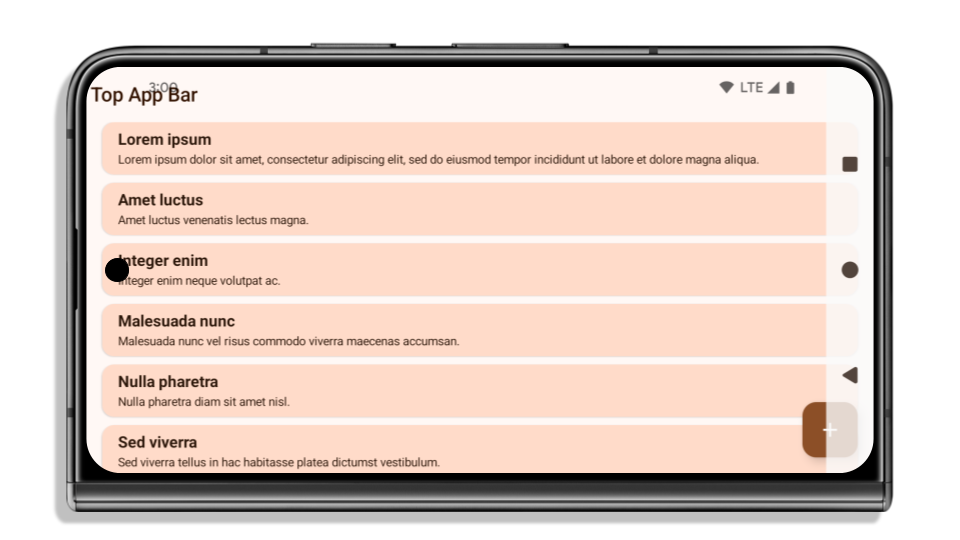
Ниже показано, как выглядит приложение до и после перехода на Android 15 (уровень API 35), а также до и после применения отступов. Это неполный пример, в Android Auto все может выглядеть иначе.


Что проверить, если приложение уже поддерживает режим без полей
Если ваше приложение уже поддерживает полноэкранный режим и применяет отступы, то изменения вас почти не затронут, за исключением следующих сценариев. Однако даже если вы считаете, что вас это не касается, мы рекомендуем протестировать приложение.
- У вас есть неплавающее окно, например
Activity, в котором вместоLAYOUT_IN_DISPLAY_CUTOUT_MODE_ALWAYSиспользуетсяSHORT_EDGES,NEVERилиDEFAULT. Если приложение аварийно завершает работу при запуске, это может быть связано с заставкой. Вы можете обновить зависимость core splashscreen до версии 1.2.0-alpha01 или более поздней или задатьwindow.attributes.layoutInDisplayCutoutMode = WindowManager.LayoutInDisplayCutoutMode.always. - На экранах с низким трафиком могут быть скрытые элементы интерфейса. Убедитесь, что на этих экранах нет перекрытых элементов интерфейса. К экранам с низким трафиком относятся:
- экраны регистрации или входа;
- Страницы настроек
Что проверить, если приложение не отображается в режиме без полей
Если ваше приложение не поддерживает режим без полей, скорее всего, оно будет затронуто. Помимо сценариев для приложений, которые уже работают в полноэкранном режиме, следует учитывать следующее:
- Если в вашем приложении используются компоненты Material 3 (
androidx.compose.material3) в Compose, напримерTopAppBar,BottomAppBarиNavigationBar, то, скорее всего, они не будут затронуты, поскольку автоматически обрабатывают отступы. - Если в вашем приложении используются компоненты Material 2 (
androidx.compose.material) в Compose, эти компоненты не обрабатывают вставки автоматически. Однако вы можете получить доступ к вставкам и применить их вручную. В androidx.compose.material 1.6.0 и более поздних версиях используйте параметрwindowInsets, чтобы вручную применить отступы дляBottomAppBar,TopAppBar,BottomNavigationиNavigationRail. Аналогично, используйте параметрcontentWindowInsetsдляScaffold. - Если в вашем приложении используются представления и компоненты Material (
com.google.android.material), то большинство компонентов Material на основе представлений, таких какBottomNavigationView,BottomAppBar,NavigationRailViewилиNavigationView, обрабатывают вставки и не требуют дополнительной работы. Однако если вы используетеAppBarLayout, вам нужно добавитьandroid:fitsSystemWindows="true". - Для пользовательских composable-функций примените вставки вручную в качестве отступов. Если ваш контент находится внутри
Scaffold, вы можете использовать отступы, используя значения отступовScaffold. В противном случае используйте один изWindowInsets. - Если в вашем приложении используются представления и
BottomSheet,SideSheetили пользовательские контейнеры, примените отступы с помощьюViewCompat.setOnApplyWindowInsetsListener. ДляRecyclerViewпримените отступы с помощью этого прослушивателя, а также добавьтеclipToPadding="false".
Что нужно проверить, если в вашем приложении должна быть защита от фонового режима
Если в приложении необходимо настроить защиту фона для панели навигации с тремя кнопками или строки состояния, разместите composable-функцию или представление за системной строкой, используя WindowInsets.Type#tappableElement(), чтобы получить высоту панели навигации с тремя кнопками, или WindowInsets.Type#statusBars.
Дополнительные ресурсы по теме
Дополнительные рекомендации по применению вставок можно найти в руководствах Edge to Edge Views и Edge to Edge Compose.
Устаревшие API
Поддержка следующих API прекращена, но они не отключены:
R.attr#enforceStatusBarContrastR.attr#navigationBarColor(для навигации с помощью трех кнопок, с альфа-каналом 80 %)Window#isStatusBarContrastEnforcedWindow#setNavigationBarColor(для навигации с помощью трех кнопок, с альфа-каналом 80 %)Window#setStatusBarContrastEnforced
Поддержка следующих API прекращена, и они отключены:
R.attr#navigationBarColor(для навигации жестами)R.attr#navigationBarDividerColorR.attr#statusBarColorWindow#setDecorFitsSystemWindowsWindow#getNavigationBarColorWindow#getNavigationBarDividerColorWindow#getStatusBarColorWindow#setNavigationBarColor(для навигации жестами)Window#setNavigationBarDividerColorWindow#setStatusBarColor
Stable configuration
If your app targets Android 15 (API level 35) or higher, Configuration no
longer excludes the system bars. If you use the screen size in the
Configuration class for layout calculation, you should replace it with better
alternatives like an appropriate ViewGroup, WindowInsets, or
WindowMetricsCalculator depending on your need.
Configuration has been available since API 1. It is typically obtained from
Activity.onConfigurationChanged. It provides information like window density,
orientation, and sizes. One important characteristic about the window sizes
returned from Configuration is that it previously excluded the system bars.
The configuration size is typically used for resource selection, such as
/res/layout-h500dp, and this is still a valid use case. However, using it for
layout calculation has always been discouraged. If you do so, you should move
away from it now. You should replace the use of Configuration with something
more suitable depending on your use case.
If you use it to calculate the layout, use an appropriate ViewGroup, such as
CoordinatorLayout or ConstraintLayout. If you use it to determine the height
of the system navbar, use WindowInsets. If you want to know the current size
of your app window, use computeCurrentWindowMetrics.
The following list describes the fields affected by this change:
Configuration.screenWidthDpandscreenHeightDpsizes no longer exclude the system bars.Configuration.smallestScreenWidthDpis indirectly affected by changes toscreenWidthDpandscreenHeightDp.Configuration.orientationis indirectly affected by changes toscreenWidthDpandscreenHeightDpon close-to-square devices.Display.getSize(Point)is indirectly affected by the changes inConfiguration. This was deprecated beginning in API level 30.Display.getMetrics()has already worked like this since API level 33.
Атрибут elegantTextHeight по умолчанию имеет значение true
For apps targeting Android 15 (API level 35), the
elegantTextHeight TextView attribute
becomes true by default, replacing the compact font used by default with some
scripts that have large vertical metrics with one that is much more readable.
The compact font was introduced to prevent breaking layouts; Android 13 (API
level 33) prevents many of these breakages by allowing the text layout to
stretch the vertical height utilizing the fallbackLineSpacing
attribute.
In Android 15, the compact font still remains in the system, so your app can set
elegantTextHeight to false to get the same behavior as before, but it is
unlikely to be supported in upcoming releases. So, if your app supports the
following scripts: Arabic, Lao, Myanmar, Tamil, Gujarati, Kannada, Malayalam,
Odia, Telugu or Thai, test your app by setting elegantTextHeight to true.

elegantTextHeight behavior for apps targeting Android 14 (API level 34) and lower.
elegantTextHeight behavior for apps targeting Android 15.Изменение ширины TextView для сложных форм букв
In previous versions of Android, some cursive fonts or languages that have
complex shaping might draw the letters in the previous or next character's area.
In some cases, such letters were clipped at the beginning or ending position.
Starting in Android 15, a TextView allocates width for drawing enough space
for such letters and allows apps to request extra paddings to the left to
prevent clipping.
Because this change affects how a TextView decides the width, TextView
allocates more width by default if the app targets Android 15 (API level 35) or
higher. You can enable or disable this behavior by calling the
setUseBoundsForWidth API on TextView.
Because adding left padding might cause a misalignment for existing layouts, the
padding is not added by default even for apps that target Android 15 or higher.
However, you can add extra padding to preventing clipping by calling
setShiftDrawingOffsetForStartOverhang.
The following examples show how these changes can improve text layout for some fonts and languages.
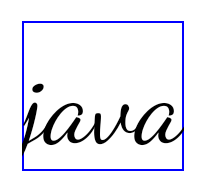
<TextView
    android:fontFamily="cursive"
    android:text="java" />
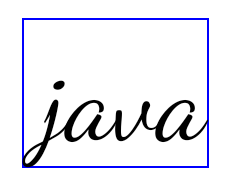
<TextView
    android:fontFamily="cursive"
    android:text="java"
    android:useBoundsForWidth="true"
    android:shiftDrawingOffsetForStartOverhang="true" />
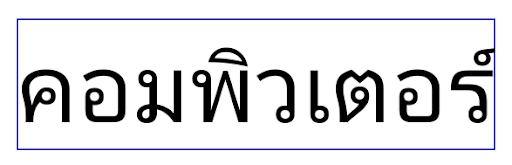
<TextView
    android:text="คอมพิวเตอร์" />

<TextView
    android:text="คอมพิวเตอร์"
    android:useBoundsForWidth="true"
    android:shiftDrawingOffsetForStartOverhang="true" />
Высота строки по умолчанию для EditText с учетом региональных настроек
In previous versions of Android, the text layout stretched the height of the
text to meet the line height of the font that matched the current locale. For
example, if the content was in Japanese, because the line height of the Japanese
font is slightly larger than the one of a Latin font, the height of the text
became slightly larger. However, despite these differences in line heights, the
EditText element was sized uniformly, regardless
of the locale being used, as illustrated in the following image:

EditText elements that
can contain text from English (en), Japanese (ja), and Burmese (my). The
height of the EditText is the same, even though these languages
have different line heights from each other.For apps targeting Android 15 (API level 35), a minimum line height is now
reserved for EditText to match the reference font for the specified Locale, as
shown in the following image:

EditText elements that
can contain text from English (en), Japanese (ja), and Burmese (my). The
height of the EditText now includes space to accommodate the
default line height for these languages' fonts.If needed, your app can restore the previous behavior by specifying the
useLocalePreferredLineHeightForMinimum attribute
to false, and your app can set custom minimum vertical metrics using the
setMinimumFontMetrics API in Kotlin and Java.
Камера и медиа
В Android 15 внесены следующие изменения в работу камеры и медиафункций для приложений, предназначенных для Android 15 или более поздней версии.
Ограничения на запрос фокуса воспроизведения аудио
Apps that target Android 15 (API level 35) must be the top app or running a
foreground service in order to request audio focus. If an app
attempts to request focus when it does not meet one of these requirements, the
call returns AUDIOFOCUS_REQUEST_FAILED.
You can learn more about audio focus at Manage audio focus.
Обновленные ограничения, не связанные с SDK
Android 15 includes updated lists of restricted non-SDK interfaces based on collaboration with Android developers and the latest internal testing. Whenever possible, we make sure that public alternatives are available before we restrict non-SDK interfaces.
If your app does not target Android 15, some of these changes might not immediately affect you. However, while it's possible for your app to access some non-SDK interfaces depending on your app's target API level, using any non-SDK method or field always carries a high risk of breaking your app.
If you are unsure if your app uses non-SDK interfaces, you can test your app to find out. If your app relies on non-SDK interfaces, you should begin planning a migration to SDK alternatives. Nevertheless, we understand that some apps have valid use cases for using non-SDK interfaces. If you can't find an alternative to using a non-SDK interface for a feature in your app, you should request a new public API.
To learn more about the changes in this release of Android, see Updates to non-SDK interface restrictions in Android 15. To learn more about non-SDK interfaces generally, see Restrictions on non-SDK interfaces.