
Concepts and Jetpack Compose implementation
When the UI thread of an Android app is blocked for too long, an "Application Not Responding" (ANR) error is triggered. If the app is in the foreground, the system displays a dialog to the user, as shown in figure 1. The ANR dialog gives the user the opportunity to force quit the app.
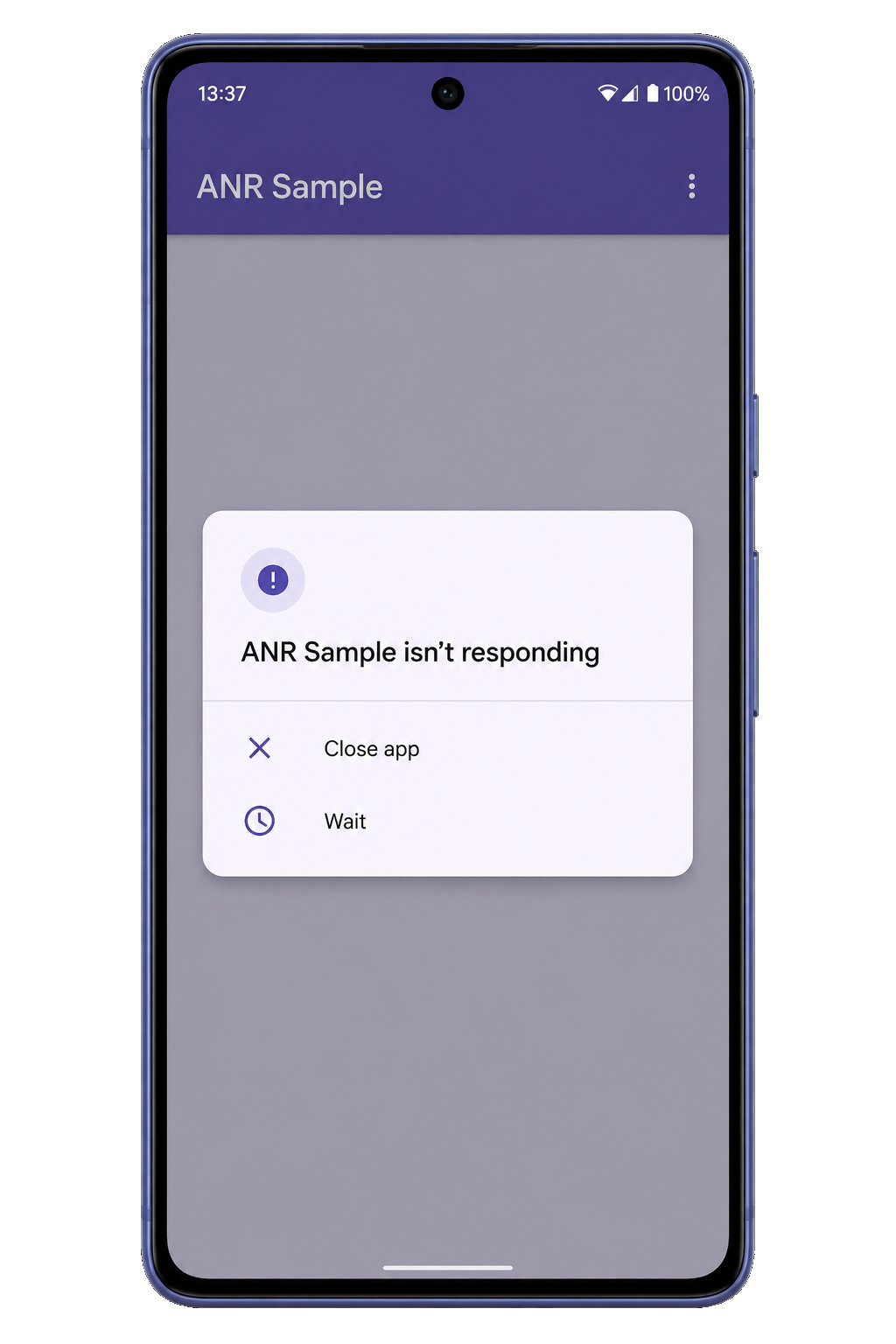
ANRs are a problem because the app's main thread, which is responsible for updating the UI, can't process user input events or draw, causing frustration to the user. For more information on the app's main thread, see Processes and threads overview.
An ANR is triggered for your app when one of the following conditions occur:
- Input dispatching timed out: If your app has not responded to an input event (such as a key press or screen touch) within 5 seconds.
- Executing service: If a service declared by your app cannot finish
executing
Service.onCreate()andService.onStartCommand()/Service.onBind()within a few seconds. **Service.startForeground()not called**: If your app usesContext.startForegroundService()to start a new service in the foreground but the service doesn't callstartForeground()within 5 seconds.- Broadcast of intent: If a
BroadcastReceiverhasn't finished executing within a set amount of time. If the app has any activity in the foreground, this timeout is 5 seconds. **JobSchedulerinteractions**: If aJobServicedoes not return fromJobService.onStartJob()orJobService.onStopJob()within a few seconds, or if a user-initiated job starts and your app doesn't callJobService.setNotification()within a few seconds afterJobService.onStartJob()was called. For apps targeting Android 13 and below, the ANRs are silent and not reported to the app. For apps targeting Android 14 and above, the ANRs are explicit and are reported to the app.
If your app is experiencing ANRs, you can use the guidance in this article to diagnose and fix the problem.
Fix the problems
After you have identified the problem, you can use the tips in this section to fix commonly found problems.
Slow code on the main thread
Identify the places in your code where the app's main thread is busy for more than 5 seconds. Look for the suspicious use cases in your app and try to reproduce the ANR.
For example, figure 2 shows a Traceview timeline where the main thread is busy for more than 5 seconds.
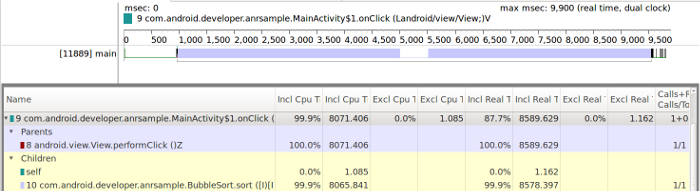
Figure 2. Traceview timeline showing a busy main thread
Figure 2 shows that most of the offending code happens in the
onClick(View) handler, as shown in the following code example:
Kotlin
override fun onClick(v: View) {
    // This task runs on the main thread.
    BubbleSort.sort(data)
}
Java
@Override
public void onClick(View view) {
    // This task runs on the main thread.
    BubbleSort.sort(data);
}
In this case, you should move the work that runs in the main thread to a worker thread. The Android Framework includes classes that can help to move the task to a worker thread. See Worker threads for more information.
I/O on the main thread
Executing I/O operations on the main thread is a common cause of slow operations
on the main thread, which can cause ANRs. In Compose, developers often
accidentally trigger disk reads (like SharedPreferences or database calls)
while trying to derive the initial state.
Execute long-running I/O operations away from the UI layer. Use
withContext(Dispatchers.IO) in a ViewModel or, even better, use a Repository
on the data layer. It's recommended to move all IO operations to a worker
thread, as shown in the previous section.
Some examples of IO operations are network and storage operations. For more information, see Performing network operations and Saving data.
Lock contention
In some scenarios, the work that causes the ANR is not directly executed on the app's main thread. If a worker thread holds a lock on a resource that the main thread requires to complete its work, then an ANR might happen.
For example, figure 3 shows a Traceview timeline where most of the work is performed on a worker thread.
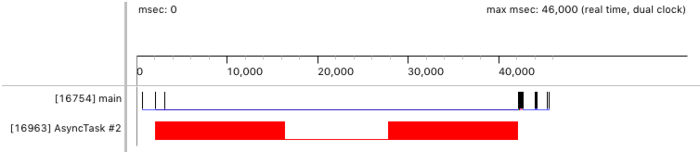
Figure 3. Traceview timeline that shows the work being executed on a worker thread
But if your users are still experiencing ANRs, you should look at the status of
the main thread in Android Device Monitor. Usually, the main thread is in the
RUNNABLE state if it's ready to update the UI and is generally
responsive.
But if the main thread can't resume execution, then it's in the BLOCKED
state and can't respond to events. The state shows on Android Device Monitor as
Monitor or Wait, as shown in figure 5.
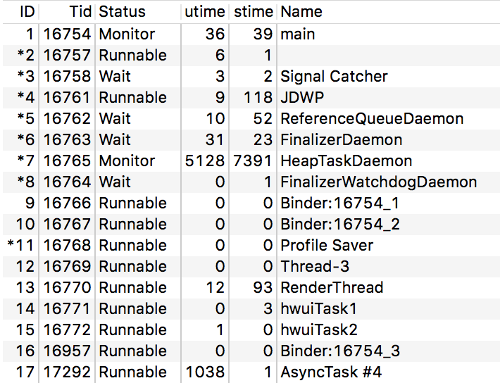
Figure 4. Main thread in the Monitor status
The following trace shows an app's main thread that is blocked waiting for a resource:
...
AsyncTask #2" prio=5 tid=18 Runnable
  | group="main" sCount=0 dsCount=0 obj=0x12c333a0 self=0x94c87100
  | sysTid=25287 nice=10 cgrp=default sched=0/0 handle=0x94b80920
  | state=R schedstat=( 0 0 0 ) utm=757 stm=0 core=3 HZ=100
  | stack=0x94a7e000-0x94a80000 stackSize=1038KB
  | held mutexes= "mutator lock"(shared held)
  at com.android.developer.anrsample.BubbleSort.sort(BubbleSort.java:8)
  at com.android.developer.anrsample.MainActivity$LockTask.doInBackground(MainActivity.java:147)
  - locked <0x083105ee> (a java.lang.Boolean)
  at com.android.developer.anrsample.MainActivity$LockTask.doInBackground(MainActivity.java:135)
  at android.os.AsyncTask$2.call(AsyncTask.java:305)
  at java.util.concurrent.FutureTask.run(FutureTask.java:237)
  at android.os.AsyncTask$SerialExecutor$1.run(AsyncTask.java:243)
  at java.util.concurrent.ThreadPoolExecutor.runWorker(ThreadPoolExecutor.java:1133)
  at java.util.concurrent.ThreadPoolExecutor$Worker.run(ThreadPoolExecutor.java:607)
  at java.lang.Thread.run(Thread.java:761)
...
Reviewing the trace can help you locate the code that blocks the main thread. The following code is responsible for holding the lock that blocks the main thread in the previous trace:
Kotlin
override fun onClick(v: View) {
    // The worker thread holds a lock on lockedResource
    LockTask().execute(data)

    synchronized(lockedResource) {
        // The main thread requires lockedResource here
        // but it has to wait until LockTask finishes using it.
    }
}

class LockTask : AsyncTask<Array<Int>, Int, Long>() {
    override fun doInBackground(vararg params: Array<Int>): Long? =
            synchronized(lockedResource) {
                // This is a long-running operation, which makes
                // the lock last for a long time
                BubbleSort.sort(params[0])
            }
}
Java
@Override
public void onClick(View v) {
    // The worker thread holds a lock on lockedResource
  new LockTask().execute(data);

  synchronized (lockedResource) {
      // The main thread requires lockedResource here
      // but it has to wait until LockTask finishes using it.
  }
}

public class LockTask extends AsyncTask<Integer[], Integer, Long> {
  @Override
  protected Long doInBackground(Integer[]... params) {
      synchronized (lockedResource) {
          // This is a long-running operation, which makes
          // the lock last for a long time
          BubbleSort.sort(params[0]);
      }
  }
}
Another example is an app's main thread that is waiting for a result from a
worker thread, as shown in the following code. Note that using wait() and
notify() is not a recommended pattern in Kotlin, which has its own mechanisms
for handling concurrency. When using Kotlin, you should use Kotlin-specific
mechanisms if possible.
Kotlin
fun onClick(v: View) {
    val lock = java.lang.Object()
    val waitTask = WaitTask(lock)
    synchronized(lock) {
        try {
            waitTask.execute(data)
            // Wait for this worker thread's notification
            lock.wait()
        } catch (e: InterruptedException) {
        }
    }
}

internal class WaitTask(private val lock: java.lang.Object) : AsyncTask<Array<Int>, Int, Long>() {
    override fun doInBackground(vararg params: Array<Int>): Long? {
        synchronized(lock) {
            BubbleSort.sort(params[0])
            // Finished, notify the main thread
            lock.notify()
        }
    }
}
Java
public void onClick(View v) {
  WaitTask waitTask = new WaitTask();
  synchronized (waitTask) {
      try {
          waitTask.execute(data);
          // Wait for this worker thread’s notification
          waitTask.wait();
      } catch (InterruptedException e) {}
  }
}

class WaitTask extends AsyncTask<Integer[], Integer, Long> {
  @Override
  protected Long doInBackground(Integer[]... params) {
      synchronized (this) {
          BubbleSort.sort(params[0]);
          // Finished, notify the main thread
          notify();
      }
  }
}
There are some other situations that can block the main thread, including
threads that use Lock, Semaphore, as well as a resource pool
(such as a pool of database connections) or other mutual exclusion (mutex)
mechanisms.
You should evaluate the locks that your app holds on resources in general, but if you want to avoid ANRs, then you should look at the locks held for resources required by the main thread.
Make sure that the locks are held for the least amount of time, or even better,
evaluate whether the app needs the hold in the first place. If you are using the
lock to determine when to update UI based on the processing of a worker thread,
use mechanisms such as onProgressUpdate() and onPostExecute() to
communicate between the worker and main threads.
Slow broadcast receivers
Apps can respond to broadcast messages, such as enabling or disabling airplane mode or a change in connectivity status, by means of broadcast receivers. An ANR occurs when an app takes too long to process the broadcast message.
An ANR occurs in the following cases:
- A broadcast receiver hasn't finished executing its
onReceivemethod within a considerable amount of time. - A broadcast receiver calls
goAsyncand fails to callfinishon thePendingResultobject.
Your app should only perform short operations in the onReceive method of
a BroadcastReceiver. However, if your app requires more complex
processing as a result of a broadcast message you should defer the task to a
ViewModel (leveraging the power of Kotlin coroutines, scopes, and dispatchers)
if the task is expected to take a few seconds at most, any type of state holder,
or to WorkManager for tasks expected to take longer than a few seconds.
You can use tools like Traceview to identify if your broadcast receiver executes long-running operations on the app's main thread. For example, figure 6 shows the timeline of a broadcast receiver that processes a message on the main thread for approximately 100 seconds.
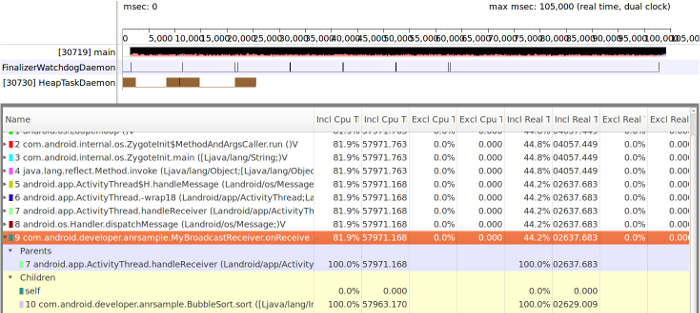
Figure 5. Traceview timeline showing the BroadcastReceiver work on the
main thread
This behavior can be caused by executing long-running operations on the
onReceive() method of the BroadcastReceiver, as shown in the
following example:
Kotlin
override fun onReceive(context: Context, intent: Intent) {
    // This is a long-running operation
    BubbleSort.sort(data)
}
Java
@Override
public void onReceive(Context context, Intent intent) {
    // This is a long-running operation
    BubbleSort.sort(data);
}
In situations like these, it's recommended to move the long-running operation to
an IntentService because it uses a worker thread to execute its work.
The following code shows how to use an IntentService to process a
long-running operation:
Kotlin
override fun onReceive(context: Context, intent: Intent) {
    Intent(context, MyIntentService::class.java).also { intentService ->
        // The task now runs on a worker thread.
        context.startService(intentService)
    }
}

class MyIntentService : IntentService("MyIntentService") {
    override fun onHandleIntent(intent: Intent?) {
        BubbleSort.sort(data)
    }
}
Java
@Override
public void onReceive(Context context, Intent intent) {
    // The task now runs on a worker thread.
    Intent intentService = new Intent(context, MyIntentService.class);
    context.startService(intentService);
}

public class MyIntentService extends IntentService {
  @Override
  protected void onHandleIntent(@Nullable Intent intent) {
      BubbleSort.sort(data);
  }
}
As a result of using the IntentService, the long-running operation is
executed on a worker thread instead of the main thread. Figure 7 shows the work
deferred to the worker thread in the Traceview timeline.
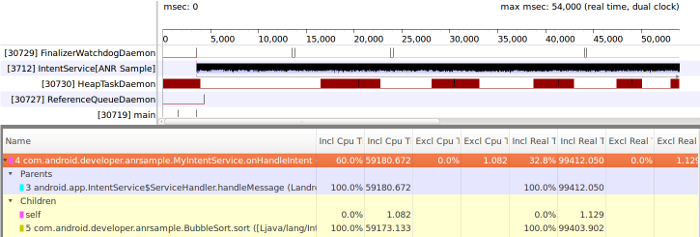
Figure 6. Traceview timeline showing the broadcast message processed on a worker thread
Your broadcast receiver can use goAsync() to signal the system that it
needs more time to process the message. However, you should call
finish() on the PendingResult object. The following example
shows how to call finish() to let the system recycle the broadcast receiver
and avoid an ANR:
Kotlin
val pendingResult = goAsync()

object : AsyncTask<Array<Int>, Int, Long>() {
    override fun doInBackground(vararg params: Array<Int>): Long? {
        // This is a long-running operation
        BubbleSort.sort(params[0])
        pendingResult.finish()
        return 0L
    }
}.execute(data)
Java
final PendingResult pendingResult = goAsync();
new AsyncTask<Integer[], Integer, Long>() {
  @Override
  protected Long doInBackground(Integer[]... params) {
      // This is a long-running operation
      BubbleSort.sort(params[0]);
      pendingResult.finish();
  }
}.execute(data);
However, moving the code from a slow broadcast receiver to another thread and
using goAsync() won't fix the ANR if the broadcast is in the background.
The ANR timeout still applies.