
Concepts and Jetpack Compose implementation
A string resource provides text strings for your application with optional text styling and formatting. There are three types of resources that can provide your application with strings:
- String
- XML resource that provides a single string.
- String Array
- XML resource that provides an array of strings.
- Quantity Strings (Plurals)
- XML resource that carries different strings for pluralization.
All strings are capable of applying some styling markup and formatting arguments. For information about styling and formatting strings, see the section about Formatting and Styling.
String
A single string that can be referenced from the application or from other resource files (such as an XML layout).
- file location:
res/values/filename.xml
The filename is arbitrary. The<string>element'snameis used as the resource ID.- compiled resource datatype:
- Resource pointer to a
String. - resource reference:
-
In Java:
R.string.string_name
In XML:@string/string_name - syntax:
-
<?xml version="1.0" encoding="utf-8"?>
<resources>
    <string
        name="string_name"
        >text_string</string>
</resources>
- elements:
- example:
- XML file saved at
res/values/strings.xml:<?xml version="1.0" encoding="utf-8"?> <resources> <string name="hello">Hello!</string> </resources>
This layout XML applies a string to a View:
<TextView
    android:layout_width="fill_parent"
    android:layout_height="wrap_content"
    android:text="@string/hello" />
This application code retrieves a string:
You can use either
getString(int)orgetText(int)to retrieve a string.getText(int)retains any rich text styling applied to the string.
String array
An array of strings that can be referenced from the application.
- file location:
res/values/filename.xml
The filename is arbitrary. The<string-array>element'snameis used as the resource ID.- compiled resource datatype:
- Resource pointer to an array of
Strings. - resource reference:
-
In Java:
R.array.string_array_name
In XML:@[package:]array/string_array_name - syntax:
-
<?xml version="1.0" encoding="utf-8"?>
<resources>
    <string-array
        name="string_array_name">
        <item
            >text_string</item>
    </string-array>
</resources>
- elements:
- example:
- XML file saved at
res/values/strings.xml:<?xml version="1.0" encoding="utf-8"?> <resources> <string-array name="planets_array"> <item>Mercury</item> <item>Venus</item> <item>Earth</item> <item>Mars</item> </string-array> </resources>
Kotlin
val array: Array<String> =
resources.getStringArray(R.array.planets_array)Java
Resources res = getResources();
String[] planets = res.getStringArray(R.array.planets_array);
Quantity strings (plurals)
Different languages have different rules for grammatical agreement with
quantity. In English, for example, the quantity 1 is a special case. We write
"1 book", but for any other quantity we'd write "n books". This distinction
between singular and plural is very common, but other languages make finer
distinctions. The full set supported by Android is zero, one, two, few,
many, and other.
The rules for deciding which case to use for a given language and quantity can
be very complex, so Android provides you with methods such as
getQuantityString() to select the appropriate resource for you.
On API 24+ you can use the much more powerful ICU MessageFormat
class instead.
- file location:
res/values/filename.xml
The filename is arbitrary. The<plurals>element'snameis used as the resource ID.- resource reference:
-
In Java:
R.plurals.plural_name - syntax:
-
<?xml version="1.0" encoding="utf-8"?>
<resources>
    <plurals
        name="plural_name">
        <item
            quantity=["zero" | "one" | "two" | "few" | "many" | "other"]
            >text_string</item>
    </plurals>
</resources>
- elements:
- example:
- XML file saved at
res/values/strings.xml:<?xml version="1.0" encoding="utf-8"?> <resources> <plurals name="numberOfSongsAvailable"> <!-- As a developer, you should always supply "one" and "other" strings. Your translators will know which strings are actually needed for their language. Always include %d in "one" because translators will need to use %d for languages where "one" doesn't mean 1 (as explained above). --> <item quantity="one">%d song found.</item> <item quantity="other">%d songs found.</item> </plurals> </resources>
XML file saved at
res/values-pl/strings.xml:<?xml version="1.0" encoding="utf-8"?> <resources> <plurals name="numberOfSongsAvailable"> <item quantity="one">Znaleziono %d piosenkę.</item> <item quantity="few">Znaleziono %d piosenki.</item> <item quantity="other">Znaleziono %d piosenek.</item> </plurals> </resources>
Usage:
Kotlin
val count = getNumberOfSongsAvailable() val songsFound = resources.
getQuantityString(R.plurals.numberOfSongsAvailable, count, count)Java
int count = getNumberOfSongsAvailable();
Resources res = getResources();
String songsFound = res.getQuantityString(R.plurals.numberOfSongsAvailable, count, count);
When using the
getQuantityString()method, you need to pass thecounttwice if your string includes string formatting. For example, for the string%d songs found, the firstcountparameter selects the appropriate plural string and the secondcountparameter is inserted into the%dplaceholder. If your plural strings do not include string formatting, you don't need to pass the third parameter togetQuantityString.
Format and style
Here are a few important things you should know about how to properly format and style your string resources.
Formatting strings
If you need to format your strings, then you can do so by putting your format arguments in the string resource, as demonstrated by the following example resource.
<string name="welcome_messages">Hello, %1$s! You have %2$d new messages.</string>
In this example, the format string has two arguments: %1$s is a string and
%2$d is a decimal number. Then, format the string by calling
getString(int, Object...). For example:
Kotlin
var text = getString(R.string.welcome_messages, username, mailCount)
Java
String text = getString(R.string.welcome_messages, username, mailCount);
Styling with HTML markup
You can add styling to your strings with HTML markup. For example:
<?xml version="1.0" encoding="utf-8"?>
<resources>
    <string name="welcome">Welcome to <b>Android</b>!</string>
</resources>
If you aren't applying formatting, you can set TextView text directly by
calling setText(java.lang.CharSequence). In some cases, however, you may
want to create a styled text resource that is also used as a format string.
Normally, this doesn't work because the format(String, Object...) and
getString(int, Object...) methods strip all the style information from
the string. The work-around to this is to write the HTML tags with escaped
entities, which are then recovered with fromHtml(String), after the
formatting takes place. For example:
- Store your styled text resource as an HTML-escaped string:
<resources> <string name="welcome_messages">Hello, %1$s! You have <b>%2$d new messages</b>.</string> </resources>
In this formatted string, a
<b>element is added. Notice that the opening bracket is HTML-escaped, using the<notation. - Then format the string as usual, but also call
fromHtml(String)to convert the HTML text into styled text:Kotlin
val text: String = getString(R.string.welcome_messages, username, mailCount)
val styledText: Spanned = Html.fromHtml(text, FROM_HTML_MODE_LEGACY)
Java
String text = getString(R.string.welcome_messages, username, mailCount);
Spanned styledText = Html.fromHtml(text, FROM_HTML_MODE_LEGACY);
Because the fromHtml(String) method formats all HTML entities, be sure
to escape any possible HTML characters in the strings you use with the formatted
text, using htmlEncode(String). For instance, if you are formatting a
string that contains characters such as "<" or "&", then they must be
escaped before formatting, so that when the formatted string is passed through
fromHtml(String), the characters come out the way they were originally
written. For example:
Kotlin
val escapedUsername: String = TextUtils.htmlEncode(username)

val text: String = getString(R.string.welcome_messages, escapedUsername, mailCount)
val styledText: Spanned = Html.fromHtml(text, FROM_HTML_MODE_LEGACY)
Java
String escapedUsername = TextUtils.htmlEncode(username);

String text = getString(R.string.welcome_messages, escapedUsername, mailCount);
Spanned styledText = Html.fromHtml(text);
Styling with spannables
A Spannable is a text object that you can style with typeface properties
such as color and font weight. You use SpannableStringBuilder to build
your text and then apply styles defined in the android.text.style
package to the text.
You can use the following helper methods to set up much of the work of creating spannable text:
Kotlin
/**
 * Returns a CharSequence that concatenates the specified array of CharSequence
 * objects and then applies a list of zero or more tags to the entire range.
 *
 * @param content an array of character sequences to apply a style to
 * @param tags the styled span objects to apply to the content
 *        such as android.text.style.StyleSpan
 */
private fun apply(content: Array<out CharSequence>, vararg tags: Any): CharSequence {
    return SpannableStringBuilder().apply {
        openTags(tags)
        content.forEach { charSequence ->
            append(charSequence)
        }
        closeTags(tags)
    }
}

/**
 * Iterates over an array of tags and applies them to the beginning of the specified
 * Spannable object so that future text appended to the text will have the styling
 * applied to it. Do not call this method directly.
 */
private fun Spannable.openTags(tags: Array<out Any>) {
    tags.forEach { tag ->
        setSpan(tag, 0, 0, Spannable.SPAN_MARK_MARK)
    }
}

/**
 * "Closes" the specified tags on a Spannable by updating the spans to be
 * endpoint-exclusive so that future text appended to the end will not take
 * on the same styling. Do not call this method directly.
 */
private fun Spannable.closeTags(tags: Array<out Any>) {
    tags.forEach { tag ->
    if (length > 0) {
            setSpan(tag, 0, length, Spanned.SPAN_EXCLUSIVE_EXCLUSIVE)
        } else {
            removeSpan(tag)
        }
    }
}
Java
/**
 * Returns a CharSequence that concatenates the specified array of CharSequence
 * objects and then applies a list of zero or more tags to the entire range.
 *
 * @param content an array of character sequences to apply a style to
 * @param tags the styled span objects to apply to the content
 *        such as android.text.style.StyleSpan
 *
 */
private static CharSequence applyStyles(CharSequence[] content, Object[] tags) {
    SpannableStringBuilder text = new SpannableStringBuilder();
    openTags(text, tags);
    for (CharSequence item : content) {
        text.append(item);
    }
    closeTags(text, tags);
    return text;
}

/**
 * Iterates over an array of tags and applies them to the beginning of the specified
 * Spannable object so that future text appended to the text will have the styling
 * applied to it. Do not call this method directly.
 */
private static void openTags(Spannable text, Object[] tags) {
    for (Object tag : tags) {
        text.setSpan(tag, 0, 0, Spannable.SPAN_MARK_MARK);
    }
}

/**
 * "Closes" the specified tags on a Spannable by updating the spans to be
 * endpoint-exclusive so that future text appended to the end will not take
 * on the same styling. Do not call this method directly.
 */
private static void closeTags(Spannable text, Object[] tags) {
    int len = text.length();
    for (Object tag : tags) {
        if (len > 0) {
            text.setSpan(tag, 0, len, Spanned.SPAN_EXCLUSIVE_EXCLUSIVE);
        } else {
            text.removeSpan(tag);
        }
    }
}
The following bold, italic, and color methods wrap the helper methods
above and demonstrate specific examples of applying styles defined in the
android.text.style package. You can create similar methods to do other
types of text styling.
Kotlin
/**
 * Returns a CharSequence that applies boldface to the concatenation
 * of the specified CharSequence objects.
 */
fun bold(vararg content: CharSequence): CharSequence = apply(content, StyleSpan(Typeface.BOLD))

/**
 * Returns a CharSequence that applies italics to the concatenation
 * of the specified CharSequence objects.
 */
fun italic(vararg content: CharSequence): CharSequence = apply(content, StyleSpan(Typeface.ITALIC))

/**
 * Returns a CharSequence that applies a foreground color to the
 * concatenation of the specified CharSequence objects.
 */
fun color(color: Int, vararg content: CharSequence): CharSequence =
        apply(content, ForegroundColorSpan(color))
Java
/**
 * Returns a CharSequence that applies boldface to the concatenation
 * of the specified CharSequence objects.
 */
public static CharSequence bold(CharSequence... content) {
    return apply(content, new StyleSpan(Typeface.BOLD));
}

/**
 * Returns a CharSequence that applies italics to the concatenation
 * of the specified CharSequence objects.
 */
public static CharSequence italic(CharSequence... content) {
    return apply(content, new StyleSpan(Typeface.ITALIC));
}

/**
 * Returns a CharSequence that applies a foreground color to the
 * concatenation of the specified CharSequence objects.
 */
public static CharSequence color(int color, CharSequence... content) {
    return apply(content, new ForegroundColorSpan(color));
}
Here's an example of how to chain these methods together to apply various styles to individual words within a phrase:
Kotlin
// Create an italic "hello, " a red "world",
// and bold the entire sequence.
val text: CharSequence = bold(italic(getString(R.string.hello)),
        color(Color.RED, getString(R.string.world)))
Java
// Create an italic "hello, " a red "world",
// and bold the entire sequence.
CharSequence text = bold(italic(getString(R.string.hello)),
    color(Color.RED, getString(R.string.world)));
The core-ktx Kotlin module also contains extension functions that make working
with spans even easier. You can check out the android.text
package documentation on GitHub to learn more.
For more information on working with spans, see the following links:
Styling with annotations
You can apply complex or custom styling by using the Annotation
class along with the <annotation> tag in your strings.xml resource files. The
annotation tag allows you to mark parts of the string for custom styling by
defining custom key-value pairs in the XML that the framework then converts
into Annotation spans. You can then retrieve these annotations and use the
key and value to apply the styling.
When creating annotations, make sure you add the <annotation>
tag to all translations of the string in every strings.xml file.
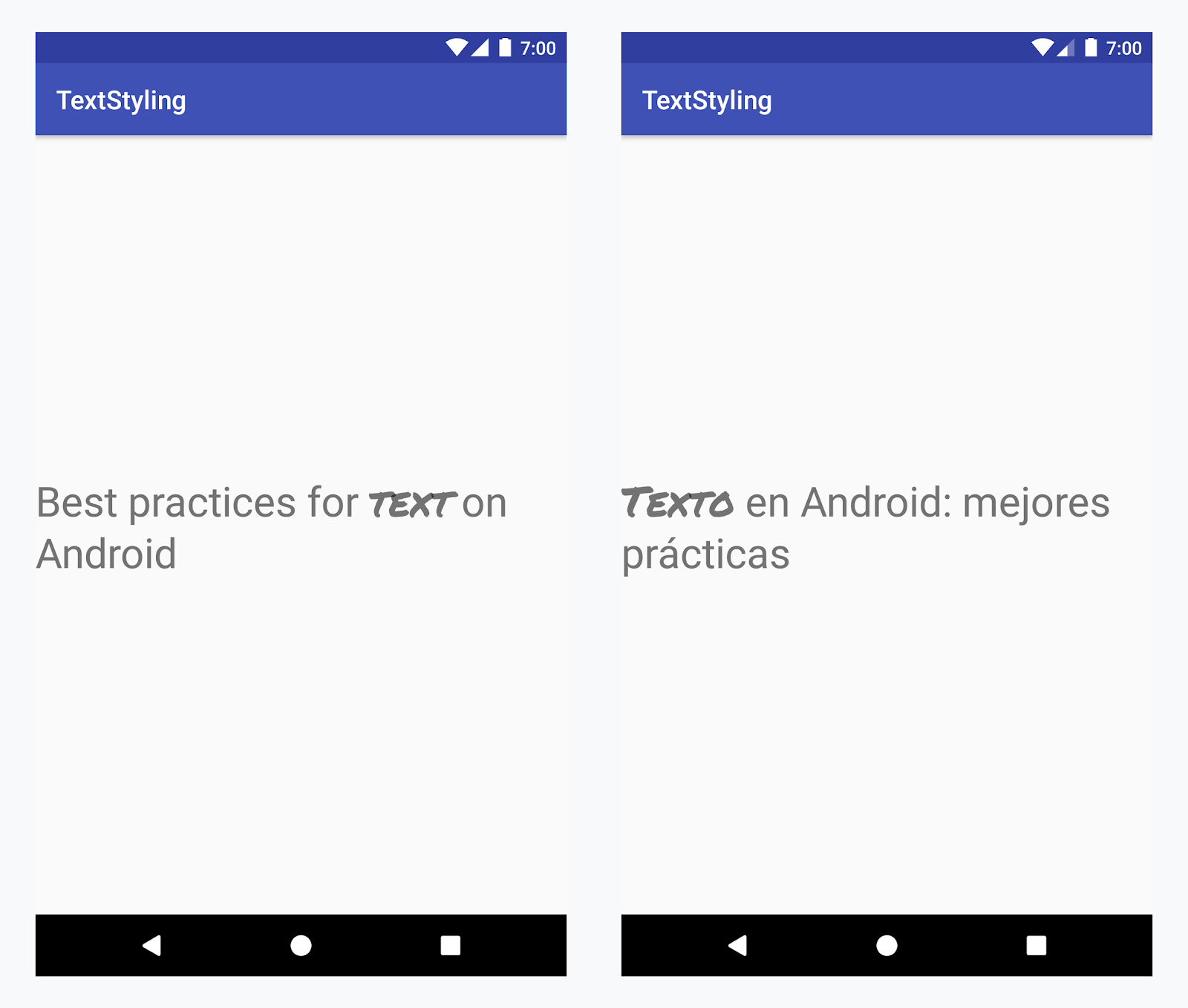
Applying a custom typeface to the word "text" in all languages
Example - adding a custom typeface
-
Add the
<annotation>tag, and define the key-value pair. In this case, the key is font, and the value is the type of font we want to use: title_emphasis// values/strings.xml <string name="title">Best practices for <annotation font="title_emphasis">text</annotation> on Android</string> // values-es/strings.xml <string name="title"><annotation font="title_emphasis">Texto</annotation> en Android: mejores prácticas</string>
-
Load the string resource and find the annotations with the font key. Then create a custom span and replace the existing span.
Kotlin
// get the text as SpannedString so we can get the spans attached to the text
val titleText = getText(R.string.title) as SpannedString

// get all the annotation spans from the text
val annotations = titleText.getSpans(0, titleText.length, Annotation::class.java)

// create a copy of the title text as a SpannableString.
// the constructor copies both the text and the spans. so we can add and remove spans
val spannableString = SpannableString(titleText)

// iterate through all the annotation spans
for (annotation in annotations) {
   // look for the span with the key font
   if (annotation.key == "font") {
      val fontName = annotation.value
      // check the value associated to the annotation key
      if (fontName == "title_emphasis") {
         // create the typeface
         val typeface = getFontCompat(R.font.permanent_marker)
         // set the span at the same indices as the annotation
         spannableString.setSpan(CustomTypefaceSpan(typeface),
            titleText.getSpanStart(annotation),
            titleText.getSpanEnd(annotation),
            Spannable.SPAN_EXCLUSIVE_EXCLUSIVE)
      }
   }
}

// now, the spannableString contains both the annotation spans and the CustomTypefaceSpan
styledText.text = spannableString
Java
// get the text as SpannedString so we can get the spans attached to the text
SpannedString titleText = (SpannedString) getText(R.string.title);

// get all the annotation spans from the text
Annotation[] annotations = titleText.getSpans(0, titleText.length(), Annotation.class);

// create a copy of the title text as a SpannableString.
// the constructor copies both the text and the spans. so we can add and remove spans
SpannableString spannableString = new SpannableString(titleText);

// iterate through all the annotation spans
for (Annotation annotation: annotations) {
  // look for the span with the key font
  if (annotation.getKey().equals("font")) {
    String fontName = annotation.getValue();
    // check the value associated to the annotation key
    if (fontName.equals("title_emphasis")) {
    // create the typeface
    Typeface typeface = ResourcesCompat.getFont(this, R.font.roboto_mono);
    // set the span at the same indices as the annotation
    spannableString.setSpan(new CustomTypefaceSpan(typeface),
      titleText.getSpanStart(annotation),
      titleText.getSpanEnd(annotation),
      Spannable.SPAN_EXCLUSIVE_EXCLUSIVE);
    }
  }
}

// now, the spannableString contains both the annotation spans and the CustomTypefaceSpan
styledText.text = spannableString;
If you're using the same text multiple times, you should construct the SpannableString object once and reuse it as needed to avoid potential performance and memory issues.
For more examples of annotation usage, see Styling internationalized text in Android.
Annotation spans and text parceling
Because Annotation spans are also ParcelableSpans, the key-value pairs are
parceled and unparceled. As long as the receiver of the parcel knows how to
interpret the annotations, you can use Annotation spans to apply custom
styling to the parceled text.
To keep your custom styling when you pass the text to an Intent Bundle, you
first need to add Annotation spans to your text. You can do this in the XML
resources via the <annotation> tag, as shown in the example above, or in code
by creating a new Annotation and setting it as a span, as shown below:
Kotlin
val spannableString = SpannableString("My spantastic text")
val annotation = Annotation("font", "title_emphasis")
spannableString.setSpan(annotation, 3, 7, Spannable.SPAN_EXCLUSIVE_EXCLUSIVE)

// start Activity with text with spans
val intent = Intent(this, MainActivity::class.java)
intent.putExtra(TEXT_EXTRA, spannableString)
startActivity(intent)
Java
SpannableString spannableString = new SpannableString("My spantastic text");
Annotation annotation = new Annotation("font", "title_emphasis");
spannableString.setSpan(annotation, 3, 7, 33);

// start Activity with text with spans
Intent intent = new Intent(this, MainActivity.class);
intent.putExtra(TEXT_EXTRA, spannableString);
this.startActivity(intent);
Retrieve the text from the Bundle as a SpannableString and then parse the
annotations attached, as shown in the example above.
Kotlin
// read text with Spans
val intentCharSequence = intent.getCharSequenceExtra(TEXT_EXTRA) as SpannableString
Java
// read text with Spans
SpannableString intentCharSequence = (SpannableString)intent.getCharSequenceExtra(TEXT_EXTRA);
For more information on text styling, see the following links: