

แนวคิดและการใช้งาน Jetpack Compose
มอบประสบการณ์การใช้งานที่ดียิ่งขึ้นให้แก่ผู้ใช้โดยตรวจสอบว่าแอปของคุณใช้งานได้ เมื่อการเชื่อมต่อเครือข่ายไม่เสถียรหรือเมื่อผู้ใช้ออฟไลน์อยู่ วิธีหนึ่งในการทำเช่นนี้คือการโหลดหน้าเว็บจากเครือข่ายและจากฐานข้อมูลในเครื่องพร้อมกัน ด้วยวิธีนี้ แอปจะขับเคลื่อน UI จากแคชฐานข้อมูลในเครื่องและส่งคำขอไปยังเครือข่ายเฉพาะเมื่อไม่มีข้อมูลในฐานข้อมูลอีกต่อไป
คู่มือนี้มีสมมติฐานว่าคุณคุ้นเคยกับไลบรารีการคงอยู่ของ Room และการใช้งานไลบรารี Paging ขั้นพื้นฐาน
ประสานงานการโหลดข้อมูล
ไลบรารีการแบ่งหน้ามีคอมโพเนนต์ RemoteMediator
สำหรับกรณีการใช้งานนี้ RemoteMediator ทำหน้าที่เป็นสัญญาณจากไลบรารีการแบ่งหน้า
เมื่อแอปไม่มีข้อมูลที่แคชไว้แล้ว คุณใช้สัญญาณนี้เพื่อโหลดข้อมูลเพิ่มเติมจากเครือข่ายและจัดเก็บไว้ในฐานข้อมูลในเครื่องได้ ซึ่ง PagingSource จะโหลดข้อมูลดังกล่าวและแสดงใน UI
เมื่อต้องการข้อมูลเพิ่มเติม ไลบรารีการแบ่งหน้าจะเรียกใช้เมธอด
load() จากการใช้งาน
RemoteMediator นี่เป็นฟังก์ชันการระงับ จึงปลอดภัย
ที่จะทำงานที่ใช้เวลานาน โดยปกติฟังก์ชันนี้จะดึงข้อมูลใหม่จาก
แหล่งข้อมูลในเครือข่ายและบันทึกลงในที่เก็บข้อมูลในเครื่อง
กระบวนการนี้ใช้ได้กับข้อมูลใหม่ แต่เมื่อเวลาผ่านไป ข้อมูลที่จัดเก็บไว้ในฐานข้อมูล
จะต้องมีการลบล้าง เช่น เมื่อผู้ใช้ทริกเกอร์การรีเฟรชด้วยตนเอง โดยพร็อพเพอร์ตี้ LoadType
จะแสดงถึงพร็อพเพอร์ตี้นี้ซึ่งส่งไปยังเมธอด load() LoadType จะแจ้งให้
RemoteMediator ทราบว่าต้องรีเฟรชข้อมูลที่มีอยู่หรือดึงข้อมูลเพิ่มเติมที่ต้องต่อท้ายหรือนำหน้าในรายการที่มีอยู่หรือไม่
ด้วยวิธีนี้ RemoteMediator จะช่วยให้มั่นใจว่าแอปจะโหลดข้อมูลที่ผู้ใช้ต้องการดูตามลำดับที่เหมาะสม
วงจรการใช้งานการแบ่งหน้า
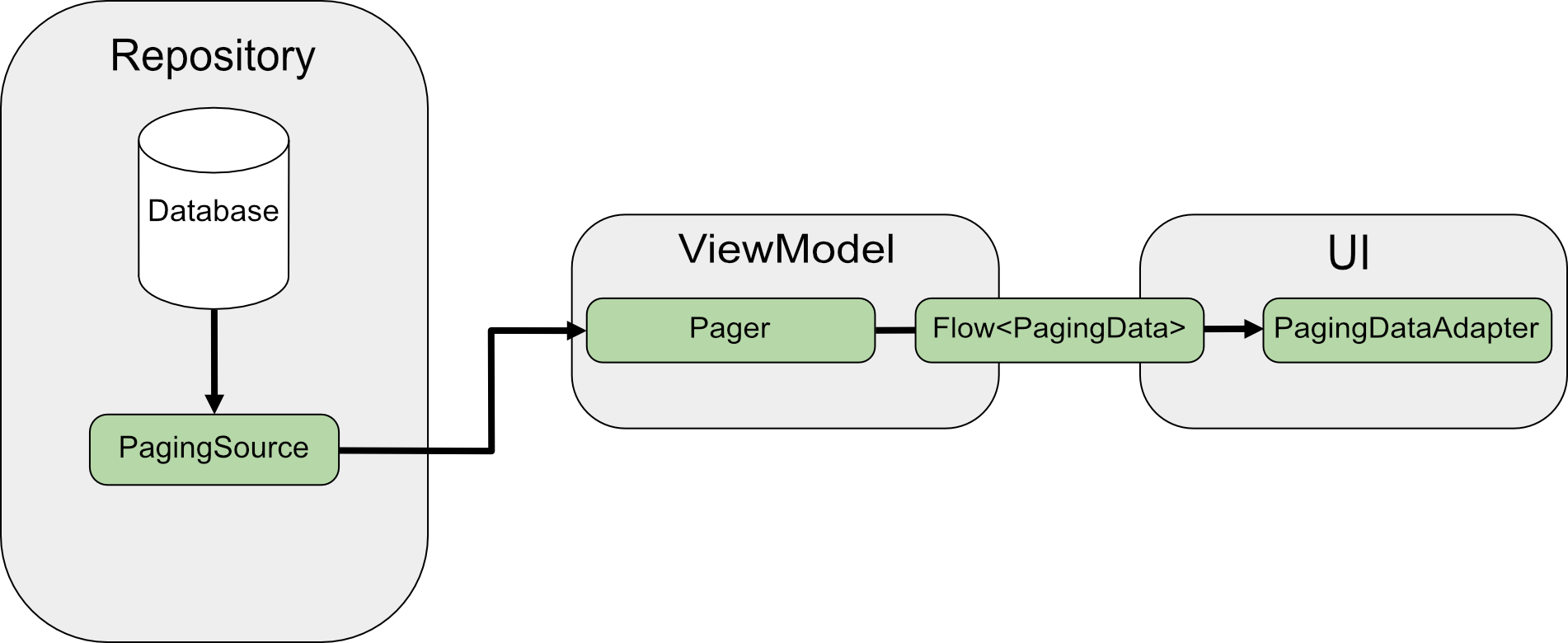
เมื่อมีการแบ่งหน้าจากเครือข่ายโดยตรง PagingSource จะโหลดข้อมูลและ
แสดงออบเจ็กต์ LoadResult
ระบบจะส่งการติดตั้งใช้งาน PagingSource ไปยัง
Pager ผ่านพารามิเตอร์
pagingSourceFactory
เมื่อ UI ต้องการข้อมูลใหม่ Pager จะเรียกเมธอด
load() จาก
PagingSource และแสดงผลสตรีมของออบเจ็กต์
PagingData ที่
แคปซูลข้อมูลใหม่ โดยปกติแล้ว ระบบจะแคชออบเจ็กต์ PagingData แต่ละรายการใน
ViewModel ก่อนที่จะส่งไปยัง UI เพื่อแสดง
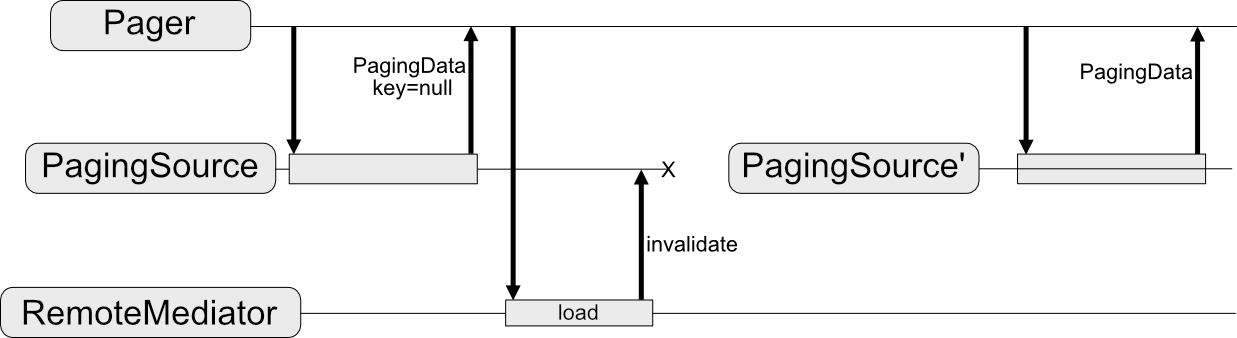
RemoteMediator จะเปลี่ยนโฟลว์ข้อมูลนี้ PagingSource ยังคงโหลดข้อมูล
แต่เมื่อข้อมูลที่แบ่งหน้าหมดแล้ว ไลบรารีการแบ่งหน้าจะทริกเกอร์ RemoteMediator เพื่อโหลดข้อมูลใหม่จากแหล่งที่มาของเครือข่าย RemoteMediator
จะจัดเก็บข้อมูลใหม่ในฐานข้อมูลของเครื่อง จึงไม่จำเป็นต้องใช้แคชในหน่วยความจำใน
ViewModel สุดท้าย PagingSource จะทำให้ตัวเองใช้ไม่ได้ และPager จะสร้างอินสแตนซ์ใหม่เพื่อโหลดข้อมูลล่าสุดจากฐานข้อมูล
การใช้งานพื้นฐาน
สมมติว่าคุณต้องการให้แอปโหลดหน้าของรายการ User จากแหล่งข้อมูลเครือข่ายที่ใช้คีย์รายการ
ลงในแคชในเครื่องที่จัดเก็บไว้ในฐานข้อมูล Room
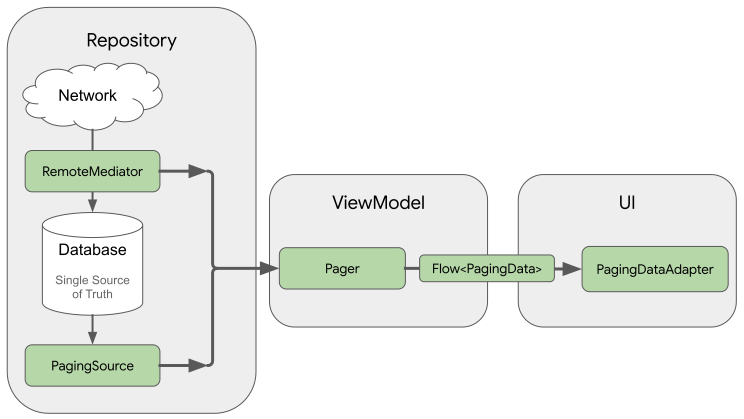
การติดตั้งใช้งาน RemoteMediator จะช่วยโหลดข้อมูลที่แบ่งหน้าจากเครือข่ายไปยังฐานข้อมูล แต่จะไม่โหลดข้อมูลลงใน UI โดยตรง แต่แอปจะใช้ฐานข้อมูลเป็นแหล่งข้อมูลที่
เชื่อถือได้แทน กล่าวคือ แอปจะแสดงเฉพาะข้อมูลที่แคชไว้ในฐานข้อมูลเท่านั้น
PagingSource
การใช้งาน (เช่น การใช้งานที่สร้างโดย Room) จะจัดการการโหลดข้อมูลที่แคชไว้
จากฐานข้อมูลลงใน UI
สร้างเอนทิตีห้อง
ขั้นตอนแรกคือการใช้ไลบรารีการคงอยู่ของ Room เพื่อกำหนดฐานข้อมูลที่เก็บ
แคชในเครื่องของข้อมูลที่แบ่งหน้าจากแหล่งข้อมูลเครือข่าย เริ่มต้นด้วยการ
ติดตั้งใช้งาน RoomDatabase
ตามที่อธิบายไว้ในบันทึกข้อมูลในฐานข้อมูลของเครื่องโดยใช้
Room
จากนั้นกำหนดเอนทิตี Room เพื่อแสดงตารางของรายการในลิสต์ตามที่อธิบายไว้ในการกำหนดข้อมูลโดยใช้เอนทิตี Room
กำหนดให้มีฟิลด์ id เป็นคีย์หลัก รวมถึงฟิลด์สำหรับข้อมูลอื่นๆ ที่รายการในลิสต์มี
Java
@Entity(tableName = "users")
public class User {
  public String id;
  public String label;
}
Java
@Entity(tableName = "users")
public class User {
  public String id;
  public String label;
}
นอกจากนี้ คุณยังต้องกำหนดออบเจ็กต์การเข้าถึงข้อมูล (DAO) สำหรับเอนทิตี Room นี้ตามที่อธิบายไว้ในการเข้าถึงข้อมูลโดยใช้ DAO ของ Room DAO สำหรับรายการในรายการ เอนทิตีต้องมีเมธอดต่อไปนี้
- เมธอด
insertAll()ที่แทรกรายการลงในตาราง - เมธอดที่ใช้สตริงการค้นหาเป็นพารามิเตอร์และแสดงผลออบเจ็กต์
PagingSourceสำหรับรายการผลการค้นหา ด้วยวิธีนี้Pagerออบเจ็กต์จะ ใช้ตารางนี้เป็นแหล่งข้อมูลที่แบ่งหน้าได้ clearAll()เมธอดที่ลบข้อมูลทั้งหมดของตาราง
Java
@Dao
interface UserDao {
  @Insert(onConflict = OnConflictStrategy.REPLACE)
  void insertAll(List<User> users);

  @Query("SELECT * FROM users WHERE mLabel LIKE :query")
  PagingSource<Integer, User> pagingSource(String query);

  @Query("DELETE FROM users")
  int clearAll();
}
Java
@Dao
interface UserDao {
  @Insert(onConflict = OnConflictStrategy.REPLACE)
  void insertAll(List<User> users);

  @Query("SELECT * FROM users WHERE mLabel LIKE :query")
  PagingSource<Integer, User> pagingSource(String query);

  @Query("DELETE FROM users")
  int clearAll();
}
ใช้ RemoteMediator
บทบาทหลักของ RemoteMediator คือการโหลดข้อมูลเพิ่มเติมจากเครือข่ายเมื่อPager ไม่มีข้อมูลเหลือหรือข้อมูลที่มีอยู่ไม่ถูกต้อง ซึ่งมีload()เมธอดที่คุณต้องลบล้างเพื่อกำหนดลักษณะการทำงานของการโหลด
การติดตั้งใช้งาน RemoteMediator โดยทั่วไปจะมีพารามิเตอร์ต่อไปนี้
query: สตริงคำค้นหาที่กำหนดข้อมูลที่จะดึงจากบริการแบ็กเอนด์database: ฐานข้อมูล Room ที่ทำหน้าที่เป็นแคชในเครื่องnetworkService: อินสแตนซ์ API สำหรับบริการแบ็กเอนด์
สร้างการติดตั้งใช้งาน RemoteMediator<Key, Value> KeyประเภทและValueประเภทควรเหมือนกันกับที่ใช้หากคุณกําลังกําหนดPagingSourceกับแหล่งข้อมูลเครือข่ายเดียวกัน ดูข้อมูลเพิ่มเติมเกี่ยวกับ
การเลือกพารามิเตอร์ประเภทได้ที่เลือกประเภทคีย์และค่า
Java
@UseExperimental(markerClass = ExperimentalPagingApi.class)
class ExampleRemoteMediator extends RxRemoteMediator<Integer, User> {
  private String query;
  private ExampleBackendService networkService;
  private RoomDb database;
  private UserDao userDao;

  ExampleRemoteMediator(
    String query,
    ExampleBackendService networkService, RoomDb database
  ) {
    query = query;
    networkService = networkService;
    database = database;
    userDao = database.userDao();
  }

  @NotNull
  @Override
  public Single<MediatorResult> loadSingle(
    @NotNull LoadType loadType,
    @NotNull PagingState<Integer, User> state
  ) {
    ...
  }
}
Java
class ExampleRemoteMediator extends ListenableFutureRemoteMediator<Integer, User> {
  private String query;
  private ExampleBackendService networkService;
  private RoomDb database;
  private UserDao userDao;
  private Executor bgExecutor;

  ExampleRemoteMediator(
    String query,
    ExampleBackendService networkService,
    RoomDb database,
    Executor bgExecutor
  ) {
    this.query = query;
    this.networkService = networkService;
    this.database = database;
    this.userDao = database.userDao();
    this.bgExecutor = bgExecutor;
  }

  @NotNull
  @Override
  public ListenableFuture<MediatorResult> loadFuture(
    @NotNull LoadType loadType,
    @NotNull PagingState<Integer, User> state
  ) {
    ...
  }
}
เมธอด load() มีหน้าที่อัปเดตชุดข้อมูลสำรองและ
ทำให้ PagingSource ไม่ถูกต้อง ไลบรารีบางรายการที่รองรับการแบ่งหน้า (เช่น Room) จะจัดการการล้างข้อมูลออบเจ็กต์ PagingSource ที่ไลบรารี นั้นๆ ใช้โดยอัตโนมัติ
เมธอด load() รับพารามิเตอร์ 2 รายการดังนี้
PagingStateซึ่งมีข้อมูลเกี่ยวกับ หน้าเว็บที่โหลดไปแล้ว ดัชนีที่เข้าถึงล่าสุด และออบเจ็กต์PagingConfigที่คุณใช้เพื่อเริ่มต้นสตรีมการแบ่งหน้าLoadTypeซึ่งระบุประเภทการโหลดREFRESHAPPENDหรือPREPEND
ค่าที่ส่งคืนของเมธอด load() คือออบเจ็กต์ MediatorResult MediatorResult อาจเป็น
MediatorResult.Error
(ซึ่งรวมถึงคำอธิบายข้อผิดพลาด) หรือ
MediatorResult.Success
(ซึ่งรวมถึงสัญญาณที่ระบุว่ามีข้อมูลเพิ่มเติมที่จะโหลดหรือไม่)
เมธอด load() ต้องดำเนินการตามขั้นตอนต่อไปนี้
- กำหนดหน้าที่จะโหลดจากเครือข่ายโดยขึ้นอยู่กับประเภทการโหลดและ ข้อมูลที่โหลดไปแล้ว
- ทริกเกอร์คำขอเครือข่าย
- ดำเนินการตามผลลัพธ์ของการดำเนินการโหลด ดังนี้
- หากโหลดสำเร็จและรายการที่ได้รับไม่ว่าง
ให้จัดเก็บรายการในฐานข้อมูลและแสดงผล
MediatorResult.Success(endOfPaginationReached = false)หลังจากจัดเก็บข้อมูลแล้ว ให้ลบล้างแหล่งข้อมูลเพื่อแจ้งให้ไลบรารีการแบ่งหน้าทราบถึงข้อมูลใหม่ - หากโหลดสำเร็จและรายการที่ได้รับว่างเปล่า
หรือเป็นดัชนีหน้าสุดท้าย ให้แสดงผล
MediatorResult.Success(endOfPaginationReached = true)หลังจากจัดเก็บข้อมูลแล้ว ให้ล้างแหล่งข้อมูลเพื่อแจ้งให้ไลบรารีการแบ่งหน้าทราบถึงข้อมูลใหม่ - หากคำขอทำให้เกิดข้อผิดพลาด ให้แสดง
MediatorResult.Error
- หากโหลดสำเร็จและรายการที่ได้รับไม่ว่าง
ให้จัดเก็บรายการในฐานข้อมูลและแสดงผล
Java
@NotNull
@Override
public Single<MediatorResult> loadSingle(
  @NotNull LoadType loadType,
  @NotNull PagingState<Integer, User> state
) {
  // The network load method takes an optional after=<user.id> parameter. For
  // every page after the first, pass the last user ID to let it continue from
  // where it left off. For REFRESH, pass null to load the first page.
  String loadKey = null;
  switch (loadType) {
    case REFRESH:
      break;
    case PREPEND:
      // In this example, you never need to prepend, since REFRESH will always
      // load the first page in the list. Immediately return, reporting end of
      // pagination.
      return Single.just(new MediatorResult.Success(true));
    case APPEND:
      User lastItem = state.lastItemOrNull();

      // You must explicitly check if the last item is null when appending,
      // since passing null to networkService is only valid for initial load.
      // If lastItem is null it means no items were loaded after the initial
      // REFRESH and there are no more items to load.
      if (lastItem == null) {
        return Single.just(new MediatorResult.Success(true));
      }

      loadKey = lastItem.getId();
      break;
  }

  return networkService.searchUsers(query, loadKey)
    .subscribeOn(Schedulers.io())
    .map((Function<SearchUserResponse, MediatorResult>) response -> {
      database.runInTransaction(() -> {
        if (loadType == LoadType.REFRESH) {
          userDao.deleteByQuery(query);
        }

        // Insert new users into database, which invalidates the current
        // PagingData, allowing Paging to present the updates in the DB.
        userDao.insertAll(response.getUsers());
      });

      return new MediatorResult.Success(response.getNextKey() == null);
    })
    .onErrorResumeNext(e -> {
      if (e instanceof IOException || e instanceof HttpException) {
        return Single.just(new MediatorResult.Error(e));
      }

      return Single.error(e);
    });
}
Java
@NotNull
@Override
public ListenableFuture<MediatorResult> loadFuture(
  @NotNull LoadType loadType,
  @NotNull PagingState<Integer, User> state
) {
  // The network load method takes an optional after=<user.id> parameter. For
  // every page after the first, pass the last user ID to let it continue from
  // where it left off. For REFRESH, pass null to load the first page.
  String loadKey = null;
  switch (loadType) {
    case REFRESH:
      break;
    case PREPEND:
      // In this example, you never need to prepend, since REFRESH will always
      // load the first page in the list. Immediately return, reporting end of
      // pagination.
      return Futures.immediateFuture(new MediatorResult.Success(true));
    case APPEND:
      User lastItem = state.lastItemOrNull();

      // You must explicitly check if the last item is null when appending,
      // since passing null to networkService is only valid for initial load.
      // If lastItem is null it means no items were loaded after the initial
      // REFRESH and there are no more items to load.
      if (lastItem == null) {
        return Futures.immediateFuture(new MediatorResult.Success(true));
      }

      loadKey = lastItem.getId();
      break;
  }

  ListenableFuture<MediatorResult> networkResult = Futures.transform(
    networkService.searchUsers(query, loadKey),
    response -> {
      database.runInTransaction(() -> {
        if (loadType == LoadType.REFRESH) {
          userDao.deleteByQuery(query);
        }

        // Insert new users into database, which invalidates the current
        // PagingData, allowing Paging to present the updates in the DB.
        userDao.insertAll(response.getUsers());
      });

      return new MediatorResult.Success(response.getNextKey() == null);
    }, bgExecutor);

  ListenableFuture<MediatorResult> ioCatchingNetworkResult =
    Futures.catching(
      networkResult,
      IOException.class,
      MediatorResult.Error::new,
      bgExecutor
    );

  return Futures.catching(
    ioCatchingNetworkResult,
    HttpException.class,
    MediatorResult.Error::new,
    bgExecutor
  );
}
กำหนดเมธอด initialize
การติดตั้งใช้งาน RemoteMediator ยังสามารถลบล้างเมธอด
initialize()
เพื่อตรวจสอบว่าข้อมูลที่แคชล้าสมัยหรือไม่ และตัดสินใจว่าจะทริกเกอร์
การรีเฟรชจากระยะไกลหรือไม่ วิธีนี้จะทำงานก่อนการโหลดใดๆ ดังนั้นคุณจึงสามารถจัดการฐานข้อมูล (เช่น ล้างข้อมูลเก่า) ก่อนที่จะทริกเกอร์การโหลดในเครื่องหรือการโหลดจากระยะไกลได้
เนื่องจาก initialize() เป็นฟังก์ชันแบบอะซิงโครนัส คุณจึงโหลดข้อมูลเพื่อ
พิจารณาความเกี่ยวข้องของข้อมูลที่มีอยู่ในฐานข้อมูลได้ กรณีที่พบบ่อยที่สุดคือข้อมูลที่แคชจะใช้ได้ในช่วงระยะเวลาหนึ่งเท่านั้น
RemoteMediator สามารถตรวจสอบว่าเวลาหมดอายุนี้ผ่านไปแล้วหรือไม่ ในกรณีนี้
ไลบรารีการแบ่งหน้าจะต้องรีเฟรชข้อมูลทั้งหมด การติดตั้งใช้งาน
initialize() ควรส่งคืน InitializeAction ดังนี้
- ในกรณีที่ต้องรีเฟรชข้อมูลผลิตภัณฑ์ในพื้นที่ทั้งหมด
initialize()ควรแสดงผลInitializeAction.LAUNCH_INITIAL_REFRESHซึ่งจะทำให้RemoteMediatorรีเฟรชจากระยะไกลเพื่อโหลดข้อมูลซ้ำทั้งหมด การโหลดAPPENDหรือPREPENDจากระยะไกลจะรอให้การโหลดREFRESHสําเร็จก่อนจึงจะดําเนินการต่อ - ในกรณีที่ไม่จำเป็นต้องรีเฟรชข้อมูลผลิตภัณฑ์ในพื้นที่
initialize()ควรแสดงผลInitializeAction.SKIP_INITIAL_REFRESHซึ่งจะทำให้RemoteMediatorข้ามการรีเฟรชจากระยะไกลและโหลดข้อมูลที่แคชไว้
Java
@NotNull
@Override
public Single<InitializeAction> initializeSingle() {
  long cacheTimeout = TimeUnit.MILLISECONDS.convert(1, TimeUnit.HOURS);
  return mUserDao.lastUpdatedSingle()
    .map(lastUpdatedMillis -> {
      if (System.currentTimeMillis() - lastUpdatedMillis <= cacheTimeout) {
        // Cached data is up-to-date, so there is no need to re-fetch
        // from the network.
        return InitializeAction.SKIP_INITIAL_REFRESH;
      } else {
        // Need to refresh cached data from network; returning
        // LAUNCH_INITIAL_REFRESH here will also block RemoteMediator's
        // APPEND and PREPEND from running until REFRESH succeeds.
        return InitializeAction.LAUNCH_INITIAL_REFRESH;
      }
    });
}
Java
@NotNull
@Override
public ListenableFuture<InitializeAction> initializeFuture() {
  long cacheTimeout = TimeUnit.MILLISECONDS.convert(1, TimeUnit.HOURS);
  return Futures.transform(
    mUserDao.lastUpdated(),
    lastUpdatedMillis -> {
      if (System.currentTimeMillis() - lastUpdatedMillis <= cacheTimeout) {
        // Cached data is up-to-date, so there is no need to re-fetch
        // from the network.
        return InitializeAction.SKIP_INITIAL_REFRESH;
      } else {
        // Need to refresh cached data from network; returning
        // LAUNCH_INITIAL_REFRESH here will also block RemoteMediator's
        // APPEND and PREPEND from running until REFRESH succeeds.
        return InitializeAction.LAUNCH_INITIAL_REFRESH;
      }
    },
    mBgExecutor);
}
สร้างเพจเจอร์
สุดท้าย คุณต้องสร้างอินสแตนซ์ Pager เพื่อตั้งค่าสตรีมของข้อมูลที่แบ่งหน้า
ซึ่งคล้ายกับการสร้างPagerจากแหล่งข้อมูลเครือข่ายอย่างง่าย แต่มี 2 สิ่งที่คุณต้องทำแตกต่างออกไป
- คุณต้องระบุเมธอดการค้นหาที่แสดงผลออบเจ็กต์
PagingSourceจาก DAO แทนการส่งเครื่องมือสร้างPagingSourceโดยตรง - คุณต้องระบุอินสแตนซ์ของการติดตั้งใช้งาน
RemoteMediatorเป็นพารามิเตอร์remoteMediator
Java
UserDao userDao = database.userDao();
Pager<Integer, User> pager = Pager(
  new PagingConfig(/* pageSize = */ 20),
  null, // initialKey,
  new ExampleRemoteMediator(query, database, networkService)
  () -> userDao.pagingSource(query));
Java
UserDao userDao = database.userDao();
Pager<Integer, User> pager = Pager(
  new PagingConfig(/* pageSize = */ 20),
  null, // initialKey
  new ExampleRemoteMediator(query, database, networkService, bgExecutor),
  () -> userDao.pagingSource(query));
จัดการกุญแจแบบรีโมต
คีย์ระยะไกลคือคีย์ที่การติดตั้งใช้งาน RemoteMediator ใช้เพื่อบอกบริการแบ็กเอนด์ว่าจะโหลดข้อมูลใดต่อไป ในกรณีที่ง่ายที่สุด แต่ละรายการของข้อมูลที่แบ่งหน้าจะมีคีย์ระยะไกลที่คุณอ้างอิงได้ง่ายๆ อย่างไรก็ตาม หากคีย์ระยะไกลไม่สอดคล้องกับรายการแต่ละรายการ คุณจะต้องจัดเก็บคีย์เหล่านั้นแยกกันและจัดการในเมธอด load()
ส่วนนี้อธิบายวิธีรวบรวม จัดเก็บ และอัปเดตคีย์ระยะไกลที่ไม่ได้จัดเก็บไว้ในแต่ละรายการ
คีย์รายการ
ส่วนนี้อธิบายวิธีใช้คีย์ระยะไกลที่สอดคล้องกับ
รายการแต่ละรายการ โดยปกติ เมื่อคีย์ API ปิดรายการแต่ละรายการ ระบบจะส่งรหัส
รายการเป็นพารามิเตอร์การค้นหา ชื่อพารามิเตอร์จะระบุว่าเซิร์ฟเวอร์ควรตอบกลับด้วยรายการก่อนหรือหลังรหัสที่ระบุ ในตัวอย่าง
ของคลาสโมเดล User ระบบจะใช้ฟิลด์ id จากเซิร์ฟเวอร์เป็นคีย์ระยะไกล
เมื่อขอข้อมูลเพิ่มเติม
เมื่อload()ต้องจัดการคีย์ระยะไกลที่เฉพาะเจาะจงรายการ โดยปกติแล้วคีย์เหล่านี้จะเป็นรหัสของข้อมูลที่ดึงมาจากเซิร์ฟเวอร์ การดำเนินการรีเฟรช
ไม่จำเป็นต้องใช้คีย์การโหลด เนื่องจากจะดึงข้อมูลล่าสุดเท่านั้น
ในทำนองเดียวกัน การดำเนินการนำหน้าไม่จำเป็นต้องดึงข้อมูลเพิ่มเติมเนื่องจาก
การรีเฟรชจะดึงข้อมูลล่าสุดจากเซิร์ฟเวอร์เสมอ
แต่การดำเนินการต่อท้ายต้องใช้รหัส ซึ่งคุณจะต้องโหลดรายการสุดท้ายจากฐานข้อมูลและใช้รหัสของรายการนั้นเพื่อโหลดข้อมูลหน้าถัดไป หากไม่มีรายการในฐานข้อมูล ระบบจะตั้งค่า endOfPaginationReached เป็นจริง
ซึ่งบ่งชี้ว่าต้องรีเฟรชข้อมูล
Java
@NotNull
@Override
public Single>MediatorResult< loadSingle(
  @NotNull LoadType loadType,
  @NotNull PagingState>Integer, User< state
) {
  // The network load method takes an optional String parameter. For every page
  // after the first, pass the String token returned from the previous page to
  // let it continue from where it left off. For REFRESH, pass null to load the
  // first page.
  Single>String< remoteKeySingle = null;
  switch (loadType) {
    case REFRESH:
      // Initial load should use null as the page key, so you can return null
      // directly.
      remoteKeySingle = Single.just(null);
      break;
    case PREPEND:
      // In this example, you never need to prepend, since REFRESH will always
      // load the first page in the list. Immediately return, reporting end of
      // pagination.
      return Single.just(new MediatorResult.Success(true));
    case APPEND:
      User lastItem = state.lastItemOrNull();

      // You must explicitly check if the last item is null when
      // appending, since passing null to networkService is only
      // valid for initial load. If lastItem is null it means no
      // items were loaded after the initial REFRESH and there are
      // no more items to load.
      if (lastItem == null) {
        return Single.just(new MediatorResult.Success(true));
      }
      remoteKeySingle = Single.just(lastItem.getId());
      break;
  }

  return remoteKeySingle
    .subscribeOn(Schedulers.io())
    .flatMap((Function<String, Single<MediatorResult>>) remoteKey -> {
      return networkService.searchUsers(query, remoteKey)
        .map(response -> {
          database.runInTransaction(() -> {
            if (loadType == LoadType.REFRESH) {
              userDao.deleteByQuery(query);
            }
            // Insert new users into database, which invalidates the current
            // PagingData, allowing Paging to present the updates in the DB.
            userDao.insertAll(response.getUsers());
          });

          return new MediatorResult.Success(response.getUsers().isEmpty());
        });
    })
    .onErrorResumeNext(e -> {
      if (e instanceof IOException || e instanceof HttpException) {
        return Single.just(new MediatorResult.Error(e));
      }

      return Single.error(e);
    });
}
Java
@NotNull
@Override
public ListenableFuture<MediatorResult> loadFuture(
  @NotNull LoadType loadType,
  @NotNull PagingState<Integer, User> state
) {
  // The network load method takes an optional after=<user.id> parameter.
  // For every page after the first, pass the last user ID to let it continue
  // from where it left off. For REFRESH, pass null to load the first page.
  ResolvableFuture<String> remoteKeyFuture = ResolvableFuture.create();
  switch (loadType) {
    case REFRESH:
      remoteKeyFuture.set(null);
      break;
    case PREPEND:
      // In this example, you never need to prepend, since REFRESH will always
      // load the first page in the list. Immediately return, reporting end of
      // pagination.
      return Futures.immediateFuture(new MediatorResult.Success(true));
    case APPEND:
      User lastItem = state.lastItemOrNull();

      // You must explicitly check if the last item is null when appending,
      // since passing null to networkService is only valid for initial load.
      // If lastItem is null it means no items were loaded after the initial
      // REFRESH and there are no more items to load.
      if (lastItem == null) {
        return Futures.immediateFuture(new MediatorResult.Success(true));
      }

      remoteKeyFuture.set(lastItem.getId());
      break;
  }

  return Futures.transformAsync(remoteKeyFuture, remoteKey -> {

    ListenableFuture<MediatorResult> networkResult = Futures.transform(
      networkService.searchUsers(query, remoteKey),
      response -> {
        database.runInTransaction(() -> {
        if (loadType == LoadType.REFRESH) {
          userDao.deleteByQuery(query);
        }

        // Insert new users into database, which invalidates the current
        // PagingData, allowing Paging to present the updates in the DB.
        userDao.insertAll(response.getUsers());
      });

      return new MediatorResult.Success(response.getUsers().isEmpty());
    }, bgExecutor);

    ListenableFuture<MediatorResult> ioCatchingNetworkResult =
      Futures.catching(
        networkResult,
        IOException.class,
        MediatorResult.Error::new,
        bgExecutor
      );

    return Futures.catching(
      ioCatchingNetworkResult,
      HttpException.class,
      MediatorResult.Error::new,
      bgExecutor
    );
  }, bgExecutor);
}
คีย์หน้าเว็บ
ส่วนนี้อธิบายวิธีใช้คีย์ระยะไกลที่ไม่สอดคล้องกับรายการแต่ละรายการ
เพิ่มตารางคีย์ระยะไกล
เมื่อคีย์ระยะไกลไม่ได้เชื่อมโยงกับรายการในรายการโดยตรง คุณควร จัดเก็บคีย์เหล่านั้นไว้ในตารางแยกต่างหากในฐานข้อมูลภายใน กำหนดเอนทิตี Room ที่ แสดงตารางของคีย์ระยะไกล
Java
@Entity(tableName = "remote_keys")
public class RemoteKey {
  public String label;
  public String nextKey;
}
Java
@Entity(tableName = "remote_keys")
public class RemoteKey {
  public String label;
  public String nextKey;
}
นอกจากนี้ คุณต้องกำหนด DAO สำหรับเอนทิตี RemoteKey ด้วย
Java
@Dao
interface RemoteKeyDao {
  @Insert(onConflict = OnConflictStrategy.REPLACE)
  void insertOrReplace(RemoteKey remoteKey);

  @Query("SELECT * FROM remote_keys WHERE label = :query")
  Single<RemoteKey> remoteKeyByQuerySingle(String query);

  @Query("DELETE FROM remote_keys WHERE label = :query")
  void deleteByQuery(String query);
}
Java
@Dao
interface RemoteKeyDao {
  @Insert(onConflict = OnConflictStrategy.REPLACE)
  void insertOrReplace(RemoteKey remoteKey);

  @Query("SELECT * FROM remote_keys WHERE label = :query")
  ListenableFuture<RemoteKey> remoteKeyByQueryFuture(String query);

  @Query("DELETE FROM remote_keys WHERE label = :query")
  void deleteByQuery(String query);
}
โหลดด้วยรีโมต
เมื่อload()เมธอดของคุณต้องจัดการคีย์หน้าเว็บระยะไกล คุณต้องกำหนดเมธอดดังกล่าวแตกต่างออกไปในลักษณะต่อไปนี้เมื่อเทียบกับการใช้งานพื้นฐานของRemoteMediator
- รวมพร็อพเพอร์ตี้เพิ่มเติมที่มีการอ้างอิงถึง DAO สำหรับตารางคีย์ระยะไกล
- กำหนดคีย์ที่จะโหลดถัดไปโดยการค้นหาตารางคีย์ระยะไกลแทนการใช้
PagingState - แทรกหรือจัดเก็บคีย์ระยะไกลที่ส่งคืนจากแหล่งข้อมูลเครือข่าย นอกเหนือจากข้อมูลที่แบ่งหน้าเอง
Java
@NotNull
@Override
public Single<MediatorResult> loadSingle(
  @NotNull LoadType loadType,
  @NotNull PagingState<Integer, User> state
) {
  // The network load method takes an optional String parameter. For every page
  // after the first, pass the String token returned from the previous page to
  // let it continue from where it left off. For REFRESH, pass null to load the
  // first page.
  Single<RemoteKey> remoteKeySingle = null;
  switch (loadType) {
    case REFRESH:
      // Initial load should use null as the page key, so you can return null
      // directly.
      remoteKeySingle = Single.just(new RemoteKey(mQuery, null));
      break;
    case PREPEND:
      // In this example, you never need to prepend, since REFRESH will always
      // load the first page in the list. Immediately return, reporting end of
      // pagination.
      return Single.just(new MediatorResult.Success(true));
    case APPEND:
      // Query remoteKeyDao for the next RemoteKey.
      remoteKeySingle = mRemoteKeyDao.remoteKeyByQuerySingle(mQuery);
      break;
  }

  return remoteKeySingle
    .subscribeOn(Schedulers.io())
    .flatMap((Function<RemoteKey, Single<MediatorResult>>) remoteKey -> {
      // You must explicitly check if the page key is null when appending,
      // since null is only valid for initial load. If you receive null
      // for APPEND, that means you have reached the end of pagination and
      // there are no more items to load.
      if (loadType != REFRESH && remoteKey.getNextKey() == null) {
        return Single.just(new MediatorResult.Success(true));
      }

      return networkService.searchUsers(query, remoteKey.getNextKey())
        .map(response -> {
          database.runInTransaction(() -> {
            if (loadType == LoadType.REFRESH) {
              userDao.deleteByQuery(query);
              remoteKeyDao.deleteByQuery(query);
            }

            // Update RemoteKey for this query.
            remoteKeyDao.insertOrReplace(new RemoteKey(query, response.getNextKey()));

            // Insert new users into database, which invalidates the current
            // PagingData, allowing Paging to present the updates in the DB.
            userDao.insertAll(response.getUsers());
          });

          return new MediatorResult.Success(response.getNextKey() == null);
        });
    })
    .onErrorResumeNext(e -> {
      if (e instanceof IOException || e instanceof HttpException) {
        return Single.just(new MediatorResult.Error(e));
      }

      return Single.error(e);
    });
}
Java
@NotNull
@Override
public ListenableFuture<MediatorResult> loadFuture(
  @NotNull LoadType loadType,
  @NotNull PagingState<Integer, User> state
) {
  // The network load method takes an optional after=<user.id> parameter. For
  // every page after the first, pass the last user ID to let it continue from
  // where it left off. For REFRESH, pass null to load the first page.
  ResolvableFuture<RemoteKey> remoteKeyFuture = ResolvableFuture.create();
  switch (loadType) {
    case REFRESH:
      remoteKeyFuture.set(new RemoteKey(query, null));
      break;
    case PREPEND:
      // In this example, you never need to prepend, since REFRESH will always
      // load the first page in the list. Immediately return, reporting end of
      // pagination.
      return Futures.immediateFuture(new MediatorResult.Success(true));
    case APPEND:
      User lastItem = state.lastItemOrNull();

      // You must explicitly check if the last item is null when appending,
      // since passing null to networkService is only valid for initial load.
      // If lastItem is null it means no items were loaded after the initial
      // REFRESH and there are no more items to load.
      if (lastItem == null) {
        return Futures.immediateFuture(new MediatorResult.Success(true));
      }

      // Query remoteKeyDao for the next RemoteKey.
      remoteKeyFuture.setFuture(
        remoteKeyDao.remoteKeyByQueryFuture(query));
      break;
  }

  return Futures.transformAsync(remoteKeyFuture, remoteKey -> {
    // You must explicitly check if the page key is null when appending,
    // since null is only valid for initial load. If you receive null
    // for APPEND, that means you have reached the end of pagination and
    // there are no more items to load.
    if (loadType != LoadType.REFRESH && remoteKey.getNextKey() == null) {
      return Futures.immediateFuture(new MediatorResult.Success(true));
    }

    ListenableFuture<MediatorResult> networkResult = Futures.transform(
      networkService.searchUsers(query, remoteKey.getNextKey()),
      response -> {
        database.runInTransaction(() -> {
        if (loadType == LoadType.REFRESH) {
          userDao.deleteByQuery(query);
          remoteKeyDao.deleteByQuery(query);
        }

        // Update RemoteKey for this query.
        remoteKeyDao.insertOrReplace(new RemoteKey(query, response.getNextKey()));

        // Insert new users into database, which invalidates the current
        // PagingData, allowing Paging to present the updates in the DB.
        userDao.insertAll(response.getUsers());
      });

      return new MediatorResult.Success(response.getNextKey() == null);
    }, bgExecutor);

    ListenableFuture<MediatorResult> ioCatchingNetworkResult =
      Futures.catching(
        networkResult,
        IOException.class,
        MediatorResult.Error::new,
        bgExecutor
      );

    return Futures.catching(
      ioCatchingNetworkResult,
      HttpException.class,
      MediatorResult.Error::new,
      bgExecutor
    );
  }, bgExecutor);
}
แหล่งข้อมูลเพิ่มเติม
ดูข้อมูลเพิ่มเติมเกี่ยวกับไลบรารี Paging ได้ที่แหล่งข้อมูลเพิ่มเติมต่อไปนี้
Codelabs
ตัวอย่าง
แนะนำสำหรับคุณ
- หมายเหตุ: ข้อความลิงก์จะแสดงเมื่อ JavaScript ปิดอยู่
- โหลดและแสดงข้อมูลแบบแบ่งหน้า
- ทดสอบการใช้งานการแบ่งหน้า
- ย้ายข้อมูลไปยัง Paging 3