

Concetti e implementazione di Jetpack Compose
Offri un'esperienza utente migliorata assicurandoti che la tua app possa essere utilizzata quando le connessioni di rete non sono affidabili o quando l'utente è offline. Un modo per farlo è eseguire la paginazione contemporaneamente dalla rete e da un database locale. In questo modo, la tua app gestisce l'UI da una cache del database locale ed effettua richieste alla rete solo quando non ci sono più dati nel database.
Questa guida presuppone che tu abbia familiarità con la libreria di persistenza Room e con l'utilizzo di base della libreria Paging.
Coordinare i caricamenti dei dati
La libreria Paging fornisce il
RemoteMediator componente
per questo caso d'uso. RemoteMediator funge da indicatore della libreria Paging quando l'app ha esaurito i dati memorizzati nella cache. Puoi utilizzare questo indicatore per caricare
dati aggiuntivi dalla rete e archiviarli nel database locale, dove un
PagingSource può caricarli e
fornirli all'UI per la visualizzazione.
Quando sono necessari dati aggiuntivi, la libreria Paging chiama il
load() metodo dall'
implementazione RemoteMediator. Si tratta di una funzione di sospensione, quindi è sicuro eseguire operazioni a lunga esecuzione. In genere, questa funzione recupera i nuovi dati da un'origine di rete e li salva nello spazio di archiviazione locale.
Questa procedura funziona con i nuovi dati, ma nel tempo i dati archiviati nel database richiedono l'invalidazione, ad esempio quando l'utente attiva manualmente un aggiornamento. Questo
è rappresentato dalla LoadType
proprietà passata al metodo load(). LoadType indica a RemoteMediator se deve aggiornare i dati esistenti o recuperare dati aggiuntivi da aggiungere o anteporre all'elenco esistente.
In questo modo, RemoteMediator garantisce che la tua app carichi i dati che gli utenti vogliono visualizzare nell'ordine appropriato.
Ciclo di vita della paginazione
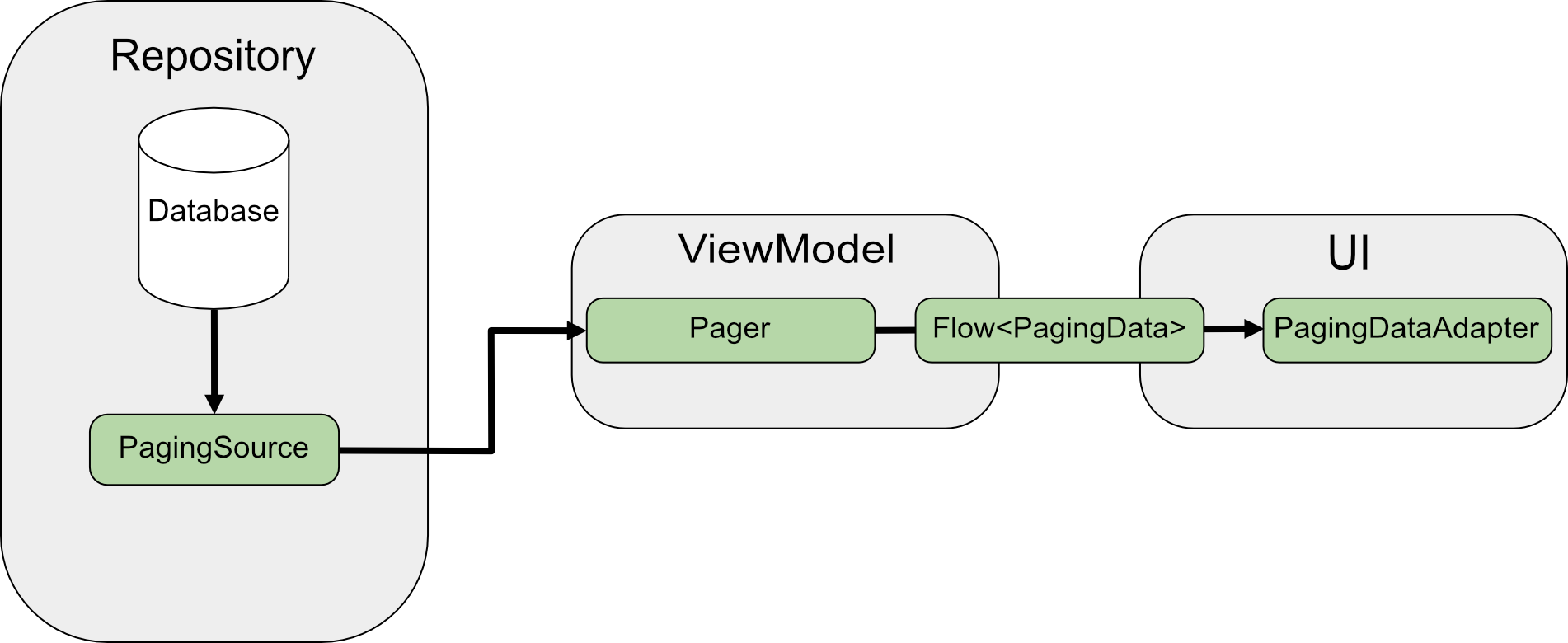
Quando la paginazione viene eseguita direttamente dalla rete, il PagingSource carica i dati e
restituisce un
LoadResult
oggetto. L'PagingSource implementazione viene passata a
Pager tramite il
pagingSourceFactory parametro.
Quando l'UI richiede nuovi dati, il Pager chiama il
load() metodo dal
PagingSource e restituisce uno stream di
PagingData oggetti che
incapsulano i nuovi dati. In genere, ogni oggetto PagingData viene memorizzato nella cache in ViewModel prima di essere inviato all'UI per la visualizzazione.

RemoteMediator modifica questo flusso di dati. Un PagingSource carica ancora i dati, ma quando i dati paginati sono esauriti, la libreria Paging attiva RemoteMediator per caricare nuovi dati dall'origine di rete. RemoteMediator archivia i nuovi dati nel database locale, quindi una cache in memoria in ViewModel non è necessaria. Infine, PagingSource si invalida e Pager crea una nuova istanza per caricare i dati aggiornati dal database.
Utilizzo di base
Supponiamo che tu voglia che la tua app carichi pagine di elementi User da un'origine dati di rete con chiave elemento in una cache locale archiviata in un database Room.
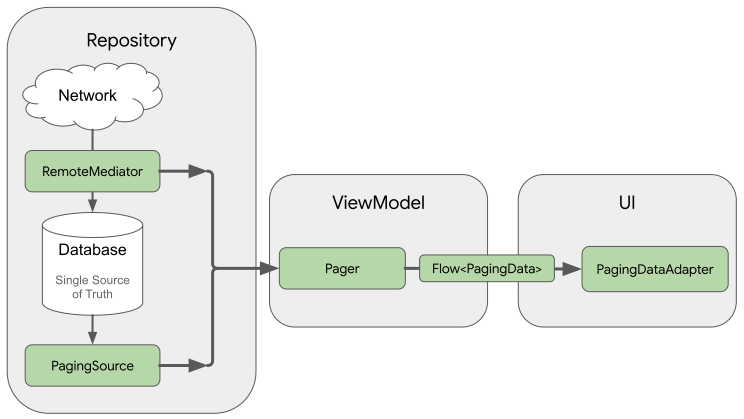
Un'implementazione di RemoteMediator consente di caricare i dati paginati dalla rete nel database, ma non carica i dati direttamente nell'UI. L'app utilizza invece
il database come origine attendibile. In altre parole, l'app visualizza solo i dati memorizzati nella cache del database. Un'implementazione di PagingSource (ad esempio, una generata da Room) gestisce il caricamento dei dati memorizzati nella cache dal database all'UI.
Creare entità Room
Il primo passaggio consiste nell'utilizzare la libreria di persistenza Room per definire un database che contenga una
cache locale dei dati paginati dall'origine dati di rete. Inizia con un'
implementazione di RoomDatabase
come descritto in Salvare i dati in un database locale utilizzando
Room.
Poi, definisci un'entità Room per rappresentare una tabella di elementi dell'elenco come descritto in
Definire i dati utilizzando le entità Room.
Assegna un campo id come chiave primaria, nonché campi per qualsiasi altra informazione contenuta negli elementi dell'elenco.
Java
@Entity(tableName = "users")
public class User {
  public String id;
  public String label;
}
Java
@Entity(tableName = "users")
public class User {
  public String id;
  public String label;
}
Devi anche definire un Data Access Object (DAO) per questa entità Room come descritto in Accedere ai dati utilizzando i DAO di Room. Il DAO per l'entità dell'elemento dell'elenco deve includere i seguenti metodi:
- Un metodo
insertAll()che inserisce un elenco di elementi nella tabella. - Un metodo che accetta la stringa di query come parametro e restituisce un oggetto
PagingSourceper l'elenco dei risultati. In questo modo, un oggettoPagerpuò utilizzare questa tabella come origine dei dati paginati. - Un metodo
clearAll()che elimina tutti i dati della tabella.
Java
@Dao
interface UserDao {
  @Insert(onConflict = OnConflictStrategy.REPLACE)
  void insertAll(List<User> users);

  @Query("SELECT * FROM users WHERE mLabel LIKE :query")
  PagingSource<Integer, User> pagingSource(String query);

  @Query("DELETE FROM users")
  int clearAll();
}
Java
@Dao
interface UserDao {
  @Insert(onConflict = OnConflictStrategy.REPLACE)
  void insertAll(List<User> users);

  @Query("SELECT * FROM users WHERE mLabel LIKE :query")
  PagingSource<Integer, User> pagingSource(String query);

  @Query("DELETE FROM users")
  int clearAll();
}
Implementare un RemoteMediator
Il ruolo principale di RemoteMediator è caricare altri dati dalla rete quando Pager esaurisce i dati o i dati esistenti vengono invalidati. Include un metodo load() che devi sostituire per definire il comportamento di caricamento.
Una tipica implementazione di RemoteMediator include i seguenti parametri:
query: una stringa di query che definisce i dati da recuperare dal servizio di backend.database: il database Room che funge da cache locale.networkService: un'istanza API per il servizio di backend.
Crea un'implementazione di RemoteMediator<Key, Value>. I tipi Key e Value devono essere gli stessi di quelli che utilizzeresti se stessi definendo un PagingSource rispetto alla stessa origine dati di rete. Per ulteriori informazioni sulla
selezione dei parametri di tipo, consulta Selezionare i tipi di chiave e valore
types.
Java
@UseExperimental(markerClass = ExperimentalPagingApi.class)
class ExampleRemoteMediator extends RxRemoteMediator<Integer, User> {
  private String query;
  private ExampleBackendService networkService;
  private RoomDb database;
  private UserDao userDao;

  ExampleRemoteMediator(
    String query,
    ExampleBackendService networkService, RoomDb database
  ) {
    query = query;
    networkService = networkService;
    database = database;
    userDao = database.userDao();
  }

  @NotNull
  @Override
  public Single<MediatorResult> loadSingle(
    @NotNull LoadType loadType,
    @NotNull PagingState<Integer, User> state
  ) {
    ...
  }
}
Java
class ExampleRemoteMediator extends ListenableFutureRemoteMediator<Integer, User> {
  private String query;
  private ExampleBackendService networkService;
  private RoomDb database;
  private UserDao userDao;
  private Executor bgExecutor;

  ExampleRemoteMediator(
    String query,
    ExampleBackendService networkService,
    RoomDb database,
    Executor bgExecutor
  ) {
    this.query = query;
    this.networkService = networkService;
    this.database = database;
    this.userDao = database.userDao();
    this.bgExecutor = bgExecutor;
  }

  @NotNull
  @Override
  public ListenableFuture<MediatorResult> loadFuture(
    @NotNull LoadType loadType,
    @NotNull PagingState<Integer, User> state
  ) {
    ...
  }
}
Il metodo load() è responsabile dell'aggiornamento del set di dati di supporto e dell'invalidazione di PagingSource. Alcune librerie che supportano la paginazione (come Room) gestiscono automaticamente l'invalidazione degli oggetti PagingSource che implementano.
Il metodo load() accetta due parametri:
PagingState, che contiene informazioni sulle pagine caricate finora, sull'indice a cui è stato eseguito l'accesso più di recente e sull'oggettoPagingConfigutilizzato per inizializzare lo stream di paginazione.LoadType, che indica il tipo di caricamento:REFRESH,APPENDoPREPEND.
Il valore restituito del metodo load() è un
MediatorResult
oggetto. MediatorResult può essere
MediatorResult.Error
(che include la descrizione dell'errore) o
MediatorResult.Success
(che include un indicatore che indica se sono presenti altri dati da caricare).
Il metodo load() deve eseguire i seguenti passaggi:
- Determina la pagina da caricare dalla rete in base al tipo di caricamento e ai dati caricati finora.
- Attiva la richiesta di rete.
- Esegui le azioni in base al risultato dell'operazione di caricamento:
- Se il caricamento ha esito positivo e l'elenco di elementi ricevuto non è vuoto, archivia gli elementi dell'elenco nel database e restituisci
MediatorResult.Success(endOfPaginationReached = false). Dopo aver archiviato i dati, invalida l'origine dati per notificare alla libreria Paging i nuovi dati. - Se il caricamento ha esito positivo e l'elenco di elementi ricevuto è vuoto o è l'indice dell'ultima pagina, restituisci
MediatorResult.Success(endOfPaginationReached = true). Dopo aver archiviato i dati, invalida l'origine dati per notificare alla libreria Paging i nuovi dati. - Se la richiesta genera un errore, restituisci
MediatorResult.Error.
- Se il caricamento ha esito positivo e l'elenco di elementi ricevuto non è vuoto, archivia gli elementi dell'elenco nel database e restituisci
Java
@NotNull
@Override
public Single<MediatorResult> loadSingle(
  @NotNull LoadType loadType,
  @NotNull PagingState<Integer, User> state
) {
  // The network load method takes an optional after=<user.id> parameter. For
  // every page after the first, pass the last user ID to let it continue from
  // where it left off. For REFRESH, pass null to load the first page.
  String loadKey = null;
  switch (loadType) {
    case REFRESH:
      break;
    case PREPEND:
      // In this example, you never need to prepend, since REFRESH will always
      // load the first page in the list. Immediately return, reporting end of
      // pagination.
      return Single.just(new MediatorResult.Success(true));
    case APPEND:
      User lastItem = state.lastItemOrNull();

      // You must explicitly check if the last item is null when appending,
      // since passing null to networkService is only valid for initial load.
      // If lastItem is null it means no items were loaded after the initial
      // REFRESH and there are no more items to load.
      if (lastItem == null) {
        return Single.just(new MediatorResult.Success(true));
      }

      loadKey = lastItem.getId();
      break;
  }

  return networkService.searchUsers(query, loadKey)
    .subscribeOn(Schedulers.io())
    .map((Function<SearchUserResponse, MediatorResult>) response -> {
      database.runInTransaction(() -> {
        if (loadType == LoadType.REFRESH) {
          userDao.deleteByQuery(query);
        }

        // Insert new users into database, which invalidates the current
        // PagingData, allowing Paging to present the updates in the DB.
        userDao.insertAll(response.getUsers());
      });

      return new MediatorResult.Success(response.getNextKey() == null);
    })
    .onErrorResumeNext(e -> {
      if (e instanceof IOException || e instanceof HttpException) {
        return Single.just(new MediatorResult.Error(e));
      }

      return Single.error(e);
    });
}
Java
@NotNull
@Override
public ListenableFuture<MediatorResult> loadFuture(
  @NotNull LoadType loadType,
  @NotNull PagingState<Integer, User> state
) {
  // The network load method takes an optional after=<user.id> parameter. For
  // every page after the first, pass the last user ID to let it continue from
  // where it left off. For REFRESH, pass null to load the first page.
  String loadKey = null;
  switch (loadType) {
    case REFRESH:
      break;
    case PREPEND:
      // In this example, you never need to prepend, since REFRESH will always
      // load the first page in the list. Immediately return, reporting end of
      // pagination.
      return Futures.immediateFuture(new MediatorResult.Success(true));
    case APPEND:
      User lastItem = state.lastItemOrNull();

      // You must explicitly check if the last item is null when appending,
      // since passing null to networkService is only valid for initial load.
      // If lastItem is null it means no items were loaded after the initial
      // REFRESH and there are no more items to load.
      if (lastItem == null) {
        return Futures.immediateFuture(new MediatorResult.Success(true));
      }

      loadKey = lastItem.getId();
      break;
  }

  ListenableFuture<MediatorResult> networkResult = Futures.transform(
    networkService.searchUsers(query, loadKey),
    response -> {
      database.runInTransaction(() -> {
        if (loadType == LoadType.REFRESH) {
          userDao.deleteByQuery(query);
        }

        // Insert new users into database, which invalidates the current
        // PagingData, allowing Paging to present the updates in the DB.
        userDao.insertAll(response.getUsers());
      });

      return new MediatorResult.Success(response.getNextKey() == null);
    }, bgExecutor);

  ListenableFuture<MediatorResult> ioCatchingNetworkResult =
    Futures.catching(
      networkResult,
      IOException.class,
      MediatorResult.Error::new,
      bgExecutor
    );

  return Futures.catching(
    ioCatchingNetworkResult,
    HttpException.class,
    MediatorResult.Error::new,
    bgExecutor
  );
}
Definire il metodo initialize
Le implementazioni di RemoteMediator possono anche sostituire il
initialize()
metodo per verificare se i dati memorizzati nella cache non sono aggiornati e decidere se attivare
un aggiornamento remoto. Questo metodo viene eseguito prima di qualsiasi caricamento, quindi puoi manipolare il database (ad esempio, per cancellare i dati precedenti) prima di attivare qualsiasi caricamento locale o remoto.
Poiché initialize() è una funzione asincrona, puoi caricare i dati per determinare la pertinenza dei dati esistenti nel database. Il caso più comune è che i dati memorizzati nella cache siano validi solo per un determinato periodo di tempo. RemoteMediator può verificare se questo tempo di scadenza è trascorso, nel qual caso la libreria Paging deve aggiornare completamente i dati. Le implementazioni di initialize() devono restituire un InitializeAction come segue:
- Nei casi in cui i dati locali devono essere aggiornati completamente,
initialize()deve restituireInitializeAction.LAUNCH_INITIAL_REFRESH. In questo modo,RemoteMediatoresegue un aggiornamento remoto per ricaricare completamente i dati. Tutti i caricamentiAPPENDoPREPENDremoti attendono il completamento del caricamentoREFRESHprima di procedere. - Nei casi in cui i dati locali non devono essere aggiornati,
initialize()deve restituireInitializeAction.SKIP_INITIAL_REFRESH. In questo modo,RemoteMediatorsalta l'aggiornamento remoto e carica i dati memorizzati nella cache.
Java
@NotNull
@Override
public Single<InitializeAction> initializeSingle() {
  long cacheTimeout = TimeUnit.MILLISECONDS.convert(1, TimeUnit.HOURS);
  return mUserDao.lastUpdatedSingle()
    .map(lastUpdatedMillis -> {
      if (System.currentTimeMillis() - lastUpdatedMillis <= cacheTimeout) {
        // Cached data is up-to-date, so there is no need to re-fetch
        // from the network.
        return InitializeAction.SKIP_INITIAL_REFRESH;
      } else {
        // Need to refresh cached data from network; returning
        // LAUNCH_INITIAL_REFRESH here will also block RemoteMediator's
        // APPEND and PREPEND from running until REFRESH succeeds.
        return InitializeAction.LAUNCH_INITIAL_REFRESH;
      }
    });
}
Java
@NotNull
@Override
public ListenableFuture<InitializeAction> initializeFuture() {
  long cacheTimeout = TimeUnit.MILLISECONDS.convert(1, TimeUnit.HOURS);
  return Futures.transform(
    mUserDao.lastUpdated(),
    lastUpdatedMillis -> {
      if (System.currentTimeMillis() - lastUpdatedMillis <= cacheTimeout) {
        // Cached data is up-to-date, so there is no need to re-fetch
        // from the network.
        return InitializeAction.SKIP_INITIAL_REFRESH;
      } else {
        // Need to refresh cached data from network; returning
        // LAUNCH_INITIAL_REFRESH here will also block RemoteMediator's
        // APPEND and PREPEND from running until REFRESH succeeds.
        return InitializeAction.LAUNCH_INITIAL_REFRESH;
      }
    },
    mBgExecutor);
}
Creare un Pager
Infine, devi creare un'istanza di Pager per configurare lo stream di dati paginati.
Questa operazione è simile alla creazione di un Pager da un'origine dati di rete semplice, ma ci sono due cose che devi fare in modo diverso:
- Anziché passare direttamente un costruttore
PagingSource, devi fornire il metodo di query che restituisce un oggettoPagingSourcedal DAO. - Devi fornire un'istanza dell'implementazione di
RemoteMediatorcome parametroremoteMediator.
Java
UserDao userDao = database.userDao();
Pager<Integer, User> pager = Pager(
  new PagingConfig(/* pageSize = */ 20),
  null, // initialKey,
  new ExampleRemoteMediator(query, database, networkService)
  () -> userDao.pagingSource(query));
Java
UserDao userDao = database.userDao();
Pager<Integer, User> pager = Pager(
  new PagingConfig(/* pageSize = */ 20),
  null, // initialKey
  new ExampleRemoteMediator(query, database, networkService, bgExecutor),
  () -> userDao.pagingSource(query));
Gestire le chiavi remote
Le chiavi remote sono chiavi che un'implementazione di RemoteMediator utilizza per indicare al servizio di backend quali dati caricare successivamente. Nel caso più semplice, ogni elemento di dati paginati include una chiave remota a cui puoi fare riferimento facilmente. Tuttavia, se le chiavi remote non corrispondono a singoli elementi, devi archiviarle separatamente e gestirle nel metodo load().
Questa sezione descrive come raccogliere, archiviare e aggiornare le chiavi remote che non sono archiviate in singoli elementi.
Chiavi degli elementi
Questa sezione descrive come utilizzare le chiavi remote che corrispondono a singoli elementi. In genere, quando un'API utilizza le chiavi per i singoli elementi, l'ID dell'elemento viene passato come parametro di query. Il nome del parametro indica se il server deve rispondere con elementi prima o dopo l'ID fornito. Nell'esempio della classe del modello User, il campo id del server viene utilizzato come chiave remota quando si richiedono dati aggiuntivi.
Quando il metodo load() deve gestire le chiavi remote specifiche dell'elemento, queste chiavi sono in genere gli ID dei dati recuperati dal server. Le operazioni di aggiornamento non richiedono una chiave di caricamento, perché recuperano solo i dati più recenti.
Allo stesso modo, le operazioni di anteposizione non devono recuperare dati aggiuntivi perché l'aggiornamento recupera sempre i dati più recenti dal server.
Tuttavia, le operazioni di aggiunta richiedono un ID. Per questo motivo, devi caricare l'ultimo elemento dal database e utilizzare il suo ID per caricare la pagina di dati successiva. Se non sono presenti elementi nel database, endOfPaginationReached viene impostato su true, il che indica che è necessario un aggiornamento dei dati.
Java
@NotNull
@Override
public Single>MediatorResult< loadSingle(
  @NotNull LoadType loadType,
  @NotNull PagingState>Integer, User< state
) {
  // The network load method takes an optional String parameter. For every page
  // after the first, pass the String token returned from the previous page to
  // let it continue from where it left off. For REFRESH, pass null to load the
  // first page.
  Single>String< remoteKeySingle = null;
  switch (loadType) {
    case REFRESH:
      // Initial load should use null as the page key, so you can return null
      // directly.
      remoteKeySingle = Single.just(null);
      break;
    case PREPEND:
      // In this example, you never need to prepend, since REFRESH will always
      // load the first page in the list. Immediately return, reporting end of
      // pagination.
      return Single.just(new MediatorResult.Success(true));
    case APPEND:
      User lastItem = state.lastItemOrNull();

      // You must explicitly check if the last item is null when
      // appending, since passing null to networkService is only
      // valid for initial load. If lastItem is null it means no
      // items were loaded after the initial REFRESH and there are
      // no more items to load.
      if (lastItem == null) {
        return Single.just(new MediatorResult.Success(true));
      }
      remoteKeySingle = Single.just(lastItem.getId());
      break;
  }

  return remoteKeySingle
    .subscribeOn(Schedulers.io())
    .flatMap((Function<String, Single<MediatorResult>>) remoteKey -> {
      return networkService.searchUsers(query, remoteKey)
        .map(response -> {
          database.runInTransaction(() -> {
            if (loadType == LoadType.REFRESH) {
              userDao.deleteByQuery(query);
            }
            // Insert new users into database, which invalidates the current
            // PagingData, allowing Paging to present the updates in the DB.
            userDao.insertAll(response.getUsers());
          });

          return new MediatorResult.Success(response.getUsers().isEmpty());
        });
    })
    .onErrorResumeNext(e -> {
      if (e instanceof IOException || e instanceof HttpException) {
        return Single.just(new MediatorResult.Error(e));
      }

      return Single.error(e);
    });
}
Java
@NotNull
@Override
public ListenableFuture<MediatorResult> loadFuture(
  @NotNull LoadType loadType,
  @NotNull PagingState<Integer, User> state
) {
  // The network load method takes an optional after=<user.id> parameter.
  // For every page after the first, pass the last user ID to let it continue
  // from where it left off. For REFRESH, pass null to load the first page.
  ResolvableFuture<String> remoteKeyFuture = ResolvableFuture.create();
  switch (loadType) {
    case REFRESH:
      remoteKeyFuture.set(null);
      break;
    case PREPEND:
      // In this example, you never need to prepend, since REFRESH will always
      // load the first page in the list. Immediately return, reporting end of
      // pagination.
      return Futures.immediateFuture(new MediatorResult.Success(true));
    case APPEND:
      User lastItem = state.lastItemOrNull();

      // You must explicitly check if the last item is null when appending,
      // since passing null to networkService is only valid for initial load.
      // If lastItem is null it means no items were loaded after the initial
      // REFRESH and there are no more items to load.
      if (lastItem == null) {
        return Futures.immediateFuture(new MediatorResult.Success(true));
      }

      remoteKeyFuture.set(lastItem.getId());
      break;
  }

  return Futures.transformAsync(remoteKeyFuture, remoteKey -> {

    ListenableFuture<MediatorResult> networkResult = Futures.transform(
      networkService.searchUsers(query, remoteKey),
      response -> {
        database.runInTransaction(() -> {
        if (loadType == LoadType.REFRESH) {
          userDao.deleteByQuery(query);
        }

        // Insert new users into database, which invalidates the current
        // PagingData, allowing Paging to present the updates in the DB.
        userDao.insertAll(response.getUsers());
      });

      return new MediatorResult.Success(response.getUsers().isEmpty());
    }, bgExecutor);

    ListenableFuture<MediatorResult> ioCatchingNetworkResult =
      Futures.catching(
        networkResult,
        IOException.class,
        MediatorResult.Error::new,
        bgExecutor
      );

    return Futures.catching(
      ioCatchingNetworkResult,
      HttpException.class,
      MediatorResult.Error::new,
      bgExecutor
    );
  }, bgExecutor);
}
Chiavi delle pagine
Questa sezione descrive come utilizzare le chiavi remote che non corrispondono a singoli elementi.
Aggiungere la tabella delle chiavi remote
Quando le chiavi remote non sono associate direttamente agli elementi dell'elenco, è consigliabile archiviarle in una tabella separata nel database locale. Definisci un'entità Room che rappresenta una tabella di chiavi remote:
Java
@Entity(tableName = "remote_keys")
public class RemoteKey {
  public String label;
  public String nextKey;
}
Java
@Entity(tableName = "remote_keys")
public class RemoteKey {
  public String label;
  public String nextKey;
}
Devi anche definire un DAO per l'entità RemoteKey:
Java
@Dao
interface RemoteKeyDao {
  @Insert(onConflict = OnConflictStrategy.REPLACE)
  void insertOrReplace(RemoteKey remoteKey);

  @Query("SELECT * FROM remote_keys WHERE label = :query")
  Single<RemoteKey> remoteKeyByQuerySingle(String query);

  @Query("DELETE FROM remote_keys WHERE label = :query")
  void deleteByQuery(String query);
}
Java
@Dao
interface RemoteKeyDao {
  @Insert(onConflict = OnConflictStrategy.REPLACE)
  void insertOrReplace(RemoteKey remoteKey);

  @Query("SELECT * FROM remote_keys WHERE label = :query")
  ListenableFuture<RemoteKey> remoteKeyByQueryFuture(String query);

  @Query("DELETE FROM remote_keys WHERE label = :query")
  void deleteByQuery(String query);
}
Caricare con le chiavi remote
Quando il metodo load() deve gestire le chiavi delle pagine remote, devi definirlo
in modo diverso rispetto all'utilizzo di base di
RemoteMediator:
- Includi una proprietà aggiuntiva che contenga un riferimento al DAO per la tabella delle chiavi remote.
- Determina la chiave da caricare successivamente eseguendo una query sulla tabella delle chiavi remote anziché utilizzare
PagingState. - Inserisci o archivia la chiave remota restituita dall'origine dati di rete oltre ai dati paginati stessi.
Java
@NotNull
@Override
public Single<MediatorResult> loadSingle(
  @NotNull LoadType loadType,
  @NotNull PagingState<Integer, User> state
) {
  // The network load method takes an optional String parameter. For every page
  // after the first, pass the String token returned from the previous page to
  // let it continue from where it left off. For REFRESH, pass null to load the
  // first page.
  Single<RemoteKey> remoteKeySingle = null;
  switch (loadType) {
    case REFRESH:
      // Initial load should use null as the page key, so you can return null
      // directly.
      remoteKeySingle = Single.just(new RemoteKey(mQuery, null));
      break;
    case PREPEND:
      // In this example, you never need to prepend, since REFRESH will always
      // load the first page in the list. Immediately return, reporting end of
      // pagination.
      return Single.just(new MediatorResult.Success(true));
    case APPEND:
      // Query remoteKeyDao for the next RemoteKey.
      remoteKeySingle = mRemoteKeyDao.remoteKeyByQuerySingle(mQuery);
      break;
  }

  return remoteKeySingle
    .subscribeOn(Schedulers.io())
    .flatMap((Function<RemoteKey, Single<MediatorResult>>) remoteKey -> {
      // You must explicitly check if the page key is null when appending,
      // since null is only valid for initial load. If you receive null
      // for APPEND, that means you have reached the end of pagination and
      // there are no more items to load.
      if (loadType != REFRESH && remoteKey.getNextKey() == null) {
        return Single.just(new MediatorResult.Success(true));
      }

      return networkService.searchUsers(query, remoteKey.getNextKey())
        .map(response -> {
          database.runInTransaction(() -> {
            if (loadType == LoadType.REFRESH) {
              userDao.deleteByQuery(query);
              remoteKeyDao.deleteByQuery(query);
            }

            // Update RemoteKey for this query.
            remoteKeyDao.insertOrReplace(new RemoteKey(query, response.getNextKey()));

            // Insert new users into database, which invalidates the current
            // PagingData, allowing Paging to present the updates in the DB.
            userDao.insertAll(response.getUsers());
          });

          return new MediatorResult.Success(response.getNextKey() == null);
        });
    })
    .onErrorResumeNext(e -> {
      if (e instanceof IOException || e instanceof HttpException) {
        return Single.just(new MediatorResult.Error(e));
      }

      return Single.error(e);
    });
}
Java
@NotNull
@Override
public ListenableFuture<MediatorResult> loadFuture(
  @NotNull LoadType loadType,
  @NotNull PagingState<Integer, User> state
) {
  // The network load method takes an optional after=<user.id> parameter. For
  // every page after the first, pass the last user ID to let it continue from
  // where it left off. For REFRESH, pass null to load the first page.
  ResolvableFuture<RemoteKey> remoteKeyFuture = ResolvableFuture.create();
  switch (loadType) {
    case REFRESH:
      remoteKeyFuture.set(new RemoteKey(query, null));
      break;
    case PREPEND:
      // In this example, you never need to prepend, since REFRESH will always
      // load the first page in the list. Immediately return, reporting end of
      // pagination.
      return Futures.immediateFuture(new MediatorResult.Success(true));
    case APPEND:
      User lastItem = state.lastItemOrNull();

      // You must explicitly check if the last item is null when appending,
      // since passing null to networkService is only valid for initial load.
      // If lastItem is null it means no items were loaded after the initial
      // REFRESH and there are no more items to load.
      if (lastItem == null) {
        return Futures.immediateFuture(new MediatorResult.Success(true));
      }

      // Query remoteKeyDao for the next RemoteKey.
      remoteKeyFuture.setFuture(
        remoteKeyDao.remoteKeyByQueryFuture(query));
      break;
  }

  return Futures.transformAsync(remoteKeyFuture, remoteKey -> {
    // You must explicitly check if the page key is null when appending,
    // since null is only valid for initial load. If you receive null
    // for APPEND, that means you have reached the end of pagination and
    // there are no more items to load.
    if (loadType != LoadType.REFRESH && remoteKey.getNextKey() == null) {
      return Futures.immediateFuture(new MediatorResult.Success(true));
    }

    ListenableFuture<MediatorResult> networkResult = Futures.transform(
      networkService.searchUsers(query, remoteKey.getNextKey()),
      response -> {
        database.runInTransaction(() -> {
        if (loadType == LoadType.REFRESH) {
          userDao.deleteByQuery(query);
          remoteKeyDao.deleteByQuery(query);
        }

        // Update RemoteKey for this query.
        remoteKeyDao.insertOrReplace(new RemoteKey(query, response.getNextKey()));

        // Insert new users into database, which invalidates the current
        // PagingData, allowing Paging to present the updates in the DB.
        userDao.insertAll(response.getUsers());
      });

      return new MediatorResult.Success(response.getNextKey() == null);
    }, bgExecutor);

    ListenableFuture<MediatorResult> ioCatchingNetworkResult =
      Futures.catching(
        networkResult,
        IOException.class,
        MediatorResult.Error::new,
        bgExecutor
      );

    return Futures.catching(
      ioCatchingNetworkResult,
      HttpException.class,
      MediatorResult.Error::new,
      bgExecutor
    );
  }, bgExecutor);
}
Risorse aggiuntive
Per saperne di più sulla libreria Paging, consulta le seguenti risorse aggiuntive:
Codelab
Campioni
Consigliati per te
- Nota: il testo del link viene visualizzato quando JavaScript è disattivato
- Caricare e visualizzare i dati paginati
- Testare l'implementazione di Paging
- Eseguire la migrazione a Paging 3