

文字列リソースは、アプリにテキスト文字列と、オプションのテキストのスタイルやフォーマットを提供します。アプリに文字列を提供できるリソースには、次の 3 つのタイプがあります。
- String
- 単一の文字列を提供する XML リソース。
- 文字列配列
- 文字列配列を提供する XML リソース。
- 数量文字列(複数形)
- 複数形を表すさまざまな文字列を保有する XML リソース。
どの文字列にも、スタイル設定のマークアップと書式設定引数を適用できます。文字列のスタイル設定と書式設定については、書式設定とスタイル設定をご覧ください。
文字列
アプリケーションや他のリソース ファイル(XML レイアウトなど)から参照できる単一の文字列。
- ファイルの場所:
res/values/filename.xml
ファイル名は任意です。<string>要素のnameをリソース ID として使用します。- コンパイルされるリソースのデータ型:
Stringへのリソース ポインタ。- リソースの参照:
-
Java 内:
R.string.string_name
XML 内:@string/string_name - 構文:
-
<?xml version="1.0" encoding="utf-8"?>
<resources>
    <string
        name="string_name"
        >text_string</string>
</resources>
- 要素:
- 例:
res/values/strings.xmlに保存された XML ファイル:<?xml version="1.0" encoding="utf-8"?> <resources> <string name="hello">Hello!</string> </resources>
次のレイアウト XML は、ビューに文字列を適用しています。
<TextView
    android:layout_width="fill_parent"
    android:layout_height="wrap_content"
    android:text="@string/hello" />
次のアプリコードは、文字列を取得します。
文字列を取得するには、
getString(int)またはgetText(int)を使用します。getText(int)は、文字列に適用されたすべてのリッチテキストのスタイル設定を保持します。
文字列配列
アプリから参照可能な文字列の配列。
- ファイルの場所:
res/values/filename.xml
ファイル名は任意です。<string-array>要素のnameをリソース ID として使用します。- コンパイルされるリソースのデータ型:
Stringの配列へのリソース ポインタ。- リソースの参照:
-
Java 内:
R.array.string_array_name
XML 内:@[package:]array/string_array_name - 構文:
-
<?xml version="1.0" encoding="utf-8"?>
<resources>
    <string-array
        name="string_array_name">
        <item
            >text_string</item>
    </string-array>
</resources>
- 要素:
- 例:
res/values/strings.xmlに保存された XML ファイル:<?xml version="1.0" encoding="utf-8"?> <resources> <string-array name="planets_array"> <item>Mercury</item> <item>Venus</item> <item>Earth</item> <item>Mars</item> </string-array> </resources>
Kotlin
val array: Array<String> =
resources.getStringArray(R.array.planets_array)Java
Resources res = getResources();
String[] planets = res.getStringArray(R.array.planets_array);
数量文字列(複数形)
言語によって、数量の文法上の運用に関するルールは異なります。英語では、たとえば数量 1 が特殊なケースです。1 の場合は「1 book」と記述しますが、その他の数量については「n books」と記述します。このような単数形と複数形の区別は一般的なものですが、さらに細かく区別する言語もあります。Android でサポートされている区分は、zero、one、two、few、many、other です。
特定の言語および数量にどの区分が当てはまるかを決定するルールは非常に複雑になる可能性があるため、Android では getQuantityString() などのメソッドによって、適切なリソースが選択されるようになっています。
API 24 以降では、さらに強力な ICU MessageFormat クラスを使用できます。
- ファイルの場所:
res/values/filename.xml
ファイル名は任意です。<plurals>要素のnameをリソース ID として使用します。- リソースの参照:
-
Java の場合:
R.plurals.plural_name - 構文:
-
<?xml version="1.0" encoding="utf-8"?>
<resources>
    <plurals
        name="plural_name">
        <item
            quantity=["zero" | "one" | "two" | "few" | "many" | "other"]
            >text_string</item>
    </plurals>
</resources>
- 要素:
- 例:
res/values/strings.xmlに保存された XML ファイル:<?xml version="1.0" encoding="utf-8"?> <resources> <plurals name="numberOfSongsAvailable"> <!-- As a developer, you should always supply "one" and "other" strings. Your translators will know which strings are actually needed for their language. Always include %d in "one" because translators will need to use %d for languages where "one" doesn't mean 1 (as explained above). --> <item quantity="one">%d song found.</item> <item quantity="other">%d songs found.</item> </plurals> </resources>
res/values-pl/strings.xmlに保存された XML ファイル:<?xml version="1.0" encoding="utf-8"?> <resources> <plurals name="numberOfSongsAvailable"> <item quantity="one">Znaleziono %d piosenkę.</item> <item quantity="few">Znaleziono %d piosenki.</item> <item quantity="other">Znaleziono %d piosenek.</item> </plurals> </resources>
使用方法:
Kotlin
val count = getNumberOfSongsAvailable() val songsFound = resources.
getQuantityString(R.plurals.numberOfSongsAvailable, count, count)Java
int count = getNumberOfSongsAvailable(); Resources res =
getResources(); String songsFound = res.getQuantityString(R.plurals.numberOfSongsAvailable, count, count);getQuantityString()メソッドを使用する際、文字列に文字列形式が含まれる場合は、countを 2 回渡す必要があります。たとえば、%d songs foundという文字列の場合、最初のcountパラメータが適切な複数形の文字列を選択し、2 つ目のcountパラメータが%dプレースホルダに挿入されます。複数形の文字列に文字列形式が含まれていない場合、3 つ目のパラメータをgetQuantityStringに渡す必要はありません。
書式とスタイル
ここでは、文字列リソースの書式とスタイルを適切に設定する方法について説明します。
文字列の書式設定
文字列の書式を設定する場合は、次のリソース例に示すように、文字列リソースに書式の引数を指定します。
<string name="welcome_messages">Hello, %1$s! You have %2$d new messages.</string>
この例では、書式設定文字列に 2 つの引数があります。%1$s は文字列、%2$d は 10 進数です。次に、getString(int, Object...) を呼び出して文字列を書式設定します。次に例を示します。
Kotlin
var text = getString(R.string.welcome_messages, username, mailCount)
Java
String text = getString(R.string.welcome_messages, username, mailCount);
HTML マークアップを使用したスタイル設定
HTML マークアップを使用して、文字列にスタイル設定を追加できます。次に例を示します。
<?xml version="1.0" encoding="utf-8"?>
<resources>
    <string name="welcome">Welcome to <b>Android</b>!</string>
</resources>
書式設定を適用していない場合は、setText(java.lang.CharSequence) を呼び出して TextView テキストを直接設定できます。ただし、場合によっては、書式設定文字列としても使用されるスタイル付きのテキスト リソースを作成することがあります。format(String, Object...) メソッドと getString(int, Object...) メソッドによって文字列からすべてのスタイル情報が削除されるため、これは通常機能しません。これを回避するには、エスケープ処理したエンティティを使用して HTML タグを記述します。エンティティは書式設定の後で fromHtml(String) によって復元されます。次に例を示します。
- スタイル付きのテキスト リソースを HTML エスケープ文字列として保存します。
<resources> <string name="welcome_messages">Hello, %1$s! You have <b>%2$d new messages</b>.</string> </resources>
この書式設定された文字列では、
<b>要素が追加されています。左かっこは<表記によって HTML エスケープされています。 - 次に、文字列を通常どおり書式設定し、
fromHtml(String)も呼び出して HTML テキストをスタイル付きテキストに変換します。Kotlin
val text: String = getString(R.string.welcome_messages, username, mailCount)
val styledText: Spanned = Html.fromHtml(text, FROM_HTML_MODE_LEGACY)
Java
String text = getString(R.string.welcome_messages, username, mailCount);
Spanned styledText = Html.fromHtml(text, FROM_HTML_MODE_LEGACY);
fromHtml(String) メソッドによってすべての HTML エンティティの書式が設定されるため、書式設定されたテキストで使用する文字列に含まれる HTML 文字は、htmlEncode(String) を使用して必ずエスケープしてください。たとえば、「<」や「&」などの文字が含まれる文字列を書式設定する場合は、その前にエスケープする必要があります。それにより、書式設定された文字列が fromHtml(String) を介して渡され、最初に記述したとおりに表示されます。次に例を示します。
Kotlin
val escapedUsername: String = TextUtils.htmlEncode(username)

val text: String = getString(R.string.welcome_messages, escapedUsername, mailCount)
val styledText: Spanned = Html.fromHtml(text, FROM_HTML_MODE_LEGACY)
Java
String escapedUsername = TextUtils.htmlEncode(username);

String text = getString(R.string.welcome_messages, escapedUsername, mailCount);
Spanned styledText = Html.fromHtml(text);
Spannable を使用したスタイル設定
Spannable は、色やフォントの太さなどの書体プロパティを使用してスタイル設定できるテキスト オブジェクトです。SpannableStringBuilder を使用してテキストを作成し、android.text.style パッケージで定義したスタイルをテキストに適用します。
次のヘルパー メソッドによって、Spannable テキストの作成作業の多くを処理できます。
Kotlin
/**
 * Returns a CharSequence that concatenates the specified array of CharSequence
 * objects and then applies a list of zero or more tags to the entire range.
 *
 * @param content an array of character sequences to apply a style to
 * @param tags the styled span objects to apply to the content
 *        such as android.text.style.StyleSpan
 */
private fun apply(content: Array<out CharSequence>, vararg tags: Any): CharSequence {
    return SpannableStringBuilder().apply {
        openTags(tags)
        content.forEach { charSequence ->
            append(charSequence)
        }
        closeTags(tags)
    }
}

/**
 * Iterates over an array of tags and applies them to the beginning of the specified
 * Spannable object so that future text appended to the text will have the styling
 * applied to it. Do not call this method directly.
 */
private fun Spannable.openTags(tags: Array<out Any>) {
    tags.forEach { tag ->
        setSpan(tag, 0, 0, Spannable.SPAN_MARK_MARK)
    }
}

/**
 * "Closes" the specified tags on a Spannable by updating the spans to be
 * endpoint-exclusive so that future text appended to the end will not take
 * on the same styling. Do not call this method directly.
 */
private fun Spannable.closeTags(tags: Array<out Any>) {
    tags.forEach { tag ->
    if (length > 0) {
            setSpan(tag, 0, length, Spanned.SPAN_EXCLUSIVE_EXCLUSIVE)
        } else {
            removeSpan(tag)
        }
    }
}
Java
/**
 * Returns a CharSequence that concatenates the specified array of CharSequence
 * objects and then applies a list of zero or more tags to the entire range.
 *
 * @param content an array of character sequences to apply a style to
 * @param tags the styled span objects to apply to the content
 *        such as android.text.style.StyleSpan
 *
 */
private static CharSequence applyStyles(CharSequence[] content, Object[] tags) {
    SpannableStringBuilder text = new SpannableStringBuilder();
    openTags(text, tags);
    for (CharSequence item : content) {
        text.append(item);
    }
    closeTags(text, tags);
    return text;
}

/**
 * Iterates over an array of tags and applies them to the beginning of the specified
 * Spannable object so that future text appended to the text will have the styling
 * applied to it. Do not call this method directly.
 */
private static void openTags(Spannable text, Object[] tags) {
    for (Object tag : tags) {
        text.setSpan(tag, 0, 0, Spannable.SPAN_MARK_MARK);
    }
}

/**
 * "Closes" the specified tags on a Spannable by updating the spans to be
 * endpoint-exclusive so that future text appended to the end will not take
 * on the same styling. Do not call this method directly.
 */
private static void closeTags(Spannable text, Object[] tags) {
    int len = text.length();
    for (Object tag : tags) {
        if (len > 0) {
            text.setSpan(tag, 0, len, Spanned.SPAN_EXCLUSIVE_EXCLUSIVE);
        } else {
            text.removeSpan(tag);
        }
    }
}
以下の bold、italic、color メソッドは、上記のヘルパー メソッドをラップして、android.text.style パッケージで定義されたスタイルを適用する例を示しています。同様のメソッドを作成して、他のタイプのテキストのスタイル設定を行うこともできます。
Kotlin
/**
 * Returns a CharSequence that applies boldface to the concatenation
 * of the specified CharSequence objects.
 */
fun bold(vararg content: CharSequence): CharSequence = apply(content, StyleSpan(Typeface.BOLD))

/**
 * Returns a CharSequence that applies italics to the concatenation
 * of the specified CharSequence objects.
 */
fun italic(vararg content: CharSequence): CharSequence = apply(content, StyleSpan(Typeface.ITALIC))

/**
 * Returns a CharSequence that applies a foreground color to the
 * concatenation of the specified CharSequence objects.
 */
fun color(color: Int, vararg content: CharSequence): CharSequence =
        apply(content, ForegroundColorSpan(color))
Java
/**
 * Returns a CharSequence that applies boldface to the concatenation
 * of the specified CharSequence objects.
 */
public static CharSequence bold(CharSequence... content) {
    return apply(content, new StyleSpan(Typeface.BOLD));
}

/**
 * Returns a CharSequence that applies italics to the concatenation
 * of the specified CharSequence objects.
 */
public static CharSequence italic(CharSequence... content) {
    return apply(content, new StyleSpan(Typeface.ITALIC));
}

/**
 * Returns a CharSequence that applies a foreground color to the
 * concatenation of the specified CharSequence objects.
 */
public static CharSequence color(int color, CharSequence... content) {
    return apply(content, new ForegroundColorSpan(color));
}
次に、これらのメソッドを連鎖させてフレーズ内の個々の単語にさまざまなスタイルを適用する方法の例を示します。
Kotlin
// Create an italic "hello, " a red "world",
// and bold the entire sequence.
val text: CharSequence = bold(italic(getString(R.string.hello)),
        color(Color.RED, getString(R.string.world)))
Java
// Create an italic "hello, " a red "world",
// and bold the entire sequence.
CharSequence text = bold(italic(getString(R.string.hello)),
    color(Color.RED, getString(R.string.world)));
core-ktx Kotlin モジュールには、スパンの処理をさらに簡単にする拡張関数が含まれています。詳しくは、GitHub の android.text パッケージ ドキュメントをご覧ください。
スパンの処理について詳しくは、次のリンクをご覧ください。
アノテーションを使用したスタイル設定
複雑なスタイル設定やカスタム スタイル設定を適用するには、strings.xml リソース ファイルで Annotation クラスと <annotation> タグを使用します。アノテーション タグを使用して文字列の一部にマークを付けることで、XML でカスタム Key-Value ペアを定義し、カスタム スタイル設定を行うことができます。これはフレームワークによって Annotation スパンに変換されます。これらのアノテーションを取得し、キーと値を使用してスタイルを適用します。
アノテーションを作成する際には、すべての strings.xml ファイルで、文字列のすべての翻訳に <annotation> タグを追加してください。
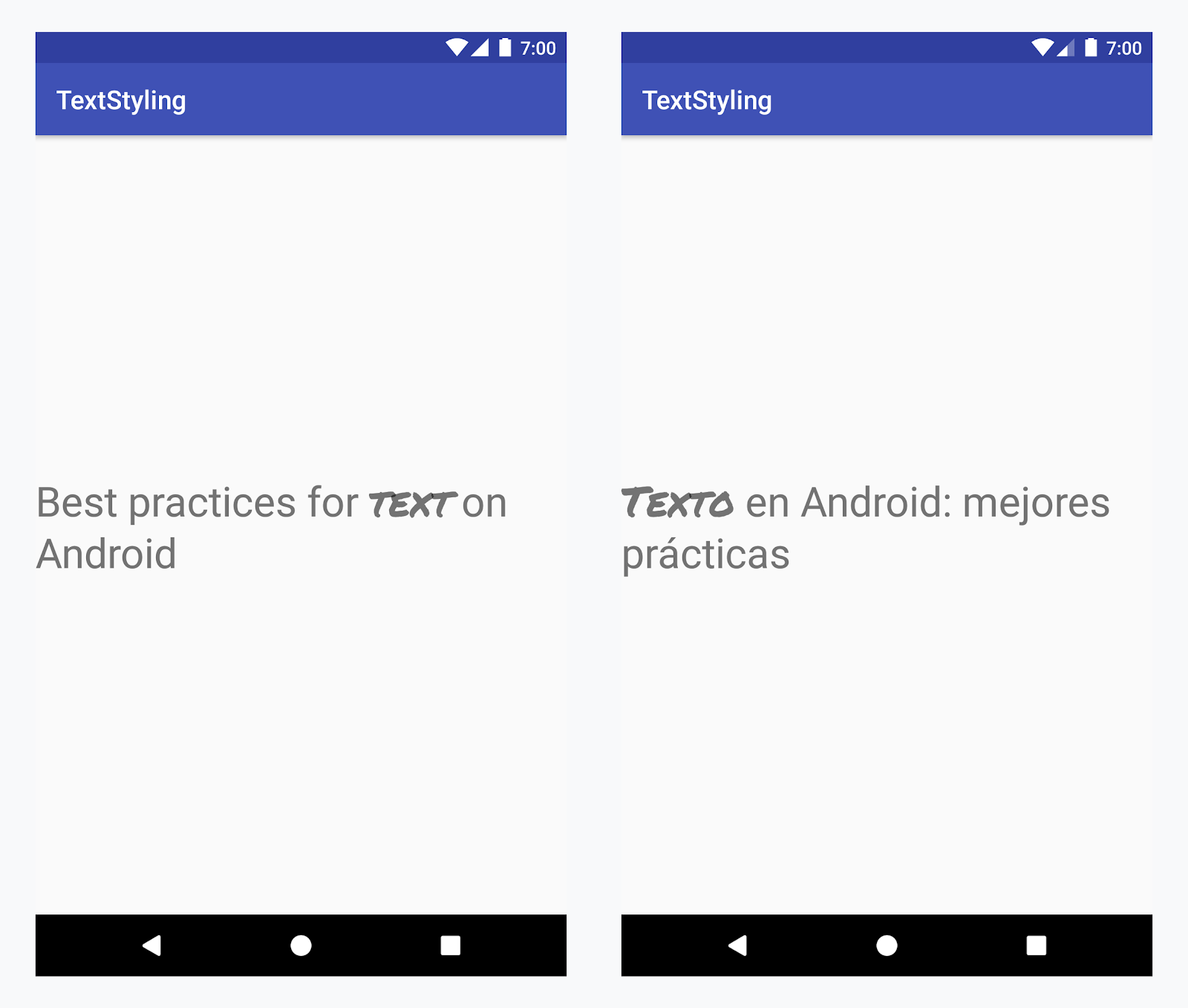
すべての言語の「text」という単語にカスタム書体を適用する
例 - カスタム書体の追加
-
<annotation>タグを追加し、Key-Value ペアを定義します。この場合、キーは font であり、値は使用するフォントのタイプ title_emphasis になります。// values/strings.xml <string name="title">Best practices for <annotation font="title_emphasis">text</annotation> on Android</string> // values-es/strings.xml <string name="title"><annotation font="title_emphasis">Texto</annotation> en Android: mejores prácticas</string>
-
文字列リソースを読み込み、font キーでアノテーションを特定します。次にカスタムスパンを作成して、既存のスパンと置き換えます。
Kotlin
// get the text as SpannedString so we can get the spans attached to the text
val titleText = getText(R.string.title) as SpannedString

// get all the annotation spans from the text
val annotations = titleText.getSpans(0, titleText.length, Annotation::class.java)

// create a copy of the title text as a SpannableString.
// the constructor copies both the text and the spans. so we can add and remove spans
val spannableString = SpannableString(titleText)

// iterate through all the annotation spans
for (annotation in annotations) {
   // look for the span with the key font
   if (annotation.key == "font") {
      val fontName = annotation.value
      // check the value associated to the annotation key
      if (fontName == "title_emphasis") {
         // create the typeface
         val typeface = getFontCompat(R.font.permanent_marker)
         // set the span at the same indices as the annotation
         spannableString.setSpan(CustomTypefaceSpan(typeface),
            titleText.getSpanStart(annotation),
            titleText.getSpanEnd(annotation),
            Spannable.SPAN_EXCLUSIVE_EXCLUSIVE)
      }
   }
}

// now, the spannableString contains both the annotation spans and the CustomTypefaceSpan
styledText.text = spannableString
Java
// get the text as SpannedString so we can get the spans attached to the text
SpannedString titleText = (SpannedString) getText(R.string.title);

// get all the annotation spans from the text
Annotation[] annotations = titleText.getSpans(0, titleText.length(), Annotation.class);

// create a copy of the title text as a SpannableString.
// the constructor copies both the text and the spans. so we can add and remove spans
SpannableString spannableString = new SpannableString(titleText);

// iterate through all the annotation spans
for (Annotation annotation: annotations) {
  // look for the span with the key font
  if (annotation.getKey().equals("font")) {
    String fontName = annotation.getValue();
    // check the value associated to the annotation key
    if (fontName.equals("title_emphasis")) {
    // create the typeface
    Typeface typeface = ResourcesCompat.getFont(this, R.font.roboto_mono);
    // set the span at the same indices as the annotation
    spannableString.setSpan(new CustomTypefaceSpan(typeface),
      titleText.getSpanStart(annotation),
      titleText.getSpanEnd(annotation),
      Spannable.SPAN_EXCLUSIVE_EXCLUSIVE);
    }
  }
}

// now, the spannableString contains both the annotation spans and the CustomTypefaceSpan
styledText.text = spannableString;
同じテキストを何度も使用する場合は、SpannableString オブジェクトを 1 回作成し、必要に応じて再利用することで、潜在的なパフォーマンスとメモリの問題を回避できます。
アノテーションの使用例については、Android での国際化されたテキストのスタイル設定をご覧ください。
アノテーション スパンとテキストのパーセリング
Annotation スパンも ParcelableSpans であるため、Key-Value ペアはパーセル化 / パーセル化解除が可能です。パーセルの受信者がアノテーションの解釈方法を理解していれば、Annotation スパンを使用して、パーセル化されたテキストにカスタム スタイルを適用できます。
インテント バンドルにテキストを渡す際にカスタム スタイルを保持するには、まず Annotation スパンをテキストに追加する必要があります。それには、上の例のように XML リソースで <annotation> タグを使用するか、次のようにコード内で新しく Annotation を作成してスパンとして設定します。
Kotlin
val spannableString = SpannableString("My spantastic text")
val annotation = Annotation("font", "title_emphasis")
spannableString.setSpan(annotation, 3, 7, Spannable.SPAN_EXCLUSIVE_EXCLUSIVE)

// start Activity with text with spans
val intent = Intent(this, MainActivity::class.java)
intent.putExtra(TEXT_EXTRA, spannableString)
startActivity(intent)
Java
SpannableString spannableString = new SpannableString("My spantastic text");
Annotation annotation = new Annotation("font", "title_emphasis");
spannableString.setSpan(annotation, 3, 7, 33);

// start Activity with text with spans
Intent intent = new Intent(this, MainActivity.class);
intent.putExtra(TEXT_EXTRA, spannableString);
this.startActivity(intent);
Bundle からテキストを SpannableString として取得してから、上記の例に示すように、添付されているアノテーションを解析します。
Kotlin
// read text with Spans
val intentCharSequence = intent.getCharSequenceExtra(TEXT_EXTRA) as SpannableString
Java
// read text with Spans
SpannableString intentCharSequence = (SpannableString)intent.getCharSequenceExtra(TEXT_EXTRA);
テキストのスタイル設定について詳しくは、次のリンクをご覧ください。