The Play PC developer tool is an offline desktop tool designed to streamline workstation onboarding, game configuration selection, and WAB generation for Installer Publishing for PC Native game publishers. By replacing manual XML editing and command-line execution, the tool enables publishers to validate installer packages, generate custom publishing configs, and compile Windows App Bundles (WAB) seamlessly.
This tool simplifies Installer Publishing setup by generating WABs and Play Publishing Configs. To automate your workflow, use the Play publishing CLI within your CI/CD pipelines to generate WABs as part of your game build process.
Getting started
To open and run the tool on your Windows workstation, follow these steps:
- Download the Play PC developer tool and extract its contents into a local directory.
- Open the extracted directory in your file explorer and double-click
play_pc_developer_tool.exeto launch the main desktop user interface.
Main dashboard
When you launch the application, you are greeted with a dashboard that has two primary workflows:
- Google Play Games for PC onboarding: Launches the early-access partner registration and multi-country code configuration picker.
- Generate WAB for installer publishing: Opens the configuration compiler and packaging manager.
PC onboarding and developer registration
This screen manages workstation setup for early-access testing, which lets you quickly register GUIDs on your workstation and configure multiregional country lists.
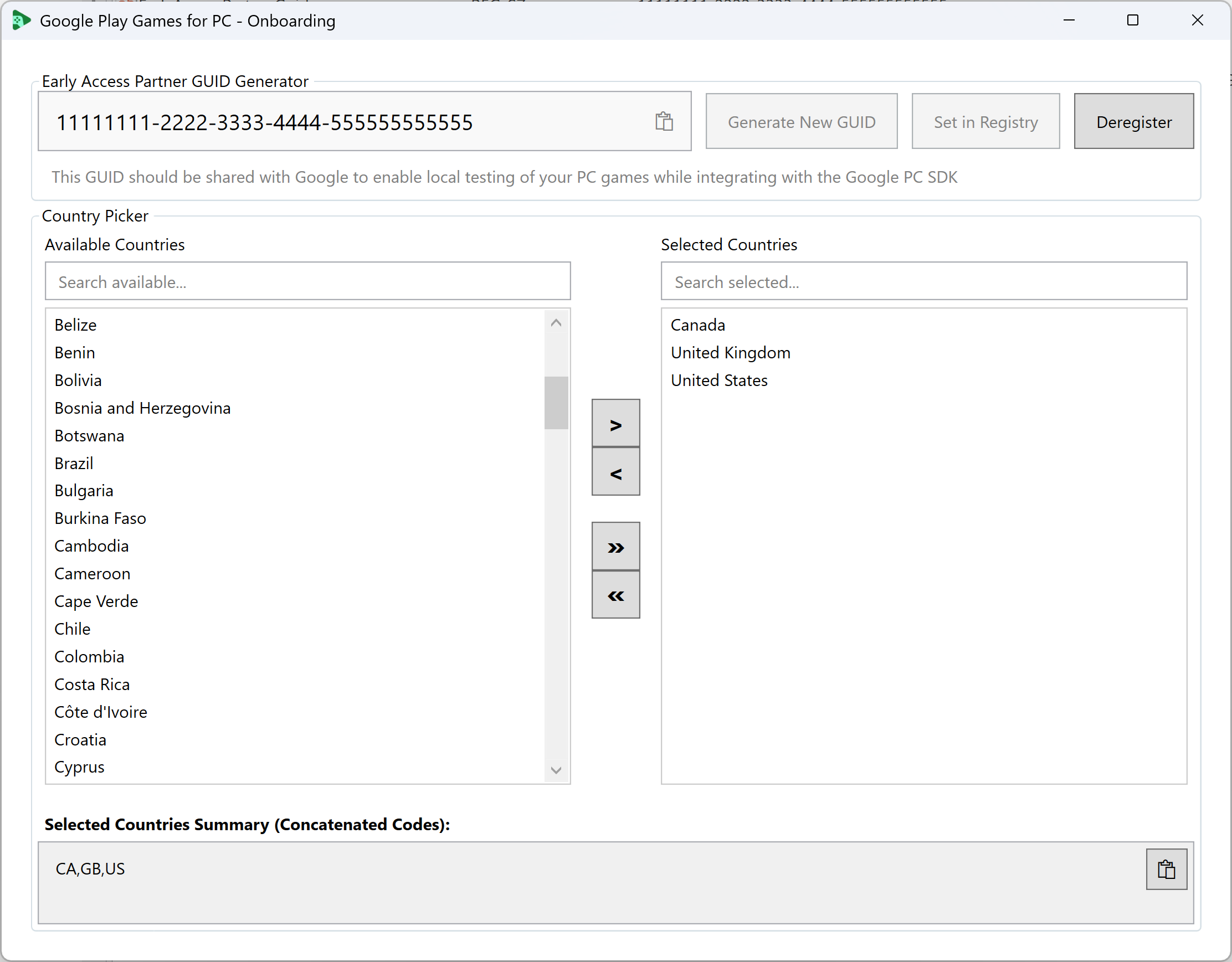
Early access registration and machine registry setup
To interact with the local Google PC SDK, early-access workstations must have a validated partner ID under appropriate system registry paths.
Note: To enable the GUID during your development build, you need to request your Play partners to allowlist the GUID. For more details, refer to the Guide.
Registry check on load and target path: On startup, the onboarding screen queries the system registry to search for an existing registered Early Access Partner GUID.
The targeted registry key path is
HKEY_LOCAL_MACHINE\Software\Google\Play
Games Services
(utilizing theEarlyAccessPartnerGuidvalue). This specific path is vital as the local PC SDK reads from it directly to authorize early access integrations. If found, the interface automatically displays the current ID and locks the inputs.Secure elevation handlers: The system needs administrative rights to write to machine registry paths. When you save or remove this setting, the tool handles administrative elevation context automatically so that standard users can configure settings securely without needing to run the entire interface with admin privileges.
Deregistration control: Clicking Deregister cleans up workstation registration states securely.
Interactive country code selector
Many PC games are published across multiple regions. You can quickly search, filter, and extract formatted country blocks that match your testing scopes.
- Dual search textboxes: You can search available or selected lists in real-time.
- List transition arrows: You can move selections between lists using structural movement buttons.
- Automatic sorting and concatenation: When country items are selected,
they are sorted alphabetically and concatenated into a clean,
comma-separated ISO country code string (for example,
AL,DZ,IN,US) for copy-pasting during Play Console setup.
WAB bundle and configuration wizard
The Bundle Generator window is the core workspace where publishers configure metadata, validate installation setups, and pack Windows App Bundles (WAB).
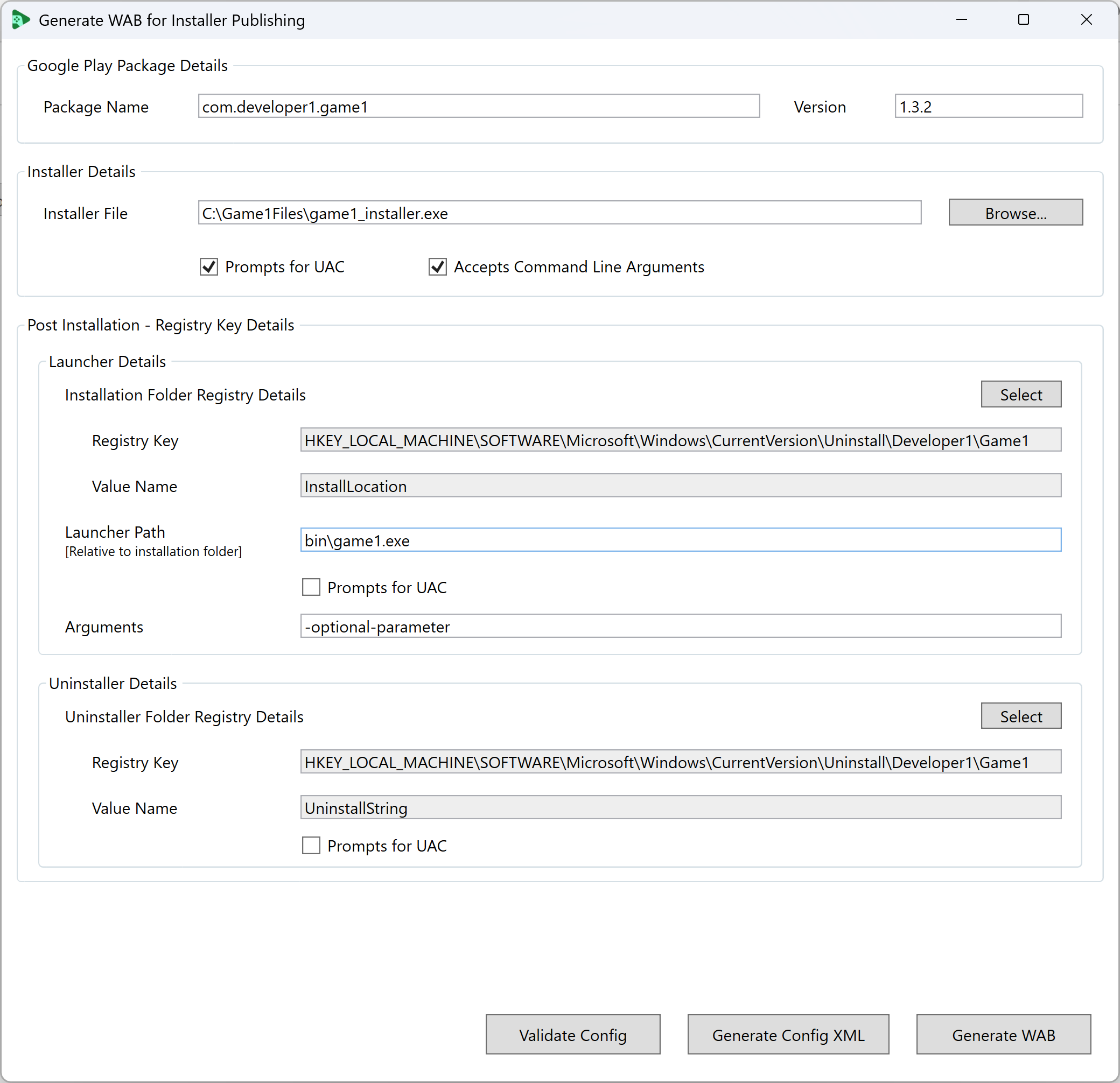
Visual registry value selector
Instead of manually typing registry paths, you can visually explore Windows registries to locate your game's installation folder, your launcher's relative path, and registry indicators for an uninstaller executable.
- Structure Value Display: Structured Value Display: Enter a top-level registry path to view a complete list of subkeys and their values.
Executable elevation verification
To prevent silent installation failures resulting from mismatched manifest credentials, the validator scans binary headers.
- Inline warnings: If the binary's elevation requirements don't match the configuration checkbox, a visual inline warning block appears.
WAB bundle compilation
To build standard Windows App Bundle (WAB) package, the tool implements a structured compilation chain using the following process:
- It generates the publishing metadata XML file locally and saves it to your storage path.
- It passes this XML configuration path and destination parameters directly to
the underlying packaging compiler tool
play_publishing_tool.exeto generate the final Windows App Bundle (WAB) package, saving it to local files.
The wizard monitors standard output and exit streams closely. It notifies the developer of compilation progress and exit statuses.