
Kiếm tiền từ trò chơi bằng cách bán sản phẩm kỹ thuật số thông qua Play Billing. SDK này cung cấp các API để hiển thị những sản phẩm có thể mua, bắt đầu quy trình mua và xử lý giao dịch mua. Các lệnh gọi đến những API thanh toán này được thực hiện bằng Tài khoản Google đã khởi chạy trò chơi trong ứng dụng Google Play Games và không yêu cầu thêm bước đăng nhập nào.
Nếu bạn đã tích hợp với Thư viện Play Billing trên Android, thì bạn sẽ thấy quen thuộc với các API Play Billing này. Các tựa game trên máy tính có thể dùng lại mọi hoạt động tích hợp phía máy chủ với Play Billing vì chúng giống nhau trên cả Android và máy tính.
Điều kiện tiên quyết
Hoàn tất thiết lập SDK.
Đọc thông tin tổng quan về hệ thống thanh toán của Google Play.
Hoàn tất thiết lập Play Billing.
Bước 1: Tạo BillingClient
Kể từ phiên bản 26.3.312.0
Đối với SDK phiên bản 26.3.312.0 trở lên, hãy dùng BillingClientParameters để định cấu hình và tạo một BillingClient. Việc này cho phép bạn bật các tính năng cụ thể trong quá trình khởi chạy, chẳng hạn như giao dịch mua đang chờ xử lý.
// Set up initialization parameters
BillingClientParams params;
params.enable_pending_purchases = true;

// Instantiate the BillingClient with parameters
BillingClient billing_client(params);
Trước phiên bản 26.3.312.0
Trong các phiên bản SDK trước 26.3.312.0, BillingClient chỉ hỗ trợ việc tạo thực thể bằng cách sử dụng hàm khởi tạo mặc định. Các lựa chọn cấu hình nâng cao không có trong những phiên bản này.
.
BillingClient billing_client;
Bước 2: Truy vấn các giao dịch mua trước đây và giao dịch mua đã hoàn tất bên ngoài ứng dụng của bạn
Khi ứng dụng của bạn khởi động hoặc khi ứng dụng đó quay lại chế độ nền trước, hãy truy vấn các giao dịch mua. Điều này là cần thiết để phát hiện những giao dịch mua diễn ra bên ngoài trò chơi của bạn hoặc để mở khoá quyền truy cập vào những giao dịch mua mà người dùng đã thực hiện trước đó.
Truy vấn về giao dịch mua bằng
BillingClient::QueryPurchases.Tiếp tục bằng cách xử lý giao dịch mua.
// Query for purchases when:
// - Application starts up
// - Application window re-enters the foreground
auto promise = std::make_shared<std::promise<QueryPurchasesResult>>();
billing_client.QueryPurchases([promise](QueryPurchasesResult result) {
   promise->set_value(std::move(result));
});

auto query_purchases_result = promise->get_future().get();
if (query_purchases_result.ok()) {
  auto purchases = query_purchases_result.value().product_purchase_details;
  // Process the purchases
} else {
  // Handle the error
}
Bước 3: Hiển thị các sản phẩm có thể mua
Bạn có thể truy vấn các sản phẩm mà mình hiện có và cho người dùng thấy các sản phẩm đó. Truy vấn thông tin chi tiết về sản phẩm là một bước quan trọng trước khi hiển thị sản phẩm cho người dùng vì việc truy vấn này sẽ trả về thông tin sản phẩm đã bản địa hoá.
Trước khi chào bán một sản phẩm, hãy kiểm tra để đảm bảo rằng người dùng chưa sở hữu sản phẩm đó. Nếu người dùng có một sản phẩm tiêu dùng vẫn còn trong nhật ký mua hàng, thì bạn phải tiêu thụ sản phẩm đó thì họ mới có thể mua lại.
- Truy vấn thông tin chi tiết về sản phẩm bằng cách sử dụng
BillingClient::QueryProductDetails. Truyền mã sản phẩm mà bạn đã đăng ký trong Google Play Console. - Hiển thị
ProductDetailsbao gồm tên theo ngôn ngữ địa phương và giá ưu đãi của sản phẩm. - Duy trì tham chiếu đến
offer_tokencủa sản phẩm. Phương thức này dùng để bắt đầu một quy trình mua hàng cho ưu đãi.
QueryProductDetailsParams params;
params.product_ids.push_back({"example_costmetic_1", ProductType::kTypeInApp});
params.product_ids.push_back({"example_costmetic_1", ProductType::kTypeInApp});
params.product_ids.push_back({"example_battle_pass", ProductType::kTypeInApp});

auto promise = std::make_shared<std::promise<QueryProductDetailsResult>>();
billing_client.QueryProductDetails(params, [promise](QueryProductDetailsResult result) {
   promise->set_value(std::move(result));
});

auto query_product_details_result = promise->get_future().get();
if (query_product_details_result.ok()) {
   auto product_details = query_product_details_result.value().product_details;
   // Display the available products and their offers to the user
} else {
   // Handle the error
}
Bước 4: Triển khai quy trình mua
Khi người dùng thể hiện ý định mua một sản phẩm mà bạn đã cho họ thấy, bạn đã sẵn sàng bắt đầu quy trình mua hàng.
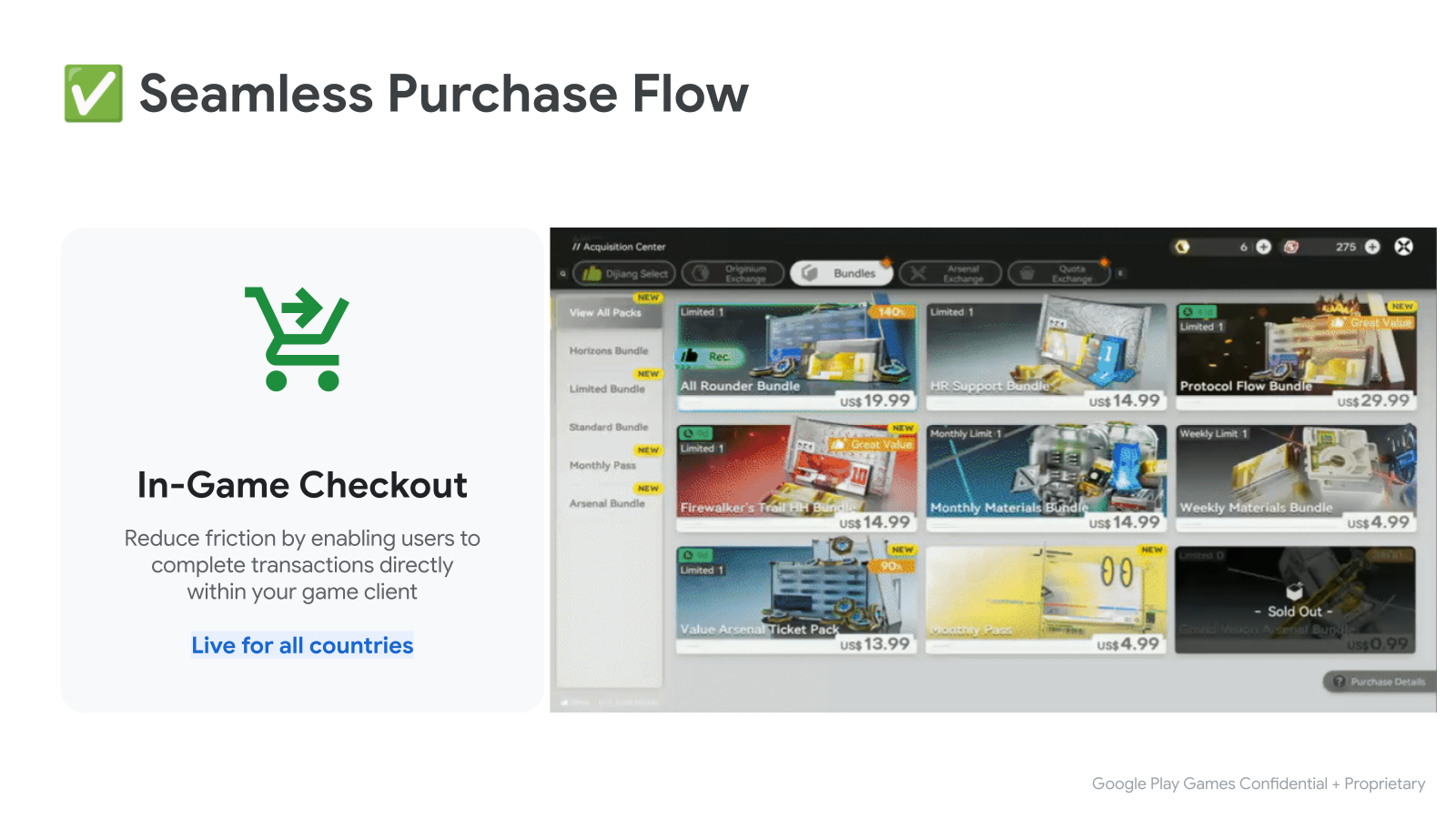
Quy trình mua hàng được hoàn tất trong trò chơi bằng một lớp phủ liền mạch dựa trên WebView:
- Bắt đầu bằng cách gọi
BillingClient::LaunchPurchaseFlow(). Truyền vàooffer_tokenthu được khi truy vấn thông tin chi tiết về sản phẩm. - Sau khi giao dịch mua hoàn tất, hàm tiếp tục sẽ được gọi cùng với kết quả.
- Nếu thành công, phần tiếp tục sẽ chứa một
ProductPurchaseDetails. Tiếp tục bằng cách xử lý giao dịch mua.
LaunchPurchaseFlowParams params { product_offer.offer_token };

auto promise = std::make_shared<std::promise<LaunchPurchaseFlowResult>>();
billing_client.LaunchPurchaseFlow(params, [promise](LaunchPurchaseFlowResult result) {
   promise->set_value(std::move(result));
});
// The purchase flow has started and is now in progress.

auto launch_purchase_flow_result = promise->get_future().get();

// The purchase flow has now completed.
if (launch_purchase_flow_result.ok()) {
   auto purchase = launch_purchase_flow_result.value().product_purchase_details;
   // Process the purchase
} else if (launch_purchase_flow_result.code() == BillingError::kUserCanceled) {
   // Handle an error caused by the user canceling the purchase flow
} else {
   // Handle any other error codes
}
Bước 5: Xử lý giao dịch mua
Xử lý bằng máy chủ phụ trợ
Đối với những trò chơi có máy chủ phụ trợ, hãy hoàn tất quy trình xử lý bằng cách gửi purchase_token đến máy chủ phụ trợ của bạn. Hoàn tất phần còn lại của quy trình xử lý bằng API Play Billing phía máy chủ. Quy trình tích hợp phía máy chủ này giống như quy trình tích hợp cho một trò chơi trên Android đã tích hợp với Play Billing.
void ProcessPurchasesWithServer(std::vector<ProductPurchaseDetails> purchases) {
   std::vector<std::string> purchase_tokens;
   for (const auto& purchase : purchases) {
      purchase_tokens.push_back(purchase.purchase_token);
   }

   // Send purchase tokens to backend server for processing
}
Xử lý mà không cần máy chủ phụ trợ
Đảm bảo rằng khoản thanh toán của người dùng không ở trạng thái đang chờ xử lý bằng cách kiểm tra xem
ProductPurchaseDetails::purchase_statecó phải làPurchaseState::kPurchaseStatePurchasedhay không. Nếu trạng thái mua là đang chờ xử lý, hãy thông báo cho người dùng rằng họ cần hoàn tất các bước bổ sung thì mới có thể nhận được sản phẩm đã mua.Cấp cho người dùng quyền truy cập vào sản phẩm đã mua và cập nhật bộ nhớ quyền của trò chơi.
Đối với các giao dịch mua sản phẩm không phải hàng tiêu dùng (sản phẩm chỉ có thể mua một lần), hãy kiểm tra xem giao dịch mua đã được xác nhận hay chưa bằng cách sử dụng
ProductPurchaseDetails::is_acknowledged.- Nếu giao dịch mua chưa được xác nhận, hãy thông báo cho Google rằng người dùng đang được cấp quyền sử dụng sản phẩm bằng cách gọi
BillingClient::AcknowledgePurchase.
- Nếu giao dịch mua chưa được xác nhận, hãy thông báo cho Google rằng người dùng đang được cấp quyền sử dụng sản phẩm bằng cách gọi
Đối với giao dịch mua sản phẩm tiêu dùng (sản phẩm có thể mua nhiều lần), hãy thông báo cho Google rằng người dùng đang được cấp quyền sử dụng sản phẩm bằng cách gọi
BillingClient::ConsumePurchase.
void ProcessPurchasesWithoutServer(std::vector<ProductPurchaseDetails> purchases) {
   std::vector<std::string> entitled_product_ids;
   for (const auto& purchase : purchases) {
      auto was_successful = ProcessPurchasePurchaseWithoutServer(purchase);
      if (was_successful) {
         entitled_product_ids.push_back(purchase.product_id);
      }
   }

   // Note that non-consumable products that were previously purchased may have
   // been refunded. These purchases will stop being returned by
   // `QueryPurchases()`. If your game has given a user access to one of these
   // products storage they should be revoked.
   //
   // ...
}

bool ProcessPurchasePurchaseWithoutServer(ProductPurchaseDetails purchase) {
   auto is_purchase_completed =
      purchase.purchase_state == PurchaseState::kPurchaseStatePurchased;
   if (!is_purchase_completed) {
      // Notify the user that they need to take additional steps to complete
      // this purchase.
      return false;
   }

   // Determine if the product ID is associated with a consumable product.
   auto is_consumable = IsConsumableProductId(purchase.product_id);
   if (is_consumable) {
      // Grant an entitlement to the product to the user.
      // ...
      // Then, notify Google by consuming the purchase.

      ConsumePurchaseParams params { purchase.purchase_token };
      auto promise = std::make_shared<std::promise<ConsumePurchaseResult>>();
      billing_client.ConsumePurchase(params, [promise](ConsumePurchaseResult result) {
         promise->set_value(std::move(result));
      });

      auto consume_purchase_result = promise->get_future().get();
      if (!consume_purchase_result.ok()) {
         // Examine the failure code & message for more details & notify user
         // of failure.
         // ...
         return false;
      }

      return true;
   }

   // Otherwise the product is assumed to be a non-consumable.

   // Grant an entitlement to the product to the user.
   // ...
   // Then, notify Google by acknowledging the purchase (if not already done).

   if (purchase.is_acknowledged) {
      return true;
   }

   AcknowledgePurchaseParams params { purchase.purchase_token };
   auto promise = std::make_shared<std::promise<AcknowledgePurchaseResult>>();
   billing_client.AcknowledgePurchase(params, [promise](AcknowledgePurchaseResult result) {
      promise->set_value(std::move(result));
   });

   auto acknowledge_purchase_result = promise->get_future().get();
   if (!acknowledge_purchase_result.ok()) {
      // Examine the failure code & message for more details & notify user
      // of failure.
      // ...
      return false;
   }

   return true;
}
Xác minh giao dịch mua phía máy khách
Tính năng xác minh phía máy khách cung cấp thêm một lớp bảo mật bằng cách xác minh chữ ký mua hàng ngay trong ứng dụng trò chơi của bạn:
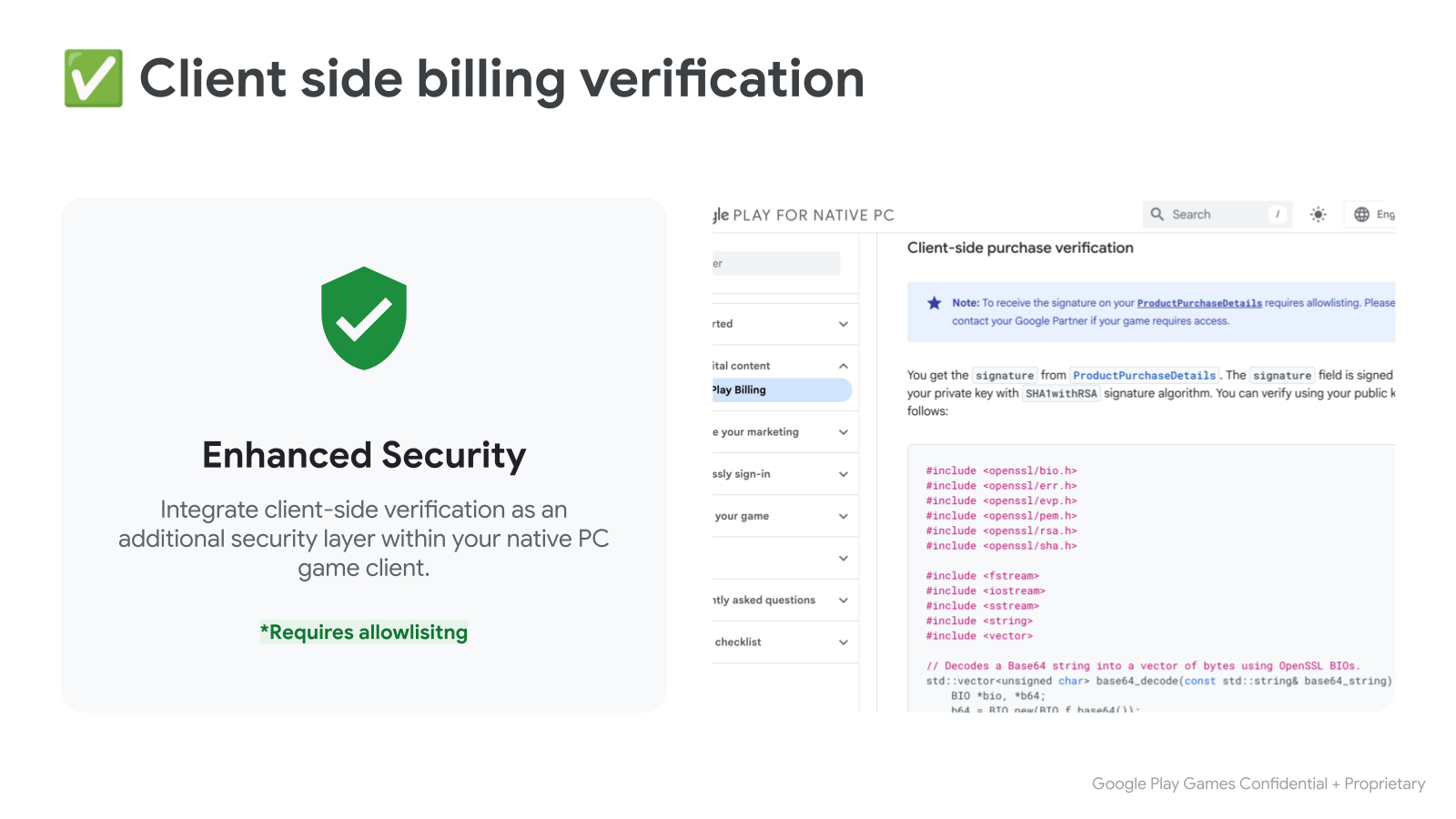
Bạn sẽ nhận được signature từ ProductPurchaseDetails. Trường signature được ký bằng khoá riêng tư của bạn bằng thuật toán chữ ký SHA1withRSA. Bạn có thể xác minh bằng khoá công khai như sau:
#include <openssl/bio.h>
#include <openssl/err.h>
#include <openssl/evp.h>
#include <openssl/pem.h>
#include <openssl/rsa.h>
#include <openssl/sha.h>

#include <fstream>
#include <iostream>
#include <sstream>
#include <string>
#include <vector>

// Decodes a Base64 string into a vector of bytes using OpenSSL BIOs.
std::vector<unsigned char> base64_decode(const std::string& base64_string) {
    BIO *bio, *b64;
    b64 = BIO_new(BIO_f_base64());
    BIO_set_flags(b64, BIO_FLAGS_BASE64_NO_NL);
    bio = BIO_new_mem_buf(base64_string.data(), base64_string.length());
    bio = BIO_push(b64, bio);

    std::vector<unsigned char> decoded_data;
    decoded_data.resize(base64_string.length());
    int length = BIO_read(bio, decoded_data.data(), decoded_data.size());
    if (length > 0) {
      decoded_data.resize(length);
    } else {
      decoded_data.clear();
    }
    BIO_free_all(bio);
    return decoded_data;
}

// Reads a PEM-encoded public key string and returns an EVP_PKEY object.
EVP_PKEY* createPublicKey(const std::string& publicKeyPem) {
  BIO* bio = BIO_new_mem_buf(publicKeyPem.data(), publicKeyPem.length());
  EVP_PKEY* pkey = PEM_read_bio_PUBKEY(bio, nullptr, nullptr, nullptr);
  BIO_free(bio);
  return pkey;
}

// Verifies the RSA-SHA1 signature of given data using a public key.
bool verifySignature(const std::string& publicKeyPem,
                     const std::string& originalData,
                     const std::string& signature_b64) {
  std::vector<unsigned char> signature = base64_decode(signature_b64);
  EVP_PKEY* pkey = createPublicKey(publicKeyPem);
  if (!pkey) {
    std::cerr << "Error loading public key." << std::endl;
    ERR_print_errors_fp(stderr);
    return false;
  }

  EVP_MD_CTX* mdctx = EVP_MD_CTX_new();
  if (!mdctx) {
    std::cerr << "EVP_MD_CTX_new failed." << std::endl;
    EVP_PKEY_free(pkey);
    return false;
  }

  if (EVP_DigestVerifyInit(mdctx, nullptr, EVP_sha1(), nullptr, pkey) <= 0 ||
      EVP_DigestVerifyUpdate(mdctx, originalData.c_str(),
                             originalData.length()) <= 0) {
    EVP_MD_CTX_free(mdctx);
    EVP_PKEY_free(pkey);
    std::cerr << "Error during EVP_DigestVerifyInit or EVP_DigestVerifyUpdate."
              << std::endl;
    return false;
  }

  int result = EVP_DigestVerifyFinal(
      mdctx, reinterpret_cast<const unsigned char*>(signature.data()),
      signature.size());

  EVP_MD_CTX_free(mdctx);
  EVP_PKEY_free(pkey);

  if (result == 0) {
    std::cerr << "Signature verification failed." << std::endl;
    return false;
  } else if (result != 1) {
    std::cerr << "Error during signature verification." << std::endl;
    ERR_print_errors_fp(stderr);
    return false;
  }

  return true;
}
Bước 6: Kiểm thử quy trình tích hợp
Giờ thì bạn đã sẵn sàng kiểm thử quá trình tích hợp với Play Billing. Để kiểm thử trong giai đoạn phát triển, bạn nên tận dụng tính năng nhân viên kiểm thử được cấp phép. Nhân viên kiểm thử được cấp phép có quyền truy cập vào các khoản thanh toán dùng cho mục đích kiểm thử để tránh việc bị tính phí như trong các giao dịch mua thực tế.
Để biết hướng dẫn về cách thiết lập người kiểm thử được cấp phép và một bộ kiểm thử thủ công mà bạn nên thực hiện, hãy xem tài liệu về cách kiểm thử quy trình tích hợp Google Play Billing Library.