

字串資源提供應用程式所用的文字字串,並可選擇文字樣式和格式。有三種類型的資源可為應用程式提供字串:
所有字串都可以套用樣式標記和格式化引數。如需樣式和格式化字串的相關資訊,請參閱「格式化和樣式」一節。
字串
可從應用程式或從其他資源檔案參照的單一字串 (例如:XML 版面配置)。
- 檔案位置:
res/values/filename.xml
您可以使用任意檔案名稱。<string>元素的name會做資源 ID 使用。- 編譯資源資料類型:
String的資源指標。- 資源參照:
-
Java:
R.string.string_name
XML:@string/string_name - 語法:
-
<?xml version="1.0" encoding="utf-8"?>
<resources>
    <string
        name="string_name"
        >text_string</string>
</resources>
- 元素:
- 例如:
- XML 檔案儲存在
res/values/strings.xml:<?xml version="1.0" encoding="utf-8"?> <resources> <string name="hello">Hello!</string> </resources>
此版面配置 XML 會套用字串至檢視畫面:
<TextView
    android:layout_width="fill_parent"
    android:layout_height="wrap_content"
    android:text="@string/hello" />
此應用程式程式碼會擷取字串:
您可以使用
getString(int)或getText(int)擷取字串。getText(int)會保留任何套用至字串的 RTF 格式樣式。
字串陣列
可從應用程式參照的字串陣列。
- 檔案位置:
res/values/filename.xml
您可以使用任意檔案名稱。<string-array>元素的name會做資源 ID 使用。- 編譯資源資料類型:
String陣列的資源指標。- 資源參照:
-
Java:
R.array.string_array_name
XML:@[package:]array/string_array_name - 語法:
-
<?xml version="1.0" encoding="utf-8"?>
<resources>
    <string-array
        name="string_array_name">
        <item
            >text_string</item>
    </string-array>
</resources>
- 元素:
- 例如:
- XML 檔案儲存在
res/values/strings.xml:<?xml version="1.0" encoding="utf-8"?> <resources> <string-array name="planets_array"> <item>Mercury</item> <item>Venus</item> <item>Earth</item> <item>Mars</item> </string-array> </resources>
Kotlin
val array: Array<String> =
resources.getStringArray(R.array.planets_array)Java
Resources res = getResources();
String[] planets = res.getStringArray(R.array.planets_array);
數量字串 (複數)
不同的語言,對於數量的文法一致性有不同的規則。以英文為例,數量 1 是一種特殊情況。我們會寫「1 Book」,但如果是其他數量,則會寫「n Books」。單數與複數的區別非常重要,但其他語言則需採用更精細的方式。Android 支援的完整組合為 zero、one、two、few、many 和 other。
決定特定語言和數量的使用方式規則可能會很複雜,因此 Android 提供 getQuantityString() 等方式,協助您選擇合適的資源。
在 API 24 以上版本中,您可以改用功能更強大的 ICU MessageFormat 類別。
- 檔案位置:
res/values/filename.xml
您可以使用任意檔案名稱。<plurals>元素的name會做資源 ID 使用。- 資源參照:
-
Java:
R.plurals.plural_name - 語法:
-
<?xml version="1.0" encoding="utf-8"?>
<resources>
    <plurals
        name="plural_name">
        <item
            quantity=["zero" | "one" | "two" | "few" | "many" | "other"]
            >text_string</item>
    </plurals>
</resources>
- 元素:
- 例如:
- XML 檔案儲存在
res/values/strings.xml:<?xml version="1.0" encoding="utf-8"?> <resources> <plurals name="numberOfSongsAvailable"> <!-- As a developer, you should always supply "one" and "other" strings. Your translators will know which strings are actually needed for their language. Always include %d in "one" because translators will need to use %d for languages where "one" doesn't mean 1 (as explained above). --> <item quantity="one">%d song found.</item> <item quantity="other">%d songs found.</item> </plurals> </resources>
XML 檔案儲存在
res/values-pl/strings.xml:<?xml version="1.0" encoding="utf-8"?> <resources> <plurals name="numberOfSongsAvailable"> <item quantity="one">Znaleziono %d piosenkę.</item> <item quantity="few">Znaleziono %d piosenki.</item> <item quantity="other">Znaleziono %d piosenek.</item> </plurals> </resources>
使用方式:
Kotlin
val count = getNumberOfSongsAvailable() val songsFound = resources.
getQuantityString(R.plurals.numberOfSongsAvailable, count, count)Java
int count = getNumberOfSongsAvailable();
Resources res = getResources();
String songsFound = res.getQuantityString(R.plurals.numberOfSongsAvailable, count, count);
使用
getQuantityString()方法時,如果字串包含字串格式,您就必須傳遞count兩次。舉例來說,如果是%d songs found字串,第一個count參數會選取適當的複數字串,並在%d預留位置插入第二個count參數。如果複數字串不包含字串格式,則不需要傳遞第三個參數至getQuantityString。
格式與樣式
以下是有關正確設定字串資源格式和樣式的幾點重要注意事項。
格式化字串
如要格式化字串,可以在字串資源中加入格式引數,如下方範例資源所示。
<string name="welcome_messages">Hello, %1$s! You have %2$d new messages.</string>
在這個範例中,格式字串有兩個引數:%1$s 是字串,而 %2$d 是十進位數字。然後呼叫 getString(int, Object...) 以格式化字串。例如:
Kotlin
var text = getString(R.string.welcome_messages, username, mailCount)
Java
String text = getString(R.string.welcome_messages, username, mailCount);
使用 HTML 標記設定樣式
您可以使用 HTML 標記,在字串中加入樣式。例如:
<?xml version="1.0" encoding="utf-8"?>
<resources>
    <string name="welcome">Welcome to <b>Android</b>!</string>
</resources>
如未套用格式,您可以呼叫 setText(java.lang.CharSequence),直接設定 TextView 文字。但是,在某些情況下,您也許會想建立也會做格式字串使用的樣式文字資源。一般而言,這並不會發揮作用,因為 format(String, Object...) 和 getString(int, Object...) 方法會去除字串中的所有樣式資訊。解決方法是編寫有逸出實體的 HTML 標記,然後在格式化後使用 fromHtml(String) 進行復原。例如:
- 儲存樣式文字資源為 HTML 逸出字串:
<resources> <string name="welcome_messages">Hello, %1$s! You have <b>%2$d new messages</b>.</string> </resources>
在此格式字串中,系統會加入
<b>元素。請注意,左括號是使用<標記法的 HTML 逸出。 - 然後依照一般方式格式化字串,不過也要呼叫
fromHtml(String),將 HTML 文字轉換為樣式文字:Kotlin
val text: String = getString(R.string.welcome_messages, username, mailCount)
val styledText: Spanned = Html.fromHtml(text, FROM_HTML_MODE_LEGACY)
Java
String text = getString(R.string.welcome_messages, username, mailCount);
Spanned styledText = Html.fromHtml(text, FROM_HTML_MODE_LEGACY);
由於 fromHtml(String) 方法會格式化所有 HTML 實體,因此請務必在搭配格式化文字的字串中使用 htmlEncode(String) 逸出任何可能的 HTML 字元。舉例來說,如果要格式化的字串包含「<」或「&」等字元,必須在格式化前逸出這些字元,才能在透過 fromHtml(String) 傳遞格式化字串時,以原始的編寫方式顯示字元。例如:
Kotlin
val escapedUsername: String = TextUtils.htmlEncode(username)

val text: String = getString(R.string.welcome_messages, escapedUsername, mailCount)
val styledText: Spanned = Html.fromHtml(text, FROM_HTML_MODE_LEGACY)
Java
String escapedUsername = TextUtils.htmlEncode(username);

String text = getString(R.string.welcome_messages, escapedUsername, mailCount);
Spanned styledText = Html.fromHtml(text);
使用 Spannables 設定樣式
Spannable 是一個文字物件,您可以使用顏色和字體粗細等字體屬性設定樣式。您可以使用 SpannableStringBuilder 建構文字,然後將 android.text.style 套件中定義的樣式套用至文字。
您可以使用下列輔助方法完成大部分 Spannable 文字建立。
Kotlin
/**
 * Returns a CharSequence that concatenates the specified array of CharSequence
 * objects and then applies a list of zero or more tags to the entire range.
 *
 * @param content an array of character sequences to apply a style to
 * @param tags the styled span objects to apply to the content
 *        such as android.text.style.StyleSpan
 */
private fun apply(content: Array<out CharSequence>, vararg tags: Any): CharSequence {
    return SpannableStringBuilder().apply {
        openTags(tags)
        content.forEach { charSequence ->
            append(charSequence)
        }
        closeTags(tags)
    }
}

/**
 * Iterates over an array of tags and applies them to the beginning of the specified
 * Spannable object so that future text appended to the text will have the styling
 * applied to it. Do not call this method directly.
 */
private fun Spannable.openTags(tags: Array<out Any>) {
    tags.forEach { tag ->
        setSpan(tag, 0, 0, Spannable.SPAN_MARK_MARK)
    }
}

/**
 * "Closes" the specified tags on a Spannable by updating the spans to be
 * endpoint-exclusive so that future text appended to the end will not take
 * on the same styling. Do not call this method directly.
 */
private fun Spannable.closeTags(tags: Array<out Any>) {
    tags.forEach { tag ->
    if (length > 0) {
            setSpan(tag, 0, length, Spanned.SPAN_EXCLUSIVE_EXCLUSIVE)
        } else {
            removeSpan(tag)
        }
    }
}
Java
/**
 * Returns a CharSequence that concatenates the specified array of CharSequence
 * objects and then applies a list of zero or more tags to the entire range.
 *
 * @param content an array of character sequences to apply a style to
 * @param tags the styled span objects to apply to the content
 *        such as android.text.style.StyleSpan
 *
 */
private static CharSequence applyStyles(CharSequence[] content, Object[] tags) {
    SpannableStringBuilder text = new SpannableStringBuilder();
    openTags(text, tags);
    for (CharSequence item : content) {
        text.append(item);
    }
    closeTags(text, tags);
    return text;
}

/**
 * Iterates over an array of tags and applies them to the beginning of the specified
 * Spannable object so that future text appended to the text will have the styling
 * applied to it. Do not call this method directly.
 */
private static void openTags(Spannable text, Object[] tags) {
    for (Object tag : tags) {
        text.setSpan(tag, 0, 0, Spannable.SPAN_MARK_MARK);
    }
}

/**
 * "Closes" the specified tags on a Spannable by updating the spans to be
 * endpoint-exclusive so that future text appended to the end will not take
 * on the same styling. Do not call this method directly.
 */
private static void closeTags(Spannable text, Object[] tags) {
    int len = text.length();
    for (Object tag : tags) {
        if (len > 0) {
            text.setSpan(tag, 0, len, Spanned.SPAN_EXCLUSIVE_EXCLUSIVE);
        } else {
            text.removeSpan(tag);
        }
    }
}
下列 bold、italic 和 color 方法會納入上述輔助方法,並展示 android.text.style 套件中定義的特定樣式範例。您可以建立類似的方法完成其他類型的文字樣式設定。
Kotlin
/**
 * Returns a CharSequence that applies boldface to the concatenation
 * of the specified CharSequence objects.
 */
fun bold(vararg content: CharSequence): CharSequence = apply(content, StyleSpan(Typeface.BOLD))

/**
 * Returns a CharSequence that applies italics to the concatenation
 * of the specified CharSequence objects.
 */
fun italic(vararg content: CharSequence): CharSequence = apply(content, StyleSpan(Typeface.ITALIC))

/**
 * Returns a CharSequence that applies a foreground color to the
 * concatenation of the specified CharSequence objects.
 */
fun color(color: Int, vararg content: CharSequence): CharSequence =
        apply(content, ForegroundColorSpan(color))
Java
/**
 * Returns a CharSequence that applies boldface to the concatenation
 * of the specified CharSequence objects.
 */
public static CharSequence bold(CharSequence... content) {
    return apply(content, new StyleSpan(Typeface.BOLD));
}

/**
 * Returns a CharSequence that applies italics to the concatenation
 * of the specified CharSequence objects.
 */
public static CharSequence italic(CharSequence... content) {
    return apply(content, new StyleSpan(Typeface.ITALIC));
}

/**
 * Returns a CharSequence that applies a foreground color to the
 * concatenation of the specified CharSequence objects.
 */
public static CharSequence color(int color, CharSequence... content) {
    return apply(content, new ForegroundColorSpan(color));
}
以下範例說明如何鏈結這些方法,為詞組中的個別字詞套用不同的樣式:
Kotlin
// Create an italic "hello, " a red "world",
// and bold the entire sequence.
val text: CharSequence = bold(italic(getString(R.string.hello)),
        color(Color.RED, getString(R.string.world)))
Java
// Create an italic "hello, " a red "world",
// and bold the entire sequence.
CharSequence text = bold(italic(getString(R.string.hello)),
    color(Color.RED, getString(R.string.world)));
core-ktx Kotlin 模組也包含擴充功能函式,可讓您更輕鬆地使用 Span。詳情請參閱 GitHub 的 android.text 套件文件。
如要進一步瞭解如何使用 Span,請參閱下列連結:
使用註解設定樣式
使用 Annotation 類別與 strings.xml 資源檔案中的 <annotation> 標記,即可套用複雜或自訂樣式。註解標記可讓您透過在 XML 中定義鍵/值組合的方式,標記自訂樣式的字串部分,然後架構就可以轉換成 Annotation Span。然後您就可以擷取這些註解,並使用鍵和值套用樣式。
建立註解時,請務必在每個 string.xml 檔案的所有翻譯中加入 <annotation> 標記。
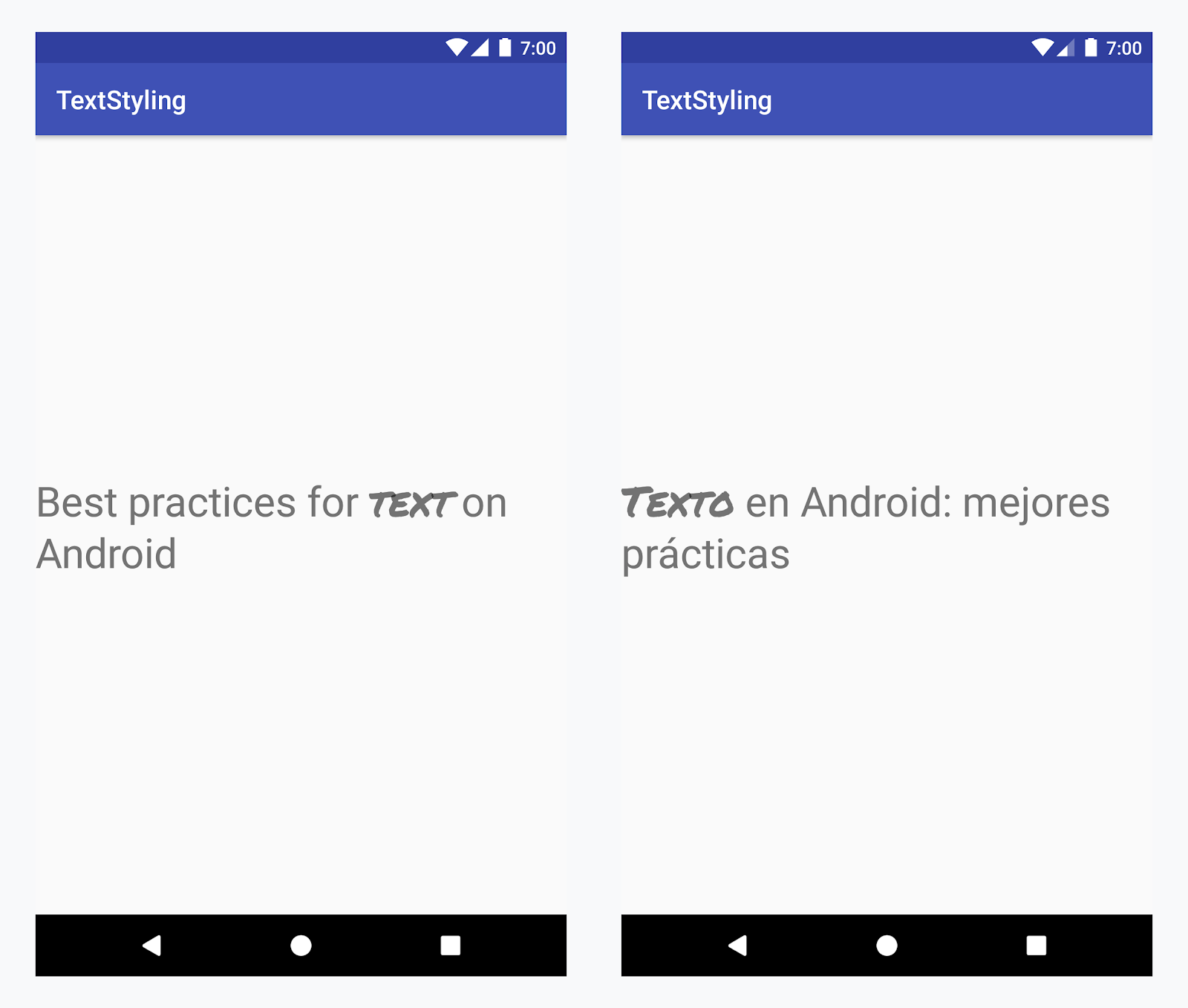
在所有語言的「Text」字詞套用自訂字體
範例 - 新增自訂字體
-
新增
<annotation>標記並定義鍵/值組合。在此情況下,鍵為「字型」,值則是要使用的字型類型:「title_emphasis」// values/strings.xml <string name="title">Best practices for <annotation font="title_emphasis">text</annotation> on Android</string> // values-es/strings.xml <string name="title"><annotation font="title_emphasis">Texto</annotation> en Android: mejores prácticas</string>
-
載入字串資源,然後使用「字型」鍵尋找註解。接著建立自訂 Span 並取代現有的 Span。
Kotlin
// get the text as SpannedString so we can get the spans attached to the text
val titleText = getText(R.string.title) as SpannedString

// get all the annotation spans from the text
val annotations = titleText.getSpans(0, titleText.length, Annotation::class.java)

// create a copy of the title text as a SpannableString.
// the constructor copies both the text and the spans. so we can add and remove spans
val spannableString = SpannableString(titleText)

// iterate through all the annotation spans
for (annotation in annotations) {
   // look for the span with the key font
   if (annotation.key == "font") {
      val fontName = annotation.value
      // check the value associated to the annotation key
      if (fontName == "title_emphasis") {
         // create the typeface
         val typeface = getFontCompat(R.font.permanent_marker)
         // set the span at the same indices as the annotation
         spannableString.setSpan(CustomTypefaceSpan(typeface),
            titleText.getSpanStart(annotation),
            titleText.getSpanEnd(annotation),
            Spannable.SPAN_EXCLUSIVE_EXCLUSIVE)
      }
   }
}

// now, the spannableString contains both the annotation spans and the CustomTypefaceSpan
styledText.text = spannableString
Java
// get the text as SpannedString so we can get the spans attached to the text
SpannedString titleText = (SpannedString) getText(R.string.title);

// get all the annotation spans from the text
Annotation[] annotations = titleText.getSpans(0, titleText.length(), Annotation.class);

// create a copy of the title text as a SpannableString.
// the constructor copies both the text and the spans. so we can add and remove spans
SpannableString spannableString = new SpannableString(titleText);

// iterate through all the annotation spans
for (Annotation annotation: annotations) {
  // look for the span with the key font
  if (annotation.getKey().equals("font")) {
    String fontName = annotation.getValue();
    // check the value associated to the annotation key
    if (fontName.equals("title_emphasis")) {
    // create the typeface
    Typeface typeface = ResourcesCompat.getFont(this, R.font.roboto_mono);
    // set the span at the same indices as the annotation
    spannableString.setSpan(new CustomTypefaceSpan(typeface),
      titleText.getSpanStart(annotation),
      titleText.getSpanEnd(annotation),
      Spannable.SPAN_EXCLUSIVE_EXCLUSIVE);
    }
  }
}

// now, the spannableString contains both the annotation spans and the CustomTypefaceSpan
styledText.text = spannableString;
如果多次使用相同的文字,建議您建構 SpannableString 物件一次,然後視需要重複使用,以避免出現潛在的效能和記憶體問題。
如需更多註解使用範例,請參閱「在 Android 中設定國際化文字樣式」。
註解 Span 和文字 Parcel
由於 Annotation Span 也是 ParcelableSpans,因此鍵/值組合會進行 Parcel 處理和解除。只要 Parcel 的接收端知道如何解譯註解,您就可以使用 Annotation Span 套用自訂樣式至以 Parcel 處理的文字。
如要在傳遞文字至意圖軟體包時保留自訂樣式,首先您必須在文字中加入 Annotation Span。您可以在 XML 資源中透過 <annotation> 標記完成此操作 (如上例所示),也可以利用建立新的 Annotation,然後將其設定為 Span (如下所示) 以完成此操作:
Kotlin
val spannableString = SpannableString("My spantastic text")
val annotation = Annotation("font", "title_emphasis")
spannableString.setSpan(annotation, 3, 7, Spannable.SPAN_EXCLUSIVE_EXCLUSIVE)

// start Activity with text with spans
val intent = Intent(this, MainActivity::class.java)
intent.putExtra(TEXT_EXTRA, spannableString)
startActivity(intent)
Java
SpannableString spannableString = new SpannableString("My spantastic text");
Annotation annotation = new Annotation("font", "title_emphasis");
spannableString.setSpan(annotation, 3, 7, 33);

// start Activity with text with spans
Intent intent = new Intent(this, MainActivity.class);
intent.putExtra(TEXT_EXTRA, spannableString);
this.startActivity(intent);
從 Bundle 擷取文字做為 SpannableString,然後剖析附加的註解,如上例所示。
Kotlin
// read text with Spans
val intentCharSequence = intent.getCharSequenceExtra(TEXT_EXTRA) as SpannableString
Java
// read text with Spans
SpannableString intentCharSequence = (SpannableString)intent.getCharSequenceExtra(TEXT_EXTRA);
如要進一步瞭解文字樣式,請參閱下列連結: