

सिद्धांत और Jetpack Compose को लागू करना
स्ट्रिंग रिसॉर्स, आपके ऐप्लिकेशन के लिए टेक्स्ट स्ट्रिंग उपलब्ध कराता है. इसमें टेक्स्ट स्टाइलिंग और फ़ॉर्मैटिंग का विकल्प होता है. तीन तरह के संसाधन, आपके ऐप्लिकेशन को स्ट्रिंग उपलब्ध करा सकते हैं:
- String
- एक्सएमएल संसाधन, जो एक स्ट्रिंग उपलब्ध कराता है.
- String Array
- एक्सएमएल संसाधन, जो स्ट्रिंग का ऐरे उपलब्ध कराता है.
- संख्या के हिसाब से स्ट्रिंग (प्लूरल)
- यह एक एक्सएमएल संसाधन है, जिसमें प्लूरलाइज़ेशन के लिए अलग-अलग स्ट्रिंग होती हैं.
सभी स्ट्रिंग में, स्टाइलिंग मार्कअप और फ़ॉर्मैटिंग आर्ग्युमेंट लागू किए जा सकते हैं. स्ट्रिंग को स्टाइल करने और फ़ॉर्मैट करने के बारे में जानकारी के लिए, फ़ॉर्मैटिंग और स्टाइलिंग सेक्शन देखें.
स्ट्रिंग
एक स्ट्रिंग, जिसे ऐप्लिकेशन या अन्य संसाधन फ़ाइलों (जैसे कि एक्सएमएल लेआउट) से रेफ़रंस किया जा सकता है.
- फ़ाइल की जगह की जानकारी:
res/values/filename.xml
फ़ाइल का नाम कुछ भी हो सकता है.<string>एलिमेंट केnameका इस्तेमाल, संसाधन आईडी के तौर पर किया जाता है.- कंपाइल किया गया रिसॉर्स डेटाटाइप:
Stringका संसाधन पॉइंटर.- संसाधन का रेफ़रंस:
-
Java में:
R.string.string_name
एक्सएमएल में:@string/string_name - सिंटैक्स:
-
<?xml version="1.0" encoding="utf-8"?>
<resources>
    <string
        name="string_name"
        >text_string</string>
</resources>
- elements:
- उदाहरण:
- एक्सएमएल फ़ाइल को
res/values/strings.xmlपर सेव किया गया है:<?xml version="1.0" encoding="utf-8"?> <resources> <string name="hello">Hello!</string> </resources>
इस लेआउट एक्सएमएल में, किसी व्यू पर स्ट्रिंग लागू की गई है:
<TextView
    android:layout_width="fill_parent"
    android:layout_height="wrap_content"
    android:text="@string/hello" />
यह ऐप्लिकेशन कोड, एक स्ट्रिंग को वापस लाता है:
किसी स्ट्रिंग को वापस पाने के लिए,
getString(int)याgetText(int)का इस्तेमाल किया जा सकता है.getText(int)से, स्ट्रिंग पर लागू की गई रिच टेक्स्ट स्टाइलिंग बनी रहती है.
स्ट्रिंग अरे
स्ट्रिंग का एक ऐसा कलेक्शन जिसका रेफ़रंस ऐप्लिकेशन से लिया जा सकता है.
- फ़ाइल की जगह की जानकारी:
res/values/filename.xml
फ़ाइल का नाम कुछ भी हो सकता है.<string-array>एलिमेंट केnameका इस्तेमाल, संसाधन आईडी के तौर पर किया जाता है.- कंपाइल किया गया रिसॉर्स डेटाटाइप:
- ,
Stringके ऐरे का संसाधन पॉइंटर है. - संसाधन का रेफ़रंस:
-
Java में:
R.array.string_array_name
एक्सएमएल में:@[package:]array/string_array_name - सिंटैक्स:
-
<?xml version="1.0" encoding="utf-8"?>
<resources>
    <string-array
        name="string_array_name">
        <item
            >text_string</item>
    </string-array>
</resources>
- elements:
- उदाहरण:
- एक्सएमएल फ़ाइल को
res/values/strings.xmlपर सेव किया गया है:<?xml version="1.0" encoding="utf-8"?> <resources> <string-array name="planets_array"> <item>Mercury</item> <item>Venus</item> <item>Earth</item> <item>Mars</item> </string-array> </resources>
Kotlin
val array: Array<String> =
resources.getStringArray(R.array.planets_array)Java
Resources res = getResources();
String[] planets = res.getStringArray(R.array.planets_array);
संख्या वाली स्ट्रिंग (प्लूरल)
अलग-अलग भाषाओं में, संख्या के हिसाब से व्याकरण के नियम अलग-अलग होते हैं. उदाहरण के लिए, अंग्रेज़ी में 1 की मात्रा एक खास मामला है. हम "1 किताब" लिखते हैं, लेकिन किसी अन्य संख्या के लिए हम "n किताबें" लिखेंगे. एकवचन और बहुवचन के बीच का यह अंतर बहुत आम है, लेकिन अन्य भाषाओं में ज़्यादा अंतर होता है. Android पर इन सभी फ़ॉर्मैट का इस्तेमाल किया जा सकता है: zero, one, two, few,
many, और other.
किसी भाषा और संख्या के लिए कौनसा केस इस्तेमाल करना है, इसके नियम बहुत जटिल हो सकते हैं. इसलिए, Android आपको getQuantityString() जैसे तरीके उपलब्ध कराता है, ताकि आपके लिए सही संसाधन चुना जा सके.
API 24 और इसके बाद के वर्शन पर, इसके बजाय ज़्यादा बेहतर ICU MessageFormat क्लास का इस्तेमाल किया जा सकता है.
- फ़ाइल की जगह की जानकारी:
res/values/filename.xml
फ़ाइल का नाम कुछ भी हो सकता है.<plurals>एलिमेंट केnameका इस्तेमाल, संसाधन आईडी के तौर पर किया जाता है.- संसाधन का रेफ़रंस:
-
Java में:
R.plurals.plural_name - सिंटैक्स:
-
<?xml version="1.0" encoding="utf-8"?>
<resources>
    <plurals
        name="plural_name">
        <item
            quantity=["zero" | "one" | "two" | "few" | "many" | "other"]
            >text_string</item>
    </plurals>
</resources>
- elements:
- उदाहरण:
- एक्सएमएल फ़ाइल को
res/values/strings.xmlपर सेव किया गया है:<?xml version="1.0" encoding="utf-8"?> <resources> <plurals name="numberOfSongsAvailable"> <!-- As a developer, you should always supply "one" and "other" strings. Your translators will know which strings are actually needed for their language. Always include %d in "one" because translators will need to use %d for languages where "one" doesn't mean 1 (as explained above). --> <item quantity="one">%d song found.</item> <item quantity="other">%d songs found.</item> </plurals> </resources>
एक्सएमएल फ़ाइल को
res/values-pl/strings.xmlपर सेव किया गया है:<?xml version="1.0" encoding="utf-8"?> <resources> <plurals name="numberOfSongsAvailable"> <item quantity="one">Znaleziono %d piosenkę.</item> <item quantity="few">Znaleziono %d piosenki.</item> <item quantity="other">Znaleziono %d piosenek.</item> </plurals> </resources>
इस्तेमाल:
Kotlin
val count = getNumberOfSongsAvailable() val songsFound = resources.
getQuantityString(R.plurals.numberOfSongsAvailable, count, count)Java
int count = getNumberOfSongsAvailable(); Resources res =
getResources(); String songsFound = res.getQuantityString(R.plurals.numberOfSongsAvailable, count, count);getQuantityString()तरीके का इस्तेमाल करते समय, अगर आपकी स्ट्रिंग में स्ट्रिंग फ़ॉर्मैटिंग शामिल है, तो आपकोcountको दो बार पास करना होगा. उदाहरण के लिए, स्ट्रिंग%d songs foundके लिए, पहलाcountपैरामीटर सही प्लूरल स्ट्रिंग चुनता है और दूसराcountपैरामीटर,%dप्लेसहोल्डर में डाला जाता है. अगर आपकी प्लूरल स्ट्रिंग में स्ट्रिंग फ़ॉर्मैटिंग शामिल नहीं है, तो आपकोgetQuantityStringको तीसरा पैरामीटर पास करने की ज़रूरत नहीं है.
फ़ॉर्मैट और स्टाइल
यहां कुछ ज़रूरी बातें बताई गई हैं, जिनके बारे में आपको पता होना चाहिए. इनकी मदद से, स्ट्रिंग रिसॉर्स को सही तरीके से फ़ॉर्मैट और स्टाइल किया जा सकता है.
स्ट्रिंग फ़ॉर्मैट करना
अगर आपको अपनी स्ट्रिंग को फ़ॉर्मैट करना है, तो स्ट्रिंग रिसॉर्स में फ़ॉर्मैट आर्ग्युमेंट डालकर ऐसा किया जा सकता है. इसके बारे में यहां दिए गए उदाहरण में बताया गया है.
<string name="welcome_messages">Hello, %1$s! You have %2$d new messages.</string>
इस उदाहरण में, फ़ॉर्मैट स्ट्रिंग में दो आर्ग्युमेंट हैं: %1$s एक स्ट्रिंग है और %2$d एक दशमलव संख्या है. इसके बाद, getString(int, Object...) को कॉल करके स्ट्रिंग को फ़ॉर्मैट करें. उदाहरण के लिए:
Kotlin
var text = getString(R.string.welcome_messages, username, mailCount)
Java
String text = getString(R.string.welcome_messages, username, mailCount);
एचटीएमएल मार्कअप का इस्तेमाल करके स्टाइलिंग करना
एचटीएमएल मार्कअप का इस्तेमाल करके, अपनी स्ट्रिंग में स्टाइलिंग जोड़ी जा सकती है. उदाहरण के लिए:
<?xml version="1.0" encoding="utf-8"?>
<resources>
    <string name="welcome">Welcome to <b>Android</b>!</string>
</resources>
अगर फ़ॉर्मैटिंग लागू नहीं की जा रही है, तो setText(java.lang.CharSequence) को कॉल करके, सीधे तौर पर TextView टेक्स्ट सेट किया जा सकता है. हालांकि, कुछ मामलों में आपको स्टाइल वाला ऐसा टेक्स्ट संसाधन बनाना पड़ सकता है जिसका इस्तेमाल फ़ॉर्मैट स्ट्रिंग के तौर पर भी किया जाता है.
आम तौर पर, यह काम नहीं करता, क्योंकि format(String, Object...) और getString(int, Object...) तरीके, स्ट्रिंग से स्टाइल की सारी जानकारी हटा देते हैं. इसके लिए, एचटीएमएल टैग को एस्केप की गई इकाइयों के साथ लिखा जाता है. इसके बाद, फ़ॉर्मैटिंग होने पर fromHtml(String) का इस्तेमाल करके उन्हें वापस लाया जाता है. उदाहरण के लिए:
- स्टाइल किए गए टेक्स्ट रिसॉर्स को एचटीएमएल-एस्केप्ड स्ट्रिंग के तौर पर सेव करें:
<resources> <string name="welcome_messages">Hello, %1$s! You have <b>%2$d new messages</b>.</string> </resources>
इस फ़ॉर्मैट की गई स्ट्रिंग में,
<b>एलिमेंट जोड़ा गया है. ध्यान दें कि ओपनिंग ब्रैकेट को<नोटेशन का इस्तेमाल करके, एचटीएमएल-एस्केप किया गया है. - इसके बाद, स्ट्रिंग को सामान्य तरीके से फ़ॉर्मैट करें. हालांकि, एचटीएमएल टेक्स्ट को स्टाइल वाले टेक्स्ट में बदलने के लिए,
fromHtml(String)को भी कॉल करें:Kotlin
val text: String = getString(R.string.welcome_messages, username, mailCount)
val styledText: Spanned = Html.fromHtml(text, FROM_HTML_MODE_LEGACY)
Java
String text = getString(R.string.welcome_messages, username, mailCount);
Spanned styledText = Html.fromHtml(text, FROM_HTML_MODE_LEGACY);
fromHtml(String) तरीके से सभी एचटीएमएल इकाइयों को फ़ॉर्मैट किया जाता है. इसलिए, पक्का करें कि फ़ॉर्मैट किए गए टेक्स्ट के साथ इस्तेमाल की जाने वाली स्ट्रिंग में मौजूद सभी एचटीएमएल वर्णों को htmlEncode(String) का इस्तेमाल करके एस्केप किया गया हो. उदाहरण के लिए, अगर आपको ऐसी स्ट्रिंग को फ़ॉर्मैट करना है जिसमें "<" या "&" जैसे वर्ण शामिल हैं, तो फ़ॉर्मैट करने से पहले उन्हें एस्केप करना होगा. ऐसा इसलिए, ताकि फ़ॉर्मैट की गई स्ट्रिंग को fromHtml(String) से पास करने पर, वर्ण उसी तरह दिखें जैसे उन्हें मूल रूप से लिखा गया था. उदाहरण के लिए:
Kotlin
val escapedUsername: String = TextUtils.htmlEncode(username)

val text: String = getString(R.string.welcome_messages, escapedUsername, mailCount)
val styledText: Spanned = Html.fromHtml(text, FROM_HTML_MODE_LEGACY)
Java
String escapedUsername = TextUtils.htmlEncode(username);

String text = getString(R.string.welcome_messages, escapedUsername, mailCount);
Spanned styledText = Html.fromHtml(text);
स्पैनबल का इस्तेमाल करके स्टाइलिंग करना
Spannable एक टेक्स्ट ऑब्जेक्ट है. इसे टाइपफ़ेस प्रॉपर्टी के साथ स्टाइल किया जा सकता है. जैसे, रंग और फ़ॉन्ट वेट. SpannableStringBuilder का इस्तेमाल करके टेक्स्ट बनाया जाता है. इसके बाद, android.text.style पैकेज में तय की गई स्टाइल को टेक्स्ट पर लागू किया जाता है.
स्पैन किए जा सकने वाले टेक्स्ट को बनाने के लिए, यहां दिए गए हेल्पर तरीकों का इस्तेमाल किया जा सकता है:
Kotlin
/**
 * Returns a CharSequence that concatenates the specified array of CharSequence
 * objects and then applies a list of zero or more tags to the entire range.
 *
 * @param content an array of character sequences to apply a style to
 * @param tags the styled span objects to apply to the content
 *        such as android.text.style.StyleSpan
 */
private fun apply(content: Array<out CharSequence>, vararg tags: Any): CharSequence {
    return SpannableStringBuilder().apply {
        openTags(tags)
        content.forEach { charSequence ->
            append(charSequence)
        }
        closeTags(tags)
    }
}

/**
 * Iterates over an array of tags and applies them to the beginning of the specified
 * Spannable object so that future text appended to the text will have the styling
 * applied to it. Do not call this method directly.
 */
private fun Spannable.openTags(tags: Array<out Any>) {
    tags.forEach { tag ->
        setSpan(tag, 0, 0, Spannable.SPAN_MARK_MARK)
    }
}

/**
 * "Closes" the specified tags on a Spannable by updating the spans to be
 * endpoint-exclusive so that future text appended to the end will not take
 * on the same styling. Do not call this method directly.
 */
private fun Spannable.closeTags(tags: Array<out Any>) {
    tags.forEach { tag ->
    if (length > 0) {
            setSpan(tag, 0, length, Spanned.SPAN_EXCLUSIVE_EXCLUSIVE)
        } else {
            removeSpan(tag)
        }
    }
}
Java
/**
 * Returns a CharSequence that concatenates the specified array of CharSequence
 * objects and then applies a list of zero or more tags to the entire range.
 *
 * @param content an array of character sequences to apply a style to
 * @param tags the styled span objects to apply to the content
 *        such as android.text.style.StyleSpan
 *
 */
private static CharSequence applyStyles(CharSequence[] content, Object[] tags) {
    SpannableStringBuilder text = new SpannableStringBuilder();
    openTags(text, tags);
    for (CharSequence item : content) {
        text.append(item);
    }
    closeTags(text, tags);
    return text;
}

/**
 * Iterates over an array of tags and applies them to the beginning of the specified
 * Spannable object so that future text appended to the text will have the styling
 * applied to it. Do not call this method directly.
 */
private static void openTags(Spannable text, Object[] tags) {
    for (Object tag : tags) {
        text.setSpan(tag, 0, 0, Spannable.SPAN_MARK_MARK);
    }
}

/**
 * "Closes" the specified tags on a Spannable by updating the spans to be
 * endpoint-exclusive so that future text appended to the end will not take
 * on the same styling. Do not call this method directly.
 */
private static void closeTags(Spannable text, Object[] tags) {
    int len = text.length();
    for (Object tag : tags) {
        if (len > 0) {
            text.setSpan(tag, 0, len, Spanned.SPAN_EXCLUSIVE_EXCLUSIVE);
        } else {
            text.removeSpan(tag);
        }
    }
}
यहां दिए गए bold, italic, और color तरीके, ऊपर दिए गए हेल्पर तरीकों को रैप करते हैं. साथ ही, android.text.style पैकेज में तय की गई स्टाइल लागू करने के खास उदाहरण दिखाते हैं. टेक्स्ट को स्टाइल करने के अन्य तरीकों के लिए, इसी तरह के तरीके बनाए जा सकते हैं.
Kotlin
/**
 * Returns a CharSequence that applies boldface to the concatenation
 * of the specified CharSequence objects.
 */
fun bold(vararg content: CharSequence): CharSequence = apply(content, StyleSpan(Typeface.BOLD))

/**
 * Returns a CharSequence that applies italics to the concatenation
 * of the specified CharSequence objects.
 */
fun italic(vararg content: CharSequence): CharSequence = apply(content, StyleSpan(Typeface.ITALIC))

/**
 * Returns a CharSequence that applies a foreground color to the
 * concatenation of the specified CharSequence objects.
 */
fun color(color: Int, vararg content: CharSequence): CharSequence =
        apply(content, ForegroundColorSpan(color))
Java
/**
 * Returns a CharSequence that applies boldface to the concatenation
 * of the specified CharSequence objects.
 */
public static CharSequence bold(CharSequence... content) {
    return apply(content, new StyleSpan(Typeface.BOLD));
}

/**
 * Returns a CharSequence that applies italics to the concatenation
 * of the specified CharSequence objects.
 */
public static CharSequence italic(CharSequence... content) {
    return apply(content, new StyleSpan(Typeface.ITALIC));
}

/**
 * Returns a CharSequence that applies a foreground color to the
 * concatenation of the specified CharSequence objects.
 */
public static CharSequence color(int color, CharSequence... content) {
    return apply(content, new ForegroundColorSpan(color));
}
यहां एक उदाहरण दिया गया है, जिसमें बताया गया है कि किसी वाक्यांश में मौजूद अलग-अलग शब्दों पर अलग-अलग स्टाइल लागू करने के लिए, इन तरीकों को एक साथ कैसे इस्तेमाल किया जा सकता है:
Kotlin
// Create an italic "hello, " a red "world",
// and bold the entire sequence.
val text: CharSequence = bold(italic(getString(R.string.hello)),
        color(Color.RED, getString(R.string.world)))
Java
// Create an italic "hello, " a red "world",
// and bold the entire sequence.
CharSequence text = bold(italic(getString(R.string.hello)),
    color(Color.RED, getString(R.string.world)));
core-ktx Kotlin मॉड्यूल में एक्सटेंशन फ़ंक्शन भी होते हैं. इनकी मदद से, स्पैन के साथ काम करना और भी आसान हो जाता है. ज़्यादा जानने के लिए, GitHub पर android.text पैकेज का दस्तावेज़ देखें.
स्पैन के साथ काम करने के बारे में ज़्यादा जानने के लिए, यहां दिए गए लिंक देखें:
एनोटेशन के साथ स्टाइलिंग करना
अपनी strings.xml रिसॉर्स फ़ाइलों में, <annotation> टैग के साथ Annotation क्लास का इस्तेमाल करके, जटिल या कस्टम स्टाइलिंग लागू की जा सकती है. एनोटेशन टैग की मदद से, स्ट्रिंग के कुछ हिस्सों को कस्टम स्टाइलिंग के लिए मार्क किया जा सकता है. इसके लिए, एक्सएमएल में कस्टम की-वैल्यू पेयर तय करने होते हैं. इसके बाद, फ़्रेमवर्क उन्हें Annotation स्पैन में बदल देता है. इसके बाद, इन एनोटेशन को वापस पाया जा सकता है. साथ ही, स्टाइलिंग लागू करने के लिए, कुंजी और वैल्यू का इस्तेमाल किया जा सकता है.
एनोटेशन बनाते समय, पक्का करें कि आपने हर strings.xml फ़ाइल में स्ट्रिंग के सभी अनुवादों में <annotation>
टैग जोड़ा हो.
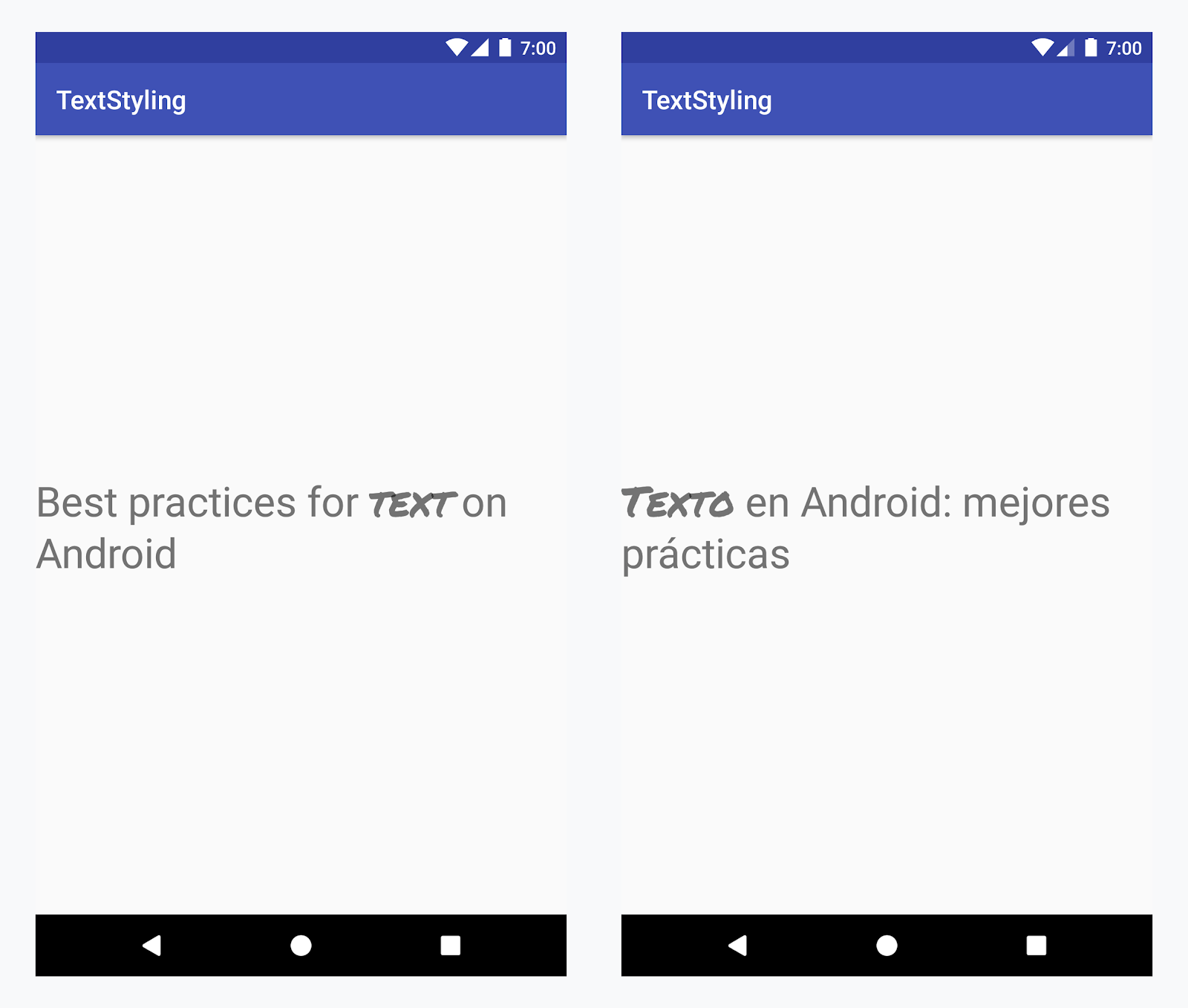
सभी भाषाओं में "text" शब्द पर कस्टम टाइपफ़ेस लागू करना
उदाहरण - कस्टम टाइपफ़ेस जोड़ना
-
<annotation>टैग जोड़ें और की-वैल्यू पेयर तय करें. इस मामले में, कुंजी font है और वैल्यू, वह फ़ॉन्ट टाइप है जिसका हमें इस्तेमाल करना है: title_emphasis// values/strings.xml <string name="title">Best practices for <annotation font="title_emphasis">text</annotation> on Android</string> // values-es/strings.xml <string name="title"><annotation font="title_emphasis">Texto</annotation> en Android: mejores prácticas</string>
-
स्ट्रिंग रिसॉर्स लोड करें और font कुंजी की मदद से एनोटेशन ढूंढें. इसके बाद, कस्टम स्पैन बनाएं और मौजूदा स्पैन को बदलें.
Kotlin
// get the text as SpannedString so we can get the spans attached to the text
val titleText = getText(R.string.title) as SpannedString

// get all the annotation spans from the text
val annotations = titleText.getSpans(0, titleText.length, Annotation::class.java)

// create a copy of the title text as a SpannableString.
// the constructor copies both the text and the spans. so we can add and remove spans
val spannableString = SpannableString(titleText)

// iterate through all the annotation spans
for (annotation in annotations) {
   // look for the span with the key font
   if (annotation.key == "font") {
      val fontName = annotation.value
      // check the value associated to the annotation key
      if (fontName == "title_emphasis") {
         // create the typeface
         val typeface = getFontCompat(R.font.permanent_marker)
         // set the span at the same indices as the annotation
         spannableString.setSpan(CustomTypefaceSpan(typeface),
            titleText.getSpanStart(annotation),
            titleText.getSpanEnd(annotation),
            Spannable.SPAN_EXCLUSIVE_EXCLUSIVE)
      }
   }
}

// now, the spannableString contains both the annotation spans and the CustomTypefaceSpan
styledText.text = spannableString
Java
// get the text as SpannedString so we can get the spans attached to the text
SpannedString titleText = (SpannedString) getText(R.string.title);

// get all the annotation spans from the text
Annotation[] annotations = titleText.getSpans(0, titleText.length(), Annotation.class);

// create a copy of the title text as a SpannableString.
// the constructor copies both the text and the spans. so we can add and remove spans
SpannableString spannableString = new SpannableString(titleText);

// iterate through all the annotation spans
for (Annotation annotation: annotations) {
  // look for the span with the key font
  if (annotation.getKey().equals("font")) {
    String fontName = annotation.getValue();
    // check the value associated to the annotation key
    if (fontName.equals("title_emphasis")) {
    // create the typeface
    Typeface typeface = ResourcesCompat.getFont(this, R.font.roboto_mono);
    // set the span at the same indices as the annotation
    spannableString.setSpan(new CustomTypefaceSpan(typeface),
      titleText.getSpanStart(annotation),
      titleText.getSpanEnd(annotation),
      Spannable.SPAN_EXCLUSIVE_EXCLUSIVE);
    }
  }
}

// now, the spannableString contains both the annotation spans and the CustomTypefaceSpan
styledText.text = spannableString;
अगर एक ही टेक्स्ट का इस्तेमाल कई बार किया जा रहा है, तो आपको SpannableString ऑब्जेक्ट को एक बार बनाना चाहिए और ज़रूरत के हिसाब से उसका फिर से इस्तेमाल करना चाहिए. इससे परफ़ॉर्मेंस और मेमोरी से जुड़ी संभावित समस्याओं से बचा जा सकता है.
एनोटेशन के इस्तेमाल के ज़्यादा उदाहरणों के लिए, Android में अंतरराष्ट्रीय भाषा के टेक्स्ट को स्टाइल करना लेख पढ़ें.
एनोटेशन स्पैन और टेक्स्ट पार्सल करना
Annotation स्पैन भी ParcelableSpans होते हैं. इसलिए, मुख्य वैल्यू वाले जोड़े पार्सल किए जाते हैं और अनपार्सल किए जाते हैं. जब तक पार्सल पाने वाले व्यक्ति को एनोटेशन समझने का तरीका पता है, तब तक पार्सल किए गए टेक्स्ट पर कस्टम स्टाइलिंग लागू करने के लिए, Annotation स्पैन का इस्तेमाल किया जा सकता है.
टेक्स्ट को Intent Bundle में पास करते समय, कस्टम स्टाइलिंग को बनाए रखने के लिए, आपको सबसे पहले अपने टेक्स्ट में Annotation स्पैन जोड़ने होंगे. एक्सएमएल रिसॉर्स में, <annotation> टैग का इस्तेमाल करके ऐसा किया जा सकता है. इसके लिए, ऊपर दिया गया उदाहरण देखें. इसके अलावा, कोड में भी ऐसा किया जा सकता है. इसके लिए, नया Annotation बनाएं और उसे स्पैन के तौर पर सेट करें. इसके लिए, यहां दिया गया उदाहरण देखें:
Kotlin
val spannableString = SpannableString("My spantastic text")
val annotation = Annotation("font", "title_emphasis")
spannableString.setSpan(annotation, 3, 7, Spannable.SPAN_EXCLUSIVE_EXCLUSIVE)

// start Activity with text with spans
val intent = Intent(this, MainActivity::class.java)
intent.putExtra(TEXT_EXTRA, spannableString)
startActivity(intent)
Java
SpannableString spannableString = new SpannableString("My spantastic text");
Annotation annotation = new Annotation("font", "title_emphasis");
spannableString.setSpan(annotation, 3, 7, 33);

// start Activity with text with spans
Intent intent = new Intent(this, MainActivity.class);
intent.putExtra(TEXT_EXTRA, spannableString);
this.startActivity(intent);
Bundle से टेक्स्ट को SpannableString के तौर पर वापस पाएं. इसके बाद, अटैच किए गए एनोटेशन को पार्स करें. जैसा कि ऊपर दिए गए उदाहरण में दिखाया गया है.
Kotlin
// read text with Spans
val intentCharSequence = intent.getCharSequenceExtra(TEXT_EXTRA) as SpannableString
Java
// read text with Spans
SpannableString intentCharSequence = (SpannableString)intent.getCharSequenceExtra(TEXT_EXTRA);
टेक्स्ट स्टाइलिंग के बारे में ज़्यादा जानने के लिए, ये लिंक देखें: