

Konzepte und Jetpack Compose-Implementierung
Eine String-Ressource stellt Text-Strings für Ihre Anwendung mit optionaler Textformatierung bereit. Es gibt drei Arten von Ressourcen, die Ihrer Anwendung Strings zur Verfügung stellen können:
- String
- XML-Ressource, die einen einzelnen String bereitstellt.
- String-Array
- XML-Ressource, die ein Array von Strings bereitstellt.
- Mengenstrings (Plurale)
- XML-Ressource mit verschiedenen Strings für die Pluralisierung.
Auf alle Strings können Formatierungs-Markup und Formatierungsargumente angewendet werden. Informationen zum Formatieren von Strings finden Sie im Abschnitt Formatierung und Gestaltung.
String
Ein einzelner String, auf den von der Anwendung oder von anderen Ressourcendateien (z. B. einem XML-Layout) verwiesen werden kann.
- Dateispeicherort:
res/values/filename.xml
Der Dateiname ist beliebig. Dasname-Attribut des<string>-Elements wird als Ressourcen-ID verwendet.- Datentyp der kompilierten Ressource:
- Ressourcenzeiger auf eine
String. - Ressourcenreferenz:
-
In Java:
R.string.string_name
In XML:@string/string_name - Syntax:
-
<?xml version="1.0" encoding="utf-8"?>
<resources>
    <string
        name="string_name"
        >text_string</string>
</resources>
- Elemente:
- Beispiel:
- XML-Datei gespeichert unter
res/values/strings.xml:<?xml version="1.0" encoding="utf-8"?> <resources> <string name="hello">Hello!</string> </resources>
In diesem Layout-XML wird ein String auf eine View angewendet:
<TextView
    android:layout_width="fill_parent"
    android:layout_height="wrap_content"
    android:text="@string/hello" />
Mit diesem Anwendungscode wird ein String abgerufen:
Sie können entweder
getString(int)odergetText(int)verwenden, um einen String abzurufen.getText(int)behält alle RTF-Formatierungen bei, die auf den String angewendet wurden.
String-Array
Ein Array mit Strings, auf die von der Anwendung aus verwiesen werden kann.
- Dateispeicherort:
res/values/filename.xml
Der Dateiname ist beliebig. Dasname-Attribut des<string-array>-Elements wird als Ressourcen-ID verwendet.- Datentyp der kompilierten Ressource:
- Ressourcenzeiger auf ein Array von
String-Elementen. - Ressourcenreferenz:
-
In Java:
R.array.string_array_name
In XML:@[package:]array/string_array_name - Syntax:
-
<?xml version="1.0" encoding="utf-8"?>
<resources>
    <string-array
        name="string_array_name">
        <item
            >text_string</item>
    </string-array>
</resources>
- Elemente:
- Beispiel:
- XML-Datei gespeichert unter
res/values/strings.xml:<?xml version="1.0" encoding="utf-8"?> <resources> <string-array name="planets_array"> <item>Mercury</item> <item>Venus</item> <item>Earth</item> <item>Mars</item> </string-array> </resources>
Kotlin
val array: Array<String> =
resources.getStringArray(R.array.planets_array)Java
Resources res = getResources();
String[] planets = res.getStringArray(R.array.planets_array);
Mengenstrings (Plurale)
In verschiedenen Sprachen gelten unterschiedliche Regeln für die grammatische Übereinstimmung mit der Menge. Im Deutschen ist die Menge 1 beispielsweise ein Sonderfall. Wir schreiben „1 Buch“, aber für jede andere Menge würden wir „n Bücher“ schreiben. Diese Unterscheidung zwischen Singular und Plural ist sehr häufig, aber in anderen Sprachen wird genauer unterschieden. Die von Android unterstützten Werte sind zero, one, two, few, many und other.
Die Regeln für die Entscheidung, welcher Fall für eine bestimmte Sprache und Menge verwendet werden soll, können sehr komplex sein. Daher bietet Android Methoden wie getQuantityString(), mit denen Sie die passende Ressource auswählen können.
Ab API 24 können Sie stattdessen die viel leistungsfähigere ICU-Klasse MessageFormat verwenden.
- Dateispeicherort:
res/values/filename.xml
Der Dateiname ist beliebig. Dasname-Attribut des<plurals>-Elements wird als Ressourcen-ID verwendet.- Ressourcenreferenz:
-
In Java:
R.plurals.plural_name - Syntax:
-
<?xml version="1.0" encoding="utf-8"?>
<resources>
    <plurals
        name="plural_name">
        <item
            quantity=["zero" | "one" | "two" | "few" | "many" | "other"]
            >text_string</item>
    </plurals>
</resources>
- Elemente:
- Beispiel:
- XML-Datei gespeichert unter
res/values/strings.xml:<?xml version="1.0" encoding="utf-8"?> <resources> <plurals name="numberOfSongsAvailable"> <!-- As a developer, you should always supply "one" and "other" strings. Your translators will know which strings are actually needed for their language. Always include %d in "one" because translators will need to use %d for languages where "one" doesn't mean 1 (as explained above). --> <item quantity="one">%d song found.</item> <item quantity="other">%d songs found.</item> </plurals> </resources>
XML-Datei gespeichert unter
res/values-pl/strings.xml:<?xml version="1.0" encoding="utf-8"?> <resources> <plurals name="numberOfSongsAvailable"> <item quantity="one">Znaleziono %d piosenkę.</item> <item quantity="few">Znaleziono %d piosenki.</item> <item quantity="other">Znaleziono %d piosenek.</item> </plurals> </resources>
Verwendung:
Kotlin
val count = getNumberOfSongsAvailable() val songsFound = resources.
getQuantityString(R.plurals.numberOfSongsAvailable, count, count)Java
int count = getNumberOfSongsAvailable();
Resources res = getResources();
String songsFound = res.getQuantityString(R.plurals.numberOfSongsAvailable, count, count);
Wenn Sie die Methode
getQuantityString()verwenden, müssen Siecountzweimal übergeben, wenn Ihr String Stringformatierung enthält. Beispiel: Für den String%d songs foundwählt der erstecount-Parameter den entsprechenden Pluralstring aus und der zweitecount-Parameter wird in den Platzhalter%deingefügt. Wenn Ihre Plural-Strings keine String-Formatierung enthalten, müssen Sie den dritten Parameter nicht angetQuantityStringübergeben.
Format und Stil
Hier sind einige wichtige Informationen zur richtigen Formatierung und Gestaltung von String-Ressourcen.
Strings formatieren
Wenn Sie Ihre Strings formatieren müssen, können Sie die Formatierungsargumente in die String-Ressource einfügen, wie im folgenden Beispiel gezeigt.
<string name="welcome_messages">Hello, %1$s! You have %2$d new messages.</string>
In diesem Beispiel hat der Formatstring zwei Argumente: %1$s ist ein String und %2$d ist eine Dezimalzahl. Formatieren Sie dann den String, indem Sie getString(int, Object...) aufrufen. Beispiel:
Kotlin
var text = getString(R.string.welcome_messages, username, mailCount)
Java
String text = getString(R.string.welcome_messages, username, mailCount);
Formatierung mit HTML-Markup
Sie können Ihren Strings mit HTML-Markup Formatierungen hinzufügen. Beispiel:
<?xml version="1.0" encoding="utf-8"?>
<resources>
    <string name="welcome">Welcome to <b>Android</b>!</string>
</resources>
Wenn Sie keine Formatierung anwenden, können Sie den TextView-Text direkt festlegen, indem Sie setText(java.lang.CharSequence) aufrufen. In einigen Fällen möchten Sie jedoch möglicherweise eine formatierte Textressource erstellen, die auch als Formatstring verwendet wird.
Normalerweise funktioniert das nicht, da mit den Methoden format(String, Object...) und getString(int, Object...) alle Stilinformationen aus dem String entfernt werden. Als Workaround können Sie die HTML-Tags mit maskierten Entitäten schreiben, die dann mit fromHtml(String) wiederhergestellt werden, nachdem die Formatierung erfolgt ist. Beispiel:
- Speichern Sie die formatierte Textressource als HTML-escaped-String:
<resources> <string name="welcome_messages">Hello, %1$s! You have <b>%2$d new messages</b>.</string> </resources>
In diesem formatierten String wird ein
<b>-Element hinzugefügt. Beachten Sie, dass die öffnende geschweifte Klammer mit der Notation<HTML-escaped wird. - Formatieren Sie den String dann wie gewohnt, rufen Sie aber auch
fromHtml(String)auf, um den HTML-Text in formatierten Text zu konvertieren:Kotlin
val text: String = getString(R.string.welcome_messages, username, mailCount)
val styledText: Spanned = Html.fromHtml(text, FROM_HTML_MODE_LEGACY)
Java
String text = getString(R.string.welcome_messages, username, mailCount);
Spanned styledText = Html.fromHtml(text, FROM_HTML_MODE_LEGACY);
Da mit der Methode fromHtml(String) alle HTML-Entitäten formatiert werden, müssen Sie alle möglichen HTML-Zeichen in den Strings, die Sie mit dem formatierten Text verwenden, mit htmlEncode(String) maskieren. Wenn Sie beispielsweise einen String formatieren, der Zeichen wie „<“ oder „&“ enthält, müssen diese vor der Formatierung maskiert werden, damit sie beim Durchlaufen von fromHtml(String) im formatierten String so dargestellt werden, wie sie ursprünglich geschrieben wurden. Beispiel:
Kotlin
val escapedUsername: String = TextUtils.htmlEncode(username)

val text: String = getString(R.string.welcome_messages, escapedUsername, mailCount)
val styledText: Spanned = Html.fromHtml(text, FROM_HTML_MODE_LEGACY)
Java
String escapedUsername = TextUtils.htmlEncode(username);

String text = getString(R.string.welcome_messages, escapedUsername, mailCount);
Spanned styledText = Html.fromHtml(text);
Formatierung mit Spannables
Ein Spannable ist ein Textobjekt, das Sie mit Schriftart-Eigenschaften wie Farbe und Schriftstärke gestalten können. Mit SpannableStringBuilder erstellen Sie Ihren Text und wenden dann Stile an, die im Paket android.text.style definiert sind.
Sie können die folgenden Hilfsmethoden verwenden, um einen Großteil der Arbeit zum Erstellen von formatierbarem Text zu erledigen:
Kotlin
/**
 * Returns a CharSequence that concatenates the specified array of CharSequence
 * objects and then applies a list of zero or more tags to the entire range.
 *
 * @param content an array of character sequences to apply a style to
 * @param tags the styled span objects to apply to the content
 *        such as android.text.style.StyleSpan
 */
private fun apply(content: Array<out CharSequence>, vararg tags: Any): CharSequence {
    return SpannableStringBuilder().apply {
        openTags(tags)
        content.forEach { charSequence ->
            append(charSequence)
        }
        closeTags(tags)
    }
}

/**
 * Iterates over an array of tags and applies them to the beginning of the specified
 * Spannable object so that future text appended to the text will have the styling
 * applied to it. Do not call this method directly.
 */
private fun Spannable.openTags(tags: Array<out Any>) {
    tags.forEach { tag ->
        setSpan(tag, 0, 0, Spannable.SPAN_MARK_MARK)
    }
}

/**
 * "Closes" the specified tags on a Spannable by updating the spans to be
 * endpoint-exclusive so that future text appended to the end will not take
 * on the same styling. Do not call this method directly.
 */
private fun Spannable.closeTags(tags: Array<out Any>) {
    tags.forEach { tag ->
    if (length > 0) {
            setSpan(tag, 0, length, Spanned.SPAN_EXCLUSIVE_EXCLUSIVE)
        } else {
            removeSpan(tag)
        }
    }
}
Java
/**
 * Returns a CharSequence that concatenates the specified array of CharSequence
 * objects and then applies a list of zero or more tags to the entire range.
 *
 * @param content an array of character sequences to apply a style to
 * @param tags the styled span objects to apply to the content
 *        such as android.text.style.StyleSpan
 *
 */
private static CharSequence applyStyles(CharSequence[] content, Object[] tags) {
    SpannableStringBuilder text = new SpannableStringBuilder();
    openTags(text, tags);
    for (CharSequence item : content) {
        text.append(item);
    }
    closeTags(text, tags);
    return text;
}

/**
 * Iterates over an array of tags and applies them to the beginning of the specified
 * Spannable object so that future text appended to the text will have the styling
 * applied to it. Do not call this method directly.
 */
private static void openTags(Spannable text, Object[] tags) {
    for (Object tag : tags) {
        text.setSpan(tag, 0, 0, Spannable.SPAN_MARK_MARK);
    }
}

/**
 * "Closes" the specified tags on a Spannable by updating the spans to be
 * endpoint-exclusive so that future text appended to the end will not take
 * on the same styling. Do not call this method directly.
 */
private static void closeTags(Spannable text, Object[] tags) {
    int len = text.length();
    for (Object tag : tags) {
        if (len > 0) {
            text.setSpan(tag, 0, len, Spanned.SPAN_EXCLUSIVE_EXCLUSIVE);
        } else {
            text.removeSpan(tag);
        }
    }
}
Die folgenden Methoden bold, italic und color umschließen die oben genannten Hilfsmethoden und zeigen konkrete Beispiele für die Anwendung von Formatierungen, die im Paket android.text.style definiert sind. Sie können ähnliche Methoden erstellen, um andere Arten von Textformatierungen vorzunehmen.
Kotlin
/**
 * Returns a CharSequence that applies boldface to the concatenation
 * of the specified CharSequence objects.
 */
fun bold(vararg content: CharSequence): CharSequence = apply(content, StyleSpan(Typeface.BOLD))

/**
 * Returns a CharSequence that applies italics to the concatenation
 * of the specified CharSequence objects.
 */
fun italic(vararg content: CharSequence): CharSequence = apply(content, StyleSpan(Typeface.ITALIC))

/**
 * Returns a CharSequence that applies a foreground color to the
 * concatenation of the specified CharSequence objects.
 */
fun color(color: Int, vararg content: CharSequence): CharSequence =
        apply(content, ForegroundColorSpan(color))
Java
/**
 * Returns a CharSequence that applies boldface to the concatenation
 * of the specified CharSequence objects.
 */
public static CharSequence bold(CharSequence... content) {
    return apply(content, new StyleSpan(Typeface.BOLD));
}

/**
 * Returns a CharSequence that applies italics to the concatenation
 * of the specified CharSequence objects.
 */
public static CharSequence italic(CharSequence... content) {
    return apply(content, new StyleSpan(Typeface.ITALIC));
}

/**
 * Returns a CharSequence that applies a foreground color to the
 * concatenation of the specified CharSequence objects.
 */
public static CharSequence color(int color, CharSequence... content) {
    return apply(content, new ForegroundColorSpan(color));
}
Hier ist ein Beispiel dafür, wie Sie diese Methoden verketten können, um einzelnen Wörtern in einem Ausdruck verschiedene Formatierungen zuzuweisen:
Kotlin
// Create an italic "hello, " a red "world",
// and bold the entire sequence.
val text: CharSequence = bold(italic(getString(R.string.hello)),
        color(Color.RED, getString(R.string.world)))
Java
// Create an italic "hello, " a red "world",
// and bold the entire sequence.
CharSequence text = bold(italic(getString(R.string.hello)),
    color(Color.RED, getString(R.string.world)));
Das Kotlin-Modul „core-ktx“ enthält außerdem Erweiterungsfunktionen, die die Arbeit mit Spans noch einfacher machen. Weitere Informationen finden Sie in der Paketdokumentation für android.text auf GitHub.
Weitere Informationen zum Arbeiten mit Spannen finden Sie unter den folgenden Links:
Formatierung mit Anmerkungen
Sie können komplexes oder benutzerdefiniertes Styling anwenden, indem Sie die Klasse Annotation zusammen mit dem Tag <annotation> in Ihren strings.xml-Ressourcendateien verwenden. Mit dem Annotations-Tag können Sie Teile des Strings für benutzerdefiniertes Styling markieren, indem Sie benutzerdefinierte Schlüssel/Wert-Paare im XML definieren, die das Framework dann in Annotation-Spans umwandelt. Sie können diese Annotationen dann abrufen und den Schlüssel und Wert verwenden, um das Styling anzuwenden.
Achten Sie beim Erstellen von Anmerkungen darauf, dass Sie das <annotation>-Tag in allen Übersetzungen des Strings in jeder strings.xml-Datei hinzufügen.
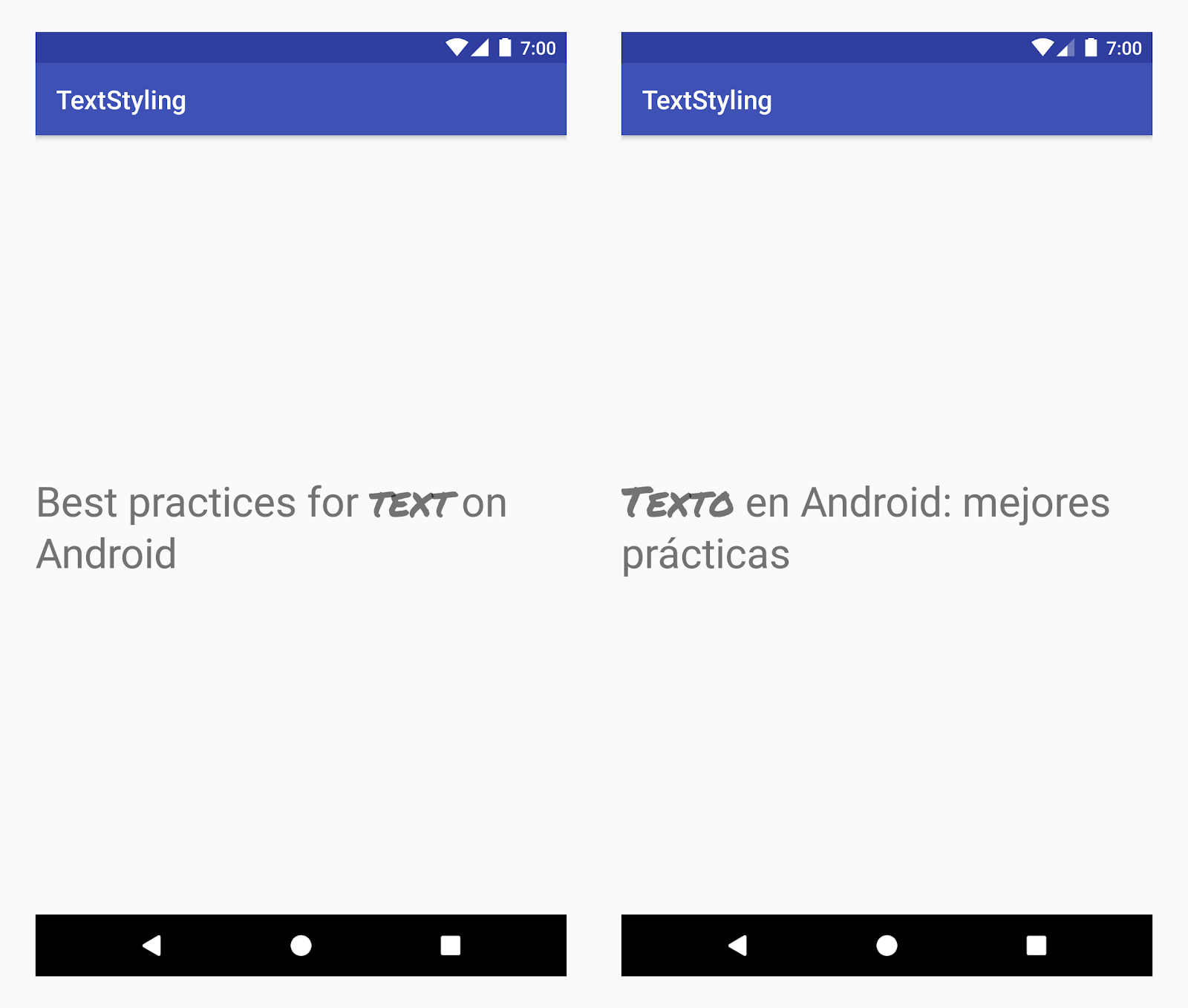
Benutzerdefinierte Schriftart auf das Wort „Text“ in allen Sprachen anwenden
Beispiel: Benutzerdefinierte Schriftart hinzufügen
-
Fügen Sie das
<annotation>-Tag hinzu und definieren Sie das Schlüssel/Wert-Paar. In diesem Fall ist der Schlüssel font und der Wert der Schriftarttyp, den wir verwenden möchten: title_emphasis.// values/strings.xml <string name="title">Best practices for <annotation font="title_emphasis">text</annotation> on Android</string> // values-es/strings.xml <string name="title"><annotation font="title_emphasis">Texto</annotation> en Android: mejores prácticas</string>
-
Laden Sie die String-Ressource und suchen Sie nach den Anmerkungen mit dem Schlüssel font. Erstellen Sie dann einen benutzerdefinierten Span und ersetzen Sie den vorhandenen Span.
Kotlin
// get the text as SpannedString so we can get the spans attached to the text
val titleText = getText(R.string.title) as SpannedString

// get all the annotation spans from the text
val annotations = titleText.getSpans(0, titleText.length, Annotation::class.java)

// create a copy of the title text as a SpannableString.
// the constructor copies both the text and the spans. so we can add and remove spans
val spannableString = SpannableString(titleText)

// iterate through all the annotation spans
for (annotation in annotations) {
   // look for the span with the key font
   if (annotation.key == "font") {
      val fontName = annotation.value
      // check the value associated to the annotation key
      if (fontName == "title_emphasis") {
         // create the typeface
         val typeface = getFontCompat(R.font.permanent_marker)
         // set the span at the same indices as the annotation
         spannableString.setSpan(CustomTypefaceSpan(typeface),
            titleText.getSpanStart(annotation),
            titleText.getSpanEnd(annotation),
            Spannable.SPAN_EXCLUSIVE_EXCLUSIVE)
      }
   }
}

// now, the spannableString contains both the annotation spans and the CustomTypefaceSpan
styledText.text = spannableString
Java
// get the text as SpannedString so we can get the spans attached to the text
SpannedString titleText = (SpannedString) getText(R.string.title);

// get all the annotation spans from the text
Annotation[] annotations = titleText.getSpans(0, titleText.length(), Annotation.class);

// create a copy of the title text as a SpannableString.
// the constructor copies both the text and the spans. so we can add and remove spans
SpannableString spannableString = new SpannableString(titleText);

// iterate through all the annotation spans
for (Annotation annotation: annotations) {
  // look for the span with the key font
  if (annotation.getKey().equals("font")) {
    String fontName = annotation.getValue();
    // check the value associated to the annotation key
    if (fontName.equals("title_emphasis")) {
    // create the typeface
    Typeface typeface = ResourcesCompat.getFont(this, R.font.roboto_mono);
    // set the span at the same indices as the annotation
    spannableString.setSpan(new CustomTypefaceSpan(typeface),
      titleText.getSpanStart(annotation),
      titleText.getSpanEnd(annotation),
      Spannable.SPAN_EXCLUSIVE_EXCLUSIVE);
    }
  }
}

// now, the spannableString contains both the annotation spans and the CustomTypefaceSpan
styledText.text = spannableString;
Wenn Sie denselben Text mehrmals verwenden, sollten Sie das SpannableString-Objekt einmal erstellen und nach Bedarf wiederverwenden, um potenzielle Leistungs- und Speicherprobleme zu vermeiden.
Weitere Beispiele für die Verwendung von Anmerkungen finden Sie unter Internationalisierten Text in Android formatieren.
Anmerkungsbereiche und Textaufteilung
Da Annotation-Bereiche auch ParcelableSpans sind, werden die Schlüssel/Wert-Paare in Pakete aufgeteilt und wieder zusammengefügt. Solange der Empfänger des Pakets weiß, wie die Anmerkungen zu interpretieren sind, können Sie Annotation-Spans verwenden, um dem aufgeteilten Text benutzerdefiniertes Styling zuzuweisen.
Wenn Sie Ihr benutzerdefiniertes Styling beibehalten möchten, wenn Sie den Text an ein Intent-Bundle übergeben, müssen Sie Ihrem Text zuerst Annotation-Spans hinzufügen. Sie können dies in den XML-Ressourcen über das Tag <annotation> tun, wie im Beispiel oben gezeigt, oder im Code, indem Sie ein neues Annotation erstellen und es als Spanne festlegen, wie unten gezeigt:
Kotlin
val spannableString = SpannableString("My spantastic text")
val annotation = Annotation("font", "title_emphasis")
spannableString.setSpan(annotation, 3, 7, Spannable.SPAN_EXCLUSIVE_EXCLUSIVE)

// start Activity with text with spans
val intent = Intent(this, MainActivity::class.java)
intent.putExtra(TEXT_EXTRA, spannableString)
startActivity(intent)
Java
SpannableString spannableString = new SpannableString("My spantastic text");
Annotation annotation = new Annotation("font", "title_emphasis");
spannableString.setSpan(annotation, 3, 7, 33);

// start Activity with text with spans
Intent intent = new Intent(this, MainActivity.class);
intent.putExtra(TEXT_EXTRA, spannableString);
this.startActivity(intent);
Rufen Sie den Text aus Bundle als SpannableString ab und parsen Sie dann die angehängten Anmerkungen, wie im Beispiel oben gezeigt.
Kotlin
// read text with Spans
val intentCharSequence = intent.getCharSequenceExtra(TEXT_EXTRA) as SpannableString
Java
// read text with Spans
SpannableString intentCharSequence = (SpannableString)intent.getCharSequenceExtra(TEXT_EXTRA);
Weitere Informationen zur Textformatierung finden Sie unter den folgenden Links: