

ページング ライブラリには、大規模なデータセットからページング データを読み込み、表示する強力な機能があります。このガイドでは、ページング ライブラリを使用し、ネットワーク データソースからのページング データのストリームを設定して RecyclerView で表示する方法について説明します。
データソースを定義する
最初のステップは、データソースを識別する PagingSource 実装を定義することです。PagingSource API クラスには load メソッドが含まれています。このメソッドをオーバーライドして、対応するデータソースからページング データを取得する方法を示します。
非同期読み込みに Kotlin コルーチンを使用するには、PagingSource クラスを直接使います。ページング ライブラリには、他の非同期フレームワークをサポートするクラスも用意されています。
- RxJava を使用する場合は、代わりに
RxPagingSourceを実装します。 - Guava の
ListenableFutureを使用する場合は、ListenableFuturePagingSourceを実装します。
キーと値の型を選択する
PagingSource<Key, Value> には、Key と Value の 2 種類のパラメータがあります。キーは、データの読み込みに使用される識別子を定義します。値はデータ自体の型です。たとえば、Int 型のページ番号を Retrofit に渡してネットワークから User オブジェクトのページを読み込む場合は、Key 型として Int を選択し、Value 型として User を選択します。
PagingSource を定義する
次の例では、ページ番号ごとにアイテムのページを読み込む PagingSource を実装します。Key 型は Int、Value 型は User です。
Java(RxJava)
class ExamplePagingSource extends RxPagingSource<Integer, User> {
  @NonNull
  private ExampleBackendService mBackend;
  @NonNull
  private String mQuery;

  ExamplePagingSource(@NonNull ExampleBackendService backend,
    @NonNull String query) {
    mBackend = backend;
    mQuery = query;
  }

  @NotNull
  @Override
  public Single<LoadResult<Integer, User>> loadSingle(
    @NotNull LoadParams<Integer> params) {
    // Start refresh at page 1 if undefined.
    Integer nextPageNumber = params.getKey();
    if (nextPageNumber == null) {
      nextPageNumber = 1;
    }

    return mBackend.searchUsers(mQuery, nextPageNumber)
      .subscribeOn(Schedulers.io())
      .map(this::toLoadResult)
      .onErrorReturn(LoadResult.Error::new);
  }

  private LoadResult<Integer, User> toLoadResult(
    @NonNull SearchUserResponse response) {
    return new LoadResult.Page<>(
      response.getUsers(),
      null, // Only paging forward.
      response.getNextPageNumber(),
      LoadResult.Page.COUNT_UNDEFINED,
      LoadResult.Page.COUNT_UNDEFINED);
  }

  @Nullable
  @Override
  public Integer getRefreshKey(@NotNull PagingState<Integer, User> state) {
    // Try to find the page key of the closest page to anchorPosition from
    // either the prevKey or the nextKey; you need to handle nullability
    // here.
    //  * prevKey == null -> anchorPage is the first page.
    //  * nextKey == null -> anchorPage is the last page.
    //  * both prevKey and nextKey are null -> anchorPage is the
    //    initial page, so return null.
    Integer anchorPosition = state.getAnchorPosition();
    if (anchorPosition == null) {
      return null;
    }

    LoadResult.Page<Integer, User> anchorPage = state.closestPageToPosition(anchorPosition);
    if (anchorPage == null) {
      return null;
    }

    Integer prevKey = anchorPage.getPrevKey();
    if (prevKey != null) {
      return prevKey + 1;
    }

    Integer nextKey = anchorPage.getNextKey();
    if (nextKey != null) {
      return nextKey - 1;
    }

    return null;
  }
}
Java(Guava/LiveData)
class ExamplePagingSource extends ListenableFuturePagingSource<Integer, User> {
  @NonNull
  private ExampleBackendService mBackend;
  @NonNull
  private String mQuery;
  @NonNull
  private Executor mBgExecutor;

  ExamplePagingSource(
    @NonNull ExampleBackendService backend,
    @NonNull String query, @NonNull Executor bgExecutor) {
    mBackend = backend;
    mQuery = query;
    mBgExecutor = bgExecutor;
  }

  @NotNull
  @Override
  public ListenableFuture<LoadResult<Integer, User>> loadFuture(@NotNull LoadParams<Integer> params) {
    // Start refresh at page 1 if undefined.
    Integer nextPageNumber = params.getKey();
    if (nextPageNumber == null) {
      nextPageNumber = 1;
    }

    ListenableFuture<LoadResult<Integer, User>> pageFuture =
      Futures.transform(mBackend.searchUsers(mQuery, nextPageNumber),
      this::toLoadResult, mBgExecutor);

    ListenableFuture<LoadResult<Integer, User>> partialLoadResultFuture =
      Futures.catching(pageFuture, HttpException.class,
      LoadResult.Error::new, mBgExecutor);

    return Futures.catching(partialLoadResultFuture,
      IOException.class, LoadResult.Error::new, mBgExecutor);
  }

  private LoadResult<Integer, User> toLoadResult(@NonNull SearchUserResponse response) {
    return new LoadResult.Page<>(response.getUsers(),
    null, // Only paging forward.
    response.getNextPageNumber(),
    LoadResult.Page.COUNT_UNDEFINED,
    LoadResult.Page.COUNT_UNDEFINED);
  }

  @Nullable
  @Override
  public Integer getRefreshKey(@NotNull PagingState<Integer, User> state) {
    // Try to find the page key of the closest page to anchorPosition from
    // either the prevKey or the nextKey; you need to handle nullability
    // here.
    //  * prevKey == null -> anchorPage is the first page.
    //  * nextKey == null -> anchorPage is the last page.
    //  * both prevKey and nextKey are null -> anchorPage is the
    //    initial page, so return null.
    Integer anchorPosition = state.getAnchorPosition();
    if (anchorPosition == null) {
      return null;
    }

    LoadResult.Page<Integer, User> anchorPage = state.closestPageToPosition(anchorPosition);
    if (anchorPage == null) {
      return null;
    }

    Integer prevKey = anchorPage.getPrevKey();
    if (prevKey != null) {
      return prevKey + 1;
    }

    Integer nextKey = anchorPage.getNextKey();
    if (nextKey != null) {
      return nextKey - 1;
    }

    return null;
  }
}
一般的な PagingSource 実装では、コンストラクタで提供されたパラメータを load メソッドに渡して、クエリに適切なデータを読み込みます。上記の例では、これらのパラメータは次のとおりです。
backend: データを提供するバックエンド サービスのインスタンス。query:backendで示されるサービスに送信する検索クエリ。
LoadParams オブジェクトには、実行する読み込みオペレーションに関する情報が含まれます。これには、読み込むキーと、読み込むアイテムの数が含まれます。
LoadResult オブジェクトには、読み込みオペレーションの結果が含まれます。LoadResult は、load の呼び出しが成功したかどうかに応じて、次の 2 つの形式のいずれかになるシールクラスです。
- 読み込みが正常に完了すると、
LoadResult.Pageオブジェクトが返されます。 - 読み込みが成功しなかった場合は、
LoadResult.Errorオブジェクトが返されます。
次の図は、この例の load 関数が各読み込みのキーを受け取り、後続の読み込みのキーを提供する方法を示しています。
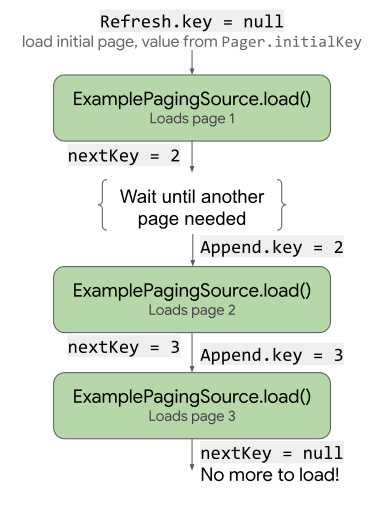
load がキーをどのように使用および更新するかを示す図。PagingSource の実装では、PagingState オブジェクトをパラメータとして受け取る getRefreshKey メソッドも実装する必要があります。初期読み込み後にデータが更新または無効化されたときに load メソッドに渡すキーが返されます。その後データが更新されると、ページング ライブラリは自動的にこのメソッドを呼び出します。
エラーを処理する
特にネットワーク経由でデータを読み込む場合、読み込みリクエストがさまざまな原因で失敗することがあります。load メソッドから LoadResult.Error オブジェクトを返すことにより、読み込み中に発生したエラーを報告できます。
たとえば、load メソッドに以下を追加することで、前の例の ExamplePagingSource での読み込みエラーをキャッチして報告できます。
Java(RxJava)
return backend.searchUsers(searchTerm, nextPageNumber)
  .subscribeOn(Schedulers.io())
  .map(this::toLoadResult)
  .onErrorReturn(LoadResult.Error::new);
Java(Guava/LiveData)
ListenableFuture<LoadResult<Integer, User>> pageFuture = Futures.transform(
  backend.searchUsers(query, nextPageNumber), this::toLoadResult,
  bgExecutor);

ListenableFuture<LoadResult<Integer, User>> partialLoadResultFuture = Futures.catching(
  pageFuture, HttpException.class, LoadResult.Error::new,
  bgExecutor);

return Futures.catching(partialLoadResultFuture,
  IOException.class, LoadResult.Error::new, bgExecutor);
Retrofit エラーの処理について詳しくは、PagingSource API リファレンスのサンプルをご覧ください。
PagingSource は、LoadResult.Error オブジェクトを収集して UI に配信し、ユーザーがそれらを操作できるようにします。UI で読み込み状態を公開する方法について詳しくは、読み込み状態の管理と表示をご覧ください。
PagingData のストリームを設定する
次に、PagingSource 実装からページング データのストリームが必要になります。ViewModel でデータ ストリームを設定します。Pager クラスには、PagingData オブジェクトの PagingSource からのリアクティブ ストリームを表示するメソッドが用意されています。ページング ライブラリは、Flow, LiveData、RxJava の Flowable や Observable タイプなど、複数のストリーム タイプの使用をサポートしています。
Pager インスタンスを作成してリアクティブ ストリームを設定する場合は、PagingConfig 構成オブジェクトとともに、PagingSource 実装のインスタンスを取得する方法を Pager に指示する関数をインスタンスに提供する必要があります。
Java(RxJava)
// CoroutineScope helper provided by the lifecycle-viewmodel-ktx artifact.
CoroutineScope viewModelScope = ViewModelKt.getViewModelScope(viewModel);
Pager<Integer, User> pager = Pager<>(
  new PagingConfig(/* pageSize = */ 20),
  () -> ExamplePagingSource(backend, query));

Flowable<PagingData<User>> flowable = PagingRx.getFlowable(pager);
PagingRx.cachedIn(flowable, viewModelScope);
Java(Guava/LiveData)
// CoroutineScope helper provided by the lifecycle-viewmodel-ktx artifact.
CoroutineScope viewModelScope = ViewModelKt.getViewModelScope(viewModel);
Pager<Integer, User> pager = Pager<>(
  new PagingConfig(/* pageSize = */ 20),
  () -> ExamplePagingSource(backend, query));

PagingLiveData.cachedIn(PagingLiveData.getLiveData(pager), viewModelScope);
cachedIn 演算子はデータ ストリームを共有可能にするとともに、指定された CoroutineScope で読み込まれたデータをキャッシュに保存します。この例では、Lifecycle lifecycle-viewmodel-ktx アーティファクトにより提供される viewModelScope を使用しています。
Pager オブジェクトは、PagingSource オブジェクトから load メソッドを呼び出し、LoadParams オブジェクトを提供し、それに応じて LoadResult オブジェクトを受け取ります。
RecyclerView アダプターを定義する
RecyclerView リストにデータを受信するようにアダプターを設定する必要があります。ページング ライブラリには、これを行うための PagingDataAdapter クラスが用意されています。
PagingDataAdapter を拡張するクラスを定義します。次の例では、UserAdapter が PagingDataAdapter を拡張して、User 型のリストアイテムに RecyclerView アダプターを提供し、UserViewHolder をビューホルダーとして使用しています。
Kotlin(コルーチン)
class UserAdapter(diffCallback: DiffUtil.ItemCallback<User>) :
  PagingDataAdapter<User, UserViewHolder>(diffCallback) {
  override fun onCreateViewHolder(
    parent: ViewGroup,
    viewType: Int
  ): UserViewHolder {
    return UserViewHolder(parent)
  }

  override fun onBindViewHolder(holder: UserViewHolder, position: Int) {
    val item = getItem(position)
    // Note that item can be null. ViewHolder must support binding a
    // null item as a placeholder.
    holder.bind(item)
  }
}
Java(RxJava)
class UserAdapter extends PagingDataAdapter<User, UserViewHolder> {
  UserAdapter(@NotNull DiffUtil.ItemCallback<User> diffCallback) {
    super(diffCallback);
  }

  @NonNull
  @Override
  public UserViewHolder onCreateViewHolder(@NonNull ViewGroup parent, int viewType) {
    return new UserViewHolder(parent);
  }

  @Override
  public void onBindViewHolder(@NonNull UserViewHolder holder, int position) {
    User item = getItem(position);
    // Note that item can be null. ViewHolder must support binding a
    // null item as a placeholder.
    holder.bind(item);
  }
}
Java(Guava/LiveData)
class UserAdapter extends PagingDataAdapter<User, UserViewHolder> {
  UserAdapter(@NotNull DiffUtil.ItemCallback<User> diffCallback) {
    super(diffCallback);
  }

  @NonNull
  @Override
  public UserViewHolder onCreateViewHolder(@NonNull ViewGroup parent, int viewType) {
    return new UserViewHolder(parent);
  }

  @Override
  public void onBindViewHolder(@NonNull UserViewHolder holder, int position) {
    User item = getItem(position);
    // Note that item can be null. ViewHolder must support binding a
    // null item as a placeholder.
    holder.bind(item);
  }
}
アダプターで、onCreateViewHolder メソッドと onBindViewHolder メソッドを定義し、DiffUtil.ItemCallback を指定します。これは、RecyclerView リスト アダプターを定義するときと同じように機能します。
Kotlin(コルーチン)
object UserComparator : DiffUtil.ItemCallback<User>() {
  override fun areItemsTheSame(oldItem: User, newItem: User): Boolean {
    // Id is unique.
    return oldItem.id == newItem.id
  }

  override fun areContentsTheSame(oldItem: User, newItem: User): Boolean {
    return oldItem == newItem
  }
}
Java(RxJava)
class UserComparator extends DiffUtil.ItemCallback<User> {
  @Override
  public boolean areItemsTheSame(@NonNull User oldItem,
    @NonNull User newItem) {
    // Id is unique.
    return oldItem.id.equals(newItem.id);
  }

  @Override
  public boolean areContentsTheSame(@NonNull User oldItem,
    @NonNull User newItem) {
    return oldItem.equals(newItem);
  }
}
Java(Guava/LiveData)
class UserComparator extends DiffUtil.ItemCallback<User> {
  @Override
  public boolean areItemsTheSame(@NonNull User oldItem,
    @NonNull User newItem) {
    // Id is unique.
    return oldItem.id.equals(newItem.id);
  }

  @Override
  public boolean areContentsTheSame(@NonNull User oldItem,
    @NonNull User newItem) {
    return oldItem.equals(newItem);
  }
}
UI でページング データを表示する
これまでに PagingSource の定義、アプリで PagingData のストリームを生成する手段の構築、PagingDataAdapter の定義を行いました。次は、これらの要素を接続してアクティビティにページング データを表示します。
アクティビティの onCreate またはフラグメントの onViewCreated メソッドで次の手順を行います。
PagingDataAdapterクラスのインスタンスを作成します。- ページング データを表示する
RecyclerViewリストにPagingDataAdapterインスタンスを渡します。 PagingDataストリームを監視し、生成されたそれぞれの値をアダプターのsubmitData()メソッドに渡します。
Kotlin(コルーチン)
val viewModel by viewModels<ExampleViewModel>()

val pagingAdapter = UserAdapter(UserComparator)
val recyclerView = findViewById<RecyclerView>(R.id.recycler_view)
recyclerView.adapter = pagingAdapter

// Activities can use lifecycleScope directly; fragments use
// viewLifecycleOwner.lifecycleScope.
lifecycleScope.launch {
  viewModel.flow.collectLatest { pagingData ->
    pagingAdapter.submitData(pagingData)
  }
}
Java(RxJava)
ExampleViewModel viewModel = new ViewModelProvider(this)
  .get(ExampleViewModel.class);

UserAdapter pagingAdapter = new UserAdapter(new UserComparator());
RecyclerView recyclerView = findViewById<RecyclerView>(
  R.id.recycler_view);
recyclerView.adapter = pagingAdapter

viewModel.flowable
  // Using AutoDispose to handle subscription lifecycle.
  // See: https://github.com/uber/AutoDispose.
  .to(autoDisposable(AndroidLifecycleScopeProvider.from(this)))
  .subscribe(pagingData -> pagingAdapter.submitData(lifecycle, pagingData));
Java(Guava/LiveData)
ExampleViewModel viewModel = new ViewModelProvider(this)
  .get(ExampleViewModel.class);

UserAdapter pagingAdapter = new UserAdapter(new UserComparator());
RecyclerView recyclerView = findViewById<RecyclerView>(
  R.id.recycler_view);
recyclerView.adapter = pagingAdapter

// Activities can use getLifecycle() directly; fragments use
// getViewLifecycleOwner().getLifecycle().
viewModel.liveData.observe(this, pagingData ->
  pagingAdapter.submitData(getLifecycle(), pagingData));
RecyclerView リストに、データソースのページング データが表示され、必要に応じて別のページが自動的に読み込まれるようになりました。