

Conceitos e implementação do Jetpack Compose
Um recurso de string fornece strings de texto para seu aplicativo com estilo e formatação de texto opcionais. Existem três tipos de recursos que podem fornecer strings ao seu aplicativo:
- String
- Recurso XML que fornece uma só string.
- Matriz de strings
- Recurso XML que fornece uma matriz de strings.
- Strings de quantidade (plurais)
- Recurso XML que contém diferentes strings para pluralização.
Todas as strings podem aplicar algumas marcações de estilo e argumentos de formatação. Para saber mais sobre estilos e formatação de strings, consulte a seção sobre Formatação e estilo.
String
É uma string única que pode ser referenciada do aplicativo ou de outros arquivos de recursos (como um layout XML).
- localização do arquivo:
res/values/filename.xml
O nome do arquivo é arbitrário. Onamedo elemento<string>é usado como o ID do recurso.- tipo de dados do recurso compilado:
- Ponteiro do recurso para um
String. - referência de recurso:
-
Em Java:
R.string.string_name
Em XML:@string/string_name - sintaxe:
-
<?xml version="1.0" encoding="utf-8"?>
<resources>
    <string
        name="string_name"
        >text_string</string>
</resources>
- elementos:
- exemplo:
- Arquivo XML salvo em
res/values/strings.xml:<?xml version="1.0" encoding="utf-8"?> <resources> <string name="hello">Hello!</string> </resources>
Esse XML de layout aplica uma string em uma visualização:
<TextView
    android:layout_width="fill_parent"
    android:layout_height="wrap_content"
    android:text="@string/hello" />
Esse código do aplicativo extrai uma string:
Você pode usar
getString(int)ougetText(int)para extrair uma string. OgetText(int)mantém qualquer estilo rich text aplicado à string.
Matriz de strings
É a matriz de strings que pode ser referenciada pelo aplicativo.
- localização do arquivo:
res/values/filename.xml
O nome do arquivo é arbitrário. Onamedo elemento<string-array>é usado como o ID do recurso.- tipo de dados do recurso compilado:
- Ponteiro de recurso para uma matriz de
Strings. - referência de recurso:
-
Em Java:
R.array.string_array_name
Em XML:@[package:]array/string_array_name - sintaxe:
-
<?xml version="1.0" encoding="utf-8"?>
<resources>
    <string-array
        name="string_array_name">
        <item
            >text_string</item>
    </string-array>
</resources>
- elementos:
- exemplo:
- Arquivo XML salvo em
res/values/strings.xml:<?xml version="1.0" encoding="utf-8"?> <resources> <string-array name="planets_array"> <item>Mercury</item> <item>Venus</item> <item>Earth</item> <item>Mars</item> </string-array> </resources>
Kotlin
val array: Array<String> =
resources.getStringArray(R.array.planets_array)Java
Resources res = getResources();
String[] planets = res.getStringArray(R.array.planets_array);
Strings de quantidade (plurais)
Diferentes idiomas têm diferentes regras de concordância gramatical de quantidade. Em inglês, por exemplo, a quantidade 1 é um caso especial. Escrevemos "1 book" (1 livro), mas, para qualquer outra quantidade, "n books" (n livros). Essa distinção
entre singular e plural é muito comum, mas outros idiomas fazem distinções
mais precisas. O conjunto completo permitido pelo Android é zero, one, two, few,
many e other.
As regras para decidir qual caso usar para determinado idioma e quantidade podem
ser muito complexas. Por isso, o Android fornece métodos como
getQuantityString() para selecionar o recurso apropriado para você.
Na API 24 ou versões mais recentes, é possível usar a classe ICU MessageFormat,
que é muito mais eficiente.
- localização do arquivo:
res/values/filename.xml
O nome do arquivo é arbitrário. Onamedo elemento<plurals>é usado como o ID do recurso.- referência de recurso:
-
Em Java:
R.plurals.plural_name - sintaxe:
-
<?xml version="1.0" encoding="utf-8"?>
<resources>
    <plurals
        name="plural_name">
        <item
            quantity=["zero" | "one" | "two" | "few" | "many" | "other"]
            >text_string</item>
    </plurals>
</resources>
- elementos:
- exemplo:
- Arquivo XML salvo em
res/values/strings.xml:<?xml version="1.0" encoding="utf-8"?> <resources> <plurals name="numberOfSongsAvailable"> <!-- As a developer, you should always supply "one" and "other" strings. Your translators will know which strings are actually needed for their language. Always include %d in "one" because translators will need to use %d for languages where "one" doesn't mean 1 (as explained above). --> <item quantity="one">%d song found.</item> <item quantity="other">%d songs found.</item> </plurals> </resources>
Arquivo XML salvo em
res/values-pl/strings.xml:<?xml version="1.0" encoding="utf-8"?> <resources> <plurals name="numberOfSongsAvailable"> <item quantity="one">Znaleziono %d piosenkę.</item> <item quantity="few">Znaleziono %d piosenki.</item> <item quantity="other">Znaleziono %d piosenek.</item> </plurals> </resources>
Uso:
Kotlin
val count = getNumberOfSongsAvailable() val songsFound = resources.
getQuantityString(R.plurals.numberOfSongsAvailable, count, count)Java
int count = getNumberOfSongsAvailable();
Resources res = getResources();
String songsFound = res.getQuantityString(R.plurals.numberOfSongsAvailable, count, count);
Ao usar o método
getQuantityString(), você precisa transmitir ocountduas vezes se a string tiver formatação. Por exemplo, para a string%d songs found, o primeiro parâmetrocountseleciona a string plural apropriada, e o segundo parâmetrocounté inserido no marcador de posição%d. Se as strings de plural não incluírem formatação de string, não será necessário transmitir o terceiro parâmetro paragetQuantityString.
Formato e estilo
Apresentamos abaixo alguns itens importantes sobre como definir a formatação e o estilo dos seus recursos de string.
Como formatar strings
Se você precisar formatar suas strings, é possível colocar os argumentos de formato no recurso de string, conforme demonstrado no exemplo a seguir.
<string name="welcome_messages">Hello, %1$s! You have %2$d new messages.</string>
Neste exemplo, a string de formatação tem dois argumentos: %1$s é uma string e
%2$d é um número decimal. Depois, formate a string chamando
getString(int, Object...). Exemplo:
Kotlin
var text = getString(R.string.welcome_messages, username, mailCount)
Java
String text = getString(R.string.welcome_messages, username, mailCount);
Aplicar estilo com marcação HTML
Você pode adicionar estilo às suas strings com marcações HTML. Exemplo:
<?xml version="1.0" encoding="utf-8"?>
<resources>
    <string name="welcome">Welcome to <b>Android</b>!</string>
</resources>
Se você não estiver aplicando uma formatação, vai poder definir diretamente o texto de TextView chamando
setText(java.lang.CharSequence). Em alguns casos, você pode
criar um recurso de texto com estilo que também é usado como uma string de formatação.
Normalmente, isso não funciona porque os métodos format(String, Object...) e
getString(int, Object...) tiram todas as informações de estilo da
string. A solução para esse problema é criar tags HTML com entidades com escape, que são então extraídas com fromHtml(String), após a
formatação. Exemplo:
- Armazene seu recurso de texto com estilo como uma string HTML com escape:
<resources> <string name="welcome_messages">Hello, %1$s! You have <b>%2$d new messages</b>.</string> </resources>
Nessa string formatada, é adicionado um elemento
<b>. O colchete de abertura tem escape HTML usando a notação<. - Em seguida, formate a string normalmente, mas também chame
fromHtml(String)para converter o texto HTML em texto com estilo:Kotlin
val text: String = getString(R.string.welcome_messages, username, mailCount)
val styledText: Spanned = Html.fromHtml(text, FROM_HTML_MODE_LEGACY)
Java
String text = getString(R.string.welcome_messages, username, mailCount);
Spanned styledText = Html.fromHtml(text, FROM_HTML_MODE_LEGACY);
Como o método fromHtml(String) formata todas as entidades HTML, não esqueça
de usar htmlEncode(String) para executar o escape de qualquer caractere HTML possível nas strings usadas com o texto
formatado. Por exemplo, se você estiver formatando uma
string que contém caracteres como "<" ou "&", eles precisam de
escape antes da formatação, para que, quando a string formatada for transmitida por
fromHtml(String), os caracteres apareçam como foram originalmente
escritos. Exemplo:
Kotlin
val escapedUsername: String = TextUtils.htmlEncode(username)

val text: String = getString(R.string.welcome_messages, escapedUsername, mailCount)
val styledText: Spanned = Html.fromHtml(text, FROM_HTML_MODE_LEGACY)
Java
String escapedUsername = TextUtils.htmlEncode(username);

String text = getString(R.string.welcome_messages, escapedUsername, mailCount);
Spanned styledText = Html.fromHtml(text);
Criar estilo com spannables
Um Spannable é um objeto de texto que pode receber estilo com propriedades typeface
como cor e peso da fonte. O SpannableStringBuilder é usado para criar
o texto e aplicar estilos definidos no
pacote android.text.style ao texto.
Você pode usar os métodos auxiliares abaixo para realizar grande parte da criação do texto spannable:
Kotlin
/**
 * Returns a CharSequence that concatenates the specified array of CharSequence
 * objects and then applies a list of zero or more tags to the entire range.
 *
 * @param content an array of character sequences to apply a style to
 * @param tags the styled span objects to apply to the content
 *        such as android.text.style.StyleSpan
 */
private fun apply(content: Array<out CharSequence>, vararg tags: Any): CharSequence {
    return SpannableStringBuilder().apply {
        openTags(tags)
        content.forEach { charSequence ->
            append(charSequence)
        }
        closeTags(tags)
    }
}

/**
 * Iterates over an array of tags and applies them to the beginning of the specified
 * Spannable object so that future text appended to the text will have the styling
 * applied to it. Do not call this method directly.
 */
private fun Spannable.openTags(tags: Array<out Any>) {
    tags.forEach { tag ->
        setSpan(tag, 0, 0, Spannable.SPAN_MARK_MARK)
    }
}

/**
 * "Closes" the specified tags on a Spannable by updating the spans to be
 * endpoint-exclusive so that future text appended to the end will not take
 * on the same styling. Do not call this method directly.
 */
private fun Spannable.closeTags(tags: Array<out Any>) {
    tags.forEach { tag ->
    if (length > 0) {
            setSpan(tag, 0, length, Spanned.SPAN_EXCLUSIVE_EXCLUSIVE)
        } else {
            removeSpan(tag)
        }
    }
}
Java
/**
 * Returns a CharSequence that concatenates the specified array of CharSequence
 * objects and then applies a list of zero or more tags to the entire range.
 *
 * @param content an array of character sequences to apply a style to
 * @param tags the styled span objects to apply to the content
 *        such as android.text.style.StyleSpan
 *
 */
private static CharSequence applyStyles(CharSequence[] content, Object[] tags) {
    SpannableStringBuilder text = new SpannableStringBuilder();
    openTags(text, tags);
    for (CharSequence item : content) {
        text.append(item);
    }
    closeTags(text, tags);
    return text;
}

/**
 * Iterates over an array of tags and applies them to the beginning of the specified
 * Spannable object so that future text appended to the text will have the styling
 * applied to it. Do not call this method directly.
 */
private static void openTags(Spannable text, Object[] tags) {
    for (Object tag : tags) {
        text.setSpan(tag, 0, 0, Spannable.SPAN_MARK_MARK);
    }
}

/**
 * "Closes" the specified tags on a Spannable by updating the spans to be
 * endpoint-exclusive so that future text appended to the end will not take
 * on the same styling. Do not call this method directly.
 */
private static void closeTags(Spannable text, Object[] tags) {
    int len = text.length();
    for (Object tag : tags) {
        if (len > 0) {
            text.setSpan(tag, 0, len, Spanned.SPAN_EXCLUSIVE_EXCLUSIVE);
        } else {
            text.removeSpan(tag);
        }
    }
}
Os métodos bold, italic e color abaixo envolvem os métodos auxiliares
acima e mostram exemplos específicos de aplicação de estilos definidos no
pacote android.text.style. Você pode criar métodos semelhantes para outros
tipos de estilos de texto.
Kotlin
/**
 * Returns a CharSequence that applies boldface to the concatenation
 * of the specified CharSequence objects.
 */
fun bold(vararg content: CharSequence): CharSequence = apply(content, StyleSpan(Typeface.BOLD))

/**
 * Returns a CharSequence that applies italics to the concatenation
 * of the specified CharSequence objects.
 */
fun italic(vararg content: CharSequence): CharSequence = apply(content, StyleSpan(Typeface.ITALIC))

/**
 * Returns a CharSequence that applies a foreground color to the
 * concatenation of the specified CharSequence objects.
 */
fun color(color: Int, vararg content: CharSequence): CharSequence =
        apply(content, ForegroundColorSpan(color))
Java
/**
 * Returns a CharSequence that applies boldface to the concatenation
 * of the specified CharSequence objects.
 */
public static CharSequence bold(CharSequence... content) {
    return apply(content, new StyleSpan(Typeface.BOLD));
}

/**
 * Returns a CharSequence that applies italics to the concatenation
 * of the specified CharSequence objects.
 */
public static CharSequence italic(CharSequence... content) {
    return apply(content, new StyleSpan(Typeface.ITALIC));
}

/**
 * Returns a CharSequence that applies a foreground color to the
 * concatenation of the specified CharSequence objects.
 */
public static CharSequence color(int color, CharSequence... content) {
    return apply(content, new ForegroundColorSpan(color));
}
Confira um exemplo de como agrupar esses métodos para aplicar vários estilos a palavras individuais em uma frase:
Kotlin
// Create an italic "hello, " a red "world",
// and bold the entire sequence.
val text: CharSequence = bold(italic(getString(R.string.hello)),
        color(Color.RED, getString(R.string.world)))
Java
// Create an italic "hello, " a red "world",
// and bold the entire sequence.
CharSequence text = bold(italic(getString(R.string.hello)),
    color(Color.RED, getString(R.string.world)));
O módulo core-ktx do Kotlin também contém funções de extensão que facilitam ainda mais o trabalho com spans. Confira a documentação do pacote android.text
no GitHub para saber mais.
Para mais informações sobre como trabalhar com spans, consulte os links abaixo (em inglês):
Estilo com anotações
Você pode aplicar estilos complexos ou personalizados usando a classe Annotation
com a tag <annotation> nos arquivos de recurso strings.xml. A
tag de anotação permite marcar partes da string para estilo personalizado definindo
pares de chave-valor personalizados no XML que a biblioteca converte
em spans da Annotation. Você pode extrair essas anotações e usar a
chave e o valor para aplicar o estilo.
Ao criar anotações, adicione a tag <annotation>
para todas as traduções da string em todos os arquivos strings.xml.
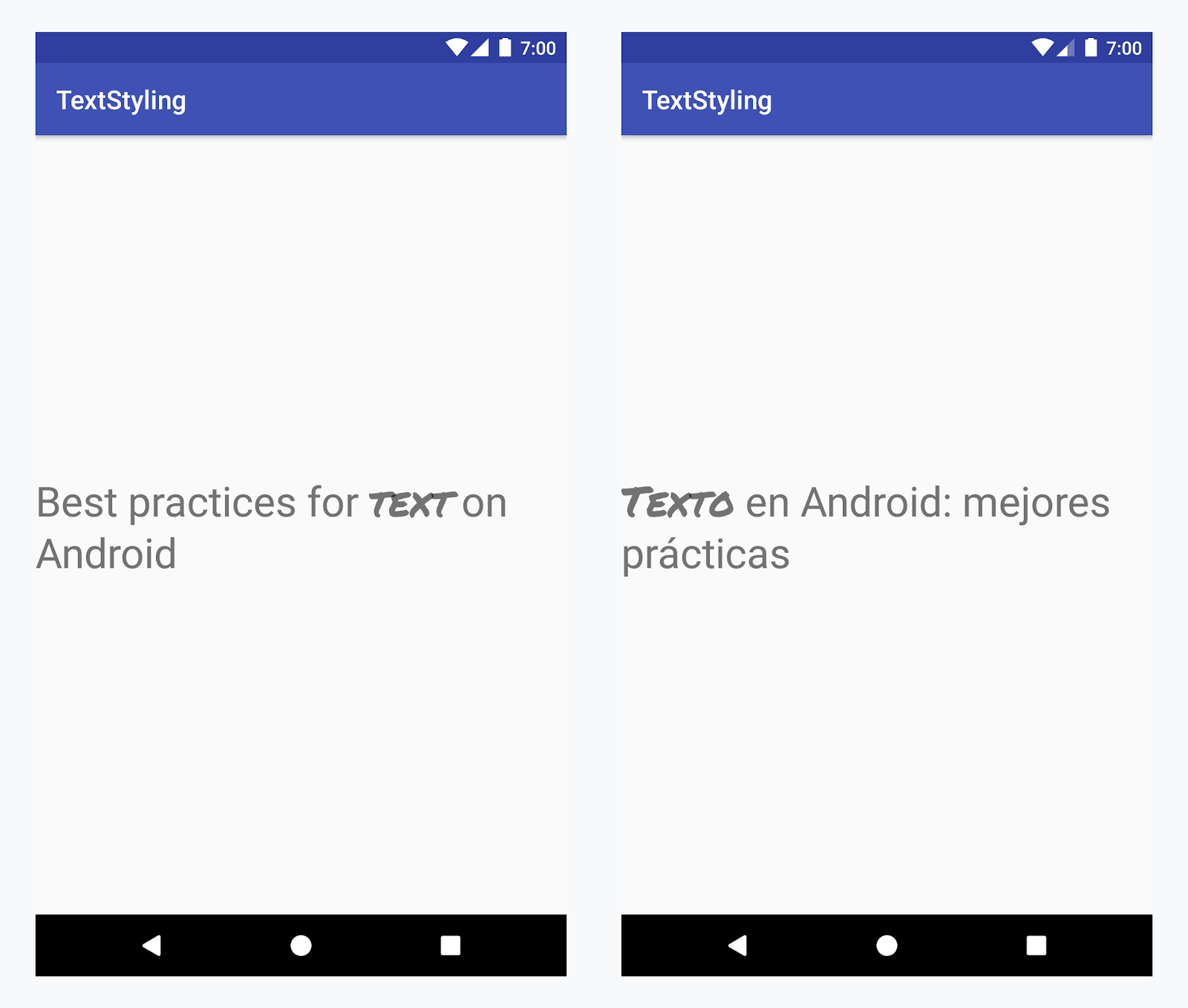
Como aplicar um typeface personalizado à palavra "texto" em todos os idiomas
Exemplo: como adicionar um typeface personalizado
-
Adicione uma tag
<annotation>e defina o par de chave-valor. Nesse caso, a chave é font, e o valor é o tipo de fonte que queremos usar: title_emphasis// values/strings.xml <string name="title">Best practices for <annotation font="title_emphasis">text</annotation> on Android</string> // values-es/strings.xml <string name="title"><annotation font="title_emphasis">Texto</annotation> en Android: mejores prácticas</string>
-
Carregue o recurso da string e encontre as anotações com a chave font. Em seguida, crie um span personalizado e substitua o existente.
Kotlin
// get the text as SpannedString so we can get the spans attached to the text
val titleText = getText(R.string.title) as SpannedString

// get all the annotation spans from the text
val annotations = titleText.getSpans(0, titleText.length, Annotation::class.java)

// create a copy of the title text as a SpannableString.
// the constructor copies both the text and the spans. so we can add and remove spans
val spannableString = SpannableString(titleText)

// iterate through all the annotation spans
for (annotation in annotations) {
   // look for the span with the key font
   if (annotation.key == "font") {
      val fontName = annotation.value
      // check the value associated to the annotation key
      if (fontName == "title_emphasis") {
         // create the typeface
         val typeface = getFontCompat(R.font.permanent_marker)
         // set the span at the same indices as the annotation
         spannableString.setSpan(CustomTypefaceSpan(typeface),
            titleText.getSpanStart(annotation),
            titleText.getSpanEnd(annotation),
            Spannable.SPAN_EXCLUSIVE_EXCLUSIVE)
      }
   }
}

// now, the spannableString contains both the annotation spans and the CustomTypefaceSpan
styledText.text = spannableString
Java
// get the text as SpannedString so we can get the spans attached to the text
SpannedString titleText = (SpannedString) getText(R.string.title);

// get all the annotation spans from the text
Annotation[] annotations = titleText.getSpans(0, titleText.length(), Annotation.class);

// create a copy of the title text as a SpannableString.
// the constructor copies both the text and the spans. so we can add and remove spans
SpannableString spannableString = new SpannableString(titleText);

// iterate through all the annotation spans
for (Annotation annotation: annotations) {
  // look for the span with the key font
  if (annotation.getKey().equals("font")) {
    String fontName = annotation.getValue();
    // check the value associated to the annotation key
    if (fontName.equals("title_emphasis")) {
    // create the typeface
    Typeface typeface = ResourcesCompat.getFont(this, R.font.roboto_mono);
    // set the span at the same indices as the annotation
    spannableString.setSpan(new CustomTypefaceSpan(typeface),
      titleText.getSpanStart(annotation),
      titleText.getSpanEnd(annotation),
      Spannable.SPAN_EXCLUSIVE_EXCLUSIVE);
    }
  }
}

// now, the spannableString contains both the annotation spans and the CustomTypefaceSpan
styledText.text = spannableString;
Se você estiver usando o mesmo texto várias vezes, vai precisar construir o objeto SpannableString uma vez e o reutilizar conforme necessário para evitar possíveis problemas de desempenho e memória.
Para mais exemplos de uso de anotações, consulte Como estilizar texto internacionalizado no Android.
Spans de anotação e parcelamento de texto
Como os spans de Annotation também são ParcelableSpans, os pares de chave-valor podem ser parcelados ou não. Desde que o receptor da parcela saiba como
interpretar as anotações, você pode usar spans de Annotation para aplicar estilos
personalizados ao texto parcelado.
Para manter seu estilo personalizado ao transmitir o texto para um Intent Bundle, primeiro é necessário adicionar spans de Annotation ao texto. Você pode fazer isso nos recursos XML usando a tag <annotation>, como mostrado no exemplo acima, ou no código criando um novo Annotation e definindo-o como um intervalo, conforme mostrado abaixo:
Kotlin
val spannableString = SpannableString("My spantastic text")
val annotation = Annotation("font", "title_emphasis")
spannableString.setSpan(annotation, 3, 7, Spannable.SPAN_EXCLUSIVE_EXCLUSIVE)

// start Activity with text with spans
val intent = Intent(this, MainActivity::class.java)
intent.putExtra(TEXT_EXTRA, spannableString)
startActivity(intent)
Java
SpannableString spannableString = new SpannableString("My spantastic text");
Annotation annotation = new Annotation("font", "title_emphasis");
spannableString.setSpan(annotation, 3, 7, 33);

// start Activity with text with spans
Intent intent = new Intent(this, MainActivity.class);
intent.putExtra(TEXT_EXTRA, spannableString);
this.startActivity(intent);
Extraia o texto do Bundle com uma SpannableString e, em seguida, analise
as anotações anexadas, conforme mostrado no exemplo acima.
Kotlin
// read text with Spans
val intentCharSequence = intent.getCharSequenceExtra(TEXT_EXTRA) as SpannableString
Java
// read text with Spans
SpannableString intentCharSequence = (SpannableString)intent.getCharSequenceExtra(TEXT_EXTRA);
Para mais informações sobre estilo de texto, consulte os links abaixo (em inglês):