

문자열 리소스를 사용하여 애플리케이션의 텍스트 문자열에 최적의 텍스트 스타일과 서식을 지정할 수 있습니다. 애플리케이션에 문자열을 제공할 수 있는 리소스 유형으로는 세 가지가 있습니다.
- String
- 단일 문자열을 제공하는 XML 리소스입니다.
- 문자열 배열
- 문자열로 구성된 배열을 제공하는 XML 리소스입니다.
- 수량 문자열 (복수형)
- 복수형 표시를 위해 여러 문자열을 포함하는 XML 리소스입니다.
모든 문자열은 몇 가지 스타일 지정 마크업 및 서식 지정 인수를 적용할 수 있습니다. 문자열의 스타일 및 서식을 지정하는 방법에 관한 자세한 내용은 서식 지정 및 스타일 지정 관련 섹션을 참고하세요.
문자열
애플리케이션 또는 다른 리소스 파일 (예: XML 레이아웃)에서 참조할 수 있는 단일 문자열입니다.
- 파일 위치:
res/values/filename.xml
파일 이름은 임의로 지정됩니다.<string>요소의name이 리소스 ID로 사용됩니다.- 컴파일된 리소스 데이터 유형:
String을 가리키는 리소스 포인터입니다.- 리소스 참조:
-
Java의 경우:
R.string.string_name
XML의 경우:@string/string_name - 문법:
-
<?xml version="1.0" encoding="utf-8"?>
<resources>
    <string
        name="string_name"
        >text_string</string>
</resources>
- 요소:
- 예:
res/values/strings.xml에 저장된 XML 파일:<?xml version="1.0" encoding="utf-8"?> <resources> <string name="hello">Hello!</string> </resources>
다음 레이아웃 XML은 뷰에 문자열을 적용합니다.
<TextView
    android:layout_width="fill_parent"
    android:layout_height="wrap_content"
    android:text="@string/hello" />
다음 애플리케이션 코드는 문자열을 검색합니다.
getString(int)또는getText(int)를 사용하여 문자열을 검색할 수 있습니다.getText(int)는 문자열에 적용된 모든 서식 있는 텍스트 스타일을 유지합니다.
문자열 배열
애플리케이션에서 참조될 수 있는 문자열로 구성된 배열입니다.
- 파일 위치:
res/values/filename.xml
파일 이름은 임의로 지정됩니다.<string-array>요소의name이 리소스 ID로 사용됩니다.- 컴파일된 리소스 데이터 유형:
String배열을 가리키는 리소스 포인터입니다.- 리소스 참조:
-
Java의 경우:
R.array.string_array_name
XML의 경우:@[package:]array/string_array_name - 문법:
-
<?xml version="1.0" encoding="utf-8"?>
<resources>
    <string-array
        name="string_array_name">
        <item
            >text_string</item>
    </string-array>
</resources>
- 요소:
- 예:
res/values/strings.xml에 저장된 XML 파일:<?xml version="1.0" encoding="utf-8"?> <resources> <string-array name="planets_array"> <item>Mercury</item> <item>Venus</item> <item>Earth</item> <item>Mars</item> </string-array> </resources>
Kotlin
val array: Array<String> =
resources.getStringArray(R.array.planets_array)Java
Resources res = getResources();
String[] planets = res.getStringArray(R.array.planets_array);
수량 문자열(복수형)
각 언어는 수량과 관련한 문법적 일치에 관한 규칙이 각각 다릅니다. 예를 들어 영어의 경우 수량 1은 특별한 사례입니다. 1의 경우 '1 book'으로 표기하지만 다른 수량의 경우 'n books'로 표기합니다. 단수형과 복수형 간의 이러한 구별은 매우 일반적인 것이며, 다른 언어에서는 더 미세하게 구별하기도 합니다. Android에서 지원하는 전체 집합은 zero, one, two, few, many, other입니다.
지정된 언어 및 수량에 사용할 사례를 결정하기 위한 규칙은 매우 복잡할 수 있으므로, Android는 적합한 리소스를 선택하는 getQuantityString()과 같은 메서드를 제공합니다.
API 24 이상에서는 훨씬 더 강력한 ICU MessageFormat 클래스를 대신 사용할 수 있습니다.
- 파일 위치:
res/values/filename.xml
파일 이름은 임의로 지정됩니다.<plurals>요소의name이 리소스 ID로 사용됩니다.- 리소스 참조:
- Java의 경우:
R.plurals.plural_name - 문법:
-
<?xml version="1.0" encoding="utf-8"?>
<resources>
    <plurals
        name="plural_name">
        <item
            quantity=["zero" | "one" | "two" | "few" | "many" | "other"]
            >text_string</item>
    </plurals>
</resources>
- 요소:
- 예:
res/values/strings.xml에 저장된 XML 파일:<?xml version="1.0" encoding="utf-8"?> <resources> <plurals name="numberOfSongsAvailable"> <!-- As a developer, you should always supply "one" and "other" strings. Your translators will know which strings are actually needed for their language. Always include %d in "one" because translators will need to use %d for languages where "one" doesn't mean 1 (as explained above). --> <item quantity="one">%d song found.</item> <item quantity="other">%d songs found.</item> </plurals> </resources>
res/values-pl/strings.xml에 저장된 XML 파일:<?xml version="1.0" encoding="utf-8"?> <resources> <plurals name="numberOfSongsAvailable"> <item quantity="one">Znaleziono %d piosenkę.</item> <item quantity="few">Znaleziono %d piosenki.</item> <item quantity="other">Znaleziono %d piosenek.</item> </plurals> </resources>
사용:
Kotlin
val count = getNumberOfSongsAvailable() val songsFound = resources.
getQuantityString(R.plurals.numberOfSongsAvailable, count, count)자바
int count = getNumberOfSongsAvailable(); Resources res =
getResources(); String songsFound = res.getQuantityString(R.plurals.numberOfSongsAvailable, count, count);getQuantityString()메서드를 사용할 때는 문자열에 문자열 서식 지정이 포함된 경우count를 두 번 전달해야 합니다. 예를 들어 문자열%d songs found의 경우 첫 번째count매개변수는 적절한 복수형 문자열을 선택하고, 두 번째count매개변수는%d자리표시자에 삽입됩니다. 복수형 문자열에 문자열 서식 지정이 포함되어 있지 않은 경우에는 세 번째 매개변수를getQuantityString에 전달할 필요가 없습니다.
서식과 스타일
다음은 문자열 리소스에 올바른 서식 및 스타일을 지정하는 방법에 관해 알아야 할 몇 가지 중요 사항입니다.
문자열 서식 지정
문자열의 서식을 지정해야 할 경우, 다음 예와 같이 문자열 리소스에 서식 인수를 추가하여 지정할 수 있습니다.
<string name="welcome_messages">Hello, %1$s! You have %2$d new messages.</string>
이 예에서 서식 문자열에는 두 개의 인수가 있습니다. %1$s는 문자열이고 %2$d는 10진수입니다. 그런 다음 getString(int, Object...)를 호출하여 문자열의 서식을 지정합니다. 예를 들면 다음과 같습니다.
Kotlin
var text = getString(R.string.welcome_messages, username, mailCount)
Java
String text = getString(R.string.welcome_messages, username, mailCount);
HTML 마크업을 사용하여 스타일 지정
HTML 마크업을 사용하여 문자열에 스타일을 추가할 수 있습니다. 예를 들면 다음과 같습니다.
<?xml version="1.0" encoding="utf-8"?>
<resources>
    <string name="welcome">Welcome to <b>Android</b>!</string>
</resources>
서식을 적용하지 않을 경우 setText(java.lang.CharSequence)를 호출하여 직접 TextView 텍스트를 설정할 수 있습니다. 그러나 경우에 따라 서식 문자열로도 사용되는 스타일이 지정된 텍스트 리소스를 생성하고자 할 수 있습니다.
일반적으로는 format(String, Object...) 및 getString(int, Object...) 메서드가 문자열에서 모든 스타일 정보를 제거하기 때문에 불가능합니다. 이에 대한 해결 방법은 이스케이프 처리된 항목을 사용하여 HTML 태그를 쓰는 것입니다. 그러면 서식 지정이 실행된 후 이 항목이 fromHtml(String)로 복구됩니다. 예를 들면 다음과 같습니다.
- 스타일이 지정된 텍스트 리소스를 HTML로 이스케이프 처리된 문자열로 저장합니다.
<resources> <string name="welcome_messages">Hello, %1$s! You have <b>%2$d new messages</b>.</string> </resources>
이 서식이 지정된 문자열에
<b>요소가 추가됩니다. 여는 괄호는 HTML에서<표기법을 사용하여 이스케이프 처리됩니다. - 그런 다음 평상시처럼 문자열의 서식을 지정하고
fromHtml(String)을 호출하여 이 HTML 텍스트를 스타일이 지정된 텍스트로 변환합니다.Kotlin
val text: String = getString(R.string.welcome_messages, username, mailCount)
val styledText: Spanned = Html.fromHtml(text, FROM_HTML_MODE_LEGACY)
자바
String text = getString(R.string.welcome_messages, username, mailCount);
Spanned styledText = Html.fromHtml(text, FROM_HTML_MODE_LEGACY);
fromHtml(String) 메서드가 모든 HTML 항목의 서식을 지정하므로 htmlEncode(String)를 사용하여 서식이 지정된 텍스트에 사용할 문자열에서 모든 가능한 HTML 문자를 이스케이프 처리해야 합니다. 예를 들어 '<' 또는 '&'와 같은 문자가 포함된 문자열의 서식을 지정하는 경우 서식을 지정하기 전에 이스케이프 처리해야 합니다. 그러면 서식이 지정된 문자열이 fromHtml(String)을 통해 전달될 때 문자가 원래 작성된 방식으로 표시됩니다. 예를 들면 다음과 같습니다.
Kotlin
val escapedUsername: String = TextUtils.htmlEncode(username)

val text: String = getString(R.string.welcome_messages, escapedUsername, mailCount)
val styledText: Spanned = Html.fromHtml(text, FROM_HTML_MODE_LEGACY)
Java
String escapedUsername = TextUtils.htmlEncode(username);

String text = getString(R.string.welcome_messages, escapedUsername, mailCount);
Spanned styledText = Html.fromHtml(text);
Spannable을 사용한 스타일 지정
Spannable은 색상 및 글꼴 두께와 같은 서체 속성을 사용하여 스타일을 지정할 수 있는 텍스트 객체입니다. SpannableStringBuilder를 사용하여 텍스트를 빌드한 후 android.text.style 패키지에 정의된 스타일을 텍스트에 적용할 수 있습니다.
다음과 같은 도우미 메서드를 사용하여 스팬 가능한 텍스트를 생성하는 작업의 대부분을 설정할 수 있습니다.
Kotlin
/**
 * Returns a CharSequence that concatenates the specified array of CharSequence
 * objects and then applies a list of zero or more tags to the entire range.
 *
 * @param content an array of character sequences to apply a style to
 * @param tags the styled span objects to apply to the content
 *        such as android.text.style.StyleSpan
 */
private fun apply(content: Array<out CharSequence>, vararg tags: Any): CharSequence {
    return SpannableStringBuilder().apply {
        openTags(tags)
        content.forEach { charSequence ->
            append(charSequence)
        }
        closeTags(tags)
    }
}

/**
 * Iterates over an array of tags and applies them to the beginning of the specified
 * Spannable object so that future text appended to the text will have the styling
 * applied to it. Do not call this method directly.
 */
private fun Spannable.openTags(tags: Array<out Any>) {
    tags.forEach { tag ->
        setSpan(tag, 0, 0, Spannable.SPAN_MARK_MARK)
    }
}

/**
 * "Closes" the specified tags on a Spannable by updating the spans to be
 * endpoint-exclusive so that future text appended to the end will not take
 * on the same styling. Do not call this method directly.
 */
private fun Spannable.closeTags(tags: Array<out Any>) {
    tags.forEach { tag ->
    if (length > 0) {
            setSpan(tag, 0, length, Spanned.SPAN_EXCLUSIVE_EXCLUSIVE)
        } else {
            removeSpan(tag)
        }
    }
}
자바
/**
 * Returns a CharSequence that concatenates the specified array of CharSequence
 * objects and then applies a list of zero or more tags to the entire range.
 *
 * @param content an array of character sequences to apply a style to
 * @param tags the styled span objects to apply to the content
 *        such as android.text.style.StyleSpan
 *
 */
private static CharSequence applyStyles(CharSequence[] content, Object[] tags) {
    SpannableStringBuilder text = new SpannableStringBuilder();
    openTags(text, tags);
    for (CharSequence item : content) {
        text.append(item);
    }
    closeTags(text, tags);
    return text;
}

/**
 * Iterates over an array of tags and applies them to the beginning of the specified
 * Spannable object so that future text appended to the text will have the styling
 * applied to it. Do not call this method directly.
 */
private static void openTags(Spannable text, Object[] tags) {
    for (Object tag : tags) {
        text.setSpan(tag, 0, 0, Spannable.SPAN_MARK_MARK);
    }
}

/**
 * "Closes" the specified tags on a Spannable by updating the spans to be
 * endpoint-exclusive so that future text appended to the end will not take
 * on the same styling. Do not call this method directly.
 */
private static void closeTags(Spannable text, Object[] tags) {
    int len = text.length();
    for (Object tag : tags) {
        if (len > 0) {
            text.setSpan(tag, 0, len, Spanned.SPAN_EXCLUSIVE_EXCLUSIVE);
        } else {
            text.removeSpan(tag);
        }
    }
}
다음 bold, italic, color 메서드는 위의 도우미 메서드를 래핑하고 android.text.style 패키지에 정의된 스타일을 적용하는 구체적인 예를 보여줍니다. 다른 유형의 텍스트 스타일 지정을 실행하는 유사한 메서드를 생성할 수 있습니다.
Kotlin
/**
 * Returns a CharSequence that applies boldface to the concatenation
 * of the specified CharSequence objects.
 */
fun bold(vararg content: CharSequence): CharSequence = apply(content, StyleSpan(Typeface.BOLD))

/**
 * Returns a CharSequence that applies italics to the concatenation
 * of the specified CharSequence objects.
 */
fun italic(vararg content: CharSequence): CharSequence = apply(content, StyleSpan(Typeface.ITALIC))

/**
 * Returns a CharSequence that applies a foreground color to the
 * concatenation of the specified CharSequence objects.
 */
fun color(color: Int, vararg content: CharSequence): CharSequence =
        apply(content, ForegroundColorSpan(color))
자바
/**
 * Returns a CharSequence that applies boldface to the concatenation
 * of the specified CharSequence objects.
 */
public static CharSequence bold(CharSequence... content) {
    return apply(content, new StyleSpan(Typeface.BOLD));
}

/**
 * Returns a CharSequence that applies italics to the concatenation
 * of the specified CharSequence objects.
 */
public static CharSequence italic(CharSequence... content) {
    return apply(content, new StyleSpan(Typeface.ITALIC));
}

/**
 * Returns a CharSequence that applies a foreground color to the
 * concatenation of the specified CharSequence objects.
 */
public static CharSequence color(int color, CharSequence... content) {
    return apply(content, new ForegroundColorSpan(color));
}
이 메서드를 함께 엮어서 다양한 스타일을 문구 내의 각 단어에 적용하는 방법의 예는 다음과 같습니다.
Kotlin
// Create an italic "hello, " a red "world",
// and bold the entire sequence.
val text: CharSequence = bold(italic(getString(R.string.hello)),
        color(Color.RED, getString(R.string.world)))
자바
// Create an italic "hello, " a red "world",
// and bold the entire sequence.
CharSequence text = bold(italic(getString(R.string.hello)),
    color(Color.RED, getString(R.string.world)));
core-ktx Kotlin 모듈에도 스팬을 더욱 쉽게 처리할 수 있는 확장 기능이 포함되어 있습니다. 자세한 내용은 GitHub에서 android.text 패키지 문서를 참고하세요.
스팬을 처리하는 방법에 관한 자세한 내용은 다음 링크를 참고하세요.
주석으로 스타일 지정
strings.xml 리소스 파일에서 Annotation 클래스와 <annotation> 태그를 함께 사용하여 복잡한 스타일이나 맞춤 스타일을 지정할 수 있습니다. 주석 태그를 사용하면 XML 프레임워크에서 맞춤 키-값 쌍을 정의한 다음, Annotation 스팬으로 변환하여 맞춤 스타일을 지정할 문자열 부분을 표시할 수 있습니다. 그런 다음, 주석을 검색하고 키와 값을 이용해 스타일을 적용합니다.
주석을 작성할 때는 모든 string.xml 파일에 있는 문자열의 모든 번역문에 <annotation> 태그를 추가하세요.
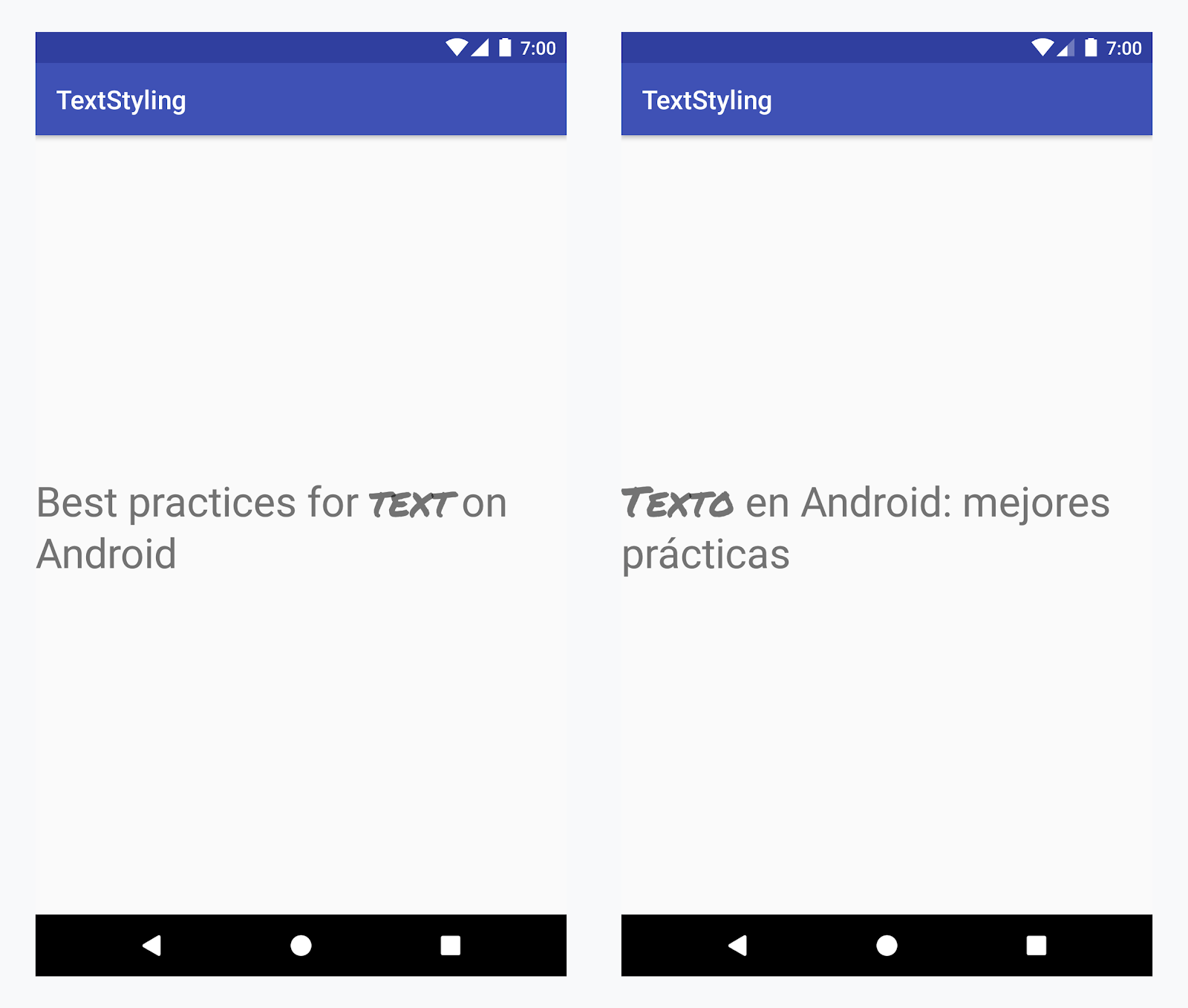
모든 언어로 'text' 단어에 맞춤 서체 적용
예: 맞춤 서체 추가
-
<annotation>태그를 추가하고 키-값 쌍을 정의합니다. 이 경우 키는 font이고 값은 사용할 글꼴 유형, 즉 title_emphasis입니다.// values/strings.xml <string name="title">Best practices for <annotation font="title_emphasis">text</annotation> on Android</string> // values-es/strings.xml <string name="title"><annotation font="title_emphasis">Texto</annotation> en Android: mejores prácticas</string>
-
문자열 리소스를 로드하고 font 키로 주석을 찾습니다. 그런 다음, 맞춤 스팬을 생성하고 기존 스팬을 대체합니다.
Kotlin
// get the text as SpannedString so we can get the spans attached to the text
val titleText = getText(R.string.title) as SpannedString

// get all the annotation spans from the text
val annotations = titleText.getSpans(0, titleText.length, Annotation::class.java)

// create a copy of the title text as a SpannableString.
// the constructor copies both the text and the spans. so we can add and remove spans
val spannableString = SpannableString(titleText)

// iterate through all the annotation spans
for (annotation in annotations) {
   // look for the span with the key font
   if (annotation.key == "font") {
      val fontName = annotation.value
      // check the value associated to the annotation key
      if (fontName == "title_emphasis") {
         // create the typeface
         val typeface = getFontCompat(R.font.permanent_marker)
         // set the span at the same indices as the annotation
         spannableString.setSpan(CustomTypefaceSpan(typeface),
            titleText.getSpanStart(annotation),
            titleText.getSpanEnd(annotation),
            Spannable.SPAN_EXCLUSIVE_EXCLUSIVE)
      }
   }
}

// now, the spannableString contains both the annotation spans and the CustomTypefaceSpan
styledText.text = spannableString
자바
// get the text as SpannedString so we can get the spans attached to the text
SpannedString titleText = (SpannedString) getText(R.string.title);

// get all the annotation spans from the text
Annotation[] annotations = titleText.getSpans(0, titleText.length(), Annotation.class);

// create a copy of the title text as a SpannableString.
// the constructor copies both the text and the spans. so we can add and remove spans
SpannableString spannableString = new SpannableString(titleText);

// iterate through all the annotation spans
for (Annotation annotation: annotations) {
  // look for the span with the key font
  if (annotation.getKey().equals("font")) {
    String fontName = annotation.getValue();
    // check the value associated to the annotation key
    if (fontName.equals("title_emphasis")) {
    // create the typeface
    Typeface typeface = ResourcesCompat.getFont(this, R.font.roboto_mono);
    // set the span at the same indices as the annotation
    spannableString.setSpan(new CustomTypefaceSpan(typeface),
      titleText.getSpanStart(annotation),
      titleText.getSpanEnd(annotation),
      Spannable.SPAN_EXCLUSIVE_EXCLUSIVE);
    }
  }
}

// now, the spannableString contains both the annotation spans and the CustomTypefaceSpan
styledText.text = spannableString;
같은 텍스트를 여러 번 사용하는 경우, SpannableString 객체는 한 번만 생성한 다음 필요에 따라 재사용해야 잠재적인 성능 및 메모리 문제를 예방할 수 있습니다.
주석 사용에 관한 자세한 예는 Android에서 국제화된 텍스트에 스타일 지정을 참고하세요.
주석 스팬 및 텍스트 파슬링
Annotation 스팬은 ParcelableSpans이기도 하기 때문에 키-값 쌍은 파슬링되기도 하고 파슬링을 해제하기도 합니다. 파슬을 수신하는 쪽이 주석을 해석하는 방법을 아는 경우 Annotation 스팬을 사용해서 파슬링된 텍스트에 맞춤 스타일을 적용할 수 있습니다.
텍스트를 인텐트 번들에 전달할 때 맞춤 스타일을 유지하려면 먼저 Annotation 스팬을 텍스트에 추가해야 합니다. 위의 예와 같이 <annotation> 태그를 사용하여 XML 리소스에서 추가하거나 아래와 같이 새로운 Annotation을 생성하고 스팬으로 설정하여 코드에서 추가할 수 있습니다.
Kotlin
val spannableString = SpannableString("My spantastic text")
val annotation = Annotation("font", "title_emphasis")
spannableString.setSpan(annotation, 3, 7, Spannable.SPAN_EXCLUSIVE_EXCLUSIVE)

// start Activity with text with spans
val intent = Intent(this, MainActivity::class.java)
intent.putExtra(TEXT_EXTRA, spannableString)
startActivity(intent)
자바
SpannableString spannableString = new SpannableString("My spantastic text");
Annotation annotation = new Annotation("font", "title_emphasis");
spannableString.setSpan(annotation, 3, 7, 33);

// start Activity with text with spans
Intent intent = new Intent(this, MainActivity.class);
intent.putExtra(TEXT_EXTRA, spannableString);
this.startActivity(intent);
Bundle에서 SpannableString으로 텍스트를 검색한 다음, 위의 예와 같이 연결된 주석을 파싱합니다.
Kotlin
// read text with Spans
val intentCharSequence = intent.getCharSequenceExtra(TEXT_EXTRA) as SpannableString
Java
// read text with Spans
SpannableString intentCharSequence = (SpannableString)intent.getCharSequenceExtra(TEXT_EXTRA);
텍스트 스타일 지정에 관한 자세한 내용은 다음 링크를 참고하세요.