

Concetti e implementazione di Jetpack Compose
Una risorsa stringa fornisce stringhe di testo per la tua applicazione con stile e formattazione del testo facoltativi. Esistono tre tipi di risorse che possono fornire stringhe alla tua applicazione:
- String
- Risorsa XML che fornisce una singola stringa.
- String Array
- Risorsa XML che fornisce un array di stringhe.
- Stringhe di quantità (plurali)
- Risorsa XML che contiene stringhe diverse per la pluralizzazione.
Tutte le stringhe sono in grado di applicare alcuni argomenti di formattazione e markup di stile. Per informazioni sulla formattazione e sullo stile delle stringhe, consulta la sezione Formattazione e stile.
Stringa
Una singola stringa a cui è possibile fare riferimento dall'applicazione o da altri file di risorse (ad esempio un layout XML).
- posizione del file:
res/values/filename.xml
Il nome file è arbitrario. L'<string>dell'elementonameviene utilizzato come ID risorsa.- tipo di dati della risorsa compilata:
- Puntatore alla risorsa
String. - resource reference:
-
In Java:
R.string.string_name
In XML:@string/string_name - sintassi:
-
<?xml version="1.0" encoding="utf-8"?>
<resources>
    <string
        name="string_name"
        >text_string</string>
</resources>
- elementi:
- esempio:
- File XML salvato in
res/values/strings.xml:<?xml version="1.0" encoding="utf-8"?> <resources> <string name="hello">Hello!</string> </resources>
Questo XML di layout applica una stringa a una visualizzazione:
<TextView
    android:layout_width="fill_parent"
    android:layout_height="wrap_content"
    android:text="@string/hello" />
Questo codice dell'applicazione recupera una stringa:
Puoi utilizzare
getString(int)ogetText(int)per recuperare una stringa.getText(int)mantiene qualsiasi stile RTF applicato alla stringa.
Array di stringhe
Un array di stringhe a cui è possibile fare riferimento dall'applicazione.
- posizione del file:
res/values/filename.xml
Il nome file è arbitrario. L'<string-array>dell'elementonameviene utilizzato come ID risorsa.- tipo di dati della risorsa compilata:
- Puntatore di risorse a un array di
String. - resource reference:
-
In Java:
R.array.string_array_name
In XML:@[package:]array/string_array_name - sintassi:
-
<?xml version="1.0" encoding="utf-8"?>
<resources>
    <string-array
        name="string_array_name">
        <item
            >text_string</item>
    </string-array>
</resources>
- elementi:
- esempio:
- File XML salvato in
res/values/strings.xml:<?xml version="1.0" encoding="utf-8"?> <resources> <string-array name="planets_array"> <item>Mercury</item> <item>Venus</item> <item>Earth</item> <item>Mars</item> </string-array> </resources>
Kotlin
val array: Array<String> =
resources.getStringArray(R.array.planets_array)Java
Resources res = getResources();
String[] planets = res.getStringArray(R.array.planets_array);
Stringhe di quantità (plurali)
Lingue diverse hanno regole diverse per la concordanza grammaticale con
la quantità. In inglese, ad esempio, la quantità 1 è un caso speciale. Scriviamo
"1 libro", ma per qualsiasi altra quantità scriveremmo "n libri". Questa distinzione
tra singolare e plurale è molto comune, ma altre lingue fanno distinzioni
più sottili. Il set completo supportato da Android è zero, one, two, few,
many e other.
Le regole per decidere quale caso utilizzare per una determinata lingua e quantità possono
essere molto complesse, quindi Android ti fornisce metodi come
getQuantityString() per selezionare la risorsa appropriata.
Sulle API 24 e successive puoi utilizzare la classe ICU MessageFormat, molto più potente.
- posizione del file:
res/values/filename.xml
Il nome file è arbitrario. L'<plurals>dell'elementonameviene utilizzato come ID risorsa.- resource reference:
-
In Java:
R.plurals.plural_name - sintassi:
-
<?xml version="1.0" encoding="utf-8"?>
<resources>
    <plurals
        name="plural_name">
        <item
            quantity=["zero" | "one" | "two" | "few" | "many" | "other"]
            >text_string</item>
    </plurals>
</resources>
- elementi:
- esempio:
- File XML salvato in
res/values/strings.xml:<?xml version="1.0" encoding="utf-8"?> <resources> <plurals name="numberOfSongsAvailable"> <!-- As a developer, you should always supply "one" and "other" strings. Your translators will know which strings are actually needed for their language. Always include %d in "one" because translators will need to use %d for languages where "one" doesn't mean 1 (as explained above). --> <item quantity="one">%d song found.</item> <item quantity="other">%d songs found.</item> </plurals> </resources>
File XML salvato in
res/values-pl/strings.xml:<?xml version="1.0" encoding="utf-8"?> <resources> <plurals name="numberOfSongsAvailable"> <item quantity="one">Znaleziono %d piosenkę.</item> <item quantity="few">Znaleziono %d piosenki.</item> <item quantity="other">Znaleziono %d piosenek.</item> </plurals> </resources>
Uso:
Kotlin
val count = getNumberOfSongsAvailable() val songsFound = resources.
getQuantityString(R.plurals.numberOfSongsAvailable, count, count)Java
int count = getNumberOfSongsAvailable();
Resources res = getResources();
String songsFound = res.getQuantityString(R.plurals.numberOfSongsAvailable, count, count);
Quando utilizzi il metodo
getQuantityString(), devi trasmetterecountdue volte se la stringa include la formattazione della stringa. Ad esempio, per la stringa%d songs found, il primo parametrocountseleziona la stringa plurale appropriata e il secondo parametrocountviene inserito nel segnaposto%d. Se le stringhe plurali non includono la formattazione delle stringhe, non devi passare il terzo parametro agetQuantityString.
Formato e stile
Ecco alcune informazioni importanti sulla formattazione e sullo stile corretti delle risorse stringa.
Stringhe di formattazione
Se devi formattare le stringhe, puoi farlo inserendo gli argomenti di formattazione nella risorsa stringa, come mostrato nell'esempio di risorsa seguente.
<string name="welcome_messages">Hello, %1$s! You have %2$d new messages.</string>
In questo esempio, la stringa di formato ha due argomenti: %1$s è una stringa e
%2$d è un numero decimale. Quindi, formatta la stringa chiamando
getString(int, Object...). Ad esempio:
Kotlin
var text = getString(R.string.welcome_messages, username, mailCount)
Java
String text = getString(R.string.welcome_messages, username, mailCount);
Applicare stili con il markup HTML
Puoi aggiungere uno stile alle stringhe con il markup HTML. Ad esempio:
<?xml version="1.0" encoding="utf-8"?>
<resources>
    <string name="welcome">Welcome to <b>Android</b>!</string>
</resources>
Se non applichi la formattazione, puoi impostare il testo TextView direttamente chiamando setText(java.lang.CharSequence). In alcuni casi, tuttavia, potresti
voler creare una risorsa di testo con stile che venga utilizzata anche come stringa di formato.
Normalmente, questo non funziona perché i metodi format(String, Object...) e
getString(int, Object...) rimuovono tutte le informazioni di stile dalla
stringa. La soluzione alternativa consiste nello scrivere i tag HTML con entità
di escape, che vengono poi recuperate con fromHtml(String), dopo
la formattazione. Ad esempio:
- Memorizza la risorsa di testo con stile come stringa con escape HTML:
<resources> <string name="welcome_messages">Hello, %1$s! You have <b>%2$d new messages</b>.</string> </resources>
In questa stringa formattata viene aggiunto un elemento
<b>. Nota che la parentesi aperta è codificata in HTML utilizzando la notazione<. - Quindi, formatta la stringa come di consueto, ma chiama anche
fromHtml(String)per convertire il testo HTML in testo con stile:Kotlin
val text: String = getString(R.string.welcome_messages, username, mailCount)
val styledText: Spanned = Html.fromHtml(text, FROM_HTML_MODE_LEGACY)
Java
String text = getString(R.string.welcome_messages, username, mailCount);
Spanned styledText = Html.fromHtml(text, FROM_HTML_MODE_LEGACY);
Poiché il metodo fromHtml(String) formatta tutte le entità HTML, assicurati
di eseguire l'escape di tutti i possibili caratteri HTML nelle stringhe che utilizzi con il testo
formattato, utilizzando htmlEncode(String). Ad esempio, se stai formattando una
stringa che contiene caratteri come "<" o "&", questi devono essere
sottoposti all'escape prima della formattazione, in modo che quando la stringa formattata viene passata tramite
fromHtml(String), i caratteri vengano visualizzati nel modo in cui erano stati originariamente
scritti. Ad esempio:
Kotlin
val escapedUsername: String = TextUtils.htmlEncode(username)

val text: String = getString(R.string.welcome_messages, escapedUsername, mailCount)
val styledText: Spanned = Html.fromHtml(text, FROM_HTML_MODE_LEGACY)
Java
String escapedUsername = TextUtils.htmlEncode(username);

String text = getString(R.string.welcome_messages, escapedUsername, mailCount);
Spanned styledText = Html.fromHtml(text);
Stili con gli spannable
Un Spannable è un oggetto di testo a cui puoi applicare uno stile con proprietà tipografiche
come colore e spessore del carattere. Utilizzi SpannableStringBuilder per creare
il testo e poi applicare gli stili definiti nel pacchetto android.text.style
al testo.
Puoi utilizzare i seguenti metodi helper per impostare gran parte del lavoro di creazione di testo esteso:
Kotlin
/**
 * Returns a CharSequence that concatenates the specified array of CharSequence
 * objects and then applies a list of zero or more tags to the entire range.
 *
 * @param content an array of character sequences to apply a style to
 * @param tags the styled span objects to apply to the content
 *        such as android.text.style.StyleSpan
 */
private fun apply(content: Array<out CharSequence>, vararg tags: Any): CharSequence {
    return SpannableStringBuilder().apply {
        openTags(tags)
        content.forEach { charSequence ->
            append(charSequence)
        }
        closeTags(tags)
    }
}

/**
 * Iterates over an array of tags and applies them to the beginning of the specified
 * Spannable object so that future text appended to the text will have the styling
 * applied to it. Do not call this method directly.
 */
private fun Spannable.openTags(tags: Array<out Any>) {
    tags.forEach { tag ->
        setSpan(tag, 0, 0, Spannable.SPAN_MARK_MARK)
    }
}

/**
 * "Closes" the specified tags on a Spannable by updating the spans to be
 * endpoint-exclusive so that future text appended to the end will not take
 * on the same styling. Do not call this method directly.
 */
private fun Spannable.closeTags(tags: Array<out Any>) {
    tags.forEach { tag ->
    if (length > 0) {
            setSpan(tag, 0, length, Spanned.SPAN_EXCLUSIVE_EXCLUSIVE)
        } else {
            removeSpan(tag)
        }
    }
}
Java
/**
 * Returns a CharSequence that concatenates the specified array of CharSequence
 * objects and then applies a list of zero or more tags to the entire range.
 *
 * @param content an array of character sequences to apply a style to
 * @param tags the styled span objects to apply to the content
 *        such as android.text.style.StyleSpan
 *
 */
private static CharSequence applyStyles(CharSequence[] content, Object[] tags) {
    SpannableStringBuilder text = new SpannableStringBuilder();
    openTags(text, tags);
    for (CharSequence item : content) {
        text.append(item);
    }
    closeTags(text, tags);
    return text;
}

/**
 * Iterates over an array of tags and applies them to the beginning of the specified
 * Spannable object so that future text appended to the text will have the styling
 * applied to it. Do not call this method directly.
 */
private static void openTags(Spannable text, Object[] tags) {
    for (Object tag : tags) {
        text.setSpan(tag, 0, 0, Spannable.SPAN_MARK_MARK);
    }
}

/**
 * "Closes" the specified tags on a Spannable by updating the spans to be
 * endpoint-exclusive so that future text appended to the end will not take
 * on the same styling. Do not call this method directly.
 */
private static void closeTags(Spannable text, Object[] tags) {
    int len = text.length();
    for (Object tag : tags) {
        if (len > 0) {
            text.setSpan(tag, 0, len, Spanned.SPAN_EXCLUSIVE_EXCLUSIVE);
        } else {
            text.removeSpan(tag);
        }
    }
}
I seguenti metodi bold, italic e color racchiudono i metodi helper precedenti e mostrano esempi specifici di applicazione degli stili definiti nel pacchetto android.text.style. Puoi creare metodi simili per eseguire altri
tipi di formattazione del testo.
Kotlin
/**
 * Returns a CharSequence that applies boldface to the concatenation
 * of the specified CharSequence objects.
 */
fun bold(vararg content: CharSequence): CharSequence = apply(content, StyleSpan(Typeface.BOLD))

/**
 * Returns a CharSequence that applies italics to the concatenation
 * of the specified CharSequence objects.
 */
fun italic(vararg content: CharSequence): CharSequence = apply(content, StyleSpan(Typeface.ITALIC))

/**
 * Returns a CharSequence that applies a foreground color to the
 * concatenation of the specified CharSequence objects.
 */
fun color(color: Int, vararg content: CharSequence): CharSequence =
        apply(content, ForegroundColorSpan(color))
Java
/**
 * Returns a CharSequence that applies boldface to the concatenation
 * of the specified CharSequence objects.
 */
public static CharSequence bold(CharSequence... content) {
    return apply(content, new StyleSpan(Typeface.BOLD));
}

/**
 * Returns a CharSequence that applies italics to the concatenation
 * of the specified CharSequence objects.
 */
public static CharSequence italic(CharSequence... content) {
    return apply(content, new StyleSpan(Typeface.ITALIC));
}

/**
 * Returns a CharSequence that applies a foreground color to the
 * concatenation of the specified CharSequence objects.
 */
public static CharSequence color(int color, CharSequence... content) {
    return apply(content, new ForegroundColorSpan(color));
}
Ecco un esempio di come concatenare questi metodi per applicare vari stili a singole parole all'interno di una frase:
Kotlin
// Create an italic "hello, " a red "world",
// and bold the entire sequence.
val text: CharSequence = bold(italic(getString(R.string.hello)),
        color(Color.RED, getString(R.string.world)))
Java
// Create an italic "hello, " a red "world",
// and bold the entire sequence.
CharSequence text = bold(italic(getString(R.string.hello)),
    color(Color.RED, getString(R.string.world)));
Il modulo Kotlin core-ktx contiene anche funzioni di estensione che semplificano ulteriormente l'utilizzo
degli span. Per saperne di più, puoi consultare la documentazione del pacchetto android.text su GitHub.
Per saperne di più su come lavorare con gli span, consulta i seguenti link:
Applicare uno stile con le annotazioni
Puoi applicare stili complessi o personalizzati utilizzando la classe Annotation
insieme al tag <annotation> nei file di risorse strings.xml. Il tag di
annotazione ti consente di contrassegnare parti della stringa per uno stile personalizzato definendo
coppie chiave-valore personalizzate nell'XML che il framework converte
in intervalli Annotation. Puoi quindi recuperare queste annotazioni e utilizzare la
chiave e il valore per applicare lo stile.
Quando crei annotazioni, assicurati di aggiungere il tag <annotation>
a tutte le traduzioni della stringa in ogni file strings.xml.
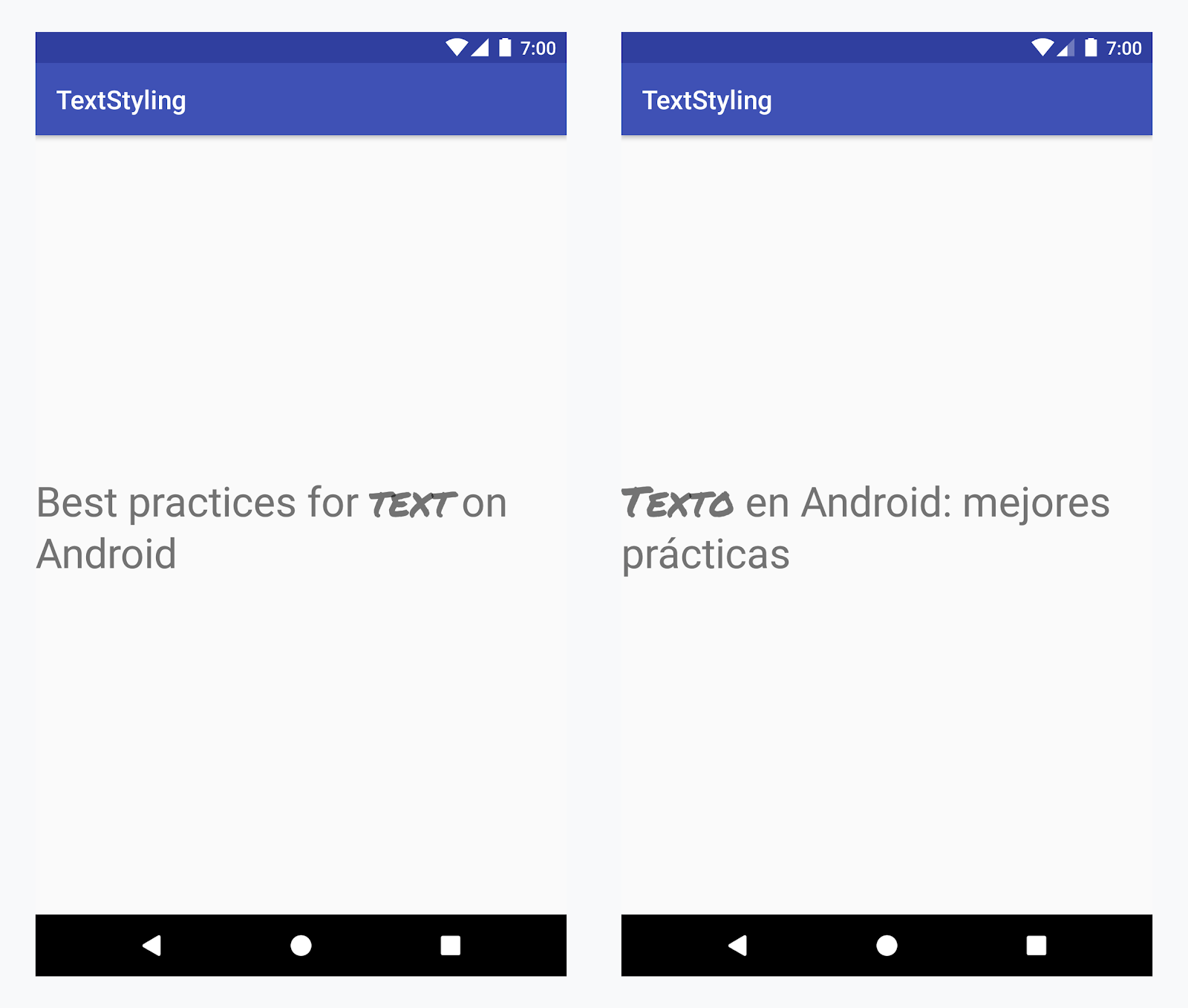
Applicazione di un carattere personalizzato alla parola "testo" in tutte le lingue
Esempio: aggiunta di un carattere personalizzato
-
Aggiungi il tag
<annotation>e definisci la coppia chiave-valore. In questo caso, la chiave è font e il valore è il tipo di carattere che vogliamo utilizzare: title_emphasis// values/strings.xml <string name="title">Best practices for <annotation font="title_emphasis">text</annotation> on Android</string> // values-es/strings.xml <string name="title"><annotation font="title_emphasis">Texto</annotation> en Android: mejores prácticas</string>
-
Carica la risorsa stringa e trova le annotazioni con la chiave font. Poi crea un intervallo personalizzato e sostituisci quello esistente.
Kotlin
// get the text as SpannedString so we can get the spans attached to the text
val titleText = getText(R.string.title) as SpannedString

// get all the annotation spans from the text
val annotations = titleText.getSpans(0, titleText.length, Annotation::class.java)

// create a copy of the title text as a SpannableString.
// the constructor copies both the text and the spans. so we can add and remove spans
val spannableString = SpannableString(titleText)

// iterate through all the annotation spans
for (annotation in annotations) {
   // look for the span with the key font
   if (annotation.key == "font") {
      val fontName = annotation.value
      // check the value associated to the annotation key
      if (fontName == "title_emphasis") {
         // create the typeface
         val typeface = getFontCompat(R.font.permanent_marker)
         // set the span at the same indices as the annotation
         spannableString.setSpan(CustomTypefaceSpan(typeface),
            titleText.getSpanStart(annotation),
            titleText.getSpanEnd(annotation),
            Spannable.SPAN_EXCLUSIVE_EXCLUSIVE)
      }
   }
}

// now, the spannableString contains both the annotation spans and the CustomTypefaceSpan
styledText.text = spannableString
Java
// get the text as SpannedString so we can get the spans attached to the text
SpannedString titleText = (SpannedString) getText(R.string.title);

// get all the annotation spans from the text
Annotation[] annotations = titleText.getSpans(0, titleText.length(), Annotation.class);

// create a copy of the title text as a SpannableString.
// the constructor copies both the text and the spans. so we can add and remove spans
SpannableString spannableString = new SpannableString(titleText);

// iterate through all the annotation spans
for (Annotation annotation: annotations) {
  // look for the span with the key font
  if (annotation.getKey().equals("font")) {
    String fontName = annotation.getValue();
    // check the value associated to the annotation key
    if (fontName.equals("title_emphasis")) {
    // create the typeface
    Typeface typeface = ResourcesCompat.getFont(this, R.font.roboto_mono);
    // set the span at the same indices as the annotation
    spannableString.setSpan(new CustomTypefaceSpan(typeface),
      titleText.getSpanStart(annotation),
      titleText.getSpanEnd(annotation),
      Spannable.SPAN_EXCLUSIVE_EXCLUSIVE);
    }
  }
}

// now, the spannableString contains both the annotation spans and the CustomTypefaceSpan
styledText.text = spannableString;
Se utilizzi lo stesso testo più volte, devi costruire l'oggetto SpannableString una sola volta e riutilizzarlo in base alle necessità per evitare potenziali problemi di prestazioni e memoria.
Per altri esempi di utilizzo delle annotazioni, consulta Applicare stili al testo internazionalizzato in Android.
Intervalli di annotazione e suddivisione del testo
Poiché gli intervalli Annotation sono anche ParcelableSpans, le coppie chiave-valore
vengono suddivise e ricomposte. Se il destinatario del pacco sa come interpretare le annotazioni, puoi utilizzare gli span Annotation per applicare uno stile personalizzato al testo del pacco.
Per mantenere lo stile personalizzato quando passi il testo a un Intent Bundle, devi
prima aggiungere gli span Annotation al testo. Puoi farlo nelle risorse XML tramite il tag <annotation>, come mostrato nell'esempio precedente, o nel codice creando un nuovo Annotation e impostandolo come span, come mostrato di seguito:
Kotlin
val spannableString = SpannableString("My spantastic text")
val annotation = Annotation("font", "title_emphasis")
spannableString.setSpan(annotation, 3, 7, Spannable.SPAN_EXCLUSIVE_EXCLUSIVE)

// start Activity with text with spans
val intent = Intent(this, MainActivity::class.java)
intent.putExtra(TEXT_EXTRA, spannableString)
startActivity(intent)
Java
SpannableString spannableString = new SpannableString("My spantastic text");
Annotation annotation = new Annotation("font", "title_emphasis");
spannableString.setSpan(annotation, 3, 7, 33);

// start Activity with text with spans
Intent intent = new Intent(this, MainActivity.class);
intent.putExtra(TEXT_EXTRA, spannableString);
this.startActivity(intent);
Recupera il testo da Bundle come SpannableString e poi analizza le annotazioni allegate, come mostrato nell'esempio precedente.
Kotlin
// read text with Spans
val intentCharSequence = intent.getCharSequenceExtra(TEXT_EXTRA) as SpannableString
Java
// read text with Spans
SpannableString intentCharSequence = (SpannableString)intent.getCharSequenceExtra(TEXT_EXTRA);
Per saperne di più sullo stile del testo, consulta i seguenti link: