

מושגים והטמעה ב-Jetpack פיתוח נייטיב
משאב מחרוזת מספק מחרוזות טקסט לאפליקציה עם עיצוב ופורמט טקסט אופציונליים. יש שלושה סוגים של מקורות שיכולים לספק מחרוזות לאפליקציה:
- מחרוזת
- משאב XML שמספק מחרוזת אחת.
- מערך מחרוזות
- משאב XML שמספק מערך של מחרוזות.
- Quantity Strings (Plurals)
- משאב XML שמכיל מחרוזות שונות לריבוי.
כל המחרוזות יכולות להחיל תגי עיצוב וארגומנטים של עיצוב. מידע על עיצוב מחרוזות זמין בקטע עיצוב.
מחרוזת
מחרוזת אחת שאפשר להפנות אליה מהאפליקציה או מקובצי משאבים אחרים (כמו פריסת XML).
- מיקום הקובץ:
res/values/filename.xml
שם הקובץ הוא שרירותי. המאפייןnameשל הרכיב<string>משמש כמזהה המשאב.- סוג הנתונים של המשאב שעבר קומפילציה:
- מצביע משאב אל
String. - הפניה למשאבים:
-
ב-Java:
R.string.string_name
ב-XML: @string/string_name - תחביר:
-
<?xml version="1.0" encoding="utf-8"?>
<resources>
    <string
        name="string_name"
        >text_string</string>
</resources>
- elements:
- דוגמא: קובץ ה-XML
- נשמר במיקום
res/values/strings.xml:<?xml version="1.0" encoding="utf-8"?> <resources> <string name="hello">Hello!</string> </resources>
קובץ ה-XML של הפריסה הזה מחיל מחרוזת על תצוגה:
<TextView
    android:layout_width="fill_parent"
    android:layout_height="wrap_content"
    android:text="@string/hello" />
קוד האפליקציה הזה מאחזר מחרוזת:
אפשר להשתמש ב-
getString(int)או ב-getText(int)כדי לאחזר מחרוזת. getText(int)שומרת על כל עיצוב טקסט עשיר שהוחל על המחרוזת.
מערך מחרוזות
מערך של מחרוזות שאפשר להפנות אליהן מהאפליקציה.
- מיקום הקובץ:
res/values/filename.xml
שם הקובץ הוא שרירותי. המאפייןnameשל הרכיב<string-array>משמש כמזהה המשאב.- סוג הנתונים של המשאב שעבר קומפילציה:
- מצביע למשאב למערך של
String. - הפניה למשאבים:
-
ב-Java:
R.array.string_array_name
ב-XML: @[package:]array/string_array_name - תחביר:
-
<?xml version="1.0" encoding="utf-8"?>
<resources>
    <string-array
        name="string_array_name">
        <item
            >text_string</item>
    </string-array>
</resources>
- elements:
- דוגמא: קובץ ה-XML
- נשמר במיקום
res/values/strings.xml:<?xml version="1.0" encoding="utf-8"?> <resources> <string-array name="planets_array"> <item>Mercury</item> <item>Venus</item> <item>Earth</item> <item>Mars</item> </string-array> </resources>
Kotlin
val array: Array<String> =
resources.getStringArray(R.array.planets_array)Java
Resources res = getResources();
String[] planets = res.getStringArray(R.array.planets_array);
מחרוזות של כמות (צורות רבות)
בשפות שונות יש כללים שונים להתאמה דקדוקית לכמות. לדוגמה, באנגלית, הכמות 1 היא מקרה מיוחד. אנחנו כותבים 'ספר אחד', אבל אם מדובר בכמות אחרת, אנחנו כותבים 'n ספרים'. ההבחנה הזו בין יחיד לרבים היא מאוד נפוצה, אבל בשפות אחרות יש הבחנות מדויקות יותר. הקבוצה המלאה שנתמכת ב-Android היא zero, one, two, few, many ו-other.
הכללים להחלטה באיזה מקרה להשתמש עבור שפה וכמות מסוימות יכולים להיות מורכבים מאוד, ולכן Android מספקת שיטות כמו getQuantityString() כדי לבחור את המשאב המתאים.
ב-API 24 ואילך, אפשר להשתמש במחלקה ICU MessageFormat, שהיא הרבה יותר חזקה.
- מיקום הקובץ:
res/values/filename.xml
שם הקובץ הוא שרירותי. המאפייןnameשל הרכיב<plurals>משמש כמזהה המשאב.- הפניה למשאבים:
-
ב-Java:
R.plurals.plural_name - תחביר:
-
<?xml version="1.0" encoding="utf-8"?>
<resources>
    <plurals
        name="plural_name">
        <item
            quantity=["zero" | "one" | "two" | "few" | "many" | "other"]
            >text_string</item>
    </plurals>
</resources>
- elements:
- דוגמא: קובץ ה-XML
- נשמר במיקום
res/values/strings.xml:<?xml version="1.0" encoding="utf-8"?> <resources> <plurals name="numberOfSongsAvailable"> <!-- As a developer, you should always supply "one" and "other" strings. Your translators will know which strings are actually needed for their language. Always include %d in "one" because translators will need to use %d for languages where "one" doesn't mean 1 (as explained above). --> <item quantity="one">%d song found.</item> <item quantity="other">%d songs found.</item> </plurals> </resources>
קובץ ה-XML נשמר במיקום
res/values-pl/strings.xml:<?xml version="1.0" encoding="utf-8"?> <resources> <plurals name="numberOfSongsAvailable"> <item quantity="one">Znaleziono %d piosenkę.</item> <item quantity="few">Znaleziono %d piosenki.</item> <item quantity="other">Znaleziono %d piosenek.</item> </plurals> </resources>
שימוש:
Kotlin
val count = getNumberOfSongsAvailable() val songsFound = resources.
getQuantityString(R.plurals.numberOfSongsAvailable, count, count)Java
int count = getNumberOfSongsAvailable();
Resources res = getResources();
String songsFound = res.getQuantityString(R.plurals.numberOfSongsAvailable, count, count);
כשמשתמשים בשיטה
getQuantityString(), צריך להעביר אתcountפעמיים אם המחרוזת כוללת עיצוב מחרוזת. לדוגמה, במחרוזת%d songs found, הפרמטר הראשוןcountבוחר את מחרוזת הרבים המתאימה והפרמטר השניcountמוכנס למחזיק המקום%d. אם מחרוזות הרבים לא כוללות עיצוב מחרוזות, לא צריך להעביר את הפרמטר השלישי אלgetQuantityString.
עיצוב וסגנון
הנה כמה דברים חשובים שצריך לדעת על הפורמט והסגנון הנכונים של משאבי מחרוזות.
עיצוב מחרוזות
אם אתם צריכים לעצב את המחרוזות, אתם יכולים לעשות זאת על ידי הוספת ארגומנטים של הפורמט למשאב המחרוזת, כמו בדוגמה הבאה של משאב.
<string name="welcome_messages">Hello, %1$s! You have %2$d new messages.</string>
בדוגמה הזו, מחרוזת הפורמט כוללת שני ארגומנטים: %1$s היא מחרוזת ו-%2$d הוא מספר עשרוני. לאחר מכן, מעצבים את המחרוזת על ידי קריאה ל-getString(int, Object...). לדוגמה:
Kotlin
var text = getString(R.string.welcome_messages, username, mailCount)
Java
String text = getString(R.string.welcome_messages, username, mailCount);
עיצוב באמצעות תגי HTML
אפשר להוסיף עיצוב למחרוזות באמצעות תגי עיצוב של HTML. לדוגמה:
<?xml version="1.0" encoding="utf-8"?>
<resources>
    <string name="welcome">Welcome to <b>Android</b>!</string>
</resources>
אם לא משתמשים בעיצוב, אפשר להגדיר טקסט TextView ישירות על ידי קריאה לפונקציה setText(java.lang.CharSequence). עם זאת, במקרים מסוימים יכול להיות שתרצו ליצור משאב טקסט עם סגנון שמשמש גם כמחרוזת פורמט.
בדרך כלל, זה לא עובד כי השיטות format(String, Object...) ו-getString(int, Object...) מסירות את כל מידע הסגנון מהמחרוזת. הפתרון לכך הוא לכתוב את תגי ה-HTML עם ישויות (entities) עם תווי escape, שמשוחזרות באמצעות fromHtml(String) אחרי העיצוב. לדוגמה:
- מאחסנים את משאב הטקסט עם העיצוב כמחרוזת עם תווי escape של HTML:
<resources> <string name="welcome_messages">Hello, %1$s! You have <b>%2$d new messages</b>.</string> </resources>
במחרוזת המעוצבת הזו, נוסף רכיב
<b>. שימו לב שהסוגר הפותח הוא HTML-escaped, באמצעות הסימון<. - לאחר מכן מעצבים את המחרוזת כרגיל, אבל גם קוראים ל-
fromHtml(String)כדי להמיר את טקסט ה-HTML לטקסט עם סגנון:Kotlin
val text: String = getString(R.string.welcome_messages, username, mailCount)
val styledText: Spanned = Html.fromHtml(text, FROM_HTML_MODE_LEGACY)
Java
String text = getString(R.string.welcome_messages, username, mailCount);
Spanned styledText = Html.fromHtml(text, FROM_HTML_MODE_LEGACY);
בשיטה fromHtml(String) כל ישויות ה-HTML עוברות עיצוב, ולכן חשוב להשתמש ב-htmlEncode(String) כדי להוסיף escape לכל תווי ה-HTML האפשריים במחרוזות שבהן משתמשים עם הטקסט המעוצב. לדוגמה, אם מעצבים מחרוזת שמכילה תווים כמו "<" או "&", צריך להוסיף להם escape לפני העיצוב, כדי שכשהמחרוזת המעוצבת תועבר דרך fromHtml(String), התווים יופיעו כמו שהם נכתבו במקור. לדוגמה:
Kotlin
val escapedUsername: String = TextUtils.htmlEncode(username)

val text: String = getString(R.string.welcome_messages, escapedUsername, mailCount)
val styledText: Spanned = Html.fromHtml(text, FROM_HTML_MODE_LEGACY)
Java
String escapedUsername = TextUtils.htmlEncode(username);

String text = getString(R.string.welcome_messages, escapedUsername, mailCount);
Spanned styledText = Html.fromHtml(text);
עיצוב באמצעות spannables
Spannable הוא אובייקט טקסט שאפשר לעצב באמצעות מאפייני גופן כמו צבע ומשקל הגופן. משתמשים ב-SpannableStringBuilder כדי ליצור את הטקסט ואז מחילים על הטקסט סגנונות שמוגדרים בחבילה android.text.style.
אפשר להשתמש בשיטות העזר הבאות כדי להגדיר חלק גדול מהעבודה של יצירת טקסט עם תכונות עיצוב:
Kotlin
/**
 * Returns a CharSequence that concatenates the specified array of CharSequence
 * objects and then applies a list of zero or more tags to the entire range.
 *
 * @param content an array of character sequences to apply a style to
 * @param tags the styled span objects to apply to the content
 *        such as android.text.style.StyleSpan
 */
private fun apply(content: Array<out CharSequence>, vararg tags: Any): CharSequence {
    return SpannableStringBuilder().apply {
        openTags(tags)
        content.forEach { charSequence ->
            append(charSequence)
        }
        closeTags(tags)
    }
}

/**
 * Iterates over an array of tags and applies them to the beginning of the specified
 * Spannable object so that future text appended to the text will have the styling
 * applied to it. Do not call this method directly.
 */
private fun Spannable.openTags(tags: Array<out Any>) {
    tags.forEach { tag ->
        setSpan(tag, 0, 0, Spannable.SPAN_MARK_MARK)
    }
}

/**
 * "Closes" the specified tags on a Spannable by updating the spans to be
 * endpoint-exclusive so that future text appended to the end will not take
 * on the same styling. Do not call this method directly.
 */
private fun Spannable.closeTags(tags: Array<out Any>) {
    tags.forEach { tag ->
    if (length > 0) {
            setSpan(tag, 0, length, Spanned.SPAN_EXCLUSIVE_EXCLUSIVE)
        } else {
            removeSpan(tag)
        }
    }
}
Java
/**
 * Returns a CharSequence that concatenates the specified array of CharSequence
 * objects and then applies a list of zero or more tags to the entire range.
 *
 * @param content an array of character sequences to apply a style to
 * @param tags the styled span objects to apply to the content
 *        such as android.text.style.StyleSpan
 *
 */
private static CharSequence applyStyles(CharSequence[] content, Object[] tags) {
    SpannableStringBuilder text = new SpannableStringBuilder();
    openTags(text, tags);
    for (CharSequence item : content) {
        text.append(item);
    }
    closeTags(text, tags);
    return text;
}

/**
 * Iterates over an array of tags and applies them to the beginning of the specified
 * Spannable object so that future text appended to the text will have the styling
 * applied to it. Do not call this method directly.
 */
private static void openTags(Spannable text, Object[] tags) {
    for (Object tag : tags) {
        text.setSpan(tag, 0, 0, Spannable.SPAN_MARK_MARK);
    }
}

/**
 * "Closes" the specified tags on a Spannable by updating the spans to be
 * endpoint-exclusive so that future text appended to the end will not take
 * on the same styling. Do not call this method directly.
 */
private static void closeTags(Spannable text, Object[] tags) {
    int len = text.length();
    for (Object tag : tags) {
        if (len > 0) {
            text.setSpan(tag, 0, len, Spanned.SPAN_EXCLUSIVE_EXCLUSIVE);
        } else {
            text.removeSpan(tag);
        }
    }
}
השיטות הבאות bold, italic ו-color עוטפות את שיטות העזר שמופיעות למעלה ומציגות דוגמאות ספציפיות להחלת סגנונות שהוגדרו בחבילה android.text.style. אפשר ליצור שיטות דומות כדי לעצב סוגים אחרים של טקסט.
Kotlin
/**
 * Returns a CharSequence that applies boldface to the concatenation
 * of the specified CharSequence objects.
 */
fun bold(vararg content: CharSequence): CharSequence = apply(content, StyleSpan(Typeface.BOLD))

/**
 * Returns a CharSequence that applies italics to the concatenation
 * of the specified CharSequence objects.
 */
fun italic(vararg content: CharSequence): CharSequence = apply(content, StyleSpan(Typeface.ITALIC))

/**
 * Returns a CharSequence that applies a foreground color to the
 * concatenation of the specified CharSequence objects.
 */
fun color(color: Int, vararg content: CharSequence): CharSequence =
        apply(content, ForegroundColorSpan(color))
Java
/**
 * Returns a CharSequence that applies boldface to the concatenation
 * of the specified CharSequence objects.
 */
public static CharSequence bold(CharSequence... content) {
    return apply(content, new StyleSpan(Typeface.BOLD));
}

/**
 * Returns a CharSequence that applies italics to the concatenation
 * of the specified CharSequence objects.
 */
public static CharSequence italic(CharSequence... content) {
    return apply(content, new StyleSpan(Typeface.ITALIC));
}

/**
 * Returns a CharSequence that applies a foreground color to the
 * concatenation of the specified CharSequence objects.
 */
public static CharSequence color(int color, CharSequence... content) {
    return apply(content, new ForegroundColorSpan(color));
}
דוגמה לאופן שבו אפשר לשרשר את השיטות האלה כדי להחיל סגנונות שונים על מילים בודדות בתוך ביטוי:
Kotlin
// Create an italic "hello, " a red "world",
// and bold the entire sequence.
val text: CharSequence = bold(italic(getString(R.string.hello)),
        color(Color.RED, getString(R.string.world)))
Java
// Create an italic "hello, " a red "world",
// and bold the entire sequence.
CharSequence text = bold(italic(getString(R.string.hello)),
    color(Color.RED, getString(R.string.world)));
מודול ה-Kotlin של core-ktx מכיל גם פונקציות הרחבה שמקלות עוד יותר על העבודה עם טווחים. מידע נוסף זמין במאמרי העזרה של החבילה ב-GitHub: android.text.
מידע נוסף על עבודה עם טווחים זמין בקישורים הבאים:
עיצוב עם הערות
אתם יכולים להחיל סגנון מורכב או מותאם אישית באמצעות המחלקה Annotation יחד עם התג <annotation> בקובצי המשאבים שלכם מסוג strings.xml. תג ההערה מאפשר לסמן חלקים במחרוזת כדי להחיל עליהם סגנון מותאם אישית. לשם כך, צריך להגדיר צמדים מותאמים אישית של מפתח/ערך ב-XML, שהמסגרת ממירה אותם לAnnotation טווחים. לאחר מכן אפשר לאחזר את ההערות האלה ולהשתמש במפתח ובערך כדי להחיל את הסגנון.
כשיוצרים הערות, חשוב להוסיף את התג <annotation>
לכל התרגומים של המחרוזת בכל קובץ strings.xml.
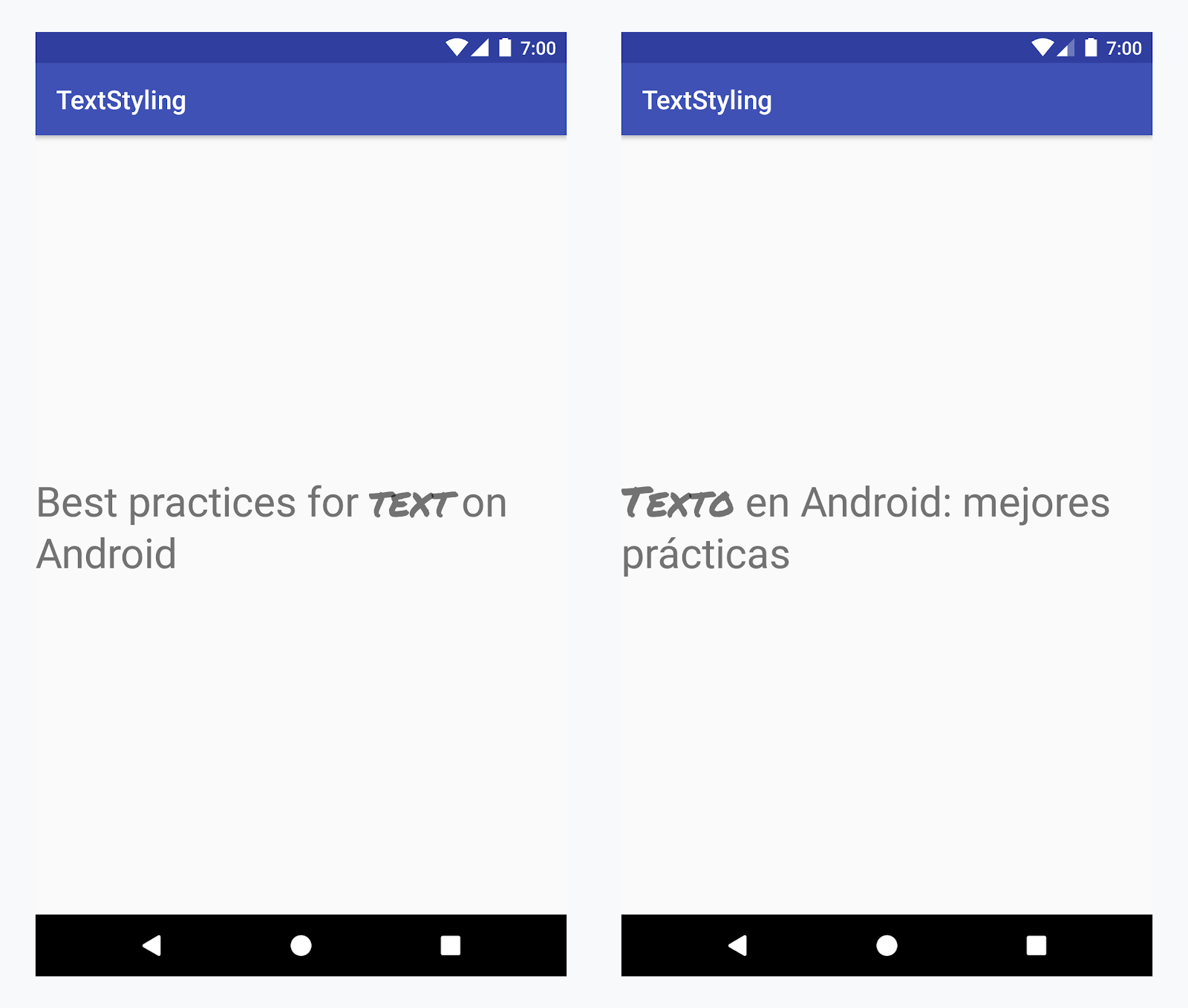
החלת גופן מותאם אישית על המילה 'text' בכל השפות
דוגמה – הוספה של גופן מותאם אישית
-
מוסיפים את התג
<annotation>ומגדירים את צמד המפתח/ערך. במקרה הזה, המפתח הוא font, והערך הוא סוג הגופן שבו רוצים להשתמש: title_emphasis// values/strings.xml <string name="title">Best practices for <annotation font="title_emphasis">text</annotation> on Android</string> // values-es/strings.xml <string name="title"><annotation font="title_emphasis">Texto</annotation> en Android: mejores prácticas</string>
-
טוענים את משאב המחרוזת ומחפשים את ההערות עם מפתח הגופן. לאחר מכן יוצרים טווח בהתאמה אישית ומחליפים את הטווח הקיים.
Kotlin
// get the text as SpannedString so we can get the spans attached to the text
val titleText = getText(R.string.title) as SpannedString

// get all the annotation spans from the text
val annotations = titleText.getSpans(0, titleText.length, Annotation::class.java)

// create a copy of the title text as a SpannableString.
// the constructor copies both the text and the spans. so we can add and remove spans
val spannableString = SpannableString(titleText)

// iterate through all the annotation spans
for (annotation in annotations) {
   // look for the span with the key font
   if (annotation.key == "font") {
      val fontName = annotation.value
      // check the value associated to the annotation key
      if (fontName == "title_emphasis") {
         // create the typeface
         val typeface = getFontCompat(R.font.permanent_marker)
         // set the span at the same indices as the annotation
         spannableString.setSpan(CustomTypefaceSpan(typeface),
            titleText.getSpanStart(annotation),
            titleText.getSpanEnd(annotation),
            Spannable.SPAN_EXCLUSIVE_EXCLUSIVE)
      }
   }
}

// now, the spannableString contains both the annotation spans and the CustomTypefaceSpan
styledText.text = spannableString
Java
// get the text as SpannedString so we can get the spans attached to the text
SpannedString titleText = (SpannedString) getText(R.string.title);

// get all the annotation spans from the text
Annotation[] annotations = titleText.getSpans(0, titleText.length(), Annotation.class);

// create a copy of the title text as a SpannableString.
// the constructor copies both the text and the spans. so we can add and remove spans
SpannableString spannableString = new SpannableString(titleText);

// iterate through all the annotation spans
for (Annotation annotation: annotations) {
  // look for the span with the key font
  if (annotation.getKey().equals("font")) {
    String fontName = annotation.getValue();
    // check the value associated to the annotation key
    if (fontName.equals("title_emphasis")) {
    // create the typeface
    Typeface typeface = ResourcesCompat.getFont(this, R.font.roboto_mono);
    // set the span at the same indices as the annotation
    spannableString.setSpan(new CustomTypefaceSpan(typeface),
      titleText.getSpanStart(annotation),
      titleText.getSpanEnd(annotation),
      Spannable.SPAN_EXCLUSIVE_EXCLUSIVE);
    }
  }
}

// now, the spannableString contains both the annotation spans and the CustomTypefaceSpan
styledText.text = spannableString;
אם אתם משתמשים באותו טקסט כמה פעמים, כדאי ליצור את האובייקט SpannableString פעם אחת ולעשות בו שימוש חוזר לפי הצורך, כדי למנוע בעיות פוטנציאליות בביצועים ובזיכרון.
דוגמאות נוספות לשימוש בהערות זמינות במאמר בנושא עיצוב טקסט שעבר לוקליזציה ב-Android.
טווחים של הערות וחלוקה של טקסט
מכיוון שטווחים של Annotation הם גם ParcelableSpans, זוגות מפתח/ערך עוברים המרה ל-parcel והמרה מ-parcel. כל עוד הנמען של החבילה יודע איך לפרש את ההערות, אפשר להשתמש בתגי Annotation כדי להחיל סגנון מותאם אישית על הטקסט בחבילה.
כדי לשמור על העיצוב המותאם אישית כשמעבירים את הטקסט לחבילת Intent, צריך קודם להוסיף לטקסט טווחי Annotation. אפשר לעשות את זה במשאבי ה-XML באמצעות התג <annotation>, כמו בדוגמה שלמעלה, או בקוד באמצעות יצירת Annotation חדש והגדרתו כ-span, כמו בדוגמה הבאה:
Kotlin
val spannableString = SpannableString("My spantastic text")
val annotation = Annotation("font", "title_emphasis")
spannableString.setSpan(annotation, 3, 7, Spannable.SPAN_EXCLUSIVE_EXCLUSIVE)

// start Activity with text with spans
val intent = Intent(this, MainActivity::class.java)
intent.putExtra(TEXT_EXTRA, spannableString)
startActivity(intent)
Java
SpannableString spannableString = new SpannableString("My spantastic text");
Annotation annotation = new Annotation("font", "title_emphasis");
spannableString.setSpan(annotation, 3, 7, 33);

// start Activity with text with spans
Intent intent = new Intent(this, MainActivity.class);
intent.putExtra(TEXT_EXTRA, spannableString);
this.startActivity(intent);
מאחזרים את הטקסט מה-Bundle כ-SpannableString ואז מנתחים את ההערות המצורפות, כמו בדוגמה שלמעלה.
Kotlin
// read text with Spans
val intentCharSequence = intent.getCharSequenceExtra(TEXT_EXTRA) as SpannableString
Java
// read text with Spans
SpannableString intentCharSequence = (SpannableString)intent.getCharSequenceExtra(TEXT_EXTRA);
מידע נוסף על סגנונות טקסט זמין בקישורים הבאים: