

Conceptos y la implementación de Jetpack Compose
Un recurso de cadenas proporciona cadenas de texto para tu aplicación con formato y estilo de texto opcionales. Existen tres tipos de recursos que pueden proporcionar strings para tu aplicación:
- String
- Recurso XML que proporciona una sola cadena.
- Array de cadenas
- Recurso XML que proporciona un array de cadenas.
- Strings de cantidad (plurales)
- Recurso XML que conlleva diferentes strings para brindar pluralización.
Todas las cadenas pueden aplicar algunos argumentos de formato y marcado de estilo. Para obtener información sobre las cadenas de formato y estilo, consulta la sección sobre Formato y estilo.
String
Una sola cadena a la que se puede hacer referencia desde la aplicación o desde otros archivos de recursos (como un diseño XML).
- ubicación del archivo:
res/values/filename.xml
El nombre del archivo es arbitrario. Elnamedel elemento de<string>se usa como ID del recurso.- tipo de datos de recursos compilados:
- Puntero de recursos a un
String. - referencia del recurso:
-
En Java:
R.string.string_name
En XML:@string/string_name - sintaxis:
-
<?xml version="1.0" encoding="utf-8"?>
<resources>
    <string
        name="string_name"
        >text_string</string>
</resources>
- elementos:
- ejemplo:
- Archivo en formato XML guardado en
res/values/strings.xml:<?xml version="1.0" encoding="utf-8"?> <resources> <string name="hello">Hello!</string> </resources>
Este XML de diseño aplica una string a un objeto View:
<TextView
    android:layout_width="fill_parent"
    android:layout_height="wrap_content"
    android:text="@string/hello" />
Este código de la aplicación recupera una cadena:
Puedes usar
getString(int)ogetText(int)para obtener una cadena.getText(int)retiene todo estilo de texto enriquecido aplicado a la cadena.
Array de cadenas
Array de cadenas al cual se puede hacer referencia desde la aplicación.
- ubicación del archivo:
res/values/filename.xml
El nombre del archivo es arbitrario. Elnamedel elemento de<string-array>se usa como ID del recurso.- tipo de datos de recursos compilados:
- Puntero de recurso para un elemento de array de
Strings. - referencia del recurso:
-
En Java:
R.array.string_array_name
En XML:@[package:]array/string_array_name - sintaxis:
-
<?xml version="1.0" encoding="utf-8"?>
<resources>
    <string-array
        name="string_array_name">
        <item
            >text_string</item>
    </string-array>
</resources>
- elementos:
- ejemplo:
- Archivo en formato XML guardado en
res/values/strings.xml:<?xml version="1.0" encoding="utf-8"?> <resources> <string-array name="planets_array"> <item>Mercury</item> <item>Venus</item> <item>Earth</item> <item>Mars</item> </string-array> </resources>
Kotlin
val array: Array<String> =
resources.getStringArray(R.array.planets_array)Java
Resources res = getResources();
String[] planets = res.getStringArray(R.array.planets_array);
Strings de cantidad (plurales)
Los diferentes idiomas tienen distintas reglas de concordancia gramatical con la cantidad. En inglés, por ejemplo, la cantidad 1 es un caso especial. Escribimos "1 libro", pero, para las demás cantidades, se debe escribir "n libros". Esta distinción entre singular y plural es muy común; sin embargo, en otros idiomas, se hacen distinciones más detalladas. El conjunto completo compatible con Android es zero, one, two, few, many y other.
Las reglas para decidir el caso que se usará para un idioma y una cantidad determinados pueden ser muy complejas, por lo cual Android te proporciona métodos como getQuantityString() para seleccionar el recurso adecuado para ti.
En el nivel de API 24 y versiones posteriores, puedes usar la clase MessageFormat de ICU mucho más potente en su lugar.
- ubicación del archivo:
res/values/filename.xml
El nombre del archivo es arbitrario. Elnamedel elemento de<plurals>se usa como ID del recurso.- referencia del recurso:
-
En Java:
R.plurals.plural_name - sintaxis:
-
<?xml version="1.0" encoding="utf-8"?>
<resources>
    <plurals
        name="plural_name">
        <item
            quantity=["zero" | "one" | "two" | "few" | "many" | "other"]
            >text_string</item>
    </plurals>
</resources>
- elementos:
- ejemplo:
- Archivo en formato XML guardado en
res/values/strings.xml:<?xml version="1.0" encoding="utf-8"?> <resources> <plurals name="numberOfSongsAvailable"> <!-- As a developer, you should always supply "one" and "other" strings. Your translators will know which strings are actually needed for their language. Always include %d in "one" because translators will need to use %d for languages where "one" doesn't mean 1 (as explained above). --> <item quantity="one">%d song found.</item> <item quantity="other">%d songs found.</item> </plurals> </resources>
Archivo en formato XML guardado en
res/values-pl/strings.xml:<?xml version="1.0" encoding="utf-8"?> <resources> <plurals name="numberOfSongsAvailable"> <item quantity="one">Znaleziono %d piosenkę.</item> <item quantity="few">Znaleziono %d piosenki.</item> <item quantity="other">Znaleziono %d piosenek.</item> </plurals> </resources>
Uso:
Kotlin
val count = getNumberOfSongsAvailable() val songsFound = resources.
getQuantityString(R.plurals.numberOfSongsAvailable, count, count)Java
int count = getNumberOfSongsAvailable();
Resources res = getResources();
String songsFound = res.getQuantityString(R.plurals.numberOfSongsAvailable, count, count);
Cuando se usa el método
getQuantityString(), debes pasarcountdos veces si tu cadena incluye formato de cadena. Por ejemplo, para la cadena%d songs found, el primer parámetro decountselecciona la cadena plural adecuada y el segundo parámetro decountse inserta en el marcador de posición%d. Si tus cadenas de plural no incluyen formato de cadena, no es necesario que pases el tercer parámetro agetQuantityString.
Formato y estilo
A continuación, se mencionan algunos puntos importantes que debes conocer sobre cómo dar formato y estilo adecuadamente a tus recursos de cadenas.
Cómo dar formato a las strings
Si necesitas dar formato a tus cadenas, puedes hacerlo disponiendo tus argumentos de formato en el recurso de cadenas, tal como se demuestra en el siguiente recurso de ejemplo.
<string name="welcome_messages">Hello, %1$s! You have %2$d new messages.</string>
En este ejemplo, la cadena de formato tiene dos argumentos: %1$s es una cadena y %2$d es un número decimal. Luego, dale formato a la cadena llamando a getString(int, Object...). Por ejemplo:
Kotlin
var text = getString(R.string.welcome_messages, username, mailCount)
Java
String text = getString(R.string.welcome_messages, username, mailCount);
Cómo dar estilo con el lenguaje de marcado HTML
Puedes agregar estilo a tus strings con el lenguaje de marcado HTML. Por ejemplo:
<?xml version="1.0" encoding="utf-8"?>
<resources>
    <string name="welcome">Welcome to <b>Android</b>!</string>
</resources>
Si no aplicas formato, puedes establecer el texto de TextView directamente llamando a setText(java.lang.CharSequence). Sin embargo, en algunos casos, es posible que desees crear un recurso de texto con estilo que también se use como cadena de formato.
Generalmente, esto no funciona porque los métodos format(String, Object...) y getString(int, Object...) quitan toda la información de estilo de la cadena. La solución temporal para esto es escribir las etiquetas HTML con entidades escapadas, que se recuperan después con fromHtml(String) una vez que se lleva a cabo el formato. Por ejemplo:
- Almacena tu recurso de texto con estilo como una string escapada con HTML:
<resources> <string name="welcome_messages">Hello, %1$s! You have <b>%2$d new messages</b>.</string> </resources>
En esta string con formato, se agrega un elemento
<b>. Ten en cuenta que el corchete de apertura está con escape HTML mediante la anotación<. - Luego, da formato a la string como siempre, pero también llama a
fromHtml(String)para convertir el texto HTML en texto con estilo:Kotlin
val text: String = getString(R.string.welcome_messages, username, mailCount)
val styledText: Spanned = Html.fromHtml(text, FROM_HTML_MODE_LEGACY)
Java
String text = getString(R.string.welcome_messages, username, mailCount);
Spanned styledText = Html.fromHtml(text, FROM_HTML_MODE_LEGACY);
Debido a que el método fromHtml(String) da formato a todas las entidades HTML, asegúrate de escapar todos los caracteres HTML posibles en las cadenas que usas con el texto con formato, mediante htmlEncode(String). Por ejemplo, si das formato a una cadena que contiene caracteres como "<" o "&", se deben escapar antes de dar formato, de modo que, cuando se pase la cadena con formato por fromHtml(String), los caracteres aparezcan como se escribieron originalmente. Por ejemplo:
Kotlin
val escapedUsername: String = TextUtils.htmlEncode(username)

val text: String = getString(R.string.welcome_messages, escapedUsername, mailCount)
val styledText: Spanned = Html.fromHtml(text, FROM_HTML_MODE_LEGACY)
Java
String escapedUsername = TextUtils.htmlEncode(username);

String text = getString(R.string.welcome_messages, escapedUsername, mailCount);
Spanned styledText = Html.fromHtml(text);
Cómo dar estilo con Spannable
Un Spannable es un objeto de texto al que puedes dar estilo con propiedades de tipos de letras, como color y grosor de la fuente. Usas SpannableStringBuilder para crear tu texto y, luego, aplicar estilos definidos en el paquete de android.text.style al texto.
Puedes usar los siguientes métodos auxiliares para configurar gran parte del trabajo de crear texto de Spannable:
Kotlin
/**
 * Returns a CharSequence that concatenates the specified array of CharSequence
 * objects and then applies a list of zero or more tags to the entire range.
 *
 * @param content an array of character sequences to apply a style to
 * @param tags the styled span objects to apply to the content
 *        such as android.text.style.StyleSpan
 */
private fun apply(content: Array<out CharSequence>, vararg tags: Any): CharSequence {
    return SpannableStringBuilder().apply {
        openTags(tags)
        content.forEach { charSequence ->
            append(charSequence)
        }
        closeTags(tags)
    }
}

/**
 * Iterates over an array of tags and applies them to the beginning of the specified
 * Spannable object so that future text appended to the text will have the styling
 * applied to it. Do not call this method directly.
 */
private fun Spannable.openTags(tags: Array<out Any>) {
    tags.forEach { tag ->
        setSpan(tag, 0, 0, Spannable.SPAN_MARK_MARK)
    }
}

/**
 * "Closes" the specified tags on a Spannable by updating the spans to be
 * endpoint-exclusive so that future text appended to the end will not take
 * on the same styling. Do not call this method directly.
 */
private fun Spannable.closeTags(tags: Array<out Any>) {
    tags.forEach { tag ->
    if (length > 0) {
            setSpan(tag, 0, length, Spanned.SPAN_EXCLUSIVE_EXCLUSIVE)
        } else {
            removeSpan(tag)
        }
    }
}
Java
/**
 * Returns a CharSequence that concatenates the specified array of CharSequence
 * objects and then applies a list of zero or more tags to the entire range.
 *
 * @param content an array of character sequences to apply a style to
 * @param tags the styled span objects to apply to the content
 *        such as android.text.style.StyleSpan
 *
 */
private static CharSequence applyStyles(CharSequence[] content, Object[] tags) {
    SpannableStringBuilder text = new SpannableStringBuilder();
    openTags(text, tags);
    for (CharSequence item : content) {
        text.append(item);
    }
    closeTags(text, tags);
    return text;
}

/**
 * Iterates over an array of tags and applies them to the beginning of the specified
 * Spannable object so that future text appended to the text will have the styling
 * applied to it. Do not call this method directly.
 */
private static void openTags(Spannable text, Object[] tags) {
    for (Object tag : tags) {
        text.setSpan(tag, 0, 0, Spannable.SPAN_MARK_MARK);
    }
}

/**
 * "Closes" the specified tags on a Spannable by updating the spans to be
 * endpoint-exclusive so that future text appended to the end will not take
 * on the same styling. Do not call this method directly.
 */
private static void closeTags(Spannable text, Object[] tags) {
    int len = text.length();
    for (Object tag : tags) {
        if (len > 0) {
            text.setSpan(tag, 0, len, Spanned.SPAN_EXCLUSIVE_EXCLUSIVE);
        } else {
            text.removeSpan(tag);
        }
    }
}
Los siguientes métodos bold, italic y color contienen los métodos de ayuda anteriores y permiten ver ejemplos específicos de cómo dar estilos definidos en el paquete android.text.style. Puedes crear métodos similares para dar otros tipos de estilos al texto.
Kotlin
/**
 * Returns a CharSequence that applies boldface to the concatenation
 * of the specified CharSequence objects.
 */
fun bold(vararg content: CharSequence): CharSequence = apply(content, StyleSpan(Typeface.BOLD))

/**
 * Returns a CharSequence that applies italics to the concatenation
 * of the specified CharSequence objects.
 */
fun italic(vararg content: CharSequence): CharSequence = apply(content, StyleSpan(Typeface.ITALIC))

/**
 * Returns a CharSequence that applies a foreground color to the
 * concatenation of the specified CharSequence objects.
 */
fun color(color: Int, vararg content: CharSequence): CharSequence =
        apply(content, ForegroundColorSpan(color))
Java
/**
 * Returns a CharSequence that applies boldface to the concatenation
 * of the specified CharSequence objects.
 */
public static CharSequence bold(CharSequence... content) {
    return apply(content, new StyleSpan(Typeface.BOLD));
}

/**
 * Returns a CharSequence that applies italics to the concatenation
 * of the specified CharSequence objects.
 */
public static CharSequence italic(CharSequence... content) {
    return apply(content, new StyleSpan(Typeface.ITALIC));
}

/**
 * Returns a CharSequence that applies a foreground color to the
 * concatenation of the specified CharSequence objects.
 */
public static CharSequence color(int color, CharSequence... content) {
    return apply(content, new ForegroundColorSpan(color));
}
Este es un ejemplo de cómo encadenar estos métodos para aplicar diversos estilos a palabras específicas en una frase:
Kotlin
// Create an italic "hello, " a red "world",
// and bold the entire sequence.
val text: CharSequence = bold(italic(getString(R.string.hello)),
        color(Color.RED, getString(R.string.world)))
Java
// Create an italic "hello, " a red "world",
// and bold the entire sequence.
CharSequence text = bold(italic(getString(R.string.hello)),
    color(Color.RED, getString(R.string.world)));
El módulo core-ktx de Kotlin también contiene funciones de extensión que facilitan mucho más el trabajo con intervalos. Para obtener más información, puedes consultar la documentación del paquete android.text en GitHub.
Para obtener más información sobre el trabajo con intervalos, consulta estos enlaces:
Cómo dar estilo con anotaciones
Puedes aplicar estilos complejos o personalizados si usas la clase Annotation junto con la etiqueta <annotation> en tus archivos de recursos strings.xml. La etiqueta de anotación permite marcar partes de la cadena para darles un estilo personalizado. Para hacerlo, deben definirse pares clave-valor personalizados en el XML que el framework convertirá en intervalos de Annotation. Después, puedes recuperar estas anotaciones y usar la clave y el valor para aplicar el diseño.
Cuando creas anotaciones, asegúrate de agregar la etiqueta <annotation> a todas las traducciones de la string en cada archivo strings.xml.
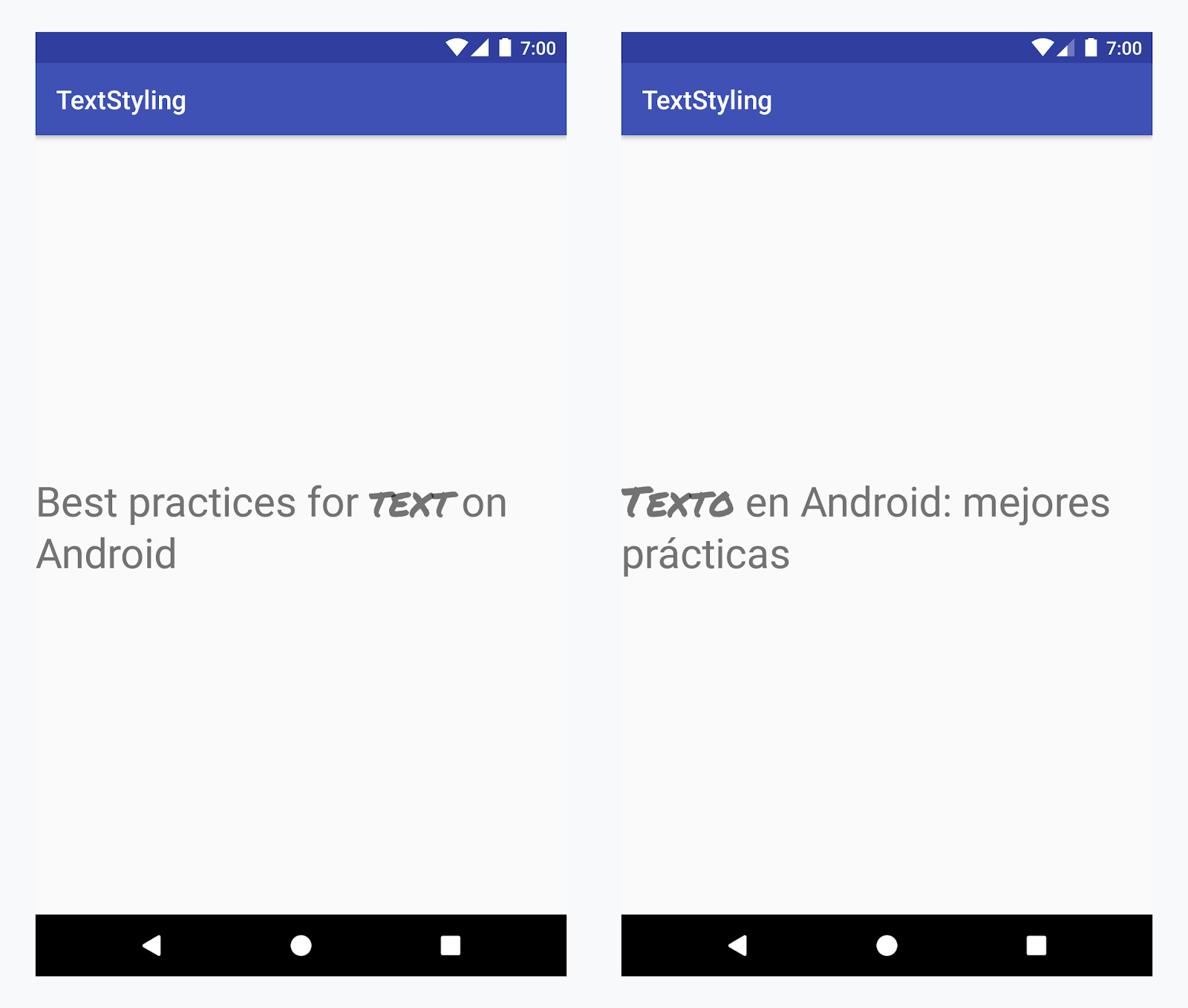
Aplicar un tipo de letra personalizado a la palabra "texto" en todos los idiomas
Ejemplo: Agregar un tipo de letra personalizado
-
Agrega la etiqueta
<annotation>y define el par clave-valor. En este caso, la clave es font y el valor es el tipo de fuente que queremos usar: title_emphasis.// values/strings.xml <string name="title">Best practices for <annotation font="title_emphasis">text</annotation> on Android</string> // values-es/strings.xml <string name="title"><annotation font="title_emphasis">Texto</annotation> en Android: mejores prácticas</string>
-
Carga el recurso de strings y busca las anotaciones con la clave font. Después, crea un intervalo personalizado y reemplaza el existente.
Kotlin
// get the text as SpannedString so we can get the spans attached to the text
val titleText = getText(R.string.title) as SpannedString

// get all the annotation spans from the text
val annotations = titleText.getSpans(0, titleText.length, Annotation::class.java)

// create a copy of the title text as a SpannableString.
// the constructor copies both the text and the spans. so we can add and remove spans
val spannableString = SpannableString(titleText)

// iterate through all the annotation spans
for (annotation in annotations) {
   // look for the span with the key font
   if (annotation.key == "font") {
      val fontName = annotation.value
      // check the value associated to the annotation key
      if (fontName == "title_emphasis") {
         // create the typeface
         val typeface = getFontCompat(R.font.permanent_marker)
         // set the span at the same indices as the annotation
         spannableString.setSpan(CustomTypefaceSpan(typeface),
            titleText.getSpanStart(annotation),
            titleText.getSpanEnd(annotation),
            Spannable.SPAN_EXCLUSIVE_EXCLUSIVE)
      }
   }
}

// now, the spannableString contains both the annotation spans and the CustomTypefaceSpan
styledText.text = spannableString
Java
// get the text as SpannedString so we can get the spans attached to the text
SpannedString titleText = (SpannedString) getText(R.string.title);

// get all the annotation spans from the text
Annotation[] annotations = titleText.getSpans(0, titleText.length(), Annotation.class);

// create a copy of the title text as a SpannableString.
// the constructor copies both the text and the spans. so we can add and remove spans
SpannableString spannableString = new SpannableString(titleText);

// iterate through all the annotation spans
for (Annotation annotation: annotations) {
  // look for the span with the key font
  if (annotation.getKey().equals("font")) {
    String fontName = annotation.getValue();
    // check the value associated to the annotation key
    if (fontName.equals("title_emphasis")) {
    // create the typeface
    Typeface typeface = ResourcesCompat.getFont(this, R.font.roboto_mono);
    // set the span at the same indices as the annotation
    spannableString.setSpan(new CustomTypefaceSpan(typeface),
      titleText.getSpanStart(annotation),
      titleText.getSpanEnd(annotation),
      Spannable.SPAN_EXCLUSIVE_EXCLUSIVE);
    }
  }
}

// now, the spannableString contains both the annotation spans and the CustomTypefaceSpan
styledText.text = spannableString;
Si usas el mismo texto varias veces, debes construir el objeto SpannableString una vez y volver a usarlo cuando lo necesites. Así evitarás posibles problemas de rendimiento y memoria.
Para conocer otros ejemplos del uso de anotaciones, consulta Cómo dar estilo a texto internacionalizado en Android.
Intervalos de anotación y parcelas de texto
Dado que los intervalos de Annotation también son ParcelableSpans, los pares clave-valor pueden dividirse y reunirse en parcelas. Siempre y cuando el receptor de la parcela sepa cómo interpretar las anotaciones, puedes usar intervalos de Annotation para aplicar estilos personalizados al texto en parcelas.
Para mantener el diseño personalizado cuando pasas el texto a un Intent Bundle, primero debes agregar intervalos de Annotation a tu texto. Puedes hacerlo en los recursos XML usando la etiqueta <annotation>, como se muestra en el ejemplo anterior, o en el código, creando una nueva Annotation y definiéndola como intervalo, tal como se ejemplifica a continuación:
Kotlin
val spannableString = SpannableString("My spantastic text")
val annotation = Annotation("font", "title_emphasis")
spannableString.setSpan(annotation, 3, 7, Spannable.SPAN_EXCLUSIVE_EXCLUSIVE)

// start Activity with text with spans
val intent = Intent(this, MainActivity::class.java)
intent.putExtra(TEXT_EXTRA, spannableString)
startActivity(intent)
Java
SpannableString spannableString = new SpannableString("My spantastic text");
Annotation annotation = new Annotation("font", "title_emphasis");
spannableString.setSpan(annotation, 3, 7, 33);

// start Activity with text with spans
Intent intent = new Intent(this, MainActivity.class);
intent.putExtra(TEXT_EXTRA, spannableString);
this.startActivity(intent);
Recupera el texto del Bundle como un SpannableString y, luego, analiza las anotaciones adjuntas, como se muestra en el ejemplo anterior.
Kotlin
// read text with Spans
val intentCharSequence = intent.getCharSequenceExtra(TEXT_EXTRA) as SpannableString
Java
// read text with Spans
SpannableString intentCharSequence = (SpannableString)intent.getCharSequenceExtra(TEXT_EXTRA);
Para obtener más información sobre cómo dar estilo al texto, consulta los siguientes enlaces: