

المفاهيم والتنفيذ في Jetpack Compose
يوفر مصدر السلاسل النصية سلاسل نصية لتطبيقك مع خيارات لتنسيق النص وتصميمه. هناك ثلاثة أنواع من الموارد التي يمكن أن توفّر لتطبيقك السلاسل:
- String
- ملف XML للموارد يوفّر سلسلة واحدة.
- مصفوفة السلسلة
- ملف XML للموارد يوفّر مصفوفة من السلاسل.
- سلاسل الكمية (صيغ الجمع)
- ملف XML للموارد يحتوي على سلاسل مختلفة للجمع.
يمكن تطبيق بعض ترميز التنسيق ومعلَمات التنسيق على جميع السلاسل. للحصول على معلومات حول تنسيق السلاسل وتصميمها، راجِع القسم حول التنسيق والتصميم.
سلسلة
سلسلة واحدة يمكن الرجوع إليها من التطبيق أو من ملفات موارد أخرى (مثل تنسيق XML).
- موقع الملف:
res/values/filename.xml
اسم الملف اختياري. يتم استخدامnameالخاص بالعنصر<string>كمعرّف للمورد.- نوع بيانات المورد المجمَّع:
- مؤشر المورد إلى
String - مرجع المورد:
-
في Java:
R.string.string_name
في XML:@string/string_name - بنية الجملة:
-
<?xml version="1.0" encoding="utf-8"?>
<resources>
    <string
        name="string_name"
        >text_string</string>
</resources>
- العناصر:
- مثلا: تم حفظ ملف XML في
-
<?xml version="1.0" encoding="utf-8"?>
<resources>
    <string name="hello">Hello!</string>
</resources>
تطبِّق لغة XML الخاصة بالتصميم سلسلة على طريقة العرض:
<TextView
    android:layout_width="fill_parent"
    android:layout_height="wrap_content"
    android:text="@string/hello" />
يستردّ الرمز البرمجي للتطبيق التالي سلسلة:
يمكنك استخدام
getString(int)أوgetText(int)لاسترداد سلسلة. تحتفظgetText(int)بأي نمط نص منسّق تم تطبيقه على السلسلة.
res/values/strings.xml:مصفوفة السلاسل النصية
مجموعة من السلاسل التي يمكن الرجوع إليها من التطبيق
- موقع الملف:
res/values/filename.xml
اسم الملف اختياري. يتم استخدامnameالخاص بالعنصر<string-array>كمعرّف للمورد.- نوع بيانات المورد المجمَّع:
- مؤشر الموارد إلى مصفوفة من
String. - مرجع المورد:
-
في Java:
R.array.string_array_name
في XML:@[package:]array/string_array_name - بنية الجملة:
-
<?xml version="1.0" encoding="utf-8"?>
<resources>
    <string-array
        name="string_array_name">
        <item
            >text_string</item>
    </string-array>
</resources>
- العناصر:
- مثلا: تم حفظ ملف XML في
-
<?xml version="1.0" encoding="utf-8"?>
<resources>
    <string-array name="planets_array">
        <item>Mercury</item>
        <item>Venus</item>
        <item>Earth</item>
        <item>Mars</item>
    </string-array>
</resources>
Kotlin
val array: Array<String> =
resources.getStringArray(R.array.planets_array)Java
Resources res = getResources();
String[] planets = res.getStringArray(R.array.planets_array);
res/values/strings.xml:سلاسل الكمية (صيغ الجمع)
تختلف اللغات في قواعد المطابقة النحوية مع الكمية. في اللغة الإنجليزية، على سبيل المثال، الكمية 1 هي حالة خاصة. نكتب "كتاب واحد"، ولكن بالنسبة إلى أي كمية أخرى، نكتب "n كتاب". هذا التمييز بين المفرد والجمع شائع جدًا، ولكن بعض اللغات الأخرى تميّز بينهما بشكل أدق. المجموعة الكاملة المتوافقة مع Android هي zero وone وtwo وfew وmany وother.
يمكن أن تكون قواعد تحديد حالة الاستخدام للغة وكمية معيّنتَين معقّدة للغاية، لذا يوفّر لك نظام التشغيل Android طرقًا، مثل getQuantityString()، لاختيار المورد المناسب لك.
في الإصدار 24 من واجهة برمجة التطبيقات أو الإصدارات الأحدث، يمكنك استخدام فئة ICU MessageFormat الأكثر فعالية.
- موقع الملف:
res/values/filename.xml
اسم الملف اختياري. يتم استخدامnameالخاص بالعنصر<plurals>كمعرّف للمورد.- مرجع المورد:
-
في Java:
R.plurals.plural_name - بنية الجملة:
-
<?xml version="1.0" encoding="utf-8"?>
<resources>
    <plurals
        name="plural_name">
        <item
            quantity=["zero" | "one" | "two" | "few" | "many" | "other"]
            >text_string</item>
    </plurals>
</resources>
- العناصر:
- مثلا: تم حفظ ملف XML في
-
<?xml version="1.0" encoding="utf-8"?>
<resources>
    <plurals name="numberOfSongsAvailable">
        <!--
             As a developer, you should always supply "one" and "other"
             strings. Your translators will know which strings are actually
             needed for their language. Always include %d in "one" because
             translators will need to use %d for languages where "one"
             doesn't mean 1 (as explained above).
          -->
        <item quantity="one">%d song found.</item>
        <item quantity="other">%d songs found.</item>
    </plurals>
</resources>
تم حفظ ملف XML في
res/values-pl/strings.xml:<?xml version="1.0" encoding="utf-8"?> <resources> <plurals name="numberOfSongsAvailable"> <item quantity="one">Znaleziono %d piosenkę.</item> <item quantity="few">Znaleziono %d piosenki.</item> <item quantity="other">Znaleziono %d piosenek.</item> </plurals> </resources>
الاستخدام:
Kotlin
val count = getNumberOfSongsAvailable() val songsFound = resources.
getQuantityString(R.plurals.numberOfSongsAvailable, count, count)Java
int count = getNumberOfSongsAvailable();
Resources res = getResources();
String songsFound = res.getQuantityString(R.plurals.numberOfSongsAvailable, count, count);
عند استخدام طريقة
getQuantityString()، عليك تمريرcountمرتين إذا كانت السلسلة تتضمّن تنسيق السلسلة. على سبيل المثال، بالنسبة إلى السلسلة%d songs found، تحدّد المَعلمة الأولىcountسلسلة الجمع المناسبة، ويتم إدراج المَعلمة الثانيةcountفي العنصر النائب%d. إذا كانت سلاسل الأعداد الجمع لا تتضمّن تنسيق السلسلة، لن تحتاج إلى تمرير المَعلمة الثالثة إلىgetQuantityString.
res/values/strings.xml:التنسيق والنمط
في ما يلي بعض النقاط المهمة التي يجب معرفتها حول كيفية تنسيق موارد السلاسل وتصميمها بشكل صحيح.
سلاسل التنسيق
إذا كنت بحاجة إلى تنسيق السلاسل، يمكنك إجراء ذلك عن طريق وضع وسيطات التنسيق في مورد السلسلة، كما هو موضّح في مثال المورد التالي.
<string name="welcome_messages">Hello, %1$s! You have %2$d new messages.</string>
في هذا المثال، تحتوي سلسلة التنسيق على وسيطتَين: %1$s هي سلسلة و%2$d هو عدد عشري. بعد ذلك، يمكنك تنسيق السلسلة من خلال استدعاء
getString(int, Object...). على سبيل المثال:
Kotlin
var text = getString(R.string.welcome_messages, username, mailCount)
Java
String text = getString(R.string.welcome_messages, username, mailCount);
تحديد الأنماط باستخدام ترميز HTML
يمكنك إضافة أنماط إلى السلاسل باستخدام ترميز HTML. على سبيل المثال:
<?xml version="1.0" encoding="utf-8"?>
<resources>
    <string name="welcome">Welcome to <b>Android</b>!</string>
</resources>
إذا لم تكن تريد تطبيق تنسيق، يمكنك ضبط نص TextView مباشرةً من خلال استدعاء setText(java.lang.CharSequence). في بعض الحالات، قد تحتاج إلى إنشاء مصدر نص منمّق يُستخدَم أيضًا كسلسلة تنسيق.
لا يمكن عادةً إجراء ذلك لأنّ الطريقتَين format(String, Object...) وgetString(int, Object...) تزيلان كل معلومات التنسيق من السلسلة. الحلّ البديل لذلك هو كتابة علامات HTML باستخدام كيانات تم تجاهلها، ثم استردادها باستخدام fromHtml(String) بعد اكتمال عملية التنسيق. على سبيل المثال:
- خزِّن مورد النص المنسّق كسلسلة تم تجاهل أحرف HTML الخاصة فيها:
<resources> <string name="welcome_messages">Hello, %1$s! You have <b>%2$d new messages</b>.</string> </resources>
في هذه السلسلة المنسَّقة، تتم إضافة عنصر
<b>. لاحظ أنّ قوس الفتح تم تحويله إلى تنسيق HTML باستخدام الترميز<. - بعد ذلك، يمكنك تنسيق السلسلة كالمعتاد، ولكن عليك أيضًا استدعاء
fromHtml(String)لتحويل نص HTML إلى نص منسّق:Kotlin
val text: String = getString(R.string.welcome_messages, username, mailCount)
val styledText: Spanned = Html.fromHtml(text, FROM_HTML_MODE_LEGACY)
Java
String text = getString(R.string.welcome_messages, username, mailCount);
Spanned styledText = Html.fromHtml(text, FROM_HTML_MODE_LEGACY);
بما أنّ طريقة fromHtml(String) تنسّق جميع عناصر HTML، احرص على إلغاء أي أحرف HTML محتملة في السلاسل التي تستخدمها مع النص المنسّق، وذلك باستخدام htmlEncode(String). على سبيل المثال، إذا كنت بصدد تنسيق سلسلة تتضمّن أحرفًا مثل "<" أو "&"، يجب إلغاء هذه الأحرف قبل التنسيق، وذلك لكي تظهر الأحرف بالطريقة التي كُتبت بها في الأصل عند تمرير السلسلة المنسَّقة من خلال fromHtml(String). على سبيل المثال:
Kotlin
val escapedUsername: String = TextUtils.htmlEncode(username)

val text: String = getString(R.string.welcome_messages, escapedUsername, mailCount)
val styledText: Spanned = Html.fromHtml(text, FROM_HTML_MODE_LEGACY)
Java
String escapedUsername = TextUtils.htmlEncode(username);

String text = getString(R.string.welcome_messages, escapedUsername, mailCount);
Spanned styledText = Html.fromHtml(text);
تطبيق الأنماط باستخدام عناصر قابلة للضبط
Spannable هو عنصر نصي يمكنك تنسيقه باستخدام خصائص خط الطباعة، مثل اللون ووزن الخط. يمكنك استخدام SpannableStringBuilder لإنشاء النص ثم تطبيق الأنماط المحددة في حزمة android.text.style على النص.
يمكنك استخدام طرق المساعدة التالية لإعداد معظم العمليات اللازمة لإنشاء نص قابل للتوسيع:
Kotlin
/**
 * Returns a CharSequence that concatenates the specified array of CharSequence
 * objects and then applies a list of zero or more tags to the entire range.
 *
 * @param content an array of character sequences to apply a style to
 * @param tags the styled span objects to apply to the content
 *        such as android.text.style.StyleSpan
 */
private fun apply(content: Array<out CharSequence>, vararg tags: Any): CharSequence {
    return SpannableStringBuilder().apply {
        openTags(tags)
        content.forEach { charSequence ->
            append(charSequence)
        }
        closeTags(tags)
    }
}

/**
 * Iterates over an array of tags and applies them to the beginning of the specified
 * Spannable object so that future text appended to the text will have the styling
 * applied to it. Do not call this method directly.
 */
private fun Spannable.openTags(tags: Array<out Any>) {
    tags.forEach { tag ->
        setSpan(tag, 0, 0, Spannable.SPAN_MARK_MARK)
    }
}

/**
 * "Closes" the specified tags on a Spannable by updating the spans to be
 * endpoint-exclusive so that future text appended to the end will not take
 * on the same styling. Do not call this method directly.
 */
private fun Spannable.closeTags(tags: Array<out Any>) {
    tags.forEach { tag ->
    if (length > 0) {
            setSpan(tag, 0, length, Spanned.SPAN_EXCLUSIVE_EXCLUSIVE)
        } else {
            removeSpan(tag)
        }
    }
}
Java
/**
 * Returns a CharSequence that concatenates the specified array of CharSequence
 * objects and then applies a list of zero or more tags to the entire range.
 *
 * @param content an array of character sequences to apply a style to
 * @param tags the styled span objects to apply to the content
 *        such as android.text.style.StyleSpan
 *
 */
private static CharSequence applyStyles(CharSequence[] content, Object[] tags) {
    SpannableStringBuilder text = new SpannableStringBuilder();
    openTags(text, tags);
    for (CharSequence item : content) {
        text.append(item);
    }
    closeTags(text, tags);
    return text;
}

/**
 * Iterates over an array of tags and applies them to the beginning of the specified
 * Spannable object so that future text appended to the text will have the styling
 * applied to it. Do not call this method directly.
 */
private static void openTags(Spannable text, Object[] tags) {
    for (Object tag : tags) {
        text.setSpan(tag, 0, 0, Spannable.SPAN_MARK_MARK);
    }
}

/**
 * "Closes" the specified tags on a Spannable by updating the spans to be
 * endpoint-exclusive so that future text appended to the end will not take
 * on the same styling. Do not call this method directly.
 */
private static void closeTags(Spannable text, Object[] tags) {
    int len = text.length();
    for (Object tag : tags) {
        if (len > 0) {
            text.setSpan(tag, 0, len, Spanned.SPAN_EXCLUSIVE_EXCLUSIVE);
        } else {
            text.removeSpan(tag);
        }
    }
}
تتضمّن الطرق التالية bold وitalic وcolor الطرق المساعدة المذكورة أعلاه، وتوضّح أمثلة محدّدة على تطبيق الأنماط المحدّدة في حزمة android.text.style. يمكنك إنشاء طرق مشابهة لتطبيق أنماط أخرى على النصوص.
Kotlin
/**
 * Returns a CharSequence that applies boldface to the concatenation
 * of the specified CharSequence objects.
 */
fun bold(vararg content: CharSequence): CharSequence = apply(content, StyleSpan(Typeface.BOLD))

/**
 * Returns a CharSequence that applies italics to the concatenation
 * of the specified CharSequence objects.
 */
fun italic(vararg content: CharSequence): CharSequence = apply(content, StyleSpan(Typeface.ITALIC))

/**
 * Returns a CharSequence that applies a foreground color to the
 * concatenation of the specified CharSequence objects.
 */
fun color(color: Int, vararg content: CharSequence): CharSequence =
        apply(content, ForegroundColorSpan(color))
Java
/**
 * Returns a CharSequence that applies boldface to the concatenation
 * of the specified CharSequence objects.
 */
public static CharSequence bold(CharSequence... content) {
    return apply(content, new StyleSpan(Typeface.BOLD));
}

/**
 * Returns a CharSequence that applies italics to the concatenation
 * of the specified CharSequence objects.
 */
public static CharSequence italic(CharSequence... content) {
    return apply(content, new StyleSpan(Typeface.ITALIC));
}

/**
 * Returns a CharSequence that applies a foreground color to the
 * concatenation of the specified CharSequence objects.
 */
public static CharSequence color(int color, CharSequence... content) {
    return apply(content, new ForegroundColorSpan(color));
}
في ما يلي مثال على كيفية ربط هذه الطرق معًا لتطبيق أنماط مختلفة على كلمات فردية ضمن عبارة:
Kotlin
// Create an italic "hello, " a red "world",
// and bold the entire sequence.
val text: CharSequence = bold(italic(getString(R.string.hello)),
        color(Color.RED, getString(R.string.world)))
Java
// Create an italic "hello, " a red "world",
// and bold the entire sequence.
CharSequence text = bold(italic(getString(R.string.hello)),
    color(Color.RED, getString(R.string.world)));
تحتوي وحدة core-ktx Kotlin أيضًا على دوال إضافية تسهّل العمل مع النطاقات. يمكنك الاطّلاع على android.text
في مستندات الحزمة على GitHub لمعرفة المزيد.
لمزيد من المعلومات حول استخدام النطاقات، يُرجى الاطّلاع على الروابط التالية:
تنسيق باستخدام التعليقات التوضيحية
يمكنك تطبيق أنماط معقّدة أو مخصّصة باستخدام الفئة Annotation
مع العلامة <annotation> في ملفات موارد strings.xml. تتيح لك علامة التعليق التوضيحي
تحديد أجزاء من السلسلة لتطبيق أنماط مخصّصة عليها من خلال
تحديد أزواج المفتاح/القيمة المخصّصة في ملف XML الذي يحوّله إطار العمل
بعد ذلك إلى نطاقات Annotation. يمكنك بعد ذلك استرداد هذه التعليقات التوضيحية واستخدام المفتاح والقيمة لتطبيق التنسيق.
عند إنشاء التعليقات التوضيحية، احرص على إضافة العلامة <annotation>
إلى جميع ترجمات السلسلة في كل ملف strings.xml.
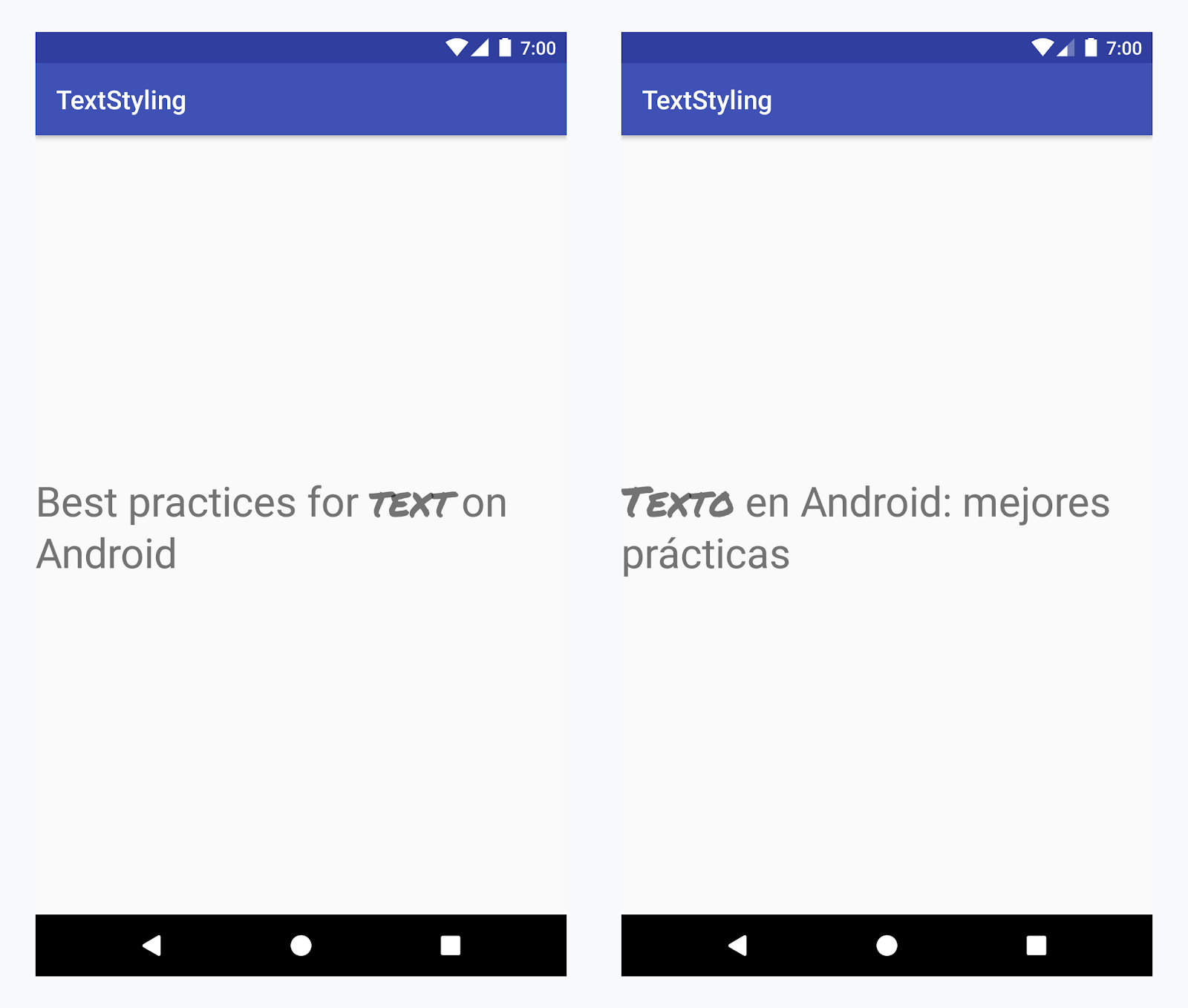
تطبيق خط مخصّص على كلمة "نص" بجميع اللغات
مثال: إضافة خط مخصّص
-
أضِف العلامة
<annotation>، وحدِّد زوج المفتاح/القيمة. في هذه الحالة، يكون المفتاح هو font، والقيمة هي نوع الخط الذي نريد استخدامه: title_emphasis// values/strings.xml <string name="title">Best practices for <annotation font="title_emphasis">text</annotation> on Android</string> // values-es/strings.xml <string name="title"><annotation font="title_emphasis">Texto</annotation> en Android: mejores prácticas</string>
-
حمِّل مصدر السلاسل النصية وابحث عن علامات التوضيح باستخدام المفتاح font. بعد ذلك، أنشئ نطاقًا مخصّصًا واستبدِل النطاق الحالي به.
Kotlin
// get the text as SpannedString so we can get the spans attached to the text
val titleText = getText(R.string.title) as SpannedString

// get all the annotation spans from the text
val annotations = titleText.getSpans(0, titleText.length, Annotation::class.java)

// create a copy of the title text as a SpannableString.
// the constructor copies both the text and the spans. so we can add and remove spans
val spannableString = SpannableString(titleText)

// iterate through all the annotation spans
for (annotation in annotations) {
   // look for the span with the key font
   if (annotation.key == "font") {
      val fontName = annotation.value
      // check the value associated to the annotation key
      if (fontName == "title_emphasis") {
         // create the typeface
         val typeface = getFontCompat(R.font.permanent_marker)
         // set the span at the same indices as the annotation
         spannableString.setSpan(CustomTypefaceSpan(typeface),
            titleText.getSpanStart(annotation),
            titleText.getSpanEnd(annotation),
            Spannable.SPAN_EXCLUSIVE_EXCLUSIVE)
      }
   }
}

// now, the spannableString contains both the annotation spans and the CustomTypefaceSpan
styledText.text = spannableString
Java
// get the text as SpannedString so we can get the spans attached to the text
SpannedString titleText = (SpannedString) getText(R.string.title);

// get all the annotation spans from the text
Annotation[] annotations = titleText.getSpans(0, titleText.length(), Annotation.class);

// create a copy of the title text as a SpannableString.
// the constructor copies both the text and the spans. so we can add and remove spans
SpannableString spannableString = new SpannableString(titleText);

// iterate through all the annotation spans
for (Annotation annotation: annotations) {
  // look for the span with the key font
  if (annotation.getKey().equals("font")) {
    String fontName = annotation.getValue();
    // check the value associated to the annotation key
    if (fontName.equals("title_emphasis")) {
    // create the typeface
    Typeface typeface = ResourcesCompat.getFont(this, R.font.roboto_mono);
    // set the span at the same indices as the annotation
    spannableString.setSpan(new CustomTypefaceSpan(typeface),
      titleText.getSpanStart(annotation),
      titleText.getSpanEnd(annotation),
      Spannable.SPAN_EXCLUSIVE_EXCLUSIVE);
    }
  }
}

// now, the spannableString contains both the annotation spans and the CustomTypefaceSpan
styledText.text = spannableString;
إذا كنت تستخدم النص نفسه عدة مرات، عليك إنشاء عنصر SpannableString مرة واحدة وإعادة استخدامه حسب الحاجة لتجنُّب المشاكل المحتملة في الأداء والذاكرة.
لمزيد من الأمثلة حول استخدام التعليقات التوضيحية، راجِع تنسيق النصوص المترجمة في Android.
نطاقات التعليقات التوضيحية وتقسيم النص
بما أنّ نطاقات Annotation هي أيضًا ParcelableSpans، يتم تجميع أزواج المفاتيح والقيم وتفكيكها. طالما أنّ مستلِم الحزمة يعرف كيفية تفسير التعليقات التوضيحية، يمكنك استخدام نطاقات Annotation لتطبيق أنماط مخصّصة على النص الذي تمّت حزمته.
للحفاظ على النمط المخصّص عند تمرير النص إلى حزمة Intent، عليك أولاً إضافة نطاقات Annotation إلى النص. يمكنك إجراء ذلك في موارد XML باستخدام العلامة <annotation>، كما هو موضّح في المثال أعلاه، أو في الرمز البرمجي من خلال إنشاء Annotation جديد وضبطه كمدى، كما هو موضّح أدناه:
Kotlin
val spannableString = SpannableString("My spantastic text")
val annotation = Annotation("font", "title_emphasis")
spannableString.setSpan(annotation, 3, 7, Spannable.SPAN_EXCLUSIVE_EXCLUSIVE)

// start Activity with text with spans
val intent = Intent(this, MainActivity::class.java)
intent.putExtra(TEXT_EXTRA, spannableString)
startActivity(intent)
Java
SpannableString spannableString = new SpannableString("My spantastic text");
Annotation annotation = new Annotation("font", "title_emphasis");
spannableString.setSpan(annotation, 3, 7, 33);

// start Activity with text with spans
Intent intent = new Intent(this, MainActivity.class);
intent.putExtra(TEXT_EXTRA, spannableString);
this.startActivity(intent);
استرجِع النص من Bundle كـ SpannableString، ثم حلِّل التعليقات التوضيحية المرفقة، كما هو موضّح في المثال أعلاه.
Kotlin
// read text with Spans
val intentCharSequence = intent.getCharSequenceExtra(TEXT_EXTRA) as SpannableString
Java
// read text with Spans
SpannableString intentCharSequence = (SpannableString)intent.getCharSequenceExtra(TEXT_EXTRA);
لمزيد من المعلومات حول تنسيق النص، يُرجى الاطّلاع على الروابط التالية: