

แนวคิดและการติดตั้งใช้งาน Jetpack Compose
ไลบรารีการแบ่งหน้ามีความสามารถอันทรงพลังในการโหลดและแสดง
ข้อมูลที่แบ่งหน้าจากชุดข้อมูลขนาดใหญ่ คู่มือนี้แสดงวิธีใช้ไลบรารี Paging
เพื่อตั้งค่าสตรีมของข้อมูลที่แบ่งหน้าจากแหล่งข้อมูลเครือข่ายและแสดง
ใน RecyclerView
กำหนดแหล่งข้อมูล
ขั้นตอนแรกคือการกําหนดการติดตั้งใช้งาน PagingSource เพื่อระบุแหล่งข้อมูล
PagingSourceคลาส API มีเมธอด load ซึ่งคุณจะลบล้างเพื่อระบุวิธีเรียกข้อมูลที่แบ่งหน้าจากแหล่งข้อมูลที่เกี่ยวข้อง
ใช้คลาส PagingSource โดยตรงเพื่อใช้ Kotlin โครูทีน สำหรับการโหลดแบบไม่พร้อมกัน นอกจากนี้ ไลบรารีการแบ่งหน้ายังมีคลาสที่รองรับเฟรมเวิร์กแบบไม่พร้อมกันอื่นๆ ด้วย
- หากต้องการใช้ RxJava ให้ใช้
RxPagingSourceแทน - หากต้องการใช้
ListenableFutureจาก Guava ให้ใช้ListenableFuturePagingSourceแทน
เลือกประเภทคีย์และค่า
PagingSource<Key, Value> มีพารามิเตอร์ประเภท 2 รายการ ได้แก่ Key และ Value คีย์
กำหนดตัวระบุที่ใช้ในการโหลดข้อมูล และค่าคือประเภทของ
ข้อมูลเอง เช่น หากคุณโหลดหน้าเว็บของUserออบเจ็กต์จากเครือข่าย
โดยส่งIntหมายเลขหน้าไปยัง Retrofit ให้เลือก Int เป็นประเภท
Key และ User เป็นประเภท Value
กำหนด PagingSource
ตัวอย่างต่อไปนี้ใช้ PagingSource ที่โหลดหน้าของสินค้าตามหมายเลขหน้า
ประเภท Key คือ Int และประเภท Value คือ User
Java (RxJava)
class ExamplePagingSource extends RxPagingSource<Integer, User> {
  @NonNull
  private ExampleBackendService mBackend;
  @NonNull
  private String mQuery;

  ExamplePagingSource(@NonNull ExampleBackendService backend,
    @NonNull String query) {
    mBackend = backend;
    mQuery = query;
  }

  @NotNull
  @Override
  public Single<LoadResult<Integer, User>> loadSingle(
    @NotNull LoadParams<Integer> params) {
    // Start refresh at page 1 if undefined.
    Integer nextPageNumber = params.getKey();
    if (nextPageNumber == null) {
      nextPageNumber = 1;
    }

    return mBackend.searchUsers(mQuery, nextPageNumber)
      .subscribeOn(Schedulers.io())
      .map(this::toLoadResult)
      .onErrorReturn(LoadResult.Error::new);
  }

  private LoadResult<Integer, User> toLoadResult(
    @NonNull SearchUserResponse response) {
    return new LoadResult.Page<>(
      response.getUsers(),
      null, // Only paging forward.
      response.getNextPageNumber(),
      LoadResult.Page.COUNT_UNDEFINED,
      LoadResult.Page.COUNT_UNDEFINED);
  }

  @Nullable
  @Override
  public Integer getRefreshKey(@NotNull PagingState<Integer, User> state) {
    // Try to find the page key of the closest page to anchorPosition from
    // either the prevKey or the nextKey; you need to handle nullability
    // here.
    //  * prevKey == null -> anchorPage is the first page.
    //  * nextKey == null -> anchorPage is the last page.
    //  * both prevKey and nextKey are null -> anchorPage is the
    //    initial page, so return null.
    Integer anchorPosition = state.getAnchorPosition();
    if (anchorPosition == null) {
      return null;
    }

    LoadResult.Page<Integer, User> anchorPage = state.closestPageToPosition(anchorPosition);
    if (anchorPage == null) {
      return null;
    }

    Integer prevKey = anchorPage.getPrevKey();
    if (prevKey != null) {
      return prevKey + 1;
    }

    Integer nextKey = anchorPage.getNextKey();
    if (nextKey != null) {
      return nextKey - 1;
    }

    return null;
  }
}
Java (Guava/LiveData)
class ExamplePagingSource extends ListenableFuturePagingSource<Integer, User> {
  @NonNull
  private ExampleBackendService mBackend;
  @NonNull
  private String mQuery;
  @NonNull
  private Executor mBgExecutor;

  ExamplePagingSource(
    @NonNull ExampleBackendService backend,
    @NonNull String query, @NonNull Executor bgExecutor) {
    mBackend = backend;
    mQuery = query;
    mBgExecutor = bgExecutor;
  }

  @NotNull
  @Override
  public ListenableFuture<LoadResult<Integer, User>> loadFuture(@NotNull LoadParams<Integer> params) {
    // Start refresh at page 1 if undefined.
    Integer nextPageNumber = params.getKey();
    if (nextPageNumber == null) {
      nextPageNumber = 1;
    }

    ListenableFuture<LoadResult<Integer, User>> pageFuture =
      Futures.transform(mBackend.searchUsers(mQuery, nextPageNumber),
      this::toLoadResult, mBgExecutor);

    ListenableFuture<LoadResult<Integer, User>> partialLoadResultFuture =
      Futures.catching(pageFuture, HttpException.class,
      LoadResult.Error::new, mBgExecutor);

    return Futures.catching(partialLoadResultFuture,
      IOException.class, LoadResult.Error::new, mBgExecutor);
  }

  private LoadResult<Integer, User> toLoadResult(@NonNull SearchUserResponse response) {
    return new LoadResult.Page<>(response.getUsers(),
    null, // Only paging forward.
    response.getNextPageNumber(),
    LoadResult.Page.COUNT_UNDEFINED,
    LoadResult.Page.COUNT_UNDEFINED);
  }

  @Nullable
  @Override
  public Integer getRefreshKey(@NotNull PagingState<Integer, User> state) {
    // Try to find the page key of the closest page to anchorPosition from
    // either the prevKey or the nextKey; you need to handle nullability
    // here.
    //  * prevKey == null -> anchorPage is the first page.
    //  * nextKey == null -> anchorPage is the last page.
    //  * both prevKey and nextKey are null -> anchorPage is the
    //    initial page, so return null.
    Integer anchorPosition = state.getAnchorPosition();
    if (anchorPosition == null) {
      return null;
    }

    LoadResult.Page<Integer, User> anchorPage = state.closestPageToPosition(anchorPosition);
    if (anchorPage == null) {
      return null;
    }

    Integer prevKey = anchorPage.getPrevKey();
    if (prevKey != null) {
      return prevKey + 1;
    }

    Integer nextKey = anchorPage.getNextKey();
    if (nextKey != null) {
      return nextKey - 1;
    }

    return null;
  }
}
การใช้งาน PagingSource ทั่วไปจะส่งพารามิเตอร์ที่ระบุไว้ในตัวสร้างไปยังเมธอด load เพื่อโหลดข้อมูลที่เหมาะสมสำหรับการค้นหา ใน
ตัวอย่างข้างต้น พารามิเตอร์เหล่านั้นคือ
backend: อินสแตนซ์ของบริการแบ็กเอนด์ที่ให้ข้อมูลquery: คำค้นหาที่จะส่งไปยังบริการที่ระบุโดยbackend
ออบเจ็กต์ LoadParams มีข้อมูลเกี่ยวกับการดำเนินการโหลดที่จะ
ดำเนินการ ซึ่งรวมถึงคีย์ที่จะโหลดและจำนวนรายการที่จะโหลด
ออบเจ็กต์ LoadResult มีผลลัพธ์ของการดำเนินการโหลด
LoadResult เป็นคลาสที่ปิดผนึกซึ่งมี 2 รูปแบบ ขึ้นอยู่กับว่าการเรียก load สำเร็จหรือไม่
- หากโหลดสำเร็จ ให้แสดงออบเจ็กต์
LoadResult.Page - หากโหลดไม่สำเร็จ ให้แสดงออบเจ็กต์
LoadResult.Error
รูปภาพต่อไปนี้แสดงวิธีที่ฟังก์ชัน load ในตัวอย่างนี้
รับคีย์สำหรับการโหลดแต่ละครั้งและระบุคีย์สำหรับการโหลดครั้งถัดไป
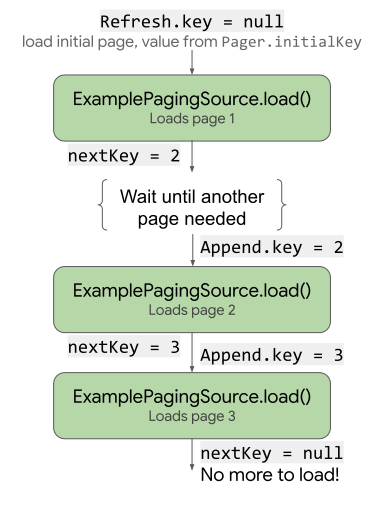
load ใช้และอัปเดตคีย์
การติดตั้งใช้งาน PagingSource ต้องใช้เมธอด getRefreshKey
ที่ใช้ออบเจ็กต์ PagingState เป็นพารามิเตอร์ด้วย โดยจะแสดงผลคีย์เพื่อส่งไปยังเมธอด load เมื่อรีเฟรชหรือทำให้ข้อมูลไม่ถูกต้อง
หลังจากโหลดครั้งแรก Paging Library จะเรียกใช้เมธอดนี้โดยอัตโนมัติเมื่อ
รีเฟรชข้อมูลในภายหลัง
จัดการข้อผิดพลาด
คำขอโหลดข้อมูลอาจไม่สำเร็จด้วยเหตุผลหลายประการ โดยเฉพาะเมื่อโหลดผ่านเครือข่าย รายงานข้อผิดพลาดที่พบระหว่างการโหลดโดยการแสดงออบเจ็กต์
LoadResult.Error จากเมธอด load
เช่น คุณสามารถตรวจหาและรายงานข้อผิดพลาดในการโหลดใน ExamplePagingSource
จากตัวอย่างก่อนหน้าได้โดยเพิ่มข้อมูลต่อไปนี้ลงในเมธอด load
Java (RxJava)
return backend.searchUsers(searchTerm, nextPageNumber)
  .subscribeOn(Schedulers.io())
  .map(this::toLoadResult)
  .onErrorReturn(LoadResult.Error::new);
Java (Guava/LiveData)
ListenableFuture<LoadResult<Integer, User>> pageFuture = Futures.transform(
  backend.searchUsers(query, nextPageNumber), this::toLoadResult,
  bgExecutor);

ListenableFuture<LoadResult<Integer, User>> partialLoadResultFuture = Futures.catching(
  pageFuture, HttpException.class, LoadResult.Error::new,
  bgExecutor);

return Futures.catching(partialLoadResultFuture,
  IOException.class, LoadResult.Error::new, bgExecutor);
ดูข้อมูลเพิ่มเติมเกี่ยวกับการจัดการข้อผิดพลาดของ Retrofit ได้ที่ตัวอย่างใน
PagingSourceเอกสารอ้างอิง API
PagingSource จะรวบรวมและส่งออบเจ็กต์ LoadResult.Error ไปยัง UI เพื่อให้คุณดำเนินการกับออบเจ็กต์เหล่านั้นได้ ดูข้อมูลเพิ่มเติมเกี่ยวกับการแสดงสถานะการโหลดใน UI ได้ที่จัดการและแสดงสถานะการโหลด
ตั้งค่าสตรีมของ PagingData
จากนั้นคุณต้องมีสตรีมข้อมูลที่แบ่งหน้าจากการติดตั้งใช้งาน PagingSource
ตั้งค่าสตรีมข้อมูลใน ViewModel คลาส Pager มีเมธอดที่แสดงสตรีมแบบรีแอ็กทีฟของออบเจ็กต์ PagingData จาก PagingSource ไลบรารีการแบ่งหน้าจะรองรับการใช้สตรีมหลายประเภท
รวมถึง Flow, LiveData และประเภท Flowable และ Observable จาก
RxJava
เมื่อสร้างอินสแตนซ์ Pager เพื่อตั้งค่าสตรีมแบบรีแอ็กทีฟ คุณต้อง
ระบุออบเจ็กต์การกำหนดค่า PagingConfig และฟังก์ชันที่บอก Pager วิธีรับอินสแตนซ์ของอิมพลีเมนต์ PagingSource
Java (RxJava)
// CoroutineScope helper provided by the lifecycle-viewmodel-ktx artifact.
CoroutineScope viewModelScope = ViewModelKt.getViewModelScope(viewModel);
Pager<Integer, User> pager = Pager<>(
  new PagingConfig(/* pageSize = */ 20),
  () -> ExamplePagingSource(backend, query));

Flowable<PagingData<User>> flowable = PagingRx.getFlowable(pager);
PagingRx.cachedIn(flowable, viewModelScope);
Java (Guava/LiveData)
// CoroutineScope helper provided by the lifecycle-viewmodel-ktx artifact.
CoroutineScope viewModelScope = ViewModelKt.getViewModelScope(viewModel);
Pager<Integer, User> pager = Pager<>(
  new PagingConfig(/* pageSize = */ 20),
  () -> ExamplePagingSource(backend, query));

PagingLiveData.cachedIn(PagingLiveData.getLiveData(pager), viewModelScope);
ตัวดำเนินการ cachedIn ทำให้สตรีมข้อมูลแชร์ได้และแคชข้อมูลที่โหลดด้วย CoroutineScope ที่ระบุ ตัวอย่างนี้ใช้ viewModelScope
ที่ได้จากอาร์ติแฟกต์lifecycle-viewmodel-ktxวงจร
ออบเจ็กต์ Pager จะเรียกใช้เมธอด load จากออบเจ็กต์ PagingSource
โดยส่งออบเจ็กต์ LoadParams ไปให้และรับออบเจ็กต์
LoadResult กลับมา
กำหนดอะแดปเตอร์ RecyclerView
นอกจากนี้ คุณยังต้องตั้งค่าอแดปเตอร์เพื่อรับข้อมูลลงในRecyclerView
รายการด้วย ไลบรารีการแบ่งหน้ามีคลาส PagingDataAdapter สำหรับวัตถุประสงค์นี้
กำหนดคลาสที่ขยาย PagingDataAdapter ในตัวอย่าง UserAdapter
extends PagingDataAdapter เพื่อจัดหาRecyclerViewอแดปเตอร์สำหรับรายการ
ประเภท User และใช้ UserViewHolder เป็น view holder
Kotlin (Coroutines)
class UserAdapter(diffCallback: DiffUtil.ItemCallback<User>) :
  PagingDataAdapter<User, UserViewHolder>(diffCallback) {
  override fun onCreateViewHolder(
    parent: ViewGroup,
    viewType: Int
  ): UserViewHolder {
    return UserViewHolder(parent)
  }

  override fun onBindViewHolder(holder: UserViewHolder, position: Int) {
    val item = getItem(position)
    // Note that item can be null. ViewHolder must support binding a
    // null item as a placeholder.
    holder.bind(item)
  }
}
Java (RxJava)
class UserAdapter extends PagingDataAdapter<User, UserViewHolder> {
  UserAdapter(@NotNull DiffUtil.ItemCallback<User> diffCallback) {
    super(diffCallback);
  }

  @NonNull
  @Override
  public UserViewHolder onCreateViewHolder(@NonNull ViewGroup parent, int viewType) {
    return new UserViewHolder(parent);
  }

  @Override
  public void onBindViewHolder(@NonNull UserViewHolder holder, int position) {
    User item = getItem(position);
    // Note that item can be null. ViewHolder must support binding a
    // null item as a placeholder.
    holder.bind(item);
  }
}
Java (Guava/LiveData)
class UserAdapter extends PagingDataAdapter<User, UserViewHolder> {
  UserAdapter(@NotNull DiffUtil.ItemCallback<User> diffCallback) {
    super(diffCallback);
  }

  @NonNull
  @Override
  public UserViewHolder onCreateViewHolder(@NonNull ViewGroup parent, int viewType) {
    return new UserViewHolder(parent);
  }

  @Override
  public void onBindViewHolder(@NonNull UserViewHolder holder, int position) {
    User item = getItem(position);
    // Note that item can be null. ViewHolder must support binding a
    // null item as a placeholder.
    holder.bind(item);
  }
}
นอกจากนี้ อะแดปเตอร์ต้องกำหนดเมธอด onCreateViewHolder และ
onBindViewHolder รวมถึงระบุ DiffUtil.ItemCallback ด้วย ซึ่งจะ
ทำงานเหมือนกับที่ทำตามปกติเมื่อกำหนดRecyclerViewอแดปเตอร์รายการ
Kotlin (Coroutines)
object UserComparator : DiffUtil.ItemCallback<User>() {
  override fun areItemsTheSame(oldItem: User, newItem: User): Boolean {
    // Id is unique.
    return oldItem.id == newItem.id
  }

  override fun areContentsTheSame(oldItem: User, newItem: User): Boolean {
    return oldItem == newItem
  }
}
Java (RxJava)
class UserComparator extends DiffUtil.ItemCallback<User> {
  @Override
  public boolean areItemsTheSame(@NonNull User oldItem,
    @NonNull User newItem) {
    // Id is unique.
    return oldItem.id.equals(newItem.id);
  }

  @Override
  public boolean areContentsTheSame(@NonNull User oldItem,
    @NonNull User newItem) {
    return oldItem.equals(newItem);
  }
}
Java (Guava/LiveData)
class UserComparator extends DiffUtil.ItemCallback<User> {
  @Override
  public boolean areItemsTheSame(@NonNull User oldItem,
    @NonNull User newItem) {
    // Id is unique.
    return oldItem.id.equals(newItem.id);
  }

  @Override
  public boolean areContentsTheSame(@NonNull User oldItem,
    @NonNull User newItem) {
    return oldItem.equals(newItem);
  }
}
แสดงข้อมูลที่แบ่งหน้าใน UI
ตอนนี้คุณได้กำหนด PagingSource สร้างวิธีให้แอป
สร้างสตรีมของ PagingData และกำหนด PagingDataAdapter แล้ว คุณก็พร้อมที่จะเชื่อมต่อองค์ประกอบเหล่านี้เข้าด้วยกันและแสดงข้อมูลแบบแบ่งหน้าในกิจกรรม
ทำตามขั้นตอนต่อไปนี้ในเมธอด onCreate ของกิจกรรมหรือเมธอดของ Fragment
onViewCreated
- สร้างอินสแตนซ์ของคลาส
PagingDataAdapter - ส่งอินสแตนซ์
PagingDataAdapterไปยังรายการRecyclerViewที่คุณต้องการแสดงข้อมูลแบบแบ่งหน้า - สังเกตสตรีม
PagingDataและส่งค่าที่สร้างขึ้นแต่ละค่าไปยังเมธอดsubmitData()ของอแดปเตอร์
Kotlin (Coroutines)
val viewModel by viewModels<ExampleViewModel>()

val pagingAdapter = UserAdapter(UserComparator)
val recyclerView = findViewById<RecyclerView>(R.id.recycler_view)
recyclerView.adapter = pagingAdapter

// Activities can use lifecycleScope directly; fragments use
// viewLifecycleOwner.lifecycleScope.
lifecycleScope.launch {
  viewModel.flow.collectLatest { pagingData ->
    pagingAdapter.submitData(pagingData)
  }
}
Java (RxJava)
ExampleViewModel viewModel = new ViewModelProvider(this)
  .get(ExampleViewModel.class);

UserAdapter pagingAdapter = new UserAdapter(new UserComparator());
RecyclerView recyclerView = findViewById<RecyclerView>(
  R.id.recycler_view);
recyclerView.adapter = pagingAdapter

viewModel.flowable
  // Using AutoDispose to handle subscription lifecycle.
  // See: https://github.com/uber/AutoDispose.
  .to(autoDisposable(AndroidLifecycleScopeProvider.from(this)))
  .subscribe(pagingData -> pagingAdapter.submitData(lifecycle, pagingData));
Java (Guava/LiveData)
ExampleViewModel viewModel = new ViewModelProvider(this)
  .get(ExampleViewModel.class);

UserAdapter pagingAdapter = new UserAdapter(new UserComparator());
RecyclerView recyclerView = findViewById<RecyclerView>(
  R.id.recycler_view);
recyclerView.adapter = pagingAdapter

// Activities can use getLifecycle() directly; fragments use
// getViewLifecycleOwner().getLifecycle().
viewModel.liveData.observe(this, pagingData ->
  pagingAdapter.submitData(getLifecycle(), pagingData));
RecyclerView รายการจะแสดงข้อมูลที่แบ่งหน้าจากแหล่งข้อมูล และ
โหลดหน้าอื่นโดยอัตโนมัติเมื่อจำเป็น