

Conceitos e implementação do Jetpack Compose
A biblioteca Paging fornece recursos avançados para carregar e exibir dados paginados de um conjunto de dados maior. Este guia demonstra como usar a biblioteca Paging
para configurar um fluxo de dados paginados de uma fonte de dados de rede e
exibi-los em uma RecyclerView.
Definir uma fonte de dados
A primeira etapa é definir uma PagingSource implementação para identificar a
fonte de dados. A classe de API PagingSource inclui o método load,
que é substituído para indicar como extrair dados paginados da fonte de dados correspondente
da fonte de dados.
Use a classe PagingSource diretamente para usar corrotinas do Kotlin para carregamento assíncrono. A biblioteca Paging também fornece classes para compatibilidade com outros frameworks assíncronos:
- Para usar RxJava, implemente
RxPagingSource. - Para usar
ListenableFuturedo Guava, implementeListenableFuturePagingSource.
Selecionar tipos de chave e valor
PagingSource<Key, Value> tem dois parâmetros de tipo: Key e Value. A chave define o identificador usado para carregar os dados, e o valor é o tipo dos próprios dados. Por exemplo, se você carregar páginas de objetos User da rede
transmitindo números de página Int para Retrofit, selecione Int como o tipo
Key e User como o tipo Value.
Definir a PagingSource
O exemplo a seguir implementa uma PagingSource que carrega páginas de itens
por número de página. O tipo Key é Int e o tipo Value é User.
Java (RxJava)
class ExamplePagingSource extends RxPagingSource<Integer, User> {
  @NonNull
  private ExampleBackendService mBackend;
  @NonNull
  private String mQuery;

  ExamplePagingSource(@NonNull ExampleBackendService backend,
    @NonNull String query) {
    mBackend = backend;
    mQuery = query;
  }

  @NotNull
  @Override
  public Single<LoadResult<Integer, User>> loadSingle(
    @NotNull LoadParams<Integer> params) {
    // Start refresh at page 1 if undefined.
    Integer nextPageNumber = params.getKey();
    if (nextPageNumber == null) {
      nextPageNumber = 1;
    }

    return mBackend.searchUsers(mQuery, nextPageNumber)
      .subscribeOn(Schedulers.io())
      .map(this::toLoadResult)
      .onErrorReturn(LoadResult.Error::new);
  }

  private LoadResult<Integer, User> toLoadResult(
    @NonNull SearchUserResponse response) {
    return new LoadResult.Page<>(
      response.getUsers(),
      null, // Only paging forward.
      response.getNextPageNumber(),
      LoadResult.Page.COUNT_UNDEFINED,
      LoadResult.Page.COUNT_UNDEFINED);
  }

  @Nullable
  @Override
  public Integer getRefreshKey(@NotNull PagingState<Integer, User> state) {
    // Try to find the page key of the closest page to anchorPosition from
    // either the prevKey or the nextKey; you need to handle nullability
    // here.
    //  * prevKey == null -> anchorPage is the first page.
    //  * nextKey == null -> anchorPage is the last page.
    //  * both prevKey and nextKey are null -> anchorPage is the
    //    initial page, so return null.
    Integer anchorPosition = state.getAnchorPosition();
    if (anchorPosition == null) {
      return null;
    }

    LoadResult.Page<Integer, User> anchorPage = state.closestPageToPosition(anchorPosition);
    if (anchorPage == null) {
      return null;
    }

    Integer prevKey = anchorPage.getPrevKey();
    if (prevKey != null) {
      return prevKey + 1;
    }

    Integer nextKey = anchorPage.getNextKey();
    if (nextKey != null) {
      return nextKey - 1;
    }

    return null;
  }
}
Java (Guava/LiveData)
class ExamplePagingSource extends ListenableFuturePagingSource<Integer, User> {
  @NonNull
  private ExampleBackendService mBackend;
  @NonNull
  private String mQuery;
  @NonNull
  private Executor mBgExecutor;

  ExamplePagingSource(
    @NonNull ExampleBackendService backend,
    @NonNull String query, @NonNull Executor bgExecutor) {
    mBackend = backend;
    mQuery = query;
    mBgExecutor = bgExecutor;
  }

  @NotNull
  @Override
  public ListenableFuture<LoadResult<Integer, User>> loadFuture(@NotNull LoadParams<Integer> params) {
    // Start refresh at page 1 if undefined.
    Integer nextPageNumber = params.getKey();
    if (nextPageNumber == null) {
      nextPageNumber = 1;
    }

    ListenableFuture<LoadResult<Integer, User>> pageFuture =
      Futures.transform(mBackend.searchUsers(mQuery, nextPageNumber),
      this::toLoadResult, mBgExecutor);

    ListenableFuture<LoadResult<Integer, User>> partialLoadResultFuture =
      Futures.catching(pageFuture, HttpException.class,
      LoadResult.Error::new, mBgExecutor);

    return Futures.catching(partialLoadResultFuture,
      IOException.class, LoadResult.Error::new, mBgExecutor);
  }

  private LoadResult<Integer, User> toLoadResult(@NonNull SearchUserResponse response) {
    return new LoadResult.Page<>(response.getUsers(),
    null, // Only paging forward.
    response.getNextPageNumber(),
    LoadResult.Page.COUNT_UNDEFINED,
    LoadResult.Page.COUNT_UNDEFINED);
  }

  @Nullable
  @Override
  public Integer getRefreshKey(@NotNull PagingState<Integer, User> state) {
    // Try to find the page key of the closest page to anchorPosition from
    // either the prevKey or the nextKey; you need to handle nullability
    // here.
    //  * prevKey == null -> anchorPage is the first page.
    //  * nextKey == null -> anchorPage is the last page.
    //  * both prevKey and nextKey are null -> anchorPage is the
    //    initial page, so return null.
    Integer anchorPosition = state.getAnchorPosition();
    if (anchorPosition == null) {
      return null;
    }

    LoadResult.Page<Integer, User> anchorPage = state.closestPageToPosition(anchorPosition);
    if (anchorPage == null) {
      return null;
    }

    Integer prevKey = anchorPage.getPrevKey();
    if (prevKey != null) {
      return prevKey + 1;
    }

    Integer nextKey = anchorPage.getNextKey();
    if (nextKey != null) {
      return nextKey - 1;
    }

    return null;
  }
}
Uma implementação típica de PagingSource transmite parâmetros fornecidos no construtor ao método load para carregar os dados apropriados em uma consulta. No exemplo acima, esses parâmetros são:
backend: uma instância do serviço de back-end que fornece os dadosquery: a consulta de pesquisa a ser enviada ao serviço indicado porbackend
O objeto LoadParams contém informações sobre a operação de carregamento a ser
realizada. Isso inclui a chave e o número de itens a serem carregados.
O objeto LoadResult contém o resultado da operação de carregamento.
LoadResult é uma classe selada que pode assumir uma de duas formas, dependendo do êxito da chamada load:
- Se o carregamento for bem-sucedido, um objeto
LoadResult.Pageé retornado. - Se o carregamento não for bem-sucedido, um objeto
LoadResult.Erroré retornado.
A figura abaixo ilustra como a função load neste exemplo recebe a chave para cada carregamento e para o carregamento seguinte.
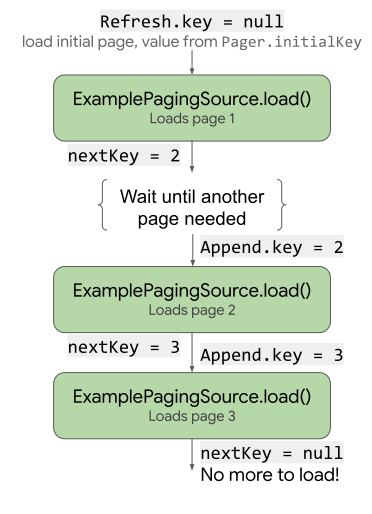
load usa e atualiza a chave.
A implementação de PagingSource também precisa implementar um getRefreshKey
método que recebe um PagingState objeto como um parâmetro. Ele retorna a chave para transmitir ao método load quando os dados são atualizados ou invalidados após o carregamento inicial. A biblioteca Paging chama esse método automaticamente nas próximas atualizações dos dados.
Solucionar erros
As solicitações para carregar dados podem falhar por diversos motivos, especialmente no carregamento
pela rede. Informe erros encontrados durante o carregamento retornando um
objeto LoadResult.Error do método load.
Por exemplo, é possível identificar e relatar erros de carregamento em ExamplePagingSource do exemplo anterior adicionando o seguinte ao método load:
Java (RxJava)
return backend.searchUsers(searchTerm, nextPageNumber)
  .subscribeOn(Schedulers.io())
  .map(this::toLoadResult)
  .onErrorReturn(LoadResult.Error::new);
Java (Guava/LiveData)
ListenableFuture<LoadResult<Integer, User>> pageFuture = Futures.transform(
  backend.searchUsers(query, nextPageNumber), this::toLoadResult,
  bgExecutor);

ListenableFuture<LoadResult<Integer, User>> partialLoadResultFuture = Futures.catching(
  pageFuture, HttpException.class, LoadResult.Error::new,
  bgExecutor);

return Futures.catching(partialLoadResultFuture,
  IOException.class, LoadResult.Error::new, bgExecutor);
Para mais informações sobre como lidar com erros de Retrofit, consulte as amostras na referência da API PagingSource.
PagingSource coleta e envia objetos LoadResult.Error à interface para que você possa tomar medidas quanto a eles. Para mais informações sobre como expor o estado de carregamento em
a interface, consulte Gerenciar e apresentar estados de carregamento.
Configurar um fluxo de PagingData
Em seguida, você precisa de um fluxo de dados paginados da implementação de PagingSource.
Configure o fluxo de dados no seu ViewModel. A classe Pager oferece
métodos que expõem um fluxo reativo de objetos PagingData de uma
PagingSource. A biblioteca Paging é compatível com o uso de vários tipos de fluxo, incluindo Flow, LiveData e os tipos Flowable e Observable do RxJava.
Ao criar uma instância de Pager para configurar seu fluxo reativo, é necessário
fornecer à instância um objeto de configuração PagingConfig e uma
função que informe ao Pager como ter uma instância da sua implementação de PagingSource:
Java (RxJava)
// CoroutineScope helper provided by the lifecycle-viewmodel-ktx artifact.
CoroutineScope viewModelScope = ViewModelKt.getViewModelScope(viewModel);
Pager<Integer, User> pager = Pager<>(
  new PagingConfig(/* pageSize = */ 20),
  () -> ExamplePagingSource(backend, query));

Flowable<PagingData<User>> flowable = PagingRx.getFlowable(pager);
PagingRx.cachedIn(flowable, viewModelScope);
Java (Guava/LiveData)
// CoroutineScope helper provided by the lifecycle-viewmodel-ktx artifact.
CoroutineScope viewModelScope = ViewModelKt.getViewModelScope(viewModel);
Pager<Integer, User> pager = Pager<>(
  new PagingConfig(/* pageSize = */ 20),
  () -> ExamplePagingSource(backend, query));

PagingLiveData.cachedIn(PagingLiveData.getLiveData(pager), viewModelScope);
O operador cachedIn torna o fluxo de dados compartilhável e armazena em cache os dados carregados com o CoroutineScope fornecido. Esse exemplo usa o viewModelScope fornecido pelo artefato do ciclo de vida lifecycle-viewmodel-ktx.
O objeto Pager chama o método load do objeto PagingSource,
fornecendo o objeto LoadParams e recebendo o
LoadResult objeto em troca.
Definir um adaptador RecyclerView
Também é necessário configurar um adaptador para receber os dados na sua lista
RecyclerView. A biblioteca Paging oferece a classe PagingDataAdapter
com essa finalidade.
Defina uma classe que estenda PagingDataAdapter. No exemplo, UserAdapter
estende PagingDataAdapter para fornecer um adaptador RecyclerView para itens de lista
do tipo User e usando UserViewHolder como um marcador de visualização:
Kotlin (Corrotinas)
class UserAdapter(diffCallback: DiffUtil.ItemCallback<User>) :
  PagingDataAdapter<User, UserViewHolder>(diffCallback) {
  override fun onCreateViewHolder(
    parent: ViewGroup,
    viewType: Int
  ): UserViewHolder {
    return UserViewHolder(parent)
  }

  override fun onBindViewHolder(holder: UserViewHolder, position: Int) {
    val item = getItem(position)
    // Note that item can be null. ViewHolder must support binding a
    // null item as a placeholder.
    holder.bind(item)
  }
}
Java (RxJava)
class UserAdapter extends PagingDataAdapter<User, UserViewHolder> {
  UserAdapter(@NotNull DiffUtil.ItemCallback<User> diffCallback) {
    super(diffCallback);
  }

  @NonNull
  @Override
  public UserViewHolder onCreateViewHolder(@NonNull ViewGroup parent, int viewType) {
    return new UserViewHolder(parent);
  }

  @Override
  public void onBindViewHolder(@NonNull UserViewHolder holder, int position) {
    User item = getItem(position);
    // Note that item can be null. ViewHolder must support binding a
    // null item as a placeholder.
    holder.bind(item);
  }
}
Java (Guava/LiveData)
class UserAdapter extends PagingDataAdapter<User, UserViewHolder> {
  UserAdapter(@NotNull DiffUtil.ItemCallback<User> diffCallback) {
    super(diffCallback);
  }

  @NonNull
  @Override
  public UserViewHolder onCreateViewHolder(@NonNull ViewGroup parent, int viewType) {
    return new UserViewHolder(parent);
  }

  @Override
  public void onBindViewHolder(@NonNull UserViewHolder holder, int position) {
    User item = getItem(position);
    // Note that item can be null. ViewHolder must support binding a
    // null item as a placeholder.
    holder.bind(item);
  }
}
O adaptador também precisa definir os onCreateViewHolder e
onBindViewHolder métodos e especificar um DiffUtil.ItemCallback. Isso funciona da mesma forma que normalmente ao definir adaptadores de lista RecyclerView:
Kotlin (Corrotinas)
object UserComparator : DiffUtil.ItemCallback<User>() {
  override fun areItemsTheSame(oldItem: User, newItem: User): Boolean {
    // Id is unique.
    return oldItem.id == newItem.id
  }

  override fun areContentsTheSame(oldItem: User, newItem: User): Boolean {
    return oldItem == newItem
  }
}
Java (RxJava)
class UserComparator extends DiffUtil.ItemCallback<User> {
  @Override
  public boolean areItemsTheSame(@NonNull User oldItem,
    @NonNull User newItem) {
    // Id is unique.
    return oldItem.id.equals(newItem.id);
  }

  @Override
  public boolean areContentsTheSame(@NonNull User oldItem,
    @NonNull User newItem) {
    return oldItem.equals(newItem);
  }
}
Java (Guava/LiveData)
class UserComparator extends DiffUtil.ItemCallback<User> {
  @Override
  public boolean areItemsTheSame(@NonNull User oldItem,
    @NonNull User newItem) {
    // Id is unique.
    return oldItem.id.equals(newItem.id);
  }

  @Override
  public boolean areContentsTheSame(@NonNull User oldItem,
    @NonNull User newItem) {
    return oldItem.equals(newItem);
  }
}
Exibir os dados paginados na sua IU
Agora que você definiu uma PagingSource, criou uma forma para o app
gerar um fluxo de PagingData e definiu PagingDataAdapter, está
pronto para conectar esses elementos e exibir dados paginados em sua
atividade.
Realize as seguintes etapas no método onCreate da atividade ou onViewCreated do fragmento:
- Crie uma instância da classe
PagingDataAdapter. - Transmita a instância
PagingDataAdapterpara a listaRecyclerViewem que você quer mostrar os dados paginados. - Observe o fluxo
PagingDatae transmita cada valor gerado ao métodosubmitData()do adaptador.
Kotlin (Corrotinas)
val viewModel by viewModels<ExampleViewModel>()

val pagingAdapter = UserAdapter(UserComparator)
val recyclerView = findViewById<RecyclerView>(R.id.recycler_view)
recyclerView.adapter = pagingAdapter

// Activities can use lifecycleScope directly; fragments use
// viewLifecycleOwner.lifecycleScope.
lifecycleScope.launch {
  viewModel.flow.collectLatest { pagingData ->
    pagingAdapter.submitData(pagingData)
  }
}
Java (RxJava)
ExampleViewModel viewModel = new ViewModelProvider(this)
  .get(ExampleViewModel.class);

UserAdapter pagingAdapter = new UserAdapter(new UserComparator());
RecyclerView recyclerView = findViewById<RecyclerView>(
  R.id.recycler_view);
recyclerView.adapter = pagingAdapter

viewModel.flowable
  // Using AutoDispose to handle subscription lifecycle.
  // See: https://github.com/uber/AutoDispose.
  .to(autoDisposable(AndroidLifecycleScopeProvider.from(this)))
  .subscribe(pagingData -> pagingAdapter.submitData(lifecycle, pagingData));
Java (Guava/LiveData)
ExampleViewModel viewModel = new ViewModelProvider(this)
  .get(ExampleViewModel.class);

UserAdapter pagingAdapter = new UserAdapter(new UserComparator());
RecyclerView recyclerView = findViewById<RecyclerView>(
  R.id.recycler_view);
recyclerView.adapter = pagingAdapter

// Activities can use getLifecycle() directly; fragments use
// getViewLifecycleOwner().getLifecycle().
viewModel.liveData.observe(this, pagingData ->
  pagingAdapter.submitData(getLifecycle(), pagingData));
A lista RecyclerView agora exibe os dados paginados da fonte de dados e carrega automaticamente outra página quando necessário.