

Pojęcia i implementacja w Jetpack Compose
Zadbaj o wygodę użytkowników, umożliwiając korzystanie z aplikacji, gdy połączenie sieciowe jest niestabilne lub gdy użytkownik jest offline. Jednym ze sposobów na to jest jednoczesne pobieranie danych z sieci i lokalnej bazy danych. W ten sposób aplikacja steruje interfejsem na podstawie lokalnej pamięci podręcznej bazy danych i wysyła żądania do sieci tylko wtedy, gdy w bazie danych nie ma już danych.
W tym przewodniku zakładamy, że znasz bibliotekę trwałości Room i podstawowe zastosowania biblioteki Paging.
Koordynowanie wczytywania danych
Biblioteka Paging udostępnia w tym przypadku użycia komponent RemoteMediator. RemoteMediator działa jako sygnał z biblioteki Paging, gdy w aplikacji skończą się dane w pamięci podręcznej. Możesz użyć tego sygnału, aby wczytać dodatkowe dane z sieci i zapisać je w lokalnej bazie danych, z której PagingSource może je wczytać i przekazać do interfejsu, aby je wyświetlić.
Gdy potrzebne są dodatkowe dane, biblioteka Paging wywołuje metodę load() z implementacji RemoteMediator. Jest to funkcja zawieszająca, więc można bezpiecznie wykonywać długotrwałe zadania. Ta funkcja zwykle pobiera nowe dane ze źródła sieciowego i zapisuje je w pamięci lokalnej.
Ten proces działa w przypadku nowych danych, ale z czasem dane przechowywane w bazie wymagają unieważnienia, np. gdy użytkownik ręcznie wywoła odświeżanie. Jest to reprezentowane przez właściwość LoadType przekazywaną do metody load(). Parametr LoadType informuje RemoteMediator, czy należy odświeżyć istniejące dane, czy pobrać dodatkowe dane, które trzeba dodać na końcu lub na początku istniejącej listy.
W ten sposób RemoteMediator zapewnia, że aplikacja wczytuje dane, które użytkownicy chcą zobaczyć, w odpowiedniej kolejności.
Cykl życia stronicowania
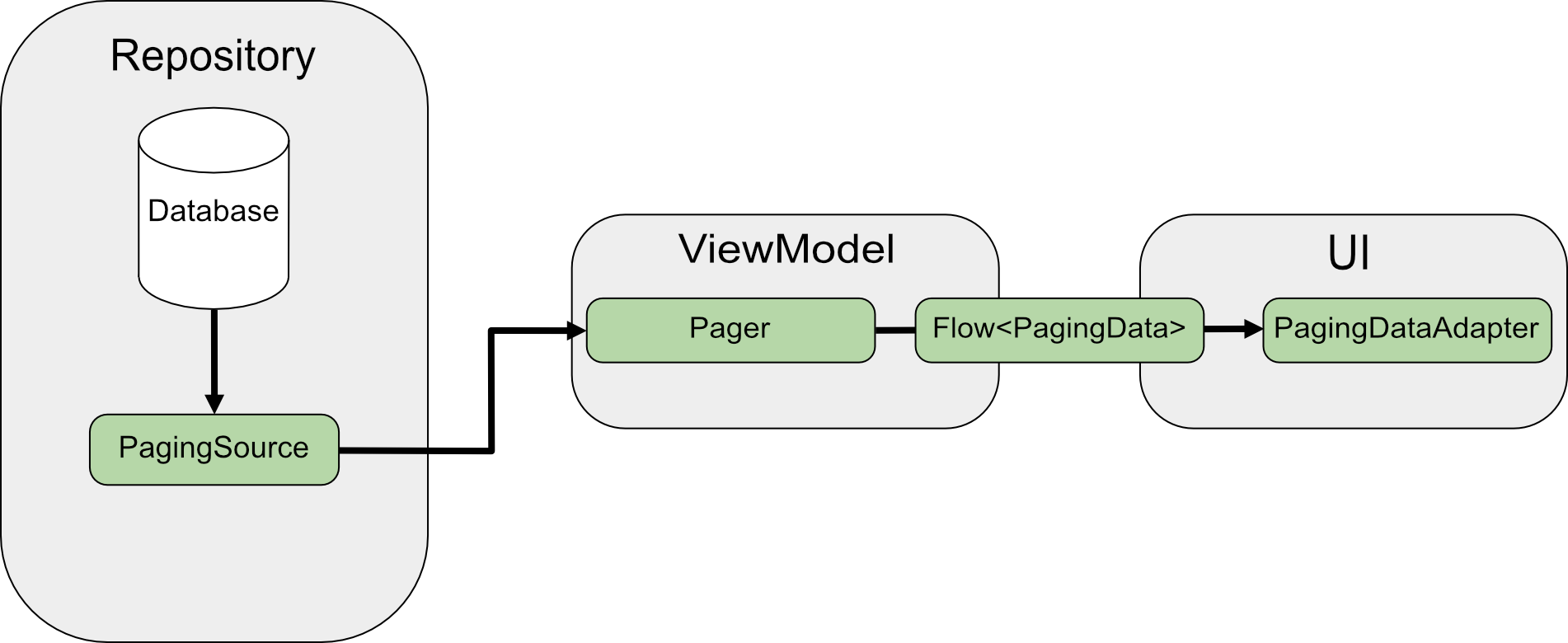
Podczas stronicowania bezpośrednio z sieci funkcja PagingSource wczytuje dane i zwraca obiekt LoadResult. Implementacja PagingSource jest przekazywana do Pager za pomocą parametru pagingSourceFactory.
Gdy interfejs wymaga nowych danych, Pager wywołuje metodę load() z PagingSource i zwraca strumień obiektów PagingData, które zawierają nowe dane. Każdy obiekt PagingData jest zwykle buforowany w ViewModel przed wysłaniem do interfejsu, aby go wyświetlić.
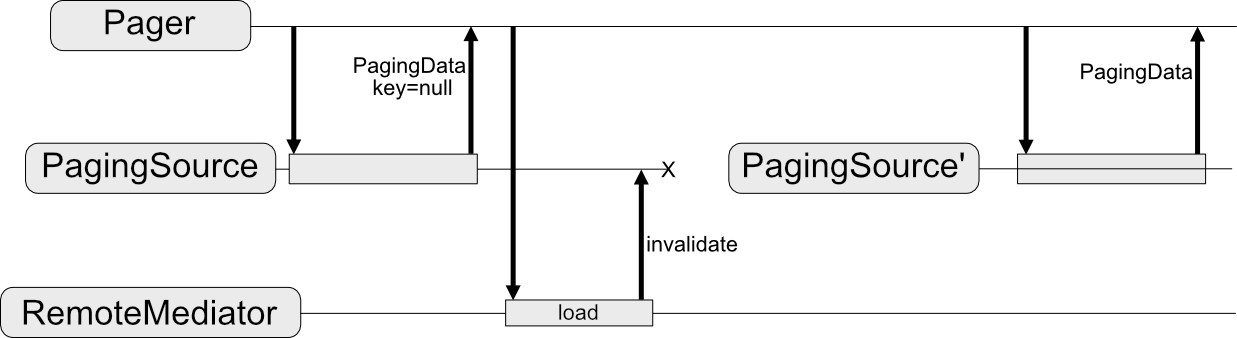
RemoteMediator zmienia ten przepływ danych. PagingSource nadal wczytuje dane, ale gdy dane podzielone na strony się wyczerpią, biblioteka Paging wywoła RemoteMediator, aby wczytać nowe dane ze źródła sieciowego. RemoteMediator
zapisuje nowe dane w lokalnej bazie danych, więc pamięć podręczna w ViewModel jest zbędna. Na koniec PagingSource unieważnia się, a Pager tworzy nową instancję, aby wczytać świeże dane z bazy danych.
Podstawowe użycie
Załóżmy, że chcesz, aby Twoja aplikacja wczytywała strony z User elementami ze źródła danych sieciowych z kluczem elementu do lokalnej pamięci podręcznej przechowywanej w bazie danych Room.
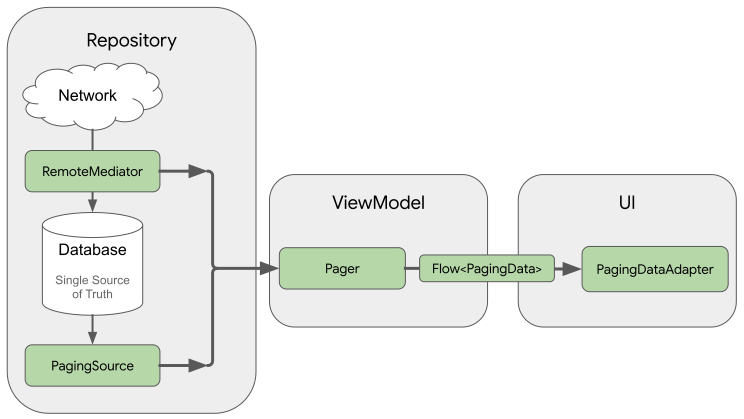
Implementacja RemoteMediator pomaga wczytywać dane podzielone na strony z sieci do bazy danych, ale nie wczytuje danych bezpośrednio do interfejsu. Zamiast tego aplikacja używa bazy danych jako źródła informacji. Innymi słowy, aplikacja wyświetla tylko dane, które zostały zapisane w pamięci podręcznej bazy danych. Implementacja PagingSource (np. wygenerowana przez Room) obsługuje wczytywanie danych z pamięci podręcznej z bazy danych do interfejsu.
Tworzenie encji Room
Pierwszym krokiem jest użycie biblioteki Room Persistence do zdefiniowania bazy danych, która będzie przechowywać lokalną pamięć podręczną danych podzielonych na strony pochodzących ze źródła danych sieciowych. Zacznij od implementacji RoomDatabase zgodnie z opisem w artykule Zapisywanie danych w lokalnej bazie danych za pomocą biblioteki Room.
Następnie zdefiniuj encję Room, która będzie reprezentować tabelę elementów listy, zgodnie z opisem w artykule Definiowanie danych za pomocą encji Room.
Nadaj mu pole id jako klucz podstawowy, a także pola dla wszystkich innych informacji, które zawierają elementy listy.
Java
@Entity(tableName = "users")
public class User {
  public String id;
  public String label;
}
Java
@Entity(tableName = "users")
public class User {
  public String id;
  public String label;
}
Musisz też zdefiniować obiekt dostępu do danych (DAO) dla tej encji Room, zgodnie z opisem w artykule Uzyskiwanie dostępu do danych za pomocą obiektów DAO w bibliotece Room. Obiekt DAO dla elementu listy musi zawierać te metody:
- Metoda
insertAll(), która wstawia do tabeli listę elementów. - Metoda, która przyjmuje ciąg zapytania jako parametr i zwraca obiekt
PagingSourcedla listy wyników. W ten sposób obiektPagermoże używać tej tabeli jako źródła danych podzielonych na strony. - Metoda
clearAll(), która usuwa wszystkie dane z tabeli.
Java
@Dao
interface UserDao {
  @Insert(onConflict = OnConflictStrategy.REPLACE)
  void insertAll(List<User> users);

  @Query("SELECT * FROM users WHERE mLabel LIKE :query")
  PagingSource<Integer, User> pagingSource(String query);

  @Query("DELETE FROM users")
  int clearAll();
}
Java
@Dao
interface UserDao {
  @Insert(onConflict = OnConflictStrategy.REPLACE)
  void insertAll(List<User> users);

  @Query("SELECT * FROM users WHERE mLabel LIKE :query")
  PagingSource<Integer, User> pagingSource(String query);

  @Query("DELETE FROM users")
  int clearAll();
}
Implementowanie klasy RemoteMediator
Głównym zadaniem RemoteMediator jest wczytywanie większej ilości danych z sieci, gdy Pager wyczerpie dane lub gdy istniejące dane zostaną unieważnione. Zawiera ona metodę load(), którą musisz zastąpić, aby określić sposób ładowania.
Typowe wdrożenie RemoteMediator obejmuje te parametry:
query: ciąg zapytania określający, które dane mają być pobierane z usługi backendu.database: baza danych Room, która służy jako pamięć podręczna.networkService: instancja interfejsu API dla usługi backendu.
Utwórz implementację usługi RemoteMediator<Key, Value>. Typ Key i typ Value powinny być takie same jak w przypadku definiowania PagingSource w odniesieniu do tego samego źródła danych z sieci. Więcej informacji o wybieraniu parametrów typu znajdziesz w artykule Wybieranie typów kluczy i wartości.
Java
@UseExperimental(markerClass = ExperimentalPagingApi.class)
class ExampleRemoteMediator extends RxRemoteMediator<Integer, User> {
  private String query;
  private ExampleBackendService networkService;
  private RoomDb database;
  private UserDao userDao;

  ExampleRemoteMediator(
    String query,
    ExampleBackendService networkService, RoomDb database
  ) {
    query = query;
    networkService = networkService;
    database = database;
    userDao = database.userDao();
  }

  @NotNull
  @Override
  public Single<MediatorResult> loadSingle(
    @NotNull LoadType loadType,
    @NotNull PagingState<Integer, User> state
  ) {
    ...
  }
}
Java
class ExampleRemoteMediator extends ListenableFutureRemoteMediator<Integer, User> {
  private String query;
  private ExampleBackendService networkService;
  private RoomDb database;
  private UserDao userDao;
  private Executor bgExecutor;

  ExampleRemoteMediator(
    String query,
    ExampleBackendService networkService,
    RoomDb database,
    Executor bgExecutor
  ) {
    this.query = query;
    this.networkService = networkService;
    this.database = database;
    this.userDao = database.userDao();
    this.bgExecutor = bgExecutor;
  }

  @NotNull
  @Override
  public ListenableFuture<MediatorResult> loadFuture(
    @NotNull LoadType loadType,
    @NotNull PagingState<Integer, User> state
  ) {
    ...
  }
}
Metoda load() odpowiada za aktualizowanie zbioru danych i unieważnianie PagingSource. Niektóre biblioteki obsługujące stronicowanie (np. Room) automatycznie unieważniają obiekty PagingSource, które implementują.
Metoda load() przyjmuje 2 parametry:
PagingState, który zawiera informacje o dotychczas wczytanych stronach, ostatnio użyty indeks i obiektPagingConfigużyty do zainicjowania strumienia stronicowania.LoadType, który wskazuje typ wczytywania:REFRESH,APPENDlubPREPEND.
Wartością zwracaną przez metodę load() jest obiekt MediatorResult. MediatorResult może mieć postać
MediatorResult.Error
(która zawiera opis błędu) lub
MediatorResult.Success
(która zawiera sygnał informujący o tym, czy jest więcej danych do wczytania).
Metoda load() musi wykonać te czynności:
- Określ, którą stronę wczytać z sieci, w zależności od typu wczytywania i danych, które zostały już wczytane.
- Wyślij żądanie sieciowe.
- Wykonywanie działań w zależności od wyniku operacji wczytywania:
- Jeśli wczytywanie się powiedzie, a otrzymana lista elementów nie jest pusta, zapisz elementy listy w bazie danych i zwróć wartość
MediatorResult.Success(endOfPaginationReached = false). Po zapisaniu danych unieważnij źródło danych, aby powiadomić bibliotekę Paging o nowych danych. - Jeśli wczytywanie się powiedzie, a otrzymana lista elementów jest pusta lub jest to ostatni indeks strony, zwróć wartość
MediatorResult.Success(endOfPaginationReached = true). Po zapisaniu danych unieważnij źródło danych, aby powiadomić bibliotekę Paging o nowych danych. - Jeśli żądanie spowoduje błąd, zwróć wartość
MediatorResult.Error.
- Jeśli wczytywanie się powiedzie, a otrzymana lista elementów nie jest pusta, zapisz elementy listy w bazie danych i zwróć wartość
Java
@NotNull
@Override
public Single<MediatorResult> loadSingle(
  @NotNull LoadType loadType,
  @NotNull PagingState<Integer, User> state
) {
  // The network load method takes an optional after=<user.id> parameter. For
  // every page after the first, pass the last user ID to let it continue from
  // where it left off. For REFRESH, pass null to load the first page.
  String loadKey = null;
  switch (loadType) {
    case REFRESH:
      break;
    case PREPEND:
      // In this example, you never need to prepend, since REFRESH will always
      // load the first page in the list. Immediately return, reporting end of
      // pagination.
      return Single.just(new MediatorResult.Success(true));
    case APPEND:
      User lastItem = state.lastItemOrNull();

      // You must explicitly check if the last item is null when appending,
      // since passing null to networkService is only valid for initial load.
      // If lastItem is null it means no items were loaded after the initial
      // REFRESH and there are no more items to load.
      if (lastItem == null) {
        return Single.just(new MediatorResult.Success(true));
      }

      loadKey = lastItem.getId();
      break;
  }

  return networkService.searchUsers(query, loadKey)
    .subscribeOn(Schedulers.io())
    .map((Function<SearchUserResponse, MediatorResult>) response -> {
      database.runInTransaction(() -> {
        if (loadType == LoadType.REFRESH) {
          userDao.deleteByQuery(query);
        }

        // Insert new users into database, which invalidates the current
        // PagingData, allowing Paging to present the updates in the DB.
        userDao.insertAll(response.getUsers());
      });

      return new MediatorResult.Success(response.getNextKey() == null);
    })
    .onErrorResumeNext(e -> {
      if (e instanceof IOException || e instanceof HttpException) {
        return Single.just(new MediatorResult.Error(e));
      }

      return Single.error(e);
    });
}
Java
@NotNull
@Override
public ListenableFuture<MediatorResult> loadFuture(
  @NotNull LoadType loadType,
  @NotNull PagingState<Integer, User> state
) {
  // The network load method takes an optional after=<user.id> parameter. For
  // every page after the first, pass the last user ID to let it continue from
  // where it left off. For REFRESH, pass null to load the first page.
  String loadKey = null;
  switch (loadType) {
    case REFRESH:
      break;
    case PREPEND:
      // In this example, you never need to prepend, since REFRESH will always
      // load the first page in the list. Immediately return, reporting end of
      // pagination.
      return Futures.immediateFuture(new MediatorResult.Success(true));
    case APPEND:
      User lastItem = state.lastItemOrNull();

      // You must explicitly check if the last item is null when appending,
      // since passing null to networkService is only valid for initial load.
      // If lastItem is null it means no items were loaded after the initial
      // REFRESH and there are no more items to load.
      if (lastItem == null) {
        return Futures.immediateFuture(new MediatorResult.Success(true));
      }

      loadKey = lastItem.getId();
      break;
  }

  ListenableFuture<MediatorResult> networkResult = Futures.transform(
    networkService.searchUsers(query, loadKey),
    response -> {
      database.runInTransaction(() -> {
        if (loadType == LoadType.REFRESH) {
          userDao.deleteByQuery(query);
        }

        // Insert new users into database, which invalidates the current
        // PagingData, allowing Paging to present the updates in the DB.
        userDao.insertAll(response.getUsers());
      });

      return new MediatorResult.Success(response.getNextKey() == null);
    }, bgExecutor);

  ListenableFuture<MediatorResult> ioCatchingNetworkResult =
    Futures.catching(
      networkResult,
      IOException.class,
      MediatorResult.Error::new,
      bgExecutor
    );

  return Futures.catching(
    ioCatchingNetworkResult,
    HttpException.class,
    MediatorResult.Error::new,
    bgExecutor
  );
}
Określ metodę initialize.
Implementacje RemoteMediator mogą też zastępować metodę initialize(), aby sprawdzać, czy dane w pamięci podręcznej są nieaktualne, i decydować, czy wywołać zdalne odświeżanie. Ta metoda jest wykonywana przed rozpoczęciem wczytywania, więc możesz manipulować bazą danych (np. usuwać stare dane) przed wywołaniem wczytywania lokalnego lub zdalnego.
Ponieważ initialize() jest funkcją asynchroniczną, możesz wczytywać dane, aby określić trafność istniejących danych w bazie danych. Najczęstszym przypadkiem jest to, że dane w pamięci podręcznej są ważne tylko przez określony czas. RemoteMediator może sprawdzić, czy ten czas wygasania minął. W takim przypadku biblioteka Paging musi w pełni odświeżyć dane. Implementacje funkcji initialize() powinny zwracać wartość InitializeAction w ten sposób:
- W przypadku, gdy dane produktów dostępnych lokalnie wymagają pełnego odświeżenia, funkcja
initialize()powinna zwrócić wartośćInitializeAction.LAUNCH_INITIAL_REFRESH. Powoduje to zdalne odświeżenieRemoteMediator, aby w pełni ponownie załadować dane. Wszystkie zdalne wczytywaniaAPPENDlubPREPENDczekają na pomyślne wczytanieREFRESH, zanim przejdą dalej. - W przypadku, gdy dane produktów dostępnych lokalnie nie wymagają odświeżenia, funkcja
initialize()powinna zwrócićInitializeAction.SKIP_INITIAL_REFRESH. Spowoduje to, żeRemoteMediatorpominie zdalne odświeżanie i wczyta dane z pamięci podręcznej.
Java
@NotNull
@Override
public Single<InitializeAction> initializeSingle() {
  long cacheTimeout = TimeUnit.MILLISECONDS.convert(1, TimeUnit.HOURS);
  return mUserDao.lastUpdatedSingle()
    .map(lastUpdatedMillis -> {
      if (System.currentTimeMillis() - lastUpdatedMillis <= cacheTimeout) {
        // Cached data is up-to-date, so there is no need to re-fetch
        // from the network.
        return InitializeAction.SKIP_INITIAL_REFRESH;
      } else {
        // Need to refresh cached data from network; returning
        // LAUNCH_INITIAL_REFRESH here will also block RemoteMediator's
        // APPEND and PREPEND from running until REFRESH succeeds.
        return InitializeAction.LAUNCH_INITIAL_REFRESH;
      }
    });
}
Java
@NotNull
@Override
public ListenableFuture<InitializeAction> initializeFuture() {
  long cacheTimeout = TimeUnit.MILLISECONDS.convert(1, TimeUnit.HOURS);
  return Futures.transform(
    mUserDao.lastUpdated(),
    lastUpdatedMillis -> {
      if (System.currentTimeMillis() - lastUpdatedMillis <= cacheTimeout) {
        // Cached data is up-to-date, so there is no need to re-fetch
        // from the network.
        return InitializeAction.SKIP_INITIAL_REFRESH;
      } else {
        // Need to refresh cached data from network; returning
        // LAUNCH_INITIAL_REFRESH here will also block RemoteMediator's
        // APPEND and PREPEND from running until REFRESH succeeds.
        return InitializeAction.LAUNCH_INITIAL_REFRESH;
      }
    },
    mBgExecutor);
}
Tworzenie strony
Na koniec musisz utworzyć instancję Pager, aby skonfigurować strumień danych podzielonych na strony.
Jest to podobne do tworzenia Pager z prostego źródła danych sieciowych, ale musisz wykonać 2 czynności w inny sposób:
- Zamiast przekazywać bezpośrednio konstruktor
PagingSource, musisz podać metodę zapytania, która zwraca obiektPagingSourcez obiektu DAO. - Jako parametr
remoteMediatormusisz podać instancję implementacjiRemoteMediator.
Java
UserDao userDao = database.userDao();
Pager<Integer, User> pager = Pager(
  new PagingConfig(/* pageSize = */ 20),
  null, // initialKey,
  new ExampleRemoteMediator(query, database, networkService)
  () -> userDao.pagingSource(query));
Java
UserDao userDao = database.userDao();
Pager<Integer, User> pager = Pager(
  new PagingConfig(/* pageSize = */ 20),
  null, // initialKey
  new ExampleRemoteMediator(query, database, networkService, bgExecutor),
  () -> userDao.pagingSource(query));
Zarządzanie pilotami
Klucze zdalne to klucze, których implementacja RemoteMediator używa do informowania usługi backendu o tym, które dane należy wczytać w następnej kolejności. W najprostszym przypadku każdy element danych podzielonych na strony zawiera klucz zdalny, do którego możesz się łatwo odwoływać. Jeśli jednak klucze zdalne nie odpowiadają poszczególnym elementom, musisz przechowywać je oddzielnie i zarządzać nimi w metodzie load().
W tej sekcji opisujemy, jak zbierać, przechowywać i aktualizować klucze zdalne, które nie są przechowywane w poszczególnych elementach.
Klucze elementów
W tej sekcji opisujemy, jak korzystać z kluczy zdalnych odpowiadających poszczególnym produktom. Zwykle, gdy klucz interfejsu API jest powiązany z poszczególnymi produktami, identyfikator produktu jest przekazywany jako parametr zapytania. Nazwa parametru wskazuje, czy serwer powinien odpowiadać elementami przed podanym identyfikatorem czy po nim. W przykładzie klasy modelu User pole id z serwera jest używane jako klucz zdalny podczas wysyłania żądania dodatkowych danych.
Gdy Twoja load() metoda musi zarządzać kluczami zdalnymi powiązanymi z elementami, klucze te są zwykle identyfikatorami danych pobranych z serwera. Operacje odświeżania nie wymagają klucza wczytywania, ponieważ pobierają tylko najnowsze dane.
Podobnie operacje dodawania na początku nie wymagają pobierania dodatkowych danych, ponieważ odświeżanie zawsze pobiera najnowsze dane z serwera.
Operacje dołączania wymagają jednak identyfikatora. Wymaga to wczytania ostatniego elementu z bazy danych i użycia jego identyfikatora do wczytania następnej strony danych. Jeśli w bazie danych nie ma żadnych elementów, wartość endOfPaginationReached jest ustawiona na „true”, co oznacza, że dane wymagają odświeżenia.
Java
@NotNull
@Override
public Single>MediatorResult< loadSingle(
  @NotNull LoadType loadType,
  @NotNull PagingState>Integer, User< state
) {
  // The network load method takes an optional String parameter. For every page
  // after the first, pass the String token returned from the previous page to
  // let it continue from where it left off. For REFRESH, pass null to load the
  // first page.
  Single>String< remoteKeySingle = null;
  switch (loadType) {
    case REFRESH:
      // Initial load should use null as the page key, so you can return null
      // directly.
      remoteKeySingle = Single.just(null);
      break;
    case PREPEND:
      // In this example, you never need to prepend, since REFRESH will always
      // load the first page in the list. Immediately return, reporting end of
      // pagination.
      return Single.just(new MediatorResult.Success(true));
    case APPEND:
      User lastItem = state.lastItemOrNull();

      // You must explicitly check if the last item is null when
      // appending, since passing null to networkService is only
      // valid for initial load. If lastItem is null it means no
      // items were loaded after the initial REFRESH and there are
      // no more items to load.
      if (lastItem == null) {
        return Single.just(new MediatorResult.Success(true));
      }
      remoteKeySingle = Single.just(lastItem.getId());
      break;
  }

  return remoteKeySingle
    .subscribeOn(Schedulers.io())
    .flatMap((Function<String, Single<MediatorResult>>) remoteKey -> {
      return networkService.searchUsers(query, remoteKey)
        .map(response -> {
          database.runInTransaction(() -> {
            if (loadType == LoadType.REFRESH) {
              userDao.deleteByQuery(query);
            }
            // Insert new users into database, which invalidates the current
            // PagingData, allowing Paging to present the updates in the DB.
            userDao.insertAll(response.getUsers());
          });

          return new MediatorResult.Success(response.getUsers().isEmpty());
        });
    })
    .onErrorResumeNext(e -> {
      if (e instanceof IOException || e instanceof HttpException) {
        return Single.just(new MediatorResult.Error(e));
      }

      return Single.error(e);
    });
}
Java
@NotNull
@Override
public ListenableFuture<MediatorResult> loadFuture(
  @NotNull LoadType loadType,
  @NotNull PagingState<Integer, User> state
) {
  // The network load method takes an optional after=<user.id> parameter.
  // For every page after the first, pass the last user ID to let it continue
  // from where it left off. For REFRESH, pass null to load the first page.
  ResolvableFuture<String> remoteKeyFuture = ResolvableFuture.create();
  switch (loadType) {
    case REFRESH:
      remoteKeyFuture.set(null);
      break;
    case PREPEND:
      // In this example, you never need to prepend, since REFRESH will always
      // load the first page in the list. Immediately return, reporting end of
      // pagination.
      return Futures.immediateFuture(new MediatorResult.Success(true));
    case APPEND:
      User lastItem = state.lastItemOrNull();

      // You must explicitly check if the last item is null when appending,
      // since passing null to networkService is only valid for initial load.
      // If lastItem is null it means no items were loaded after the initial
      // REFRESH and there are no more items to load.
      if (lastItem == null) {
        return Futures.immediateFuture(new MediatorResult.Success(true));
      }

      remoteKeyFuture.set(lastItem.getId());
      break;
  }

  return Futures.transformAsync(remoteKeyFuture, remoteKey -> {

    ListenableFuture<MediatorResult> networkResult = Futures.transform(
      networkService.searchUsers(query, remoteKey),
      response -> {
        database.runInTransaction(() -> {
        if (loadType == LoadType.REFRESH) {
          userDao.deleteByQuery(query);
        }

        // Insert new users into database, which invalidates the current
        // PagingData, allowing Paging to present the updates in the DB.
        userDao.insertAll(response.getUsers());
      });

      return new MediatorResult.Success(response.getUsers().isEmpty());
    }, bgExecutor);

    ListenableFuture<MediatorResult> ioCatchingNetworkResult =
      Futures.catching(
        networkResult,
        IOException.class,
        MediatorResult.Error::new,
        bgExecutor
      );

    return Futures.catching(
      ioCatchingNetworkResult,
      HttpException.class,
      MediatorResult.Error::new,
      bgExecutor
    );
  }, bgExecutor);
}
Klucze strony
W tej sekcji opisujemy, jak korzystać z kluczy zdalnych, które nie odpowiadają poszczególnym elementom.
Dodawanie tabeli kluczy zdalnych
Jeśli klucze zdalne nie są bezpośrednio powiązane z elementami listy, najlepiej przechowywać je w osobnej tabeli w lokalnej bazie danych. Zdefiniuj element Room, który reprezentuje tabelę kluczy zdalnych:
Java
@Entity(tableName = "remote_keys")
public class RemoteKey {
  public String label;
  public String nextKey;
}
Java
@Entity(tableName = "remote_keys")
public class RemoteKey {
  public String label;
  public String nextKey;
}
Musisz też zdefiniować obiekt DAO dla encji RemoteKey:
Java
@Dao
interface RemoteKeyDao {
  @Insert(onConflict = OnConflictStrategy.REPLACE)
  void insertOrReplace(RemoteKey remoteKey);

  @Query("SELECT * FROM remote_keys WHERE label = :query")
  Single<RemoteKey> remoteKeyByQuerySingle(String query);

  @Query("DELETE FROM remote_keys WHERE label = :query")
  void deleteByQuery(String query);
}
Java
@Dao
interface RemoteKeyDao {
  @Insert(onConflict = OnConflictStrategy.REPLACE)
  void insertOrReplace(RemoteKey remoteKey);

  @Query("SELECT * FROM remote_keys WHERE label = :query")
  ListenableFuture<RemoteKey> remoteKeyByQueryFuture(String query);

  @Query("DELETE FROM remote_keys WHERE label = :query")
  void deleteByQuery(String query);
}
Załaduj za pomocą kluczy zdalnych
Jeśli metoda load() musi zarządzać kluczami stron zdalnych, musisz zdefiniować ją inaczej niż w przypadku podstawowego użycia metody RemoteMediator:
- Dodaj dodatkową właściwość, która zawiera odwołanie do obiektu DAO w tabeli kluczy zdalnych.
- Określ, który klucz ma zostać wczytany jako następny, wysyłając zapytanie do zdalnej tabeli kluczy zamiast używać
PagingState. - Wstaw lub zapisz zwrócony klucz zdalny ze źródła danych sieciowych oprócz samych danych podzielonych na strony.
Java
@NotNull
@Override
public Single<MediatorResult> loadSingle(
  @NotNull LoadType loadType,
  @NotNull PagingState<Integer, User> state
) {
  // The network load method takes an optional String parameter. For every page
  // after the first, pass the String token returned from the previous page to
  // let it continue from where it left off. For REFRESH, pass null to load the
  // first page.
  Single<RemoteKey> remoteKeySingle = null;
  switch (loadType) {
    case REFRESH:
      // Initial load should use null as the page key, so you can return null
      // directly.
      remoteKeySingle = Single.just(new RemoteKey(mQuery, null));
      break;
    case PREPEND:
      // In this example, you never need to prepend, since REFRESH will always
      // load the first page in the list. Immediately return, reporting end of
      // pagination.
      return Single.just(new MediatorResult.Success(true));
    case APPEND:
      // Query remoteKeyDao for the next RemoteKey.
      remoteKeySingle = mRemoteKeyDao.remoteKeyByQuerySingle(mQuery);
      break;
  }

  return remoteKeySingle
    .subscribeOn(Schedulers.io())
    .flatMap((Function<RemoteKey, Single<MediatorResult>>) remoteKey -> {
      // You must explicitly check if the page key is null when appending,
      // since null is only valid for initial load. If you receive null
      // for APPEND, that means you have reached the end of pagination and
      // there are no more items to load.
      if (loadType != REFRESH && remoteKey.getNextKey() == null) {
        return Single.just(new MediatorResult.Success(true));
      }

      return networkService.searchUsers(query, remoteKey.getNextKey())
        .map(response -> {
          database.runInTransaction(() -> {
            if (loadType == LoadType.REFRESH) {
              userDao.deleteByQuery(query);
              remoteKeyDao.deleteByQuery(query);
            }

            // Update RemoteKey for this query.
            remoteKeyDao.insertOrReplace(new RemoteKey(query, response.getNextKey()));

            // Insert new users into database, which invalidates the current
            // PagingData, allowing Paging to present the updates in the DB.
            userDao.insertAll(response.getUsers());
          });

          return new MediatorResult.Success(response.getNextKey() == null);
        });
    })
    .onErrorResumeNext(e -> {
      if (e instanceof IOException || e instanceof HttpException) {
        return Single.just(new MediatorResult.Error(e));
      }

      return Single.error(e);
    });
}
Java
@NotNull
@Override
public ListenableFuture<MediatorResult> loadFuture(
  @NotNull LoadType loadType,
  @NotNull PagingState<Integer, User> state
) {
  // The network load method takes an optional after=<user.id> parameter. For
  // every page after the first, pass the last user ID to let it continue from
  // where it left off. For REFRESH, pass null to load the first page.
  ResolvableFuture<RemoteKey> remoteKeyFuture = ResolvableFuture.create();
  switch (loadType) {
    case REFRESH:
      remoteKeyFuture.set(new RemoteKey(query, null));
      break;
    case PREPEND:
      // In this example, you never need to prepend, since REFRESH will always
      // load the first page in the list. Immediately return, reporting end of
      // pagination.
      return Futures.immediateFuture(new MediatorResult.Success(true));
    case APPEND:
      User lastItem = state.lastItemOrNull();

      // You must explicitly check if the last item is null when appending,
      // since passing null to networkService is only valid for initial load.
      // If lastItem is null it means no items were loaded after the initial
      // REFRESH and there are no more items to load.
      if (lastItem == null) {
        return Futures.immediateFuture(new MediatorResult.Success(true));
      }

      // Query remoteKeyDao for the next RemoteKey.
      remoteKeyFuture.setFuture(
        remoteKeyDao.remoteKeyByQueryFuture(query));
      break;
  }

  return Futures.transformAsync(remoteKeyFuture, remoteKey -> {
    // You must explicitly check if the page key is null when appending,
    // since null is only valid for initial load. If you receive null
    // for APPEND, that means you have reached the end of pagination and
    // there are no more items to load.
    if (loadType != LoadType.REFRESH && remoteKey.getNextKey() == null) {
      return Futures.immediateFuture(new MediatorResult.Success(true));
    }

    ListenableFuture<MediatorResult> networkResult = Futures.transform(
      networkService.searchUsers(query, remoteKey.getNextKey()),
      response -> {
        database.runInTransaction(() -> {
        if (loadType == LoadType.REFRESH) {
          userDao.deleteByQuery(query);
          remoteKeyDao.deleteByQuery(query);
        }

        // Update RemoteKey for this query.
        remoteKeyDao.insertOrReplace(new RemoteKey(query, response.getNextKey()));

        // Insert new users into database, which invalidates the current
        // PagingData, allowing Paging to present the updates in the DB.
        userDao.insertAll(response.getUsers());
      });

      return new MediatorResult.Success(response.getNextKey() == null);
    }, bgExecutor);

    ListenableFuture<MediatorResult> ioCatchingNetworkResult =
      Futures.catching(
        networkResult,
        IOException.class,
        MediatorResult.Error::new,
        bgExecutor
      );

    return Futures.catching(
      ioCatchingNetworkResult,
      HttpException.class,
      MediatorResult.Error::new,
      bgExecutor
    );
  }, bgExecutor);
}
Dodatkowe materiały
Więcej informacji o bibliotece Paging znajdziesz w tych materiałach:
Codelabs
Próbki
Polecane dla Ciebie
- Uwaga: tekst linku jest wyświetlany, gdy język JavaScript jest wyłączony.
- Wczytywanie i wyświetlanie danych podzielonych na strony
- Testowanie implementacji biblioteki Paging
- Migracja do biblioteki Paging 3