

कॉन्सेप्ट और Jetpack Compose को लागू करना
उपयोगकर्ताओं को बेहतर अनुभव देने के लिए, पक्का करें कि आपका ऐप्लिकेशन तब भी इस्तेमाल किया जा सके, जब इंटरनेट कनेक्शन ठीक से काम न कर रहा हो या उपयोगकर्ता ऑफ़लाइन हो. ऐसा करने का एक तरीका यह है कि नेटवर्क और लोकल डेटाबेस से एक साथ पेज लोड किया जाए. इस तरह, आपका ऐप्लिकेशन लोकल डेटाबेस कैश मेमोरी से यूज़र इंटरफ़ेस (यूआई) को चलाता है. साथ ही, डेटाबेस में डेटा न होने पर ही नेटवर्क से अनुरोध करता है.
यह गाइड इस बात को ध्यान में रखकर बनाई गई है कि आपको रूम परसिस्टेंस लाइब्रेरी और पेजिंग लाइब्रेरी के बुनियादी इस्तेमाल के बारे में जानकारी है.
कोऑर्डिनेट डेटा लोड करना
पेजिंग लाइब्रेरी, इस इस्तेमाल के उदाहरण के लिए RemoteMediator कॉम्पोनेंट उपलब्ध कराती है. RemoteMediator, Paging लाइब्रेरी से सिग्नल के तौर पर काम करता है.
यह सिग्नल तब मिलता है, जब ऐप्लिकेशन में कैश मेमोरी में सेव किया गया डेटा खत्म हो जाता है. इस सिग्नल का इस्तेमाल करके, नेटवर्क से ज़्यादा डेटा लोड किया जा सकता है और उसे लोकल डेटाबेस में सेव किया जा सकता है. इसके बाद, PagingSource इसे लोड करके, यूज़र इंटरफ़ेस (यूआई) को उपलब्ध करा सकता है, ताकि वह इसे दिखा सके.
जब ज़्यादा डेटा की ज़रूरत होती है, तो पेजिंग लाइब्रेरी, RemoteMediator इंप्लिमेंटेशन से load() तरीके को कॉल करती है. यह एक सस्पेंडिंग फ़ंक्शन है. इसलिए, लंबे समय तक चलने वाले काम को सुरक्षित तरीके से किया जा सकता है. यह फ़ंक्शन आम तौर पर, किसी नेटवर्क सोर्स से नया डेटा फ़ेच करता है और उसे डिवाइस के स्टोरेज में सेव करता है.
यह प्रोसेस नए डेटा के साथ काम करती है. हालांकि, समय के साथ डेटाबेस में सेव किए गए डेटा को अमान्य करना पड़ता है. जैसे, जब उपयोगकर्ता मैन्युअल तरीके से रीफ़्रेश ट्रिगर करता है. इसे load() तरीके में पास की गई LoadType प्रॉपर्टी से दिखाया जाता है. LoadType, RemoteMediator को बताता है कि उसे मौजूदा डेटा को रीफ़्रेश करना है या अतिरिक्त डेटा फ़ेच करना है. इस अतिरिक्त डेटा को मौजूदा सूची में पहले या बाद में जोड़ा जाना चाहिए.
इस तरह, RemoteMediator यह पक्का करता है कि आपका ऐप्लिकेशन उस डेटा को लोड करे जिसे उपयोगकर्ता सही क्रम में देखना चाहते हैं.
पेजिंग लाइफ़साइकल
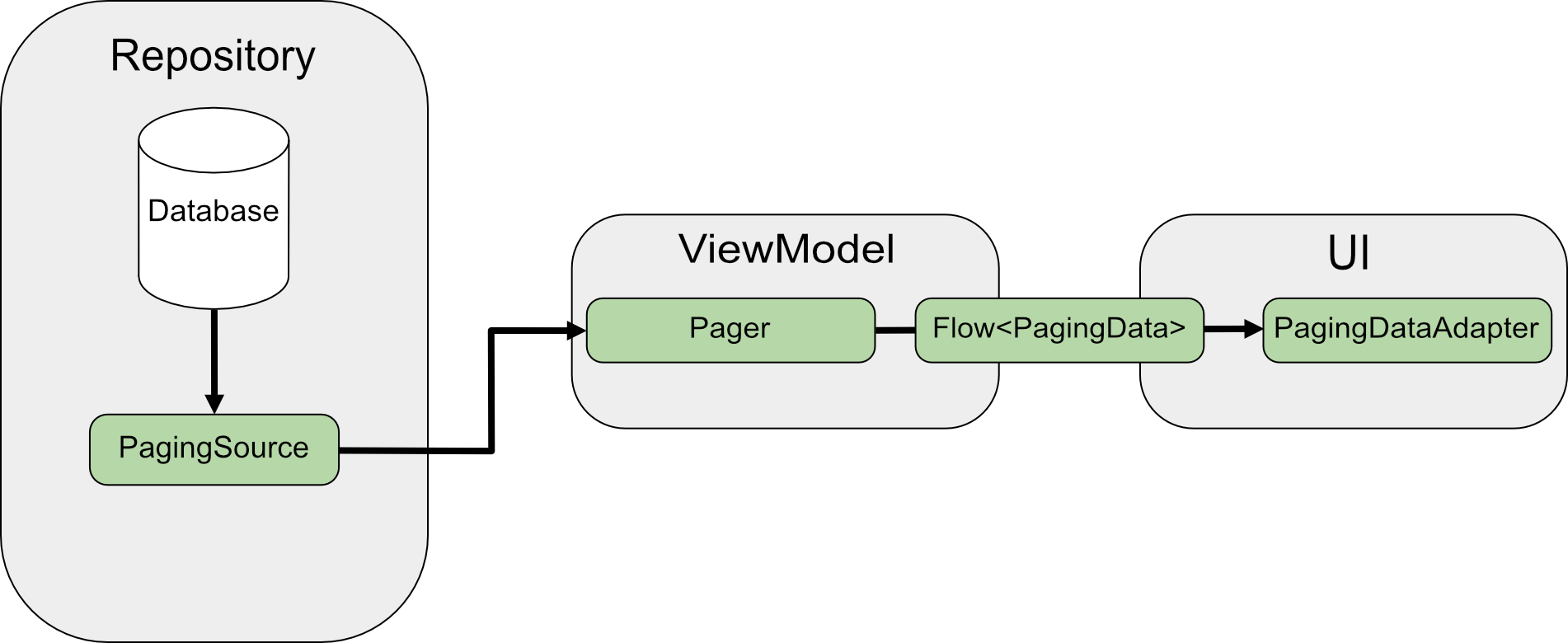
नेटवर्क से सीधे तौर पर पेजिंग करते समय, PagingSource डेटा लोड करता है और
LoadResult
ऑब्जेक्ट दिखाता है. PagingSource को लागू करने की प्रोसेस को pagingSourceFactory पैरामीटर के ज़रिए Pager को पास किया जाता है.
यूज़र इंटरफ़ेस (यूआई) को नए डेटा की ज़रूरत होने पर, Pager, PagingSource से load() तरीके को कॉल करता है. साथ ही, PagingData ऑब्जेक्ट की एक स्ट्रीम दिखाता है जो नए डेटा को एनकैप्सुलेट करती है. हर PagingData ऑब्जेक्ट को आम तौर पर, यूज़र इंटरफ़ेस (यूआई) पर दिखाने के लिए भेजने से पहले, ViewModel में कैश मेमोरी में सेव किया जाता है.
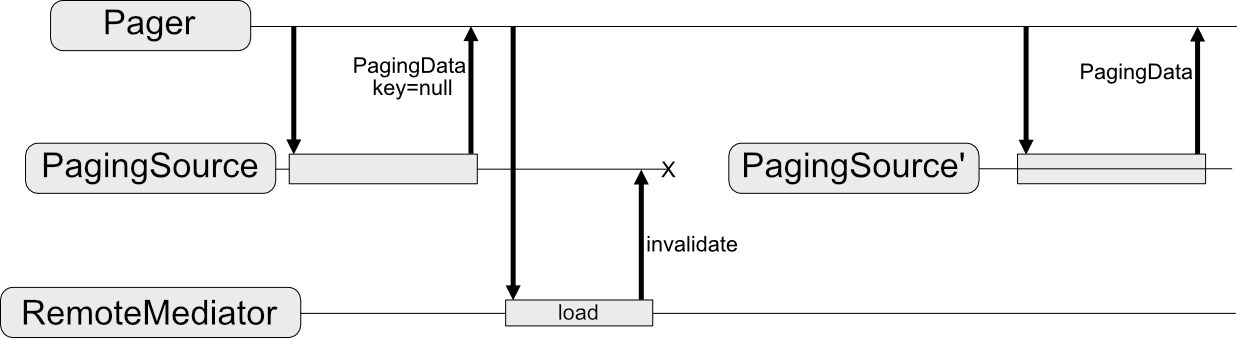
RemoteMediator इस डेटा फ़्लो को बदल देता है. PagingSource अब भी डेटा लोड करता है;
लेकिन जब पेज पर मौजूद डेटा खत्म हो जाता है, तो Paging लाइब्रेरी, नेटवर्क सोर्स से नया डेटा लोड करने के लिए
RemoteMediator को ट्रिगर करती है. RemoteMediator
नए डेटा को लोकल डेटाबेस में सेव करता है. इसलिए, ViewModel में इन-मेमोरी कैश की ज़रूरत नहीं होती. आखिर में, PagingSource खुद को अमान्य कर देता है और Pager, डेटाबेस से नया डेटा लोड करने के लिए एक नया इंस्टेंस बनाता है.
बुनियादी इस्तेमाल
मान लें कि आपको अपने ऐप्लिकेशन में, आइटम-की वाले नेटवर्क डेटा सोर्स से User आइटम के पेज लोड करने हैं. इसके लिए, आपको Room डेटाबेस में सेव की गई लोकल कैश मेमोरी का इस्तेमाल करना होगा.
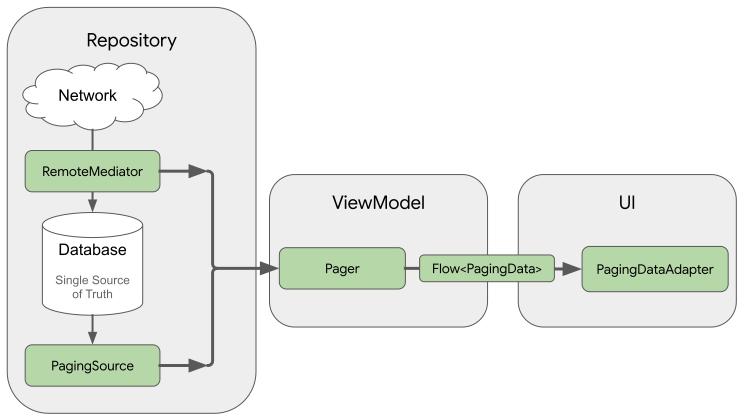
RemoteMediator को लागू करने से, नेटवर्क से पेज पर मौजूद डेटा को डेटाबेस में लोड करने में मदद मिलती है. हालांकि, यह डेटा को सीधे यूज़र इंटरफ़ेस (यूआई) में लोड नहीं करता. इसके बजाय, ऐप्लिकेशन डेटाबेस को सोर्स ऑफ़ ट्रुथ के तौर पर इस्तेमाल करता है. दूसरे शब्दों में, ऐप्लिकेशन सिर्फ़ वह डेटा दिखाता है जो डेटाबेस में कैश मेमोरी में सेव किया गया है. PagingSource
का इस्तेमाल (उदाहरण के लिए, Room से जनरेट किया गया) करके, डेटाबेस से कैश मेमोरी में सेव किए गए डेटा को यूज़र इंटरफ़ेस (यूआई) में लोड किया जाता है.
रूम की इकाइयां बनाना
सबसे पहले, रूम परसिस्टेंस लाइब्रेरी का इस्तेमाल करके, एक डेटाबेस तय करें. इसमें नेटवर्क डेटा सोर्स से मिले पेज वाले डेटा की लोकल कैश मेमोरी सेव होती है. RoomDatabase को लागू करने से शुरुआत करें. इसके बारे में Room का इस्तेमाल करके, लोकल डेटाबेस में डेटा सेव करें में बताया गया है.
इसके बाद, सूची के आइटम की टेबल दिखाने के लिए, Room की इकाई तय करें. इसके बारे में Room की इकाइयों का इस्तेमाल करके डेटा तय करना लेख में बताया गया है.
इसे प्राथमिक कुंजी के तौर पर id फ़ील्ड दें. साथ ही, सूची के आइटम में मौजूद किसी भी अन्य जानकारी के लिए फ़ील्ड दें.
Java
@Entity(tableName = "users")
public class User {
  public String id;
  public String label;
}
Java
@Entity(tableName = "users")
public class User {
  public String id;
  public String label;
}
आपको इस रूम एंटिटी के लिए, डेटा ऐक्सेस ऑब्जेक्ट (डीएओ) भी तय करना होगा. इसके बारे में, रूम डीएओ का इस्तेमाल करके डेटा ऐक्सेस करना लेख में बताया गया है. सूची के आइटम वाली इकाई के लिए डीएओ में, ये तरीके शामिल होने चाहिए:
insertAll()तरीका, टेबल में आइटम की सूची शामिल करता है.- यह एक ऐसा तरीका है जो क्वेरी स्ट्रिंग को पैरामीटर के तौर पर लेता है और नतीजों की सूची के लिए,
PagingSourceऑब्जेक्ट दिखाता है. इस तरह,Pagerऑब्जेक्ट, इस टेबल को पेज किए गए डेटा के सोर्स के तौर पर इस्तेमाल कर सकता है. clearAll()का एक तरीका, जिससे टेबल का पूरा डेटा मिटाया जाता है.
Java
@Dao
interface UserDao {
  @Insert(onConflict = OnConflictStrategy.REPLACE)
  void insertAll(List<User> users);

  @Query("SELECT * FROM users WHERE mLabel LIKE :query")
  PagingSource<Integer, User> pagingSource(String query);

  @Query("DELETE FROM users")
  int clearAll();
}
Java
@Dao
interface UserDao {
  @Insert(onConflict = OnConflictStrategy.REPLACE)
  void insertAll(List<User> users);

  @Query("SELECT * FROM users WHERE mLabel LIKE :query")
  PagingSource<Integer, User> pagingSource(String query);

  @Query("DELETE FROM users")
  int clearAll();
}
RemoteMediator लागू करना
RemoteMediator का मुख्य काम, नेटवर्क से ज़्यादा डेटा लोड करना है. ऐसा तब होता है, जब Pager में डेटा खत्म हो जाता है या मौजूदा डेटा अमान्य हो जाता है. इसमें load() तरीका शामिल है. लोड होने के तरीके को तय करने के लिए, आपको इसे बदलना होगा.
RemoteMediator को लागू करने के लिए, आम तौर पर ये पैरामीटर शामिल किए जाते हैं:
query: यह एक क्वेरी स्ट्रिंग है, जो यह तय करती है कि बैकएंड सेवा से कौनसा डेटा वापस पाना है.database: Room डेटाबेस, जो लोकल कैश मेमोरी के तौर पर काम करता है.networkService: बैकएंड सेवा के लिए एपीआई इंस्टेंस.
RemoteMediator<Key, Value> को लागू करने का तरीका बनाएं. Key टाइप और Value टाइप एक जैसे होने चाहिए. ठीक वैसे ही जैसे एक ही नेटवर्क डेटा सोर्स के लिए PagingSource तय करते समय होते हैं. टाइप पैरामीटर चुनने के बारे में ज़्यादा जानकारी के लिए, कुंजी और वैल्यू के टाइप चुनना लेख पढ़ें.
Java
@UseExperimental(markerClass = ExperimentalPagingApi.class)
class ExampleRemoteMediator extends RxRemoteMediator<Integer, User> {
  private String query;
  private ExampleBackendService networkService;
  private RoomDb database;
  private UserDao userDao;

  ExampleRemoteMediator(
    String query,
    ExampleBackendService networkService, RoomDb database
  ) {
    query = query;
    networkService = networkService;
    database = database;
    userDao = database.userDao();
  }

  @NotNull
  @Override
  public Single<MediatorResult> loadSingle(
    @NotNull LoadType loadType,
    @NotNull PagingState<Integer, User> state
  ) {
    ...
  }
}
Java
class ExampleRemoteMediator extends ListenableFutureRemoteMediator<Integer, User> {
  private String query;
  private ExampleBackendService networkService;
  private RoomDb database;
  private UserDao userDao;
  private Executor bgExecutor;

  ExampleRemoteMediator(
    String query,
    ExampleBackendService networkService,
    RoomDb database,
    Executor bgExecutor
  ) {
    this.query = query;
    this.networkService = networkService;
    this.database = database;
    this.userDao = database.userDao();
    this.bgExecutor = bgExecutor;
  }

  @NotNull
  @Override
  public ListenableFuture<MediatorResult> loadFuture(
    @NotNull LoadType loadType,
    @NotNull PagingState<Integer, User> state
  ) {
    ...
  }
}
load() मेथड, बैकिंग डेटासेट को अपडेट करने और PagingSource को अमान्य करने के लिए ज़िम्मेदार है. पेजिंग की सुविधा के साथ काम करने वाली कुछ लाइब्रेरी (जैसे, Room), लागू किए गए PagingSource ऑब्जेक्ट को अमान्य करने की प्रोसेस को अपने-आप मैनेज करेंगी.
load() वाले तरीके में दो पैरामीटर होते हैं:
PagingState, जिसमें अब तक लोड किए गए पेजों, हाल ही में ऐक्सेस किए गए इंडेक्स, औरPagingConfigऑब्जेक्ट की जानकारी होती है. इस ऑब्जेक्ट का इस्तेमाल, पेजिंग स्ट्रीम को शुरू करने के लिए किया जाता है.LoadType, इससे लोड के टाइप के बारे में पता चलता है:REFRESH,APPENDयाPREPEND.
load() तरीके की रिटर्न वैल्यू, एक MediatorResult ऑब्जेक्ट है. MediatorResult,
MediatorResult.Error
(जिसमें गड़बड़ी की जानकारी शामिल है) या
MediatorResult.Success
(जिसमें यह बताने वाला सिग्नल शामिल है कि लोड करने के लिए और डेटा है या नहीं) हो सकता है.
load() तरीके में ये चरण पूरे करने होंगे:
- लोड टाइप और अब तक लोड किए गए डेटा के आधार पर, यह तय करें कि नेटवर्क से कौनसा पेज लोड करना है.
- नेटवर्क का अनुरोध ट्रिगर करें.
- लोड ऑपरेशन के नतीजे के आधार पर कार्रवाइयां करें:
- अगर लोड हो जाता है और आइटम की मिली सूची खाली नहीं है, तो सूची के आइटम को डेटाबेस में सेव करें और
MediatorResult.Success(endOfPaginationReached = false)दिखाएं. डेटा सेव होने के बाद, डेटा सोर्स को अमान्य करें, ताकि Paging लाइब्रेरी को नए डेटा की सूचना दी जा सके. - अगर लोड हो जाता है और आइटम की मिली सूची खाली है या यह आखिरी पेज इंडेक्स है, तो
MediatorResult.Success(endOfPaginationReached = true)दिखाएं. डेटा सेव होने के बाद, डेटा सोर्स को अमान्य करें, ताकि Paging लाइब्रेरी को नए डेटा की सूचना दी जा सके. - अगर अनुरोध की वजह से कोई गड़बड़ी होती है, तो
MediatorResult.Errorदिखाएं.
- अगर लोड हो जाता है और आइटम की मिली सूची खाली नहीं है, तो सूची के आइटम को डेटाबेस में सेव करें और
Java
@NotNull
@Override
public Single<MediatorResult> loadSingle(
  @NotNull LoadType loadType,
  @NotNull PagingState<Integer, User> state
) {
  // The network load method takes an optional after=<user.id> parameter. For
  // every page after the first, pass the last user ID to let it continue from
  // where it left off. For REFRESH, pass null to load the first page.
  String loadKey = null;
  switch (loadType) {
    case REFRESH:
      break;
    case PREPEND:
      // In this example, you never need to prepend, since REFRESH will always
      // load the first page in the list. Immediately return, reporting end of
      // pagination.
      return Single.just(new MediatorResult.Success(true));
    case APPEND:
      User lastItem = state.lastItemOrNull();

      // You must explicitly check if the last item is null when appending,
      // since passing null to networkService is only valid for initial load.
      // If lastItem is null it means no items were loaded after the initial
      // REFRESH and there are no more items to load.
      if (lastItem == null) {
        return Single.just(new MediatorResult.Success(true));
      }

      loadKey = lastItem.getId();
      break;
  }

  return networkService.searchUsers(query, loadKey)
    .subscribeOn(Schedulers.io())
    .map((Function<SearchUserResponse, MediatorResult>) response -> {
      database.runInTransaction(() -> {
        if (loadType == LoadType.REFRESH) {
          userDao.deleteByQuery(query);
        }

        // Insert new users into database, which invalidates the current
        // PagingData, allowing Paging to present the updates in the DB.
        userDao.insertAll(response.getUsers());
      });

      return new MediatorResult.Success(response.getNextKey() == null);
    })
    .onErrorResumeNext(e -> {
      if (e instanceof IOException || e instanceof HttpException) {
        return Single.just(new MediatorResult.Error(e));
      }

      return Single.error(e);
    });
}
Java
@NotNull
@Override
public ListenableFuture<MediatorResult> loadFuture(
  @NotNull LoadType loadType,
  @NotNull PagingState<Integer, User> state
) {
  // The network load method takes an optional after=<user.id> parameter. For
  // every page after the first, pass the last user ID to let it continue from
  // where it left off. For REFRESH, pass null to load the first page.
  String loadKey = null;
  switch (loadType) {
    case REFRESH:
      break;
    case PREPEND:
      // In this example, you never need to prepend, since REFRESH will always
      // load the first page in the list. Immediately return, reporting end of
      // pagination.
      return Futures.immediateFuture(new MediatorResult.Success(true));
    case APPEND:
      User lastItem = state.lastItemOrNull();

      // You must explicitly check if the last item is null when appending,
      // since passing null to networkService is only valid for initial load.
      // If lastItem is null it means no items were loaded after the initial
      // REFRESH and there are no more items to load.
      if (lastItem == null) {
        return Futures.immediateFuture(new MediatorResult.Success(true));
      }

      loadKey = lastItem.getId();
      break;
  }

  ListenableFuture<MediatorResult> networkResult = Futures.transform(
    networkService.searchUsers(query, loadKey),
    response -> {
      database.runInTransaction(() -> {
        if (loadType == LoadType.REFRESH) {
          userDao.deleteByQuery(query);
        }

        // Insert new users into database, which invalidates the current
        // PagingData, allowing Paging to present the updates in the DB.
        userDao.insertAll(response.getUsers());
      });

      return new MediatorResult.Success(response.getNextKey() == null);
    }, bgExecutor);

  ListenableFuture<MediatorResult> ioCatchingNetworkResult =
    Futures.catching(
      networkResult,
      IOException.class,
      MediatorResult.Error::new,
      bgExecutor
    );

  return Futures.catching(
    ioCatchingNetworkResult,
    HttpException.class,
    MediatorResult.Error::new,
    bgExecutor
  );
}
शुरुआती तरीका तय करें
RemoteMediator के लागू होने पर, initialize() तरीके को भी बदला जा सकता है. इससे यह पता लगाया जा सकता है कि कैश मेमोरी में सेव किया गया डेटा पुराना है या नहीं. साथ ही, यह भी तय किया जा सकता है कि रिमोट रीफ़्रेश को ट्रिगर करना है या नहीं. यह तरीका, किसी भी डेटा को लोड करने से पहले लागू होता है. इसलिए, किसी भी लोकल या रिमोट लोड को ट्रिगर करने से पहले, डेटाबेस में बदलाव किया जा सकता है. उदाहरण के लिए, पुराना डेटा मिटाना.
initialize() एक एसिंक्रोनस फ़ंक्शन है. इसलिए, डेटाबेस में मौजूद डेटा कितना काम का है, यह तय करने के लिए डेटा लोड किया जा सकता है. आम तौर पर, कैश मेमोरी में सेव किया गया डेटा कुछ समय के लिए ही मान्य होता है. RemoteMediator यह जांच कर सकता है कि समयसीमा खत्म होने का समय बीत चुका है या नहीं. अगर समयसीमा खत्म हो चुकी है, तो पेजिंग लाइब्रेरी को डेटा को पूरी तरह से रीफ़्रेश करना होगा. initialize() को लागू करने पर, InitializeAction को इस तरह से रिटर्न करना चाहिए:
- अगर स्थानीय डेटा को पूरी तरह से रीफ़्रेश करना ज़रूरी है, तो
initialize()कोInitializeAction.LAUNCH_INITIAL_REFRESHदिखाना चाहिए. इससेRemoteMediator, डेटा को पूरी तरह से फिर से लोड करने के लिए, रिमोट रीफ़्रेश करता है. कोई भी रिमोटAPPENDयाPREPENDलोड, आगे बढ़ने से पहलेREFRESHलोड के पूरा होने का इंतज़ार करता है. - अगर स्थानीय डेटा को रीफ़्रेश करने की ज़रूरत नहीं है, तो
initialize()कोInitializeAction.SKIP_INITIAL_REFRESHदिखाना चाहिए. इस वजह से,RemoteMediatorरिमोट रीफ़्रेश को स्किप कर देता है और कैश मेमोरी में सेव किया गया डेटा लोड करता है.
Java
@NotNull
@Override
public Single<InitializeAction> initializeSingle() {
  long cacheTimeout = TimeUnit.MILLISECONDS.convert(1, TimeUnit.HOURS);
  return mUserDao.lastUpdatedSingle()
    .map(lastUpdatedMillis -> {
      if (System.currentTimeMillis() - lastUpdatedMillis <= cacheTimeout) {
        // Cached data is up-to-date, so there is no need to re-fetch
        // from the network.
        return InitializeAction.SKIP_INITIAL_REFRESH;
      } else {
        // Need to refresh cached data from network; returning
        // LAUNCH_INITIAL_REFRESH here will also block RemoteMediator's
        // APPEND and PREPEND from running until REFRESH succeeds.
        return InitializeAction.LAUNCH_INITIAL_REFRESH;
      }
    });
}
Java
@NotNull
@Override
public ListenableFuture<InitializeAction> initializeFuture() {
  long cacheTimeout = TimeUnit.MILLISECONDS.convert(1, TimeUnit.HOURS);
  return Futures.transform(
    mUserDao.lastUpdated(),
    lastUpdatedMillis -> {
      if (System.currentTimeMillis() - lastUpdatedMillis <= cacheTimeout) {
        // Cached data is up-to-date, so there is no need to re-fetch
        // from the network.
        return InitializeAction.SKIP_INITIAL_REFRESH;
      } else {
        // Need to refresh cached data from network; returning
        // LAUNCH_INITIAL_REFRESH here will also block RemoteMediator's
        // APPEND and PREPEND from running until REFRESH succeeds.
        return InitializeAction.LAUNCH_INITIAL_REFRESH;
      }
    },
    mBgExecutor);
}
पेजर बनाना
आखिर में, आपको पेज किए गए डेटा की स्ट्रीम सेट अप करने के लिए, Pager इंस्टेंस बनाना होगा.
यह किसी सामान्य नेटवर्क डेटा सोर्स से Pager बनाने जैसा ही है. हालांकि, आपको दो चीज़ें अलग तरीके से करनी होंगी:
PagingSourceकंस्ट्रक्टर को सीधे पास करने के बजाय, आपको क्वेरी का वह तरीका उपलब्ध कराना होगा जो डीएओ सेPagingSourceऑब्जेक्ट दिखाता है.- आपको
remoteMediatorपैरामीटर के तौर पर,RemoteMediatorको लागू करने का एक इंस्टेंस देना होगा.
Java
UserDao userDao = database.userDao();
Pager<Integer, User> pager = Pager(
  new PagingConfig(/* pageSize = */ 20),
  null, // initialKey,
  new ExampleRemoteMediator(query, database, networkService)
  () -> userDao.pagingSource(query));
Java
UserDao userDao = database.userDao();
Pager<Integer, User> pager = Pager(
  new PagingConfig(/* pageSize = */ 20),
  null, // initialKey
  new ExampleRemoteMediator(query, database, networkService, bgExecutor),
  () -> userDao.pagingSource(query));
रिमोट बटन मैनेज करना
रिमोट कुंजियां ऐसी कुंजियां होती हैं जिनका इस्तेमाल RemoteMediator लागू करने के लिए किया जाता है. इससे बैकएंड सेवा को यह पता चलता है कि आगे कौनसा डेटा लोड करना है. सबसे आसान मामले में, पेज किए गए डेटा के हर आइटम में एक रिमोट कुंजी शामिल होती है. इसे आसानी से रेफ़र किया जा सकता है. हालांकि, अगर रिमोट कुंजियां अलग-अलग आइटम से मेल नहीं खाती हैं, तो आपको उन्हें अलग से सेव करना होगा. साथ ही, उन्हें अपने load() तरीके से मैनेज करना होगा.
इस सेक्शन में, अलग-अलग आइटम में सेव नहीं की गई रिमोट कुंजियों को इकट्ठा करने, सेव करने, और अपडेट करने का तरीका बताया गया है.
आइटम की कुंजियां
इस सेक्शन में, अलग-अलग आइटम से जुड़ी रिमोट कुंजियों के साथ काम करने का तरीका बताया गया है. आम तौर पर, जब कोई एपीआई अलग-अलग आइटम के लिए काम करता है, तो आइटम आईडी को क्वेरी पैरामीटर के तौर पर पास किया जाता है. पैरामीटर के नाम से पता चलता है कि सर्वर को दिए गए आईडी से पहले या बाद के आइटम के साथ जवाब देना चाहिए या नहीं. User मॉडल क्लास के उदाहरण में, सर्वर से मिले id फ़ील्ड का इस्तेमाल, ज़्यादा डेटा का अनुरोध करते समय रिमोट कुंजी के तौर पर किया जाता है.
जब आपके load() तरीके को किसी आइटम के लिए रिमोट कुंजियां मैनेज करनी होती हैं, तो ये कुंजियां आम तौर पर सर्वर से फ़ेच किए गए डेटा के आईडी होते हैं. रीफ़्रेश करने की कार्रवाइयों के लिए, लोड कुंजी की ज़रूरत नहीं होती. ऐसा इसलिए, क्योंकि वे सिर्फ़ सबसे हाल का डेटा वापस लाती हैं.
इसी तरह, प्रीपेंड ऑपरेशन के लिए कोई अतिरिक्त डेटा फ़ेच करने की ज़रूरत नहीं होती. इसकी वजह यह है कि रीफ़्रेश करने पर, सर्वर से हमेशा नया डेटा फ़ेच होता है.
हालांकि, अपेंड ऑपरेशन के लिए आईडी की ज़रूरत होती है. इसके लिए, आपको डेटाबेस से आखिरी आइटम लोड करना होगा और उसके आईडी का इस्तेमाल करके, डेटा का अगला पेज लोड करना होगा. अगर डेटाबेस में कोई आइटम नहीं है, तो endOfPaginationReached को true पर सेट किया जाता है. इससे पता चलता है कि डेटा को रीफ़्रेश करने की ज़रूरत है.
Java
@NotNull
@Override
public Single>MediatorResult< loadSingle(
  @NotNull LoadType loadType,
  @NotNull PagingState>Integer, User< state
) {
  // The network load method takes an optional String parameter. For every page
  // after the first, pass the String token returned from the previous page to
  // let it continue from where it left off. For REFRESH, pass null to load the
  // first page.
  Single>String< remoteKeySingle = null;
  switch (loadType) {
    case REFRESH:
      // Initial load should use null as the page key, so you can return null
      // directly.
      remoteKeySingle = Single.just(null);
      break;
    case PREPEND:
      // In this example, you never need to prepend, since REFRESH will always
      // load the first page in the list. Immediately return, reporting end of
      // pagination.
      return Single.just(new MediatorResult.Success(true));
    case APPEND:
      User lastItem = state.lastItemOrNull();

      // You must explicitly check if the last item is null when
      // appending, since passing null to networkService is only
      // valid for initial load. If lastItem is null it means no
      // items were loaded after the initial REFRESH and there are
      // no more items to load.
      if (lastItem == null) {
        return Single.just(new MediatorResult.Success(true));
      }
      remoteKeySingle = Single.just(lastItem.getId());
      break;
  }

  return remoteKeySingle
    .subscribeOn(Schedulers.io())
    .flatMap((Function<String, Single<MediatorResult>>) remoteKey -> {
      return networkService.searchUsers(query, remoteKey)
        .map(response -> {
          database.runInTransaction(() -> {
            if (loadType == LoadType.REFRESH) {
              userDao.deleteByQuery(query);
            }
            // Insert new users into database, which invalidates the current
            // PagingData, allowing Paging to present the updates in the DB.
            userDao.insertAll(response.getUsers());
          });

          return new MediatorResult.Success(response.getUsers().isEmpty());
        });
    })
    .onErrorResumeNext(e -> {
      if (e instanceof IOException || e instanceof HttpException) {
        return Single.just(new MediatorResult.Error(e));
      }

      return Single.error(e);
    });
}
Java
@NotNull
@Override
public ListenableFuture<MediatorResult> loadFuture(
  @NotNull LoadType loadType,
  @NotNull PagingState<Integer, User> state
) {
  // The network load method takes an optional after=<user.id> parameter.
  // For every page after the first, pass the last user ID to let it continue
  // from where it left off. For REFRESH, pass null to load the first page.
  ResolvableFuture<String> remoteKeyFuture = ResolvableFuture.create();
  switch (loadType) {
    case REFRESH:
      remoteKeyFuture.set(null);
      break;
    case PREPEND:
      // In this example, you never need to prepend, since REFRESH will always
      // load the first page in the list. Immediately return, reporting end of
      // pagination.
      return Futures.immediateFuture(new MediatorResult.Success(true));
    case APPEND:
      User lastItem = state.lastItemOrNull();

      // You must explicitly check if the last item is null when appending,
      // since passing null to networkService is only valid for initial load.
      // If lastItem is null it means no items were loaded after the initial
      // REFRESH and there are no more items to load.
      if (lastItem == null) {
        return Futures.immediateFuture(new MediatorResult.Success(true));
      }

      remoteKeyFuture.set(lastItem.getId());
      break;
  }

  return Futures.transformAsync(remoteKeyFuture, remoteKey -> {

    ListenableFuture<MediatorResult> networkResult = Futures.transform(
      networkService.searchUsers(query, remoteKey),
      response -> {
        database.runInTransaction(() -> {
        if (loadType == LoadType.REFRESH) {
          userDao.deleteByQuery(query);
        }

        // Insert new users into database, which invalidates the current
        // PagingData, allowing Paging to present the updates in the DB.
        userDao.insertAll(response.getUsers());
      });

      return new MediatorResult.Success(response.getUsers().isEmpty());
    }, bgExecutor);

    ListenableFuture<MediatorResult> ioCatchingNetworkResult =
      Futures.catching(
        networkResult,
        IOException.class,
        MediatorResult.Error::new,
        bgExecutor
      );

    return Futures.catching(
      ioCatchingNetworkResult,
      HttpException.class,
      MediatorResult.Error::new,
      bgExecutor
    );
  }, bgExecutor);
}
पेज बटन
इस सेक्शन में, ऐसी रिमोट कुंजियों के साथ काम करने का तरीका बताया गया है जो अलग-अलग आइटम से मेल नहीं खाती हैं.
रिमोट कुंजी टेबल जोड़ें
जब रिमोट कुंजियां, सूची के आइटम से सीधे तौर पर नहीं जुड़ी होती हैं, तो उन्हें स्थानीय डेटाबेस में एक अलग टेबल में सेव करना सबसे सही होता है. रिमोट कुंजियों की टेबल को दिखाने वाली Room इकाई तय करें:
Java
@Entity(tableName = "remote_keys")
public class RemoteKey {
  public String label;
  public String nextKey;
}
Java
@Entity(tableName = "remote_keys")
public class RemoteKey {
  public String label;
  public String nextKey;
}
आपको RemoteKey इकाई के लिए एक डीएओ भी तय करना होगा:
Java
@Dao
interface RemoteKeyDao {
  @Insert(onConflict = OnConflictStrategy.REPLACE)
  void insertOrReplace(RemoteKey remoteKey);

  @Query("SELECT * FROM remote_keys WHERE label = :query")
  Single<RemoteKey> remoteKeyByQuerySingle(String query);

  @Query("DELETE FROM remote_keys WHERE label = :query")
  void deleteByQuery(String query);
}
Java
@Dao
interface RemoteKeyDao {
  @Insert(onConflict = OnConflictStrategy.REPLACE)
  void insertOrReplace(RemoteKey remoteKey);

  @Query("SELECT * FROM remote_keys WHERE label = :query")
  ListenableFuture<RemoteKey> remoteKeyByQueryFuture(String query);

  @Query("DELETE FROM remote_keys WHERE label = :query")
  void deleteByQuery(String query);
}
रिमोट बटन की मदद से लोड करें
जब आपके load() तरीके को रिमोट पेज की कुंजियों को मैनेज करने की ज़रूरत होती है, तो आपको इसे RemoteMediator के बुनियादी इस्तेमाल की तुलना में, यहां दिए गए तरीकों से अलग तरीके से तय करना होगा:
- एक अतिरिक्त प्रॉपर्टी शामिल करें, जिसमें आपकी रिमोट की टेबल के लिए डीएओ का रेफ़रंस हो.
PagingStateका इस्तेमाल करने के बजाय, रिमोट की टेबल से क्वेरी करके यह तय करें कि अगली कौनसी कुंजी लोड करनी है.- पेज किए गए डेटा के अलावा, नेटवर्क डेटा सोर्स से मिली रिमोट कुंजी को डालें या सेव करें.
Java
@NotNull
@Override
public Single<MediatorResult> loadSingle(
  @NotNull LoadType loadType,
  @NotNull PagingState<Integer, User> state
) {
  // The network load method takes an optional String parameter. For every page
  // after the first, pass the String token returned from the previous page to
  // let it continue from where it left off. For REFRESH, pass null to load the
  // first page.
  Single<RemoteKey> remoteKeySingle = null;
  switch (loadType) {
    case REFRESH:
      // Initial load should use null as the page key, so you can return null
      // directly.
      remoteKeySingle = Single.just(new RemoteKey(mQuery, null));
      break;
    case PREPEND:
      // In this example, you never need to prepend, since REFRESH will always
      // load the first page in the list. Immediately return, reporting end of
      // pagination.
      return Single.just(new MediatorResult.Success(true));
    case APPEND:
      // Query remoteKeyDao for the next RemoteKey.
      remoteKeySingle = mRemoteKeyDao.remoteKeyByQuerySingle(mQuery);
      break;
  }

  return remoteKeySingle
    .subscribeOn(Schedulers.io())
    .flatMap((Function<RemoteKey, Single<MediatorResult>>) remoteKey -> {
      // You must explicitly check if the page key is null when appending,
      // since null is only valid for initial load. If you receive null
      // for APPEND, that means you have reached the end of pagination and
      // there are no more items to load.
      if (loadType != REFRESH && remoteKey.getNextKey() == null) {
        return Single.just(new MediatorResult.Success(true));
      }

      return networkService.searchUsers(query, remoteKey.getNextKey())
        .map(response -> {
          database.runInTransaction(() -> {
            if (loadType == LoadType.REFRESH) {
              userDao.deleteByQuery(query);
              remoteKeyDao.deleteByQuery(query);
            }

            // Update RemoteKey for this query.
            remoteKeyDao.insertOrReplace(new RemoteKey(query, response.getNextKey()));

            // Insert new users into database, which invalidates the current
            // PagingData, allowing Paging to present the updates in the DB.
            userDao.insertAll(response.getUsers());
          });

          return new MediatorResult.Success(response.getNextKey() == null);
        });
    })
    .onErrorResumeNext(e -> {
      if (e instanceof IOException || e instanceof HttpException) {
        return Single.just(new MediatorResult.Error(e));
      }

      return Single.error(e);
    });
}
Java
@NotNull
@Override
public ListenableFuture<MediatorResult> loadFuture(
  @NotNull LoadType loadType,
  @NotNull PagingState<Integer, User> state
) {
  // The network load method takes an optional after=<user.id> parameter. For
  // every page after the first, pass the last user ID to let it continue from
  // where it left off. For REFRESH, pass null to load the first page.
  ResolvableFuture<RemoteKey> remoteKeyFuture = ResolvableFuture.create();
  switch (loadType) {
    case REFRESH:
      remoteKeyFuture.set(new RemoteKey(query, null));
      break;
    case PREPEND:
      // In this example, you never need to prepend, since REFRESH will always
      // load the first page in the list. Immediately return, reporting end of
      // pagination.
      return Futures.immediateFuture(new MediatorResult.Success(true));
    case APPEND:
      User lastItem = state.lastItemOrNull();

      // You must explicitly check if the last item is null when appending,
      // since passing null to networkService is only valid for initial load.
      // If lastItem is null it means no items were loaded after the initial
      // REFRESH and there are no more items to load.
      if (lastItem == null) {
        return Futures.immediateFuture(new MediatorResult.Success(true));
      }

      // Query remoteKeyDao for the next RemoteKey.
      remoteKeyFuture.setFuture(
        remoteKeyDao.remoteKeyByQueryFuture(query));
      break;
  }

  return Futures.transformAsync(remoteKeyFuture, remoteKey -> {
    // You must explicitly check if the page key is null when appending,
    // since null is only valid for initial load. If you receive null
    // for APPEND, that means you have reached the end of pagination and
    // there are no more items to load.
    if (loadType != LoadType.REFRESH && remoteKey.getNextKey() == null) {
      return Futures.immediateFuture(new MediatorResult.Success(true));
    }

    ListenableFuture<MediatorResult> networkResult = Futures.transform(
      networkService.searchUsers(query, remoteKey.getNextKey()),
      response -> {
        database.runInTransaction(() -> {
        if (loadType == LoadType.REFRESH) {
          userDao.deleteByQuery(query);
          remoteKeyDao.deleteByQuery(query);
        }

        // Update RemoteKey for this query.
        remoteKeyDao.insertOrReplace(new RemoteKey(query, response.getNextKey()));

        // Insert new users into database, which invalidates the current
        // PagingData, allowing Paging to present the updates in the DB.
        userDao.insertAll(response.getUsers());
      });

      return new MediatorResult.Success(response.getNextKey() == null);
    }, bgExecutor);

    ListenableFuture<MediatorResult> ioCatchingNetworkResult =
      Futures.catching(
        networkResult,
        IOException.class,
        MediatorResult.Error::new,
        bgExecutor
      );

    return Futures.catching(
      ioCatchingNetworkResult,
      HttpException.class,
      MediatorResult.Error::new,
      bgExecutor
    );
  }, bgExecutor);
}
अन्य संसाधन
पेजिंग लाइब्रेरी के बारे में ज़्यादा जानने के लिए, यहां दिए गए अन्य संसाधन देखें:
सैंपल
आपके लिए सुझाव
- ध्यान दें: JavaScript बंद होने पर, लिंक टेक्स्ट दिखता है
- पेज पर मौजूद डेटा को लोड करना और दिखाना
- पेजिंग लागू करने की जांच करना
- Paging 3 पर माइग्रेट करना