

Beberapa konten paling nyaman dinikmati dalam layar penuh tanpa indikator apa pun di status bar atau menu navigasi. Beberapa contohnya adalah video, game, galeri gambar, buku, dan slide presentasi. Hal ini disebut sebagai mode imersif. Halaman ini menunjukkan cara melibatkan pengguna lebih mendalam dengan konten dalam layar penuh.
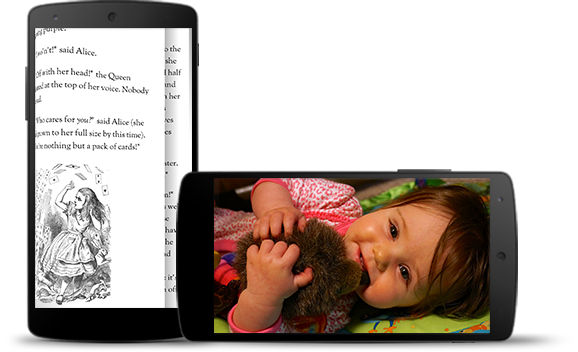
Mode imersif membantu pengguna menghindari keluar dari game secara tidak sengaja dan memberikan pengalaman imersif untuk menikmati gambar, video, dan buku. Namun, perhatikan frekuensi pengguna masuk dan keluar aplikasi untuk memeriksa notifikasi, melakukan penelusuran dadakan, atau melakukan tindakan lain. Karena mode imersif menyebabkan pengguna kehilangan akses mudah ke navigasi sistem, gunakan mode imersif hanya jika manfaatnya bagi pengalaman pengguna lebih dari sekadar menggunakan ruang layar tambahan.
Gunakan WindowInsetsControllerCompat.hide()
untuk menyembunyikan bilah sistem dan WindowInsetsControllerCompat.show()
untuk menampilkannya kembali.
Cuplikan berikut menunjukkan contoh konfigurasi tombol untuk menyembunyikan dan menampilkan status bar sistem.
Kotlin
override fun onCreate(savedInstanceState: Bundle?) {
    ...

    val windowInsetsController =
        WindowCompat.getInsetsController(window, window.decorView)
    // Configure the behavior of the hidden system bars.
    windowInsetsController.systemBarsBehavior =
        WindowInsetsControllerCompat.BEHAVIOR_SHOW_TRANSIENT_BARS_BY_SWIPE

    // Add a listener to update the behavior of the toggle fullscreen button when
    // the system bars are hidden or revealed.
    ViewCompat.setOnApplyWindowInsetsListener(window.decorView) { view, windowInsets ->
        // You can hide the caption bar even when the other system bars are visible.
        // To account for this, explicitly check the visibility of navigationBars()
        // and statusBars() rather than checking the visibility of systemBars().
        if (windowInsets.isVisible(WindowInsetsCompat.Type.navigationBars())
            || windowInsets.isVisible(WindowInsetsCompat.Type.statusBars())) {
            binding.toggleFullscreenButton.setOnClickListener {
                // Hide both the status bar and the navigation bar.
                windowInsetsController.hide(WindowInsetsCompat.Type.systemBars())
            }
        } else {
            binding.toggleFullscreenButton.setOnClickListener {
                // Show both the status bar and the navigation bar.
                windowInsetsController.show(WindowInsetsCompat.Type.systemBars())
            }
        }
        ViewCompat.onApplyWindowInsets(view, windowInsets)
    }
}
Java
@Override
protected void onCreate(Bundle savedInstanceState) {
    ...

    WindowInsetsControllerCompat windowInsetsController =
            WindowCompat.getInsetsController(getWindow(), getWindow().getDecorView());
    // Configure the behavior of the hidden system bars.
    windowInsetsController.setSystemBarsBehavior(
            WindowInsetsControllerCompat.BEHAVIOR_SHOW_TRANSIENT_BARS_BY_SWIPE
    );

    // Add a listener to update the behavior of the toggle fullscreen button when
    // the system bars are hidden or revealed.
    ViewCompat.setOnApplyWindowInsetsListener(
        getWindow().getDecorView(),
        (view, windowInsets) -> {
        // You can hide the caption bar even when the other system bars are visible.
        // To account for this, explicitly check the visibility of navigationBars()
        // and statusBars() rather than checking the visibility of systemBars().
        if (windowInsets.isVisible(WindowInsetsCompat.Type.navigationBars())
                || windowInsets.isVisible(WindowInsetsCompat.Type.statusBars())) {
            binding.toggleFullscreenButton.setOnClickListener(v -> {
                // Hide both the status bar and the navigation bar.
                windowInsetsController.hide(WindowInsetsCompat.Type.systemBars());
            });
        } else {
            binding.toggleFullscreenButton.setOnClickListener(v -> {
                // Show both the status bar and the navigation bar.
                windowInsetsController.show(WindowInsetsCompat.Type.systemBars());
            });
        }
        return ViewCompat.onApplyWindowInsets(view, windowInsets);
    });
}
Secara opsional, Anda dapat menentukan jenis kolom sistem yang akan disembunyikan dan menentukan perilakunya saat pengguna berinteraksi dengannya.
Menentukan kolom sistem yang akan disembunyikan
Untuk menentukan jenis kolom sistem yang akan disembunyikan, teruskan salah satu parameter berikut
ke WindowInsetsControllerCompat.hide().
Gunakan
WindowInsetsCompat.Type.systemBars()untuk menyembunyikan kedua kolom sistem.Gunakan
WindowInsetsCompat.Type.statusBars()untuk menyembunyikan status bar saja.Gunakan
WindowInsetsCompat.Type.navigationBars()untuk menyembunyikan hanya menu navigasi.
Menentukan perilaku kolom sistem tersembunyi
Gunakan WindowInsetsControllerCompat.setSystemBarsBehavior()
untuk menentukan perilaku kolom sistem tersembunyi saat pengguna berinteraksi dengannya.
Gunakan
WindowInsetsControllerCompat.BEHAVIOR_SHOW_BARS_BY_TOUCHuntuk menampilkan bilah sistem yang tersembunyi pada interaksi pengguna mana pun di layar yang sesuai.Gunakan
WindowInsetsControllerCompat.BEHAVIOR_SHOW_BARS_BY_SWIPEuntuk menampilkan kolom sistem yang tersembunyi pada gestur sistem apa pun, seperti menggeser dari tepi layar tempat kolom disembunyikan.Gunakan
WindowInsetsControllerCompat.BEHAVIOR_SHOW_TRANSIENT_BARS_BY_SWIPEuntuk menampilkan sementara bilah sistem yang tersembunyi dengan gestur sistem, seperti menggeser dari tepi layar tempat bilah disembunyikan. Panel sistem sementara ini melapisi konten aplikasi Anda, mungkin memiliki tingkat transparansi tertentu, dan otomatis disembunyikan setelah waktu tunggu singkat.