Sometimes, you might need to query a set of three or more tables that are all
related to each other. In that case, you define *nested relationships* between
the tables.
> [!CAUTION]
> **Caution:** Querying data with nested relationships requires Room to manipulate a large volume of data and can affect performance. Use as few nested relationships as possible in your queries.
Suppose that in the music streaming app example, you want to query all the
users, all the playlists for each user, and all the songs in each playlist for
each user. Users have a [one-to-many relationship](https://developer.android.com/training/data-storage/room/relationships/one-to-many.md.txt) with playlists, and
playlists have a [many-to-many relationship](https://developer.android.com/training/data-storage/room/relationships/many-to-many.md.txt) with songs. The following code
example shows the classes that represent these entities as well as the
cross-reference table for the many-to-many relationship between playlists and
songs:
```kotlin
@Entity
data class User(
@PrimaryKey val userId: Long,
val name: String,
val age: Int
)
@Entity
data class Playlist(
@PrimaryKey val playlistId: Long,
val userCreatorId: Long,
val playlistName: String
)
@Entity
data class Song(
@PrimaryKey val songId: Long,
val songName: String,
val artist: String
)
@Entity(primaryKeys = ["playlistId", "songId"], indices = [Index("playlistId", "songId")])
data class PlaylistSongCrossRef(
val playlistId: Long,
val songId: Long
)
```
First, model the relationship between two of the tables in your set as you
normally do, using a data class and the [`@Relation`](https://developer.android.com/reference/kotlin/androidx/room3/Relation.md.txt) annotation. The
following example shows a `PlaylistWithSongs` class that models a many-to-many
relationship between the `Playlist` entity class and the `Song` entity class:
```kotlin
data class PlaylistWithSongs(
@Embedded val playlist: Playlist,
@Relation(
parentColumns = ["playlistId"],
entityColumns = ["songId"],
associateBy = Junction(PlaylistSongCrossRef::class)
)
val songs: List
)
```
After you define a data class that represents this relationship, create another
data class that models the relationship between another table from your set and
the first relationship class, "nesting" the existing relationship within the new
one. The following example shows a `UserWithPlaylistsAndSongs` class that models
a one-to-many relationship between the `User` entity class and the
`PlaylistWithSongs` relationship class:
```kotlin
data class UserWithPlaylistsAndSongs(
@Embedded val user: User,
@Relation(
entity = Playlist::class,
parentColumns = ["userId"],
entityColumns = ["userCreatorId"]
)
val playlists: List
)
```
The `UserWithPlaylistsAndSongs` class indirectly models the relationships
between all three of the entity classes: `User`, `Playlist`, and `Song`. This is
illustrated in figure 1.
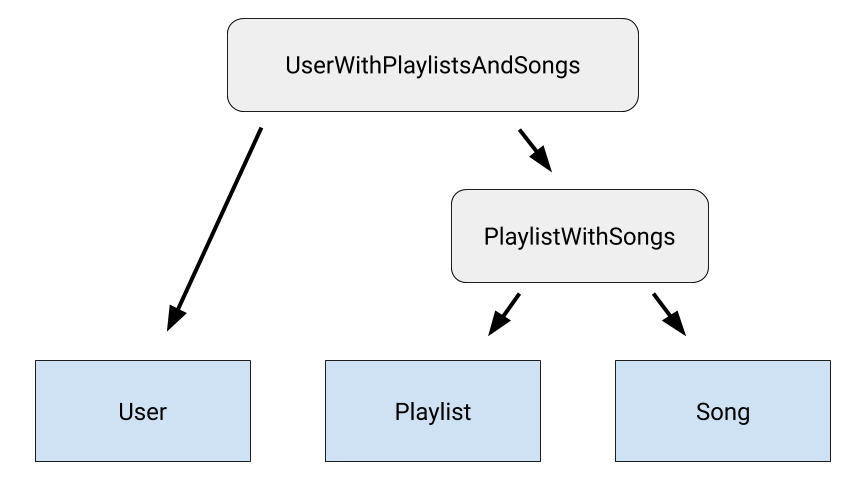 **Figure 1.** Diagram of relationship classes in the music streaming app example.
If your set has more tables, create a class to model the relationship between
each remaining table and the previous relationship class. This process creates
a chain of nested relationships among all tables you want to query.
Finally, add a function to the data access object (DAO) class to expose the
query function that your app needs. This function requires Room to run
multiple queries, so add the [`@Transaction`](https://developer.android.com/reference/kotlin/androidx/room3/Transaction.md.txt) annotation so that the whole
operation runs atomically:
```kotlin
@Transaction
@Query("SELECT * FROM User")
suspend fun getUsersWithPlaylistsAndSongs(): List
```