# ConstraintLayout
Summary:[Nested Classes](https://developer.android.com/reference/android/support/constraint/ConstraintLayout#nestedclasses)\|[Fields](https://developer.android.com/reference/android/support/constraint/ConstraintLayout#lfields)\|[Ctors](https://developer.android.com/reference/android/support/constraint/ConstraintLayout#pubctors)\|[Methods](https://developer.android.com/reference/android/support/constraint/ConstraintLayout#pubmethods)\|[Protected Methods](https://developer.android.com/reference/android/support/constraint/ConstraintLayout#promethods)\|[Inherited Methods](https://developer.android.com/reference/android/support/constraint/ConstraintLayout#inhmethods)
# ConstraintLayout
| This package is part of the Android[support library](https://developer.android.com/topic/libraries/support-library)which is no longer maintained. The Constraint Layout support library has been superseded by the[AndroidX Constraint Layout library](https://developer.android.com/reference/androidx/constraintlayout/classes), which is part of[Jetpack](https://developer.android.com/jetpack). The`ConstraintLayout`class has been superseded by[`androidx.constraintlayout.widget.ConstraintLayout`](https://developer.android.com/reference/androidx/constraintlayout/widget/ConstraintLayout). We recommend using the AndroidX libraries in all new projects. You should also consider[migrating](https://developer.android.com/jetpack/androidx/migrate)existing projects to AndroidX.
`
public
class
ConstraintLayout
`
`
``
extends ViewGroup
``
`
|---|---|---------------------------------------------|
| java.lang.Object |||
| ↳ | ViewGroup ||
| | ↳ | android.support.constraint.ConstraintLayout |
|----------------------------------------------------------------------------------------------------------------------------------------------------------------------------------------------------------------------------------------------------------------------------------------------------------------------------------------------------------------------------------------------------------------------------------------------------------------------------------|
| Known direct subclasses [MotionLayout](https://developer.android.com/reference/android/support/constraint/motion/MotionLayout) |--------------------------------------------------------------------------------------------------------|-------------------------------------------------------------| | [MotionLayout](https://developer.android.com/reference/android/support/constraint/motion/MotionLayout) | **A subclass of ConstraintLayout for building animations.** | |
*** ** * ** ***
A`ConstraintLayout`is a[android.view.ViewGroup](https://developer.android.com/reference/android/view/ViewGroup/package-summary)which allows you to position and size widgets in a flexible way.
**Note:** `ConstraintLayout`is available as a support library that you can use on Android systems starting with API level 9 (Gingerbread). As such, we are planning on enriching its API and capabilities over time. This documentation will reflect those changes.
There are currently various types of constraints that you can use:
- [Relative positioning](https://developer.android.com/reference/android/support/constraint/ConstraintLayout#RelativePositioning)
- [Margins](https://developer.android.com/reference/android/support/constraint/ConstraintLayout#Margins)
- [Centering positioning](https://developer.android.com/reference/android/support/constraint/ConstraintLayout#CenteringPositioning)
- [Circular positioning](https://developer.android.com/reference/android/support/constraint/ConstraintLayout#CircularPositioning)
- [Visibility behavior](https://developer.android.com/reference/android/support/constraint/ConstraintLayout#VisibilityBehavior)
- [Dimension constraints](https://developer.android.com/reference/android/support/constraint/ConstraintLayout#DimensionConstraints)
- [Chains](https://developer.android.com/reference/android/support/constraint/ConstraintLayout#Chains)
- [Virtual Helpers objects](https://developer.android.com/reference/android/support/constraint/ConstraintLayout#VirtualHelpers)
- [Optimizer](https://developer.android.com/reference/android/support/constraint/ConstraintLayout#Optimizer)
Note that you cannot have a circular dependency in constraints.
Also see[ConstraintLayout.LayoutParams](https://developer.android.com/reference/android/support/constraint/ConstraintLayout.LayoutParams)for layout attributes
### Developer Guide
#### Relative positioning
Relative positioning is one of the basic building blocks of creating layouts in ConstraintLayout. Those constraints allow you to position a given widget relative to another one. You can constrain a widget on the horizontal and vertical axis:
- Horizontal Axis: left, right, start and end sides
- Vertical Axis: top, bottom sides and text baseline
The general concept is to constrain a given side of a widget to another side of any other widget.
For example, in order to position button B to the right of button A (Fig. 1):
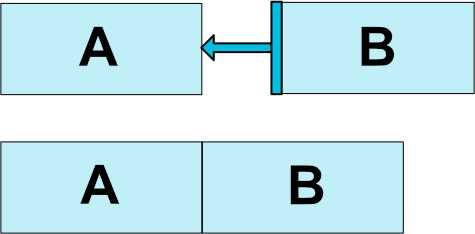
***Fig. 1 - Relative Positioning Example***
you would need to do:
This tells the system that we want the left side of button B to be constrained to the right side of button A. Such a position constraint means that the system will try to have both sides share the same location.
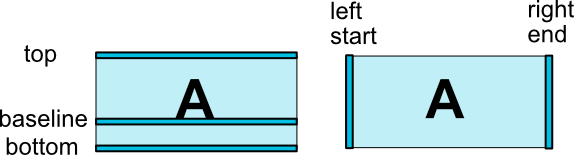
***Fig. 2 - Relative Positioning Constraints***
Here is the list of available constraints (Fig. 2):
- `layout_constraintLeft_toLeftOf`
- `layout_constraintLeft_toRightOf`
- `layout_constraintRight_toLeftOf`
- `layout_constraintRight_toRightOf`
- `layout_constraintTop_toTopOf`
- `layout_constraintTop_toBottomOf`
- `layout_constraintBottom_toTopOf`
- `layout_constraintBottom_toBottomOf`
- `layout_constraintBaseline_toBaselineOf`
- `layout_constraintStart_toEndOf`
- `layout_constraintStart_toStartOf`
- `layout_constraintEnd_toStartOf`
- `layout_constraintEnd_toEndOf`
They all take a reference`id`to another widget, or the`parent`(which will reference the parent container, i.e. the ConstraintLayout):
#### Margins
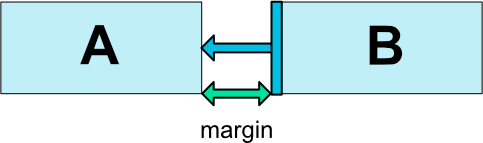
***Fig. 3 - Relative Positioning Margins***
If side margins are set, they will be applied to the corresponding constraints (if they exist) (Fig. 3), enforcing the margin as a space between the target and the source side. The usual layout margin attributes can be used to this effect:
- `android:layout_marginStart`
- `android:layout_marginEnd`
- `android:layout_marginLeft`
- `android:layout_marginTop`
- `android:layout_marginRight`
- `android:layout_marginBottom`
Note that a margin can only be positive or equals to zero, and takes a`Dimension`.
#### Margins when connected to a GONE widget
When a position constraint target's visibility is`View.GONE`, you can also indicate a different margin value to be used using the following attributes:
- `layout_goneMarginStart`
- `layout_goneMarginEnd`
- `layout_goneMarginLeft`
- `layout_goneMarginTop`
- `layout_goneMarginRight`
- `layout_goneMarginBottom`
#### Centering positioning and bias
A useful aspect of`ConstraintLayout`is in how it deals with "impossible" constrains. For example, if we have something like:
#### Visibility behavior
`ConstraintLayout`has a specific handling of widgets being marked as`View.GONE`.
`GONE`widgets, as usual, are not going to be displayed and are not part of the layout itself (i.e. their actual dimensions will not be changed if marked as`GONE`).
But in terms of the layout computations,`GONE`widgets are still part of it, with an important distinction:
- For the layout pass, their dimension will be considered as zero (basically, they will be resolved to a point)
- If they have constraints to other widgets they will still be respected, but any margins will be as if equals to zero
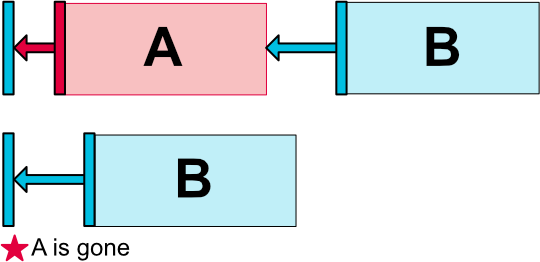
***Fig. 7 - Visibility Behavior***
This specific behavior allows to build layouts where you can temporarily mark widgets as being`GONE`, without breaking the layout (Fig. 7), which can be particularly useful when doing simple layout animations.
**Note:** The margin used will be the margin that B had defined when connecting to A (see Fig. 7 for an example). In some cases, this might not be the margin you want (e.g. A had a 100dp margin to the side of its container, B only a 16dp to A, marking A as gone, B will have a margin of 16dp to the container). For this reason, you can specify an alternate margin value to be used when the connection is to a widget being marked as gone (see[the section above about the gone margin attributes](https://developer.android.com/reference/android/support/constraint/ConstraintLayout#GoneMargin)).
#### Dimensions constraints
##### Minimum dimensions on ConstraintLayout
You can define minimum and maximum sizes for the`ConstraintLayout`itself:
- `android:minWidth`set the minimum width for the layout
- `android:minHeight`set the minimum height for the layout
- `android:maxWidth`set the maximum width for the layout
- `android:maxHeight`set the maximum height for the layout
Those minimum and maximum dimensions will be used by`ConstraintLayout`when its dimensions are set to`WRAP_CONTENT`.
##### Widgets dimension constraints
The dimension of the widgets can be specified by setting the`android:layout_width`and`android:layout_height`attributes in 3 different ways:
- Using a specific dimension (either a literal value such as`123dp`or a`Dimension`reference)
- Using`WRAP_CONTENT`, which will ask the widget to compute its own size
- Using`0dp`, which is the equivalent of "`MATCH_CONSTRAINT`"
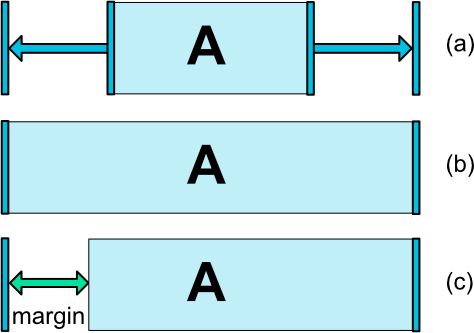
***Fig. 8 - Dimension Constraints***
The first two works in a similar fashion as other layouts. The last one will resize the widget in such a way as matching the constraints that are set (see Fig. 8, (a) is wrap_content, (b) is 0dp). If margins are set, they will be taken in account in the computation (Fig. 8, (c) with 0dp).
**Important:** `MATCH_PARENT`is not recommended for widgets contained in a`ConstraintLayout`. Similar behavior can be defined by using`MATCH_CONSTRAINT`with the corresponding left/right or top/bottom constraints being set to`"parent"`.
##### WRAP_CONTENT : enforcing constraints (***Added in 1.1***)
If a dimension is set to`WRAP_CONTENT`, in versions before 1.1 they will be treated as a literal dimension -- meaning, constraints will not limit the resulting dimension. While in general this is enough (and faster), in some situations, you might want to use`WRAP_CONTENT`, yet keep enforcing constraints to limit the resulting dimension. In that case, you can add one of the corresponding attribute:
- `app:layout_constrainedWidth="true|false"`
- `app:layout_constrainedHeight="true|false"`
##### MATCH_CONSTRAINT dimensions (***Added in 1.1***)
When a dimension is set to`MATCH_CONSTRAINT`, the default behavior is to have the resulting size take all the available space. Several additional modifiers are available:
- `layout_constraintWidth_min`and`layout_constraintHeight_min`: will set the minimum size for this dimension
- `layout_constraintWidth_max`and`layout_constraintHeight_max`: will set the maximum size for this dimension
- `layout_constraintWidth_percent`and`layout_constraintHeight_percent`: will set the size of this dimension as a percentage of the parent
###### Min and Max
The value indicated for min and max can be either a dimension in Dp, or "wrap", which will use the same value as what`WRAP_CONTENT`would do.
###### Percent dimension
To use percent, you need to set the following:
- The dimension should be set to`MATCH_CONSTRAINT`(0dp)
- The default should be set to percent`app:layout_constraintWidth_default="percent"`or`app:layout_constraintHeight_default="percent"`
- Then set the`layout_constraintWidth_percent`or`layout_constraintHeight_percent`attributes to a value between 0 and 1
##### Ratio
You can also define one dimension of a widget as a ratio of the other one. In order to do that, you need to have at least one constrained dimension be set to`0dp`(i.e.,`MATCH_CONSTRAINT`), and set the attribute`layout_constraintDimensionRatio`to a given ratio. For example:
will set the height of the button to be the same as its width.
The ratio can be expressed either as:
- a float value, representing a ratio between width and height
- a ratio in the form "width:height"
You can also use ratio if both dimensions are set to`MATCH_CONSTRAINT`(0dp). In this case the system sets the largest dimensions that satisfies all constraints and maintains the aspect ratio specified. To constrain one specific side based on the dimensions of another, you can pre append`W,`" or`H,`to constrain the width or height respectively. For example, If one dimension is constrained by two targets (e.g. width is 0dp and centered on parent) you can indicate which side should be constrained, by adding the letter`W`(for constraining the width) or`H`(for constraining the height) in front of the ratio, separated by a comma:
will set the height of the button following a 16:9 ratio, while the width of the button will match the constraints to parent.
#### Chains
Chains provide group-like behavior in a single axis (horizontally or vertically). The other axis can be constrained independently.
##### Creating a chain
A set of widgets are considered a chain if they are linked together via a bi-directional connection (see Fig. 9, showing a minimal chain, with two widgets).
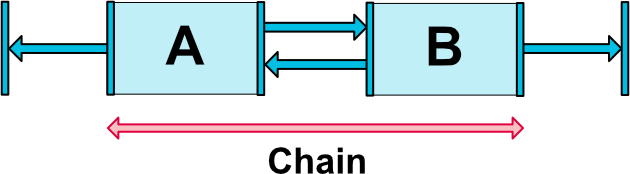
***Fig. 9 - Chain***
##### Chain heads
Chains are controlled by attributes set on the first element of the chain (the "head" of the chain):

***Fig. 10 - Chain Head***
The head is the left-most widget for horizontal chains, and the top-most widget for vertical chains.
##### Margins in chains
If margins are specified on connections, they will be taken in account. In the case of spread chains, margins will be deducted from the allocated space.
##### Chain Style
When setting the attribute`layout_constraintHorizontal_chainStyle`or`layout_constraintVertical_chainStyle`on the first element of a chain, the behavior of the chain will change according to the specified style (default is`CHAIN_SPREAD`).
- `CHAIN_SPREAD`-- the elements will be spread out (default style)
- Weighted chain -- in`CHAIN_SPREAD`mode, if some widgets are set to`MATCH_CONSTRAINT`, they will split the available space
- `CHAIN_SPREAD_INSIDE`-- similar, but the endpoints of the chain will not be spread out
- `CHAIN_PACKED`-- the elements of the chain will be packed together. The horizontal or vertical bias attribute of the child will then affect the positioning of the packed elements
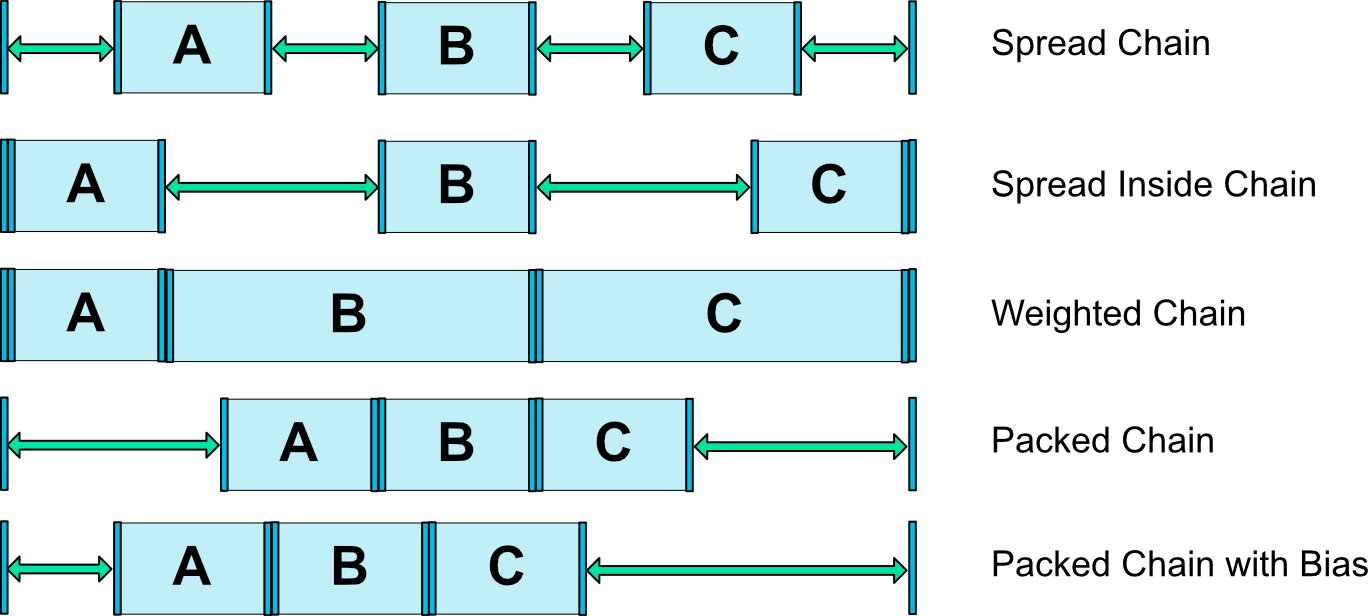
***Fig. 11 - Chains Styles***
##### Weighted chains
The default behavior of a chain is to spread the elements equally in the available space. If one or more elements are using`MATCH_CONSTRAINT`, they will use the available empty space (equally divided among themselves). The attribute`layout_constraintHorizontal_weight`and`layout_constraintVertical_weight`will control how the space will be distributed among the elements using`MATCH_CONSTRAINT`. For exemple, on a chain containing two elements using`MATCH_CONSTRAINT`, with the first element using a weight of 2 and the second a weight of 1, the space occupied by the first element will be twice that of the second element.
##### Margins and chains (***in 1.1***)
When using margins on elements in a chain, the margins are additive.
For example, on a horizontal chain, if one element defines a right margin of 10dp and the next element defines a left margin of 5dp, the resulting margin between those two elements is 15dp.
An item plus its margins are considered together when calculating leftover space used by chains to position items. The leftover space does not contain the margins.
#### Virtual Helper objects
In addition to the intrinsic capabilities detailed previously, you can also use special helper objects in`ConstraintLayout`to help you with your layout. Currently, the`Guideline`object allows you to create Horizontal and Vertical guidelines which are positioned relative to the`ConstraintLayout`container. Widgets can then be positioned by constraining them to such guidelines. In**1.1** ,`Barrier`and`Group`were added too.
#### Optimizer (***in 1.1***)
In 1.1 we exposed the constraints optimizer. You can decide which optimizations are applied by adding the tag*app:layout_optimizationLevel*to the ConstraintLayout element.
- **none**: no optimizations are applied
- **standard**: Default. Optimize direct and barrier constraints only
- **direct**: optimize direct constraints
- **barrier**: optimize barrier constraints
- **chain**: optimize chain constraints (experimental)
- **dimensions**: optimize dimensions measures (experimental), reducing the number of measures of match constraints elements
This attribute is a mask, so you can decide to turn on or off specific optimizations by listing the ones you want. For example:*app:layout_optimizationLevel="direct\|barrier\|chain"*
**See also:**
- [Guideline](https://developer.android.com/reference/android/support/constraint/Guideline)
## Summary
| ### Nested classes ||
|----------|-------------------------------------------------------------------------------------------------------------------------------------------------------------------------------------------------------------------------------------------------------------------------------------------------------------------------------------------|
| ` class` | [ConstraintLayout.LayoutParams](https://developer.android.com/reference/android/support/constraint/ConstraintLayout.LayoutParams) This class contains the different attributes specifying how a view want to be laid out inside a[ConstraintLayout](https://developer.android.com/reference/android/support/constraint/ConstraintLayout). |
| ### Fields ||
|----------------------------------------------------------------------------------------------------------------------------------|-------------------------------------------------------------------------------------------------------------------------------------------|
| ` protected `[ConstraintLayoutStates](https://developer.android.com/reference/android/support/constraint/ConstraintLayoutStates) | [mConstraintLayoutSpec](https://developer.android.com/reference/android/support/constraint/ConstraintLayout#mConstraintLayoutSpec) |
| ` protected ConstraintWidgetContainer` | [mLayoutWidget](https://developer.android.com/reference/android/support/constraint/ConstraintLayout#mLayoutWidget) |
| ### Public constructors ||
|-----------------------------------------------------------------------------------------------------------------------------------------------------------------------------------------------------------------------------------------------|---|
| ` `[ConstraintLayout](https://developer.android.com/reference/android/support/constraint/ConstraintLayout#ConstraintLayout(Context))`(Context context) ` |
| ` `[ConstraintLayout](https://developer.android.com/reference/android/support/constraint/ConstraintLayout#ConstraintLayout(Context,%20AttributeSet))`(Context context, AttributeSet attrs) ` |
| ` `[ConstraintLayout](https://developer.android.com/reference/android/support/constraint/ConstraintLayout#ConstraintLayout(Context,%20AttributeSet,%20int))`(Context context, AttributeSet attrs, int defStyleAttr) ` |
| ` `[ConstraintLayout](https://developer.android.com/reference/android/support/constraint/ConstraintLayout#ConstraintLayout(Context,%20AttributeSet,%20int,%20int))`(Context context, AttributeSet attrs, int defStyleAttr, int defStyleRes) ` |
| ### Public methods ||
|---------|---------------------------------------------------------------------------------------------------------------------------------------------------------------------------------------------------------------------------------------------------------------------------------------------------------------------------------------------------------------|
| ` int` | ` `[getMaxHeight](https://developer.android.com/reference/android/support/constraint/ConstraintLayout#getMaxHeight())`() ` The maximum height of this view. |
| ` int` | ` `[getMaxWidth](https://developer.android.com/reference/android/support/constraint/ConstraintLayout#getMaxWidth())`() ` |
| ` int` | ` `[getMinHeight](https://developer.android.com/reference/android/support/constraint/ConstraintLayout#getMinHeight())`() ` The minimum height of this view. |
| ` int` | ` `[getMinWidth](https://developer.android.com/reference/android/support/constraint/ConstraintLayout#getMinWidth())`() ` The minimum width of this view. |
| ` int` | ` `[getOptimizationLevel](https://developer.android.com/reference/android/support/constraint/ConstraintLayout#getOptimizationLevel())`() ` Return the current optimization level for the layout resolution |
| ` void` | ` `[loadLayoutDescription](https://developer.android.com/reference/android/support/constraint/ConstraintLayout#loadLayoutDescription(int))`(int layoutDescription) ` Load a layout description file from the resources. |
| ` void` | ` `[requestLayout](https://developer.android.com/reference/android/support/constraint/ConstraintLayout#requestLayout())`() ` |
| ` void` | ` `[resolveSystem](https://developer.android.com/reference/android/support/constraint/ConstraintLayout#resolveSystem(int,%20int))`(int widthMeasureSpec, int heightMeasureSpec) ` |
| ` void` | ` `[setConstraintSet](https://developer.android.com/reference/android/support/constraint/ConstraintLayout#setConstraintSet(android.support.constraint.ConstraintSet))`(`[ConstraintSet](https://developer.android.com/reference/android/support/constraint/ConstraintSet)` set) ` Sets a ConstraintSet object to manage constraints. |
| ` void` | ` `[setMaxHeight](https://developer.android.com/reference/android/support/constraint/ConstraintLayout#setMaxHeight(int))`(int value) ` Set the max height for this view |
| ` void` | ` `[setMaxWidth](https://developer.android.com/reference/android/support/constraint/ConstraintLayout#setMaxWidth(int))`(int value) ` Set the max width for this view |
| ` void` | ` `[setMinHeight](https://developer.android.com/reference/android/support/constraint/ConstraintLayout#setMinHeight(int))`(int value) ` Set the min height for this view |
| ` void` | ` `[setMinWidth](https://developer.android.com/reference/android/support/constraint/ConstraintLayout#setMinWidth(int))`(int value) ` Set the min width for this view |
| ` void` | ` `[setOnConstraintsChanged](https://developer.android.com/reference/android/support/constraint/ConstraintLayout#setOnConstraintsChanged(android.support.constraint.ConstraintsChangedListener))`(`[ConstraintsChangedListener](https://developer.android.com/reference/android/support/constraint/ConstraintsChangedListener)` constraintsChangedListener) ` |
| ` void` | ` `[setOptimizationLevel](https://developer.android.com/reference/android/support/constraint/ConstraintLayout#setOptimizationLevel(int))`(int level) ` Set the optimization for the layout resolution. |
| ` void` | ` `[setState](https://developer.android.com/reference/android/support/constraint/ConstraintLayout#setState(int,%20int,%20int))`(int id, int screenWidth, int screenHeight) ` Set the State of the ConstraintLayout, causing it to load a particular ConstraintSet. |
| ### Protected methods ||
|--------------------------------------------------------------------------------------------------------------------------------------|---------------------------------------------------------------------------------------------------------------------------------------------------------------------------------------------------------------------------------------------------------------------------------------------------------------------------------------------------------------------------------------------------------------------------------------------------------------------------------------------------|
| ` void` | ` `[applyConstraintsFromLayoutParams](https://developer.android.com/reference/android/support/constraint/ConstraintLayout#applyConstraintsFromLayoutParams(boolean,%20View,%20ConstraintWidget,%20android.support.constraint.ConstraintLayout.LayoutParams,%20))`(boolean isInEditMode, View child, ConstraintWidget widget, `[ConstraintLayout.LayoutParams](https://developer.android.com/reference/android/support/constraint/ConstraintLayout.LayoutParams)` layoutParams, ` idToWidget) |
| ` boolean` | ` `[checkLayoutParams](https://developer.android.com/reference/android/support/constraint/ConstraintLayout#checkLayoutParams(ViewGroup.LayoutParams))`(ViewGroup.LayoutParams p) ` |
| ` `[ConstraintLayout.LayoutParams](https://developer.android.com/reference/android/support/constraint/ConstraintLayout.LayoutParams) | ` `[generateDefaultLayoutParams](https://developer.android.com/reference/android/support/constraint/ConstraintLayout#generateDefaultLayoutParams())`() ` |
| ` ViewGroup.LayoutParams` | ` `[generateLayoutParams](https://developer.android.com/reference/android/support/constraint/ConstraintLayout#generateLayoutParams(ViewGroup.LayoutParams))`(ViewGroup.LayoutParams p) ` |
| ` void` | ` `[onLayout](https://developer.android.com/reference/android/support/constraint/ConstraintLayout#onLayout(boolean,%20int,%20int,%20int,%20int))`(boolean changed, int left, int top, int right, int bottom) ` |
| ` void` | ` `[onMeasure](https://developer.android.com/reference/android/support/constraint/ConstraintLayout#onMeasure(int,%20int))`(int widthMeasureSpec, int heightMeasureSpec) ` |
| ` void` | ` `[parseLayoutDescription](https://developer.android.com/reference/android/support/constraint/ConstraintLayout#parseLayoutDescription(int))`(int id) ` Subclasses can override the handling of layoutDescription |
| ### Inherited methods |
|-----------------------|---|
| From class` java.lang.Object ` |-------------------|-------------------------------| | ` Object` | ` clone() ` | | ` boolean` | ` equals(Object arg0) ` | | ` void` | ` finalize() ` | | ` final Class` | ` getClass() ` | | ` int` | ` hashCode() ` | | ` final void` | ` notify() ` | | ` final void` | ` notifyAll() ` | | ` String` | ` toString() ` | | ` final void` | ` wait(long arg0, int arg1) ` | | ` final void` | ` wait(long arg0) ` | | ` final void` | ` wait() ` | ||
## Fields
### mConstraintLayoutSpec
```
protected ConstraintLayoutStates mConstraintLayoutSpec
```
| Parameters ||
|----------------|-----------------------|
| `context` | `Context` |
| `attrs` | `AttributeSet` |
| `defStyleAttr` | `int` |
| `defStyleRes` | `int` |
## Public methods
### getMaxHeight
```
public int getMaxHeight ()
```
The maximum height of this view.
| Returns ||
|-------|----------------------------------------|
| `int` | The maximum height of this view |
**See also:**
- [setMaxHeight(int)](https://developer.android.com/reference/android/support/constraint/ConstraintLayout#setMaxHeight(int))
### getMaxWidth
```
public int getMaxWidth ()
```
| Returns ||
|-------|--------|
| `int` | |
### getMinHeight
```
public int getMinHeight ()
```
The minimum height of this view.
| Returns ||
|-------|----------------------------------------|
| `int` | The minimum height of this view |
**See also:**
- [setMinHeight(int)](https://developer.android.com/reference/android/support/constraint/ConstraintLayout#setMinHeight(int))
### getMinWidth
```
public int getMinWidth ()
```
The minimum width of this view.
| Returns ||
|-------|---------------------------------------|
| `int` | The minimum width of this view |
**See also:**
- [setMinWidth(int)](https://developer.android.com/reference/android/support/constraint/ConstraintLayout#setMinWidth(int))
### getOptimizationLevel
```
public int getOptimizationLevel ()
```
Return the current optimization level for the layout resolution
| Returns ||
|-------|--------------------------|
| `int` | the current level |
### loadLayoutDescription
```
public void loadLayoutDescription (int layoutDescription)
```
Load a layout description file from the resources.
| Parameters ||
|---------------------|----------------------------------------------------------------------|
| `layoutDescription` | `int`: The resource id, or 0 to reset the layout description. |
### requestLayout
```
public void requestLayout ()
```
### resolveSystem
```
public void resolveSystem (int widthMeasureSpec,
int heightMeasureSpec)
```
| Parameters ||
|---------------------|--------------|
| `widthMeasureSpec` | `int` |
| `heightMeasureSpec` | `int` |
### setConstraintSet
```
public void setConstraintSet (ConstraintSet set)
```
Sets a ConstraintSet object to manage constraints. The ConstraintSet overrides LayoutParams of child views.
| Parameters ||
|-------|-------------------------------------------------------------|
| `set` | `ConstraintSet`: Layout children using ConstraintSet |
### setMaxHeight
```
public void setMaxHeight (int value)
```
Set the max height for this view
### setMaxWidth
```
public void setMaxWidth (int value)
```
Set the max width for this view
### setMinHeight
```
public void setMinHeight (int value)
```
Set the min height for this view
### setMinWidth
```
public void setMinWidth (int value)
```
Set the min width for this view
### setOnConstraintsChanged
```
public void setOnConstraintsChanged (ConstraintsChangedListener constraintsChangedListener)
```
| Parameters ||
|------------------------------|-------------------------------------|
| `constraintsChangedListener` | `ConstraintsChangedListener` |
### setOptimizationLevel
```
public void setOptimizationLevel (int level)
```
Set the optimization for the layout resolution.
The optimization can be any of the following:
- Optimizer.OPTIMIZATION_NONE
- Optimizer.OPTIMIZATION_STANDARD
- a mask composed of specific optimizations
The mask can be composed of any combination of the following:
- Optimizer.OPTIMIZATION_DIRECT
- Optimizer.OPTIMIZATION_BARRIER
- Optimizer.OPTIMIZATION_CHAIN (experimental)
- Optimizer.OPTIMIZATION_DIMENSIONS (experimental)
Note that the current implementation of Optimizer.OPTIMIZATION_STANDARD is as a mask of DIRECT and BARRIER.
| Parameters ||
|---------|----------------------------------|
| `level` | `int`: optimization level |
### setState
```
public void setState (int id,
int screenWidth,
int screenHeight)
```
Set the State of the ConstraintLayout, causing it to load a particular ConstraintSet. For states with variants the variant with matching width and height constraintSet will be chosen
| Parameters ||
|----------------|--------------------------------------------------|
| `id` | `int`: the constraint set state |
| `screenWidth` | `int`: the width of the screen in pixels |
| `screenHeight` | `int`: the height of the screen in pixels |
## Protected methods
### applyConstraintsFromLayoutParams
```
protected void applyConstraintsFromLayoutParams (boolean isInEditMode,
View child,
ConstraintWidget widget,
ConstraintLayout.LayoutParams layoutParams,
idToWidget)
```