Added in [API level 1](https://developer.android.com/guide/topics/manifest/uses-sdk-element#ApiLevels) Summary: [Nested Classes](https://developer.android.com/reference/android/media/MediaRecorder#nestedclasses) \| [Constants](https://developer.android.com/reference/android/media/MediaRecorder#constants) \| [Inherited Constants](https://developer.android.com/reference/android/media/MediaRecorder#inhconstants) \| [Ctors](https://developer.android.com/reference/android/media/MediaRecorder#pubctors) \| [Methods](https://developer.android.com/reference/android/media/MediaRecorder#pubmethods) \| [Protected Methods](https://developer.android.com/reference/android/media/MediaRecorder#promethods) \| [Inherited Methods](https://developer.android.com/reference/android/media/MediaRecorder#inhmethods)
# MediaRecorder
*** ** * ** ***
` public class MediaRecorder `
` extends https://developer.android.com/reference/java/lang/Object ` ` implements https://developer.android.com/reference/android/media/AudioRecordingMonitor, https://developer.android.com/reference/android/media/AudioRouting, https://developer.android.com/reference/android/media/MicrophoneDirection `
|---|---|
| [java.lang.Object](https://developer.android.com/reference/java/lang/Object) ||
| ↳ | android.media.MediaRecorder |
*** ** * ** ***
Used to record audio and video. The recording control is based on a simple state machine (see below).
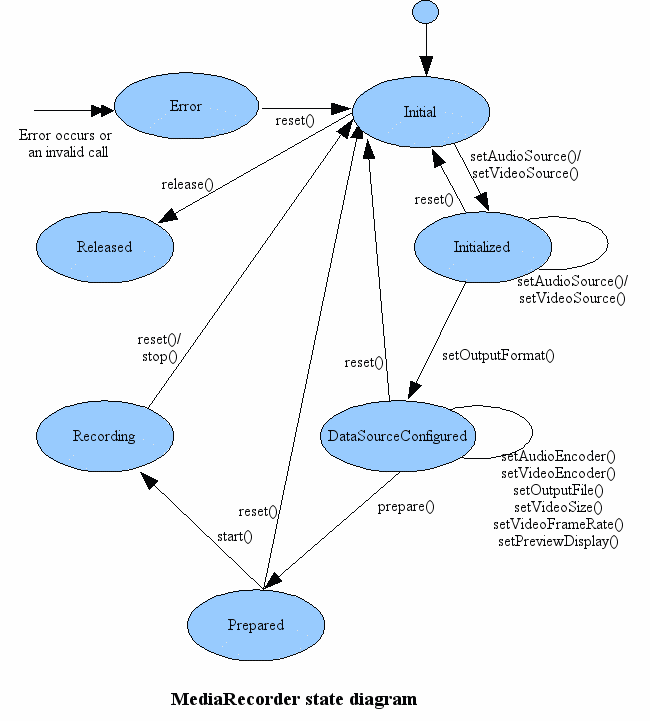
A common case of using MediaRecorder to record audio works as follows:
```
MediaRecorder recorder = new MediaRecorder(context);
recorder.setAudioSource(MediaRecorder.AudioSource.MIC);
recorder.setOutputFormat(MediaRecorder.OutputFormat.THREE_GPP);
recorder.setAudioEncoder(MediaRecorder.AudioEncoder.AMR_NB);
recorder.setOutputFile(PATH_NAME);
recorder.prepare();
recorder.start(); // Recording is now started
...
recorder.stop();
recorder.reset(); // You can reuse the object by going back to setAudioSource() step
recorder.release(); // Now the object cannot be reused
```
Applications may want to register for informational and error events in order to be informed of some internal update and possible runtime errors during recording. Registration for such events is done by setting the appropriate listeners (via calls (to `https://developer.android.com/reference/android/media/MediaRecorder#setOnInfoListener(android.media.MediaRecorder.OnInfoListener)`setOnInfoListener and/or `https://developer.android.com/reference/android/media/MediaRecorder#setOnErrorListener(android.media.MediaRecorder.OnErrorListener)`setOnErrorListener). In order to receive the respective callback associated with these listeners, applications are required to create MediaRecorder objects on threads with a Looper running (the main UI thread by default already has a Looper running).
**Note:** Currently, MediaRecorder does not work on the emulator.
### Developer Guides
For more information about how to use MediaRecorder for recording video, read the [Camera](https://developer.android.com/guide/topics/media/camera#capture-video) developer guide. For more information about how to use MediaRecorder for recording sound, read the [Audio Capture](https://developer.android.com/guide/topics/media/audio-capture) developer guide.
## Summary
| ### Nested classes ||
|---|---|
| ` class` | `https://developer.android.com/reference/android/media/MediaRecorder.AudioEncoder` Defines the audio encoding. |
| ` class` | `https://developer.android.com/reference/android/media/MediaRecorder.AudioSource` Defines the audio source. |
| ` class` | `https://developer.android.com/reference/android/media/MediaRecorder.MetricsConstants` |
| ` interface` | `https://developer.android.com/reference/android/media/MediaRecorder.OnErrorListener` Interface definition for a callback to be invoked when an error occurs while recording. |
| ` interface` | `https://developer.android.com/reference/android/media/MediaRecorder.OnInfoListener` Interface definition of a callback to be invoked to communicate some info and/or warning about the recording. |
| ` class` | `https://developer.android.com/reference/android/media/MediaRecorder.OutputFormat` Defines the output format. |
| ` class` | `https://developer.android.com/reference/android/media/MediaRecorder.VideoEncoder` Defines the video encoding. |
| ` class` | `https://developer.android.com/reference/android/media/MediaRecorder.VideoSource` Defines the video source. |
| ### Constants ||
|---|---|
| `int` | `https://developer.android.com/reference/android/media/MediaRecorder#MEDIA_ERROR_SERVER_DIED` Media server died. |
| `int` | `https://developer.android.com/reference/android/media/MediaRecorder#MEDIA_RECORDER_ERROR_UNKNOWN` Unspecified media recorder error. |
| `int` | `https://developer.android.com/reference/android/media/MediaRecorder#MEDIA_RECORDER_INFO_MAX_DURATION_REACHED` A maximum duration had been setup and has now been reached. |
| `int` | `https://developer.android.com/reference/android/media/MediaRecorder#MEDIA_RECORDER_INFO_MAX_FILESIZE_APPROACHING` A maximum filesize had been setup and current recorded file size has reached 90% of the limit. |
| `int` | `https://developer.android.com/reference/android/media/MediaRecorder#MEDIA_RECORDER_INFO_MAX_FILESIZE_REACHED` A maximum filesize had been setup and has now been reached. |
| `int` | `https://developer.android.com/reference/android/media/MediaRecorder#MEDIA_RECORDER_INFO_NEXT_OUTPUT_FILE_STARTED` A maximum filesize had been reached and MediaRecorder has switched output to a new file set by application `https://developer.android.com/reference/android/media/MediaRecorder#setNextOutputFile(java.io.File)`. |
| `int` | `https://developer.android.com/reference/android/media/MediaRecorder#MEDIA_RECORDER_INFO_UNKNOWN` Unspecified media recorder info. |
### Inherited constants
From interface `https://developer.android.com/reference/android/media/MicrophoneDirection` `int` `https://developer.android.com/reference/android/media/MicrophoneDirection#MIC_DIRECTION_AWAY_FROM_USER`
Optimize capture for audio coming from the side of the device pointing away from the user.
`int` `https://developer.android.com/reference/android/media/MicrophoneDirection#MIC_DIRECTION_EXTERNAL`
Optimize capture for audio coming from an off-device microphone.
`int` `https://developer.android.com/reference/android/media/MicrophoneDirection#MIC_DIRECTION_TOWARDS_USER`
Optimize capture for audio coming from the side of the device facing the user.
`int` `https://developer.android.com/reference/android/media/MicrophoneDirection#MIC_DIRECTION_UNSPECIFIED`
Don't do any directionality processing of the activated microphone(s).
| ### Public constructors ||
|---|---|
| ` https://developer.android.com/reference/android/media/MediaRecorder#MediaRecorder()() ` *This constructor is deprecated. Use `https://developer.android.com/reference/android/media/MediaRecorder#MediaRecorder(android.content.Context)` instead* |
| ` https://developer.android.com/reference/android/media/MediaRecorder#MediaRecorder(android.content.Context)(https://developer.android.com/reference/android/content/Context context) ` Default constructor. |
| ### Public methods ||
|---|---|
| ` void` | ` https://developer.android.com/reference/android/media/MediaRecorder#addOnRoutingChangedListener(android.media.AudioRouting.OnRoutingChangedListener,%20android.os.Handler)(https://developer.android.com/reference/android/media/AudioRouting.OnRoutingChangedListener listener, https://developer.android.com/reference/android/os/Handler handler) ` Adds an `https://developer.android.com/reference/android/media/AudioRouting.OnRoutingChangedListener` to receive notifications of routing changes on this MediaRecorder. |
| ` https://developer.android.com/reference/java/util/List` | ` https://developer.android.com/reference/android/media/MediaRecorder#getActiveMicrophones()() ` Return A lists of `https://developer.android.com/reference/android/media/MicrophoneInfo` representing the active microphones. |
| ` https://developer.android.com/reference/android/media/AudioRecordingConfiguration` | ` https://developer.android.com/reference/android/media/MediaRecorder#getActiveRecordingConfiguration()() ` Returns the current active audio recording for this audio recorder. |
| ` static final int` | ` https://developer.android.com/reference/android/media/MediaRecorder#getAudioSourceMax()() ` Gets the maximum value for audio sources. |
| ` https://developer.android.com/reference/android/media/metrics/LogSessionId` | ` https://developer.android.com/reference/android/media/MediaRecorder#getLogSessionId()() ` Returns the `https://developer.android.com/reference/android/media/metrics/LogSessionId` for MediaRecorder. |
| ` int` | ` https://developer.android.com/reference/android/media/MediaRecorder#getMaxAmplitude()() ` Returns the maximum absolute amplitude that was sampled since the last call to this method. |
| ` https://developer.android.com/reference/android/os/PersistableBundle` | ` https://developer.android.com/reference/android/media/MediaRecorder#getMetrics()() ` Return Metrics data about the current Mediarecorder instance. |
| ` https://developer.android.com/reference/android/media/AudioDeviceInfo` | ` https://developer.android.com/reference/android/media/MediaRecorder#getPreferredDevice()() ` Returns the selected input device specified by `https://developer.android.com/reference/android/media/MediaRecorder#setPreferredDevice(android.media.AudioDeviceInfo)`. |
| ` https://developer.android.com/reference/android/media/AudioDeviceInfo` | ` https://developer.android.com/reference/android/media/MediaRecorder#getRoutedDevice()() ` Returns an `https://developer.android.com/reference/android/media/AudioDeviceInfo` identifying the current routing of this MediaRecorder Note: The query is only valid if the MediaRecorder is currently recording. |
| ` https://developer.android.com/reference/java/util/List` | ` https://developer.android.com/reference/android/media/MediaRecorder#getRoutedDevices()() ` Returns a List of `https://developer.android.com/reference/android/media/AudioDeviceInfo` identifying the current routing of this MediaRecorder. |
| ` https://developer.android.com/reference/android/view/Surface` | ` https://developer.android.com/reference/android/media/MediaRecorder#getSurface()() ` Gets the surface to record from when using SURFACE video source. |
| ` boolean` | ` https://developer.android.com/reference/android/media/MediaRecorder#isPrivacySensitive()() ` Returns whether this MediaRecorder is marked as privacy sensitive or not with regard to audio capture. |
| ` void` | ` https://developer.android.com/reference/android/media/MediaRecorder#pause()() ` Pauses recording. |
| ` void` | ` https://developer.android.com/reference/android/media/MediaRecorder#prepare()() ` Prepares the recorder to begin capturing and encoding data. |
| ` void` | ` https://developer.android.com/reference/android/media/MediaRecorder#registerAudioRecordingCallback(java.util.concurrent.Executor,%20android.media.AudioManager.AudioRecordingCallback)(https://developer.android.com/reference/java/util/concurrent/Executor executor, https://developer.android.com/reference/android/media/AudioManager.AudioRecordingCallback cb) ` Register a callback to be notified of audio capture changes via a `https://developer.android.com/reference/android/media/AudioManager.AudioRecordingCallback`. |
| ` void` | ` https://developer.android.com/reference/android/media/MediaRecorder#release()() ` Releases resources associated with this MediaRecorder object. |
| ` void` | ` https://developer.android.com/reference/android/media/MediaRecorder#removeOnRoutingChangedListener(android.media.AudioRouting.OnRoutingChangedListener)(https://developer.android.com/reference/android/media/AudioRouting.OnRoutingChangedListener listener) ` Removes an `https://developer.android.com/reference/android/media/AudioRouting.OnRoutingChangedListener` which has been previously added to receive rerouting notifications. |
| ` void` | ` https://developer.android.com/reference/android/media/MediaRecorder#reset()() ` Restarts the MediaRecorder to its idle state. |
| ` void` | ` https://developer.android.com/reference/android/media/MediaRecorder#resume()() ` Resumes recording. |
| ` void` | ` https://developer.android.com/reference/android/media/MediaRecorder#setAudioChannels(int)(int numChannels) ` Sets the number of audio channels for recording. |
| ` void` | ` https://developer.android.com/reference/android/media/MediaRecorder#setAudioEncoder(int)(int audio_encoder) ` Sets the audio encoder to be used for recording. |
| ` void` | ` https://developer.android.com/reference/android/media/MediaRecorder#setAudioEncodingBitRate(int)(int bitRate) ` Sets the audio encoding bit rate for recording. |
| ` void` | ` https://developer.android.com/reference/android/media/MediaRecorder#setAudioProfile(android.media.EncoderProfiles.AudioProfile)(https://developer.android.com/reference/android/media/EncoderProfiles.AudioProfile profile) ` Uses the settings from an AudioProfile for recording. |
| ` void` | ` https://developer.android.com/reference/android/media/MediaRecorder#setAudioSamplingRate(int)(int samplingRate) ` Sets the audio sampling rate for recording. |
| ` void` | ` https://developer.android.com/reference/android/media/MediaRecorder#setAudioSource(int)(int audioSource) ` Sets the audio source to be used for recording. |
| ` void` | ` https://developer.android.com/reference/android/media/MediaRecorder#setCamera(android.hardware.Camera)(https://developer.android.com/reference/android/hardware/Camera c) ` *This method was deprecated in API level 21. Use `https://developer.android.com/reference/android/media/MediaRecorder#getSurface()` and the `https://developer.android.com/reference/android/hardware/camera2/package-summary` API instead.* |
| ` void` | ` https://developer.android.com/reference/android/media/MediaRecorder#setCaptureRate(double)(double fps) ` Set video frame capture rate. |
| ` void` | ` https://developer.android.com/reference/android/media/MediaRecorder#setInputSurface(android.view.Surface)(https://developer.android.com/reference/android/view/Surface surface) ` Configures the recorder to use a persistent surface when using SURFACE video source. |
| ` void` | ` https://developer.android.com/reference/android/media/MediaRecorder#setLocation(float,%20float)(float latitude, float longitude) ` Set and store the geodata (latitude and longitude) in the output file. |
| ` void` | ` https://developer.android.com/reference/android/media/MediaRecorder#setLogSessionId(android.media.metrics.LogSessionId)(https://developer.android.com/reference/android/media/metrics/LogSessionId id) ` Sets the `https://developer.android.com/reference/android/media/metrics/LogSessionId` for MediaRecorder. |
| ` void` | ` https://developer.android.com/reference/android/media/MediaRecorder#setMaxDuration(int)(int max_duration_ms) ` Sets the maximum duration (in ms) of the recording session. |
| ` void` | ` https://developer.android.com/reference/android/media/MediaRecorder#setMaxFileSize(long)(long max_filesize_bytes) ` Sets the maximum filesize (in bytes) of the recording session. |
| ` void` | ` https://developer.android.com/reference/android/media/MediaRecorder#setNextOutputFile(java.io.File)(https://developer.android.com/reference/java/io/File file) ` Sets the next output file to be used when the maximum filesize is reached on the prior output `https://developer.android.com/reference/android/media/MediaRecorder#setOutputFile(java.io.File)` or `https://developer.android.com/reference/android/media/MediaRecorder#setNextOutputFile(java.io.File)`). |
| ` void` | ` https://developer.android.com/reference/android/media/MediaRecorder#setNextOutputFile(java.io.FileDescriptor)(https://developer.android.com/reference/java/io/FileDescriptor fd) ` Sets the next output file descriptor to be used when the maximum filesize is reached on the prior output `https://developer.android.com/reference/android/media/MediaRecorder#setOutputFile(java.io.File)` or `https://developer.android.com/reference/android/media/MediaRecorder#setNextOutputFile(java.io.File)`). |
| ` void` | ` https://developer.android.com/reference/android/media/MediaRecorder#setOnErrorListener(android.media.MediaRecorder.OnErrorListener)(https://developer.android.com/reference/android/media/MediaRecorder.OnErrorListener l) ` Register a callback to be invoked when an error occurs while recording. |
| ` void` | ` https://developer.android.com/reference/android/media/MediaRecorder#setOnInfoListener(android.media.MediaRecorder.OnInfoListener)(https://developer.android.com/reference/android/media/MediaRecorder.OnInfoListener listener) ` Register a callback to be invoked when an informational event occurs while recording. |
| ` void` | ` https://developer.android.com/reference/android/media/MediaRecorder#setOrientationHint(int)(int degrees) ` Sets the orientation hint for output video playback. |
| ` void` | ` https://developer.android.com/reference/android/media/MediaRecorder#setOutputFile(java.io.FileDescriptor)(https://developer.android.com/reference/java/io/FileDescriptor fd) ` Pass in the file descriptor of the file to be written. |
| ` void` | ` https://developer.android.com/reference/android/media/MediaRecorder#setOutputFile(java.lang.String)(https://developer.android.com/reference/java/lang/String path) ` Sets the path of the output file to be produced. |
| ` void` | ` https://developer.android.com/reference/android/media/MediaRecorder#setOutputFile(java.io.File)(https://developer.android.com/reference/java/io/File file) ` Pass in the file object to be written. |
| ` void` | ` https://developer.android.com/reference/android/media/MediaRecorder#setOutputFormat(int)(int output_format) ` Sets the format of the output file produced during recording. |
| ` boolean` | ` https://developer.android.com/reference/android/media/MediaRecorder#setPreferredDevice(android.media.AudioDeviceInfo)(https://developer.android.com/reference/android/media/AudioDeviceInfo deviceInfo) ` Specifies an audio device (via an `https://developer.android.com/reference/android/media/AudioDeviceInfo` object) to route the input from this MediaRecorder. |
| ` boolean` | ` https://developer.android.com/reference/android/media/MediaRecorder#setPreferredMicrophoneDirection(int)(int direction) ` Specifies the logical microphone (for processing). |
| ` boolean` | ` https://developer.android.com/reference/android/media/MediaRecorder#setPreferredMicrophoneFieldDimension(float)(float zoom) ` Specifies the zoom factor (i.e. |
| ` void` | ` https://developer.android.com/reference/android/media/MediaRecorder#setPreviewDisplay(android.view.Surface)(https://developer.android.com/reference/android/view/Surface sv) ` Sets a Surface to show a preview of recorded media (video). |
| ` void` | ` https://developer.android.com/reference/android/media/MediaRecorder#setPrivacySensitive(boolean)(boolean privacySensitive) ` Indicates that this capture request is privacy sensitive and that any concurrent capture is not permitted. |
| ` void` | ` https://developer.android.com/reference/android/media/MediaRecorder#setProfile(android.media.CamcorderProfile)(https://developer.android.com/reference/android/media/CamcorderProfile profile) ` Uses the settings from a CamcorderProfile object for recording. |
| ` void` | ` https://developer.android.com/reference/android/media/MediaRecorder#setVideoEncoder(int)(int video_encoder) ` Sets the video encoder to be used for recording. |
| ` void` | ` https://developer.android.com/reference/android/media/MediaRecorder#setVideoEncodingBitRate(int)(int bitRate) ` Sets the video encoding bit rate for recording. |
| ` void` | ` https://developer.android.com/reference/android/media/MediaRecorder#setVideoEncodingProfileLevel(int,%20int)(int profile, int level) ` Sets the desired video encoding profile and level for recording. |
| ` void` | ` https://developer.android.com/reference/android/media/MediaRecorder#setVideoEncodingQuality(int)(int quality) ` Sets the video encoding quality for recording. |
| ` void` | ` https://developer.android.com/reference/android/media/MediaRecorder#setVideoFrameRate(int)(int rate) ` Sets the frame rate of the video to be captured. |
| ` void` | ` https://developer.android.com/reference/android/media/MediaRecorder#setVideoProfile(android.media.EncoderProfiles.VideoProfile)(https://developer.android.com/reference/android/media/EncoderProfiles.VideoProfile profile) ` Uses the settings from a VideoProfile object for recording. |
| ` void` | ` https://developer.android.com/reference/android/media/MediaRecorder#setVideoSize(int,%20int)(int width, int height) ` Sets the width and height of the video to be captured. |
| ` void` | ` https://developer.android.com/reference/android/media/MediaRecorder#setVideoSource(int)(int video_source) ` Sets the video source to be used for recording. |
| ` void` | ` https://developer.android.com/reference/android/media/MediaRecorder#start()() ` Begins capturing and encoding data to the file specified with setOutputFile(). |
| ` void` | ` https://developer.android.com/reference/android/media/MediaRecorder#stop()() ` Stops recording. |
| ` void` | ` https://developer.android.com/reference/android/media/MediaRecorder#unregisterAudioRecordingCallback(android.media.AudioManager.AudioRecordingCallback)(https://developer.android.com/reference/android/media/AudioManager.AudioRecordingCallback cb) ` Unregister an audio recording callback previously registered with `https://developer.android.com/reference/android/media/MediaRecorder#registerAudioRecordingCallback(java.util.concurrent.Executor,%20android.media.AudioManager.AudioRecordingCallback)`. |
| ### Protected methods ||
|---|---|
| ` void` | ` https://developer.android.com/reference/android/media/MediaRecorder#finalize()() ` Called by the garbage collector on an object when garbage collection determines that there are no more references to the object. |
### Inherited methods
From class ` https://developer.android.com/reference/java/lang/Object ` ` https://developer.android.com/reference/java/lang/Object` ` https://developer.android.com/reference/java/lang/Object#clone()() `
Creates and returns a copy of this object.
` boolean` ` https://developer.android.com/reference/java/lang/Object#equals(java.lang.Object)(https://developer.android.com/reference/java/lang/Object obj) `
Indicates whether some other object is "equal to" this one.
` void` ` https://developer.android.com/reference/java/lang/Object#finalize()() `
Called by the garbage collector on an object when garbage collection determines that there are no more references to the object.
` final https://developer.android.com/reference/java/lang/Class` ` https://developer.android.com/reference/java/lang/Object#getClass()() `
Returns the runtime class of this `Object`.
` int` ` https://developer.android.com/reference/java/lang/Object#hashCode()() `
Returns a hash code value for the object.
` final void` ` https://developer.android.com/reference/java/lang/Object#notify()() `
Wakes up a single thread that is waiting on this object's monitor.
` final void` ` https://developer.android.com/reference/java/lang/Object#notifyAll()() `
Wakes up all threads that are waiting on this object's monitor.
` https://developer.android.com/reference/java/lang/String` ` https://developer.android.com/reference/java/lang/Object#toString()() `
Returns a string representation of the object.
` final void` ` https://developer.android.com/reference/java/lang/Object#wait(long,%20int)(long timeoutMillis, int nanos) `
Causes the current thread to wait until it is awakened, typically by being *notified* or *interrupted*, or until a certain amount of real time has elapsed.
` final void` ` https://developer.android.com/reference/java/lang/Object#wait(long)(long timeoutMillis) `
Causes the current thread to wait until it is awakened, typically by being *notified* or *interrupted*, or until a certain amount of real time has elapsed.
` final void` ` https://developer.android.com/reference/java/lang/Object#wait()() `
Causes the current thread to wait until it is awakened, typically by being *notified* or *interrupted*.
From interface ` https://developer.android.com/reference/android/media/AudioRecordingMonitor ` ` abstract https://developer.android.com/reference/android/media/AudioRecordingConfiguration` ` https://developer.android.com/reference/android/media/AudioRecordingMonitor#getActiveRecordingConfiguration()() `
Returns the current active audio recording for this audio recorder.
` abstract void` ` https://developer.android.com/reference/android/media/AudioRecordingMonitor#registerAudioRecordingCallback(java.util.concurrent.Executor,%20android.media.AudioManager.AudioRecordingCallback)(https://developer.android.com/reference/java/util/concurrent/Executor executor, https://developer.android.com/reference/android/media/AudioManager.AudioRecordingCallback cb) `
Register a callback to be notified of audio capture changes via a `https://developer.android.com/reference/android/media/AudioManager.AudioRecordingCallback`.
` abstract void` ` https://developer.android.com/reference/android/media/AudioRecordingMonitor#unregisterAudioRecordingCallback(android.media.AudioManager.AudioRecordingCallback)(https://developer.android.com/reference/android/media/AudioManager.AudioRecordingCallback cb) `
Unregister an audio recording callback previously registered with `https://developer.android.com/reference/android/media/AudioRecordingMonitor#registerAudioRecordingCallback(java.util.concurrent.Executor,%20android.media.AudioManager.AudioRecordingCallback)`.
From interface ` https://developer.android.com/reference/android/media/AudioRouting ` ` abstract void` ` https://developer.android.com/reference/android/media/AudioRouting#addOnRoutingChangedListener(android.media.AudioRouting.OnRoutingChangedListener,%20android.os.Handler)(https://developer.android.com/reference/android/media/AudioRouting.OnRoutingChangedListener listener, https://developer.android.com/reference/android/os/Handler handler) `
Adds an `https://developer.android.com/reference/android/media/AudioRouting.OnRoutingChangedListener` to receive notifications of routing changes on this AudioTrack/AudioRecord.
` abstract https://developer.android.com/reference/android/media/AudioDeviceInfo` ` https://developer.android.com/reference/android/media/AudioRouting#getPreferredDevice()() `
Returns the selected output/input specified by `https://developer.android.com/reference/android/media/AudioRouting#setPreferredDevice(android.media.AudioDeviceInfo)`.
` abstract https://developer.android.com/reference/android/media/AudioDeviceInfo` ` https://developer.android.com/reference/android/media/AudioRouting#getRoutedDevice()() `
Returns an `https://developer.android.com/reference/android/media/AudioDeviceInfo` identifying the current routing of this AudioTrack/AudioRecord.
` default https://developer.android.com/reference/java/util/List` ` https://developer.android.com/reference/android/media/AudioRouting#getRoutedDevices()() `
Returns a List of `https://developer.android.com/reference/android/media/AudioDeviceInfo` identifying the current routing of this AudioTrack/AudioRecord.
` abstract void` ` https://developer.android.com/reference/android/media/AudioRouting#removeOnRoutingChangedListener(android.media.AudioRouting.OnRoutingChangedListener)(https://developer.android.com/reference/android/media/AudioRouting.OnRoutingChangedListener listener) `
Removes an `https://developer.android.com/reference/android/media/AudioRouting.OnRoutingChangedListener` which has been previously added to receive rerouting notifications.
` abstract boolean` ` https://developer.android.com/reference/android/media/AudioRouting#setPreferredDevice(android.media.AudioDeviceInfo)(https://developer.android.com/reference/android/media/AudioDeviceInfo deviceInfo) `
Specifies an audio device (via an `https://developer.android.com/reference/android/media/AudioDeviceInfo` object) to route the output/input to/from.
From interface ` https://developer.android.com/reference/android/media/MicrophoneDirection ` ` abstract boolean` ` https://developer.android.com/reference/android/media/MicrophoneDirection#setPreferredMicrophoneDirection(int)(int direction) `
Specifies the logical microphone (for processing).
` abstract boolean` ` https://developer.android.com/reference/android/media/MicrophoneDirection#setPreferredMicrophoneFieldDimension(float)(float zoom) `
Specifies the zoom factor (i.e.
## Constants
### MEDIA_ERROR_SERVER_DIED
Added in [API level 17](https://developer.android.com/guide/topics/manifest/uses-sdk-element#ApiLevels)
```
public static final int MEDIA_ERROR_SERVER_DIED
```
Media server died. In this case, the application must release the MediaRecorder object and instantiate a new one.
**See also:**
- `https://developer.android.com/reference/android/media/MediaRecorder.OnErrorListener`
Constant Value: 100 (0x00000064)
### MEDIA_RECORDER_ERROR_UNKNOWN
Added in [API level 3](https://developer.android.com/guide/topics/manifest/uses-sdk-element#ApiLevels)
```
public static final int MEDIA_RECORDER_ERROR_UNKNOWN
```
Unspecified media recorder error.
**See also:**
- `https://developer.android.com/reference/android/media/MediaRecorder.OnErrorListener`
Constant Value: 1 (0x00000001)
### MEDIA_RECORDER_INFO_MAX_DURATION_REACHED
Added in [API level 3](https://developer.android.com/guide/topics/manifest/uses-sdk-element#ApiLevels)
```
public static final int MEDIA_RECORDER_INFO_MAX_DURATION_REACHED
```
A maximum duration had been setup and has now been reached.
**See also:**
- `https://developer.android.com/reference/android/media/MediaRecorder.OnInfoListener`
Constant Value: 800 (0x00000320)
### MEDIA_RECORDER_INFO_MAX_FILESIZE_APPROACHING
Added in [API level 26](https://developer.android.com/guide/topics/manifest/uses-sdk-element#ApiLevels)
```
public static final int MEDIA_RECORDER_INFO_MAX_FILESIZE_APPROACHING
```
A maximum filesize had been setup and current recorded file size has reached 90% of the limit. This is sent once per file upon reaching/passing the 90% limit. To continue the recording, applicaiton should use `https://developer.android.com/reference/android/media/MediaRecorder#setNextOutputFile(java.io.File)` to set the next output file. Otherwise, recording will stop when reaching maximum file size.
**See also:**
- `https://developer.android.com/reference/android/media/MediaRecorder.OnInfoListener`
Constant Value: 802 (0x00000322)
### MEDIA_RECORDER_INFO_MAX_FILESIZE_REACHED
Added in [API level 3](https://developer.android.com/guide/topics/manifest/uses-sdk-element#ApiLevels)
```
public static final int MEDIA_RECORDER_INFO_MAX_FILESIZE_REACHED
```
A maximum filesize had been setup and has now been reached. Note: This event will not be sent if application already set next output file through `https://developer.android.com/reference/android/media/MediaRecorder#setNextOutputFile(java.io.File)`.
**See also:**
- `https://developer.android.com/reference/android/media/MediaRecorder.OnInfoListener`
Constant Value: 801 (0x00000321)
### MEDIA_RECORDER_INFO_NEXT_OUTPUT_FILE_STARTED
Added in [API level 26](https://developer.android.com/guide/topics/manifest/uses-sdk-element#ApiLevels)
```
public static final int MEDIA_RECORDER_INFO_NEXT_OUTPUT_FILE_STARTED
```
A maximum filesize had been reached and MediaRecorder has switched output to a new file set by application `https://developer.android.com/reference/android/media/MediaRecorder#setNextOutputFile(java.io.File)`. For best practice, application should use this event to keep track of whether the file previously set has been used or not.
**See also:**
- `https://developer.android.com/reference/android/media/MediaRecorder.OnInfoListener`
Constant Value: 803 (0x00000323)
### MEDIA_RECORDER_INFO_UNKNOWN
Added in [API level 3](https://developer.android.com/guide/topics/manifest/uses-sdk-element#ApiLevels)
```
public static final int MEDIA_RECORDER_INFO_UNKNOWN
```
Unspecified media recorder info.
**See also:**
- `https://developer.android.com/reference/android/media/MediaRecorder.OnInfoListener`
Constant Value: 1 (0x00000001)
## Public constructors
### MediaRecorder
Added in [API level 1](https://developer.android.com/guide/topics/manifest/uses-sdk-element#ApiLevels)
```
public MediaRecorder ()
```
**This constructor is deprecated.**
Use `https://developer.android.com/reference/android/media/MediaRecorder#MediaRecorder(android.content.Context)` instead
Default constructor.
### MediaRecorder
Added in [API level 31](https://developer.android.com/guide/topics/manifest/uses-sdk-element#ApiLevels)
```
public MediaRecorder (Context context)
```
Default constructor.
| Parameters ||
|---|---|
| `context` | `Context`: Context the recorder belongs to. This value cannot be `null`.
|
## Public methods
### addOnRoutingChangedListener
Added in [API level 28](https://developer.android.com/guide/topics/manifest/uses-sdk-element#ApiLevels)
```
public void addOnRoutingChangedListener (AudioRouting.OnRoutingChangedListener listener,
Handler handler)
```
Adds an `https://developer.android.com/reference/android/media/AudioRouting.OnRoutingChangedListener` to receive notifications of routing changes on this MediaRecorder.
| Parameters ||
|---|---|
| `listener` | `AudioRouting.OnRoutingChangedListener`: The `https://developer.android.com/reference/android/media/AudioRouting.OnRoutingChangedListener` interface to receive notifications of rerouting events.
|
| `handler` | `Handler`: Specifies the `https://developer.android.com/reference/android/os/Handler` object for the thread on which to execute the callback. If `null`, the handler on the main looper will be used.
|
### getActiveMicrophones
Added in [API level 28](https://developer.android.com/guide/topics/manifest/uses-sdk-element#ApiLevels)
```
public List getActiveMicrophones ()
```
Return A lists of `https://developer.android.com/reference/android/media/MicrophoneInfo` representing the active microphones. By querying channel mapping for each active microphone, developer can know how the microphone is used by each channels or a capture stream.
| Returns ||
|---|---|
| `https://developer.android.com/reference/java/util/List` | a lists of `https://developer.android.com/reference/android/media/MicrophoneInfo` representing the active microphones
|
| Throws ||
|---|---|
| `https://developer.android.com/reference/java/io/IOException` | if an error occurs |
### getActiveRecordingConfiguration
Added in [API level 29](https://developer.android.com/guide/topics/manifest/uses-sdk-element#ApiLevels)
```
public AudioRecordingConfiguration getActiveRecordingConfiguration ()
```
Returns the current active audio recording for this audio recorder.
| Returns ||
|---|---|
| `https://developer.android.com/reference/android/media/AudioRecordingConfiguration` | a valid `https://developer.android.com/reference/android/media/AudioRecordingConfiguration` if this recorder is active or null otherwise.
|
**See also:**
- `https://developer.android.com/reference/android/media/AudioRecordingConfiguration`
### getAudioSourceMax
Added in [API level 4](https://developer.android.com/guide/topics/manifest/uses-sdk-element#ApiLevels)
```
public static final int getAudioSourceMax ()
```
Gets the maximum value for audio sources.
| Returns ||
|---|---|
| `int` |
|
**See also:**
- `https://developer.android.com/reference/android/media/MediaRecorder.AudioSource`
### getLogSessionId
Added in [API level 31](https://developer.android.com/guide/topics/manifest/uses-sdk-element#ApiLevels)
```
public LogSessionId getLogSessionId ()
```
Returns the `https://developer.android.com/reference/android/media/metrics/LogSessionId` for MediaRecorder.
| Returns ||
|---|---|
| `https://developer.android.com/reference/android/media/metrics/LogSessionId` | the global ID for monitoring the MediaRecorder performance. This value cannot be `null`.
|
### getMaxAmplitude
Added in [API level 1](https://developer.android.com/guide/topics/manifest/uses-sdk-element#ApiLevels)
```
public int getMaxAmplitude ()
```
Returns the maximum absolute amplitude that was sampled since the last call to this method. Call this only after the setAudioSource().
| Returns ||
|---|---|
| `int` | the maximum absolute amplitude measured since the last call, or 0 when called for the first time
|
| Throws ||
|---|---|
| `https://developer.android.com/reference/java/lang/IllegalStateException` | if it is called before the audio source has been set. |
### getMetrics
Added in [API level 26](https://developer.android.com/guide/topics/manifest/uses-sdk-element#ApiLevels)
```
public PersistableBundle getMetrics ()
```
Return Metrics data about the current Mediarecorder instance.
| Returns ||
|---|---|
| `https://developer.android.com/reference/android/os/PersistableBundle` | a `https://developer.android.com/reference/android/os/PersistableBundle` containing the set of attributes and values available for the media being generated by this instance of MediaRecorder. The attributes are descibed in `https://developer.android.com/reference/android/media/MediaRecorder.MetricsConstants`. Additional vendor-specific fields may also be present in the return value.
|
### getPreferredDevice
Added in [API level 28](https://developer.android.com/guide/topics/manifest/uses-sdk-element#ApiLevels)
```
public AudioDeviceInfo getPreferredDevice ()
```
Returns the selected input device specified by `https://developer.android.com/reference/android/media/MediaRecorder#setPreferredDevice(android.media.AudioDeviceInfo)`. Note that this is not guaranteed to correspond to the actual device being used for recording.
| Returns ||
|---|---|
| `https://developer.android.com/reference/android/media/AudioDeviceInfo` |
|
### getRoutedDevice
Added in [API level 28](https://developer.android.com/guide/topics/manifest/uses-sdk-element#ApiLevels)
```
public AudioDeviceInfo getRoutedDevice ()
```
Returns an `https://developer.android.com/reference/android/media/AudioDeviceInfo` identifying the current routing of this MediaRecorder Note: The query is only valid if the MediaRecorder is currently recording. If the recorder is not recording, the returned device can be null or correspond to previously selected device when the recorder was last active.
| Returns ||
|---|---|
| `https://developer.android.com/reference/android/media/AudioDeviceInfo` |
|
### getRoutedDevices
Added in [API level 36](https://developer.android.com/guide/topics/manifest/uses-sdk-element#ApiLevels)
```
public List getRoutedDevices ()
```
Returns a List of `https://developer.android.com/reference/android/media/AudioDeviceInfo` identifying the current routing of this MediaRecorder. Note: The query is only valid if the MediaRecorder is currently recording. If the recorder is not recording, the returned devices can be empty or correspond to previously selected devices when the recorder was last active.
| Returns ||
|---|---|
| `https://developer.android.com/reference/java/util/List` | This value cannot be `null`.
|
### getSurface
Added in [API level 21](https://developer.android.com/guide/topics/manifest/uses-sdk-element#ApiLevels)
```
public Surface getSurface ()
```
Gets the surface to record from when using SURFACE video source.
May only be called after `https://developer.android.com/reference/android/media/MediaRecorder#prepare()`. Frames rendered to the Surface before `https://developer.android.com/reference/android/media/MediaRecorder#start()` will be discarded.
| Returns ||
|---|---|
| `https://developer.android.com/reference/android/view/Surface` |
|
| Throws ||
|---|---|
| `https://developer.android.com/reference/java/lang/IllegalStateException` | if it is called before `https://developer.android.com/reference/android/media/MediaRecorder#prepare()`, after `https://developer.android.com/reference/android/media/MediaRecorder#stop()`, or is called when VideoSource is not set to SURFACE. |
**See also:**
- `https://developer.android.com/reference/android/media/MediaRecorder.VideoSource`
### isPrivacySensitive
Added in [API level 30](https://developer.android.com/guide/topics/manifest/uses-sdk-element#ApiLevels)
```
public boolean isPrivacySensitive ()
```
Returns whether this MediaRecorder is marked as privacy sensitive or not with regard to audio capture.
See `https://developer.android.com/reference/android/media/MediaRecorder#setPrivacySensitive(boolean)`
| Returns ||
|---|---|
| `boolean` | true if privacy sensitive, false otherwise
|
### pause
Added in [API level 24](https://developer.android.com/guide/topics/manifest/uses-sdk-element#ApiLevels)
```
public void pause ()
```
Pauses recording. Call this after start(). You may resume recording with resume() without reconfiguration, as opposed to stop(). It does nothing if the recording is already paused. When the recording is paused and resumed, the resulting output would be as if nothing happend during paused period, immediately switching to the resumed scene.
| Throws ||
|---|---|
| `https://developer.android.com/reference/java/lang/IllegalStateException` | if it is called before start() or after stop() |
### prepare
Added in [API level 1](https://developer.android.com/guide/topics/manifest/uses-sdk-element#ApiLevels)
```
public void prepare ()
```
Prepares the recorder to begin capturing and encoding data. This method must be called after setting up the desired audio and video sources, encoders, file format, etc., but before start().
| Throws ||
|---|---|
| `https://developer.android.com/reference/java/io/IOException` | if prepare fails otherwise. |
| `https://developer.android.com/reference/java/lang/IllegalStateException` | if it is called after start() or before setOutputFormat(). |
### registerAudioRecordingCallback
Added in [API level 29](https://developer.android.com/guide/topics/manifest/uses-sdk-element#ApiLevels)
```
public void registerAudioRecordingCallback (Executor executor,
AudioManager.AudioRecordingCallback cb)
```
Register a callback to be notified of audio capture changes via a `https://developer.android.com/reference/android/media/AudioManager.AudioRecordingCallback`. A callback is received when the capture path configuration changes (pre-processing, format, sampling rate...) or capture is silenced/unsilenced by the system.
| Parameters ||
|---|---|
| `executor` | `Executor`: `https://developer.android.com/reference/java/util/concurrent/Executor` to handle the callbacks. This value cannot be `null`. Callback and listener events are dispatched through this `https://developer.android.com/reference/java/util/concurrent/Executor`, providing an easy way to control which thread is used. To dispatch events through the main thread of your application, you can use `https://developer.android.com/reference/android/content/Context#getMainExecutor()`. Otherwise, provide an `https://developer.android.com/reference/java/util/concurrent/Executor` that dispatches to an appropriate thread.
|
| `cb` | `AudioManager.AudioRecordingCallback`: non-null callback to register
|
### release
Added in [API level 1](https://developer.android.com/guide/topics/manifest/uses-sdk-element#ApiLevels)
```
public void release ()
```
Releases resources associated with this MediaRecorder object. It is good practice to call this method when you're done using the MediaRecorder. In particular, whenever an Activity of an application is paused (its onPause() method is called), or stopped (its onStop() method is called), this method should be invoked to release the MediaRecorder object, unless the application has a special need to keep the object around. In addition to unnecessary resources (such as memory and instances of codecs) being held, failure to call this method immediately if a MediaRecorder object is no longer needed may also lead to continuous battery consumption for mobile devices, and recording failure for other applications if no multiple instances of the same codec are supported on a device. Even if multiple instances of the same codec are supported, some performance degradation may be expected when unnecessary multiple instances are used at the same time.
### removeOnRoutingChangedListener
Added in [API level 28](https://developer.android.com/guide/topics/manifest/uses-sdk-element#ApiLevels)
```
public void removeOnRoutingChangedListener (AudioRouting.OnRoutingChangedListener listener)
```
Removes an `https://developer.android.com/reference/android/media/AudioRouting.OnRoutingChangedListener` which has been previously added to receive rerouting notifications.
| Parameters ||
|---|---|
| `listener` | `AudioRouting.OnRoutingChangedListener`: The previously added `https://developer.android.com/reference/android/media/AudioRouting.OnRoutingChangedListener` interface to remove.
|
### reset
Added in [API level 1](https://developer.android.com/guide/topics/manifest/uses-sdk-element#ApiLevels)
```
public void reset ()
```
Restarts the MediaRecorder to its idle state. After calling this method, you will have to configure it again as if it had just been constructed.
### resume
Added in [API level 24](https://developer.android.com/guide/topics/manifest/uses-sdk-element#ApiLevels)
```
public void resume ()
```
Resumes recording. Call this after start(). It does nothing if the recording is not paused.
| Throws ||
|---|---|
| `https://developer.android.com/reference/java/lang/IllegalStateException` | if it is called before start() or after stop() |
**See also:**
- `https://developer.android.com/reference/android/media/MediaRecorder#pause()`
### setAudioChannels
Added in [API level 8](https://developer.android.com/guide/topics/manifest/uses-sdk-element#ApiLevels)
```
public void setAudioChannels (int numChannels)
```
Sets the number of audio channels for recording. Call this method before prepare(). Prepare() may perform additional checks on the parameter to make sure whether the specified number of audio channels are applicable.
| Parameters ||
|---|---|
| `numChannels` | `int`: the number of audio channels. Usually it is either 1 (mono) or 2 (stereo).
|
### setAudioEncoder
Added in [API level 1](https://developer.android.com/guide/topics/manifest/uses-sdk-element#ApiLevels)
```
public void setAudioEncoder (int audio_encoder)
```
Sets the audio encoder to be used for recording. If this method is not called, the output file will not contain an audio track. Call this after setOutputFormat() but before prepare().
| Parameters ||
|---|---|
| `audio_encoder` | `int`: the audio encoder to use. Value is one of the following: - `https://developer.android.com/reference/android/media/MediaRecorder.AudioEncoder#DEFAULT` - `https://developer.android.com/reference/android/media/MediaRecorder.AudioEncoder#AMR_NB` - `https://developer.android.com/reference/android/media/MediaRecorder.AudioEncoder#AMR_WB` - `https://developer.android.com/reference/android/media/MediaRecorder.AudioEncoder#AAC` - `https://developer.android.com/reference/android/media/MediaRecorder.AudioEncoder#HE_AAC` - `https://developer.android.com/reference/android/media/MediaRecorder.AudioEncoder#AAC_ELD` - `https://developer.android.com/reference/android/media/MediaRecorder.AudioEncoder#VORBIS` - `https://developer.android.com/reference/android/media/MediaRecorder.AudioEncoder#OPUS` |
| Throws ||
|---|---|
| `https://developer.android.com/reference/java/lang/IllegalStateException` | if it is called before setOutputFormat() or after prepare(). |
**See also:**
- `https://developer.android.com/reference/android/media/MediaRecorder.AudioEncoder`
### setAudioEncodingBitRate
Added in [API level 8](https://developer.android.com/guide/topics/manifest/uses-sdk-element#ApiLevels)
```
public void setAudioEncodingBitRate (int bitRate)
```
Sets the audio encoding bit rate for recording. Call this method before prepare(). Prepare() may perform additional checks on the parameter to make sure whether the specified bit rate is applicable, and sometimes the passed bitRate will be clipped internally to ensure the audio recording can proceed smoothly based on the capabilities of the platform.
| Parameters ||
|---|---|
| `bitRate` | `int`: the audio encoding bit rate in bits per second.
|
### setAudioProfile
Added in [API level 31](https://developer.android.com/guide/topics/manifest/uses-sdk-element#ApiLevels)
```
public void setAudioProfile (EncoderProfiles.AudioProfile profile)
```
Uses the settings from an AudioProfile for recording.
This method should be called after the video AND audio sources are set, and before setOutputFile().
This method can be used instead of `https://developer.android.com/reference/android/media/MediaRecorder#setProfile(android.media.CamcorderProfile)` when using EncoderProfiles.
| Parameters ||
|---|---|
| `profile` | `EncoderProfiles.AudioProfile`: the AudioProfile to use. This value cannot be `null`.
|
**See also:**
- `https://developer.android.com/reference/android/media/EncoderProfiles`
- `https://developer.android.com/reference/android/media/CamcorderProfile#getAll(java.lang.String,%20int)`
### setAudioSamplingRate
Added in [API level 8](https://developer.android.com/guide/topics/manifest/uses-sdk-element#ApiLevels)
```
public void setAudioSamplingRate (int samplingRate)
```
Sets the audio sampling rate for recording. Call this method before prepare(). Prepare() may perform additional checks on the parameter to make sure whether the specified audio sampling rate is applicable. The sampling rate really depends on the format for the audio recording, as well as the capabilities of the platform. For instance, the sampling rate supported by AAC audio coding standard ranges from 8 to 96 kHz, the sampling rate supported by AMRNB is 8kHz, and the sampling rate supported by AMRWB is 16kHz. Please consult with the related audio coding standard for the supported audio sampling rate.
| Parameters ||
|---|---|
| `samplingRate` | `int`: the sampling rate for audio in samples per second.
|
### setAudioSource
Added in [API level 1](https://developer.android.com/guide/topics/manifest/uses-sdk-element#ApiLevels)
```
public void setAudioSource (int audioSource)
```
Sets the audio source to be used for recording. If this method is not called, the output file will not contain an audio track. The source needs to be specified before setting recording-parameters or encoders. Call this only before setOutputFormat().
| Parameters ||
|---|---|
| `audioSource` | `int`: the audio source to use. Value is one of the following: - `https://developer.android.com/reference/android/media/MediaRecorder.AudioSource#DEFAULT` - `https://developer.android.com/reference/android/media/MediaRecorder.AudioSource#MIC` - `https://developer.android.com/reference/android/media/MediaRecorder.AudioSource#VOICE_UPLINK` - `https://developer.android.com/reference/android/media/MediaRecorder.AudioSource#VOICE_DOWNLINK` - `https://developer.android.com/reference/android/media/MediaRecorder.AudioSource#VOICE_CALL` - `https://developer.android.com/reference/android/media/MediaRecorder.AudioSource#CAMCORDER` - `https://developer.android.com/reference/android/media/MediaRecorder.AudioSource#VOICE_RECOGNITION` - `https://developer.android.com/reference/android/media/MediaRecorder.AudioSource#VOICE_COMMUNICATION` - `https://developer.android.com/reference/android/media/MediaRecorder.AudioSource#UNPROCESSED` - `https://developer.android.com/reference/android/media/MediaRecorder.AudioSource#VOICE_PERFORMANCE` |
| Throws ||
|---|---|
| `https://developer.android.com/reference/java/lang/IllegalStateException` | if it is called after setOutputFormat() |
**See also:**
- `https://developer.android.com/reference/android/media/MediaRecorder.AudioSource`
### setCamera
Added in [API level 3](https://developer.android.com/guide/topics/manifest/uses-sdk-element#ApiLevels)
Deprecated in [API level 21](https://developer.android.com/guide/topics/manifest/uses-sdk-element#ApiLevels)
```
public void setCamera (Camera c)
```
**This method was deprecated in API level 21.**
Use `https://developer.android.com/reference/android/media/MediaRecorder#getSurface()` and the `https://developer.android.com/reference/android/hardware/camera2/package-summary` API instead.
Sets a `https://developer.android.com/reference/android/hardware/Camera` to use for recording.
Use this function to switch quickly between preview and capture mode without a teardown of the camera object. `https://developer.android.com/reference/android/hardware/Camera#unlock()` should be called before this. Must call before `https://developer.android.com/reference/android/media/MediaRecorder#prepare()`.
| Parameters ||
|---|---|
| `c` | `Camera`: the Camera to use for recording
|
### setCaptureRate
Added in [API level 11](https://developer.android.com/guide/topics/manifest/uses-sdk-element#ApiLevels)
```
public void setCaptureRate (double fps)
```
Set video frame capture rate. This can be used to set a different video frame capture rate than the recorded video's playback rate. This method also sets the recording mode to time lapse. In time lapse video recording, only video is recorded. Audio related parameters are ignored when a time lapse recording session starts, if an application sets them.
| Parameters ||
|---|---|
| `fps` | `double`: Rate at which frames should be captured in frames per second. The fps can go as low as desired. However the fastest fps will be limited by the hardware. For resolutions that can be captured by the video camera, the fastest fps can be computed using `https://developer.android.com/reference/android/hardware/Camera.Parameters#getPreviewFpsRange(int[])`. For higher resolutions the fastest fps may be more restrictive. Note that the recorder cannot guarantee that frames will be captured at the given rate due to camera/encoder limitations. However it tries to be as close as possible.
|
### setInputSurface
Added in [API level 23](https://developer.android.com/guide/topics/manifest/uses-sdk-element#ApiLevels)
```
public void setInputSurface (Surface surface)
```
Configures the recorder to use a persistent surface when using SURFACE video source.
May only be called before `https://developer.android.com/reference/android/media/MediaRecorder#prepare()`. If called, `https://developer.android.com/reference/android/media/MediaRecorder#getSurface()` should not be used and will throw IllegalStateException. Frames rendered to the Surface before `https://developer.android.com/reference/android/media/MediaRecorder#start()` will be discarded.
| Parameters ||
|---|---|
| `surface` | `Surface`: a persistent input surface created by `https://developer.android.com/reference/android/media/MediaCodec#createPersistentInputSurface()` This value cannot be `null`.
|
| Throws ||
|---|---|
| `https://developer.android.com/reference/java/lang/IllegalArgumentException` | if the surface was not created by `https://developer.android.com/reference/android/media/MediaCodec#createPersistentInputSurface()`. |
| `https://developer.android.com/reference/java/lang/IllegalStateException` | if it is called after `https://developer.android.com/reference/android/media/MediaRecorder#prepare()` and before `https://developer.android.com/reference/android/media/MediaRecorder#stop()`. |
**See also:**
- `https://developer.android.com/reference/android/media/MediaCodec#createPersistentInputSurface()`
- `https://developer.android.com/reference/android/media/MediaRecorder.VideoSource`
### setLocation
Added in [API level 14](https://developer.android.com/guide/topics/manifest/uses-sdk-element#ApiLevels)
```
public void setLocation (float latitude,
float longitude)
```
Set and store the geodata (latitude and longitude) in the output file. This method should be called before prepare(). The geodata is stored in udta box if the output format is OutputFormat.THREE_GPP or OutputFormat.MPEG_4, and is ignored for other output formats. The geodata is stored according to ISO-6709 standard.
| Parameters ||
|---|---|
| `latitude` | `float`: latitude in degrees. Its value must be in the range \[-90, 90\].
|
| `longitude` | `float`: longitude in degrees. Its value must be in the range \[-180, 180\].
|
| Throws ||
|---|---|
| `https://developer.android.com/reference/java/lang/IllegalArgumentException` | if the given latitude or longitude is out of range. |
### setLogSessionId
Added in [API level 31](https://developer.android.com/guide/topics/manifest/uses-sdk-element#ApiLevels)
```
public void setLogSessionId (LogSessionId id)
```
Sets the `https://developer.android.com/reference/android/media/metrics/LogSessionId` for MediaRecorder.
The log session ID is a random 32-byte hexadecimal string that is used for monitoring the MediaRecorder performance.
| Parameters ||
|---|---|
| `id` | `LogSessionId`: the global ID for monitoring the MediaRecorder performance. This value cannot be `null`.
|
### setMaxDuration
Added in [API level 3](https://developer.android.com/guide/topics/manifest/uses-sdk-element#ApiLevels)
```
public void setMaxDuration (int max_duration_ms)
```
Sets the maximum duration (in ms) of the recording session. Call this after setOutputFormat() but before prepare(). After recording reaches the specified duration, a notification will be sent to the `https://developer.android.com/reference/android/media/MediaRecorder.OnInfoListener` with a "what" code of `https://developer.android.com/reference/android/media/MediaRecorder#MEDIA_RECORDER_INFO_MAX_DURATION_REACHED` and recording will be stopped. Stopping happens asynchronously, there is no guarantee that the recorder will have stopped by the time the listener is notified.
When using MPEG-4 container (`https://developer.android.com/reference/android/media/MediaRecorder#setOutputFormat(int)` with `https://developer.android.com/reference/android/media/MediaRecorder.OutputFormat#MPEG_4`), it is recommended to set maximum duration that fits the use case. Setting a larger than required duration may result in a larger than needed output file because of space reserved for MOOV box expecting large movie data in this recording session. Unused space of MOOV box is turned into FREE box in the output file.
| Parameters ||
|---|---|
| `max_duration_ms` | `int`: the maximum duration in ms (if zero or negative, disables the duration limit)
|
| Throws ||
|---|---|
| `https://developer.android.com/reference/java/lang/IllegalArgumentException` | |
### setMaxFileSize
Added in [API level 3](https://developer.android.com/guide/topics/manifest/uses-sdk-element#ApiLevels)
```
public void setMaxFileSize (long max_filesize_bytes)
```
Sets the maximum filesize (in bytes) of the recording session. Call this after setOutputFormat() but before prepare(). After recording reaches the specified filesize, a notification will be sent to the `https://developer.android.com/reference/android/media/MediaRecorder.OnInfoListener` with a "what" code of `https://developer.android.com/reference/android/media/MediaRecorder#MEDIA_RECORDER_INFO_MAX_FILESIZE_REACHED` and recording will be stopped. Stopping happens asynchronously, there is no guarantee that the recorder will have stopped by the time the listener is notified.
When using MPEG-4 container (`https://developer.android.com/reference/android/media/MediaRecorder#setOutputFormat(int)` with `https://developer.android.com/reference/android/media/MediaRecorder.OutputFormat#MPEG_4`), it is recommended to set maximum filesize that fits the use case. Setting a larger than required filesize may result in a larger than needed output file because of space reserved for MOOV box expecting large movie data in this recording session. Unused space of MOOV box is turned into FREE box in the output file.
| Parameters ||
|---|---|
| `max_filesize_bytes` | `long`: the maximum filesize in bytes (if zero or negative, disables the limit)
|
| Throws ||
|---|---|
| `https://developer.android.com/reference/java/lang/IllegalArgumentException` | |
### setNextOutputFile
Added in [API level 26](https://developer.android.com/guide/topics/manifest/uses-sdk-element#ApiLevels)
```
public void setNextOutputFile (File file)
```
Sets the next output file to be used when the maximum filesize is reached on the prior output `https://developer.android.com/reference/android/media/MediaRecorder#setOutputFile(java.io.File)` or `https://developer.android.com/reference/android/media/MediaRecorder#setNextOutputFile(java.io.File)`). File should be seekable. After setting the next output file, application should not use the file until `https://developer.android.com/reference/android/media/MediaRecorder#stop()`. Application must call this after receiving on the `https://developer.android.com/reference/android/media/MediaRecorder.OnInfoListener` a "what" code of `https://developer.android.com/reference/android/media/MediaRecorder#MEDIA_RECORDER_INFO_MAX_FILESIZE_APPROACHING` and before receiving a "what" code of `https://developer.android.com/reference/android/media/MediaRecorder#MEDIA_RECORDER_INFO_MAX_FILESIZE_REACHED`. The file is not used until switching to that output. Application will receive `https://developer.android.com/reference/android/media/MediaRecorder#MEDIA_RECORDER_INFO_NEXT_OUTPUT_FILE_STARTED` when the next output file is used. Application will not be able to set a new output file if the previous one has not been used. Application is responsible for cleaning up unused files after `https://developer.android.com/reference/android/media/MediaRecorder#stop()` is called.
| Parameters ||
|---|---|
| `file` | `File`: The file to use.
|
| Throws ||
|---|---|
| `https://developer.android.com/reference/java/io/IOException` | if setNextOutputFile fails otherwise. |
| `https://developer.android.com/reference/java/lang/IllegalStateException` | if it is called before prepare(). |
### setNextOutputFile
Added in [API level 26](https://developer.android.com/guide/topics/manifest/uses-sdk-element#ApiLevels)
```
public void setNextOutputFile (FileDescriptor fd)
```
Sets the next output file descriptor to be used when the maximum filesize is reached on the prior output `https://developer.android.com/reference/android/media/MediaRecorder#setOutputFile(java.io.File)` or `https://developer.android.com/reference/android/media/MediaRecorder#setNextOutputFile(java.io.File)`). File descriptor must be seekable and writable. After setting the next output file, application should not use the file referenced by this file descriptor until `https://developer.android.com/reference/android/media/MediaRecorder#stop()`. It is the application's responsibility to close the file descriptor. It is safe to do so as soon as this call returns. Application must call this after receiving on the `https://developer.android.com/reference/android/media/MediaRecorder.OnInfoListener` a "what" code of `https://developer.android.com/reference/android/media/MediaRecorder#MEDIA_RECORDER_INFO_MAX_FILESIZE_APPROACHING` and before receiving a "what" code of `https://developer.android.com/reference/android/media/MediaRecorder#MEDIA_RECORDER_INFO_MAX_FILESIZE_REACHED`. The file is not used until switching to that output. Application will receive`https://developer.android.com/reference/android/media/MediaRecorder#MEDIA_RECORDER_INFO_NEXT_OUTPUT_FILE_STARTED` when the next output file is used. Application will not be able to set a new output file if the previous one has not been used. Application is responsible for cleaning up unused files after `https://developer.android.com/reference/android/media/MediaRecorder#stop()` is called.
| Parameters ||
|---|---|
| `fd` | `FileDescriptor`: an open file descriptor to be written into.
|
| Throws ||
|---|---|
| `https://developer.android.com/reference/java/io/IOException` | if setNextOutputFile fails otherwise. |
| `https://developer.android.com/reference/java/lang/IllegalStateException` | if it is called before prepare(). |
### setOnErrorListener
Added in [API level 3](https://developer.android.com/guide/topics/manifest/uses-sdk-element#ApiLevels)
```
public void setOnErrorListener (MediaRecorder.OnErrorListener l)
```
Register a callback to be invoked when an error occurs while recording.
| Parameters ||
|---|---|
| `l` | `MediaRecorder.OnErrorListener`: the callback that will be run
|
### setOnInfoListener
Added in [API level 3](https://developer.android.com/guide/topics/manifest/uses-sdk-element#ApiLevels)
```
public void setOnInfoListener (MediaRecorder.OnInfoListener listener)
```
Register a callback to be invoked when an informational event occurs while recording.
| Parameters ||
|---|---|
| `listener` | `MediaRecorder.OnInfoListener`: the callback that will be run
|
### setOrientationHint
Added in [API level 9](https://developer.android.com/guide/topics/manifest/uses-sdk-element#ApiLevels)
```
public void setOrientationHint (int degrees)
```
Sets the orientation hint for output video playback. This method should be called before prepare(). This method will not trigger the source video frame to rotate during video recording, but to add a composition matrix containing the rotation angle in the output video if the output format is OutputFormat.THREE_GPP or OutputFormat.MPEG_4 so that a video player can choose the proper orientation for playback. Note that some video players may choose to ignore the compostion matrix in a video during playback.
| Parameters ||
|---|---|
| `degrees` | `int`: the angle to be rotated clockwise in degrees. The supported angles are 0, 90, 180, and 270 degrees.
|
| Throws ||
|---|---|
| `https://developer.android.com/reference/java/lang/IllegalArgumentException` | if the angle is not supported. |
### setOutputFile
Added in [API level 3](https://developer.android.com/guide/topics/manifest/uses-sdk-element#ApiLevels)
```
public void setOutputFile (FileDescriptor fd)
```
Pass in the file descriptor of the file to be written. Call this after setOutputFormat() but before prepare().
| Parameters ||
|---|---|
| `fd` | `FileDescriptor`: an open file descriptor to be written into.
|
| Throws ||
|---|---|
| `https://developer.android.com/reference/java/lang/IllegalStateException` | if it is called before setOutputFormat() or after prepare() |
### setOutputFile
Added in [API level 1](https://developer.android.com/guide/topics/manifest/uses-sdk-element#ApiLevels)
```
public void setOutputFile (String path)
```
Sets the path of the output file to be produced. Call this after setOutputFormat() but before prepare().
| Parameters ||
|---|---|
| `path` | `String`: The pathname to use.
|
| Throws ||
|---|---|
| `https://developer.android.com/reference/java/lang/IllegalStateException` | if it is called before setOutputFormat() or after prepare() |
### setOutputFile
Added in [API level 26](https://developer.android.com/guide/topics/manifest/uses-sdk-element#ApiLevels)
```
public void setOutputFile (File file)
```
Pass in the file object to be written. Call this after setOutputFormat() but before prepare(). File should be seekable. After setting the next output file, application should not use the file until `https://developer.android.com/reference/android/media/MediaRecorder#stop()`. Application is responsible for cleaning up unused files after `https://developer.android.com/reference/android/media/MediaRecorder#stop()` is called.
| Parameters ||
|---|---|
| `file` | `File`: the file object to be written into.
|
### setOutputFormat
Added in [API level 1](https://developer.android.com/guide/topics/manifest/uses-sdk-element#ApiLevels)
```
public void setOutputFormat (int output_format)
```
Sets the format of the output file produced during recording. Call this after setAudioSource()/setVideoSource() but before prepare().
It is recommended to always use 3GP format when using the H.263 video encoder and AMR audio encoder. Using an MPEG-4 container format may confuse some desktop players.
| Parameters ||
|---|---|
| `output_format` | `int`: the output format to use. The output format needs to be specified before setting recording-parameters or encoders. Value is one of the following: - `https://developer.android.com/reference/android/media/MediaRecorder.OutputFormat#DEFAULT` - `https://developer.android.com/reference/android/media/MediaRecorder.OutputFormat#THREE_GPP` - `https://developer.android.com/reference/android/media/MediaRecorder.OutputFormat#MPEG_4` - `https://developer.android.com/reference/android/media/MediaRecorder.OutputFormat#AMR_NB` - `https://developer.android.com/reference/android/media/MediaRecorder.OutputFormat#AMR_WB` - `https://developer.android.com/reference/android/media/MediaRecorder.OutputFormat#AAC_ADTS` - `https://developer.android.com/reference/android/media/MediaRecorder.OutputFormat#MPEG_2_TS` - `https://developer.android.com/reference/android/media/MediaRecorder.OutputFormat#WEBM` - `https://developer.android.com/reference/android/media/MediaRecorder.OutputFormat#OGG` |
| Throws ||
|---|---|
| `https://developer.android.com/reference/java/lang/IllegalStateException` | if it is called after prepare() or before setAudioSource()/setVideoSource(). |
**See also:**
- `https://developer.android.com/reference/android/media/MediaRecorder.OutputFormat`
### setPreferredDevice
Added in [API level 28](https://developer.android.com/guide/topics/manifest/uses-sdk-element#ApiLevels)
```
public boolean setPreferredDevice (AudioDeviceInfo deviceInfo)
```
Specifies an audio device (via an `https://developer.android.com/reference/android/media/AudioDeviceInfo` object) to route the input from this MediaRecorder.
| Parameters ||
|---|---|
| `deviceInfo` | `AudioDeviceInfo`: The `https://developer.android.com/reference/android/media/AudioDeviceInfo` specifying the audio source. If deviceInfo is null, default routing is restored.
|
| Returns ||
|---|---|
| `boolean` | true if succesful, false if the specified `https://developer.android.com/reference/android/media/AudioDeviceInfo` is non-null and does not correspond to a valid audio input device.
|
### setPreferredMicrophoneDirection
Added in [API level 29](https://developer.android.com/guide/topics/manifest/uses-sdk-element#ApiLevels)
```
public boolean setPreferredMicrophoneDirection (int direction)
```
Specifies the logical microphone (for processing).
| Parameters ||
|---|---|
| `direction` | `int`: Direction constant. Value is one of the following: - `https://developer.android.com/reference/android/media/MicrophoneDirection#MIC_DIRECTION_UNSPECIFIED` - `https://developer.android.com/reference/android/media/MicrophoneDirection#MIC_DIRECTION_TOWARDS_USER` - `https://developer.android.com/reference/android/media/MicrophoneDirection#MIC_DIRECTION_AWAY_FROM_USER` - `https://developer.android.com/reference/android/media/MicrophoneDirection#MIC_DIRECTION_EXTERNAL` |
| Returns ||
|---|---|
| `boolean` | true if sucessful.
|
### setPreferredMicrophoneFieldDimension
Added in [API level 29](https://developer.android.com/guide/topics/manifest/uses-sdk-element#ApiLevels)
```
public boolean setPreferredMicrophoneFieldDimension (float zoom)
```
Specifies the zoom factor (i.e. the field dimension) for the selected microphone (for processing). The selected microphone is determined by the use-case for the stream.
| Parameters ||
|---|---|
| `zoom` | `float`: the desired field dimension of microphone capture. Range is from -1 (wide angle), though 0 (no zoom) to 1 (maximum zoom). Value is between -1.0f and 1.0f inclusive
|
| Returns ||
|---|---|
| `boolean` | true if sucessful.
|
### setPreviewDisplay
Added in [API level 1](https://developer.android.com/guide/topics/manifest/uses-sdk-element#ApiLevels)
```
public void setPreviewDisplay (Surface sv)
```
Sets a Surface to show a preview of recorded media (video). Calls this before prepare() to make sure that the desirable preview display is set. If `https://developer.android.com/reference/android/media/MediaRecorder#setCamera(android.hardware.Camera)` is used and the surface has been already set to the camera, application do not need to call this. If this is called with non-null surface, the preview surface of the camera will be replaced by the new surface. If this method is called with null surface or not called at all, media recorder will not change the preview surface of the camera.
| Parameters ||
|---|---|
| `sv` | `Surface`: the Surface to use for the preview
|
**See also:**
- `https://developer.android.com/reference/android/hardware/Camera#setPreviewDisplay(android.view.SurfaceHolder)`
### setPrivacySensitive
Added in [API level 30](https://developer.android.com/guide/topics/manifest/uses-sdk-element#ApiLevels)
```
public void setPrivacySensitive (boolean privacySensitive)
```
Indicates that this capture request is privacy sensitive and that any concurrent capture is not permitted.
The default is not privacy sensitive except when the audio source set with `https://developer.android.com/reference/android/media/MediaRecorder#setAudioSource(int)` is `https://developer.android.com/reference/android/media/MediaRecorder.AudioSource#VOICE_COMMUNICATION` or `https://developer.android.com/reference/android/media/MediaRecorder.AudioSource#CAMCORDER`.
Always takes precedence over default from audio source when set explicitly.
Using this API is only permitted when the audio source is one of:
- `https://developer.android.com/reference/android/media/MediaRecorder.AudioSource#MIC`
- `https://developer.android.com/reference/android/media/MediaRecorder.AudioSource#CAMCORDER`
- `https://developer.android.com/reference/android/media/MediaRecorder.AudioSource#VOICE_RECOGNITION`
- `https://developer.android.com/reference/android/media/MediaRecorder.AudioSource#VOICE_COMMUNICATION`
- `https://developer.android.com/reference/android/media/MediaRecorder.AudioSource#UNPROCESSED`
- `https://developer.android.com/reference/android/media/MediaRecorder.AudioSource#VOICE_PERFORMANCE`
Invoking `https://developer.android.com/reference/android/media/MediaRecorder#prepare()` will throw an IOException if this condition is not met.
Must be called after `https://developer.android.com/reference/android/media/MediaRecorder#setAudioSource(int)` and before `https://developer.android.com/reference/android/media/MediaRecorder#setOutputFormat(int)`.
| Parameters ||
|---|---|
| `privacySensitive` | `boolean`: True if capture from this MediaRecorder must be marked as privacy sensitive, false otherwise.
|
| Throws ||
|---|---|
| `https://developer.android.com/reference/java/lang/IllegalStateException` | if called before `https://developer.android.com/reference/android/media/MediaRecorder#setAudioSource(int)` or after `https://developer.android.com/reference/android/media/MediaRecorder#setOutputFormat(int)` |
### setProfile
Added in [API level 8](https://developer.android.com/guide/topics/manifest/uses-sdk-element#ApiLevels)
```
public void setProfile (CamcorderProfile profile)
```
Uses the settings from a CamcorderProfile object for recording. This method should be called after the video AND audio sources are set, and before setOutputFile(). If a time lapse CamcorderProfile is used, audio related source or recording parameters are ignored.
| Parameters ||
|---|---|
| `profile` | `CamcorderProfile`: the CamcorderProfile to use
|
**See also:**
- `https://developer.android.com/reference/android/media/CamcorderProfile`
### setVideoEncoder
Added in [API level 3](https://developer.android.com/guide/topics/manifest/uses-sdk-element#ApiLevels)
```
public void setVideoEncoder (int video_encoder)
```
Sets the video encoder to be used for recording. If this method is not called, the output file will not contain an video track. Call this after setOutputFormat() and before prepare().
| Parameters ||
|---|---|
| `video_encoder` | `int`: the video encoder to use. Value is one of the following: - `https://developer.android.com/reference/android/media/MediaRecorder.VideoEncoder#DEFAULT` - `https://developer.android.com/reference/android/media/MediaRecorder.VideoEncoder#H263` - `https://developer.android.com/reference/android/media/MediaRecorder.VideoEncoder#H264` - `https://developer.android.com/reference/android/media/MediaRecorder.VideoEncoder#MPEG_4_SP` - `https://developer.android.com/reference/android/media/MediaRecorder.VideoEncoder#VP8` - `https://developer.android.com/reference/android/media/MediaRecorder.VideoEncoder#HEVC` - `https://developer.android.com/reference/android/media/MediaRecorder.VideoEncoder#VP9` - `https://developer.android.com/reference/android/media/MediaRecorder.VideoEncoder#DOLBY_VISION` - `https://developer.android.com/reference/android/media/MediaRecorder.VideoEncoder#AV1` - `https://developer.android.com/reference/android/media/MediaRecorder.VideoEncoder#APV` |
| Throws ||
|---|---|
| `https://developer.android.com/reference/java/lang/IllegalStateException` | if it is called before setOutputFormat() or after prepare() |
**See also:**
- `https://developer.android.com/reference/android/media/MediaRecorder.VideoEncoder`
### setVideoEncodingBitRate
Added in [API level 8](https://developer.android.com/guide/topics/manifest/uses-sdk-element#ApiLevels)
```
public void setVideoEncodingBitRate (int bitRate)
```
Sets the video encoding bit rate for recording. Call this method before prepare(). Prepare() may perform additional checks on the parameter to make sure whether the specified bit rate is applicable, and sometimes the passed bitRate will be clipped internally to ensure the video recording can proceed smoothly based on the capabilities of the platform.
NB: the actual bitrate and other encoding characteristics may be affected by the minimum quality floor behavior introduced in `https://developer.android.com/reference/android/os/Build.VERSION_CODES#S`. More detail on how and where this impacts video encoding can be found in the `https://developer.android.com/reference/android/media/MediaCodec` page and looking for "quality floor" (near the top of the page).
| Parameters ||
|---|---|
| `bitRate` | `int`: the video encoding bit rate in bits per second.
|
### setVideoEncodingProfileLevel
Added in [API level 26](https://developer.android.com/guide/topics/manifest/uses-sdk-element#ApiLevels)
```
public void setVideoEncodingProfileLevel (int profile,
int level)
```
Sets the desired video encoding profile and level for recording. The profile and level must be valid for the video encoder set by `https://developer.android.com/reference/android/media/MediaRecorder#setVideoEncoder(int)`. This method can called before or after `https://developer.android.com/reference/android/media/MediaRecorder#setVideoEncoder(int)` but it must be called before `https://developer.android.com/reference/android/media/MediaRecorder#prepare()`. `prepare()` may perform additional checks on the parameter to make sure that the specified profile and level are applicable, and sometimes the passed profile or level will be discarded due to codec capablity or to ensure the video recording can proceed smoothly based on the capabilities of the platform.
Application can also use the `https://developer.android.com/reference/android/media/MediaCodecInfo.CodecCapabilities#profileLevels` to query applicable combination of profile and level for the corresponding format. Note that the requested profile/level may not be supported by the codec that is actually being used by this MediaRecorder instance.
| Parameters ||
|---|---|
| `profile` | `int`: declared in `https://developer.android.com/reference/android/media/MediaCodecInfo.CodecProfileLevel`.
|
| `level` | `int`: declared in `https://developer.android.com/reference/android/media/MediaCodecInfo.CodecProfileLevel`.
|
| Throws ||
|---|---|
| `https://developer.android.com/reference/java/lang/IllegalArgumentException` | when an invalid profile or level value is used. |
### setVideoEncodingQuality
Added in [API level 37](https://developer.android.com/guide/topics/manifest/uses-sdk-element#ApiLevels)
```
public void setVideoEncodingQuality (int quality)
```
Sets the video encoding quality for recording. Call this method before `https://developer.android.com/reference/android/media/MediaRecorder#prepare()`. `https://developer.android.com/reference/android/media/MediaRecorder#prepare()` may perform additional checks on the parameter to make sure the specified quality value is applicable. The parameter will only be applied if `https://developer.android.com/reference/android/media/MediaCodecInfo.EncoderCapabilities#BITRATE_MODE_CQ` mode is supported for the selected encoder. Applications should not set both encoding quality and encoding bitrate, because in this case behavior is undefined.
| Parameters ||
|---|---|
| `quality` | `int`: the video encoding quality. Range of possible values can be obtained for a specific encoder by querying `https://developer.android.com/reference/android/media/MediaCodecInfo.EncoderCapabilities#getQualityRange()`. Quality is implementation-specific. As a general rule, a higher quality setting results in a better image quality and a lower compression ratio. Value is 0 or greater
|
| Throws ||
|---|---|
| `https://developer.android.com/reference/java/lang/IllegalArgumentException` | when negative quality value is used. |
### setVideoFrameRate
Added in [API level 3](https://developer.android.com/guide/topics/manifest/uses-sdk-element#ApiLevels)
```
public void setVideoFrameRate (int rate)
```
Sets the frame rate of the video to be captured. Must be called after setVideoSource(). Call this after setOutputFormat() but before prepare().
NOTE: On some devices that have auto-frame rate, this sets the maximum frame rate, not a constant frame rate. Actual frame rate will vary according to lighting conditions.
| Parameters ||
|---|---|
| `rate` | `int`: the number of frames per second of video to capture
|
| Throws ||
|---|---|
| `https://developer.android.com/reference/java/lang/IllegalStateException` | if it is called after prepare() or before setOutputFormat(). |
### setVideoProfile
Added in [API level 31](https://developer.android.com/guide/topics/manifest/uses-sdk-element#ApiLevels)
```
public void setVideoProfile (EncoderProfiles.VideoProfile profile)
```
Uses the settings from a VideoProfile object for recording.
This method should be called after the video AND audio sources are set, and before setOutputFile().
This method can be used instead of `https://developer.android.com/reference/android/media/MediaRecorder#setProfile(android.media.CamcorderProfile)` when using EncoderProfiles.
| Parameters ||
|---|---|
| `profile` | `EncoderProfiles.VideoProfile`: the VideoProfile to use. This value cannot be `null`.
|
**See also:**
- `https://developer.android.com/reference/android/media/EncoderProfiles`
- `https://developer.android.com/reference/android/media/CamcorderProfile#getAll(java.lang.String,%20int)`
### setVideoSize
Added in [API level 3](https://developer.android.com/guide/topics/manifest/uses-sdk-element#ApiLevels)
```
public void setVideoSize (int width,
int height)
```
Sets the width and height of the video to be captured. Must be called after setVideoSource(). Call this after setOutputFormat() but before prepare().
| Parameters ||
|---|---|
| `width` | `int`: the width of the video to be captured
|
| `height` | `int`: the height of the video to be captured
|
| Throws ||
|---|---|
| `https://developer.android.com/reference/java/lang/IllegalStateException` | if it is called after prepare() or before setOutputFormat() |
### setVideoSource
Added in [API level 3](https://developer.android.com/guide/topics/manifest/uses-sdk-element#ApiLevels)
```
public void setVideoSource (int video_source)
```
Sets the video source to be used for recording. If this method is not called, the output file will not contain an video track. The source needs to be specified before setting recording-parameters or encoders. Call this only before setOutputFormat().
| Parameters ||
|---|---|
| `video_source` | `int`: the video source to use
|
| Throws ||
|---|---|
| `https://developer.android.com/reference/java/lang/IllegalStateException` | if it is called after setOutputFormat() |
**See also:**
- `https://developer.android.com/reference/android/media/MediaRecorder.VideoSource`
### start
Added in [API level 1](https://developer.android.com/guide/topics/manifest/uses-sdk-element#ApiLevels)
```
public void start ()
```
Begins capturing and encoding data to the file specified with setOutputFile(). Call this after prepare().
Since API level 13, if applications set a camera via `https://developer.android.com/reference/android/media/MediaRecorder#setCamera(android.hardware.Camera)`, the apps can use the camera after this method call. The apps do not need to lock the camera again. However, if this method fails, the apps should still lock the camera back. The apps should not start another recording session during recording.
| Throws ||
|---|---|
| `https://developer.android.com/reference/java/lang/IllegalStateException` | if it is called before prepare() or when the camera is already in use by another app. |
### stop
Added in [API level 1](https://developer.android.com/guide/topics/manifest/uses-sdk-element#ApiLevels)
```
public void stop ()
```
Stops recording. Call this after start(). Once recording is stopped, you will have to configure it again as if it has just been constructed. Note that a RuntimeException is intentionally thrown to the application, if no valid audio/video data has been received when stop() is called. This happens if stop() is called immediately after start(). The failure lets the application take action accordingly to clean up the output file (delete the output file, for instance), since the output file is not properly constructed when this happens.
| Throws ||
|---|---|
| `https://developer.android.com/reference/java/lang/IllegalStateException` | if it is called before start() |
### unregisterAudioRecordingCallback
Added in [API level 29](https://developer.android.com/guide/topics/manifest/uses-sdk-element#ApiLevels)
```
public void unregisterAudioRecordingCallback (AudioManager.AudioRecordingCallback cb)
```
Unregister an audio recording callback previously registered with `https://developer.android.com/reference/android/media/MediaRecorder#registerAudioRecordingCallback(java.util.concurrent.Executor,%20android.media.AudioManager.AudioRecordingCallback)`.
| Parameters ||
|---|---|
| `cb` | `AudioManager.AudioRecordingCallback`: non-null callback to unregister
|
## Protected methods
### finalize
Added in [API level 1](https://developer.android.com/guide/topics/manifest/uses-sdk-element#ApiLevels)
```
protected void finalize ()
```
Called by the garbage collector on an object when garbage collection determines that there are no more references to the object. A subclass overrides the `finalize` method to dispose of system resources or to perform other cleanup.
The general contract of `finalize` is that it is invoked if and when the Java virtual machine has determined that there is no longer any means by which this object can be accessed by any thread that has not yet died, except as a result of an action taken by the finalization of some other object or class which is ready to be finalized. The `finalize` method may take any action, including making this object available again to other threads; the usual purpose of `finalize`, however, is to perform cleanup actions before the object is irrevocably discarded. For example, the finalize method for an object that represents an input/output connection might perform explicit I/O transactions to break the connection before the object is permanently discarded.
The `finalize` method of class `Object` performs no special action; it simply returns normally. Subclasses of `Object` may override this definition.
The Java programming language does not guarantee which thread will invoke the `finalize` method for any given object. It is guaranteed, however, that the thread that invokes finalize will not be holding any user-visible synchronization locks when finalize is invoked. If an uncaught exception is thrown by the finalize method, the exception is ignored and finalization of that object terminates.
After the `finalize` method has been invoked for an object, no further action is taken until the Java virtual machine has again determined that there is no longer any means by which this object can be accessed by any thread that has not yet died, including possible actions by other objects or classes which are ready to be finalized, at which point the object may be discarded.
The `finalize` method is never invoked more than once by a Java virtual machine for any given object.
Any exception thrown by the `finalize` method causes the finalization of this object to be halted, but is otherwise ignored.