> [!NOTE]
> **Note:** You must complete the [Sidekick SDK registration form](https://forms.gle/HbSayip7NBrTsmL49) to publish APKs on Google Play using the Sidekick SDK.
The Sidekick SDK is available to developers who:
- Publish releases as an APK, rather than an Android App Bundle (AAB).
- Need access to Sidekick, but use an incompatible anti-tampering solution.
To add Sidekick SDK, add the `com.google.android.play:sidekick`
to your dependencies. Make sure that you include Google's Maven repository
([`maven.google.com`](https://maven.google.com)) as one of your listed repositories.
For example, in your module's `build.gradle.kts` file, add the following:
```
dependencyResolutionManagement {
repositories {
google()
// Other repositories
}
}
```
```
dependencies {
// Other dependencies
implementation("com.google.android.play:sidekick:+")
}
```
### Implementation requirements
- **Minimum SDK level:** Sidekick latest version requires a `minSdkVersion` of 23.
- **Testing workflow:** Tests can be conducted only through [internal or
closed testing](https://support.google.com/googleplay/android-developer/answer/9845334) tracks using the Google Play Console.
- **Feature disabling:** If you need to disable the feature, you must either deploy your application again after removing the SDK or contact [support](https://play.google.com/console/help-and-support) to request remote disablement.
### Games using multiple processes
If your game activities run in a separate process (use the `android:process`
attribute in your `AndroidManifest.xml`'s `` tags), you must update
the manifest by adding the following content providers. No other code changes
are needed.
```xml
[...]
[...]
```
### Publish on Google Play
- To publish releases on Google Play using the Sidekick SDK, complete the [Sidekick SDK registration form](https://forms.gle/HbSayip7NBrTsmL49). Your game will be approved within 1-2 weeks, after which you can upload releases that have integrated the Sidekick SDK as normal.
- Even after completing Sidekick SDK integration, it is necessary to enable the setting in the Play Console. Kindly ensure that **Add Play Games Sidekick to app bundles you upload** is selected. The console will verify the bundle's SDK status without duplicating it.
[](https://developer.android.com/static/images/games/pgs/closed_testing.png) The **Add Play Games Sidekick to app bundles you upload** checkbox (click to enlarge).
- If you use the Sidekick SDK to enable Sidekick, you might see a "Play Games Sidekick is off" warning when you upload your bundle. This is expected because the Play Console doesn't inject any code into your bundle.
[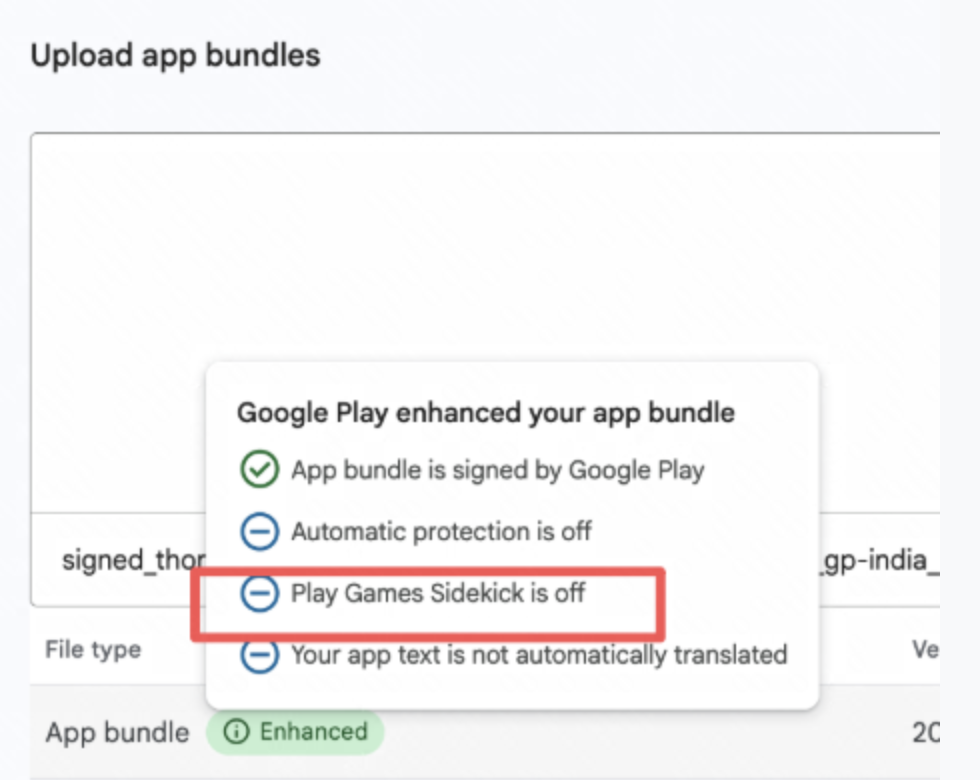](https://developer.android.com/static/images/games/pgs/sidekick_warning.png) The **Play Games Sidekick is off warning** checkbox (click to enlarge).