Applicable XR devices This guidance helps you build experiences for these types of XR devices. [Learn about XR device types →](https://developer.android.com/develop/xr/devices)  XR Headsets [](https://developer.android.com/develop/xr/devices#xr-headsets)  Wired XR Glasses [](https://developer.android.com/develop/xr/devices#xr-glasses) [Learn about XR device types →](https://developer.android.com/develop/xr/devices)
Adjust the following performance-related Unity settings and follow these
guidelines to prevent audio-related impacts on your app's performance.
- Limit simultaneous audio sources to avoid CPU spikes.
- Enable spatial audio only on nearby sounds - use panning for distant sounds to reduce CPU load.
- Avoid streaming from compressed Asset Bundles (even with LZ4) when dealing with music. The decompression overhead will cause high, spikey CPU usage that severely impacts performance.
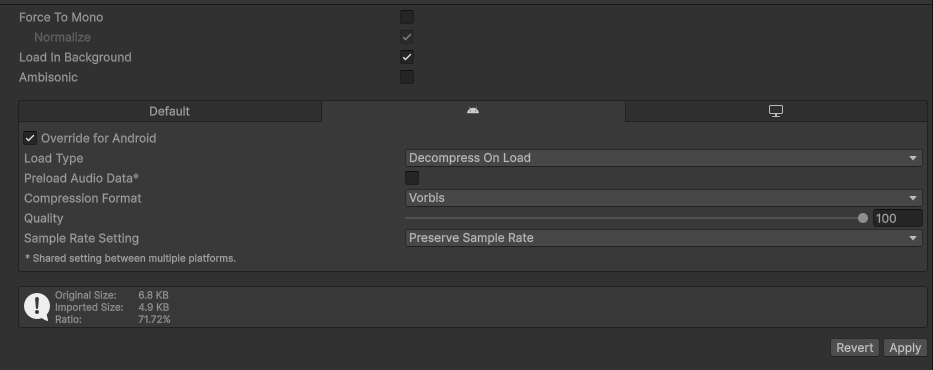
- In your Unity's project's audio settings, enable **Load in Background** and
set the **Load type** to **Decompress on Load** to force the audio to
pre-load.