Create a bottom app bar to help users navigate and access functions in your app.
Follow this guidance to add a bottom app bar to your app by using the
[`BottomAppBar`](https://developer.android.com/reference/com/google/android/material/bottomappbar/BottomAppBar.md.txt) composable.
## Results
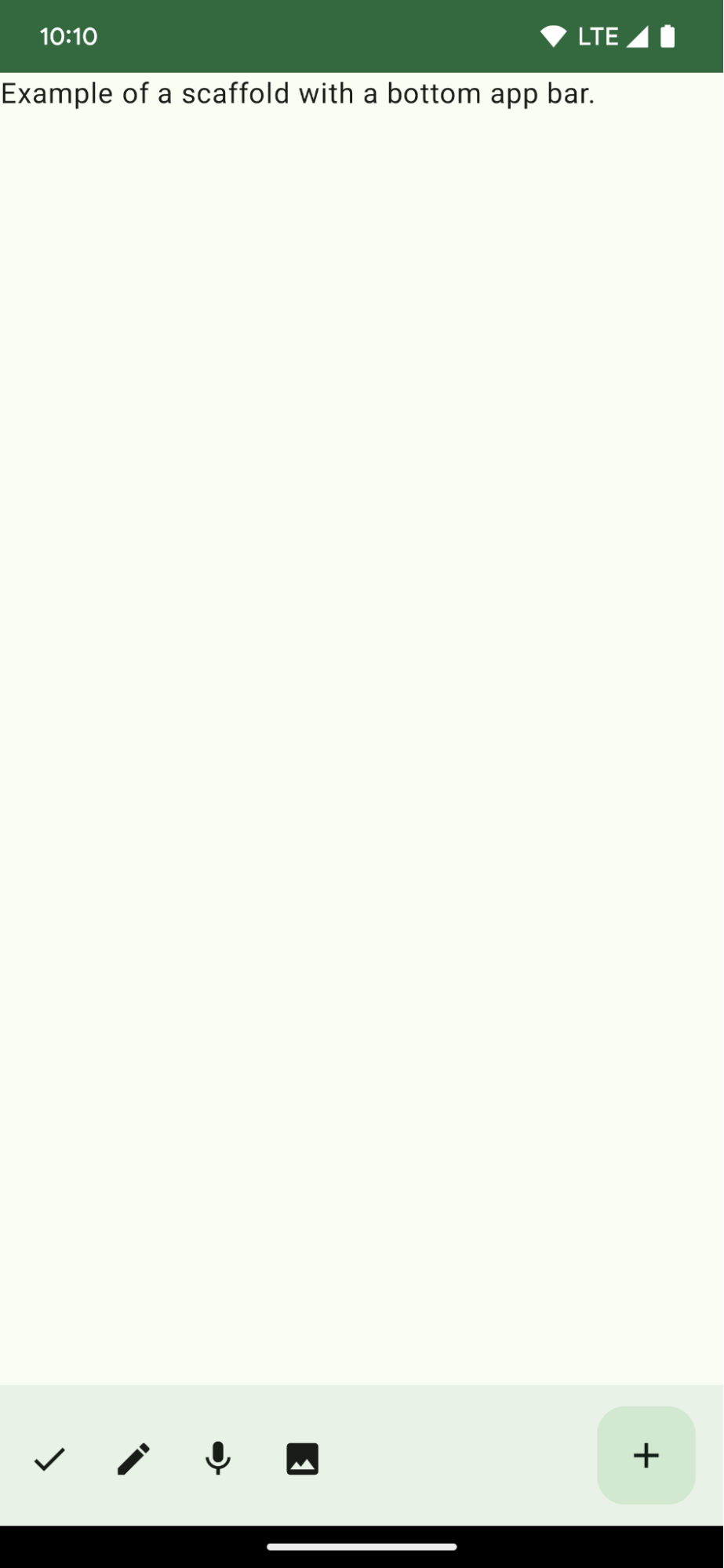 **Figure 1.** An example of a bottom app bar.
## Version compatibility
This implementation requires that your project minSDK be set to API level 21 or
higher.
### Dependencies
## Create a bottom app bar
Use the following code to create a bottom app bar containing four icon buttons,
and a floating action button:
```kotlin
@Composable
fun BottomAppBarExample() {
Scaffold(
bottomBar = {
BottomAppBar(
actions = {
IconButton(onClick = { /* do something */ }) {
Icon(painter = rememberVectorPainter(AppIcons.Check), contentDescription = "Localized description")
}
IconButton(onClick = { /* do something */ }) {
Icon(
painter = rememberVectorPainter(AppIcons.Edit),
contentDescription = "Localized description",
)
}
IconButton(onClick = { /* do something */ }) {
Icon(
painter = rememberVectorPainter(AppIcons.Mic),
contentDescription = "Localized description",
)
}
IconButton(onClick = { /* do something */ }) {
Icon(
painter = rememberVectorPainter(AppIcons.Image),
contentDescription = "Localized description",
)
}
},
floatingActionButton = {
FloatingActionButton(
onClick = { /* do something */ },
containerColor = BottomAppBarDefaults.bottomAppBarFabColor,
elevation = FloatingActionButtonDefaults.bottomAppBarFabElevation()
) {
Icon(painter = rememberVectorPainter(AppIcons.Add), "Localized description")
}
}
)
},
) { innerPadding ->
Text(
modifier = Modifier.padding(innerPadding),
text = "Example of a scaffold with a bottom app bar."
)
}
}
```
### Key points about the code
- An outer [`Scaffold`](https://developer.android.com/reference/kotlin/androidx/compose/material/Scaffold.composable.md.txt#Scaffold(androidx.compose.foundation.layout.WindowInsets,androidx.compose.ui.Modifier,androidx.compose.material.ScaffoldState,kotlin.Function0,kotlin.Function0,kotlin.Function1,kotlin.Function0,androidx.compose.material.FabPosition,kotlin.Boolean,kotlin.Function1,kotlin.Boolean,androidx.compose.ui.graphics.Shape,androidx.compose.ui.unit.Dp,androidx.compose.ui.graphics.Color,androidx.compose.ui.graphics.Color,androidx.compose.ui.graphics.Color,androidx.compose.ui.graphics.Color,androidx.compose.ui.graphics.Color,kotlin.Function1)) that has a `bottomBar` set.
- A `bottomBar` implementation that contains a list of actions.
- Actions that are implementations of [`IconButton`](https://developer.android.com/reference/kotlin/androidx/compose/material/IconButton.composable.md.txt#IconButton(kotlin.Function0,androidx.compose.ui.Modifier,kotlin.Boolean,androidx.compose.foundation.interaction.MutableInteractionSource,kotlin.Function0)) that contain [`Icon`](https://developer.android.com/reference/kotlin/androidx/compose/material3/Icon.composable.md.txt#Icon(androidx.compose.ui.graphics.ImageBitmap,kotlin.String,androidx.compose.ui.Modifier,androidx.compose.ui.graphics.Color)) for image and content description text, each with an `onClick` lambda to perform these actions.
You can pass composables for the following key parameters:
- `actions`: a series of icons that appear on the left side of the bar. These are commonly either key actions for the given screen, or navigation items.
- [`floatingActionButton`](https://developer.android.com/reference/com/google/android/material/floatingactionbutton/FloatingActionButton.md.txt): the floating action button that appears on the right side of the bar.
> [!NOTE]
> **Note:** After you add the bottom app bar, you can customize it with content as you do with other containers by filling the `BottomAppBar` composable with other content. You can also use `BottomAppBar` without passing a value for `actions` or `floatingActionButton`.
## Collections that contain this guide
This guide is part of these curated Quick Guide collections that cover
broader Android development goals:
 
### Create a home screen scaffold
Find out how to use a standardized platform to build complex user interfaces. The scaffold holds together different parts of the UI, giving apps a coherent look and feel. [Quick guide collection](https://developer.android.com/develop/ui/compose/quick-guides/collections/create-a-home-screen-scaffold)  
### Display interactive components
Learn how composable functions can enable you to easily create beautiful UI components based on the Material Design design system. [Quick guide collection](https://developer.android.com/develop/ui/compose/quick-guides/collections/display-interactive-components) 
## Have questions or feedback
Go to our frequently asked questions page and learn about quick guides or reach out and let us know your thoughts. [Go to FAQ](https://developer.android.com/quick-guides/faq.md.txt) [Leave feedback](https://issuetracker.google.com/issues/new?component=1573691&template=1993320)