The [navigation drawer](https://material.io/components/navigation-drawer) component is a slide-in menu that lets users navigate
to various sections of your app. Users can activate it by swiping from the side
or tapping a menu icon.
Consider these three use cases for implementing a navigation drawer:
- **Content organization:** Enable users to switch between different categories, such as in news or blogging apps.
- **Account management:** Provide quick links to account settings and profile sections in apps with user accounts.
- **Feature discovery:** Organize multiple features and settings in a single menu to facilitate user discovery and access in complex apps.
In Material Design, there are two types of navigation drawers:
- **Standard:** Share space within a screen with other content.
- **Modal:** Appears over the top of other content within a screen.
## Results
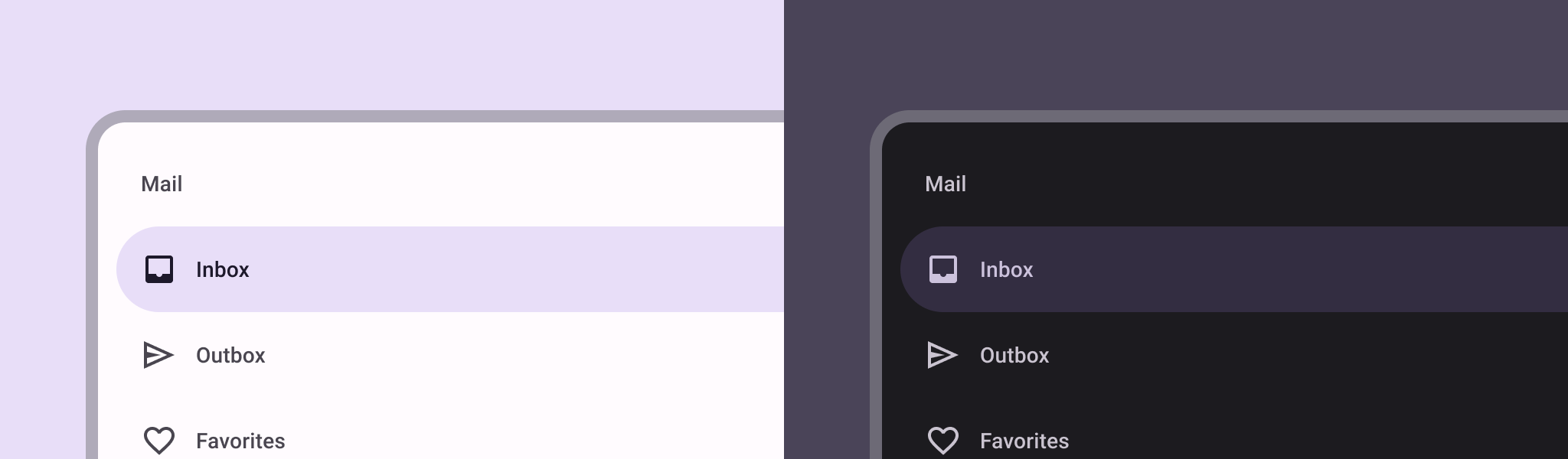
**Figure 1.** A standard navigation drawer (left) and a modal navigation drawer (right).
## Version compatibility
This implementation requires that your project minSDK be set to API level 21 or
higher.
### Dependencies
## Implement a navigation drawer
You can use the [`ModalNavigationDrawer`](https://developer.android.com/reference/kotlin/androidx/compose/material3/ModalNavigationDrawer.composable.md.txt#ModalNavigationDrawer(kotlin.Function0,androidx.compose.ui.Modifier,androidx.compose.material3.DrawerState,kotlin.Boolean,androidx.compose.ui.graphics.Color,kotlin.Function0)) composable to implement a
navigation drawer:
### Key points
- Use the `drawerContent` slot to provide a [`ModalDrawerSheet`](https://developer.android.com/reference/kotlin/androidx/compose/material3/ModalDrawerSheet.composable.md.txt#ModalDrawerSheet(androidx.compose.ui.Modifier,androidx.compose.ui.graphics.Shape,androidx.compose.ui.graphics.Color,androidx.compose.ui.graphics.Color,androidx.compose.ui.unit.Dp,androidx.compose.foundation.layout.WindowInsets,kotlin.Function1)) and
provide the drawer's contents.
- `ModalNavigationDrawer` accepts a number of additional drawer parameters.
For example, you can toggle whether or not the drawer responds to drags with
the `gesturesEnabled` parameter as in the following example:
## Control navigation drawer behavior
To control how the drawer opens and closes, use [`DrawerState`](https://developer.android.com/reference/kotlin/androidx/compose/material3/DrawerState.md.txt):
### Key points
- Pass a `DrawerState` to `ModalNavigationDrawer` using the `drawerState` parameter.
- `DrawerState` provides access to the [`open`](https://developer.android.com/reference/kotlin/androidx/compose/material3/DrawerState.md.txt#open) and [`close`](https://developer.android.com/reference/kotlin/androidx/compose/material3/DrawerState.md.txt#close) functions, as well as properties related to the current drawer state. These suspending functions require a `CoroutineScope`, which you can instantiate using [`rememberCoroutineScope`](https://developer.android.com/reference/kotlin/androidx/compose/runtime/package-summary.md.txt#remembercoroutinescope). You can also call the suspending functions in response to UI events.
## Collections that contain this guide
This guide is part of these curated Quick Guide collections that cover
broader Android development goals:
 
### Display interactive components
Learn how composable functions can enable you to easily create beautiful UI components based on the Material Design design system. [Quick guide collection](https://developer.android.com/develop/ui/compose/quick-guides/collections/display-interactive-components) 
## Have questions or feedback
Go to our frequently asked questions page and learn about quick guides or reach out and let us know your thoughts. [Go to FAQ](https://developer.android.com/quick-guides/faq.md.txt) [Leave feedback](https://issuetracker.google.com/issues/new?component=1573691&template=1993320)