This page describes how to implement basic `FlexBox` layouts.
## Set up project
1. Add the [`androidx.compose.foundation.layout`](https://developer.android.com/jetpack/androidx/versions.md.txt) library to your project's
`lib.versions.toml`.
```kotlin
[versions]
compose = "1.13.0-rc01"
[libraries]
androidx-compose-foundation-layout = { group = "androidx.compose.foundation", name = "foundation-layout", version.ref = "compose" }
```
2. Add the library dependency to your app's `build.gradle.kts`.
```kotlin
dependencies {
implementation(libs.androidx.compose.foundation.layout)
}
```
## Create basic FlexBox layouts
**Example 1** : `FlexBox` lays out two `Text` elements that are centrally
aligned.
```kotlin
FlexBox(
config = {
direction(FlexDirection.Column)
alignItems(FlexAlignItems.Center)
}
) {
Text(text = "Hello", fontSize = 48.sp)
Text(text = "World!", fontSize = 48.sp)
}
```

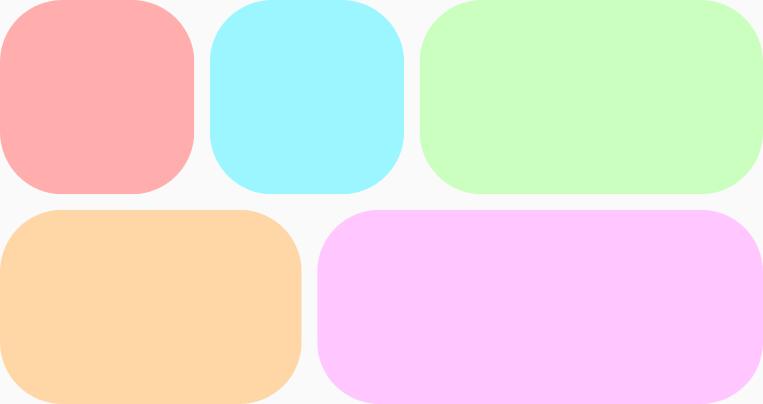
**Example 2** : `FlexBox` wraps five items onto two rows and grows them unequally
to fill the available space on each row. There is an `8.dp`
gap, both vertically and horizontally, between the items.
```kotlin
FlexBox(
config = {
wrap(FlexWrap.Wrap)
gap(8.dp)
}
) {
// All boxes have an intrinsic width of 100.dp
// Some grow to fill any remaining space on the row.
RedRoundedBox()
BlueRoundedBox()
GreenRoundedBox(modifier = Modifier.flex { grow(1.0f) })
OrangeRoundedBox(modifier = Modifier.flex { grow(1.0f) })
PinkRoundedBox(modifier = Modifier.flex { grow(1.0f) })
}
```
To learn more about `FlexBox` behavior, see [Set container behavior](https://developer.android.com/develop/ui/compose/layouts/adaptive/flexbox/container-behavior.md.txt) and [Set
item behavior](https://developer.android.com/develop/ui/compose/layouts/adaptive/flexbox/item-behavior).